From Wikipedia, the free encyclopedia
| ar ||
| Original authors | Ken Thompson, Dennis Ritchie (AT&T Bell Laboratories) |
| Developers | Various open-source and commercial developers |
| Release | November 3, 1971; 54 years ago |
| Written in | C |
| Operating system | Unix, Unix-like, V, Plan 9, Inferno |
| Platform | Cross-platform |
| Type | Command |
| License | Plan 9: MIT License |
|---|
| archiver format ||
| Filename extension | .a, .lib, .ar1 |
| Internet media type | application/x-archive1 |
| Magic number | !<arch> |
| Type of format | archive format |
| Container for | usually object files (.o) |
| Standard | Not standardized, several variants exist |
| Open format? | Yes2 |
|---|
ar , short for archiver , is a shell command for maintaining multiple files as a single archive file (i.e. a file archiver). It is often used to create and update static library files that the link editor or linker uses and for generating deb format packages for the Debian Linux distribution. It can be used to create archives for any purpose, but has been largely replaced by tar for purposes other than static libraries.3
Originally developed for Unix, the command is widely available on Unix-based systems, and similar commands are available on other platforms. An implementation is included in GNU Binutils.2
File format
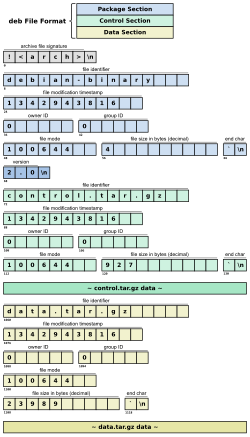
Diagram showing an example file structure of a .deb file
The format of a file that results from using ar has never been standardized.45
The first format appeared in the first edition of Unix6 and was used through Version 6 Unix.74 Version 7 Unix had a modified version of that format,84 which was also used in UNIX System III9 and in UNIX System V on the PDP-11.10
A new format was introduced in the first release of System V on processors other than PDP-11s.11
Modern archives are, on most systems, based on a common format with two main variants, BSD4 (initially used for a.out files) and UNIX System V release 2 and later12 (initially used for COFF files and later used for ELF files) and used as well by GNU13 and Windows. AIX has its own formats (small14 and big15), as does Coherent; those formats vary significantly from the common format.
Structure
An archive file begins with a header that identifies the file type and is followed with a section for each contained file. Each contained file section consists of a header followed by the file content. The headers consist solely of printable ASCII characters and line feeds. In fact, an archive containing only text files is also a text file.
The content of a contained file begins on an even byte boundary. A newline is inserted between files as padding, if necessary. Nevertheless, the size stored reflects the size excluding padding.16
Archive header
The first header, a.k.a. file signature, is a magic number that encodes the ASCII string !<arch> followed by a single line feed character (0x0A).
Contained file header
Each file is preceded by a header that contains information about the file. The common format is as follows. Numeric values are encoded in ASCII and all values are right-padded with spaces (0x20).
| Offset | Length | Content | Format |
|---|---|---|---|
| 0 | 16 | File identifier | ASCII |
| 16 | 12 | File modification timestamp (in seconds) | Decimal |
| 28 | 6 | Owner ID | Decimal |
| 34 | 6 | Group ID | Decimal |
| 40 | 8 | File mode (type and permission) | Octal |
| 48 | 10 | File size in bytes | Decimal |
| 58 | 2 | Ending characters | 0x60 0x0A |
Variants
Variants of the command were developed to address issues including:
File name length limitation
The BSD and System V/GNU variants devised different methods of storing long file names.
Global symbol table
Many implementations include a global symbol table (a.k.a. armap, directory or index) for fast linking without needing to scan the whole archive for a symbol. POSIX recognizes this feature, and requires implementations to have an -s option for updating it. Most implementations put it at the first file entry.17
Although the common format is not at risk of this problem, many implementations are vulnerable to failure in that year.
BSD
The BSD implementation stores file names right-padded with ASCII spaces. This causes issues with spaces inside file names.*[clarification needed](https://en.wikipedia.org/wiki/Wikipedia:Please_clarify "clarification needed")* The 4.4BSD implementation stores extended file names*[clarification needed](https://en.wikipedia.org/wiki/Wikipedia:Please_clarify "clarification needed")* by placing the string "#1/" followed by the file name length in the file name field, and storing the real file name in front of the data section.4
The BSD implementation traditionally does not handle the building of a global symbol lookup table, and delegates this task to a separate utility, ranlib,18 which inserts an architecture-specific*[clarification needed](https://en.wikipedia.org/wiki/Wikipedia:Please_clarify "clarification needed")* file named __.SYMDEF as first archive member.19 Some descendants put a space and "SORTED" after the name to indicate a sorted version.20 A 64-bit variant called __.SYMDEF_64 exists on Darwin.
To conform to POSIX, newer BSD implementations support the -s option instead of ranlib. FreeBSD in particular ditched the SYMDEF table format and embraced the System V style table.21
System V/GNU*[clarification needed](https://en.wikipedia.org/wiki/Wikipedia:Please_clarify "clarification needed")*
To allow spaces in file names, the System V implementation uses a slash ('/') to mark the end of the file. This limits the file name to 15 chars. Filenames longer than 15 ASCII chars are replaced by an index, represented by a slash ('/') followed by the decimal character offset in the indexfile of the start or the name. The index file is named "//" and is usually the second entry of the archive, after the symbol table which always is the first. The format of this "//" file itself is simply a list of the long file names, separated by one or more LF characters. LF characters cannot be part of a filename. The GNU version uses '/'-terminated names and no LF.
The System V implementation uses the special file name "/" to denote that the following data entry contains a symbol lookup table, which is used in ar libraries*[clarification needed](https://en.wikipedia.org/wiki/Wikipedia:Please_clarify "clarification needed")* to speed up access. This symbol table is built in three parts which are recorded together as contiguous data.
- A 32-bit big endian integer, giving the number of entries in the table.
- A set of 32-bit big endian integers. One for each symbol, recording the position within the archive of the header for the file containing this symbol.
- A set of Zero-terminated strings. Each is a symbol name, and occurs in the same order as the list of positions in part 2.
Some System V systems do not use this format. For operating systems such as HP-UX 11.0, this information is stored in a data structure based on the SOM file format.
The special file "/" is not terminated with a specific sequence; the end is assumed once the last symbol name has been read.*[clarification needed](https://en.wikipedia.org/wiki/Wikipedia:Please_clarify "clarification needed")*
To overcome the 4 GiB file size limit*[clarification needed](https://en.wikipedia.org/wiki/Wikipedia:Please_clarify "clarification needed")* some operating system like Solaris 11.2 and GNU use a variant lookup table. Instead of 32-bit integers, 64-bit integers are used in the symbol lookup tables. The string "/SYM64/" instead "/" is used as identifier for this table22
Windows
The Windows (PE/COFF) variant is based on the SysV/GNU variant. The first entry "/" has the same layout as the SysV/GNU symbol table. The second entry is another "/", a Microsoft extension that stores an extended symbol cross-reference table. This one is sorted and uses little-endian integers.523 The third entry is the optional "//" long name data as in SysV/GNU.24
Thin archive
The GNU binutils and Elfutils implementations have an additional "thin archive" format with the magic number !<thin>. A thin archive only contains a symbol table and references to the file. The file format is essentially a System V format archive where every file is stored without the data sections. Every file name is stored as a "long" file name and they are to be resolved as if they were symbolic links.25
Examples
The following command creates an archive libclass.a with object files class1.o, class2.o, class3.o:
ar rcs libclass.a class1.o class2.o class3.oThe linker ld can read object code from an archive file. The following example shows how the archive libclass.a (specified as -lclass) is linked with the object code of main.o.
ld main.o -lclass