FrameBuffer 应用编程
什么是 FrameBuffer
FrameBuffer(帧缓冲) 是 Linux 系统中的一种显示驱动接口。它将显示设备(如 LCD)进行抽象,屏蔽了不同显示设备硬件的实现差异,对应用层呈现为一块显示内存(显存),允许上层应用程序直接对显示缓冲区进行读写操作,而无需关心物理显存的位置等具体细节,这些都由 FrameBuffer 设备驱动来完成。
在 Linux 系统中,显示设备被称为 FrameBuffer 设备(帧缓冲设备) ,LCD 显示屏即属于 FrameBuffer 设备。FrameBuffer 设备对应的设备文件为 /dev/fbX(X 为数字,如 0、1、2、3 等),Linux 最多可支持 32 个 FrameBuffer 设备,分别为 /dev/fb0 到 /dev/fb31。开发板出厂系统中,/dev/fb0 设备节点便是 LCD 屏。
应用程序读写 /dev/fbX 就相当于读写显示设备的显示缓冲区(显存)。例如,若 LCD 分辨率为 800*480,每个像素点用 24 位(RGB888)表示,则显存大小为:
800×480×24/8=1152000 字节
执行以下命令可将 LCD 清屏(填充为黑色):
bash
dd if=/dev/zero of=/dev/fb0 bs=1024 count=1125该命令将 1125 × 1024 个字节的 0x00 数据全部写入 LCD 显存中。
LCD 显示原理
LCD 屏幕由按矩阵排列的像素点阵组成,每个像素由 R(红)、G(绿)、B(蓝)三个子像素构成。显示的原理大致如下:
- 显存(FrameBuffer) :系统在内存中划出一块区域作为显存,每个像素的颜色数据按顺序存放在这块内存中。显存中第
(y × 宽度 + x)个位置的数据,就对应屏幕上第y行第x列的像素。 - LCD 控制器:硬件上有一个 LCD 控制器,它会以固定的刷新率(如 60Hz)不断地从显存中读取像素数据。
- 显示驱动:控制器将读出的数字信号转换为 LCD 面板需要的模拟电压,驱动每个子像素显示对应的亮度,组合起来就成了一帧完整的画面。
- 刷新过程:控制器从显存起始地址开始,逐行扫描读取每个像素的数据并输出到屏幕,扫完一帧后立即从头开始下一帧,周而复始。
所以,应用程序往显存中写入数据,LCD 控制器自动将其显示到屏幕上------这就是为什么读写 /dev/fbX 就能控制 LCD 显示。
为什么需要显存?
- LCD 需要持续刷新 :LCD 面板必须以固定频率(如 60Hz)不断刷新,否则画面会消失。这意味着显示数据的供给是连续且实时的。
- CPU 无法独占:CPU 还要运行其他任务,不可能一直都在送数据给 LCD。
- 显存作为缓冲区 :在内存中划出一块区域作为显存,CPU 只需要在需要更新画面时往里面写数据,其余时间可以去做别的事;而 LCD 控制器通过 DMA(直接存储器访问) 方式独立地从显存读取数据并驱动显示,完全不需要 CPU 干预。
LCD 应用编程介绍
操作 /dev/fbX 设备的一般步骤如下:
- 打开
/dev/fbX设备文件。 - 使用
ioctl()获取当前显示设备的参数信息(如分辨率、像素格式),据此计算显示缓冲区的大小。 - 通过存储映射 I/O(
mmap()) 将屏幕的显示缓冲区映射到用户空间。 - 映射成功后,直接读写显存进行绘图或图片显示等操作。
- 完成显示后,调用
munmap()取消映射,并调用close()关闭设备文件。
19.3.1 使用 ioctl() 获取屏幕参数信息
对于 FrameBuffer 设备,常用的 ioctl() 请求如下:
| 宏定义 | 功能 | 数据结构 |
|---|---|---|
FBIOGET_VSCREENINFO |
获取可变参数信息 | struct fb_var_screeninfo |
FBIOPUT_VSCREENINFO |
设置可变参数信息 | struct fb_var_screeninfo |
FBIOGET_FSCREENINFO |
获取固定参数信息 | struct fb_fix_screeninfo |
这些宏定义及数据结构均定义在 <linux/fb.h> 头文件中。
c
#define FBIOGET_VSCREENINFO 0x4600
#define FBIOPUT_VSCREENINFO 0x4601
#define FBIOGET_FSCREENINFO 0x4602
struct fb_var_screeninfo 结构体
该结构体描述 FrameBuffer 设备的可变参数信息:
c
struct fb_var_screeninfo {
    __u32 xres;             /* 可视区域 X 分辨率(一行像素点数) */
    __u32 yres;             /* 可视区域 Y 分辨率(一列像素点数) */
    __u32 xres_virtual;     /* 虚拟区域 X 分辨率 */
    __u32 yres_virtual;     /* 虚拟区域 Y 分辨率 */
    __u32 xoffset;          /* 虚拟到可见屏幕的行偏移 */
    __u32 yoffset;          /* 虚拟到可见屏幕的列偏移 */
    __u32 bits_per_pixel;   /* 像素深度 bpp */
    __u32 grayscale;        /* =0 彩色, =1 灰度, >1 FOURCC 颜色 */

    struct fb_bitfield red;     /* 红色分量色域偏移 */
    struct fb_bitfield green;   /* 绿色分量色域偏移 */
    struct fb_bitfield blue;    /* 蓝色分量色域偏移 */
    struct fb_bitfield transp;  /* 透明度分量色域偏移 */

    __u32 nonstd;           /* =0 标准像素格式, ≠0 非标准 */
    __u32 activate;
    __u32 height;           /* 显示高度(mm) */
    __u32 width;            /* 显示宽度(mm) */
    __u32 accel_flags;

    /* 时序参数 */
    __u32 pixclock;         /* pixel clock in ps */
    __u32 left_margin;
    __u32 right_margin;
    __u32 upper_margin;
    __u32 lower_margin;
    __u32 hsync_len;
    __u32 vsync_len;
    __u32 sync;
    __u32 vmode;
    __u32 rotate;
    __u32 colorspace;
    __u32 reserved[4];
};
通过 xres、yres 获取屏幕分辨率,bits_per_pixel 获取像素深度,显存大小计算公式为:
screen_size=xres×yres×bits_per_pixel/8
xres_virtual、yres_virtual 表示虚拟分辨率 ,通常与 xres、yres 一致,但也可以设置得比实际分辨率大。虚拟区域配合 xoffset、yoffset 可实现两个实用功能:
- 滚动(Panning):虚拟区域大于屏幕时,通过修改偏移量让屏幕显示虚拟区域的不同部分,实现平滑滚动而无需重新绘制。
- 双缓冲(Double Buffering) :将
yres_virtual设为2 * yres,显存中就有上下两个页面。一页用于显示的同时往另一页绘图,然后切换偏移量,避免画面撕裂。
red、green、blue 三个 struct fb_bitfield 变量描述 RGB 颜色通道的位偏移和位长度,据此可判断 LCD 的像素格式(如 RGB888、RGB565、BGR888 等)。
struct fb_fix_screeninfo 结构体
该结构体描述 FrameBuffer 设备的固定参数信息(不可修改):
c
struct fb_fix_screeninfo {
    char id[16];                /* 字符串标识符 */
    unsigned long smem_start;   /* 显存起始地址(物理地址) */
    __u32 smem_len;             /* 显存长度 */
    __u32 type;
    __u32 type_aux;
    __u32 visual;
    __u16 xpanstep;
    __u16 ypanstep;
    __u16 ywrapstep;
    __u32 line_length;          /* 一行的字节数 */
    unsigned long mmio_start;   /* MMIO 起始地址(物理地址) */
    __u32 mmio_len;             /* MMIO 长度 */
    __u32 accel;
    __u16 capabilities;
    __u16 reserved[2];
};
line_length 表示屏幕一行像素点所占的字节数,通常可用 line_length * yres 计算显示缓冲区大小。
struct fb_var_screeninfo------ 前缀var代表 Variable(可变) ,描述分辨率、像素格式等可动态调整的参数,可通过FBIOPUT_VSCREENINFO修改(前提是驱动支持)。struct fb_fix_screeninfo------ 前缀fix代表 Fixed(固定) ,描述显存地址、行长等硬件底层固定的参数,应用程序只能读取,不可修改。
struct fb_bitfield 结构体
c
struct fb_bitfield {
    __u32 offset;       /* 偏移量 */
    __u32 length;       /* 长度 */
    __u32 msb_right;    /* != 0 : 最高有效位在右侧 */
};
获取屏幕参数示例程序
c
#include <stdio.h>
#include <stdlib.h>
#include <sys/types.h>
#include <sys/stat.h>
#include <fcntl.h>
#include <unistd.h>
#include <sys/ioctl.h>
#include <linux/fb.h>

int main(int argc, char *argv[])
{
    struct fb_fix_screeninfo fb_fix;
    struct fb_var_screeninfo fb_var;
    int fd;

    /* 打开 framebuffer 设备 */
    if (0 > (fd = open("/dev/fb0", O_WRONLY))) {
        perror("open error");
        exit(-1);
    }

    /* 获取参数信息 */
    ioctl(fd, FBIOGET_VSCREENINFO, &fb_var);
    ioctl(fd, FBIOGET_FSCREENINFO, &fb_fix);

    printf("分辨率: %d*%d\n"
           "像素深度 bpp: %d\n"
           "一行的字节数: %d\n"
           "像素格式: R<%d %d> G<%d %d> B<%d %d>\n",
           fb_var.xres, fb_var.yres, fb_var.bits_per_pixel,
           fb_fix.line_length,
           fb_var.red.offset, fb_var.red.length,
           fb_var.green.offset, fb_var.green.length,
           fb_var.blue.offset, fb_var.blue.length);

    /* 关闭设备文件退出程序 */
    close(fd);
    exit(0);
}
注意 :
ALPHA/Mini I.MX6U开发板出厂系统中,LCD 驱动程序将其实现为 RGB565 格式的显示设备。用户可通过修改设备树使其支持 RGB888,或通过ioctl修改。不建议通过FBIOPUT_VSCREENINFO随意修改可变参数,若驱动支持不够完善,可能引发问题。
使用 mmap() 将显示缓冲区映射到用户空间
为什么需要使用存储映射 I/O 而非普通 read()/write()?当数据量较大时,普通 I/O 方式效率较低。例如,一台 1920×1080 分辨率、ARGB8888 像素格式的显示器,刷一帧图像的数据量为:
1920×1080×32/8=8294400 字节(约 8MB)
且显示的图像往往是动态更新的,数据量庞大,使用普通 I/O 必然导致效率低下,因此采用 mmap() 存储映射 I/O 方式。
为什么普通 I/O 效率低?
每次调用
read()/write()都经历以下过程:
- 系统调用:用户态 → 内核态切换
- 数据拷贝 :将数据从用户缓冲区 拷贝到内核缓冲区(一次额外的内存拷贝)
- 写入设备:驱动将内核缓冲区的数据写入显存
如果要刷新一帧 8MB 的数据,每刷一部分就要重复一次上述流程,系统调用次数和数据拷贝量都非常大。
而
mmap()的优势在于 :建立映射后,应用程序直接读写映射区的内存,相当于直接操作显存------无需系统调用、无需内核态切换、无需数据拷贝。这也是存储映射 I/O 的优势。
LCD 应用编程
本节实现 LCD 上的画点(打点) 、画线 、画矩形 、填充等基本操作。
关键宏定义
c
#define argb8888_to_rgb565(color)   ({ \
            unsigned int temp = (color); \
            ((temp & 0xF80000UL) >> 8) | \
            ((temp & 0xFC00UL) >> 5) | \
            ((temp & 0xF8UL) >> 3); \
            })
该宏将 ARGB8888 格式颜色转换为 RGB565 格式。因为开发板出厂系统的 LCD 是 RGB565 格式(每像素 16 位),而绘图函数传参用的是 ARGB8888 (32 位整数,如 0xFF0000 表示红色),写入显存前必须压缩为 16 位 RGB565 值,否则直接赋值给 unsigned short 会发生截断导致颜色错误。
之所以不直接用 RGB565 传参,我猜测应该是主要有两点考虑:
- 可读性 :
0xFF0000一眼就能看出是红色,而 RGB565 的红色0xF800不够直观。 - 灵活性 :若后期将 LCD 切换为 RGB888 模式,只需修改转换宏,所有调用了
lcd_fill(..., 0xFF0000)的代码无需改动。
主要函数
| 函数 | 功能 | 说明 |
|---|---|---|
lcd_draw_point(x, y, color) |
打点 | 在 (x, y) 位置绘制颜色为 color 的像素点 |
lcd_draw_line(x, y, dir, length, color) |
画线 | 从 (x, y) 开始画水平或垂直的线条,dir!=0 为水平,dir=0 为垂直 |
lcd_draw_rectangle(s_x, e_x, s_y, e_y, color) |
画矩形 | 绘制指定矩形区域的四条边 |
lcd_fill(s_x, e_x, s_y, e_y, color) |
填充 | 将指定矩形区域填充为指定颜色 |
示例代码(lcd_test.c)
c
#include <stdio.h>
#include <stdlib.h>
#include <sys/types.h>
#include <sys/stat.h>
#include <fcntl.h>
#include <unistd.h>
#include <sys/ioctl.h>
#include <sys/mman.h>
#include <linux/fb.h>

#define argb8888_to_rgb565(color)   ({ \
            unsigned int temp = (color); \
            ((temp & 0xF80000UL) >> 8) | \
            ((temp & 0xFC00UL) >> 5) | \
            ((temp & 0xF8UL) >> 3); \
            })

static int width;                       // LCD X 分辨率
static int height;                      // LCD Y 分辨率
static unsigned short *screen_base = NULL;  // 映射后的显存基地址

static void lcd_draw_point(unsigned int x, unsigned int y, unsigned int color)
{
    unsigned short rgb565_color = argb8888_to_rgb565(color);

    if (x >= width) x = width - 1;
    if (y >= height) y = height - 1;

    screen_base[y * width + x] = rgb565_color;
}

static void lcd_draw_line(unsigned int x, unsigned int y, int dir,
            unsigned int length, unsigned int color)
{
    unsigned short rgb565_color = argb8888_to_rgb565(color);
    unsigned int end;
    unsigned long temp;

    if (x >= width) x = width - 1;
    if (y >= height) y = height - 1;

    temp = y * width + x;
    if (dir) {  // 水平线
        end = x + length - 1;
        if (end >= width) end = width - 1;
        for ( ; x <= end; x++, temp++)
            screen_base[temp] = rgb565_color;
    } else {    // 垂直线
        end = y + length - 1;
        if (end >= height) end = height - 1;
        for ( ; y <= end; y++, temp += width)
            screen_base[temp] = rgb565_color;
    }
}

static void lcd_draw_rectangle(unsigned int start_x, unsigned int end_x,
            unsigned int start_y, unsigned int end_y,
            unsigned int color)
{
    int x_len = end_x - start_x + 1;
    int y_len = end_y - start_y - 1;

    lcd_draw_line(start_x, start_y, 1, x_len, color);  // 上边
    lcd_draw_line(start_x, end_y, 1, x_len, color);     // 下边
    lcd_draw_line(start_x, start_y + 1, 0, y_len, color); // 左边
    lcd_draw_line(end_x, start_y + 1, 0, y_len, color); // 右边
}

static void lcd_fill(unsigned int start_x, unsigned int end_x,
            unsigned int start_y, unsigned int end_y,
            unsigned int color)
{
    unsigned short rgb565_color = argb8888_to_rgb565(color);
    unsigned long temp;
    unsigned int x;

    if (end_x >= width) end_x = width - 1;
    if (end_y >= height) end_y = height - 1;

    temp = start_y * width;
    for ( ; start_y <= end_y; start_y++, temp += width) {
        for (x = start_x; x <= end_x; x++)
            screen_base[temp + x] = rgb565_color;
    }
}

int main(int argc, char *argv[])
{
    struct fb_fix_screeninfo fb_fix;
    struct fb_var_screeninfo fb_var;
    unsigned int screen_size;
    int fd;

    /* 打开 framebuffer 设备 */
    if (0 > (fd = open("/dev/fb0", O_RDWR))) {
        perror("open error");
        exit(EXIT_FAILURE);
    }

    /* 获取参数信息 */
    ioctl(fd, FBIOGET_VSCREENINFO, &fb_var);
    ioctl(fd, FBIOGET_FSCREENINFO, &fb_fix);

    /* 计算显存大小:用 line_length * yres 而非 xres * yres * bpp / 8
     * 因为 line_length 是驱动实际返回的一行字节数,可能包含对齐填充字节
     * 用后者算出的值可能偏小,导致 mmap 映射区域不足
     */
    screen_size = fb_fix.line_length * fb_var.yres;
    width = fb_var.xres;
    height = fb_var.yres;

    /* mmap(起始地址, 长度, 读写权限, 映射方式, 文件描述符, 偏移量)
    PROT_WRITE:映射区可写
    MAP_SHARED:共享映射。对映射区的修改会写回文件 (从用户空间映射区写到磁盘设备中)。
     * 将显存映射到用户空间,返回映射区的首地址
     */
    screen_base = mmap(NULL, screen_size, PROT_WRITE, MAP_SHARED, fd, 0);
    if (MAP_FAILED == (void *)screen_base) {
        perror("mmap error");
        close(fd);
        exit(EXIT_FAILURE);
    }

    /* 画正方形方块 */
    int w = height * 0.25;
    lcd_fill(0, width-1, 0, height-1, 0x0);             // 清屏(黑色)
    lcd_fill(0, w, 0, w, 0xFF0000);                     // 红色方块
    lcd_fill(width-w, width-1, 0, w, 0xFF00);            // 绿色方块
    lcd_fill(0, w, height-w, height-1, 0xFF);            // 蓝色方块
    lcd_fill(width-w, width-1, height-w, height-1, 0xFFFF00); // 黄色方块

    /* 画线: 十字交叉线 */
    lcd_draw_line(0, height * 0.5, 1, width, 0xFFFFFF);    // 白色水平线
    lcd_draw_line(width * 0.5, 0, 0, height, 0xFFFFFF);    // 白色垂直线

    /* 画矩形 */
    unsigned int s_x, s_y, e_x, e_y;
    s_x = 0.25 * width;
    s_y = w;
    e_x = width - s_x;
    e_y = height - s_y;

    for ( ; (s_x <= e_x) && (s_y <= e_y);
            s_x+=5, s_y+=5, e_x-=5, e_y-=5)
        lcd_draw_rectangle(s_x, e_x, s_y, e_y, 0xFFFFFF);

    /* 退出 */
    munmap(screen_base, screen_size);
    close(fd);
    exit(EXIT_SUCCESS);
}
main() 函数执行流程
open()打开/dev/fb0获取文件描述符fd。ioctl()获取 LCD 的可变参数和固定参数信息,计算显存大小和分辨率。mmap()建立显存映射。- 调用自定义函数在 LCD 上绘图(画方块、画线、画矩形)。
munmap()取消映射,close()关闭设备文件,退出程序。
显示 BMP 图片
BMP 图像介绍
BMP(Bitmap)是 Windows 操作系统中的标准图像文件格式,文件后缀名为 .bmp。它采用位映射存储格式,图像数据没有进行任何压缩,因此文件占用空间大但无失真、解析简单。
BMP 图像深度可选:1bit、4bit、8bit、16bit、24bit、32bit。典型的 BMP 文件由以下四部分组成:
| 数据段 | 大小 | 说明 |
|---|---|---|
| BMP 文件头 | 14 字节 | 文件格式、大小、位图数据偏移量 |
| 位图信息头 | 通常 40 或 56 字节 | 尺寸、位深度、压缩方式、颜色索引 |
| 调色板 | 由颜色索引数决定 | 可选,索引到颜色的映射表 |
| 位图数据 | 由图像尺寸决定 | 图像原始数据 |
真彩色图像(16位、24位、32位)不需要调色板,位图信息头后面紧跟位图数据。
BMP 文件头结构
c
typedef struct tagBITMAPFILEHEADER {
    UINT16 bfType;        /* 文件类型,"BM" 表示 Windows 位图 */
    DWORD  bfSize;        /* 文件大小(字节) */
    UINT16 bfReserved1;   /* 保留,必须为 0 */
    UINT16 bfReserved2;   /* 保留,必须为 0 */
    DWORD  bfOffBits;     /* 从文件起始到位图数据的字节偏移量 */
} BITMAPFILEHEADER;
位图信息头结构
c
typedef struct tagBITMAPINFOHEADER {
    DWORD  biSize;            /* 位图信息头大小 */
    LONG   biWidth;           /* 图像宽度(像素) */
    LONG   biHeight;          /* 图像高度(像素),正数为倒向位图,负数为正向位图 */
    WORD   biPlanes;          /* 色彩平面数,总为 1 */
    WORD   biBitCount;        /* 像素深度(1/4/8/16/24/32) */
    DWORD  biCompression;     /* 压缩类型:0=RGB, 3=Bit-Fields */
    DWORD  biSizeImage;       /* 图像数据大小 */
    LONG   biXPelsPerMeter;   /* 水平分辨率(像素/米) */
    LONG   biYPelsPerMeter;   /* 垂直分辨率(像素/米) */
    DWORD  biClrUsed;         /* 实际使用的颜色索引数 */
    DWORD  biClrImportant;    /* 重要颜色索引数 */
} BITMAPINFOHEADER;
正向位图与倒向位图
- 正向位图 (
biHeight为负数):图像数据按左上角到右下角排列,水平从左到右,垂直从上到下。 - 倒向位图 (
biHeight为正数):图像数据按左下角到右上角排列,水平从左到右,垂直从下到上。大多数 BMP 图像为倒向位图。
RGB 与 Bit-Fields 编码
对于 16bpp 及以上的位图,不使用调色板,有两种编码格式:
- RGB 编码:R、G、B 三种颜色信息容量均分(如 24bpp 各占 8 位)。
- Bit-Fields(BF)编码 :利用位域掩码确定 RGB 三分量的信息容量。当压缩方式为 BF(
biCompression=3)时,位图信息头大小为 56 字节,多出的 16 字节为 R、G、B、A 四个分量的位域掩码。
A 分量 即 Alpha(透明度) 通道,取值范围 0~255,0 表示完全透明,255 表示完全不透明。在 BMP 中通常无实际意义,但 ARGB8888 格式会占 8 位。
位域掩码的作用:指出 R、G、B(或 A)各分量在一个像素值中分别占多少位、位于什么位置。通过掩码即可从像素值中提取或组合出各颜色分量,从而动态判断像素格式。
对于 RGB565 格式,R、G、B 的位域掩码分别为 0xF800、0x07E0、0x001F:
- R 通道:高 5 位(bit 15~11)
- G 通道:中间 6 位(bit 10~5)
- B 通道:低 5 位(bit 4~0)
在 LCD 上显示 BMP 图像
显示 BMP 图像的核心思路:解析 BMP 文件头和位图信息头,读取位图数据,然后写入 LCD 显存。
示例代码
c
#include <stdio.h>
#include <stdlib.h>
#include <sys/types.h>
#include <sys/stat.h>
#include <fcntl.h>
#include <unistd.h>
#include <sys/ioctl.h>
#include <string.h>
#include <linux/fb.h>
#include <sys/mman.h>

/**** BMP 文件头数据结构 ****/
typedef struct {
    unsigned char type[2];
    unsigned int size;
    unsigned short reserved1;
    unsigned short reserved2;
    unsigned int offset;
} __attribute__ ((packed)) bmp_file_header;

/**** 位图信息头数据结构 ****/
typedef struct {
    unsigned int size;
    int width;
    int height;
    unsigned short planes;
    unsigned short bpp;           /* bits per pixel,每个像素占多少位 */
    unsigned int compression;
    unsigned int image_size;
    int x_pels_per_meter;
    int y_pels_per_meter;
    unsigned int clr_used;
    unsigned int clr_omportant;
} __attribute__ ((packed)) bmp_info_header;

static int width;
static int height;
static unsigned short *screen_base = NULL;
static unsigned long line_length;

static int show_bmp_image(const char *path)
{
    bmp_file_header file_h;
    bmp_info_header info_h;
    unsigned short *line_buf = NULL;
    unsigned long line_bytes;
    unsigned int min_h, min_bytes;
    int fd = -1;
    int j;

    /* 打开文件 */
    if (0 > (fd = open(path, O_RDONLY))) {
        perror("open error");
        return -1;
    }

    /* 读取 BMP 文件头 */
    if (sizeof(bmp_file_header) !=
        read(fd, &file_h, sizeof(bmp_file_header))) {
        perror("read error");
        close(fd);
        return -1;
    }

    if (0 != memcmp(file_h.type, "BM", 2)) {
        fprintf(stderr, "it's not a BMP file\n");
        close(fd);
        return -1;
    }

    /* 读取位图信息头 */
    if (sizeof(bmp_info_header) !=
        read(fd, &info_h, sizeof(bmp_info_header))) {
        perror("read error");
        close(fd);
        return -1;
    }

    printf("文件大小: %d\n"
           "位图数据的偏移量: %d\n"
           "位图信息头大小: %d\n"
           "图像分辨率: %d*%d\n"
           "像素深度: %d\n", file_h.size, file_h.offset,
           info_h.size, info_h.width, info_h.height,
           info_h.bpp);

    /* 将文件读写位置移动到图像数据开始处 */
    if (-1 == lseek(fd, file_h.offset, SEEK_SET)) {
        perror("lseek error");
        close(fd);
        return -1;
    }

    /* 申请一个 buf、暂存 bmp 图像的一行数据 */
    line_bytes = info_h.width * info_h.bpp / 8;  // bpp ÷ 8 将位(bit)转为字节(Byte)
    line_buf = malloc(line_bytes);
    if (NULL == line_buf) {
        fprintf(stderr, "malloc error\n");
        close(fd);
        return -1;
    }

    if (line_length > line_bytes)           // line_length: LCD一行字节数
        min_bytes = line_bytes;             // line_bytes: BMP一行字节数
    else                                    // 取较小值防止memcpy越界
        min_bytes = line_length;

    /* 读取图像数据显示到 LCD */
    if (0 < info_h.height) {        // 倒向位图
        if (info_h.height > height) {
            min_h = height;
            lseek(fd, (info_h.height - height) * line_bytes, SEEK_CUR);
            screen_base += width * (height - 1);
        } else {
            min_h = info_h.height;
            screen_base += width * (info_h.height - 1);
        }

        for (j = min_h; j > 0; screen_base -= width, j--) {
            read(fd, line_buf, line_bytes);
            memcpy(screen_base, line_buf, min_bytes);
        }
    } else {                        // 正向位图
        int temp = 0 - info_h.height;
        if (temp > height)
            min_h = height;
        else
            min_h = temp;

        for (j = 0; j < min_h; j++, screen_base += width) {
            read(fd, line_buf, line_bytes);
            memcpy(screen_base, line_buf, min_bytes);
        }
    }

    close(fd);
    free(line_buf);
    return 0;
}

int main(int argc, char *argv[])
{
    struct fb_fix_screeninfo fb_fix;
    struct fb_var_screeninfo fb_var;
    unsigned int screen_size;
    int fd;

    if (2 != argc) {
        fprintf(stderr, "usage: %s <bmp_file>\n", argv[0]);
        exit(-1);
    }

    if (0 > (fd = open("/dev/fb0", O_RDWR))) {
        perror("open error");
        exit(EXIT_FAILURE);
    }

    ioctl(fd, FBIOGET_VSCREENINFO, &fb_var);
    ioctl(fd, FBIOGET_FSCREENINFO, &fb_fix);

    screen_size = fb_fix.line_length * fb_var.yres;
    line_length = fb_fix.line_length;
    width = fb_var.xres;
    height = fb_var.yres;

    screen_base = mmap(NULL, screen_size, PROT_WRITE, MAP_SHARED, fd, 0);
    if (MAP_FAILED == (void *)screen_base) {
        perror("mmap error");
        close(fd);
        exit(EXIT_FAILURE);
    }

    memset(screen_base, 0xFF, screen_size);
    show_bmp_image(argv[1]);

    munmap(screen_base, screen_size);
    close(fd);
    exit(EXIT_SUCCESS);
}
显示 BMP 的主要流程:
- 打开 BMP 文件,读取文件头和位图信息头。
- 校验文件类型是否为
"BM"。 - 通过
lseek()将文件读写位置移至图像数据起始处(file_h.offset)。 - 根据
info_h.height判断正向/倒向位图,逐行读取图像数据并memcpy到显存映射区。 - 关闭文件,释放资源。
注意 :示例代码默认传入的 BMP 图像为 RGB565 格式。如需兼容 RGB888 等其他格式,需根据
bmp_info_header中的compression和位域掩码进行判断处理。
在开发板上测试
- 使用交叉编译工具编译示例代码。
- 将编译得到的可执行文件及 BMP 图像文件拷贝到开发板 Linux 系统的用户家目录下。
- 退出出厂系统的 Qt GUI 应用程序。(查看QT进程,然后关闭QT进程)
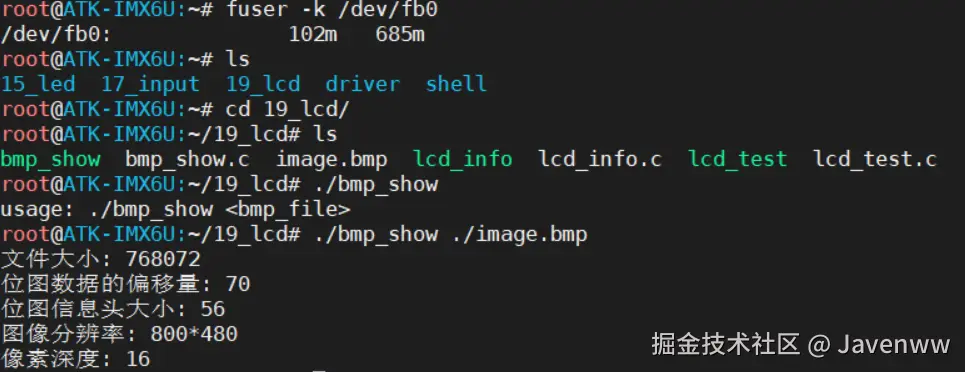
- 执行测试程序,LCD 屏上将显示指定的 BMP 图像。