目录
在上篇文章中介绍的入场效果主要依赖整体文字的位移、缩放和旋转。这篇继续往"逐字控制"和"空间纵深"方向扩展:把一句话拆成单个字符按顺序弹出、让单个字符从四面八方飞入汇成一行、以及让整段文字从远处放大飞入再飞走。这些效果的核心都是把基础属性(位移、缩放、透明度)组合出更丰富的观感,适合在标题页、启动屏、品牌展示等场景里提升视觉冲击力。
涉及的核心知识点:
Repeater拆分文字为单字,实现逐字动画PauseAnimation { duration: index * n }制造 stagger 交错效果transform: Translate改变变换原点,控制飞入起点scale+opacity模拟远近透视
Demo 1 逐字弹出
把一整句话拆成单个字符,每个字按顺序弹出,并带独立的回弹和淡出。这个效果在标题展示、节日祝福、品牌口号里很常见。
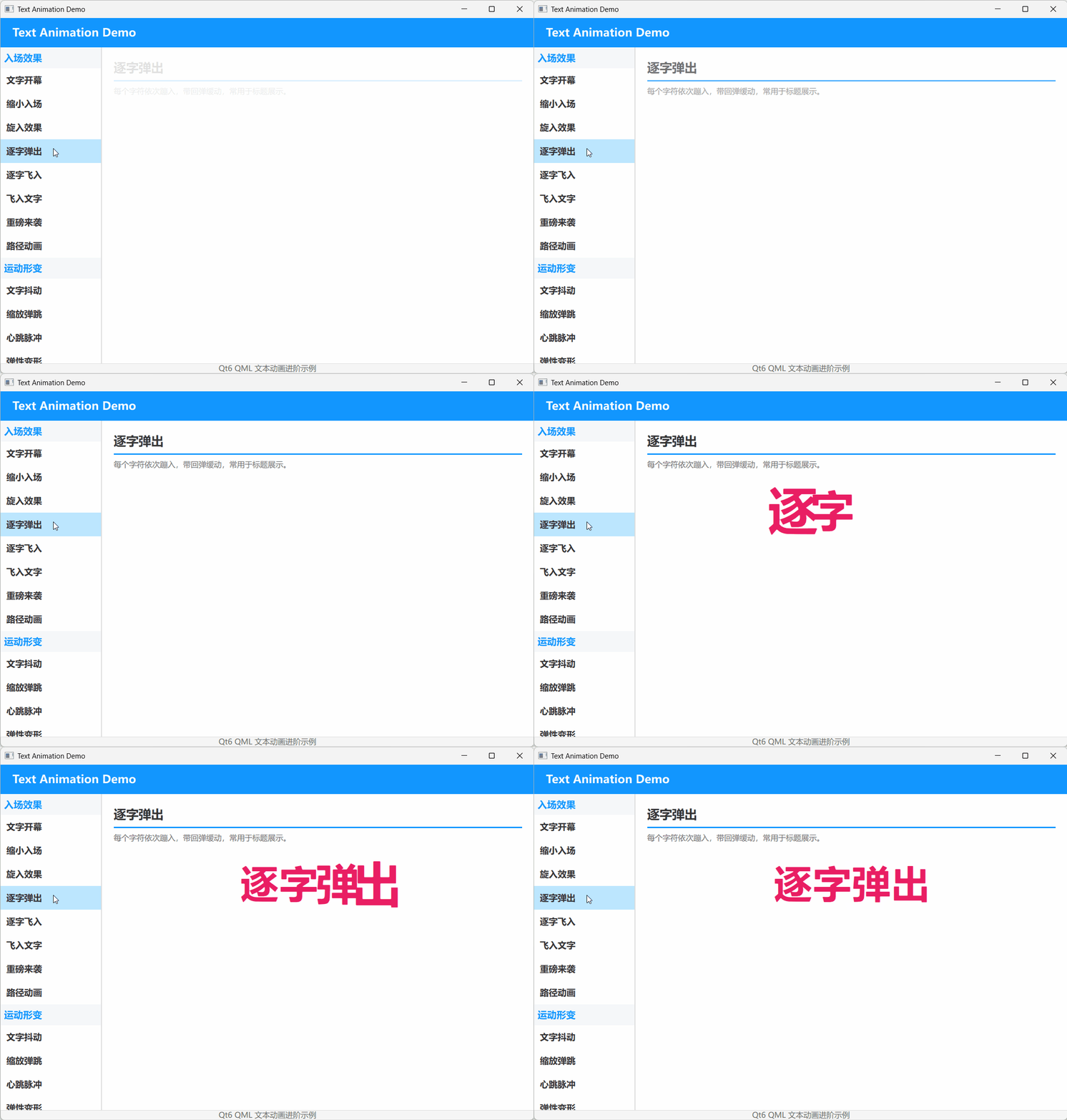
以下演示代码来自
qml_text/Demo_TextCharPop.qml,为便于阅读,只展示了关键代码。
演示代码
qml
import QtQuick
import QtQuick.Layouts

DemoPage {
    id: root
    title: "逐字弹出"
    description: "每个字符依次蹦入,带回弹缓动,常用于标题展示。"

    property string fullText: "逐字弹出"
    property var chars: fullText.split('')

    // 每个字的动画总时长必须相同,否则多轮循环后会因各自的 loop 周期不同而错位
    property int staggerDelay: 120
    property int loopDuration: 3300

    Row {
        Layout.alignment: Qt.AlignHCenter
        spacing: 2

        Repeater {
            model: root.chars.length

            Text {
                text: root.chars[index]
                font.pointSize: 48
                font.bold: true
                color: "#E91E63"
                scale: 0
                opacity: 0

                SequentialAnimation on scale {
                    loops: Animation.Infinite
                    running: root.visible && root.opacity === 1
                    PauseAnimation { duration: index * root.staggerDelay }
                    NumberAnimation { from: 0; to: 1.4; duration: 200; easing.type: Easing.OutQuad }
                    NumberAnimation { from: 1.4; to: 1.0; duration: 200; easing.type: Easing.OutBounce }
                    PauseAnimation { duration: 1500 }
                    NumberAnimation { from: 1.0; to: 0; duration: 200 }
                    // 用末尾停顿补齐到统一的 loopDuration,保证所有字符循环周期一致
                    PauseAnimation { duration: root.loopDuration - 2100 - index * root.staggerDelay }
                }

                SequentialAnimation on opacity {
                    loops: Animation.Infinite
                    running: root.visible && root.opacity === 1
                    PauseAnimation { duration: index * root.staggerDelay }
                    NumberAnimation { from: 0; to: 1; duration: 100 }
                    PauseAnimation { duration: 1800 }
                    NumberAnimation { from: 1; to: 0; duration: 200 }
                    // 与 scale 动画保持相同的总周期
                    PauseAnimation { duration: root.loopDuration - 2100 - index * root.staggerDelay }
                }
            }
        }
    }
}
关键逻辑解析
核心思路是把 fullText.split('') 拆成字符数组,再用 Repeater 生成等量的 Text。每个 Text 的动画开始处用 PauseAnimation { duration: index * root.staggerDelay },利用 Repeater 给每个子项分配的 index 制造 stagger(交错)效果:第 0 个字先出,第 1 个字延迟 120ms,第 2 个字延迟 240ms,以此类推。
scale 动画先用 OutQuad 快速放大到 1.4 倍,再用 OutBounce 落到 1.0,做出"蹦出来"的感觉。opacity 则简单淡入,保持同步。
容易踩坑的地方 :如果每个字符的循环周期不一样,播放几轮后各字的相位就会错开,出现"乱弹出"的现象。原实现把 index * 120 同时放在循环开头和结尾,导致每个字的总周期是 2100 + index * 240,各不相同。修复方法是引入统一的 loopDuration,并在循环末尾用 loopDuration - 2100 - index * staggerDelay 补齐停顿,让所有字的 SequentialAnimation 周期完全相同,这样每次重新循环时仍然保持初始的交错节奏。
Demo 2 逐字飞入
这个效果把一句话拆成单个字符,每个字符从不同的方向(左上、右下等)飞入到最终位置,汇成一行后再整体淡出。比单纯的逐字弹出多了空间位移,适合做更活泼的标题展示。
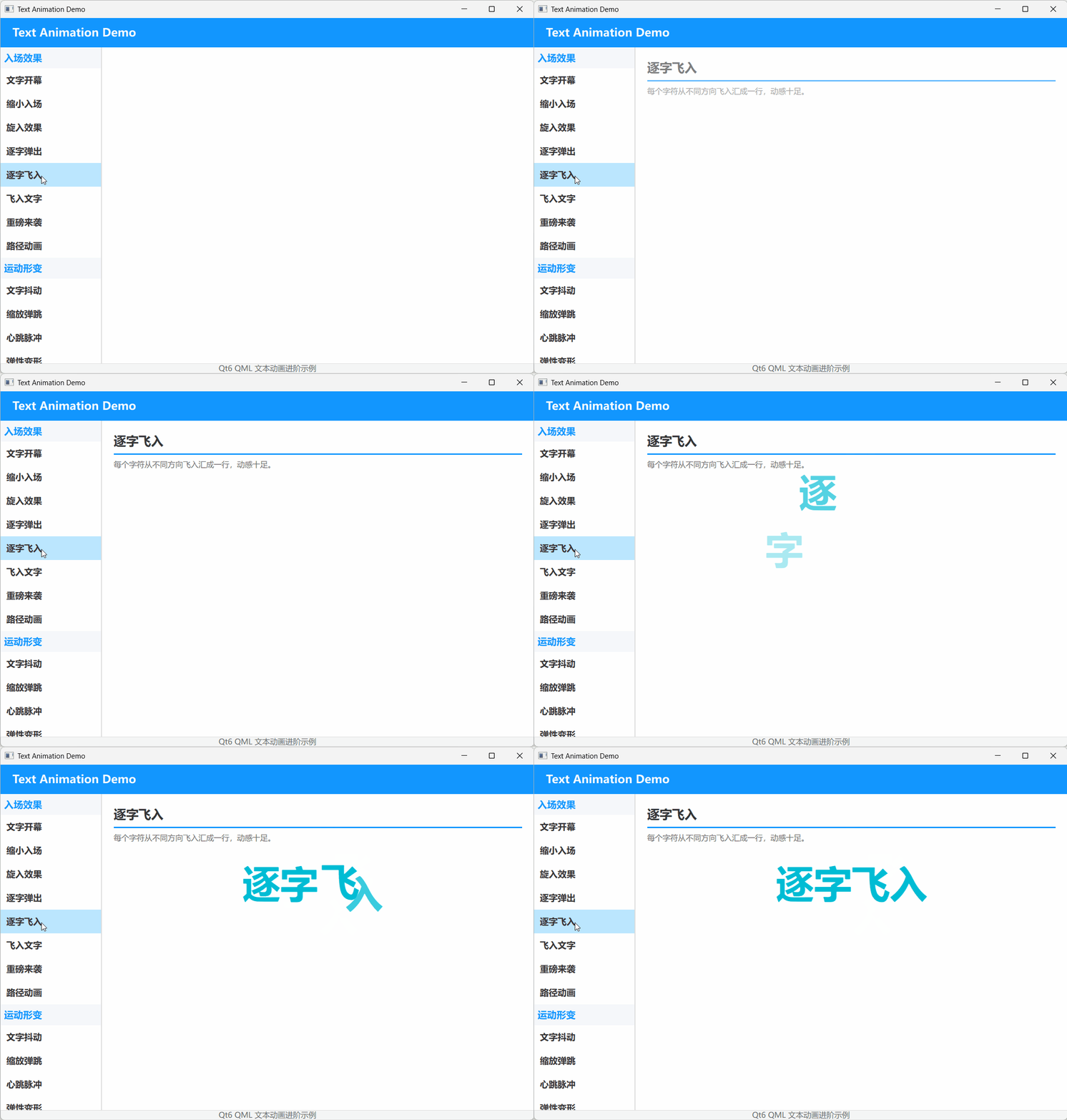
以下演示代码来自
qml_text/Demo_TextCharFlyIn.qml,为便于阅读,只展示了关键代码。
演示代码
qml
import QtQuick
import QtQuick.Layouts

DemoPage {
    id: root
    title: "逐字飞入"
    description: "每个字符从不同方向飞入汇成一行,动感十足。"

    property string fullText: "逐字飞入"
    property var chars: fullText.split('')

    // 每个字符的飞入方向(固定,保证循环一致)
    property var fromXs: [180, -160, 130, -120]
    property var fromYs: [-140, 130, -100, 110]

    // 统一循环周期,避免不同 index 的字因 loop 时长不同而逐渐错位
    property int staggerDelay: 100
    property int loopDuration: 3300

    Row {
        Layout.alignment: Qt.AlignHCenter
        spacing: 0

        Repeater {
            model: root.chars.length

            Text {
                id: charItem
                text: root.chars[index]
                font.pointSize: 48
                font.bold: true
                color: "#00BCD4"
                opacity: 0

                transform: Translate {
                    id: charTranslate
                    x: 0
                    y: 0
                }

                SequentialAnimation {
                    running: root.visible && root.opacity === 1
                    loops: Animation.Infinite

                    ScriptAction {
                        script: {
                            charTranslate.x = root.fromXs[index % root.fromXs.length]
                            charTranslate.y = root.fromYs[index % root.fromYs.length]
                            charItem.opacity = 0
                        }
                    }

                    PauseAnimation { duration: index * root.staggerDelay }

                    ParallelAnimation {
                        NumberAnimation { target: charTranslate; property: "x"; to: 0; duration: 500; easing.type: Easing.OutCubic }
                        NumberAnimation { target: charTranslate; property: "y"; to: 0; duration: 500; easing.type: Easing.OutCubic }
                        NumberAnimation { target: charItem; property: "opacity"; to: 1; duration: 300 }
                    }

                    PauseAnimation { duration: 1500 }

                    NumberAnimation { target: charItem; property: "opacity"; to: 0; duration: 200 }

                    // 用末尾停顿补齐到统一的 loopDuration,保证所有字符循环周期一致
                    PauseAnimation { duration: root.loopDuration - 2200 - index * root.staggerDelay }
                }
            }
        }
    }
}
关键逻辑解析
和第 1 篇的逐字弹出一样,这里也是用 Repeater 拆分字符。区别在于每个字符额外挂载了一个 Translate 变换,用来控制飞入的起点。fromXs 和 fromYs 是两个固定数组,存了四个方向;通过 index % root.fromXs.length 让每个字轮流取一个方向,保证循环时方向不变、效果稳定。
动画分成三步:先 ScriptAction 复位到起点,再 PauseAnimation 按 index * root.staggerDelay 交错等待,最后 ParallelAnimation 同时把 x、y 归 0 并把 opacity 提到 1。Easing.OutCubic 让飞行末段减速,落地感更自然。
容易踩坑的地方 :和逐字弹出一样,如果每个字符的循环总时长不一致,运行一段时间后 stagger 就会错位,出现有的字消失慢、动画不连贯的问题。这里同样用统一的 loopDuration,并在循环末尾用 loopDuration - 2200 - index * staggerDelay 补齐停顿,确保所有字符周期相同。如果你想让飞入方向更随机或更可控,可以把 fromXs/fromYs 改成函数生成,或者暴露成组件属性让外部传入。
Demo 3 飞入文字
这个 demo 模拟的是文字从远处朝屏幕飞来的效果:文字先很小、很透明,然后快速放大并变清晰,停留片刻后再继续放大飞走。配合底部进度条,形成一组轮播标题。
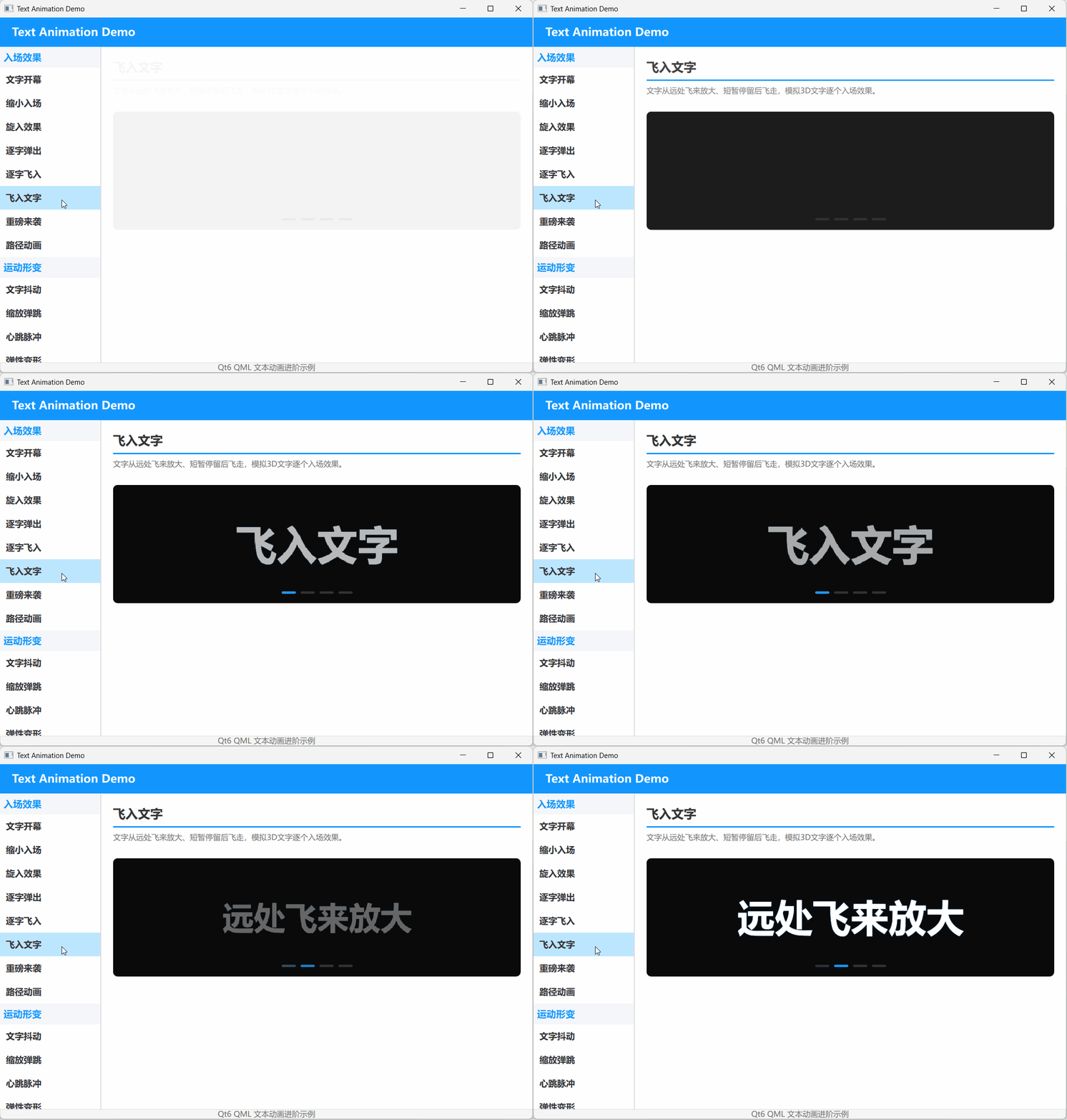
以下演示代码来自
qml_text/Demo_TextFlyIn3D.qml,为便于阅读,只展示了关键代码。
演示代码
qml
import QtQuick
import QtQuick.Layouts

DemoPage {
    id: root
    title: "飞入文字"
    description: "文字从远处飞来放大、短暂停留后飞走,模拟3D文字逐个入场效果。"

    // 3D 飞入文字:文字从远处飞来、放大、停留、飞走
    property int currentIndex: -1
    property var words: ["飞入文字", "远处飞来放大", "暂停留后飞走", "模拟入场效果"]

    Rectangle {
        Layout.fillWidth: true
        Layout.preferredHeight: 200
        color: "#0a0a0a"
        radius: 8
        clip: true

        Text {
            id: playText
            anchors.centerIn: parent
            font.pointSize: 48
            font.bold: true
            color: "#FFFFFF"
            style: Text.Outline
            styleColor: "#401296FF"
            scale: 0.1
            opacity: 0

            property real depthGlow: 0

            // 阴影层
            layer.enabled: true

            SequentialAnimation {
                id: flyInAnimation
                loops: Animation.Infinite
                running: root.visible && root.opacity === 1
                // onStarted 只在动画启动时触发一次,而 infinite loop 不会重新触发它,
                // 因此每轮循环的初始化必须放在 ScriptAction 里执行
                ScriptAction {
                    script: {
                        if (root.currentIndex < root.words.length - 1)
                            root.currentIndex++
                        else
                            root.currentIndex = 0
                        // console.log("root.currentIndex = " + root.currentIndex)
                        playText.text = root.words[root.currentIndex]
                        playText.scale = 0.1
                        playText.opacity = 0
                    }
                }
                ParallelAnimation {
                    NumberAnimation { target: playText; property: "scale"; to: 1.0; duration: 600; easing.type: Easing.OutBack }
                    NumberAnimation { target: playText; property: "opacity"; to: 1.0; duration: 400 }
                }
                PauseAnimation { duration: 800 }
                ParallelAnimation {
                    NumberAnimation { target: playText; property: "scale"; to: 1.8; duration: 400; easing.type: Easing.InQuad }
                    NumberAnimation { target: playText; property: "opacity"; to: 0; duration: 400 }
                }
                PauseAnimation { duration: 200 }
            }
        }

        // 底部进度指示
        Row {
            anchors.bottom: parent.bottom
            anchors.bottomMargin: 16
            anchors.horizontalCenter: parent.horizontalCenter
            spacing: 8

            Repeater {
                model: root.words.length

                Rectangle {
                    width: 24
                    height: 4
                    radius: 2
                    color: index === root.currentIndex ? "#1296FF" : "#333333"
                    Behavior on color { ColorAnimation { duration: 200 } }
                }
            }
        }
    }
}
关键逻辑解析
这个 demo 没有真正的 3D 变换,而是用 scale 和 opacity 的变化模拟透视:远处的东西看起来小且淡,飞近后变大变清晰,飞过头后又变大变淡直到消失。Easing.OutBack 让文字到达正常大小时有一个轻微回弹,增强"飞入并停住"的感觉;Easing.InQuad 则让飞走时加速,模拟渐行渐远。
SequentialAnimation 设置 loops: Animation.Infinite 无限循环,并通过 running: root.visible && root.opacity === 1 只在当前 demo 可见时播放。需要注意:onStarted 只在动画真正启动时触发一次,无限循环不会重复触发它,所以每轮循环前的文字切换和状态重置必须放在 ScriptAction 里执行,这样每次循环都会先执行 ScriptAction,再进入飞入/飞出的动画段。底部进度条用 Repeater 生成一组小矩形,color 根据 index === root.currentIndex 切换,配合 Behavior on color 做过渡。
运行验证
- 用 Qt Creator 打开
qml_text/CMakeLists.txt; - 按
Ctrl+R运行项目; - 在主界面找到"逐字弹出""逐字飞入""飞入文字"三个卡片,观察循环效果。
扩展复用方向
- 把
Demo_TextCharPop的fullText和staggerDelay提取为组件属性,做成可配置的口号展示组件。 - 把
Demo_TextCharFlyIn的fromXs/fromYs改为组件属性,让外部自定义每个字的飞入方向。 - 把
Demo_TextFlyIn3D的words数组暴露成接口,做成可配置的广告语轮播组件。
已验证环境:
- Qt 版本:Qt 6.8.2、Qt 6.11.1
- 操作系统:Windows 11