一、线程的概述
进程 是 系统分配资源的基本单位
线程 是 cpu执行调度的基本单位
线程是轻量级的进程(LWP:light weight process),在Linux环境下线程的本质仍是进 程,进程必须至少包含一个线程。
线程 依赖于 进程,线程共享进程的资源,进程结束 当前进程的所有线程 都将立即结束。
线程共享资源:
- 文件描述符表
- 每种信号的处理方式
- 当前工作目录
-
- 用户ID和组ID 内存地址空间 (.text/.data/.bss/heap/共享库)
线程非共享资源:
- 线程id
- 处理器现场和栈指针(内核栈)
- 独立的栈空间(用户空间栈)
- errno变量
- 信号屏蔽字
- 调度优先级
线程的优缺点:
优点: (1)提高程序并发性(2)开销小 (3)数据通信、共享数据方便
缺点: (1)库函数,不稳定 (2)调试、编写困难、gdb不支持 (3)对信号支持不好
优点相对 突出,缺点均不是硬伤。Linux下由于实现方法导致进程、线程差别不是很大。
二、线程的API
1、查看线程号
#include <pthread.h>
pthread_t pthread_self(void);
功能: 获取线程号。
参数: 无
返回值: 调用线程的线程 ID
2、创建线程
#include<pthread.h>
int pthread_create(pthread_t *thread,
const pthread_attr_t *attr, void *(*start_routine)(void *),void *arg );
功能: 创建一个线程
参数: thread:线程标识符地址。 attr:线程属性结构体地址,通常设置为 NULL。 start_routine:线程函数的入口地址。 arg:传给线程函数的参数。
返回值: 成功:0 失败:非 0
案例1:创建线程 每个线程有独立的线程函数
#include <stdio.h>
#include <pthread.h>
#include <unistd.h>
void *pthread_fun01(void *arg)
{
    int i = 0;
    while (1)
    {
        printf("%s‐‐‐‐‐‐‐i=%d\n", (char *)arg, i++);
        sleep(1);
    }
    return NULL;
    }
    void *pthread_fun02(void *arg)
    {
        int i = 0;
    while (1)
    {
        printf("%s‐‐‐‐‐‐‐i=%d\n", (char *)arg, i++);
        sleep(1);
    }
    return NULL;
}
int main(int argc, char const *argv[])
{
    //创建两个线程
    pthread_t tid1, tid2;
    pthread_create(&tid1, NULL, pthread_fun01, "任务A");
    pthread_create(&tid2, NULL, pthread_fun02, "任务B");

    getchar();
    return 0;
}
案例2:创建线程 每个线程共用的同一线程函数
#include <stdio.h>
#include <pthread.h>
#include <unistd.h>
void *pthread_fun(void *arg)
{
    int i = 0;
    while (1)
    {
        printf("%s‐‐‐‐‐‐‐i=%d\n", (char *)arg, i++);
        sleep(1);
    }

    return NULL;
}

int main(int argc, char const *argv[])
{
    //创建两个线程
    pthread_t tid1, tid2;
    pthread_create(&tid1, NULL, pthread_fun, "任务A");
    pthread_create(&tid2, NULL, pthread_fun, "任务B");

    getchar();
    return 0;
}
3、回收线程资源(阻塞)
pthread_join函数:带阻塞
#include<pthread.h>
int pthread_join(pthread_t thread, void **retval);
功能: 等待线程结束 (此函数会阻塞),并回收线程资源,类似进程的 wait() 函数。如果线程 已经结束,那么该函数会立即返回。
参数: thread:被等待的线程号。 retval:用来存储线程退出状态的指针的地址
返回值: 成功:0 失败:非 0
例1:回收线程资源
#include <stdio.h>
#include <pthread.h>
#include <unistd.h>
void *pthread_fun01(void *arg)
{

    int i = 0;
    for (; i < 5; i++)
    {
        printf("%s‐‐‐‐‐‐‐i=%d\n", (char *)arg, i++);
        sleep(1);
    }

    return NULL;
}
void *pthread_fun02(void *arg)
{

    int i = 0;
    for (; i < 3; i++)
    {
        printf("%s‐‐‐‐‐‐‐i=%d\n", (char *)arg, i++);
        sleep(1);
    }

    return NULL;
}

int main(int argc, char const *argv[])
{
    //创建两个线程
    pthread_t tid1, tid2;
    pthread_create(&tid1, NULL, pthread_fun01, "任务A");
    pthread_create(&tid2, NULL, pthread_fun02, "任务B");

    //回收线程资源(带阻塞的)
    pthread_join(tid1, NULL);
    printf("tid1结束了\n");
    pthread_join(tid2, NULL);
    printf("tid2结束了\n");

    return 0;
}
例2:回收线程资源 并获取线程返回值的值
#include <stdio.h>
#include <pthread.h>
#include <unistd.h>
void *pthread_fun01(void *arg)
{

    int i = 0;
    for (; i < 5; i++)
    {
        printf("%s‐‐‐‐‐‐‐i=%d\n", (char *)arg, i++);
        sleep(1);
    }

    return (void *)"任务A";
}
void *pthread_fun02(void *arg)
{

    int i = 0;
    for (; i < 3; i++)
    {
        printf("%s‐‐‐‐‐‐‐i=%d\n", (char *)arg, i++);
        sleep(1);
    }

    return (void *)"任务B";
}

int main(int argc, char const *argv[])
{
    //创建两个线程
    pthread_t tid1, tid2;
    pthread_create(&tid1, NULL, pthread_fun01, "任务A");
    pthread_create(&tid2, NULL, pthread_fun02, "任务B");

    //回收线程资源(带阻塞的)
    void *p1 = NULL;
    pthread_join(tid1, &p1);
    printf("tid1结束了,返回值为%s\n", (char *)p1);
    pthread_join(tid2, &p1);
    printf("tid2结束了, 返回值为%s\n", (char *)p1);

    return 0;
}
4、pthread_detach分离线程(不阻塞)
将线程的回收工作 分离出去 线程结束时,线程由系统回收资源。
#include<pthread.h>
int pthread_detach(pthread_t thread);
功能: 使调用线程与当前进程分离,分离后不代表此线程不依赖与当前进程,线程分离的目的 是将线程资源的回收工作交由系统自动来完成,也就是说当被分离的线程结束之后,系统会 自动回收它的资源。所以,此函数不会阻塞。
参数: thread:线程号。
返回值: 成功:0 失败:非0
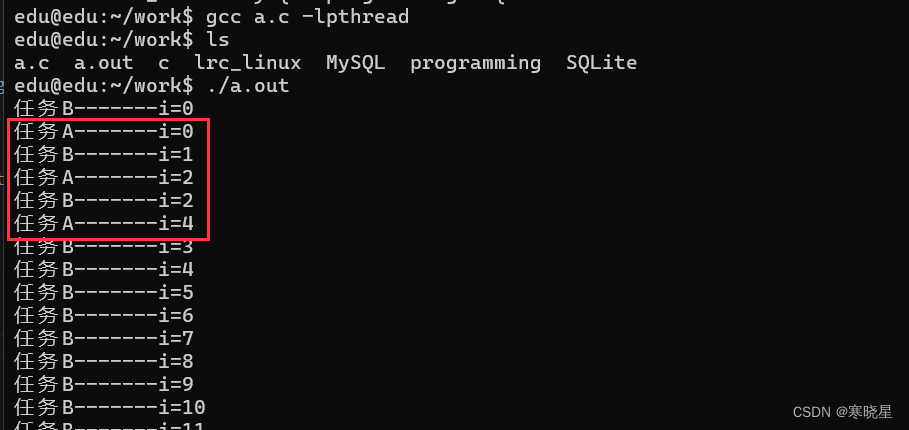
#include <stdio.h>
#include <pthread.h>
#include <unistd.h>
void *pthread_fun01(void *arg)
{

    int i = 0;
    for (; i < 5; i++)
    {
       printf("%s‐‐‐‐‐‐‐i=%d\n", (char *)arg, i++);
        sleep(1);
    }

    return (void *)"任务A";
}

int main(int argc, char const *argv[])
{
    //创建两个线程
    pthread_t tid1, tid2;
    pthread_create(&tid1, NULL, pthread_fun01, "任务A");
    //线程分离(不带阻塞)
    pthread_detach(tid1);

    //主函数 也是一个线程
    int i = 0;
    while (1)
    {
        printf("%s‐‐‐‐‐‐‐i=%d\n", "任务B", i++);
        sleep(1);
    }

    return 0;
}
三、线程的取消和退出
1、线程的取消
取消自己、也可以取消当前进程的其他线程。
#include<pthread.h>
int pthread_cancel(pthread_t thread);
功能: 杀死(取消)线程
参数: thread : 目标线程ID。
返回值: 成功:0 失败:出错编号
杀死线程也不是立刻就能完成,必须要到达取消点。 取消点:是线程检查是否被取消,并 按请求进行动作的一个位置。通常是一些系统调用。
#include <stdio.h>
#include <pthread.h>
#include <unistd.h>
void *pthread_fun01(void *arg)
{

    int i = 0;
    while (1)
    {
        printf("%s‐‐‐‐‐‐‐i=%d\n", (char *)arg, i++);
        sleep(1); //取消点
    }

    return NULL;
}

int main(int argc, char const *argv[])
{
    //创建两个线程
    pthread_t tid1;
    pthread_create(&tid1, NULL, pthread_fun01, "任务A");
    //线程分离(不带阻塞)
    pthread_detach(tid1);

    printf("5秒后结束任务A\n");
    sleep(5);
    pthread_cancel(tid1);

    getchar();
    return 0;
}
2、线程退出
#include<pthread.h>
void pthread_exit(void *retval);
功能: 退出调用线程。一个进程中的多个线程是共享该进程的数据段,因此,通常线程退出后 所占用的资源并不会释放。
参数: retval:存储线程退出状态的指针。
返回值:无
#include <stdio.h>
#include <pthread.h>
#include <unistd.h>
void *pthread_fun01(void *arg)
{

    int i = 0;
    while (1)
    {
        printf("%s‐‐‐‐‐‐‐i=%d\n", (char *)arg, i++);
        if (i == 5)
        pthread_exit(NULL); //线程结束
        sleep(1);
    }

    return NULL;
}

int main(int argc, char const *argv[])
{
    //创建线程
    pthread_t tid1;
    pthread_create(&tid1, NULL, pthread_fun01, "任务A");

    pthread_join(tid1, NULL);
    printf("任务A结束了\n");
    return 0;
}
四、线程的属性
1、结构体
typedef struct
{
    int etachstate; //线程的分离状态
    int schedpolicy; //线程调度策略
    struct sched_param schedparam; //线程的调度参数
    int inheritsched; //线程的继承性
    int scope; //线程的作用域
    size_t guardsize; //线程栈末尾的警戒缓冲区大小
    int stackaddr_set; //线程的栈设置
    void* stackaddr; //线程栈的位置
    size_t stacksize; //线程栈的大小
} pthread_attr_t;
使用线程的属性 完成线程分离:
以前的方案:
pthread_t tid1;
pthread_create(&tid1,NULL, pthread_fun01, "任务A");
//线程分离(不带阻塞)
pthread_detach(tid1);
如果线程先结束 pthread_detach后执行 就存在问题。
现在的方案:创建线程的时候 通过线程属性 设置线程分离,就定义保存 先分离 后执行线 程(解决了上面的问题) 初始化的函数为pthread_attr_init,这个函数必须在pthread_create函数之前调用。
初始化线程属性函数:
int pthread_attr_init (pthread_attr_t *attr);
函数返回值:成功:0;失败:错误号
销毁线程属性所占用的资源函数:
int pthread_attr_destroy (pthread_attr_t *attr);
函数返回值:成功:0;失败:错误号
线程分离状态的函数: 设置线程属性,分离or非分离
int pthread_attr_setdetachstate(pthread_attr_t *attr, int detachstate);
获取程属性,分离or非分离
int pthread_attr_getdetachstate(pthread_attr_t *attr, int *detachstat);
参数:
attr:已初始化的线程属性
detachstate:分离状态
PTHREAD_CREATE_DETACHED(分离线程)
PTHREAD_CREATE_JOINABLE(非分离线程)
案例1:设置线程分离、修改线程的栈的地址和大小
#include <pthread.h>
#include <stdio.h>
#include <unistd.h>
#include <stdlib.h>
//#define SIZE 0x100000
#define SIZE 128
void *th_fun(void *arg)
{
    while (1)
    sleep(1);
}
int main(void)
{
    pthread_t tid;
    int err, detachstate, i = 1;
    pthread_attr_t attr;
    size_t stacksize;
    void *stackaddr;

    //初始化线程属性
    pthread_attr_init(&attr);
    //设置线程的属性值为分离状态
    pthread_attr_setdetachstate(&attr, PTHREAD_CREATE_DETACHED);

    #if 1
    while (1)
    {
        stackaddr = malloc(SIZE);
        if (stackaddr == NULL)
        {
            perror("malloc");
            exit(1);
        }
        stacksize = SIZE;
        //将栈的地址 和栈的大小设置到线程属性值里
        pthread_attr_setstack(&attr, stackaddr, stacksize);

        //将上面设置好的线程属性值 赋值到 创建的线程中
        err = pthread_create(&tid, &attr, th_fun, NULL);
        if (err != 0)
        {
            printf("%s\n", strerror(err));
            exit(1);
        }
        printf("%d\n", i++);
    }
    #endif
    pthread_attr_destroy(&attr);
    return 0;
}
例2:设置线程分离
#include <pthread.h>
#include <stdio.h>
#include <unistd.h>
#include <stdlib.h>
//#define SIZE 0x100000
#define SIZE 128
void *th_fun(void *arg)
{
    while (1)
    {
        printf("任务A\n");
        sleep(1);
    }

}
int main(void)
{
    pthread_t tid;
    pthread_attr_t attr;

    //初始化线程属性
    pthread_attr_init(&attr);
    //设置线程的属性值为分离状态
    pthread_attr_setdetachstate(&attr, PTHREAD_CREATE_DETACHED);
    //创建线程
    pthread_create(&tid, &attr, th_fun, NULL);

    pthread_attr_destroy(&attr);
    getchar();

    return 0;
}
五、创建多线程
#include <pthread.h>
#include <stdio.h>
#include <unistd.h>
#include <stdlib.h>
#include <string.h>
typedef struct
{
    char task_name[32];
    int time;
} MSG;

void *deal_fun(void *arg)
{
    MSG msg = *(MSG *)arg;
    int i = 0;
    for (i = msg.time; i > 0; i‐‐)
    {
        printf("%s剩余时间%d\n", msg.task_name, i);
        sleep(1);
    }
    return NULL;
}
int main(int argc, char const *argv[])
{

    while (1)
    {
        MSG msg;
        printf("输入新增的任务名:");

        fgets(msg.task_name, sizeof(msg.task_name), stdin);
        msg.task_name[strlen(msg.task_name) ‐ 1] = 0;

        printf("输入运行时间:");
        scanf("%d", &msg.time);
        getchar(); //获取换行符

        pthread_t tid;
        pthread_create(&tid, NULL, deal_fun, (void *)&msg);
        pthread_detach(tid); //线程分离
    }
    return 0;
}