本文详细介绍如何在 Windows 10 环境下开发和运行 Hadoop MapReduce 程序,并将其部署到 AWS EMR 集群进行分布式计算。包含完整的实操步骤、代码示例和故障排除指南。
目录
- 一、环境准备
- [二、创建 Maven 工程](#二、创建 Maven 工程)
- [三、编写 WordCount 程序](#三、编写 WordCount 程序)
- [四、Windows 本地运行调试](#四、Windows 本地运行调试)
- 五、打包与命令行测试
- [六、部署到 AWS EMR](#六、部署到 AWS EMR)
- 七、查看运行结果
- [八、MapReduce 执行原理深入解析](#八、MapReduce 执行原理深入解析)
- 九、性能对比与优化建议
- 十、常见问题与解决方案
一、环境准备
1.1 所需软件版本
| 软件 | 版本 | 说明 |
|---|---|---|
| Windows | 10/11 | 操作系统 |
| JDK | 1.8 | Hadoop 2.x 推荐版本 |
| IntelliJ IDEA | 2023.x | 开发 IDE |
| Hadoop | 2.8.5 | Hadoop 运行环境 |
| AWS EMR | 5.x+ | 云端集群服务 |
1.2 安装步骤
安装 JDK 8
powershell
# 检查 Java 版本
java -version
# 输出示例:java version "1.8.0_333"
下载并解压 Hadoop
访问 Hadoop 官网 下载 hadoop-2.8.5.tar.gz,解压到本地目录:
E:\hadoop\hadoop-2.8.5下载 winutils
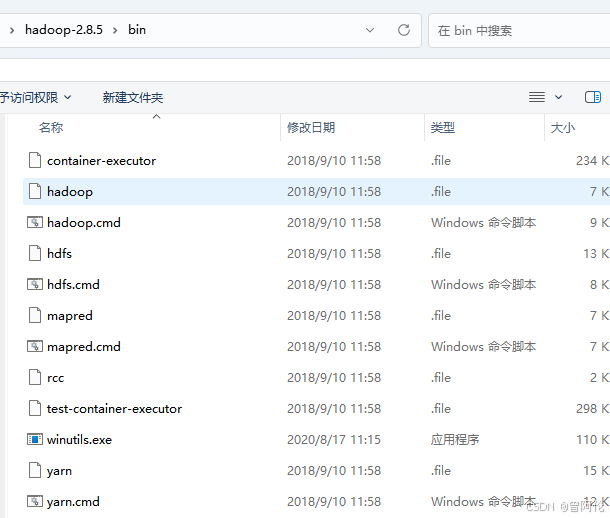
由于 Windows 原生不支持 Hadoop 的部分功能,需要下载 winutils,将 bin 目录下的文件拷贝到 hadoop-2.8.5/bin 目录中覆盖原文件。
二、创建 Maven 工程
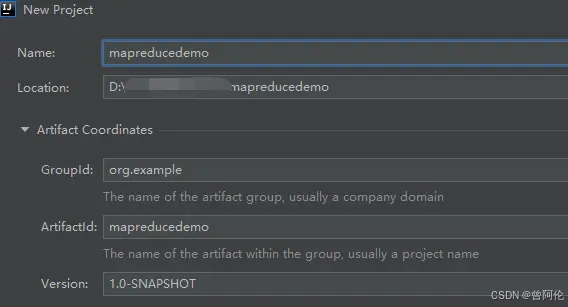
2.1 新建项目
在 IntelliJ IDEA 中创建 Maven 项目:
2.2 配置 pom.xml
xml
<?xml version="1.0" encoding="UTF-8"?>
<project xmlns="http://maven.apache.org/POM/4.0.0"
         xmlns:xsi="http://www.w3.org/2001/XMLSchema-instance"
         xsi:schemaLocation="http://maven.apache.org/POM/4.0.0
         http://maven.apache.org/xsd/maven-4.0.0.xsd">
    <modelVersion>4.0.0</modelVersion>

    <groupId>com.example</groupId>
    <artifactId>mapreducedemo</artifactId>
    <version>1.0-SNAPSHOT</version>

    <properties>
        <java.version>1.8</java.version>
        <hadoop.version>2.8.5</hadoop.version>
    </properties>

    <dependencies>
        <dependency>
            <groupId>org.apache.hadoop</groupId>
            <artifactId>hadoop-client</artifactId>
            <version>${hadoop.version}</version>
        </dependency>
    </dependencies>

    <build>
        <plugins>
            <plugin>
                <groupId>org.apache.maven.plugins</groupId>
                <artifactId>maven-compiler-plugin</artifactId>
                <version>3.8.1</version>
                <configuration>
                    <source>${java.version}</source>
                    <target>${java.version}</target>
                </configuration>
            </plugin>
            <plugin>
                <groupId>org.apache.maven.plugins</groupId>
                <artifactId>maven-shade-plugin</artifactId>
                <version>3.2.4</version>
                <configuration>
                    <createDependencyReducedPom>false</createDependencyReducedPom>
                </configuration>
                <executions>
                    <execution>
                        <phase>package</phase>
                        <goals>
                            <goal>shade</goal>
                        </goals>
                        <configuration>
                            <filters>
                                <filter>
                                    <artifact>*:*</artifact>
                                    <excludes>
                                        <exclude>META-INF/*.SF</exclude>
                                        <exclude>META-INF/*.DSA</exclude>
                                        <exclude>META-INF/*.RSA</exclude>
                                    </excludes>
                                </filter>
                            </filters>
                            <transformers>
                                <transformer
                    implementation="org.apache.maven.plugins.shade.resource.ServicesResourceTransformer"/>
                                <transformer
                    implementation="org.apache.maven.plugins.shade.resource.ManifestResourceTransformer">
                                    <mainClass>com.example.WordCount</mainClass>
                                </transformer>
                            </transformers>
                        </configuration>
                    </execution>
                </executions>
            </plugin>
        </plugins>
    </build>
</project>
三、编写 WordCount 程序
3.1 创建 Java 类
创建包 com.example 和类 WordCount.java:
java
package com.example;

import java.io.IOException;
import java.util.StringTokenizer;

import org.apache.hadoop.conf.Configuration;
import org.apache.hadoop.fs.Path;
import org.apache.hadoop.io.IntWritable;
import org.apache.hadoop.io.Text;
import org.apache.hadoop.mapreduce.Job;
import org.apache.hadoop.mapreduce.Mapper;
import org.apache.hadoop.mapreduce.Reducer;
import org.apache.hadoop.mapreduce.lib.input.FileInputFormat;
import org.apache.hadoop.mapreduce.lib.output.FileOutputFormat;

public class WordCount {

    public static class TokenizerMapper
            extends Mapper<Object, Text, Text, IntWritable> {

        private final static IntWritable one = new IntWritable(1);
        private Text word = new Text();

        public void map(Object key, Text value, Context context
        ) throws IOException, InterruptedException {
            StringTokenizer itr = new StringTokenizer(value.toString());
            while (itr.hasMoreTokens()) {
                word.set(itr.nextToken());
                context.write(word, one);
            }
        }
    }

    public static class IntSumReducer
            extends Reducer<Text, IntWritable, Text, IntWritable> {
        private IntWritable result = new IntWritable();

        public void reduce(Text key, Iterable<IntWritable> values,
                           Context context
        ) throws IOException, InterruptedException {
            int sum = 0;
            for (IntWritable val : values) {
                sum += val.get();
            }
            result.set(sum);
            context.write(key, result);
        }
    }

    public static void main(String[] args) throws Exception {
        Configuration conf = new Configuration();
        Job job = Job.getInstance(conf, "word count");
        job.setJarByClass(WordCount.class);
        job.setMapperClass(TokenizerMapper.class);
        job.setCombinerClass(IntSumReducer.class);
        job.setReducerClass(IntSumReducer.class);
        job.setOutputKeyClass(Text.class);
        job.setOutputValueClass(IntWritable.class);
        FileInputFormat.addInputPath(job, new Path(args[0]));
        FileOutputFormat.setOutputPath(job, new Path(args[1]));
        System.exit(job.waitForCompletion(true) ? 0 : 1);
    }
}
3.2 创建输入文件
在项目根目录创建 demo.txt:
Hello World
Hello Hadoop
Hello MapReduce
MapReduce is fun
Hadoop is powerful
四、Windows 本地运行调试
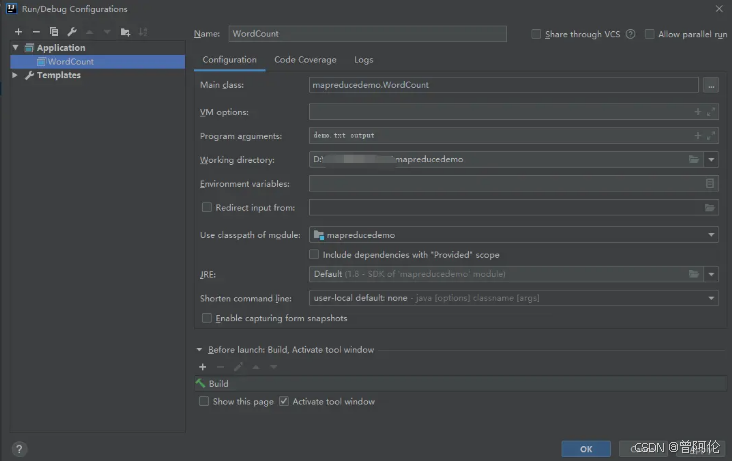
4.1 配置运行参数
在 IDEA 中配置运行参数:
4.2 设置环境变量
在 IDEA 的运行配置中设置环境变量:
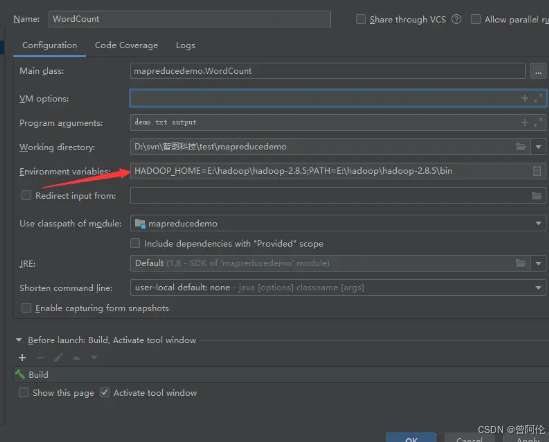
HADOOP_HOME=E:\hadoop\hadoop-2.8.5
PATH=E:\hadoop\hadoop-2.8.5\bin;%PATH%
4.3 常见错误与解决方案
问题:运行时报错
Exception in thread "main" java.lang.UnsatisfiedLinkError:
org.apache.hadoop.io.nativeio.NativeIO$Windows.access0(Ljava/lang/String;I)Z
解决方案 :确保已正确安装 winutils,并设置了 HADOOP_HOME 环境变量。
4.4 运行成功
运行成功后,输出目录 output 会生成以下文件:
output/
├── _SUCCESS
└── part-r-00000
查看 part-r-00000 内容:
Hello   3
Hadoop  2
MapReduce   2
World   1
fun     1
is      2
powerful    1
五、打包与命令行测试
5.1 打包项目
bash
mvn clean package打包成功后,在 target 目录生成 mapreducedemo-1.0-SNAPSHOT.jar。
5.2 命令行测试
powershell
# 设置环境变量
set HADOOP_HOME=E:\hadoop\hadoop-2.8.5
set PATH=E:\hadoop\hadoop-2.8.5\bin;%PATH%

# 运行程序
java -jar mapreducedemo-1.0-SNAPSHOT.jar demo.txt output
六、部署到 AWS EMR
6.1 上传文件到 S3
bash
# 上传 JAR 包
aws s3 cp target/mapreducedemo-1.0-SNAPSHOT.jar \
    s3://your-bucket/jar/mapreducedemo-1.0-SNAPSHOT.jar

# 上传输入文件
aws s3 cp demo.txt \
    s3://your-bucket/input/demo.txt
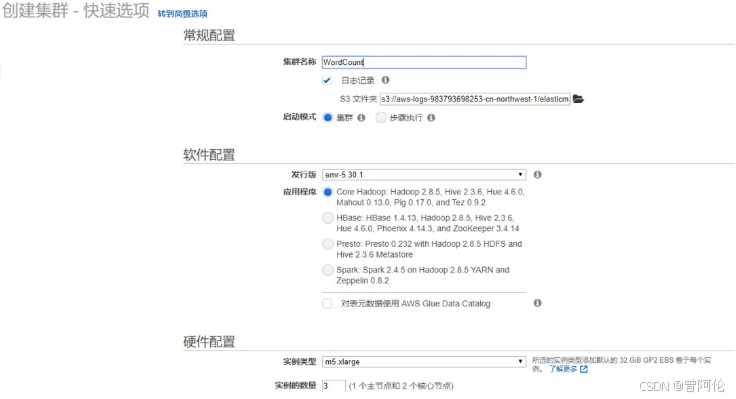
6.2 创建 EMR 集群
登录 AWS 控制台,进入 EMR 服务:
6.3 添加 Step
在集群创建过程中或创建后,添加 MapReduce Step:
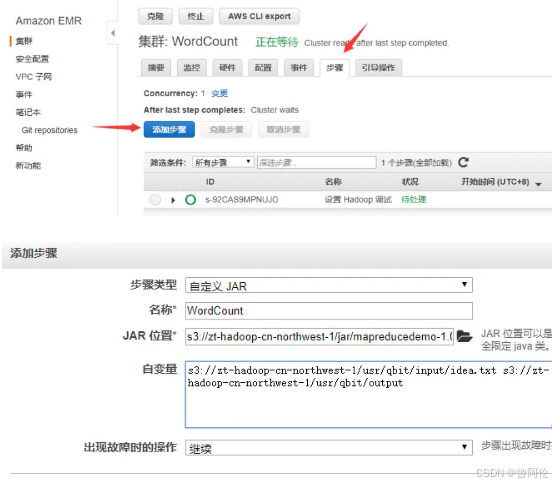
配置参数:
- Step type: Custom JAR
- Name: WordCount
- JAR location :
s3://your-bucket/jar/mapreducedemo-1.0-SNAPSHOT.jar - Arguments :
s3://your-bucket/input/demo.txt s3://your-bucket/output
七、查看运行结果
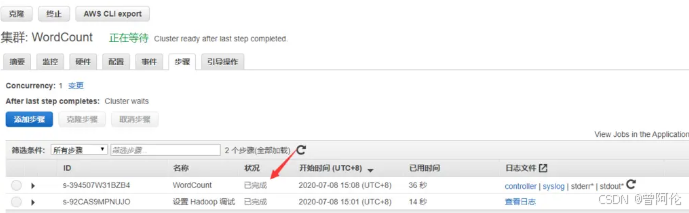
7.1 等待运行完成
在 EMR 控制台查看 Step 状态:
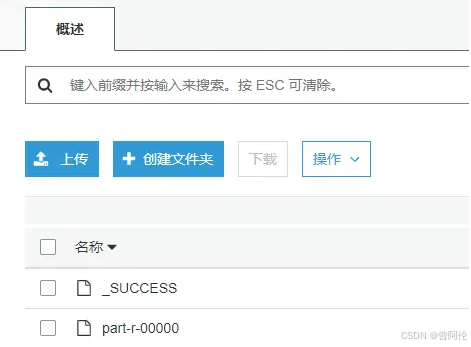
7.2 查看输出
运行完成后,在 S3 中查看输出文件:
bash
# 下载输出文件
aws s3 cp s3://your-bucket/output/part-r-00000 .

# 查看内容
cat part-r-00000
八、MapReduce 执行原理深入解析
8.1 MapReduce 执行流程
#mermaid-svg-coc3shS2JFJCDV6n{font-family:"trebuchet ms",verdana,arial,sans-serif;font-size:16px;fill:#333;}@keyframes edge-animation-frame{from{stroke-dashoffset:0;}}@keyframes dash{to{stroke-dashoffset:0;}}#mermaid-svg-coc3shS2JFJCDV6n .edge-animation-slow{stroke-dasharray:9,5!important;stroke-dashoffset:900;animation:dash 50s linear infinite;stroke-linecap:round;}#mermaid-svg-coc3shS2JFJCDV6n .edge-animation-fast{stroke-dasharray:9,5!important;stroke-dashoffset:900;animation:dash 20s linear infinite;stroke-linecap:round;}#mermaid-svg-coc3shS2JFJCDV6n .error-icon{fill:#552222;}#mermaid-svg-coc3shS2JFJCDV6n .error-text{fill:#552222;stroke:#552222;}#mermaid-svg-coc3shS2JFJCDV6n .edge-thickness-normal{stroke-width:1px;}#mermaid-svg-coc3shS2JFJCDV6n .edge-thickness-thick{stroke-width:3.5px;}#mermaid-svg-coc3shS2JFJCDV6n .edge-pattern-solid{stroke-dasharray:0;}#mermaid-svg-coc3shS2JFJCDV6n .edge-thickness-invisible{stroke-width:0;fill:none;}#mermaid-svg-coc3shS2JFJCDV6n .edge-pattern-dashed{stroke-dasharray:3;}#mermaid-svg-coc3shS2JFJCDV6n .edge-pattern-dotted{stroke-dasharray:2;}#mermaid-svg-coc3shS2JFJCDV6n .marker{fill:#333333;stroke:#333333;}#mermaid-svg-coc3shS2JFJCDV6n .marker.cross{stroke:#333333;}#mermaid-svg-coc3shS2JFJCDV6n svg{font-family:"trebuchet ms",verdana,arial,sans-serif;font-size:16px;}#mermaid-svg-coc3shS2JFJCDV6n p{margin:0;}#mermaid-svg-coc3shS2JFJCDV6n .label{font-family:"trebuchet ms",verdana,arial,sans-serif;color:#333;}#mermaid-svg-coc3shS2JFJCDV6n .cluster-label text{fill:#333;}#mermaid-svg-coc3shS2JFJCDV6n .cluster-label span{color:#333;}#mermaid-svg-coc3shS2JFJCDV6n .cluster-label span p{background-color:transparent;}#mermaid-svg-coc3shS2JFJCDV6n .label text,#mermaid-svg-coc3shS2JFJCDV6n span{fill:#333;color:#333;}#mermaid-svg-coc3shS2JFJCDV6n .node rect,#mermaid-svg-coc3shS2JFJCDV6n .node circle,#mermaid-svg-coc3shS2JFJCDV6n .node ellipse,#mermaid-svg-coc3shS2JFJCDV6n .node polygon,#mermaid-svg-coc3shS2JFJCDV6n .node path{fill:#ECECFF;stroke:#9370DB;stroke-width:1px;}#mermaid-svg-coc3shS2JFJCDV6n .rough-node .label text,#mermaid-svg-coc3shS2JFJCDV6n .node .label text,#mermaid-svg-coc3shS2JFJCDV6n .image-shape .label,#mermaid-svg-coc3shS2JFJCDV6n .icon-shape .label{text-anchor:middle;}#mermaid-svg-coc3shS2JFJCDV6n .node .katex path{fill:#000;stroke:#000;stroke-width:1px;}#mermaid-svg-coc3shS2JFJCDV6n .rough-node .label,#mermaid-svg-coc3shS2JFJCDV6n .node .label,#mermaid-svg-coc3shS2JFJCDV6n .image-shape .label,#mermaid-svg-coc3shS2JFJCDV6n .icon-shape .label{text-align:center;}#mermaid-svg-coc3shS2JFJCDV6n .node.clickable{cursor:pointer;}#mermaid-svg-coc3shS2JFJCDV6n .root .anchor path{fill:#333333!important;stroke-width:0;stroke:#333333;}#mermaid-svg-coc3shS2JFJCDV6n .arrowheadPath{fill:#333333;}#mermaid-svg-coc3shS2JFJCDV6n .edgePath .path{stroke:#333333;stroke-width:2.0px;}#mermaid-svg-coc3shS2JFJCDV6n .flowchart-link{stroke:#333333;fill:none;}#mermaid-svg-coc3shS2JFJCDV6n .edgeLabel{background-color:rgba(232,232,232, 0.8);text-align:center;}#mermaid-svg-coc3shS2JFJCDV6n .edgeLabel p{background-color:rgba(232,232,232, 0.8);}#mermaid-svg-coc3shS2JFJCDV6n .edgeLabel rect{opacity:0.5;background-color:rgba(232,232,232, 0.8);fill:rgba(232,232,232, 0.8);}#mermaid-svg-coc3shS2JFJCDV6n .labelBkg{background-color:rgba(232, 232, 232, 0.5);}#mermaid-svg-coc3shS2JFJCDV6n .cluster rect{fill:#ffffde;stroke:#aaaa33;stroke-width:1px;}#mermaid-svg-coc3shS2JFJCDV6n .cluster text{fill:#333;}#mermaid-svg-coc3shS2JFJCDV6n .cluster span{color:#333;}#mermaid-svg-coc3shS2JFJCDV6n div.mermaidTooltip{position:absolute;text-align:center;max-width:200px;padding:2px;font-family:"trebuchet ms",verdana,arial,sans-serif;font-size:12px;background:hsl(80, 100%, 96.2745098039%);border:1px solid #aaaa33;border-radius:2px;pointer-events:none;z-index:100;}#mermaid-svg-coc3shS2JFJCDV6n .flowchartTitleText{text-anchor:middle;font-size:18px;fill:#333;}#mermaid-svg-coc3shS2JFJCDV6n rect.text{fill:none;stroke-width:0;}#mermaid-svg-coc3shS2JFJCDV6n .icon-shape,#mermaid-svg-coc3shS2JFJCDV6n .image-shape{background-color:rgba(232,232,232, 0.8);text-align:center;}#mermaid-svg-coc3shS2JFJCDV6n .icon-shape p,#mermaid-svg-coc3shS2JFJCDV6n .image-shape p{background-color:rgba(232,232,232, 0.8);padding:2px;}#mermaid-svg-coc3shS2JFJCDV6n .icon-shape .label rect,#mermaid-svg-coc3shS2JFJCDV6n .image-shape .label rect{opacity:0.5;background-color:rgba(232,232,232, 0.8);fill:rgba(232,232,232, 0.8);}#mermaid-svg-coc3shS2JFJCDV6n .label-icon{display:inline-block;height:1em;overflow:visible;vertical-align:-0.125em;}#mermaid-svg-coc3shS2JFJCDV6n .node .label-icon path{fill:currentColor;stroke:revert;stroke-width:revert;}#mermaid-svg-coc3shS2JFJCDV6n :root{--mermaid-font-family:"trebuchet ms",verdana,arial,sans-serif;} Shuffle 细节
输入文件
InputFormat
Split 切分
Mapper 阶段
Shuffle 阶段
排序合并
Reducer 阶段
OutputFormat
输出文件
Partition 分区
Sort 排序
Spill 溢写
Merge 合并
8.2 WordCount 执行过程详解
| 阶段 | 输入 | 输出 | 说明 |
|---|---|---|---|
| Input | demo.txt |
<0, "Hello World"> |
读取文件,产生键值对 |
| Map | <0, "Hello World"> |
<Hello, 1>, <World, 1> |
分词并计数 |
| Combine | <Hello, [1,1,1]> |
<Hello, 3> |
本地合并(可选) |
| Shuffle | Map 输出 | 按 Key 分组 | 分区、排序、合并 |
| Reduce | <Hello, [3]> |
<Hello, 3> |
最终汇总 |
| Output | Reduce 输出 | part-r-00000 |
写入输出文件 |
8.3 Combiner 的作用
Combiner 是一个本地的 Reducer,它可以在 Map 任务结束后对中间结果进行合并,减少网络传输的数据量:
没有 Combiner:
  Map1: <Hello, 1>, <Hello, 1> → 传输 2 条记录
  Map2: <Hello, 1> → 传输 1 条记录
  Reduce: 接收 3 条记录

有 Combiner:
  Map1: <Hello, 1>, <Hello, 1> → <Hello, 2> → 传输 1 条记录
  Map2: <Hello, 1> → 传输 1 条记录
  Reduce: 接收 2 条记录
九、性能对比与优化建议
9.1 本地 vs EMR 性能对比
| 指标 | 本地运行 | EMR 集群 |
|---|---|---|
| 数据规模 | 小数据集(<1GB) | 大数据集(>1GB) |
| 计算节点 | 1 | N(可扩展) |
| 网络开销 | 无 | 有 |
| 启动时间 | 秒级 | 分钟级 |
| 成本 | 免费 | 按小时计费 |
9.2 优化建议
数据层面:
- 合理设置 Block Size(默认 128MB)
- 使用 SequenceFile 或 Parquet 格式,减少 I/O
- 数据预处理,去除无效数据
代码层面:
- 使用 Combiner 减少网络传输
- 避免在 Mapper/Reducer 中创建大量对象
- 使用自定义 Writable 类型
集群层面:
- 根据数据量选择合适的实例类型
- 设置合理的 Map/Reduce 任务数量
- 配置内存和 CPU 参数
十、常见问题与解决方案
10.1 问题汇总
| 问题 | 原因 | 解决方案 |
|---|---|---|
UnsatisfiedLinkError |
Windows 缺少原生库 | 安装 winutils |
ClassNotFoundException |
主类配置错误 | 检查 mainClass 配置 |
Output directory already exists |
输出目录已存在 | 删除或修改输出路径 |
| EMR Step 失败 | 权限不足 | 检查 S3 权限配置 |
Could not find or load main class |
JAR 包未正确打包 | 使用 shade 插件重新打包 |
java.net.ConnectException |
端口未开放 | 检查安全组配置 |
OutOfMemoryError |
内存不足 | 调整 JVM 参数 |
10.2 调试技巧
- 查看日志 :EMR 集群的日志存储在 S3 的
logs目录中 - 本地测试:先在本地运行通过后再部署到云端
- 逐步验证:每一步都确认成功后再进行下一步
- 启用调试模式 :在运行配置中添加
-Dmapred.job.tracker=local