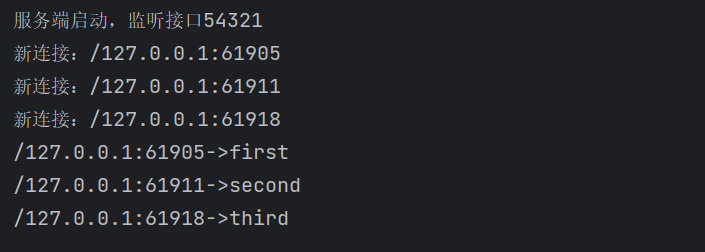
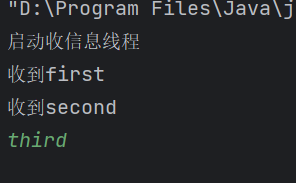
一(前言)、由于一代版本仅支持客户端和服务端互通,暂时缺少客户端之间的沟通,所以在第二代版本中进行更新,二代版本中使用多实例实现多个客户端,并且支持某一客户端发的信息能被其他客户端接收,同时也能被服务端接收,下面做代码解释
二(服务端类代码解释)
1.全局变量为服务端套接字和一个普通套接字数组
2.函数1(初始化函数):作用是让服务端套接字绑定特定接口,监听该接口的连接请求
3.函数2(监听链接函数):返回值为向特定接口发起连接请求的客户端套接字,可用于获取该客户端的输入输出流
4.函数3(给指定套接字发指定信息的函数):参数表有两个变量,也即想联系的套接字和字符串内容。发送函数同v1逻辑,通过获取该套接字的输出流,并输出特定内容
5.函数4(使客户端持续读取信息并且广播该信息的函数):这里用到Lambda表达式以及增强型for循环实现功能
6.函数5(主函数):包含初始化,在死循环中监听客户端发起的连接请求,并将新连接进的客户端加入sockets数组中
java
public class Server {
    ServerSocket ss=null;
    ArrayList<Socket> sockets=new ArrayList<>();//存所有连接上来的客户端
    //初始化函数
    public void initialize(){
        try {
            ss=new ServerSocket(54321);
        } catch (IOException e) {
            throw new RuntimeException(e);
        }
    }
    //监听连接
    public Socket listen(){
        try {
            return ss.accept();
        } catch (IOException e) {
            throw new RuntimeException(e);
        }
    }
    //发消息给指定socket
    public void send(Socket s,String msg){

        try {
            //获取该socket的输出流
            OutputStream os=s.getOutputStream();
            byte[] data=msg.getBytes(StandardCharsets.UTF_8);
            os.write(data.length);//发字节数组长度
            os.write(data);//发消息
            os.flush();//刷新
        } catch (IOException e) {
            throw new RuntimeException(e);
        }
    }
    //收取消息
    public String receive(InputStream inputStream){
        try {
            int length=inputStream.read();
            if(length==-1)return null;
            byte[] data=new byte[length];
            inputStream.read(data);
            //返回特定格式字符串
            return new String(data,StandardCharsets.UTF_8);
        } catch (IOException e) {
            throw new RuntimeException(e);
        }

    }
    //给某个socket开独立线程,死循环收消息并且群发
    public void handeleClient(Socket client){
        new Thread(() -> {
            try {
                InputStream inputStream=client.getInputStream();
                while (true){
                    String msg=receive(inputStream);
                    if(msg==null)break;
                    System.out.println(client.getInetAddress()+":"+client.getPort()+"->"+msg);
                    for(Socket s:sockets){
                        if(s!=client){
                            send(s,msg);
                        }
                    }
                }
            } catch (IOException e) {
                throw new RuntimeException(e);
            }
        }).start();
    }
    //主函数
    public static void main(String[] args) {
        Server server=new Server();
        server.initialize();
        System.out.println("服务端启动,监听接口"+server.ss.getLocalPort());
        while (true){
            Socket client=server.listen();
            server.sockets.add(client);
            System.out.println("新连接:"+client.getInetAddress()+":"+client.getPort());
            server.handeleClient(client);
        }
    }

}
三(客户端代码解释)
1.函数一(初始化)
2.函数二(收信息函数):通过输入流的read函数实现
3.函数三(发消息函数)
4.函数四(启动一个线程,使客户端的收发信息相互独立)
5.函数五(主函数):先启动收发信息线程,再循环读取输入流的消息并且群发广播
java
public class Client {
    Socket socket=null;
    //初始化
    public void initialize(){
     try {
         socket=new Socket("127.0.0.1",54321);
     } catch (IOException e) {
         throw new RuntimeException(e);
     }
    }
    //收信息函数
    public String receive(){
        try {
            InputStream in=socket.getInputStream();
            int length=in.read();
            byte[] data=new byte[length];
            in.read(data);
            return new String(data, StandardCharsets.UTF_8);
        } catch (IOException e) {
            throw new RuntimeException(e);
        }

    }
    //发信息函数
    public void send(String msg){
        try {
            OutputStream os=socket.getOutputStream();
            byte[] data=msg.getBytes(StandardCharsets.UTF_8);
            os.write(data.length);//发字节数组长度
            os.write(data);//发消息
            os.flush();//刷新
        } catch (IOException e) {
            throw new RuntimeException(e);
        }
    }
    //收信息线程,使客户端实现收发信息独立,能同时收发消息
    public void startreceiveThread(){
        new Thread(() -> {
            while (true){
                String msg=receive();
                if(msg==null)break;
                System.out.println("收到"+msg);
            }
        }).start();
        System.out.println("启动收信息线程");
    }

    //主函数
    public static void main(String[] args) {
        Client client=new Client();
        client.initialize();
        client.startreceiveThread();//收信息线程先启动
        Scanner scanner=new Scanner(System.in);
        while (true){
            String msg=scanner.nextLine();
            client.send(msg);
        }
    }
}
四(效果展示)