很多游戏有涂料绘制玩法,有时间了就来研究下,现在配合ai学习成本已经大大降低,但更多的应该是借助ai的便利加快学习速度,不能仅仅依赖ai制作而自己不懂原理。
具体效果如下:
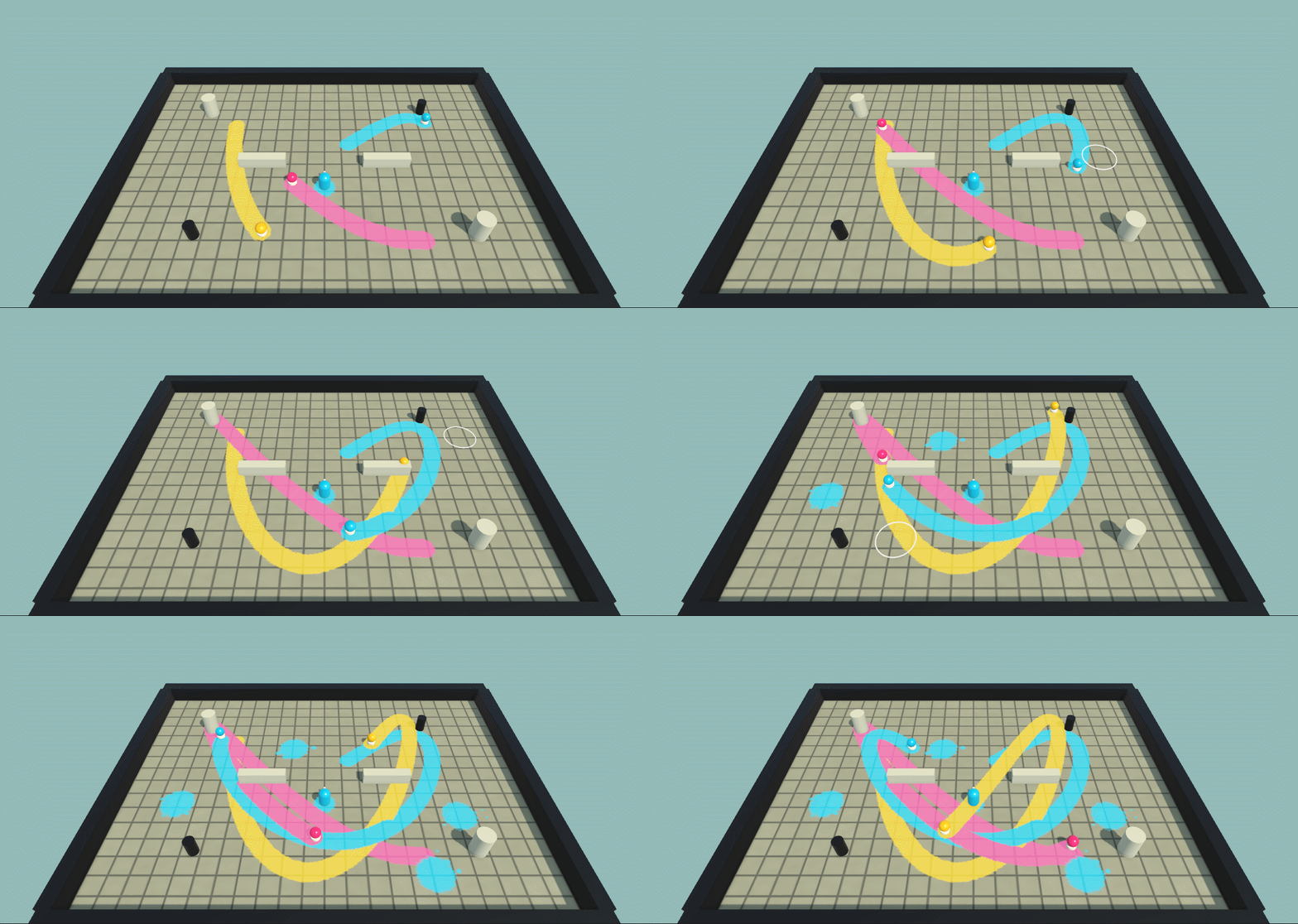
具体实现方式是典型的 Ping-Pong RenderTexture(双缓冲画板)
创建两张 RenderTexture,分别作为画布 A 和画布 B。绘制时,以画布 A 中已有的颜料为基础,通过 Material 参数告诉笔刷 Shader 绘制位置、颜色、大小和透明度,再使用 Graphics.Blit 将新的绘制结果写入画布 B。绘制完成后交换 A 和 B的引用,使最新结果成为下一次绘制的基础。最后,将保存最新颜料结果的 RenderTexture 设置到地面上方的透明颜料材质中,与下方地面的原始贴图进行透明混合。
脚本比较简单,重点控制GPU绘制,涉及以下内容
-
RenderTexture(渲染纹理) :作为"画布"的核心载体,将 GPU 的渲染结果存储为纹理,供后续混合和显示。脚本中同时维护了
currentPaint和scratchPaint来实现双缓冲机制。 -
Graphics.Blit(图像拷贝/绘制):这是 GPU 上最高效的像素处理命令。脚本用它把带有画笔 Shader 的材质应用到 RenderTexture 上,实现真正的 GPU 端绘画,完全避开 CPU 逐像素操作。
-
Shader 与 Material(着色器与材质) :通过
brushShader创建运行时材质,并动态传入_BrushUV、_BrushRadiusUV、_BrushColor等参数来控制绘制的形状、大小、颜色和透明度。 -
Source-Over 混合模式(合成运算) :画笔 Shader 中的
Graphics.Blit默认就是源覆盖目标,实现了"新画笔颜色覆盖旧颜色,同时保留透明边缘"的效果。 -
坐标系转换(World to UV) :通过
transform.InverseTransformPoint和surfaceSize,将三维世界坐标精确映射到 0~1 的 UV 空间,让画笔"粘"在物体表面。using System;
using UnityEngine;namespace PaintWorldDemo
{
[DisallowMultipleComponent]
public sealed class PaintCanvas : MonoBehaviour
{
[SerializeField] private Renderer targetRenderer;
[SerializeField] private Shader brushShader;
[SerializeField] private Vector2 surfaceSize = new Vector2(28f, 20f);
[SerializeField, Range(256, 2048)] private int textureResolution = 1024;private Material brushMaterial; private Material runtimeSurfaceMaterial; private RenderTexture currentPaint; private RenderTexture scratchPaint; private int paintTextureProperty; private int stampSeed; private System.Random splatterRandom = new System.Random(7823); public Vector2 SurfaceSize => surfaceSize; public void Configure(Renderer renderer, Shader paintBrushShader, Vector2 size, int resolution) { targetRenderer = renderer; brushShader = paintBrushShader; surfaceSize = size; textureResolution = Mathf.Clamp(resolution, 256, 2048); } private void Awake() { EnsureInitialized(); } private void EnsureInitialized() { if (currentPaint != null) { return; } if (targetRenderer == null || brushShader == null) { Debug.LogError("[PaintWorldDemo] PaintCanvas is missing its renderer or brush shader.", this); enabled = false; return; } currentPaint = CreatePaintTexture("PaintMap_Current"); scratchPaint = CreatePaintTexture("PaintMap_Scratch"); brushMaterial = new Material(brushShader) { name = "PaintBrush_Runtime", hideFlags = HideFlags.HideAndDontSave }; runtimeSurfaceMaterial = targetRenderer.material; runtimeSurfaceMaterial.name = targetRenderer.sharedMaterial.name + " (Runtime)"; paintTextureProperty = runtimeSurfaceMaterial.HasProperty("_PaintMap") ? Shader.PropertyToID("_PaintMap") : Shader.PropertyToID("_BaseMap"); if (paintTextureProperty == Shader.PropertyToID("_BaseMap") && runtimeSurfaceMaterial.HasProperty("_BaseColor")) { Color overlayTint = runtimeSurfaceMaterial.GetColor("_BaseColor"); runtimeSurfaceMaterial.SetColor("_BaseColor", new Color(1f, 1f, 1f, overlayTint.a)); } ClearPaint(); } private RenderTexture CreatePaintTexture(string textureName) { RenderTexture texture = new RenderTexture( textureResolution, textureResolution, 0, RenderTextureFormat.ARGB32, RenderTextureReadWrite.Linear) { name = textureName, filterMode = FilterMode.Bilinear, wrapMode = TextureWrapMode.Clamp, useMipMap = false, autoGenerateMips = false, hideFlags = HideFlags.HideAndDontSave }; texture.Create(); return texture; } public bool TryWorldToUV(Vector3 worldPosition, out Vector2 uv) { Vector3 local = transform.InverseTransformPoint(worldPosition); uv = new Vector2( local.x / surfaceSize.x + 0.5f, local.z / surfaceSize.y + 0.5f); return uv.x >= 0f && uv.x <= 1f && uv.y >= 0f && uv.y <= 1f; } public void PaintWorld(Vector3 worldPosition, Color color, float radius, float opacity = 1f, float softness = 0.18f) { EnsureInitialized(); if (!enabled || !TryWorldToUV(worldPosition, out Vector2 uv)) { return; } float worldScaleX = Mathf.Max(0.0001f, transform.TransformVector(Vector3.right).magnitude); float worldScaleZ = Mathf.Max(0.0001f, transform.TransformVector(Vector3.forward).magnitude); Vector2 radiusUv = new Vector2( Mathf.Max(0.0001f, radius / worldScaleX / surfaceSize.x), Mathf.Max(0.0001f, radius / worldScaleZ / surfaceSize.y)); brushMaterial.SetVector("_BrushUV", new Vector4(uv.x, uv.y, 0f, 0f)); brushMaterial.SetVector("_BrushRadiusUV", new Vector4(radiusUv.x, radiusUv.y, 0f, 0f)); brushMaterial.SetColor("_BrushColor", new Color(color.r, color.g, color.b, Mathf.Clamp01(opacity))); brushMaterial.SetFloat("_Softness", Mathf.Clamp(softness, 0.02f, 0.8f)); brushMaterial.SetFloat("_Seed", ++stampSeed * 0.731f); Graphics.Blit(currentPaint, scratchPaint, brushMaterial); RenderTexture swap = currentPaint; currentPaint = scratchPaint; scratchPaint = swap; runtimeSurfaceMaterial.SetTexture(paintTextureProperty, currentPaint); } public void PaintSplatterWorld(Vector3 worldPosition, Color color, float radius) { PaintWorld(worldPosition, color, radius, 1f, 0.2f); int droplets = 5; for (int i = 0; i < droplets; i++) { double angle = splatterRandom.NextDouble() * Math.PI * 2.0; float distance = radius * Mathf.Lerp(0.72f, 1.48f, (float)splatterRandom.NextDouble()); float dropletRadius = radius * Mathf.Lerp(0.08f, 0.22f, (float)splatterRandom.NextDouble()); Vector3 offset = ( transform.right * (float)Math.Cos(angle) + transform.forward * (float)Math.Sin(angle)) * distance; PaintWorld(worldPosition + offset, color, dropletRadius, 0.9f, 0.35f); } } public void ClearPaint() { EnsureInitialized(); if (currentPaint == null) { return; } RenderTexture previous = RenderTexture.active; RenderTexture.active = currentPaint; GL.Clear(false, true, Color.clear); RenderTexture.active = scratchPaint; GL.Clear(false, true, Color.clear); RenderTexture.active = previous; runtimeSurfaceMaterial.SetTexture(paintTextureProperty, currentPaint); } private void OnDestroy() { ReleaseTexture(currentPaint); ReleaseTexture(scratchPaint); if (brushMaterial != null) { Destroy(brushMaterial); } if (runtimeSurfaceMaterial != null) { Destroy(runtimeSurfaceMaterial); } } private static void ReleaseTexture(RenderTexture texture) { if (texture == null) { return; } texture.Release(); Destroy(texture); } }}
shader文件也不复杂,有比较完整的注释信息,重点是理解输入和输出、噪声与混合
Shader "Hidden/PaintWorldDemo/Brush"
{
    Properties
    {
        _MainTex ("Previous Paint", 2D) = "black" {}
    }

    SubShader
    {
        Cull Off
        ZWrite Off
        ZTest Always

        Pass
        {
            CGPROGRAM
            #pragma vertex vert_img
            #pragma fragment frag
            #include "UnityCG.cginc"

            sampler2D _MainTex;
            float4 _BrushUV;
            float4 _BrushRadiusUV;
            float4 _BrushColor;
            float _Softness;
            float _Seed;

            float Hash21(float2 p)
            {
                p = frac(p * float2(123.34, 456.21));
                p += dot(p, p + 45.32 + _Seed);
                return frac(p.x * p.y);
            }

            fixed4 frag(v2f_img i) : SV_Target
            {
                // ==================== 1. 获取背景与定位 ====================
                // 从屏幕上(_MainTex通常是当前屏幕快照)读取该像素原本的颜色
                float4 previous = tex2D(_MainTex, i.uv);
                // 将当前像素转换为"以画笔中心为原点、画笔半径为1"的局部坐标系
                // 结果含义:中心(0,0)、边缘(±1, ±1)、超出范围则为绝对值>1
                float2 normalizedDelta = (i.uv - _BrushUV.xy) / max(_BrushRadiusUV.xy, 0.00001);
                // 计算该像素距离画笔中心的距离(0~1以内代表在画笔内,>1则在外围)
                float distanceToCenter = length(normalizedDelta);

                // ==================== 2. 生成两种随机/噪点,模拟自然纹理 ====================
                // 计算程序化噪声,让画笔内部出现斑点/颗粒感(类似沙粒或墨点的不均匀分布)
                float coarseNoise = Hash21(floor(i.uv * 220.0) + _Seed);
                // 计算程序化噪声,让画笔内部产生柔和的纹理流动感(类似宣纸的纤维纹理或水彩的扩散纹路)
                float waveNoise = sin((i.uv.x * 31.0 + i.uv.y * 47.0 + _Seed) * 6.28318) * 0.5 + 0.5;
                // ==================== 3. 合成不规则边缘(核心效果) ====================
                // 计算逻辑:
                //   - 基础值 = distanceToCenter(完美的圆形距离)
                //   - 扰动值 = (coarseNoise * 0.65 + waveNoise * 0.35) 混合两种噪点,权重不同
                //   - 减去0.5让扰动值围绕0上下浮动,再乘以0.18控制扰动幅度
                //   - 最终结果:距离值被扭曲,导致画笔边缘出现锯齿状、颗粒状的不规则形状
                float irregularDistance = distanceToCenter + (coarseNoise * 0.65 + waveNoise * 0.35 - 0.5) * 0.18;
                // 计算覆盖强度(即透明度/alpha值):
                //   - smoothstep(1.0 - _Softness, 1.0, irregularDistance) 实现边缘羽化
                //   - _Softness 控制从完全不透明到完全透明之间的过渡带有多宽(0为硬边,1为全透明渐变)
                //   - 再用 1.0 减去,让内部为1(不透明),外部为0(完全透明)
                float coverage = 1.0 - smoothstep(1.0 - _Softness, 1.0, irregularDistance);
                // ==================== 4. 混合运算(Source-Over 合成模式) ====================
                // 计算混合后的alpha值:新像素覆盖旧像素,同时保留透明度
                coverage *= _BrushColor.a;
                // 预乘Alpha方式的颜色混合(避免半透明边缘出现黑边/白边)
                //   新颜色 = 画笔颜色 * 覆盖强度 + 旧颜色 * 旧透明度 * (1 - 覆盖强度)
                float mixedAlpha = coverage + previous.a * (1.0 - coverage);
                float3 premultipliedColor =
                    _BrushColor.rgb * coverage +
                    previous.rgb * previous.a * (1.0 - coverage);
                float3 mixedColor = premultipliedColor / max(mixedAlpha, 0.00001);
                return float4(mixedColor, mixedAlpha);
            }
            ENDCG
        }
    }
}
这类绘制游戏一般都会有常见的撤销系统,感觉实现也不复杂,无非是每次落笔前和落笔后复制一份缓存罢了。