HTML5实现数学函数画图器
这是Python实现数学函数画图器https://blog.csdn.net/cnds123/article/details/147835662 版本的改写为HTML5版本。原因在于纯网页、部署最简单。数学解析引擎(Math.js)通过CDN加载 mathjs,首次使用需要网络。生产环境建议下载 mathjs 文件后本地部署。若准备正式部署,建议下一步将 CDN 中的 mathjs 下载到项目目录,可以离线使用,例如:
project/
├─ index.html
└─ mathjs/
└─ math.js
然后将:
<script src="https://cdn.jsdelivr.net/npm/mathjs@13.0.3/lib/browser/math.js"></script>
改为:
<script src="./mathjs/math.js"></script>
这样可离线运行,也避免CDN【注】不可用或版本变化影响正式使用。
【注 CDN(Content Delivery Network,内容分发网络):一种分布在多个地理位置的服务器网络,通过将内容缓存到离用户最近的边缘节点,实现内容的快速、高效、可靠分发。
CDN 适合在线网站,纯本地适合单文件分发。
在线网站(部署在服务器上):用户访问时必须联网。此时用 CDN,百利而无一害。因为你不需要把庞大的 math.js(几百 KB)塞进自己的服务器代码里,节省了带宽;且用户浏览器能缓存,访问飞快。
单文件分发(用户下载到电脑双击):一旦用户断网,或者 CDN 域名在国内解析失败,用户只会看到一个白屏或报错。将将js库如 math.js 放在本地使用,保证了 100% 的离线可用性,符合用户对"单文件绿色软件"的心理预期。】
此工具可以输入处理的函数比较自由,如
y=x^(1/3)
y=(x+1)^(1/3)
y=arcsin(x)
y=3sin(3x)
y=1/(x-1)
y=2x^2+1.3x+1
(x/3)^2+(y/2)^2=1
1/4x^2+1/4xy+1/3y^2-3/8x+1/9y-2=0
y-2x^(1/3)=0
函数画图器解决了一般分数幂x^(a/b),如y= x^(1/3)图像不全问题, 智能输入友好特性方面------支持中文全角符号自动转换(如 ;=() 等),支持隐式乘法(如 2x、xy=1)等方面,都下了很大功夫解决,非常适合学生和教师快速绘制函数图像。
①对于一般函数(方程),自变量和因变量分别用 x 和 y 表示。
②对于参数方程,自变量用 t 表示,因变量用 x 和 y 表示,两个参数方程用英文分号分隔。如 x=3cos(t) ; y=4sin(t)。更多示例:
x=cos(3t); y=sin(2t)
x=4cos(2t)sin(t); y=4sin(2t)sin(t)
③对于极坐标方程,自变量用 t 表示,因变量用 r 表示。如 r=4/(1+0.5cos(t)) ,注:为了输入方便考虑,不使用θ和ρ。示例:
r=4/(1+0.5cos(2t))
r=3(sin(2t)+cos(2t))
r=sin(3t)
更多情况,可参见内置帮助。
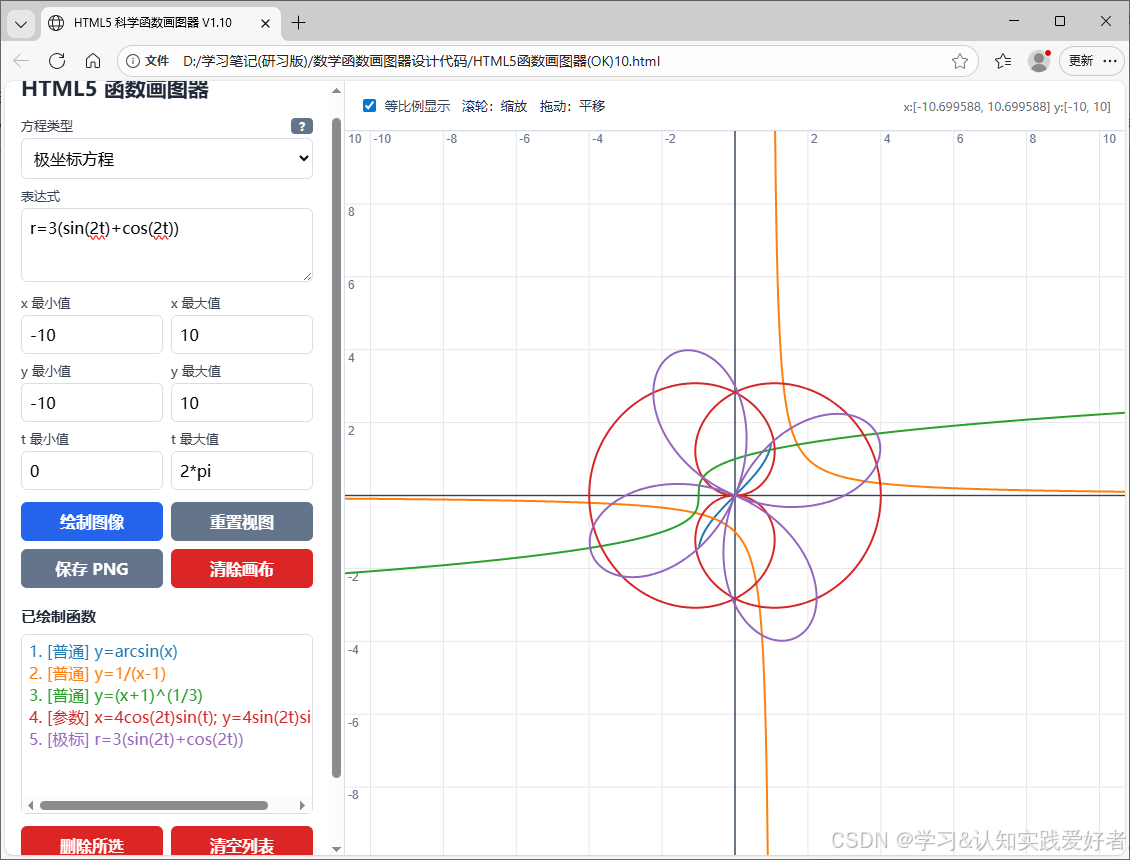
运行截图
源码:
html
<!DOCTYPE html>
<html lang="zh-CN">
<head>
<meta charset="UTF-8" />
<meta name="viewport" content="width=device-width, initial-scale=1.0" />
<title>HTML5 科学函数画图器 V1.10</title>
<!-- 引入 math.js 用于安全、强大的表达式解析 -->
<script src="https://cdn.jsdelivr.net/npm/mathjs@13.0.3/lib/browser/math.js"></script>
<style>
:root {
--bg: #f4f6f9;
--panel: #ffffff;
--border: #d9dee7;
--primary: #2563eb;
--danger: #dc2626;
--text: #1f2937;
--muted: #6b7280;
}
* { box-sizing: border-box; }
body {
margin: 0;
font-family: "Microsoft YaHei", Arial, sans-serif;
color: var(--text);
background: var(--bg);
overflow: hidden;
}
#app {
height: 100vh;
display: grid;
grid-template-columns: 340px 1fr;
}
#sidebar {
overflow-y: auto;
padding: 16px;
background: var(--panel);
border-right: 1px solid var(--border);
}
h1 {
margin: 0 0 16px;
font-size: 21px;
}
h2 {
margin: 18px 0 8px;
font-size: 15px;
}
label {
display: block;
font-size: 13px;
margin: 8px 0 4px;
color: #374151;
}
.mode-header {
display: flex;
justify-content: space-between;
align-items: center;
margin-top: 8px;
margin-bottom: 4px;
}
.mode-header label {
margin: 0;
}
input, textarea, select, button {
font: inherit;
}
input, textarea, select {
width: 100%;
border: 1px solid var(--border);
border-radius: 6px;
padding: 8px;
outline: none;
background: #fff;
}
input:focus, textarea:focus, select:focus {
border-color: var(--primary);
box-shadow: 0 0 0 2px #bfdbfe;
}
textarea {
min-height: 74px;
resize: vertical;
}
.row {
display: grid;
grid-template-columns: 1fr 1fr;
gap: 8px;
}
.buttons {
display: grid;
grid-template-columns: 1fr 1fr;
gap: 8px;
margin-top: 12px;
}
button {
cursor: pointer;
border: 0;
border-radius: 6px;
padding: 9px 10px;
color: #fff;
background: var(--primary);
font-weight: bold;
}
button:hover { filter: brightness(0.95); }
button.secondary { background: #64748b; }
button.danger { background: var(--danger); }
button.full { grid-column: 1 / -1; }
/* 列表滚动条容器 */
.list-wrapper {
width: 100%;
height: 180px;
border: 1px solid var(--border);
border-radius: 6px;
overflow: auto;
background: #fff;
}
#functionList {
width: max-content;
min-width: 100%;
height: 100%;
border: none;
outline: none;
padding: 5px;
background: transparent;
overflow: visible;
}
#message {
margin-top: 12px;
min-height: 42px;
padding: 8px;
border-radius: 6px;
font-size: 13px;
white-space: pre-wrap;
}
#message.info {
background: #eff6ff;
color: #1d4ed8;
}
#message.error {
background: #fef2f2;
color: #b91c1c;
}
#main {
min-width: 0;
position: relative;
display: flex;
flex-direction: column;
}
#toolbar {
display: flex;
align-items: center;
gap: 12px;
height: 50px;
padding: 0 14px;
background: #fff;
border-bottom: 1px solid var(--border);
font-size: 13px;
}
#toolbar label {
margin: 0;
display: flex;
align-items: center;
gap: 6px;
width: auto;
}
#equalScale {
width: auto;
}
#canvasWrap {
flex: 1;
position: relative;
overflow: hidden;
background: #fff;
}
canvas {
width: 100%;
height: 100%;
display: block;
cursor: grab;
}
canvas.dragging {
cursor: grabbing;
}
#status {
margin-left: auto;
color: var(--muted);
font-size: 12px;
}
/* =========================
弹窗(Modal)样式
========================= */
.modal {
display: none;
position: fixed;
z-index: 2000;
left: 0;
top: 0;
width: 100%;
height: 100%;
overflow: auto;
background-color: rgba(15, 23, 42, 0.6);
backdrop-filter: blur(4px);
}
.modal-content {
background-color: #ffffff;
margin: 6% auto;
padding: 24px;
border: 1px solid var(--border);
width: 90%;
max-width: 620px;
border-radius: 12px;
box-shadow: 0 20px 25px -5px rgba(0, 0, 0, 0.1), 0 10px 10px -5px rgba(0, 0, 0, 0.04);
line-height: 1.6;
font-size: 13.5px;
position: relative;
color: #334155;
}
.close-btn {
color: #94a3b8;
font-size: 28px;
font-weight: bold;
cursor: pointer;
position: absolute;
right: 20px;
top: 12px;
transition: color 0.2s;
}
.close-btn:hover {
color: #1e293b;
}
.modal-content h3 {
margin-top: 0;
margin-bottom: 16px;
font-size: 18px;
color: #0f172a;
border-bottom: 2px solid var(--bg);
padding-bottom: 8px;
}
.modal-content code {
background-color: #f1f5f9;
padding: 2px 6px;
border-radius: 4px;
font-family: Consolas, Monaco, monospace;
color: #0f172a;
font-weight: bold;
}
.modal-content ul {
padding-left: 20px;
margin: 8px 0;
}
.modal-content li {
margin-bottom: 6px;
}
@media (max-width: 850px) {
body { overflow: auto; }
#app {
min-height: 100vh;
grid-template-columns: 1fr;
grid-template-rows: auto 70vh;
}
#sidebar {
border-right: 0;
border-bottom: 1px solid var(--border);
}
}
</style>
</head>
<body>
<div id="app">
<aside id="sidebar">
<h1>HTML5 函数画图器</h1>
<div class="mode-header">
<label for="mode">方程类型</label>
<button id="helpBtn" class="secondary" style="padding: 2px 8px; font-size: 12px; border-radius: 4px; width: auto; margin: 0; line-height: 1;">?</button>
</div>
<select id="mode">
<option value="normal">普通函数 / 隐函数</option>
<option value="parametric">参数方程</option>
<option value="polar">极坐标方程</option>
</select>
<label for="expression">表达式</label>
<textarea id="expression">y=x^(1/3)</textarea>
<div class="row">
<div>
<label for="xmin">x 最小值</label>
<input id="xmin" value="-10" />
</div>
<div>
<label for="xmax">x 最大值</label>
<input id="xmax" value="10" />
</div>
</div>
<div class="row">
<div>
<label for="ymin">y 最小值</label>
<input id="ymin" value="-10" />
</div>
<div>
<label for="ymax">y 最大值</label>
<input id="ymax" value="10" />
</div>
</div>
<div class="row">
<div>
<label for="tmin">t 最小值</label>
<input id="tmin" value="0" />
</div>
<div>
<label for="tmax">t 最大值</label>
<input id="tmax" value="2*pi" />
</div>
</div>
<div class="buttons">
<button id="plotBtn">绘制图像</button>
<button id="resetViewBtn" class="secondary">重置视图</button>
<button id="saveBtn" class="secondary">保存 PNG</button>
<button id="clearCanvasBtn" class="danger">清除画布</button>
</div>
<h2>已绘制函数</h2>
<div class="list-wrapper">
<select id="functionList" multiple></select>
</div>
<div class="buttons">
<button id="deleteBtn" class="danger">删除所选</button>
<button id="clearListBtn" class="danger">清空列表</button>
</div>
<div id="message" class="info">准备就绪。</div>
</aside>
<main id="main">
<div id="toolbar">
<label>
<input id="equalScale" type="checkbox" checked />
等比例显示
</label>
<span>滚轮:缩放 拖动:平移</span>
<span id="status"></span>
</div>
<div id="canvasWrap">
<canvas id="canvas"></canvas>
</div>
</main>
</div>
<!-- 帮助说明弹窗 -->
<div id="helpModal" class="modal">
<div class="modal-content">
<span class="close-btn" id="closeModalBtn">×</span>
<h3>函数画图器使用说明 (设计:Wang Kejun)</h3>
<strong>1. 方程类型与输入示例</strong>
<ul>
<li><strong>普通函数</strong>:格式 <code>y=f(x)</code>,例如 <code>y=x^(1/3)</code> (完美支持负数半轴)。</li>
<li><strong>隐函数</strong>:格式 <code>F(x,y)=G(x,y)</code>,例如 <code>xy=1</code> 或 <code>1/4x^2+1/4xy+1/3y^2-3/8x+1/9y-2=0</code>。</li>
<li><strong>参数方程</strong>:格式 <code>x=f(t); y=g(t)</code>,用英文分号 <code>;</code> 或中文分号 <code>;</code> 分隔,例如 <code>x=3cos(t); y=2sin(t)</code>。</li>
<li><strong>极坐标方程</strong>:格式 <code>r=f(t)</code>,例如 <code>r=4/(1+0.5cos(t))</code>。</li>
</ul>
<strong>2. 可用常数与数学函数(大小写通用)</strong>
<ul>
<li><strong>常数</strong>:圆周率 <code>pi</code> (π)、自然常数 <code>e</code>。</li>
<li><strong>基本函数</strong>:<code>sin</code>, <code>cos</code>, <code>tan</code>, <code>asin</code> (或 <code>arcsin</code>), <code>acos</code> (或 <code>arccos</code>), <code>atan</code> (或 <code>arctan</code>), <code>sqrt</code>, <code>abs</code>, <code>exp</code>。</li>
<li><strong>双曲函数</strong>:<code>sinh</code>, <code>cosh</code>, <code>tanh</code>。</li>
<li><strong>对数函数</strong>:自然对数 <code>ln</code> (或 <code>log</code>)、常用对数 <code>lg</code> (或 <code>log10</code>)。</li>
<li><strong>整值/符号函数</strong>:向下取整 <code>floor</code>、向上取整 <code>ceil</code>、四舍五入 <code>round</code>、符号函数 <code>sign</code> (或 <code>sgn</code>)。</li>
</ul>
<strong>3. 智能输入友好特性</strong>
<ul>
<li><strong>省略乘号</strong>:支持隐式乘法,如 <code>2x</code>, <code>3sin(2x)</code>, <code>xy=1</code> 均可被智能识别。</li>
<li><strong>中文输入免切换</strong>:系统会自动将中文全角符号(如 <code>( ) ; = × ÷ + - ^ π</code>)自动转换为标准半角符号。</li>
</ul>
<strong>4. 视口交互</strong>
<ul>
<li>在绘图区滑动<strong>鼠标滚轮</strong>可对视口进行无级缩放。</li>
<li>在绘图区<strong>按住鼠标左键拖拽</strong>可任意平移视口。</li>
</ul>
</div>
</div>
<script>
"use strict";
/* =========================
基础状态
========================= */
const canvas = document.getElementById("canvas");
const ctx = canvas.getContext("2d");
const state = {
functions: [],
functionCounter: 0,
view: {
xmin: -10,
xmax: 10,
ymin: -10,
ymax: 10
},
dragging: false,
dragStart: null,
dragView: null
};
const COLORS = [
"#1f77b4", "#ff7f0e", "#2ca02c", "#d62728",
"#9467bd", "#8c564b", "#e377c2", "#7f7f7f",
"#bcbd22", "#17becf"
];
const TYPE_PREFIXES = {
normal: "[普通]",
implicit: "[隐式]",
parametric: "[参数]",
polar: "[极标]"
};
/* =========================
DOM 工具与弹窗交互
========================= */
function el(id) {
return document.getElementById(id);
}
function setMessage(text, type = "info") {
const box = el("message");
box.textContent = text;
box.className = type;
}
function getInputValue(id) {
return el(id).value.trim();
}
// 弹窗交互控制
el("helpBtn").addEventListener("click", () => {
el("helpModal").style.display = "block";
});
el("closeModalBtn").addEventListener("click", () => {
el("helpModal").style.display = "none";
});
window.addEventListener("click", (event) => {
const modal = el("helpModal");
if (event.target === modal) {
modal.style.display = "none";
}
});
/* =========================
数学表达式安全处理与智能分词
========================= */
const ALLOWED_VARIABLES = new Set(["x", "y", "t", "pi", "e"]);
function fractionalPower(x, numerator, denominator) {
const num = parseInt(numerator);
const den = parseInt(denominator);
if (isNaN(num) || isNaN(den) || den === 0) return NaN;
if (den % 2 === 1) {
if (num === 0) return 1.0;
const sign = Math.sign(x);
const signPower = Math.pow(sign, num);
return signPower * Math.pow(Math.abs(x), num / den);
} else {
if (x > 0) {
return Math.pow(x, num / den);
} else if (x === 0) {
return num === 0 ? 1.0 : 0.0;
} else {
return NaN;
}
}
}
// 核心优化:同时注册简写与全写,确保双重安全通过沙箱验证
const ALLOWED_FUNCTIONS = {
sin: Math.sin,
cos: Math.cos,
tan: Math.tan,
asin: Math.asin,
acos: Math.acos,
atan: Math.atan,
arcsin: Math.asin,
arccos: Math.acos,
arctan: Math.atan,
sinh: Math.sinh,
cosh: Math.cosh,
tanh: Math.tanh,
sqrt: Math.sqrt,
cbrt: Math.cbrt,
abs: Math.abs,
ln: Math.log,
log: Math.log,
log10: Math.log10,
lg: Math.log10,
exp: Math.exp,
floor: Math.floor,
ceil: Math.ceil,
round: Math.round,
sign: Math.sign,
sgn: Math.sign,
fractional_power: fractionalPower
};
// 全局输入智能归一化(全角转半角)
function normalizeInput(text) {
const map = {
';': ';',
'=': '=',
'(': '(',
')': ')',
'+': '+',
'-': '-',
'---': '-',
'--': '-',
'*': '*',
'×': '*',
'/': '/',
'÷': '/',
'^': '^',
',': ',',
'。': '.',
'π': 'pi'
};
return text.replace(/[;=()+------*×/÷^,。π]/g, m => map[m]);
}
function normalizeExpression(expression) {
let result = normalizeInput(expression.trim().toLowerCase());
// 核心修复:更正正则,将 arcsin/arccos/arctan 正确翻译为 asin/acos/atan
result = result
.replace(/\bsgn\b/g, "sign")
.replace(/\bln\b/g, "log")
.replace(/\blg\b/g, "log10")
.replace(/\barcsin\b/g, "asin")
.replace(/\barccos\b/g, "acos")
.replace(/\barctan\b/g, "atan");
result = result.replace(/(\d)\s*(?=[a-zA-Z_\(])(?![eE][+-]?\d)/g, "$1*");
result = result.replace(/(\))\s*(?=[a-zA-Z_\(])/g, "$1*");
result = result.replace(/([xy])\s*(?=[a-z0-9\(])/gi, "$1*");
result = result.replace(/\bt\s*(?=[a-z0-9\(])(?!an)/gi, "t*");
result = result.replace(/\bpi\s*(?=[a-z0-9\(])/gi, "pi*");
result = result.replace(/\be\s*(?=[yt\(]|x(?!p\())/gi, "e*");
result = result.replace(
/(\b\w+\b|\([^()]+\))\s*\^\s*\(\s*(\d+)\s*\/\s*(\d+)\s*\)/g,
"fractional_power($1, $2, $3)"
);
return result;
}
function validateAst(node) {
if (!node || !node.type) {
throw new Error("表达式结构无效。");
}
switch (node.type) {
case "ConstantNode":
if (typeof node.value !== "number") {
throw new Error("仅允许数值常量。");
}
return;
case "SymbolNode":
if (!ALLOWED_VARIABLES.has(node.name)) {
throw new Error(`不允许的变量或名称:${node.name}`);
}
return;
case "ParenthesisNode":
validateAst(node.content);
return;
case "OperatorNode":
if (!["+", "-", "*", "/", "^"].includes(node.op)) {
throw new Error(`不允许的运算符:${node.op}`);
}
node.args.forEach(validateAst);
return;
case "FunctionNode": {
if (!node.fn || node.fn.type !== "SymbolNode") {
throw new Error("不允许函数属性访问或复杂调用。");
}
const name = node.fn.name;
if (!Object.prototype.hasOwnProperty.call(ALLOWED_FUNCTIONS, name)) {
throw new Error(`不允许的函数:${name}`);
}
node.args.forEach(validateAst);
return;
}
default:
throw new Error(`不允许的表达式结构:${node.type}`);
}
}
function compileExpression(rawExpression) {
const expression = normalizeExpression(rawExpression);
if (!expression) {
throw new Error("表达式不能为空。");
}
let node;
try {
node = math.parse(expression);
} catch (error) {
throw new Error(`表达式语法错误:${error.message}`);
}
validateAst(node);
const compiled = node.compile();
return (scope = {}) => {
const safeScope = {
x: Number(scope.x ?? 0),
y: Number(scope.y ?? 0),
t: Number(scope.t ?? 0),
pi: Math.PI,
e: Math.E,
...ALLOWED_FUNCTIONS
};
let value;
try {
value = compiled.evaluate(safeScope);
} catch {
return NaN;
}
if (typeof value !== "number" || !Number.isFinite(value)) {
return NaN;
}
return value;
};
}
function parseNumberExpression(text, fieldName) {
const fn = compileExpression(text);
const value = fn();
if (!Number.isFinite(value)) {
throw new Error(`${fieldName} 必须是有限实数。`);
}
return value;
}
function parseRanges() {
const ranges = {
xmin: parseNumberExpression(getInputValue("xmin"), "x 最小值"),
xmax: parseNumberExpression(getInputValue("xmax"), "x 最大值"),
ymin: parseNumberExpression(getInputValue("ymin"), "y 最小值"),
ymax: parseNumberExpression(getInputValue("ymax"), "y 最大值"),
tmin: parseNumberExpression(getInputValue("tmin"), "t 最小值"),
tmax: parseNumberExpression(getInputValue("tmax"), "t 最大值")
};
if (ranges.xmin >= ranges.xmax) throw new Error("x 最小值必须小于 x 最大值。");
if (ranges.ymin >= ranges.ymax) throw new Error("y 最小值必须小于 y 最大值。");
if (ranges.tmin >= ranges.tmax) throw new Error("t 最小值必须小于 t 最大值。");
return ranges;
}
/* =========================
方程解析
========================= */
function splitEquation(text) {
const parts = text.split("=");
if (parts.length !== 2) {
throw new Error("方程必须且只能包含一个等号 = 。");
}
return {
left: parts[0].trim(),
right: parts[1].trim()
};
}
function parseNormalOrImplicit(expression, originalCleanExpr) {
const { left, right } = splitEquation(expression);
const origParts = splitEquation(originalCleanExpr);
if (left === "y") {
const expressionFn = compileExpression(right);
return {
kind: "normal",
fn: (x) => expressionFn({ x }),
label: `y=${origParts.right}`
};
}
if (right === "y") {
const expressionFn = compileExpression(left);
return {
kind: "normal",
fn: (x) => expressionFn({ x }),
label: `y=${origParts.left}`
};
}
const leftFn = compileExpression(left);
const rightFn = compileExpression(right);
return {
kind: "implicit",
fn: (x, y) => leftFn({ x, y }) - rightFn({ x, y }),
label: `${origParts.left}=${origParts.right}`
};
}
function parseParametric(expression, originalCleanExpr) {
const parts = expression.split(";").map(x => x.trim()).filter(Boolean);
const origPartsList = originalCleanExpr.split(";").map(x => x.trim()).filter(Boolean);
if (parts.length !== 2 || origPartsList.length !== 2) {
throw new Error("参数方程格式应为:x=...; y=...");
}
let xExpr = null;
let yExpr = null;
let origXExpr = null;
let origYExpr = null;
for (let i = 0; i < parts.length; i++) {
const { left, right } = splitEquation(parts[i]);
const origPart = splitEquation(origPartsList[i]);
if (left === "x") {
xExpr = right;
origXExpr = origPart.right;
}
else if (left === "y") {
yExpr = right;
origYExpr = origPart.right;
}
else throw new Error("参数方程左侧只能是 x 或 y。");
}
if (!xExpr || !yExpr) {
throw new Error("参数方程必须同时提供 x=... 和 y=...。");
}
const fx = compileExpression(xExpr);
const fy = compileExpression(yExpr);
return {
kind: "parametric",
fn: (t) => [fx({ t }), fy({ t })],
label: `x=${origXExpr}; y=${origYExpr}`
};
}
function parsePolar(expression, originalCleanExpr) {
const { left, right } = splitEquation(expression);
const origParts = splitEquation(originalCleanExpr);
if (left !== "r") {
throw new Error("极坐标方程格式应为:r=...");
}
const fr = compileExpression(right);
return {
kind: "polar",
fn: (t) => {
const r = fr({ t });
return [r * Math.cos(t), r * Math.sin(t)];
},
label: `r=${origParts.right}`
};
}
/* =========================
Canvas 坐标系统
========================= */
function resizeCanvas() {
const rect = canvas.getBoundingClientRect();
const dpr = window.devicePixelRatio || 1;
canvas.width = Math.max(1, Math.floor(rect.width * dpr));
canvas.height = Math.max(1, Math.floor(rect.height * dpr));
ctx.setTransform(dpr, 0, 0, dpr, 0, 0);
redraw();
}
function canvasSize() {
const rect = canvas.getBoundingClientRect();
return { width: rect.width, height: rect.height };
}
function getEffectiveView() {
const view = { ...state.view };
const { width, height } = canvasSize();
if (!el("equalScale").checked || width <= 0 || height <= 0) {
return view;
}
const worldW = view.xmax - view.xmin;
const worldH = view.ymax - view.ymin;
const screenRatio = width / height;
const worldRatio = worldW / worldH;
const cx = (view.xmin + view.xmax) / 2;
const cy = (view.ymin + view.ymax) / 2;
if (worldRatio > screenRatio) {
const newH = worldW / screenRatio;
view.ymin = cy - newH / 2;
view.ymax = cy + newH / 2;
} else {
const newW = worldH * screenRatio;
view.xmin = cx - newW / 2;
view.xmax = cx + newW / 2;
}
return view;
}
function worldToScreen(x, y, view = getEffectiveView()) {
const { width, height } = canvasSize();
return {
x: (x - view.xmin) / (view.xmax - view.xmin) * width,
y: height - (y - view.ymin) / (view.ymax - view.ymin) * height
};
}
function screenToWorld(px, py, view = getEffectiveView()) {
const { width, height } = canvasSize();
return {
x: view.xmin + px / width * (view.xmax - view.xmin),
y: view.ymax - py / height * (view.ymax - view.ymin)
};
}
function niceStep(range, target = 10) {
const raw = range / target;
const power = Math.pow(10, Math.floor(Math.log10(raw)));
const unit = raw / power;
let factor = 1;
if (unit >= 5) factor = 5;
else if (unit >= 2) factor = 2;
return factor * power;
}
function formatTick(v) {
if (Math.abs(v) < 1e-10) return "0";
if (Math.abs(v) >= 10000 || Math.abs(v) < 0.001) return v.toExponential(2);
return Number(v.toFixed(6)).toString();
}
/* =========================
坐标轴与网格
========================= */
function drawGridAndAxes() {
const { width, height } = canvasSize();
const view = getEffectiveView();
ctx.clearRect(0, 0, width, height);
ctx.fillStyle = "#ffffff";
ctx.fillRect(0, 0, width, height);
const xStep = niceStep(view.xmax - view.xmin);
const yStep = niceStep(view.ymax - view.ymin);
ctx.lineWidth = 1;
ctx.font = "12px Arial";
ctx.textBaseline = "top";
ctx.strokeStyle = "#e5e7eb";
ctx.fillStyle = "#64748b";
for (let x = Math.ceil(view.xmin / xStep) * xStep; x <= view.xmax; x += xStep) {
const p = worldToScreen(x, 0, view);
ctx.beginPath();
ctx.moveTo(p.x, 0);
ctx.lineTo(p.x, height);
ctx.stroke();
if (Math.abs(x) > xStep * 1e-8) {
ctx.fillText(formatTick(x), p.x + 3, 3);
}
}
for (let y = Math.ceil(view.ymin / yStep) * yStep; y <= view.ymax; y += yStep) {
const p = worldToScreen(0, y, view);
ctx.beginPath();
ctx.moveTo(0, p.y);
ctx.lineTo(width, p.y);
ctx.stroke();
if (Math.abs(y) > yStep * 1e-8) {
ctx.fillText(formatTick(y), 3, p.y + 3);
}
}
ctx.strokeStyle = "#334155";
ctx.lineWidth = 1.4;
if (view.xmin <= 0 && view.xmax >= 0) {
const p = worldToScreen(0, 0, view);
ctx.beginPath();
ctx.moveTo(p.x, 0);
ctx.lineTo(p.x, height);
ctx.stroke();
}
if (view.ymin <= 0 && view.ymax >= 0) {
const p = worldToScreen(0, 0, view);
ctx.beginPath();
ctx.moveTo(0, p.y);
ctx.lineTo(width, p.y);
ctx.stroke();
}
}
/* =========================
曲线绘制
========================= */
function drawNormalFunction(item, view) {
const { width, height } = canvasSize();
const samples = Math.max(800, Math.floor(width * 1.5));
const dx = (view.xmax - view.xmin) / samples;
const yRange = view.ymax - view.ymin;
ctx.strokeStyle = item.color;
ctx.lineWidth = 2;
ctx.beginPath();
let drawing = false;
let previousY = null;
for (let i = 0; i <= samples; i++) {
const x = view.xmin + i * dx;
const y = item.fn(x);
if (!Number.isFinite(y) || Math.abs(y) > yRange * 100) {
drawing = false;
previousY = null;
continue;
}
const p = worldToScreen(x, y, view);
const largeJump =
previousY !== null &&
Math.abs(y - previousY) > yRange * 0.7;
if (!drawing || largeJump || p.y < -height * 2 || p.y > height * 3) {
ctx.moveTo(p.x, p.y);
drawing = true;
} else {
ctx.lineTo(p.x, p.y);
}
previousY = y;
}
ctx.stroke();
}
function drawParametricFunction(item, view) {
const samples = 2000;
const dt = (item.tmax - item.tmin) / samples;
const { width, height } = canvasSize();
ctx.strokeStyle = item.color;
ctx.lineWidth = 2;
ctx.beginPath();
let drawing = false;
let prev = null;
for (let i = 0; i <= samples; i++) {
const t = item.tmin + i * dt;
const [x, y] = item.fn(t);
if (!Number.isFinite(x) || !Number.isFinite(y)) {
drawing = false;
prev = null;
continue;
}
const p = worldToScreen(x, y, view);
const jump = prev &&
(Math.abs(p.x - prev.x) > width * 0.4 || Math.abs(p.y - prev.y) > height * 0.4);
if (!drawing || jump) {
ctx.moveTo(p.x, p.y);
drawing = true;
} else {
ctx.lineTo(p.x, p.y);
}
prev = p;
}
ctx.stroke();
}
/*
Marching Squares 隐函数等值线绘制
*/
function drawImplicitFunction(item, view) {
const { width, height } = canvasSize();
const cols = Math.min(260, Math.max(80, Math.floor(width / 4)));
const rows = Math.min(260, Math.max(80, Math.floor(height / 4)));
const dx = (view.xmax - view.xmin) / cols;
const dy = (view.ymax - view.ymin) / rows;
const values = Array.from({ length: rows + 1 }, () => Array(cols + 1));
for (let j = 0; j <= rows; j++) {
const y = view.ymin + j * dy;
for (let i = 0; i <= cols; i++) {
const x = view.xmin + i * dx;
const v = item.fn(x, y);
values[j][i] = Number.isFinite(v) ? v : NaN;
}
}
ctx.strokeStyle = item.color;
ctx.lineWidth = 1.7;
ctx.beginPath();
function interpolate(x1, y1, v1, x2, y2, v2) {
let ratio = 0.5;
if (Number.isFinite(v1) && Number.isFinite(v2) && v1 !== v2) {
ratio = v1 / (v1 - v2);
}
ratio = Math.max(0, Math.min(1, ratio));
return {
x: x1 + ratio * (x2 - x1),
y: y1 + ratio * (y2 - y1)
};
}
const cases = {
1: [[3, 0]],
2: [[0, 1]],
3: [[3, 1]],
4: [[1, 2]],
5: [[3, 2], [0, 1]],
6: [[0, 2]],
7: [[3, 2]],
8: [[2, 3]],
9: [[0, 2]],
10: [[0, 3], [1, 2]],
11: [[1, 2]],
12: [[1, 3]],
13: [[0, 1]],
14: [[3, 0]]
};
for (let j = 0; j < rows; j++) {
const y0 = view.ymin + j * dy;
const y1 = y0 + dy;
for (let i = 0; i < cols; i++) {
const x0 = view.xmin + i * dx;
const x1 = x0 + dx;
const v0 = values[j][i];
const v1 = values[j][i + 1];
const v2 = values[j + 1][i + 1];
const v3 = values[j + 1][i];
if (![v0, v1, v2, v3].every(Number.isFinite)) continue;
let index = 0;
if (v0 >= 0) index |= 1;
if (v1 >= 0) index |= 2;
if (v2 >= 0) index |= 4;
if (v3 >= 0) index |= 8;
if (index === 0 || index === 15) continue;
const edgePoints = [
interpolate(x0, y0, v0, x1, y0, v1),
interpolate(x1, y0, v1, x1, y1, v2),
interpolate(x1, y1, v2, x0, y1, v3),
interpolate(x0, y1, v3, x0, y0, v0)
];
const segments = cases[index] || [];
for (const [a, b] of segments) {
const p1 = worldToScreen(edgePoints[a].x, edgePoints[a].y, view);
const p2 = worldToScreen(edgePoints[b].x, edgePoints[b].y, view);
ctx.moveTo(p1.x, p1.y);
ctx.lineTo(p2.x, p2.y);
}
}
}
ctx.stroke();
}
function redraw() {
if (!canvas.width || !canvas.height) return;
drawGridAndAxes();
const view = getEffectiveView();
for (const item of state.functions) {
try {
if (item.kind === "normal") {
drawNormalFunction(item, view);
} else if (item.kind === "parametric" || item.kind === "polar") {
drawParametricFunction(item, view);
} else if (item.kind === "implicit") {
drawImplicitFunction(item, view);
}
} catch (error) {
console.error("绘制失败:", error);
}
}
updateStatus(view);
}
function updateStatus(view) {
el("status").textContent =
`x:[${formatTick(view.xmin)}, ${formatTick(view.xmax)}] ` +
`y:[${formatTick(view.ymin)}, ${formatTick(view.ymax)}]`;
}
/* =========================
函数管理
========================= */
function updateFunctionList() {
const list = el("functionList");
list.innerHTML = "";
state.functions.forEach((item) => {
const option = document.createElement("option");
option.value = String(item.id);
const prefix = TYPE_PREFIXES[item.kind] || "";
option.textContent = `${item.id}. ${prefix} ${item.label}`;
option.style.color = item.color;
list.appendChild(option);
});
}
function plotCurrentExpression() {
try {
const mode = el("mode").value;
const rawInput = getInputValue("expression");
const cleanInput = normalizeInput(rawInput);
const expression = normalizeExpression(rawInput);
const ranges = parseRanges();
let parsed;
if (mode === "normal") {
parsed = parseNormalOrImplicit(expression, cleanInput);
} else if (mode === "parametric") {
parsed = parseParametric(expression, cleanInput);
} else {
parsed = parsePolar(expression, cleanInput);
}
state.functionCounter++;
parsed.id = state.functionCounter;
parsed.color = COLORS[(state.functionCounter - 1) % COLORS.length];
parsed.tmin = ranges.tmin;
parsed.tmax = ranges.tmax;
state.view = {
xmin: ranges.xmin,
xmax: ranges.xmax,
ymin: ranges.ymin,
ymax: ranges.ymax
};
state.functions.push(parsed);
updateFunctionList();
redraw();
setMessage(`绘制成功:${parsed.label}`, "info");
} catch (error) {
console.error(error);
setMessage(`绘制失败:${error.message}`, "error");
}
}
function deleteSelected() {
const selectedIds = new Set(
[...el("functionList").selectedOptions].map(option => Number(option.value))
);
if (!selectedIds.size) {
setMessage("请先在函数列表中选择要删除的项目。", "error");
return;
}
state.functions = state.functions.filter(item => !selectedIds.has(item.id));
updateFunctionList();
redraw();
setMessage("已删除所选函数。", "info");
}
function clearAllFunctions() {
state.functions = [];
state.functionCounter = 0;
updateFunctionList();
redraw();
setMessage("已清空函数列表和画布。", "info");
}
function resetView() {
try {
const ranges = parseRanges();
state.view = {
xmin: ranges.xmin,
xmax: ranges.xmax,
ymin: ranges.ymin,
ymax: ranges.ymax
};
redraw();
setMessage("视图已重置。", "info");
} catch (error) {
setMessage(`无法重置视图:${error.message}`, "error");
}
}
function savePng() {
const link = document.createElement("a");
link.download = `function-plot-${Date.now()}.png`;
link.href = canvas.toDataURL("image/png");
link.click();
setMessage("PNG 图像已开始下载。", "info");
}
/* =========================
鼠标滚轮缩放、拖拽平移
========================= */
canvas.addEventListener("wheel", (event) => {
event.preventDefault();
const rect = canvas.getBoundingClientRect();
const mouseX = event.clientX - rect.left;
const mouseY = event.clientY - rect.top;
const before = screenToWorld(mouseX, mouseY);
const scale = event.deltaY < 0 ? 0.85 : 1.18;
const width = state.view.xmax - state.view.xmin;
const height = state.view.ymax - state.view.ymin;
const newWidth = width * scale;
const newHeight = height * scale;
const rx = (before.x - state.view.xmin) / width;
const ry = (before.y - state.view.ymin) / height;
state.view.xmin = before.x - newWidth * rx;
state.view.xmax = state.view.xmin + newWidth;
state.view.ymin = before.y - newHeight * ry;
state.view.ymax = state.view.ymin + newHeight;
redraw();
}, { passive: false });
canvas.addEventListener("mousedown", (event) => {
if (event.button !== 0) return;
state.dragging = true;
state.dragStart = { x: event.clientX, y: event.clientY };
state.dragView = { ...state.view };
canvas.classList.add("dragging");
});
window.addEventListener("mousemove", (event) => {
if (!state.dragging) return;
const rect = canvas.getBoundingClientRect();
const dx = event.clientX - state.dragStart.x;
const dy = event.clientY - state.dragStart.y;
const worldDx = -dx / rect.width * (state.dragView.xmax - state.dragView.xmin);
const worldDy = dy / rect.height * (state.dragView.ymax - state.dragView.ymin);
state.view.xmin = state.dragView.xmin + worldDx;
state.view.xmax = state.dragView.xmax + worldDx;
state.view.ymin = state.dragView.ymin + worldDy;
state.view.ymax = state.dragView.ymax + worldDy;
redraw();
});
window.addEventListener("mouseup", () => {
state.dragging = false;
canvas.classList.remove("dragging");
});
/* =========================
事件绑定
========================= */
el("plotBtn").addEventListener("click", plotCurrentExpression);
el("deleteBtn").addEventListener("click", deleteSelected);
el("clearListBtn").addEventListener("click", clearAllFunctions);
el("clearCanvasBtn").addEventListener("click", clearAllFunctions);
el("resetViewBtn").addEventListener("click", resetView);
el("saveBtn").addEventListener("click", savePng);
el("equalScale").addEventListener("change", redraw);
el("expression").addEventListener("keydown", (event) => {
if (event.ctrlKey && event.key === "Enter") {
plotCurrentExpression();
}
});
el("mode").addEventListener("change", () => {
const mode = el("mode").value;
if (mode === "normal") {
el("expression").value = "y=x^(1/3)";
} else if (mode === "parametric") {
el("expression").value = "x=3cos(t); y=2sin(t)";
} else {
el("expression").value = "r=sin(3t)";
}
});
window.addEventListener("resize", resizeCanvas);
/* =========================
初始化
========================= */
if (typeof math === "undefined") {
setMessage("mathjs 加载失败。请检查网络,或改用本地 mathjs 文件。", "error");
} else {
resizeCanvas();
}
</script>
</body>
</html>
html