初阶
接口的实现:
- 1. 接口
- 2. xml
UserInfoMapper 就这几行:
java
@Mapper
public interface UserInfoMapper {
    @Select("select * from user_info")
    List<UserInfo> getList();
}
没有 implements UserInfoMapper 的实现类,这就是 MyBatis 的魔法。
- 注意,SQL查询,返回的结果确定为一个(根据主键查询),使用对象来接受
- 返回的结果,可能为0-n个,必须使用List来接受,不能使用对象
接口
完整调用链 + 原理
UserController.getList()   ← 你访问 /user/getList
    ↓ 调用
UserService.getList()
    ↓ @Autowired 注入的其实是代理对象
userInfoMapper.getList()   ← 这不是真实实现类,是 MyBatis 动态代理
    ↓ 拦截方法,读取 @Select 注解
执行 SQL: select * from user_info
    ↓ 把结果映射成 List<UserInfo>
返回数据┌─────────────────────────────────────────────────────────────┐
│ 1. 执行 SQL: SELECT * FROM user_info WHERE id = 2 │
└─────────────────────────┬───────────────────────────────────┘
↓
┌─────────────────────────────────────────────────────────────┐
│ 2. 获取 ResultSet(数据库列名) │
│ id, username, password, age, gender, phone, │
│ delete_flag, create_time, update_time │
└─────────────────────────┬───────────────────────────────────┘
↓
┌─────────────────────────────────────────────────────────────┐
│ 3. 驼峰命名转换(mapUnderscoreToCamelCase=true) │
│ delete_flag → deleteFlag │
│ create_time → createTime │
│ update_time → updateTime │
└─────────────────────────┬───────────────────────────────────┘
↓
┌─────────────────────────────────────────────────────────────┐
│ 4. 反射匹配属性并赋值 │
│ userInfo.setId(resultSet.getInt("id")) │
│ userInfo.setDeleteFlag(resultSet.getInt("delete_flag")) │
│ userInfo.setCreateTime(resultSet.getDate("create_time"))│
└─────────────────────────┬───────────────────────────────────┘
↓
┌─────────────────────────────────────────────────────────────┐
│ 5. 返回完整的 UserInfo 对象 │
└─────────────────────────────────────────────────────────────┘3 个关键注解/配置起的作用
| 元素 | 作用 |
|---|---|
@Mapper (第9行) |
告诉 MyBatis:扫描这个接口,给它动态生成代理对象,并放进 Spring 容器 |
@Select(...) (第12行) |
把 SQL 语句绑定到 getList() 方法上 |
@Autowired (UserService:13) |
从 Spring 容器拿到的不是接口本身,而是 MyBatis 生成的代理实例 |
另一种写法(XML 版,效果一样)
-
添加依赖(mybatis和mysql)
-
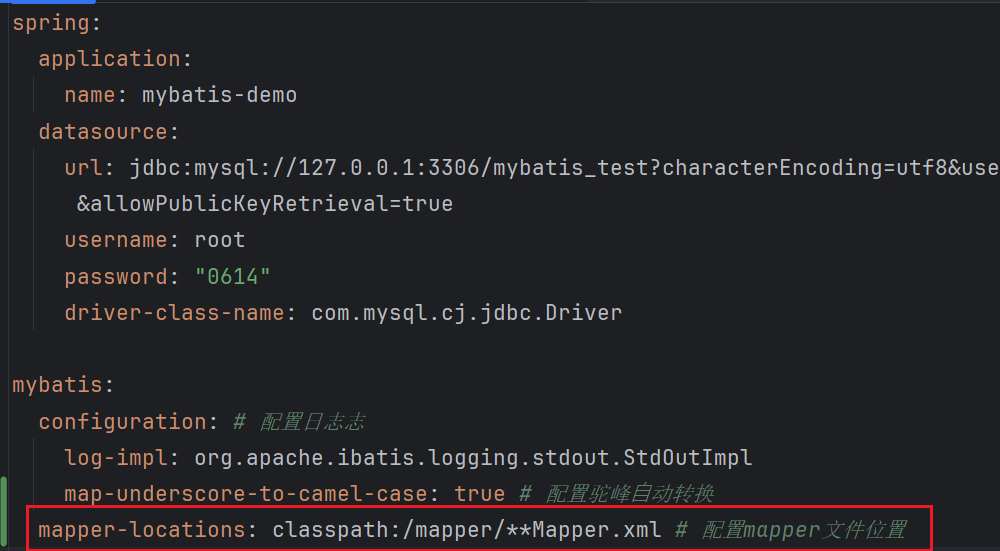
配置文件(数据库信息和文件地址)
-
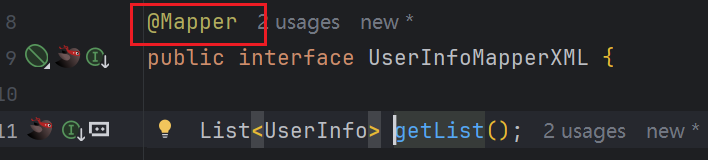
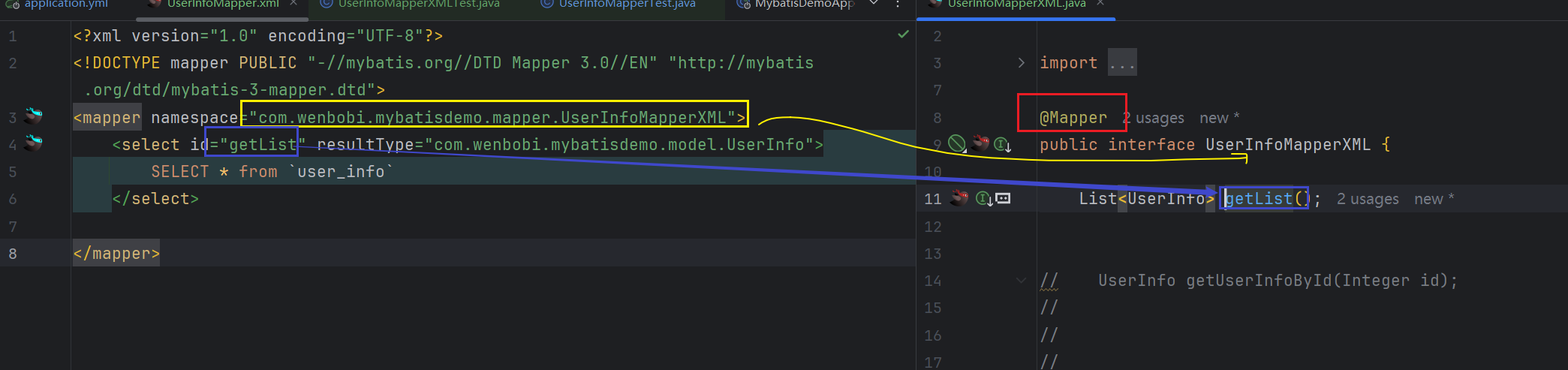
写接口文件
-
写xml实现
xml
<!-- UserInfoMapper.xml -->
<mapper namespace="com.wenbobi.mybatisdemo.mapper.UserInfoMapper">
    <select id="getList" resultType="com.wenbobi.mybatisdemo.model.UserInfo">
        select * from user_info
    </select>
</mapper>
然后接口去掉 @Select 就行:
java
@Mapper
public interface UserInfoMapper {
    List<UserInfo> getList();  // SQL 在 XML 里
}
总结
MyBatis 用 @Mapper 标记接口 → 启动时扫描 → JDK 动态代理生成实现类 → 调用时根据 @Select/XML 执行 SQL,所以你永远看不到手动写的实现类。
数据库开发规范
- 表名字段名为小写
- 单词之间使用下划线
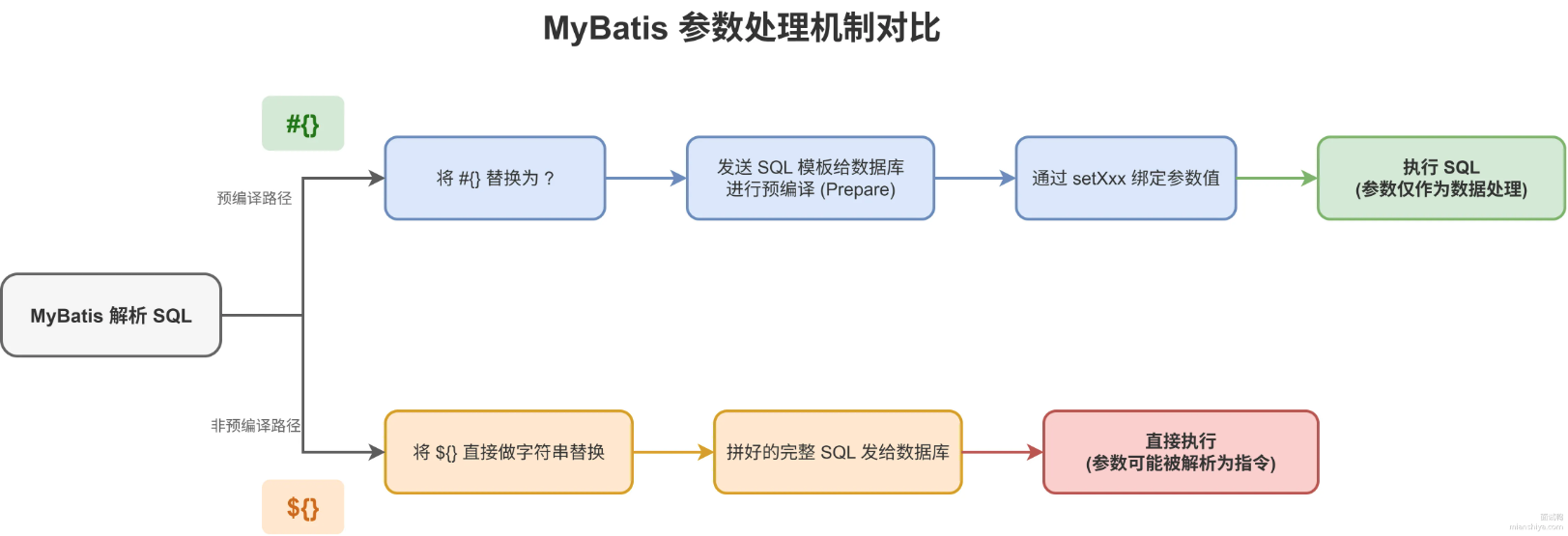
'#'和'$'
进阶
1. 动态 SQL
动态 SQL 是 Mybatis 的强大特性之一,能够完成不同条件下不同的 sql 拼接
1.1 <if>标签
业务场景
添加用户页面分为必填字段 、非必填字段,非必填字段传空时不能拼接对应 SQL,需要动态判断。
添加用户页面
以性别gender非必填为例:
1)Mapper 接口
java
Integer insertUserByCondition(UserInfo userInfo);2)Mapper.xml 实现
xml
<insert id="insertUserByCondition">
INSERT INTO user_info (
username,
`password`,
age,
<if test="gender != null">
gender,
</if>
phone)
VALUES (
#{username},
#{age},
<if test="gender != null">
#{gender},
</if>
#{phone})
</insert>
3)注解方式(不推荐)
注解写动态 SQL 需要外层包裹<script>标签:
java
@Insert("<script>" +
"INSERT INTO user_info (username,`password`,age," +
"<if test='gender!=null'>gender,</if>" +
"phone)" +
"VALUES(#{username},#{age}," +
"<if test='gender!=null'>#{gender},</if>" +
"#{phone})"+
"</script>")
Integer insertUserByCondition(UserInfo userInfo);
注意点
test中取值是实体类属性,不是数据库字段。
常见问题
Q:能不能不判断,直接把字段设为 null?
A:不可以;若该字段设置了数据库默认值,会自动填充默认值,不符合需求。
1.2 <trim>标签
当存在多个动态字段时,<if>配合<trim>统一处理前缀、后缀、多余逗号。
标签属性说明
prefix:整个语句块前缀suffix:整个语句块后缀prefixOverrides:移除语句块开头指定字符suffixOverrides:移除语句块末尾指定字符
Mapper.xml 完整示例
xml
<insert id="insertUserByCondition">
INSERT INTO user_info
<trim prefix="(" suffix=")" suffixOverrides=",">
<if test="username !=null">
username,
</if>
<if test="password !=null">
`password`,
</if>
<if test="age != null">
age,
</if>
<if test="gender != null">
gender,
</if>
<if test="phone != null">
phone,
</if>
</trim>
VALUES
<trim prefix="(" suffix=")" suffixOverrides=",">
<if test="username !=null">
#{username},
</if>
<if test="password !=null">
#{password},
</if>
<if test="age != null">
#{age},
</if>
<if test="gender != null">
#{gender},
</if>
<if test="phone != null">
#{phone}
</if>
</trim>
</insert>
执行逻辑
prefix="("自动在字段开头拼接(suffix=")"自动在字段结尾拼接)suffixOverrides=","自动删除最后一个字段末尾多余逗号
1.3 <where>标签
业务场景
多条件模糊查询,条件动态拼接,自动处理and/or前缀问题。
Mapper.xml 示例
xml
<select id="queryByCondition" resultType="com.example.demo.model.UserInfo">
select id, username, age, gender, phone, delete_flag, create_time, update_time
from user_info
<where>
<if test="age != null">
and age = #{age}
</if>
<if test="gender != null">
and gender = #{gender}
</if>
<if test="deleteFlag != null">
and delete_flag = #{deleteFlag}
</if>
</where>
</select><where>特性
- 只有内部
<if>有内容时,才会生成WHERE关键字 - 自动移除条件开头多余的
AND/OR
等价写法(trim 替代 where)
xml
<trim prefix="where" prefixOverrides="and">
...
</trim>
缺点:无任何条件时,会保留
where关键字,SQL 语法报错,优先使用<where>
1.4 <set>标签
业务场景
动态更新:只更新入参不为 null 的字段,自动处理末尾多余逗号。
Mapper.xml 示例
xml
<update id="updateUserByCondition">
update user_info
<set>
<if test="username != null">
username = #{username},
</if>
<if test="age != null">
age = #{age},
</if>
<if test="deleteFlag != null">
delete_flag = #{deleteFlag},
</if>
</set>
where id = #{id}
</update><set>特性
- 自动生成
SET关键字 - 自动删除最后一个字段后的多余逗号
等价 trim 写法
xml
<trim prefix="set" suffixOverrides=",">
...
</trim>
1.5 <foreach>标签
用于遍历集合 / 数组,常用于in批量查询、批量删除。
标签属性
collection:接口入参集合名(List/Set/ 数组)item:遍历单条元素变量名open:遍历块开头拼接字符串close:遍历块结尾拼接字符串separator:遍历元素之间分隔符
示例:根据 id 批量删除
Mapper 接口
java
void deleteByIds(List<Integer> ids);Mapper.xml
xml
<delete id="deleteByIds">
delete from user_info
where id in
<foreach collection="ids" item="id" separator="," open="(" close=")">
#{id}
</foreach>
</delete>
1.6 <include> & <sql> 复用 SQL 片段
问题
多查询语句存在重复字段,冗余代码。
解决方案
<sql id="xxx">:定义可复用 SQL 片段<include refid="xxx">:引用片段
示例
xml
<!-- 定义通用查询字段 -->
<sql id="allColumn">
id, username, age, gender, phone, delete_flag, create_time, update_time
</sql>

<!-- 复用片段 -->
<select id="queryAllUser" resultMap="BaseMap">
select
<include refid="allColumn"></include>
from user_info
</select>

<select id="queryById" resultType="com.example.demo.model.UserInfo">
select
<include refid="allColumn"></include>
from user_info where id= #{id}
</select>
2. 案例练习
2.1 表白墙(MyBatis 持久化存储留言)
2.1.1 建表语句
sql
DROP TABLE IF EXISTS message_info;
CREATE TABLE `message_info` (
`id` INT ( 11 ) NOT NULL AUTO_INCREMENT,
`from` VARCHAR ( 127 ) NOT NULL,
`to` VARCHAR ( 127 ) NOT NULL,
`message` VARCHAR ( 256 ) NOT NULL,
`delete_flag` TINYINT ( 4 ) DEFAULT 0 COMMENT '0-正常, 1-删除',
`create_time` DATETIME DEFAULT now(),
`update_time` DATETIME DEFAULT now() ON UPDATE now(),
PRIMARY KEY ( `id` )
) ENGINE = INNODB DEFAULT CHARSET = utf8mb4;
ON UPDATE now () 说明
更新数据时自动刷新当前时间;版本差异:
- MySQL <5.6.5:仅 TIMESTAMP 支持自动更新,单表仅一列可配置
- MySQL >=5.6.5:TIMESTAMP/DATETIME 均支持,允许多列配置
2.1.2 pom.xml 依赖
xml
<!-- MyBatis SpringBoot Starter -->
<dependency>
<groupId>org.mybatis.spring.boot</groupId>
<artifactId>mybatis-spring-boot-starter</artifactId>
<version>4.0.1</version>
</dependency>
<!-- MySQL驱动 -->
<dependency>
<groupId>com.mysql</groupId>
<artifactId>mysql-connector-j</artifactId>
<scope>runtime</scope>
</dependency>
IDEA快速引入依赖
2.1.3 application.yml 配置
yml
spring:
  datasource:
    url: jdbc:mysql://127.0.0.1:3306/mybatis_test?characterEncoding=utf8&useSSL=false&allowPublicKeyRetrieval=true
    username: root
    password: root
    driver-class-name: com.mysql.cj.jdbc.Driver
mybatis:
  configuration:
    log-impl: org.apache.ibatis.logging.stdout.StdOutImpl # 打印SQL日志
    map-underscore-to-camel-case: true # 下划线自动转驼峰
2.1.4 后端分层代码
1)Model 实体
java
import lombok.Data;
import java.util.Date;
@Data
public class MessageInfo {
    private Integer id;
    private String from;
    private String to;
    private String message;
    private Integer deleteFlag;
    private Date createTime;
    private Date updateTime;
}
2)Mapper 数据层
java
import com.example.demo.model.MessageInfo;
import org.apache.ibatis.annotations.Insert;
import org.apache.ibatis.annotations.Mapper;
import org.apache.ibatis.annotations.Select;
import java.util.List;

@Mapper
public interface MessageInfoMapper {
    @Select("select `id`, `from`, `to`, `message` from message_info where delete_flag=0")
    List<MessageInfo> queryAll();

    @Insert("insert into message_info (`from`,`to`, `message`) values(#{from},#{to},#{message})")
    Integer addMessage(MessageInfo messageInfo);
}
3)Service 业务层
java
import com.example.demo.mapper.MessageInfoMapper;
import com.example.demo.model.MessageInfo;
import org.springframework.beans.factory.annotation.Autowired;
import org.springframework.stereotype.Service;
import java.util.List;

@Service
public class MessageInfoService {
    @Autowired
    private MessageInfoMapper messageInfoMapper;

    public List<MessageInfo> queryAll() {
        return messageInfoMapper.queryAll();
    }
    public Integer addMessage(MessageInfo messageInfo) {
        return messageInfoMapper.addMessage(messageInfo);
    }
}
4)Controller 控制层
java
import com.example.demo.model.MessageInfo;
import com.example.demo.service.MessageInfoService;
import org.springframework.beans.factory.annotation.Autowired;
import org.springframework.util.StringUtils;
import org.springframework.web.bind.annotation.RequestMapping;
import org.springframework.web.bind.annotation.RestController;
import java.util.List;

@RequestMapping("/message")
@RestController
public class MessageController {
    @Autowired
    private MessageInfoService messageInfoService;

    // 查询全部留言
    @RequestMapping("/getList")
    public List<MessageInfo> getList() {
        return messageInfoService.queryAll();
    }

    // 发布留言
    @RequestMapping("/publish")
    public boolean publish(MessageInfo messageInfo) {
        System.out.println(messageInfo);
        if (StringUtils.hasLength(messageInfo.getFrom())
                && StringUtils.hasLength(messageInfo.getTo())
                && StringUtils.hasLength(messageInfo.getMessage())) {
            messageInfoService.addMessage(messageInfo);
            return true;
        }
        return false;
    }
}
2.1.5 测试
访问页面:http://127.0.0.1:8080/messagewall.html
提交留言后数据持久化至数据库,重启服务数据不丢失。
2.2 图书管理系统(完整 CRUD + 分页 + 登录拦截)
2.2.1 数据库表设计
sql
-- 创建数据库
DROP DATABASE IF EXISTS book_test;
CREATE DATABASE book_test DEFAULT CHARACTER SET utf8mb4;

-- 用户表
DROP TABLE IF EXISTS user_info;
CREATE TABLE user_info (
`id` INT NOT NULL AUTO_INCREMENT,
`user_name` VARCHAR ( 128 ) NOT NULL,
`password` VARCHAR ( 128 ) NOT NULL,
`delete_flag` TINYINT ( 4 ) NULL DEFAULT 0,
`create_time` DATETIME DEFAULT now(),
`update_time` DATETIME DEFAULT now() ON UPDATE now(),
PRIMARY KEY ( `id` ),
UNIQUE INDEX `user_name_UNIQUE` ( `user_name` ASC )
) ENGINE = INNODB DEFAULT CHARACTER SET = utf8mb4 COMMENT = '用户表';

-- 图书表
DROP TABLE IF EXISTS book_info;
CREATE TABLE `book_info` (
`id` INT ( 11 ) NOT NULL AUTO_INCREMENT,
`book_name` VARCHAR ( 127 ) NOT NULL,
`author` VARCHAR ( 127 ) NOT NULL,
`count` INT ( 11 ) NOT NULL,
`price` DECIMAL (7,2 ) NOT NULL,
`publish` VARCHAR ( 256 ) NOT NULL,
`status` TINYINT ( 4 ) DEFAULT 1 COMMENT '0-无效, 1-正常, 2-不允许借阅',
`create_time` DATETIME DEFAULT now(),
`update_time` DATETIME DEFAULT now() ON UPDATE now(),
PRIMARY KEY ( `id` )
) ENGINE = INNODB DEFAULT CHARSET = utf8mb4;

-- 初始化用户数据
INSERT INTO user_info ( user_name, PASSWORD ) VALUES ( "admin", "admin" );
INSERT INTO user_info ( user_name, PASSWORD ) VALUES ( "zhangsan", "123456" );

-- 初始化图书数据
INSERT INTO `book_info` (book_name,author,count, price, publish) VALUES ('活着', '余华', 29, 22.00, '北京文艺出版社');
INSERT INTO `book_info` (book_name,author,count, price, publish) VALUES ('平凡的世界', '路遥', 5, 98.56, '北京十月文艺出版社');
INSERT INTO `book_info` (book_name,author,count, price, publish) VALUES ('三体', '刘慈欣', 9, 102.67, '重庆出版社');
INSERT INTO `book_info` (book_name,author,count, price, publish) VALUES ('金字塔原理', '麦肯锡', 16, 178.00, '民主与建设出版社');
2.2.2 配置文件 yml
yml
spring:
  datasource:
    url: jdbc:mysql://127.0.0.1:3306/book_test?characterEncoding=utf8&useSSL=false&allowPublicKeyRetrieval=true
    username: root
    password: root
    driver-class-name: com.mysql.cj.jdbc.Driver
mybatis:
  configuration:
    map-underscore-to-camel-case: true
    log-impl: org.apache.ibatis.logging.stdout.StdOutImpl
  mapper-locations: classpath:mapper/**Mapper.xml # xml映射文件路径
logging:
  file:
    name: spring-book.log
2.2.3 实体类
UserInfo 用户
java
import lombok.Data;
import java.util.Date;
@Data
public class UserInfo {
    private Integer id;
    private String userName;
    private String password;
    private Integer deleteFlag;
    private Date createTime;
    private Date updateTime;
}
BookInfo 图书
java
import lombok.Data;
import java.math.BigDecimal;
import java.util.Date;
@Data
public class BookInfo {
    private Integer id;
    private String bookName;
    private String author;
    private Integer count;
    private BigDecimal price;
    private String publish;
    private Integer status;
    private String statusCN; // 状态中文
    private Date createTime;
    private Date updateTime;
}
分页请求 / 返回封装
java
// 分页请求参数
@Data
public class PageRequest {
    private int currentPage = 1;
    private int pageSize = 10;
    public int getOffset() {
        return (currentPage-1) * pageSize;
    }
}

// 分页结果
@Data
public class PageResult<T> {
    private int total;
    private List<T> records;
    public PageResult(Integer total, List<T> records) {
        this.total = total;
        this.records = records;
    }
}

// 全局统一返回体
@Data
public class Result<T> {
    private ResultStatus status;
    private String errorMessage;
    private T data;

    // 成功
    public static <T> Result<T> success(T data) {
        Result<T> result = new Result<>();
        result.setStatus(ResultStatus.SUCCESS);
        result.setErrorMessage("");
        result.setData(data);
        return result;
    }
    // 业务失败
    public static <T> Result<T> fail(String msg) {
        Result<T> result = new Result<>();
        result.setStatus(ResultStatus.FAIL);
        result.setErrorMessage(msg);
        result.setData(null);
        return result;
    }
    // 未登录
    public static <T> Result<T> unlogin() {
        Result<T> result = new Result<>();
        result.setStatus(ResultStatus.UNLOGIN);
        result.setErrorMessage("用户未登录");
        result.setData(null);
        return result;
    }
}

// 状态枚举
public enum ResultStatus {
    SUCCESS(200),
    UNLOGIN(-1),
    FAIL(-2);
    private Integer code;
    ResultStatus(int code) { this.code = code; }
    public Integer getCode() { return code; }
}

// 图书状态枚举
public enum BookStatus {
    DELETED(0,"无效"),
    NORMAL(1,"可借阅"),
    FORBIDDEN(2,"不可借阅");
    private Integer code;
    private String name;
    BookStatus(int code, String name) {
        this.code = code;
        this.name = name;
    }
    public static BookStatus getNameByCode(Integer code){
        switch (code){
            case 0: return DELETED;
            case 1: return NORMAL;
            case 2: return FORBIDDEN;
        }
        return null;
    }
    public String getName() { return name; }
}

// Session常量类
public class Constant {
    public static final String SESSION_USER_KEY = "session_user_key";
}
2.2.4 用户登录模块
Mapper
java
@Mapper
public interface UserInfoMapper {
    @Select("select id, user_name,`password`, delete_flag, create_time, update_time " +
            "from user_info where delete_flag=0 and user_name=#{name}")
    UserInfo queryUserByName(String name);
}
Service
java
@Service
public class UserService {
    @Autowired
    private UserInfoMapper userInfoMapper;
    public UserInfo queryUserByName(String name) {
        return userInfoMapper.queryUserByName(name);
    }
}
Controller
java
import com.example.demo.constant.Constant;
import com.example.demo.model.UserInfo;
import com.example.demo.service.UserService;
import org.springframework.beans.factory.annotation.Autowired;
import org.springframework.util.StringUtils;
import org.springframework.web.bind.annotation.RequestMapping;
import org.springframework.web.bind.annotation.RestController;
import jakarta.servlet.http.HttpSession;

@RequestMapping("/user")
@RestController
public class UserController {
    @Autowired
    private UserService userService;

    @RequestMapping("/login")
    public boolean login(String name, String password, HttpSession session){
        if (!StringUtils.hasLength(name) || !StringUtils.hasLength(password)){
            return false;
        }
        UserInfo userInfo = userService.queryUserByName(name);
        if (userInfo == null){
            return false;
        }
        if(password.equals(userInfo.getPassword())){
            userInfo.setPassword("");
            session.setAttribute(Constant.SESSION_USER_KEY,userInfo);
            return true;
        }
        return false;
    }
}
登录页面
2.2.5 图书 CRUD 核心代码
1)添加图书
Mapper 接口
java
@Insert("insert into book_info (book_name,author,count,price,publish,status) " +
        "values (#{bookName},#{author},#{count},#{price},#{publish},#{status})")
Integer insertBook(BookInfo bookInfo);
Controller
java
@RequestMapping("/addBook")
public String addBook(BookInfo bookInfo) {
    log.info("添加图书:{}", bookInfo);
    if (!StringUtils.hasLength(bookInfo.getBookName())
            || !StringUtils.hasLength(bookInfo.getAuthor())
            || bookInfo.getCount()==null
            || bookInfo.getPrice()==null
            || !StringUtils.hasLength(bookInfo.getPublish())
            || bookInfo.getStatus() ==null
    ) {
        return "输入参数不合法, 请检查入参!";
    }
    try {
        bookService.addBook(bookInfo);
        return "";
    } catch (Exception e) {
        log.error("添加图书失败", e);
        return e.getMessage();
    }
}
2)分页图书列表
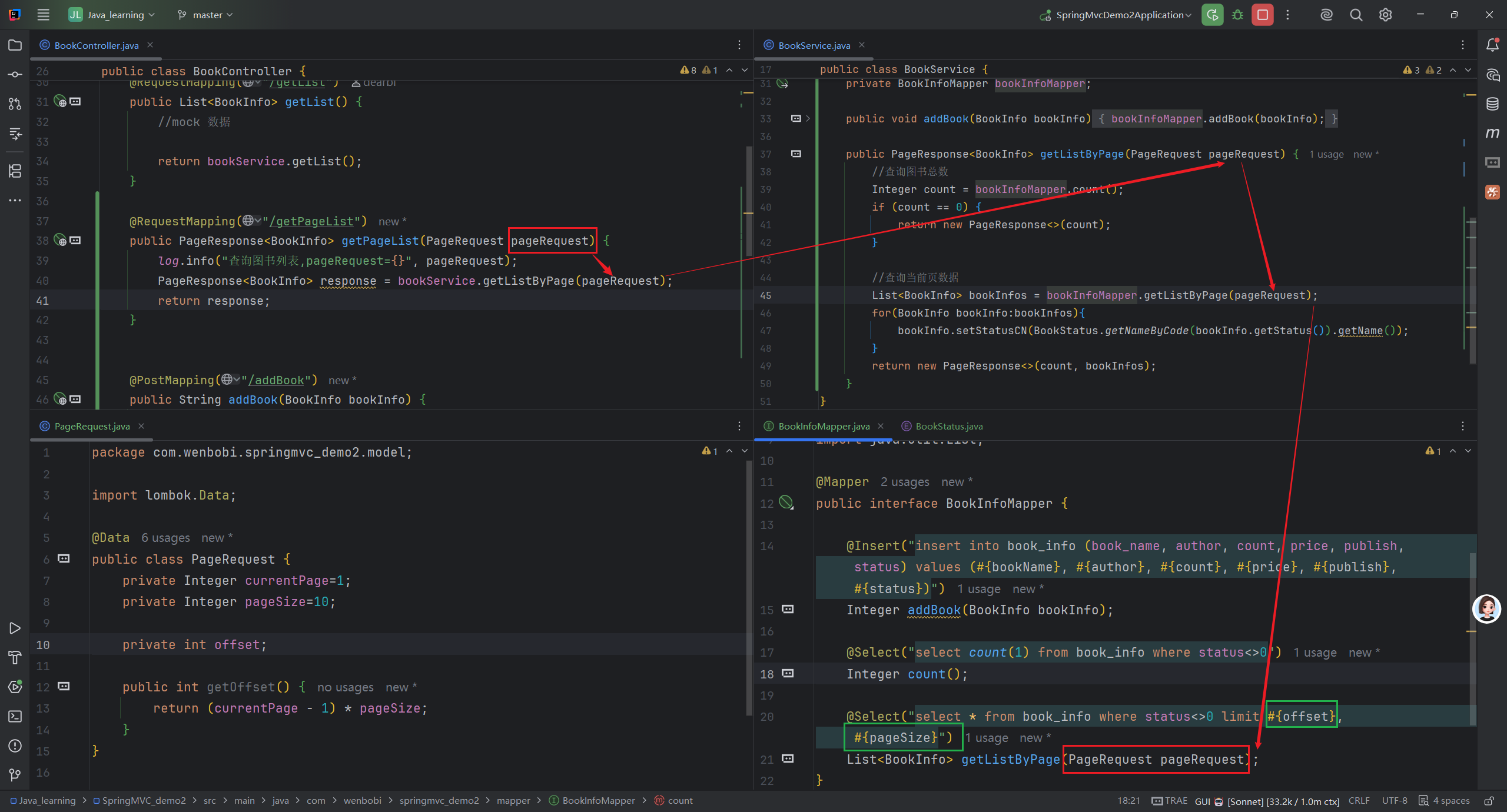
前端传 ?currentPage=2&pageSize=5
          ↓
Spring 绑定到 PageRequest { currentPage=2, pageSize=5 }
          ↓
     传给 BookService.getListByPage(pageRequest)
          ↓
BookInfoMapper 执行 SQL:
  "select * from book_info where status<>0 limit #{offset}, #{pageSize}"
          ↓
   MyBatis 解析 #{offset}  →  调用 pageRequest.getOffset()
                              → 返回 (2-1)*5 = 5
   MyBatis 解析 #{pageSize} →  调用 pageRequest.getPageSize()
                              → 返回 5
          ↓
最终 SQL:  select * from book_info where status<>0 limit 5, 5
          ↓
MySQL 跳过前5条,返回第6~10条
Mapper
java
@Select("select count(1) from book_info where status<>0")
Integer count();

@Select("select * from book_info where status !=0 order by id desc limit #{offset}, #{pageSize}")
List<BookInfo> queryBookListByPage(PageRequest pageRequest);
Service
java
public PageResult<BookInfo> getBookListByPage(PageRequest pageRequest) {
    Integer count = bookInfoMapper.count();
    List<BookInfo> books = bookInfoMapper.queryBookListByPage(pageRequest);
    for (BookInfo book:books){
        book.setStatusCN(BookStatus.getNameByCode(book.getStatus()).getName());
    }
    return new PageResult<>(count,books);
}
Controller(带登录校验)
java
@RequestMapping("/getListByPage")
public Result<PageResult<BookInfo>> getListByPage(PageRequest pageRequest, HttpSession session) {
    if (session.getAttribute(Constant.SESSION_USER_KEY)==null){
        return Result.unlogin();
    }
    PageResult<BookInfo> pageResult = bookService.getBookListByPage(pageRequest);
    return Result.success(pageResult);
}
3)修改图书(动态 SQL xml)
BookInfoMapper.xml
xml
<?xml version="1.0" encoding="UTF-8"?>
<!DOCTYPE mapper PUBLIC "-//mybatis.org//DTD Mapper 3.0//EN"
"http://mybatis.org/dtd/mybatis-3-mapper.dtd">
<mapper namespace="com.example.demo.mapper.BookInfoMapper">
    <update id="updateBook">
        update book_info
        <set>
            <if test='bookName!=null'>
                book_name = #{bookName},
            </if>
            <if test='author!=null'>
                author = #{author},
            </if>
            <if test='price!=null'>
                price = #{price},
            </if>
            <if test='count!=null'>
                count = #{count},
            </if>
            <if test='publish!=null'>
                publish = #{publish},
            </if>
            <if test='status!=null'>
                status = #{status},
            </if>
        </set>
        where id = #{id}
    </update>
</mapper>
4)删除图书(逻辑删除)
逻辑删除:更新status=0,不执行 delete 物理删除
5)批量删除(foreach)
xml
<update id="batchDeleteBook">
update book_info set status=0
where id in
<foreach collection="ids" item="id" separator="," open="(" close=")">
#{id}
</foreach>
</update>
2.2.6 登录拦截思路
- 登录成功将用户信息存入
Session - 所有图书操作接口先判断
Session是否存在用户 - 未登录返回统一
Result.unlogin(),前端跳转登录页 - 缺陷:每个接口重复写判断逻辑,优化方案:拦截器 / 过滤器
3. MyBatis Generator 代码生成工具
MyBatis Generator (MBG):根据数据库表自动生成 Model、Mapper 接口、Mapper.xml,简化 CRUD 基础代码。
3.1 Maven 插件配置 pom.xml
xml;
<plugin>
<groupId>org.mybatis.generator</groupId>
<artifactId>mybatis-generator-maven-plugin</artifactId>
<version>1.3.6</version>
<executions>
<execution>
<id>Generate MyBatis Artifacts</id>
<phase>deploy</phase>
<goals>
<goal>generate</goal>
</goals>
</execution>
</executions>
<configuration>
<configurationFile>src/main/resources/mybatisGenerator/generatorConfig.xml</configurationFile>
<overwrite>true</overwrite>
<verbose>true</verbose>
<includeCompileDependencies>true</includeCompileDependencies>
</configuration>
<dependencies>
<dependency>
<groupId>mysql</groupId>
<artifactId>mysql-connector-java</artifactId>
<version>8.0.33</version>
</dependency>
</dependencies>
</plugin>
3.2 generatorConfig.xml 核心配置
xml
<?xml version="1.0" encoding="UTF-8"?>
<!DOCTYPE generatorConfiguration
PUBLIC "-//mybatis.org//DTD MyBatis Generator Configuration 1.0//EN"
"http://mybatis.org/dtd/mybatis-generator-config_1_0.dtd">
<generatorConfiguration>
<context id="MysqlTables" targetRuntime="MyBatis3Simple">
<!-- 关闭注释 -->
<commentGenerator>
<property name="suppressDate" value="true" />
<property name="suppressAllComments" value="true" />
</commentGenerator>
<!-- 数据库连接 -->
<jdbcConnection driverClass="com.mysql.cj.jdbc.Driver"
connectionURL="jdbc:mysql://127.0.0.1:3306/db?serverTimezone=Asia/Shanghai&nullCatalogMeansCurrent=true"
userId="root" password="root">
</jdbcConnection>
<!-- 生成实体类 -->
<javaModelGenerator targetPackage="com.example.demo.model" targetProject="src/main/java" >
<property name="trimStrings" value="true" />
</javaModelGenerator>
<!-- 生成xml映射文件 -->
<sqlMapGenerator targetPackage="mapper" targetProject="src/main/resources" >
</sqlMapGenerator>
<!-- 生成Mapper接口 -->
<javaClientGenerator targetPackage="com.example.demo.mapper" targetProject="src/main/java" type="XMLMAPPER" >
</javaClientGenerator>
<!-- 映射表 -->
<table tableName="user_info" domainObjectName="UserInfo" >
<generatedKey column="id" sqlStatement="Mysql" identity="true" />
</table>
</context>
</generatorConfiguration>3.3 使用方式
Maven 插件执行 generate,一键生成全套数据层代码。