Linux系统编程实战项目:模拟实现shell
- [模拟 Shell 基础铺垫](#模拟 Shell 基础铺垫)
- shell的模拟实现
模拟 Shell 基础铺垫
本篇难度较高,建议补完 Linux操作系统的使用 和 Linux系统编程 中本篇之前的所有博客再进行食用。
复习什么是shell
Linux 分为核心 (kernel) 和命令行解释器 (command interpreter,一般也指 shell) 。一般用户不能直接使用 kernel,而是通过 kernel 的"外壳"程序,也就是所谓的 shell(英语单词指外壳),来与 kernel 沟通。Shell 的最简单定义:命令行解释器(command Interpreter)。它主要包含:
-
将使用者的命令翻译给核心(kernel)处理。
-
同时,将核心的处理结果翻译给使用者。
类比 windows GUI,我们操作 windows 不是直接操作 windows 内核,而是通过图形接口,点击,从而完成我们的操作(比如进入D盘的操作,我们通常是双击 D 盘盘符,或者运行起来一个应用程序)。
shell 对于 Linux,有相同的作用,主要是对用户的指令进行解析 ,解析指令传递给内核。操作系统内核执行命令得到的反馈结果再通过内核运行出结果,再通过 shell 解析给用户。
工作原理
shell 的工作原理可认为是子进程的创建。例如如下的 2 个命令:
bash
[root@localhost epoll]# ls
client.cpp readme.md server.cpp utility.h
[root@localhost epoll]# ps
 PID TTY TIME CMD
 3451 pts/0 00:00:00 bash
 3514 pts/0 00:00:00 ps
用下图的时间轴来表示事件的发生次序。其中时间从左向右。shell 由标识为 bash 的方块代表,它随着时间的流逝从左向右移动。shell 从用户读入字符串 "ls" 。shell 建立一个新的进程,然后在那个进程中运行 ls 程序并等待那个进程结束。
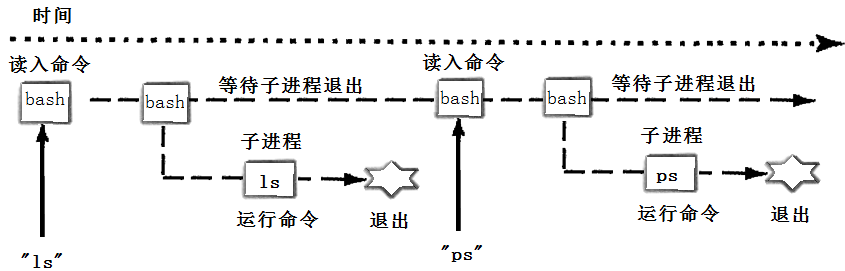
然后 shell 读取新的一行输入,建立一个新的进程,在这个进程中运行程序并等待这个进程结束。
函数和进程之间的相似性
exec / exit 就像 call /return:
一个 C 程序有很多函数组成。一个函数可以调用另外一个函数,同时传递给它一些参数。被调用的函数执行一定的操作,然后返回一个值。每个函数都有他的局部变量,不同的函数通过 call/return系统进行通信。
这种通过参数和返回值 在拥有私有数据的函数间通信 的模式是结构化程序设计的基础。Linux 鼓励将这种应用于程序之内的模式扩展到程序之间 。
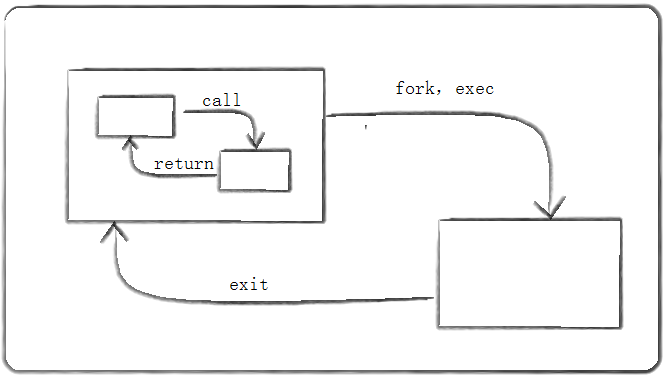
一个 C 程序可以 fork/ exec 另一个程序,并传给它一些参数。这个被调用的程序执行一定的操作,然后通过 exit(n) 来返回值。
调用它的进程可以通过 wait(&ret) 来获取 exit 的返回值。
shell的模拟实现
本次将模拟实现一个简易的 Myshell 类。实现这个的意义在于练习将所学知识运用于实践。同时根据 LLM (Large Language Model ,即大语言模型,例如 DeepSeek、Kimi 等) 的描述,分析实现过程中的细节做的不到位的地方。
基础框架
这里的 shell 循环以下过程:
-
输入命令提示符 。例如普通用户 Bjarne ,则输入命令提示符:
[Bjarne@myshell dirname]$。 -
获取命令行。
-
解析命令行。
- 管道检测。即
A | B,通常情况下是 A 命令将输出的信息传输给 B 。通过管道检测将一条长指令拆分成多个小的指令。
- 管道检测。即
-
循环遍历指令集。每个指令都需要做的工作:
-
重定向检测 。这里实现 3 种重定向:
>、>>和<。 -
指令分割。将指令按空格切分成多个部分。
-
内建命令判断 。这里实现 3 种:
cd、export和echo。 -
建立子进程和管道。每个子进程代表一个指令,管道由子进程掌握写端,父进程掌握读端。
-
将
stdin和stdout重定向为管道的文件描述符。 -
替换子进程(execvp)。
-
-
父进程关闭所有管道防止阻塞。
-
父进程等待所有子进程退出 (wait),之后重新执行 1 。
其他的功能例如与运算、脚本语言支持的 for 循环、 while 循环等需要深入研究 shell ,且内容过于丰富,和本文总结知识的目的不符,计划后期进行迭代。
根据如上描述,可实现一个 Shell 类:
cpp
// Myshell类
class Myshell {
private:
    string _user_command;      // 暂时存储用户的指令
    string _pwd;               // shell的工作目录
    string _user;              // shell服务的用户
    vector<string> _tmp_cmd;   // 经管道拆解后,用户的指令
    vector<Channel> _channels; // 匿名管道信息存储
    int lastproc;              // 上个指令的返回值

private:
    void init();        // 初始化Myshell类的成员信息
    string _get_pwd();  // 获取工作目录
    string _get_user(); // 获取用户名
    void _check_pipe(); // 检查管道
    void _run_cmd();    // 执行用户命令
    vector<string>
    _check_user_cmd(string &cmd);       // 根据空格拆解上传的用户命令cmd
    Reset_file _check_dir(string &cmd); // 对cmd做重定向检查
    void _reset_file(Reset_file &);     // 重定向操作
    void _exchange_program(vector<string> &cmd);         // 程序替换
    bool _in_command(vector<string> &cmd, Reset_file &); // 内建命令检查

public:
    Myshell();                      // 初始化Myshell对象
    string _homepath();             // 获取家目录
    void start();                   // 启动Myshell
    friend void test_5_test_pipe(); // 为测试管道简单设置的友元
};
其中获取用户名和工作目录的接口:
cpp
string Myshell::_get_pwd() {
    // getcwd传回的是malloc生成的地址,需要调用者手动free
    char *tmp_ptr = getcwd(nullptr, 0);
    string pwd = tmp_ptr;
    int pos = pwd.rfind("/");

    if (pos != string::npos) {
        pwd = pwd.substr(pwd.rfind("/") + 1, string::npos);
    } else {
        cout << "Error PWD.\n";
        exit(-1);
    }
    if (pwd == string(getenv("USER")))
        pwd = "~";
    free(tmp_ptr);
    return pwd;
}

string Myshell::_get_user() {
    char *tmp_ptr = getenv("USER");
    string user = tmp_ptr;
    if (user.size()) {
        return user;
    } else {
        cout << "Error USER.\n";
        exit(-2);
    }
}
用于启动 myshell 的 start 接口暂定:
cpp
void Myshell::start() {
    while (_user_command != "exit") {
        init();
        // 1. 输入命令提示符
        _pwd = _get_pwd(); // 获取工作目录
        _user = _get_user(); // 获取用户信息
        cout << "[" << _user << "@myshell " << _pwd << "]$ "; // 输出

        // 2. 获取命令行
        getline(cin, _user_command);

        // 3. 解析命令行
        // 3.0 管道判断
        _check_pipe();
        // 3.1 逐条执行命令
        _run_cmd();
        // TODO
    }
    sleep(1);
}
解析命令行
这里的思路是:
- 判断命令内是否有管道,将命令拆分成多个
string存入数组_tmp_cmd。 - 遍历
_tmp_cmd,对每个字符串做如下解析:- 重定向判断。
- 按空格分割命令。
- 内建命令判断。
- 循环创建进程和匿名管道。
管道判断
用户命令相当于 Myshell 进程的子进程,所以当出现管道时,用户命令可拆解为多个子命令,这些子命令通过匿名管道进行通信。
具体思路:
Myshell进程检查用户命令是否存在管道符号|。若不存在则直接退出。查找可通过string自带的find接口实现,需要 2 个变量进行定位进行查找。也可通过 C 语言自带的strtok或 Boost 库的字符串处理函数进行查找。
例如指令 ps ajx | grep a.exe | grep -v grep ,可拆分成 3 个指令 ps ajx 、 grep a.exe 和 grep -v grep 。
- 将命令拆解为多个命令保存在
vector<string> _tmp_cmd内,每个元素相当于一条完整的命令。即使没有管道,也会拆解出 1 个元素。
例如指令 ps ajx | grep a.exe | grep -v grep ,最后分解为
{``{ps ajx}, {grep a.exe}, {grep -v grep}} 存储在 _tmp_cmd 中。
- 循环遍历
_tmp_cmd内的命令字符串并逐一解析。主要工作内容为重定向判断、分割命令和内建命令判断。
详细代码见参考程序。
重定向判断
程序替换不会影响进程打开过的文件。这里定义 3 种重定向:
-
>。以覆盖的方式,将进程输出内容输出到指定文件。 -
<。即进程输入内容全部来自指定文件。 -
>>。以追加的方式,将进程输出内容输出到指定文件。
这里定义额外的重定向类 Reset_file,该类的成员中规定额外的 bool 变量 _file_add 、 file_write 和 _file_read 对重定向的文件进行标记,同时定义另外 2 个字符串 _in_file 和 _out_file 指定重定向的文件。每个子命令都有这样一个重定向信息类。
cpp
// 子命令的重定向信息类
struct Reset_file {
    string _in_file;  // 指令的输入文件
    bool _file_add;   //>>重定向
    bool _file_write; //>重定向
    bool _file_read;  //<重定向
    string _out_file; // 指令的输出文件
    Reset_file()
        : _in_file(""), _file_add(false), _file_write(false), _file_read(false),
          _out_file("") {}
    void print() {
        // 用于调试方便的print类
    }
};
在指令需要重定向时,先对各个 bool 变量进行标记,并保存为 Reset_file 对象。然后再分内建命令和进程命令 2 种情况讨论,前者直接通过文件流打开文件进行操作,后者通过 Linux 的重定向接口操作数据流向。
详细实现见参考程序。
分割命令
例如指令 grep -v grep ,因为需要将子进程替换为指令 grep 的进程,所以将字符串命令拆分为 3 个部分 {"grep","-v","grep"} ,然后通过 exev 系接口替换为 grep 进程。
拆分方式可参考管道,可选 string 自带的 find 接口,或 C 接口 strtok 按空格进行字符串切割。
例如这里使用 strtok 进行切割:
cpp
vector<string> Myshell::_check_user_cmd(string &cmd) {
    vector<string> return_cmd; // 要返回的命令
    char a[] = " ";
    // 设置缓冲区,使用C语言的strtok拆分字符串
    // 可用string的find
    char *buf = (char *)calloc(cmd.size() + 5, 1);
    char *c = nullptr;
    string tmp;

    for (size_t i = 0; i < cmd.size(); i++) {
        buf[i] = cmd[i];
    }
    c = strtok(buf, a);
    while (c != NULL) {
        tmp = string(c);
        if (tmp.size())
            return_cmd.push_back(tmp);
        c = strtok(NULL, a);
    }
    free(buf);
    return return_cmd; // 使用C++11标准时这里为移动构造
}
内建命令
内建命令相当于一个 C/C++ 程序自己内部的一个函数。
这里模拟实现一部分内建命令:
cd。通过chdir和setenv修改工作目录。export。通过setenv导入环境变量。echo。若命令带$则是为了输出特殊含义:echo $?:输出上一个进程的返回值。echo $ENV_VAR:输出指定环境变量,通过getenv获取。echo "xxx":掐头去尾即可。
这里不用 putenv 是因为这个接口返回的指针是个临时指针,若使用 string 操作的话,很容易造成生成临时对象离开作用域后被 delete 回收导致非法访问的情况。
详细实现见参考程序。
建立子进程和管道
完成之前的工作后就可得到代表最终指令的 final_cmd 数组和配套的重定向信息 _rf 对象。final_cmd 数组由 _check_user_cmd 接口对子命令进行解析获取, _rf 由重定向判断接口获取,详细见参考程序,这里的重点为子进程和管道创建。
这里选择的思路:
- 创建由子进程拥有写端 ,父进程拥有读端 的匿名管道 ,并保存在信道数组
_channels内。 - 父进程不关闭所有的读端,每个子进程可根据进程自身继承自父进程的
channels读取匿名管道的信息。 - 除了最后一个子进程 ,每个子进程均需要将
stdout重定向为匿名管道。 - 子进程关闭所有管道。
- 使用
execvp进行程序替换。
原理就是子进程会继承所有父进程的文件描述符,所以也会继承所有管道。这在管道的特性研究中有提及。
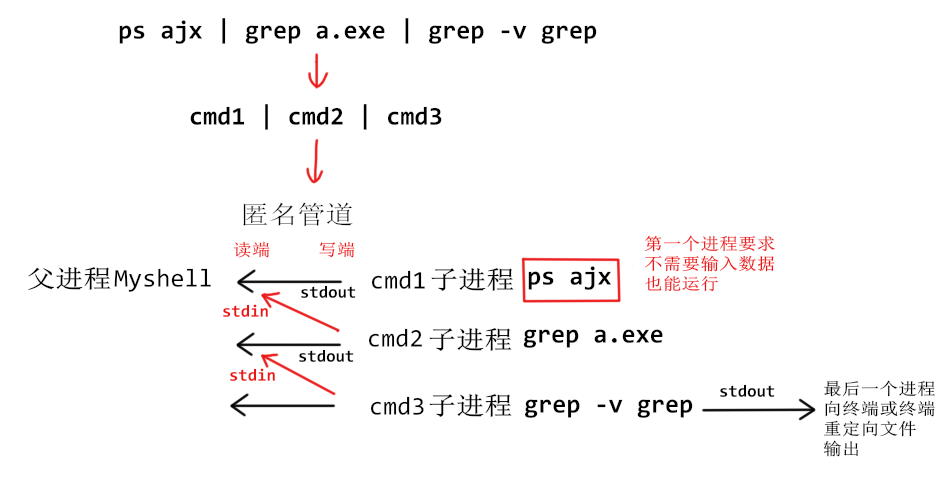
这里进行程序替换时,务必关闭所有管道的文件描述符,否则很容易会出现运行时被操作系统查出没有及时关闭的管道导致进程阻塞的情况。
父进程的收尾工作
父进程在建立子进程和管道的工作中的任务就是关闭创建的管道的写端并记录读端通信信道。
cpp
void Myshell::_run_cmd(){
    for (int sz = 0; sz < _tmp_cmd.size(); sz++) {
        // TODO
        pid_t id = fork();
        // TODO
        // 父进程
        close(ctof[1]);                            // 关闭写端
        _channels.push_back(Channel(ctof[0], id)); // 记录读端信道
    }
    // TODO
}
当 _tmp_cmd 遍历完毕时,父进程即可开始进行收尾工作。
首先是关闭所有管道,防止进程阻塞。
cpp
for (int i = 0; i < _channels.size(); i++) {
    close(_channels[i].ctrlFD);
}
然后就是等待所有子进程回归。若不关心前台进程和后台进程,则统一阻塞等待。
cpp
for (int i = 0; i < _tmp_cmd.size(); i++) {
    int status = 0;
    int rid = 0;
    rid = waitpid(-1, &status, 0); // 阻塞等待
    if (rid > 0) {
        lastproc = WEXITSTATUS(status);
    }
}
也可以先记录所有后台进程的信息,再对所有前台进程进行阻塞等待。
这里实现的比较粗糙,直接统计后台进程数,然后在 start 处设置后台进程回收的代码块。
cpp
void Myshell::start() {
    while (true) {
        if (bgnum > 0) { // 回收后台进程只是顺便
            int status = 0;
            int rid = waitpid(-1, &status, WNOHANG);
            if (rid > 0) {
                lastproc = WEXITSTATUS(status);
                bgnum--;
            }
        }
        // TODO
    }
    sleep(1);
}
vector<string> Myshell::_check_user_cmd(string &cmd) {
    vector<string> return_cmd; // 要返回的命令
    // TODO
    if (!return_cmd.empty() && return_cmd[return_cmd.size() - 1] == "&") {
        ++bgnum;
    }
    return return_cmd;
}
最终参考程序
v1.0参考
myshell.hpp 如下,内部包含 Myshell 类及其附件,以及各种测试函数。启动时直接执行 mystd::test_Myshell_start(); 即可。
cpp
#pragma once

#include <cstdio>
#include <cstdlib>
#include <cstring>
#include <fcntl.h>
#include <fstream>
#include <iostream>
#include <string>
#include <sys/types.h>
#include <sys/wait.h>
#include <unistd.h>
#include <vector>

namespace mystd {
using std::cerr;
using std::cin;
using std::cout;
using std::endl;
using std::getline;
using std::ifstream;
using std::ofstream;
using std::string;
using std::to_string;
using std::vector;

#define ERR_EXIT(m) \
    do { \
        cerr << #m << " error, errno: " << errno \
             << ", errstring: " << strerror(errno) << endl; \
        exit(1); \
    } while (0)

// 信道类,为方便测试用struct,可用class
struct Channel {
    Channel(int fd, pid_t id) : ctrlFD(fd), workerID(id) {
        name = "channel" + to_string(++number);
    }
    int ctrlFD;        // 匿名管道描述符
    pid_t workerID;    // 管道链接的进程 ID
    string name;       // 信道名
    static int number; // 进程创建的信道数
    void print() {
        cout << name << " " << ctrlFD << " " << workerID << endl;
    }
};
int Channel::number = 0;

// 子命令的重定向信息类
struct Reset_file {
    string _in_file;  // 指令的输入文件
    bool _file_add;   //>>重定向
    bool _file_write; //>重定向
    bool _file_read;  //<重定向
    string _out_file; // 指令的输出文件
    Reset_file()
        : _in_file(""), _file_add(false), _file_write(false), _file_read(false),
          _out_file("") {}
    void print() {
        if (_in_file.size()) {
            cout << "> ";
            cout << _in_file << " ";
        }
        if (_out_file.size()) {
            if (_file_add)
                cout << ">> ";
            else
                cout << "> ";
            cout << _out_file << " ";
        }
        cout << endl;
    }
};

// Myshell类
class Myshell {
private:
    string _user_command;      // 暂时存储用户的指令
    string _pwd;               // shell的工作目录
    string _user;              // shell服务的用户
    vector<string> _tmp_cmd;   // 经管道拆解后,用户的指令
    vector<Channel> _channels; // 匿名管道信息存储
    int lastproc;              // 上个指令的返回值
    static int bgnum;          // 在运行的后台进程数

private:
    void init();        // 初始化Myshell类的成员信息
    string _get_pwd();  // 获取工作目录
    string _get_user(); // 获取用户名
    void _check_pipe(); // 检查管道
    void _run_cmd();    // 执行用户命令
    vector<string>
    _check_user_cmd(string &cmd);       // 根据空格拆解上传的用户命令cmd
    Reset_file _check_dir(string &cmd); // 对cmd做重定向检查
    void _reset_file(Reset_file &);     // 重定向操作
    void _exchange_program(vector<string> &cmd);         // 程序替换
    bool _in_command(vector<string> &cmd, Reset_file &); // 内建命令检查

public:
    Myshell();                      // 初始化Myshell对象
    string _homepath();             // 获取家目录
    void start();                   // 启动Myshell
    friend void test_5_test_pipe(); // 为测试管道简单设置的友元
};
int Myshell::bgnum =
    0; // 类外定义时不用static,此时不建议定义放在hpp中,这里默认不会多次展开hpp

// 实现,建议通过框架内的函数名进行查找
void Myshell::init() {
    _user_command = "";
    _pwd = _get_pwd();
    _user = _get_user();
    _tmp_cmd.clear();
    _channels.clear();
}

string Myshell::_get_pwd() {
    // getcwd传回的是malloc生成的地址,需要调用者手动free
    char *tmp_ptr = getcwd(nullptr, 0);
    string pwd = tmp_ptr;
    int pos = pwd.rfind("/");

    if (pos != string::npos) {
        pwd = pwd.substr(pwd.rfind("/") + 1, string::npos);
    } else {
        cout << "Error PWD.\n";
        exit(-1);
    }
    if (pwd == string(getenv("USER")))
        pwd = "~";
    free(tmp_ptr);
    return pwd;
}

string Myshell::_get_user() {
    char *tmp_ptr = getenv("USER");
    string user = tmp_ptr;
    if (user.size()) {
        return user;
    } else {
        cout << "Error USER.\n";
        exit(-2);
    }
}

void Myshell::_check_pipe() { // 检查管道
    int _start = 0, _end = _user_command.find("|", 0);
    while (_start < _user_command.size() &&
           (_end = _user_command.find("|", _start)) != -1) {
        // ps ajx | grep a.exe | grep -v grep
        // 01234567
        _tmp_cmd.push_back(_user_command.substr(_start, _end - _start));
        _start = _end + 1;
    }
    // 1、没查到管道,则命令只有 1 条
    // 2、查到管道,则命令有若干条,此时应该将最后 1 条添加进数组
    _tmp_cmd.push_back(_user_command.substr(_start));
}

vector<string> Myshell::_check_user_cmd(string &cmd) {
    vector<string> return_cmd; // 要返回的命令
    char a[] = " ";
    // 设置缓冲区,使用C语言的strtok拆分字符串
    // 可用string的find
    char *buf = (char *)calloc(cmd.size() + 5, 1);
    char *c = nullptr;
    string tmp;

    for (size_t i = 0; i < cmd.size(); i++) {
        buf[i] = cmd[i];
    }
    c = strtok(buf, a);
    while (c != NULL) {
        tmp = string(c);
        if (tmp.size())
            return_cmd.push_back(tmp);
        c = strtok(NULL, a);
    }
    free(buf);
    if (!return_cmd.empty() && return_cmd[return_cmd.size() - 1] == "&") {
        ++bgnum;
    }
    return return_cmd;
}

Reset_file Myshell::_check_dir(string &cmd) {
    Reset_file frin; // final return info最终返回的信息
    int pos1 = 0;
    int start_pos = 0;
    // 1. 找 <,例如 ./a.exe <t.txt
    pos1 = cmd.find("<", 0);
    if (pos1 != -1) {
        frin._file_read = true; // 表示是<
        start_pos = pos1;
        int pos = pos1 + 1;
        // 1. 用户输入的是 <filename
        // 2. 用户输入的是 < filename或<   filename
        while (pos < cmd.size() && cmd[pos] == ' ') {
            pos++;
        }
        while (pos < cmd.size() && cmd[pos] != ' ') {
            frin._in_file += cmd[pos];
            pos++;
        }
        // 3. 将重定向文件部分覆盖
        cmd.replace(start_pos, pos - start_pos + 1, " ");
    }
    // 2. 找 >>
    pos1 = cmd.find(">>", 0);
    if (pos1 != -1) {
        frin._file_add = true; // 表示是>>
        start_pos = pos1;
        int pos = pos1 + 2;
        // 1. 用户输入的是 >>filename
        // 2. 用户输入的是 >> filename或>>   filename
        while (pos < cmd.size() && cmd[pos] == ' ') {
            pos++;
        }
        while (pos < cmd.size() && cmd[pos] != ' ') {
            frin._out_file += cmd[pos];
            pos++;
        }

        // 3. 将重定向文件部分覆盖
        cmd.replace(start_pos, pos - start_pos, " ");
        return frin;
    }
    // 3. 找 >
    pos1 = cmd.find(">", 0);
    if (pos1 != -1 && cmd[pos1 + 1] != '>') {
        frin._file_write = true; // 表示是>
        start_pos = pos1;
        int pos = pos1 + 1;
        // 1. 用户输入的是 >>filename
        // 2. 用户输入的是 > filename或>   filename
        while (pos < cmd.size() && cmd[pos] == ' ') {
            pos++;
        }
        while (pos < cmd.size() && cmd[pos] != ' ') {
            frin._out_file += cmd[pos];
            pos++;
        }
        cmd.replace(start_pos, pos - start_pos, " ");
        return frin;
    }
    return frin;
}

void Myshell::_reset_file(Reset_file &info) {
    if (info._in_file.size() > 0) {
        // 重定向输入 <
        int fd = open(info._in_file.c_str(), O_RDONLY, 0666); // 文件只读
        if (fd < 0) {
            ERR_EXIT(op);
            exit(-1);
        }
        close(0);
        dup2(fd, 0);
        close(fd);
    }
    if (info._out_file.size() > 0) {
        // 重定向
        mode_t _mode = 0;
        if (info._file_add)
            _mode |= O_APPEND; // 追加
        else
            _mode |= O_TRUNC; // 清空
        _mode |= O_CREAT;     // 文件不存在就创建一个
        _mode |= O_WRONLY;    // 文件只写
        int fd = open(info._out_file.c_str(), _mode, 0666);
        close(1);
        dup2(fd, 1);
    }
}

void Myshell::_exchange_program(vector<string> &cmd) {
    // 这里用户没法直接找到命令的源程序在哪,需要借助自带的环境变量
    char *_list[128] = {nullptr};
    for (int i = 0; i < cmd.size(); i++) {
        _list[i] = (char *)(cmd[i].c_str());
    }
    execvp(_list[0], (char *const *)(_list));
}

bool Myshell::_in_command(vector<string> &cmd,
                          Reset_file &rinfo) { // 指令 cd dir
    if (cmd[0] == "cd") {
        // cd的任务:
        // 1. 更换工作目录,若cd后为空则返回家目录
        // 2. 更新当前目录和环境变量
        if (cmd.size() > 1 && cmd[1].size() > 0) {
            chdir(cmd[1].c_str());
        } else {
            chdir(_homepath().c_str());
        }
        _pwd = _get_pwd();
        // // 环境变量要求格式为 ENV_NAME=env_value
        // //
        // // putenv是临时添加,不会生成副本,导致系统容易访问被清理的环境变量
        // putenv((char *)((string("PWD=") + getcwd(nullptr, 0)).c_str()));
        setenv("PWD", _get_pwd().c_str(), 1);
        // // Debug
        // cout << getenv("PWD") << endl;
        return 1;
    } else if (cmd[0] == "export") {
        if (cmd.size() > 1) {
            string _env = cmd[1].substr(0, cmd[1].find("=", 0));
            string _val = cmd[1].substr(cmd[1].find("=", 0) + 1, string::npos);
            setenv(_env.c_str(), _val.c_str(), 1);
            // putenv((char *)(cmd[1].c_str()));
            // // Debug
            cout << getenv(_env.c_str()) << endl;
        }
        return 1;
    } else if (cmd[0] == "echo") {
        // echo的任务:
        // 1. 若echo后为空则输出换行符
        // 2. 若echo后的指令字符串的首字符为$,则要求输出环境变量
        // 3. 若1、2都不满足,则输出字符串
        if (cmd.size() <= 1 || cmd[1].size() <= 0) {
            // 文件选择
            if (rinfo._file_write) {
                ofstream out_file(rinfo._out_file,
                                  ofstream::out | ofstream::trunc);
                out_file << endl;
            } else if (rinfo._file_add) {
                ofstream out_file(rinfo._out_file,
                                  ofstream::out | ofstream::app);
                out_file << endl;
            } else
                cout << endl;
            return 1;
        }
        if (cmd[1][0] == '$' && cmd[1].size() > 1) {
            // 文件选择
            if (cmd[1][1] == '?') { // 上个进程的返回值
                if (rinfo._file_write) {
                    ofstream out_file(rinfo._out_file,
                                      ofstream::out | ofstream::trunc);
                    out_file << lastproc << endl;
                } else if (rinfo._file_add) {
                    ofstream out_file(rinfo._out_file,
                                      ofstream::out | ofstream::app);
                    out_file << lastproc << endl;
                } else
                    cout << lastproc << endl;
                lastproc = 0;
            } else { // 检测环境变量
                // command: echo $xxx
                // // Debug
                // cout << "Debug::All normal\n";

                string tmp = cmd[1].substr(1, string::npos).c_str();
                // // Debug
                // cout << tmp << endl;

                // // // Debug
                // char *tmpptr = getenv(tmp.c_str());

                // // Debug
                // cout << (void *)(tmpptr) << endl;
                char *_tmp_val = getenv(tmp.c_str());
                string tmp_val;
                if (_tmp_val)
                    tmp_val = _tmp_val;
                else
                    tmp_val = "";

                if (rinfo._file_write) {
                    ofstream out_file(rinfo._out_file,
                                      ofstream::out | ofstream::trunc);
                    out_file << tmp_val << endl;
                } else if (rinfo._file_add) {
                    ofstream out_file(rinfo._out_file,
                                      ofstream::out | ofstream::app);
                    out_file << tmp_val << endl;
                } else
                    cout << tmp_val << endl;
            }
        } else { // 一般字符串
            if (cmd[1][0] == '"' && cmd[1][cmd[1].size() - 1] == '"') {
                // cout << "DEBUG " << cmd[1].substr(1, cmd[1].size() - 2) <<
                // endl;
                cmd[1] = cmd[1].substr(1, cmd[1].size() - 2);
                // cout << "DEBUG " << cmd[1] << endl;
            }
            if (rinfo._file_write) {
                ofstream out_file(rinfo._out_file,
                                  ofstream::out | ofstream::trunc);
                out_file << cmd[1] << endl;
            } else if (rinfo._file_add) {
                ofstream out_file(rinfo._out_file,
                                  ofstream::out | ofstream::app);
                out_file << cmd[1] << endl;
            } else
                cout << cmd[1] << endl;
        }
        return 1;
    }
    return 0;
}

string Myshell::_homepath() {
    string home = getenv("HOME");
    if (home.size() > 0)
        return home;
    else
        return string(".");
}

Myshell::Myshell() {
    init();
}
void Myshell::start() {
    while (true) {
        if (bgnum > 0) { // 回收后台进程只是顺便
            int status = 0;
            int rid = waitpid(-1, &status, WNOHANG);
            if (rid > 0) {
                lastproc = WEXITSTATUS(status);
                bgnum--;
            }
        }
        init();
        // 1. 输入命令提示符
        _pwd = _get_pwd();   // 获取工作目录
        _user = _get_user(); // 获取用户信息
        (cout << "[" << _user << "@myshell " << _pwd << "]$ ")
            .flush(); // 输出并立刻刷新
        // 2. 获取命令行
        getline(cin, _user_command);
        if (_user_command == "exit")
            break;
        if (_user_command.size() == 0) // 防止后续流程检测不到有效命令出错
            continue;
        // 3. 解析命令行
        // 3.0 管道判断
        _check_pipe();
        // 3.1 逐条执行命令
        _run_cmd();
        // 其他事
    }
    sleep(1);
}

void Myshell::_run_cmd() { // 执行用户命令
    for (int sz = 0; sz < _tmp_cmd.size(); sz++) {
        // 3.2 重定向判断
        Reset_file _rf = _check_dir(_tmp_cmd[sz]);
        // 3.3 分割命令
        vector<string> final_cmd = _check_user_cmd(_tmp_cmd[sz]);
        // 3.4 内建命令判断
        if (_in_command(final_cmd, _rf)) {
            continue;
        }
        // 4. 建立子进程
        // ps ajx | grep a.exe | grep -v grep
        // 逆序创建,统一将stdin重定向为管道
        // 4.1 创建管道
        int ctof[2] = {0};
        int _pipe_id = pipe(ctof);
        if (_pipe_id != 0) {
            ERR_EXIT(pipe);
            exit(-1);
        }
        // 4.2 创建进程
        pid_t id = fork();
        if (id < 0) {
            ERR_EXIT(fork);
            exit(-1);
        }
        // 5.替换子进程
        // 子进程
        if (id == 0) {
            close(ctof[0]); // 关闭读端
            if (_channels.size()) {
                // fork分开执行流时,
                // 子进程继承的是还没加入自己那条管道
                // 的channels,所以直接访问最后一个元素
                dup2(_channels[_channels.size() - 1].ctrlFD,
                     STDIN_FILENO); // #define STDIN_FILENO 0,即也可以填0
            }
            // stdout重定向为匿名管道读端
            // 子进程还可自动关闭写端
            if (sz != _tmp_cmd.size() - 1) // 不是最后一个指令
                dup2(ctof[1], STDOUT_FILENO);
            close(ctof[1]); // dup2重定向完成后关闭描述符,管道文件依旧在内存中
            for (auto &ch : _channels) { // 务必关闭所有信道文件描述符
                close(ch.ctrlFD);
            }
            _reset_file(_rf);             // 完成重定向
            _exchange_program(final_cmd); // 程序替换
            exit(0);
        }
        // 父进程
        if (final_cmd[final_cmd.size() - 1] == "&") {
            cout << "[" << bgnum << "] " << id << endl;
        }
        close(ctof[1]);                            // 关闭写端
        _channels.push_back(Channel(ctof[0], id)); // 记录读端信道

    } // 6. 父进程等待子进程退出
    // 6.1 务必先关闭所有管道
    for (int i = 0; i < _channels.size(); i++) {
        close(_channels[i].ctrlFD);
    }
    // 6.2 再等待所有子进程回归
    for (int i = 0; i < _tmp_cmd.size(); i++) {
        if (_tmp_cmd[i].rfind("&") != string::npos) // 后台进程则选择不理会
            continue;
        int status = 0;
        int rid = waitpid(-1, &status, 0); // 阻塞等待
        if (rid > 0) {
            lastproc = WEXITSTATUS(status);
        }
    }
}

void test4_getcwd() {
    string st = getcwd(nullptr, 0);
    cout << st << endl;
    chdir("/home/Bjarne/work");
    st = getcwd(nullptr, 0);
    cout << st << endl;
    st = Myshell()._homepath();
    cout << st << endl;
}

void test3_test_strtok() {
    char a[] = "@.", b[] = "0721@qq.com";
    char *c = strtok(b, a);
    while (c != NULL) {
        printf("%s\n", c);
        c = strtok(NULL, a);
    }
}

void test1_find_pwd() {
    string st = getenv("PWD");                   // 获取当前工作目录
    cout << st << endl << st.rfind("/") << endl; // 找到最低一级的目录在哪
    // for (int i = 0; i < st.size(); i++) {
    //     cout << i << ' ';
    // }
    // cout << endl;
    // for (int i = 0; i < st.size(); i++) {
    //     cout << st[i] << ' ';
    // }
    /*
0 1 2 3 4 5 6 7 8 9 10 11 12 13 14 15 16 17 18 19 20 21 22 23 24
/ h o m e / B j a r n  e  /  w  o  r  k  /  c  p  p  T  e  s  t
    */
    cout << st.substr(st.rfind("/") + 1, string::npos) << endl;
}

void test_5_test_pipe() {
    Myshell myshell;
    getline(cin, myshell._user_command);
    myshell._check_pipe();
    for (auto &x : myshell._tmp_cmd)
        cout << x << '\n';

    for (int sz = 0; sz < myshell._tmp_cmd.size(); sz++) {
        // 3.2 重定向判断
        Reset_file _rf = myshell._check_dir(myshell._tmp_cmd[sz]);
        cout << "查看重定向操作\n";
        _rf.print();
        // 3.3 分割命令
        vector<string> final_cmd =
            myshell._check_user_cmd(myshell._tmp_cmd[sz]);
        cout << "输出经过拆解后的指令\n";
        for (auto &x : final_cmd) {
            cout << x << ' ';
        }
        cout << endl;
    }
}

void test_Myshell_start() {
    Myshell myshell;
    myshell.start();
}

} // namespace mystd
v1.0问题分析
v1.0 版本的 myshell 存在几个问题:
- "上帝类" (God Class,也译作"全能类") 设计,即所有功能集中在 Myshell 类中,使得 Myshell 类以一己之力承担所有任务,违反单一职责原则,在发生错误时不容易纠错。初学时可暂时按这个模式设计,但实际项目中务必将职务分离成多个类。
- 没有信号处理机制。使用组合键例如 Ctrl + z 被处理的不是 Myshell 进程生成的子进程而是 Myshell 进程本身。
- 后台进程处理不完善。例如后台程序出错了,前台程序应该如何处理并没有实际处理等。
- 不持支逻辑运算符
&&、||等,毕竟不在职能之内。 - 指令不存在时不会有任何反馈。
- 有时
echo $PWD并不能输出完整工作目录,尚不知道原因。 - 不支持很多正经 shell 应该支持的其他功能,后续测试时可能发现。
- 测试毕竟不严谨,还有很多 BUG 尚未发现。
作为合格的 shell ,v1.0 或许还差很多;作为知识点的阶段性总结成果, v1.0 算是比较不错的作品。