HarmonyOS NEXT AI 智能生活助手:PromptManager 设计与实现
前言
在之前的文章中,AI 的 Prompt 是直接写在代码中的------这在企业级项目中是"坏味道"。一旦需要修改 Prompt,就必须修改源代码、重新编译、重新发布。
本文将实现完整的 PromptManager:
- Prompt 存储:独立文件管理,支持 Markdown 格式
- 模板引擎 :参数注入
{``{variable}} - 版本控制:版本号、变更历史、回滚
- 动态加载:运行时热加载,无需重新编译
- Prompt 分类:按 AI 能力模块划分
一、Prompt 独立管理架构
1.1 整体设计
prompt/
├── chat.md           # 聊天系统 Prompt
├── translate.md      # 翻译 Prompt
├── flower.md         # 每日花语
├── summary.md        # 文章总结
├── todo.md           # 待办生成
├── schedule.md       # 日程规划
├── code.md           # 代码解释
├── system.md         # 系统全局 Prompt
└── templates/        # Prompt 模板
    ├── chat.default.md
    └── chat.creative.md

PromptManager
    ↓
loadPrompt(name) → 读取 .md 文件
    ↓
buildPrompt(name, params) → 注入参数
    ↓
AIService → 组装 messages
    ↓
LLM Provider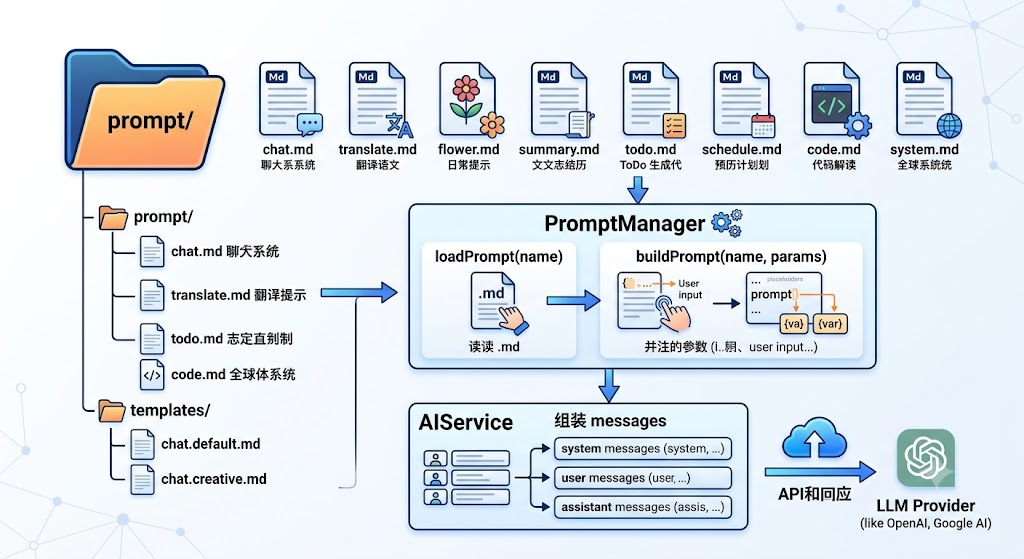
1.2 Prompt 设计原则
| 原则 | 说明 | 实现方式 |
|---|---|---|
| 模块化 | 每个 AI 能力独立 Prompt | 按文件拆分 |
| 参数化 | 动态内容通过 {``{变量}} 注入 |
模板引擎替换 |
| 版本化 | 每个 Prompt 有版本号和变更记录 | 文件头元数据 |
| 可测试 | 支持独立测试和对比 | A/B 测试接口 |
| 可回滚 | 快速回退到上一版本 | 版本号管理 |
二、Prompt 文件格式
2.1 文件结构规范
每个 Prompt 文件使用 Markdown + YAML front matter 格式:
markdown
---
name: chat
version: 2.1.0
description: AI 聊天系统 Prompt
author: HarmonyAI Team
created: 2025-01-01
updated: 2025-06-15
changelog:
  - 2.1.0: 优化角色设定,增加工具使用指导
  - 2.0.0: 重构 Prompt 结构,增强上下文管理
  - 1.0.0: 初始版本
tags:
  - chat
  - system
  - conversation
---

# 角色设定

你是一个名为 **HarmonyAI** 的智能生活助手,由 HarmonyOS NEXT 平台驱动。

## 核心能力

- 多轮对话:{{history}}
- 当前语言:{{language}}
- 用户偏好:{{preferences}}

## 回答规范

1. **简洁准确**:优先用简短的语言回答问题
2. **结构化**:复杂回答使用 Markdown 格式
3. **代码展示**:使用 ```language 标注代码块
4. **中文优先**:默认使用中文回答
5. **友好亲切**:使用 {{tone}} 的语气

## 工具使用

当用户需要以下功能时,主动推荐对应工具:
- 翻译 → 使用翻译功能
- 图片识别 → 使用 OCR 功能
- 代码解释 → 使用代码分析功能
2.2 各能力模块 Prompt 示例
translate.md(翻译 Prompt):
markdown
---
name: translate
version: 1.3.0
description: AI 翻译系统 Prompt
---

你是一个专业的翻译助手。请将以下文本从 {{sourceLang}} 翻译为 {{targetLang}}。

## 翻译规范

1. 保持原文的语气和风格
2. 专业术语准确翻译
3. 长句适当拆分
4. 文化差异适当本地化

## 输出格式

{ "translated": "翻译结果", "pronunciation": "发音(可选)", "explanation": "翻译说明" }

## 示例

**输入:** Hello, how are you?
**输出:** { "translated": "你好,最近怎么样?", "pronunciation": "Nǐ hǎo, zuìjìn zěnme yàng?", "explanation": "日常问候的友好表达" }flower.md(花语 Prompt):
markdown
---
name: flower
version: 1.1.0
description: AI 每日花语查询
---

你是一位花语专家。请查询「{{flowerName}}」的花语和寓意。

## 输出格式

请用以下 JSON 格式回答:

{
  "name": "花名",
  "language": "花语(一句话)",
  "meaning": "详细寓意",
  "suggestion": "送花建议",
  "story": "相关的历史故事或传说",
  "poem": "与花相关的诗句"
}
三、PromptManager 核心实现
3.1 Prompt 元数据
typescript
// prompt/PromptMeta.ts
export interface PromptMeta {
  name: string;          // Prompt 名称
  version: string;       // 版本号 (semver)
  description: string;   // 描述
  author: string;        // 作者
  created: string;       // 创建日期
  updated: string;       // 更新日期
  changelog: string[];  // 变更记录
  tags: string[];       // 标签
}

export interface PromptTemplate {
  meta: PromptMeta;
  content: string;       // 原始内容
  compiled: string;      // 编译后的内容(无 front matter)
}

export class PromptError extends Error {
  constructor(message: string, public code: string) {
    super(message);
    this.name = 'PromptError';
  }
}

// Prompt 未找到
export class PromptNotFoundError extends PromptError {
  constructor(name: string) {
    super(`Prompt "${name}" not found`, 'PROMPT_NOT_FOUND');
  }
}

// Prompt 版本冲突
export class PromptVersionConflictError extends PromptError {
  constructor(name: string, expected: string, actual: string) {
    super(
      `Prompt "${name}" version conflict: expected ${expected}, got ${actual}`,
      'VERSION_CONFLICT'
    );
  }
}
3.2 PromptManager 实现
typescript
// prompt/PromptManager.ts
import resourceManager from '@ohos.resourceManager';

export class PromptManager {
  private static instance: PromptManager;
  private prompts: Map<string, PromptTemplate> = new Map();
  private resourceManager: resourceManager.ResourceManager | null = null;

  static getInstance(): PromptManager {
    if (!PromptManager.instance) {
      PromptManager.instance = new PromptManager();
    }
    return PromptManager.instance;
  }

  // 初始化
  async init(context: Context): Promise<void> {
    this.resourceManager = context.resourceManager;
    // 预加载所有 Prompt
    await this.loadAllPrompts();
  }

  // 加载所有 Prompt
  async loadAllPrompts(): Promise<void> {
    const promptNames = [
      'chat', 'translate', 'flower', 'summary',
      'todo', 'schedule', 'code', 'system'
    ];

    for (const name of promptNames) {
      await this.loadPrompt(name);
    }
    hilog.info(0x0000, 'PromptManager',
      'Loaded %{public}d prompts', this.prompts.size);
  }

  // 加载指定 Prompt
  async loadPrompt(name: string): Promise<PromptTemplate> {
    try {
      // 从 resources/rawfile 读取
      const content = await this.readPromptFile(`${name}.md`);
      const parsed = this.parsePromptFile(content);
      this.prompts.set(name, parsed);
      return parsed;
    } catch (error) {
      hilog.error(0x0000, 'PromptManager',
        'Failed to load prompt %{public}s: %{public}s',
        name, error.message);
      throw new PromptNotFoundError(name);
    }
  }

  // 从 rawfile 读取 Prompt 文件
  private async readPromptFile(fileName: string): Promise<string> {
    if (!this.resourceManager) {
      throw new PromptError('ResourceManager not initialized', 'NO_RESOURCE');
    }

    try {
      // HarmonyOS 读取 rawfile
      const data = await this.resourceManager.getRawFileContent(fileName);
      const decoder = util.TextDecoder.create('utf-8');
      return decoder.decodeWithStream(data);
    } catch (e) {
      // fallback: 尝试从本地文件系统读取
      return this.readPromptFromFiles(fileName);
    }
  }

  // 从 files 目录读取(开发/调试用)
  private async readPromptFromFiles(fileName: string): Promise<string> {
    const context = getContext();
    const filePath = `${context.filesDir}/prompts/${fileName}`;
    try {
      const file = await fs.open(filePath, fs.OpenMode.READ_ONLY);
      const stat = await fs.stat(filePath);
      const buf = new ArrayBuffer(stat.size);
      await fs.read(file.fd, buf);
      fs.close(file);
      return util.TextDecoder.create('utf-8').decodeWithStream(buf);
    } catch {
      // 返回默认 Prompt
      return this.getDefaultPrompt(fileName.replace('.md', ''));
    }
  }

  // 解析 Prompt 文件(提取 front matter 和内容)
  private parsePromptFile(content: string): PromptTemplate {
    const meta: PromptMeta = {
      name: '',
      version: '1.0.0',
      description: '',
      author: 'HarmonyAI',
      created: new Date().toISOString().split('T')[0],
      updated: new Date().toISOString().split('T')[0],
      changelog: [],
      tags: []
    };

    let body = content;

    // 解析 YAML front matter (--- xxx ---)
    const frontMatterMatch = content.match(/^---\n([\s\S]*?)\n---\n/);
    if (frontMatterMatch) {
      const yaml = frontMatterMatch[1];
      // 简单解析 key: value
      yaml.split('\n').forEach(line => {
        const [key, ...values] = line.split(':');
        const value = values.join(':').trim();
        switch (key.trim()) {
          case 'name': meta.name = value; break;
          case 'version': meta.version = value; break;
          case 'description': meta.description = value.replace(/^["']|["']$/g, ''); break;
          case 'author': meta.author = value; break;
          case 'created': meta.created = value; break;
          case 'updated': meta.updated = value; break;
          case 'tags': meta.tags = value.replace(/[[\]"]/g, '').split(',').map(t => t.trim()); break;
        }
      });
      body = content.slice(frontMatterMatch[0].length);
    }

    return {
      meta,
      content: body.trim(),
      compiled: body.trim()
    };
  }

  // 构建 Prompt(注入参数)
  buildPrompt(name: string, params: Record<string, string> = {}): string {
    const template = this.prompts.get(name);
    if (!template) {
      throw new PromptNotFoundError(name);
    }

    // 参数替换 {{variable}}
    let compiled = template.compiled;
    for (const [key, value] of Object.entries(params)) {
      const regex = new RegExp(`\\{\\{\\s*${key}\\s*\\}\\}`, 'g');
      compiled = compiled.replace(regex, value);
    }

    return compiled;
  }

  // 获取 Prompt 元数据
  getPromptMeta(name: string): PromptMeta | null {
    const template = this.prompts.get(name);
    return template ? template.meta : null;
  }

  // 获取所有 Prompt 名称
  getPromptNames(): string[] {
    return Array.from(this.prompts.keys());
  }

  // 获取所有 Prompt 元数据
  getAllMetas(): PromptMeta[] {
    return Array.from(this.prompts.values()).map(t => t.meta);
  }

  // 重新加载指定 Prompt
  async reloadPrompt(name: string): Promise<void> {
    await this.loadPrompt(name);
  }

  // 重新加载所有 Prompt
  async reloadAllPrompts(): Promise<void> {
    await this.loadAllPrompts();
  }

  // 默认 Prompt(兜底)
  private getDefaultPrompt(name: string): string {
    const defaults: Record<string, string> = {
      chat: `你是一个智能生活助手,名叫 HarmonyAI。
请友好地回答用户的问题,使用 Markdown 格式。`,
      translate: `请将以下文本翻译为目标语言。`,
      flower: `请查询指定花的花语和寓意。`,
      summary: `请总结以下文本的核心内容。`,
      todo: `请从以下自然语言中提取待办事项。`,
      schedule: `请根据以下描述生成日程安排。`,
      code: `请解释以下代码的功能和实现原理。`,
      system: `你是 HarmonyAI,一个运行在 HarmonyOS NEXT 上的智能助手。`
    };
    return defaults[name] || '';
  }
}
关键设计 :使用 YAML front matter 管理 Prompt 元数据(版本、标签、变更记录),与正文分离。
buildPrompt方法使用正则替换实现参数注入,支持灵活的{``{variable}}语法。
3.3 PromptManager 核心方法汇总
| 方法 | 参数 | 返回值 | 功能说明 |
|---|---|---|---|
init(context) |
Context |
Promise<void> |
初始化 ResourceManager |
loadAllPrompts() |
无 | Promise<void> |
预加载所有 Prompt 文件 |
loadPrompt(name) |
string |
Promise<PromptTemplate> |
加载指定 Prompt |
buildPrompt(name, params) |
string, Record<string, string> |
string |
构建并注入参数 |
getPromptMeta(name) |
string |
`PromptMeta | null` |
getPromptNames() |
无 | string[] |
获取所有 Prompt 名称 |
getAllMetas() |
无 | PromptMeta[] |
获取所有元数据 |
reloadPrompt(name) |
string |
Promise<void> |
重新加载指定 Prompt |
reloadAllPrompts() |
无 | Promise<void> |
重新加载所有 Prompt |
四、Prompt 模板引擎
4.1 增强模板引擎
typescript
// prompt/TemplateEngine.ts
export class TemplateEngine {
  // 高级模板替换
  static compile(template: string, params: Record<string, any>): string {
    let result = template;

    // 1. 简单变量替换 {{name}}
    result = result.replace(/\{\{(\w+)\}\}/g, (_, key) => {
      return params[key] !== undefined ? String(params[key]) : `{{${key}}}`;
    });

    // 2. 条件渲染 {{#if condition}}content{{/if}}
    result = result.replace(
      /\{\{#if (\w+)\}\}([\s\S]*?)\{\{\/if\}\}/g,
      (_, key, content) => {
        return params[key] ? content : '';
      }
    );

    // 3. 循环渲染 {{#each items}}item{{/each}}
    result = result.replace(
      /\{\{#each (\w+)\}\}([\s\S]*?)\{\{\/each\}\}/g,
      (_, key, template) => {
        const items = params[key] as any[];
        if (!items || !Array.isArray(items)) return '';
        return items.map(item => {
          return template.replace(/\{\{this\}\}/g, String(item));
        }).join('\n');
      }
    );

    // 4. 默认值 {{name:default}}
    result = result.replace(/\{\{(\w+):([^}]+)\}\}/g, (_, key, defaultValue) => {
      return params[key] !== undefined ? String(params[key]) : defaultValue;
    });

    return result;
  }

  // 验证参数完整性
  static validateParams(template: string, params: Record<string, any>): string[] {
    const missing: string[] = [];
    const regex = /\{\{(\w+)\}\}/g;
    let match;
    while ((match = regex.exec(template)) !== null) {
      const key = match[1];
      if (params[key] === undefined && !key.startsWith('#')) {
        missing.push(key);
      }
    }
    return missing;
  }
}
4.2 A/B 测试支持
typescript
// prompt/PromptABTest.ts
export class PromptABTest {
  private experiments: Map<string, Experiment> = new Map();

  // 注册实验
  register(name: string, variants: string[]) {
    this.experiments.set(name, {
      name,
      variants,
      assignments: new Map()
    });
  }

  // 为用户分配变体
  assign(userId: string, experimentName: string): string {
    const experiment = this.experiments.get(experimentName);
    if (!experiment) throw new Error(`Experiment ${experimentName} not found`);

    // 一致性哈希:同一用户始终看到同一变体
    const hash = this.hashCode(userId + experimentName);
    const index = Math.abs(hash) % experiment.variants.length;
    const variant = experiment.variants[index];

    experiment.assignments.set(userId, variant);
    return variant;
  }

  // 获取用户的变体
  getVariant(userId: string, experimentName: string): string | undefined {
    const experiment = this.experiments.get(experimentName);
    return experiment?.assignments.get(userId);
  }

  private hashCode(str: string): number {
    let hash = 0;
    for (let i = 0; i < str.length; i++) {
      const char = str.charCodeAt(i);
      hash = ((hash << 5) - hash) + char;
      hash |= 0;
    }
    return hash;
  }
}

interface Experiment {
  name: string;
  variants: string[];
  assignments: Map<string, string>;
}
五、Prompt 管理页面
5.1 Prompt 设置页面
typescript
// pages/SettingPage.ets (Prompt 管理部分)
@Component
struct PromptSettings {
  @State prompts: PromptMeta[] = [];
  @State selectedPrompt: PromptMeta | null = null;
  @State promptContent: string = '';
  @StorageLink('statusBarHeight') statusBarHeight: number = 32;
  @StorageLink('navBarHeight') navBarHeight: number = 24;
  private promptManager = PromptManager.getInstance();

  aboutToAppear() {
    this.prompts = this.promptManager.getAllMetas();
  }

  build() {
    Column() {
      // 顶部安全区占位
      Row().width('100%').height(this.statusBarHeight);

      // Prompt 列表
      List() {
        ForEach(this.prompts, (meta: PromptMeta) => {
          ListItem() {
            Column() {
              Row() {
                Text(meta.name).fontSize(16).fontWeight(FontWeight.Bold);
                Blank();
                Text(`v${meta.version}`)
                  .fontSize(12).fontColor('#6C5CE7')
                  .backgroundColor('#F0F0FF')
                  .borderRadius(8).padding({ left: 8, right: 8 });
              }
              Text(meta.description).fontSize(13).fontColor(Color.Gray);
              Row() {
                ForEach(meta.tags, (tag: string) => {
                  Text(tag).fontSize(11).fontColor('#0984E3')
                    .backgroundColor('#E8F4FD')
                    .borderRadius(4).padding({ left: 6, right: 6, top: 2, bottom: 2 });
                }, (tag: string) => tag);
              }
              .margin({ top: 6 });
            }
            .padding(12)
            .backgroundColor(Color.White)
            .borderRadius(12)
            .margin({ bottom: 8 })
            .onClick(() => {
              this.selectedPrompt = meta;
            });
          }
        }, (meta: PromptMeta) => meta.name);
      }
      .layoutWeight(1);

      // 底部安全区占位
      Row().width('100%').height(this.navBarHeight);
    }
    .padding(16);
  }
}
六、Prompt 优化策略
6.1 历史对话注入
typescript
// 构建聊天消息时注入历史对话
async buildChatMessages(text: string): Promise<Message[]> {
  const systemPrompt = this.promptManager.buildPrompt('chat', {
    history: this.formatHistory(),
    language: this.getLanguage(),
    preferences: this.getUserPreferences(),
    tone: '友好亲切'
  });

  return [
    { role: 'system', content: systemPrompt },
    ...this.getRecentHistory(10),  // 最近 10 轮对话
    { role: 'user', content: text }
  ];
}

// 格式化历史对话
private formatHistory(): string {
  return this.messages.slice(-20).map(m =>
    `${m.role === 'user' ? '用户' : '助手'}: ${m.content.slice(0, 100)}`
  ).join('\n');
}
6.2 Few-shot 示例注入
typescript
// 在 Prompt 中注入示例
buildPromptWithExamples(name: string, examples: Example[]): string {
  const base = this.promptManager.buildPrompt(name, {});

  const exampleSection = examples.map((ex, i) =>
    `## 示例 ${i + 1}\n\n**输入:** ${ex.input}\n\n**输出:** ${ex.output}`
  ).join('\n\n');

  return `${base}\n\n---\n\n## 参考示例\n\n${exampleSection}`;
}
七、性能与缓存
7.1 Prompt 缓存
typescript
// LRU 缓存 Prompt 编译结果
private promptCache: Map<string, { result: string; timestamp: number }> = new Map();
private readonly CACHE_TTL = 5 * 60 * 1000; // 5 分钟

buildPromptWithCache(name: string, params: Record<string, string>): string {
  const cacheKey = `${name}:${JSON.stringify(params)}`;
  const cached = this.promptCache.get(cacheKey);

  if (cached && Date.now() - cached.timestamp < this.CACHE_TTL) {
    return cached.result;
  }

  const result = this.buildPrompt(name, params);
  this.promptCache.set(cacheKey, { result, timestamp: Date.now() });
  return result;
}
7.2 批量预加载
typescript
// 在应用启动时预加载所有 Prompt
onCreate(want, launchParam) {
  PromptManager.getInstance().init(this.context);
  // 不需要等待,后台加载
}
7.3 Prompt 加载策略对比
| 策略 | 加载时机 | 优点 | 缺点 | 适用场景 |
|---|---|---|---|---|
| 启动预加载 | App 启动时 | 首次使用无延迟 | 增加启动时间 | 小型 Prompt 文件 |
| 懒加载 | 首次使用时 | 启动速度快 | 首次有短暂延迟 | 大型 Prompt 文件 |
| 混合模式 | 核心预载 + 其他懒加载 | 平衡性能 | 实现稍复杂 | 企业级应用(推荐) |
推荐方案 :HarmonyAI 采用混合模式,
chat和system在启动时预加载,其他能力模块按需加载。
八、完整使用流程
8.1 Prompt 文件存放位置
resources/
├── rawfile/
│   └── prompts/
│       ├── chat.md
│       ├── translate.md
│       ├── flower.md
│       ├── summary.md
│       ├── todo.md
│       ├── schedule.md
│       ├── code.md
│       └── system.md
└── ...
8.2 AIService 调用 Prompt
typescript
// service/AIService.ts
async chat(messages: Message[]): Promise<ChatResponse> {
  // 1. 构建系统 Prompt
  const systemPrompt = PromptManager.getInstance().buildPrompt('chat', {
    role: '智能生活助手',
    language: 'zh-CN',
    tone: '友好亲切'
  });

  // 2. 组装消息
  const builtMessages = [
    { role: 'system', content: systemPrompt },
    ...messages
  ];

  // 3. 调用 Provider
  return this.provider.chat({ messages: builtMessages });
}
九、常见问题
9.1 Prompt 参数未替换
typescript
// 错误:参数名拼写不一致
// template: "你的角色是 {{role}}"
// buildPrompt('chat', { roles: '助手' }); // 拼写错误

// 正确:参数名一致
buildPrompt('chat', { role: '助手' }); // role 匹配
9.2 文件编码问题
markdown
// 错误:Prompt 文件编码不正确导致解析失败
// 解决方案:确保 .md 文件使用 UTF-8 编码保存

// 检查编码
file --mime-encoding prompt/chat.md
// 输出:chat.md: utf-8
十、Git 提交
bash
git add .
git commit -m "feat(prompt): 完成 PromptManager 设计与实现

- 设计 YAML front matter Prompt 文件格式
- 实现 PromptManager(加载/解析/编译/缓存)
- 实现 TemplateEngine(变量注入/条件/循环)
- 实现 Prompt 版本管理与变更记录
- 支持热加载和 A/B 测试
- 实现 Prompt 管理设置页面
- 8 个能力模块 Prompt 模板
- LRU 缓存优化

Co-Authored-By: AtomCode (deepseek-v4-flash) <noreply@atomgit.com>"

git tag v0.0.7
总结
本文实现了完整的 Prompt 独立管理体系,这是企业级 AI 应用的关键基础设施。核心要点:
- 独立文件存储 :每个 Prompt 独立
.md文件,支持 YAML front matter - 模板引擎 :
{``{variable}}参数注入、条件渲染、循环渲染 - 版本管理:semver 版本号、changelog、元数据追踪
- 动态加载:运行时加载和重新加载,无需重新编译
- 缓存优化:LRU 缓存 + TTL,减少重复编译
- A/B 测试:支持 Prompt 变体分配和效果对比
- 8 个 Prompt 模板:覆盖所有 AI 能力模块
如果这篇文章对你有帮助,欢迎点赞👍、收藏⭐、关注🔔,你的支持是我持续创作的动力!
上一篇: 会话管理与聊天记录保存
下一篇: Provider 抽象与模型切换
相关资源: