直接用 http.createHttp().request() 写网络请求,代码三个月后就烂了。每个页面一套 try-catch,错误处理全凭手感,弱网下请求超时用户只能干瞪眼,页面切走请求还在后台跑。我花了两周把网络层重构成这套方案------在 http 之上封一层,把拦截、重试、取消、类型校验统一收口。架构师就该这么干。
一、问题背景
直接用 @kit.NetworkKit 的 http 模块,会撞上这些典型问题:
| 问题 | 具体表现 |
|---|---|
| 错误处理散落各处 | 每个请求单独 try-catch,重复代码一大堆 |
| 没有重试机制 | 地铁里请求超时了,用户只看到一个"加载失败" |
| 错误不分类型 | 网络断了和后端 500 用同一种方式处理 |
| 类型不安全 | 响应 JSON 直接拿来用,字段名写错运行时才发现 |
| 请求无法取消 | 从 A 页面跳到 B 页面,A 的请求还在跑,回来状态全乱 |
说白了就是缺一个统一的网络层。
二、前置条件
- DevEco Studio 5.0+ / HarmonyOS 5.0.0(API 12)及以上
@kit.NetworkKit的http模块- 网络权限:entry 模块
module.json5声明ohos.permission.INTERNET(HTTP 请求必需) - ArkTS 严格类型规范:全链路强类型,不靠宽松类型和动态访问兜底
- 状态管理 V2 装饰器:
@ComponentV2/@Local/@ObservedV2/@Trace/@Monitor
本文所有 TypeScript 示例默认文件顶部已有如下 import:
typescript
import { http } from '@kit.NetworkKit'三、整体架构
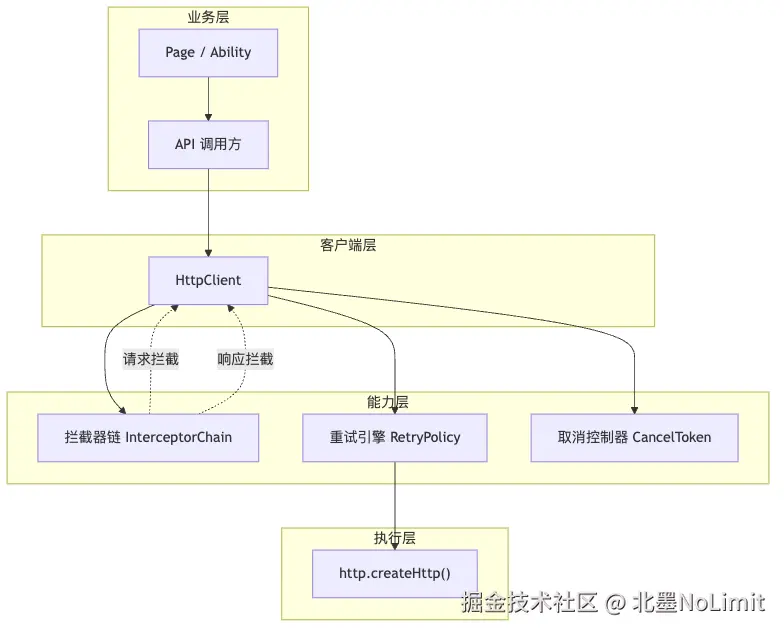
四层结构,各层只干一件事:
- 业务层:页面直接调语义化方法,不用关心网络细节
- 客户端层:统一入口,负责编排拦截、重试、取消
- 能力层:拦截器链、重试引擎、取消控制器,三个独立模块各管各的
- 执行层 :最终调
@kit.NetworkKit原始 API
几个原则定死:全链路强类型;模块之间单一职责;拦截器可插拔;请求跟页面生命周期绑定。
四、类型定义
先把数据模型定清楚,后面的代码都基于这些类型。
typescript
import { http } from '@kit.NetworkKit'

// 请求配置:所有字段强类型,不允许 any / Record / 小写 object
interface RequestConfig {
  url: string
  method: http.RequestMethod
  headers: Map<string, string>
  body: string                       // 已序列化的 body,调用方自己 JSON.stringify
  connectTimeout: number
  readTimeout: number
  retryable: boolean
  cancelToken: CancelToken | null
}

// 业务响应:code 表示业务状态,data 才是负载
interface ApiResponse<T> {
  code: number
  message: string
  data: T
  timestamp: number
}

// 原始 HTTP 响应:headers 用 Map,不用 Record
interface HttpResponse {
  statusCode: number
  headers: Map<string, string>
  body: string
}

// 业务模型示例:按实际接口字段定义(页面示例 UserProfile 见第十一节)
interface OrderResult {
  orderId: string
  status: string
}
RequestConfig 用 Builder 模式构造,写起来不容易传错参数:
typescript
import { http } from '@kit.NetworkKit'

class RequestConfigBuilder {
  private _url: string = ""
  private _method: http.RequestMethod = http.RequestMethod.GET
  private _headers: Map<string, string> = new Map()
  private _body: string = ""
  private _connectTimeout: number = 10000
  private _readTimeout: number = 15000
  private _retryable: boolean = true
  private _cancelToken: CancelToken | null = null

  url(v: string): RequestConfigBuilder { this._url = v; return this }
  method(v: http.RequestMethod): RequestConfigBuilder { this._method = v; return this }
  header(k: string, v: string): RequestConfigBuilder { this._headers.set(k, v); return this }
  body(v: string): RequestConfigBuilder { this._body = v; return this }
  timeout(c: number, r: number): RequestConfigBuilder {
    this._connectTimeout = c
    this._readTimeout = r
    return this
  }
  noRetry(): RequestConfigBuilder { this._retryable = false; return this }
  withCancel(t: CancelToken): RequestConfigBuilder { this._cancelToken = t; return this }

  build(): RequestConfig {
    return {
      url: this._url,
      method: this._method,
      headers: this._headers,
      body: this._body,
      connectTimeout: this._connectTimeout,
      readTimeout: this._readTimeout,
      retryable: this._retryable,
      cancelToken: this._cancelToken
    }
  }
}
五、拦截器链
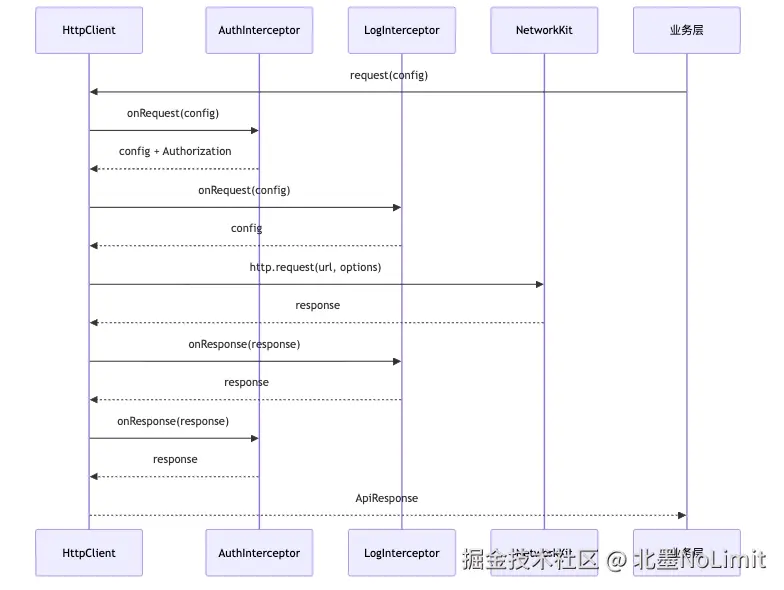
拦截器解决"每个请求都要做的事"------加 Token、打日志、上报错误。把这些逻辑从业务代码里抽出来,通过拦截器统一注入。
typescript
interface RequestInterceptor {
  intercept(config: RequestConfig): Promise<RequestConfig>
}

interface ResponseInterceptor {
  intercept<T>(response: ApiResponse<T>): Promise<ApiResponse<T>>
}

class InterceptorChain {
  private requestInterceptors: RequestInterceptor[] = []
  private responseInterceptors: ResponseInterceptor[] = []

  addRequest(interceptor: RequestInterceptor): void {
    this.requestInterceptors.push(interceptor)
  }

  addResponse(interceptor: ResponseInterceptor): void {
    this.responseInterceptors.push(interceptor)
  }

  async processRequest(config: RequestConfig): Promise<RequestConfig> {
    let current: RequestConfig = config
    for (const interceptor of this.requestInterceptors) {
      current = await interceptor.intercept(current)
    }
    return current
  }

  async processResponse<T>(response: ApiResponse<T>): Promise<ApiResponse<T>> {
    let current: ApiResponse<T> = response
    for (let i: number = this.responseInterceptors.length - 1; i >= 0; i--) {
      current = await this.responseInterceptors[i].intercept(current)
    }
    return current
  }
}
实际项目里最常用的拦截器是认证。请求侧注入 Token,响应侧捕获 401 触发刷新。两侧职责不同,拆成两个类更清晰:
typescript
import { http } from '@kit.NetworkKit'

class AuthRequestInterceptor implements RequestInterceptor {
  private accessToken: string = ""

  setToken(token: string): void { this.accessToken = token }

  async intercept(config: RequestConfig): Promise<RequestConfig> {
    if (this.accessToken.length > 0) {
      config.headers.set("Authorization", "Bearer " + this.accessToken)
    }
    return config
  }
}

class AuthResponseInterceptor implements ResponseInterceptor {
  private refreshPromise: Promise<string> | null = null
  private applyToken: (token: string) => void = () => {}

  setTokenApplier(apply: (token: string) => void): void { this.applyToken = apply }

  async intercept<T>(response: ApiResponse<T>): Promise<ApiResponse<T>> {
    if (response.code === 401) {
      await this.refreshToken()
      throw new HttpError("Token 已刷新,请重试", HttpErrorType.BUSINESS)
    }
    return response
  }

  private async refreshToken(): Promise<void> {
    if (this.refreshPromise === null) {
      this.refreshPromise = this.doRefresh()
    }
    await this.refreshPromise
    this.refreshPromise = null
  }

  private async doRefresh(): Promise<string> {
    const httpObj: http.HttpRequest = http.createHttp()
    const resp: http.HttpResponse = await httpObj.request(
      "https://api.example.com/auth/refresh",
      { method: http.RequestMethod.POST }
    )
    httpObj.destroy()
    const newToken: string = "new_token"
    this.applyToken(newToken)
    return newToken
  }
}
refreshPromise 做了防并发------多个 401 同时回来,只触发一次刷新。applyToken 回调把新 Token 同步回 AuthRequestInterceptor,避免两个类之间循环依赖。
六、错误分类
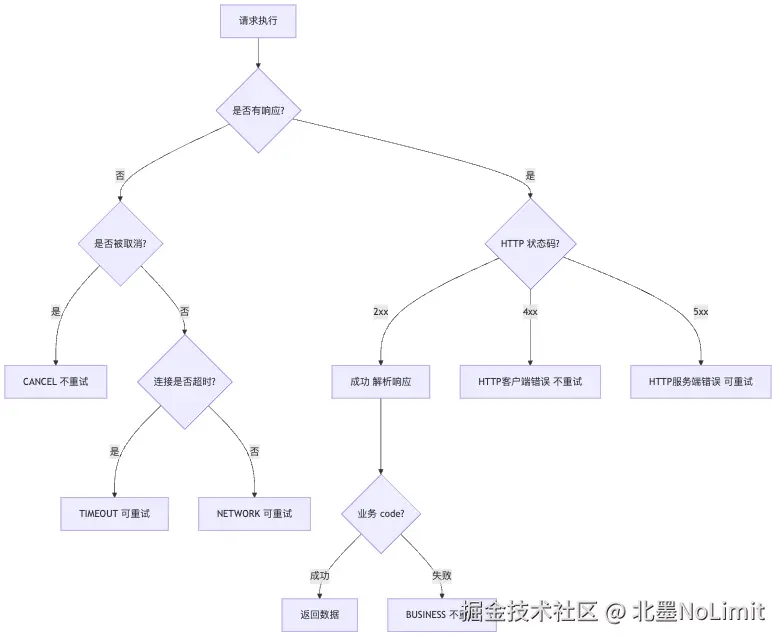
不同类型错误的处理方式完全不同,不能一刀切。
typescript
enum HttpErrorType {
  NETWORK = "NETWORK",    // 网络断了
  TIMEOUT = "TIMEOUT",    // 超时
  HTTP = "HTTP",          // 4xx / 5xx
  BUSINESS = "BUSINESS",  // 后端返回的业务错误
  CANCEL = "CANCEL",      // 被取消了
  PARSE = "PARSE"         // JSON 解析失败
}

class HttpError extends Error {
  type: HttpErrorType
  statusCode: number
  constructor(message: string, type: HttpErrorType, statusCode: number = 0) {
    super(message)
    this.type = type
    this.statusCode = statusCode
  }
}

class ErrorClassifier {
  static isRetryable(error: HttpError): boolean {
    if (error.type === HttpErrorType.NETWORK) return true
    if (error.type === HttpErrorType.TIMEOUT) return true
    if (error.type === HttpErrorType.HTTP) return error.statusCode >= 500
    return false
  }
}
规则:网络问题与超时可重试;5xx 可重试;4xx 与业务错误不重试。
七、指数退避重试
最简单的重试是"失败了立刻再来一次",弱网下会变成请求风暴。正确做法是每次重试之间加等待时间,逐次翻倍------这就是指数退避。再加随机抖动,避免多个客户端同时重试打到同一时间点。

typescript
interface RetryConfig {
  maxRetries: number
  baseDelay: number
  maxDelay: number
  jitterFactor: number
}

const DEFAULT_RETRY: RetryConfig = {
  maxRetries: 3,
  baseDelay: 1000,
  maxDelay: 30000,
  jitterFactor: 0.5
}

class RetryEngine {
  private config: RetryConfig
  constructor(config: RetryConfig) { this.config = config }

  calculateDelay(attempt: number): number {
    const exp: number = this.config.baseDelay * Math.pow(2, attempt)
    const capped: number = Math.min(exp, this.config.maxDelay)
    const jitter: number = capped * this.config.jitterFactor * Math.random()
    return Math.floor(capped + jitter)
  }

  getMaxRetries(): number { return this.config.maxRetries }
}
抖动因子建议 0.3~0.5:太小打散效果不够,太大会让等待时间拉得太长。
八、请求取消
页面切走后请求还在跑,是鸿蒙应用里很常见的内存泄漏。解决思路是把请求跟页面生命周期绑在一起:
typescript
class CancelToken {
  private _cancelled: boolean = false
  cancel(): void { this._cancelled = true }
  isCancelled(): boolean { return this._cancelled }
}页面里:aboutToAppear 创建新 Token,aboutToDisappear 取消它。完整示例见"十一、页面集成"。
九、HttpClient 主体
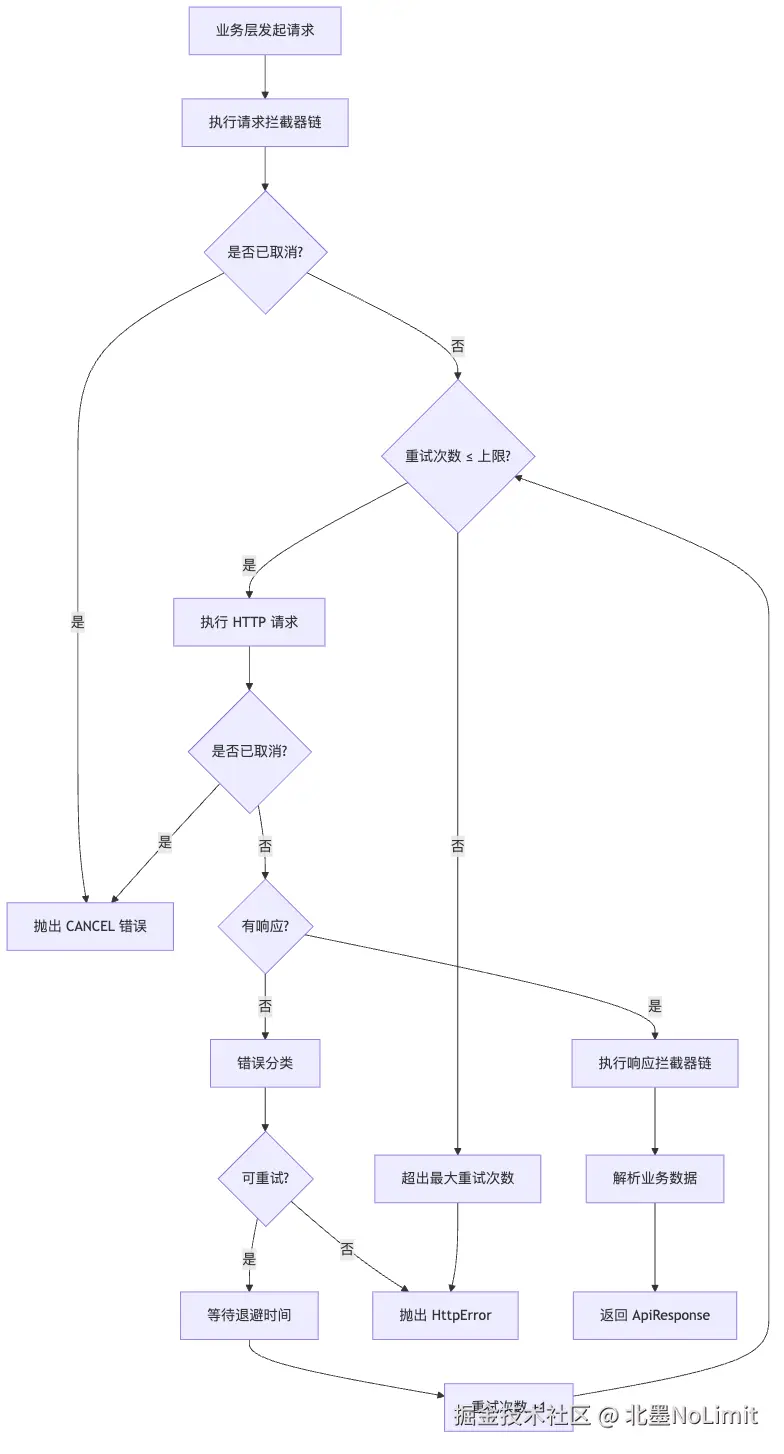
把前面几个模块组装起来:
typescript
import { http } from '@kit.NetworkKit'

class HttpClient {
  private chain: InterceptorChain
  private retryEngine: RetryEngine

  constructor(chain: InterceptorChain, retryConfig: RetryConfig) {
    this.chain = chain
    this.retryEngine = new RetryEngine(retryConfig)
  }

  async request<T>(config: RequestConfig): Promise<ApiResponse<T>> {
    const processedConfig: RequestConfig = await this.chain.processRequest(config)

    if (processedConfig.cancelToken !== null && processedConfig.cancelToken.isCancelled()) {
      throw new HttpError("请求已取消", HttpErrorType.CANCEL)
    }

    let lastError: HttpError | null = null
    const maxRetries: number = processedConfig.retryable ? this.retryEngine.getMaxRetries() : 0

    for (let attempt: number = 0; attempt <= maxRetries; attempt++) {
      if (processedConfig.cancelToken !== null && processedConfig.cancelToken.isCancelled()) {
        throw new HttpError("请求已取消", HttpErrorType.CANCEL)
      }
      try {
        const response: HttpResponse = await this.executeHttp(processedConfig)
        const apiResponse: ApiResponse<T> = this.parseResponse<T>(response)
        return await this.chain.processResponse(apiResponse)
      } catch (error) {
        // ArkTS 要求 catch 不带类型标注;按需在内部 cast
        const e: Error = error as Error
        lastError = this.toHttpError(e)
        if (!ErrorClassifier.isRetryable(lastError)) {
          throw lastError
        }
        if (attempt >= maxRetries) {
          throw lastError
        }
        const delay: number = this.retryEngine.calculateDelay(attempt)
        await new Promise<void>((resolve: () => void) => { setTimeout(() => resolve(), delay) })
      }
    }
    throw lastError !== null ? lastError : new HttpError("未知错误", HttpErrorType.NETWORK)
  }

  private async executeHttp(config: RequestConfig): Promise<HttpResponse> {
    const httpObj: http.HttpRequest = http.createHttp()
    try {
      const response: http.HttpResponse = await httpObj.request(config.url, {
        method: config.method,
        header: config.headers,
        extraData: config.body,
        connectTimeout: config.connectTimeout,
        readTimeout: config.readTimeout,
        expectDataType: http.HttpDataType.STRING
      })
      // response.header 来自 SDK 的 Object 字段,ArkTS 不允许用 Record<> 通用解析;
      // 业务侧如需读取响应头,建议在 ResponseInterceptor 里直接拿原始 http.HttpResponse 处理。
      const body: string = (response.result as string) ?? ""
      const headers: Map<string, string> = new Map()
      return { statusCode: response.responseCode, headers: headers, body: body }
    } finally {
      httpObj.destroy()
    }
  }

  private parseResponse<T>(response: HttpResponse): ApiResponse<T> {
    if (response.statusCode < 200 || response.statusCode >= 300) {
      throw new HttpError("HTTP " + response.statusCode, HttpErrorType.HTTP, response.statusCode)
    }
    // JSON 边界做一次 cast:原始 JSON → 强类型响应模型
    return JSON.parse(response.body) as ApiResponse<T>
  }

  private toHttpError(error: Error): HttpError {
    if (error instanceof HttpError) {
      return error
    }
    const message: string = error.message
    if (message.indexOf("timeout") >= 0) {
      return new HttpError(message, HttpErrorType.TIMEOUT)
    }
    return new HttpError(message, HttpErrorType.NETWORK)
  }
}
request() 流程:拦截器处理 → 检查取消 → 循环执行(带重试)→ 响应拦截 → 返回。每次 executeHttp 都会在 finally 里销毁 http 实例,避免连接泄漏。
十、组装与使用
初始化一次,全局复用:
typescript
import { http } from '@kit.NetworkKit'

function createHttpClient(): HttpClient {
  const chain: InterceptorChain = new InterceptorChain()
  const authReq: AuthRequestInterceptor = new AuthRequestInterceptor()
  const authResp: AuthResponseInterceptor = new AuthResponseInterceptor()
  authResp.setTokenApplier((token: string): void => { authReq.setToken(token) })
  chain.addRequest(authReq)
  chain.addResponse(authResp)
  return new HttpClient(chain, DEFAULT_RETRY)
}

// 全局单例:页面与业务模块共用同一个 HttpClient
const globalHttpClient: HttpClient = createHttpClient()业务调用(UserProfile 定义见第十一节;cancelToken 为页面持有的取消令牌,见第十一节):
typescript
import { http } from '@kit.NetworkKit'

// GET 请求,失败自动重试
const profile: ApiResponse<UserProfile> = await globalHttpClient.request<UserProfile>(
  new RequestConfigBuilder()
    .url("https://api.example.com/users/12345")
    .method(http.RequestMethod.GET)
    .timeout(5000, 10000)
    .build()
)

// POST 请求,不重试(防重复提交),绑定取消令牌
const order: ApiResponse<OrderResult> = await globalHttpClient.request<OrderResult>(
  new RequestConfigBuilder()
    .url("https://api.example.com/orders")
    .method(http.RequestMethod.POST)
    .body(JSON.stringify(orderData))
    .noRetry()
    .withCancel(cancelToken)
    .timeout(10000, 20000)
    .build()
)
注意 POST 那条链:.noRetry() 防重复提交,.withCancel(cancelToken) 绑定页面生命周期。订单这种写操作,重试一次就可能产生两个订单。
十一、页面集成(状态管理 V2)
下面是一个完整的 ArkUI 页面示例,全 V2 装饰器:
typescript
import { http } from '@kit.NetworkKit'

// 数据模型:用 @ObservedV2 + @Trace 让属性可被观察
@ObservedV2
class UserProfile {
  @Trace name: string = ""
  @Trace avatar: string = ""
  @Trace email: string = ""
}

@Entry
@ComponentV2
struct UserProfilePage {
  @Local profile: UserProfile = new UserProfile()
  @Local loading: boolean = true
  @Local errorMsg: string = ""

  private client: HttpClient = globalHttpClient
  private cancelToken: CancelToken = new CancelToken()

  aboutToAppear(): void {
    this.cancelToken = new CancelToken()
    this.loadProfile()
  }

  aboutToDisappear(): void {
    this.cancelToken.cancel()
  }

  async loadProfile(): Promise<void> {
    try {
      this.loading = true
      const config: RequestConfig = new RequestConfigBuilder()
        .url("https://api.example.com/users/12345")
        .method(http.RequestMethod.GET)
        .withCancel(this.cancelToken)
        .build()
      const resp: ApiResponse<UserProfile> = await this.client.request<UserProfile>(config)
      this.profile.name = resp.data.name
      this.profile.avatar = resp.data.avatar
      this.profile.email = resp.data.email
      this.errorMsg = ""
    } catch (error) {
      // ArkTS 要求 catch 不带类型标注;用 Error 兜底
      const e: Error = error as Error
      if (e instanceof HttpError && e.type !== HttpErrorType.CANCEL) {
        this.errorMsg = e.type === HttpErrorType.NETWORK
          ? "网络不可达,请检查连接"
          : "请求失败,请稍后重试"
      }
    } finally {
      this.loading = false
    }
  }

  build() {
    Column() {
      if (this.loading) {
        LoadingProgress()
      } else if (this.errorMsg.length > 0) {
        Text(this.errorMsg)
          .fontSize(16)
          .fontColor("#999999")
      } else {
        Column() {
          Image(this.profile.avatar)
            .width(64)
            .height(64)
            .borderRadius(32)
          Text(this.profile.name)
            .fontSize(20)
            .fontWeight(FontWeight.Bold)
            .margin({ top: 12 })
          Text(this.profile.email)
            .fontSize(14)
            .fontColor("#666666")
            .margin({ top: 4 })
        }
        .alignItems(HorizontalAlign.Center)
        .padding(24)
      }
    }
    .width("100%")
    .height("100%")
    .justifyContent(FlexAlign.Center)
  }
}
V2 要点,直接对照记:
@ComponentV2替代@Component,@Local替代@StateUserProfile加@ObservedV2,内部属性加@Trace,赋值就能触发 UI 刷新@Entry仍可包裹@ComponentV2- 监听某个属性变化用
@Monitor替代 V1 的@Watch - 跨层级注入用
@Provider/@Consumer替代@Provide/@Consume - 全局 / 持久化状态用
AppStorageV2/PersistenceV2(从@kit.ArkUI引入)
十二、踩坑记录
Http 实例必须销毁
http.createHttp() 返回的对象持有 TCP 连接,不调 destroy() 连接数会一直涨,涨到系统上限就崩。养成习惯用 try-finally:
typescript
const httpObj: http.HttpRequest = http.createHttp()
try {
  const response: http.HttpResponse = await httpObj.request(url)
} finally {
  httpObj.destroy()
}
超时要设两个
connectTimeout 控制 TCP 建连(建议5-10秒),readTimeout 控制等响应(建议10-30秒)。只设一个的话,弱网下另一个阶段超时你根本捕获不到。
POST 重试要保证幂等
不确定后端是否幂等的接口,老老实实 .noRetry()。否则用户下单点一下,网络抖动重试两次,就变成两个订单:
typescript
import { http } from '@kit.NetworkKit'
import { util } from '@kit.ArkTS'

// 确认幂等的接口,带幂等键
.header("Idempotency-Key", util.generateRandomUUID())

// 不确定的,关掉重试
.noRetry()
十三、总结
这套方案解决了几个具体问题:
- 拦截器把 Token 管理、日志、错误上报从业务代码里剥离
- 指数退避重试让弱网下的体验好了很多
- 错误分类让不同问题有不同处理------该重试的重试,该报错的报错
CancelToken杜绝了页面切换后的内存泄漏- 全链路类型安全,编译期就能发现问题
落地建议:
- 小项目:直接用
HttpClient+ Builder,不用拦截器 - 中型项目:加上重试
- 大项目:完整采用,配套加上自定义业务拦截器(埋点、上报、签名等)
收获一句话:网络层不是工具函数,是架构。把错误分类、重试策略、生命周期绑定这些决策集中在封装层,业务代码才干净,团队才能一致。