一 组网说明
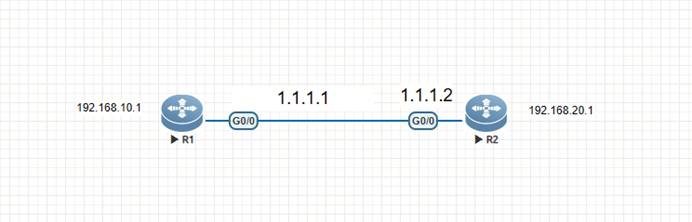
如上图,R1和R2设备互联,R1开启ssh进行测试
二 设备配置
2.1 ssh配置
1.设备配置
hostname R1
!
enable service ssh-server
username 1 password Admin@123
username 1 privilege 15
!
line vty 0 4
login local
!
2.2 PC作为客户端-登录测试
C:\Users\Administrator>ssh 1@192.168.1.133
The authenticity of host '192.168.1.133 (192.168.1.133)' can't be established.
RSA key fingerprint is SHA256:1a4MBauwZ+BX5+0Hfiy40/SO+/jVoqvc0tN2WU6kyg0.
Are you sure you want to continue connecting (yes/no/fingerprint)? yes
Warning: Permanently added '192.168.1.133' (RSA) to the list of known hosts.
1@192.168.1.133's password:
User's password is too weak. Please change the password!
R1#
2.3 登录状态查看
R1#show users
Line User Host(s) Idle Location
* 0 con 0 --- idle 00:00:00 ---
1 vty 0 1 idle 00:02:24 192.168.1.13
R1#show users all
Line User Host(s) Idle Location
* 0 con 0 --- idle 00:00:00 ---
1 vty 0 1 idle 00:02:30 192.168.1.13
2 vty 1 --- 00:00:00 ---
3 vty 2 --- 00:00:00 ---
4 vty 3 --- 00:00:00 ---
5 vty 4 --- 00:00:00 ---
R1#
R1#show service
web-server : disabled
web-server(https): disabled
snmp-agent : enabled
ssh-server : enabled
telnet-server : enabled
R1#
2.4 锐捷网络设备作为客户端-登录测试
R2#ssh -l 1 192.168.10.1
%Trying 192.168.10.1, 22,...open
1@192.168.10.1's password:
User's password is too weak. Please change the password!
R1#
2.5 登录状态再次查看
R1#
R1#show users
Line User Host(s) Idle Location
* 0 con 0 --- idle 00:00:00 ---
2 vty 1 1 idle 00:01:42 1.1.1.2
R1#
R1#show users all
Line User Host(s) Idle Location
* 0 con 0 --- idle 00:00:00 ---
1 vty 0 --- 00:00:00 ---
2 vty 1 1 idle 00:01:48 1.1.1.2
3 vty 2 --- 00:00:00 ---
4 vty 3 --- 00:00:00 ---
5 vty 4 --- 00:00:00 ---
R1#
R1#show service
web-server : disabled
web-server(https): disabled
snmp-agent : enabled
ssh-server : enabled
telnet-server : enabled
R1#
2.6 SSH参数查看
R2#ssh ?
-c Select encryption algorithm
-l Log in using this user name
-m Select HMAC algorithm
-p Connect to this port
-v Specify SSH Protocol Version
WORD IP address or hostname of a remote system
R2#ssh -l 1 ?
-c Select encryption algorithm
-m Select HMAC algorithm
-p Connect to this port
-v Specify SSH Protocol Version
WORD IP address or hostname of a remote system
R2#ssh -l 1 192.168.10.1
%Trying 192.168.10.1, 22,...open
1@192.168.10.1's password:
User's password is too weak. Please change the password!
R1#
3.line vty接口配置
R1(config-line)#transport ?
input Define which protocols to use when connecting to the terminal server
R1(config-line)#transport in
R1(config-line)#transport input ?
all All protocols
none No protocols
ssh TCP/IP SSH protocol
telnet TCP/IP Telnet protocol
R1(config-line)#transport input