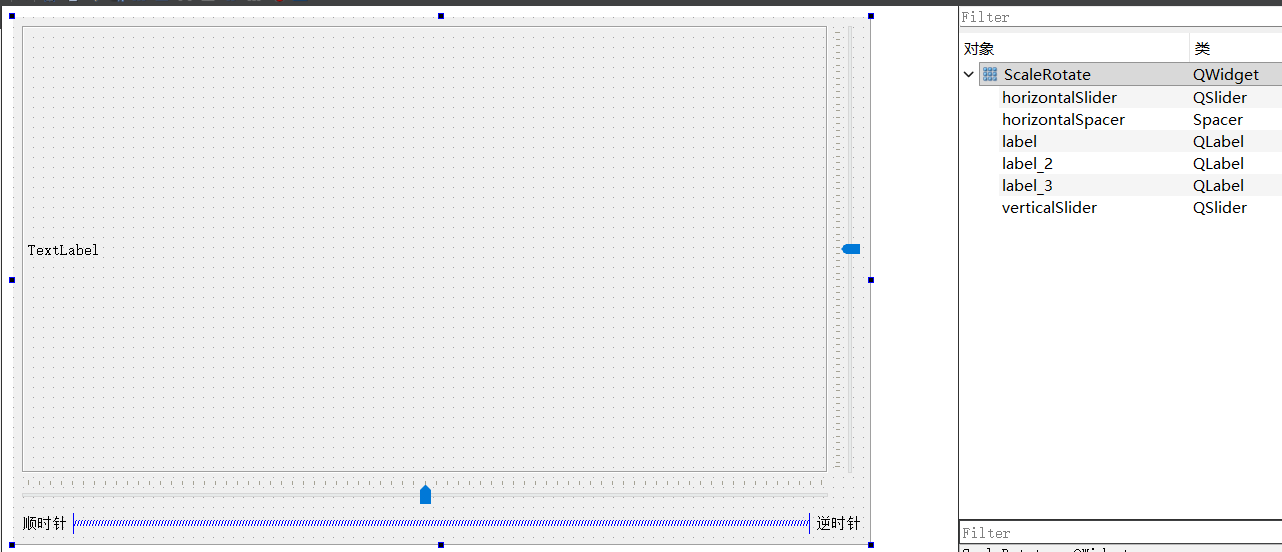
- Mat
cv::Mat Mat(int rows, int cols, int type);
Mat imgRot(2,3, CV_32FC1)
初始化
CV_32FC1
32F:32‑bit float 单精度浮点数C1:1 个通道2x3 的 仿射矩阵
32FC1 32为float C1 一个通道
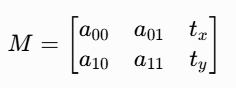
- getRotationMatrix2D
Mat getRotationMatrix2D(Point2f center, double angle, double scale);
根据中心坐标、旋转角度、缩放参数 生成旋转仿射矩阵
angle > 0 顺时针 < 0 逆时针 取值 -360 ~ 360
scale > 1 放大 < 1 缩小 取值 0 ~ 2
- warpAffine
void warpAffine(
InputArray src,
OutputArray dst,
InputArray M,
Size dsize,
int flags = INTER_LINEAR,
int borderMode = BORDER_CONSTANT,
const Scalar& borderValue = Scalar()
);
作用:使用2x3的仿射矩阵,对图像进行(旋转、缩放、剪切,平移)仿射变换,将变换后的图片存入 imgDst
QString imgPath = "xxxxxx";

Mat imgSrc = imread(imgPath.toStdString());
cvtColor(imgSrc, imgSrc, COLOR_BGR2RGB);

//设置仿射矩阵
Mat imgRot(2, 3, CV_32FC1);

// 求旋转矩阵
int angle = 50;
int scanle = 0.6;
imgRot = getRotateMarix2D(imgSrc,angle,scaled);

//旋转
Mat imgDst;
warpAffian(imgSrc, imgDst, imgRot, imgSrc.size());

ui->lable->setPixmap(QImage::fromImage(QImage((const unsinged char*)imgDst.data, imgDst.cols, imgDst.rows, static_cast<int>(imgDst.step, QImage::Format_RGB888))));
scalerotate.h
cpp
#ifndef SCALEROTATE_H
#define SCALEROTATE_H

#include <QWidget>
#include <opencv2/opencv.hpp>

using namespace cv;
namespace Ui {
class ScaleRotate;
}

class ScaleRotate : public QWidget
{
    Q_OBJECT

public:
    explicit ScaleRotate(QWidget *parent = nullptr);
    ~ScaleRotate();

    void initmainwindow();
    void imgShow();
    void imgProc(float angle, float scaled);

private slots:
    void on_verticalSlider_valueChanged(int value);
    void on_horizontalSlider_valueChanged(int value);

private:
    Ui::ScaleRotate *ui;

    Mat myImg;
    QImage myQImg;
    int angle, scaled;
};

#endif // SCALEROTATE_H
scalerotate.cpp
cpp
#include "scalerotate.h"
#include "ui_scalerotate.h"

#include <QDebug>

ScaleRotate::ScaleRotate(QWidget *parent) :
    QWidget(parent),
    ui(new Ui::ScaleRotate)
{
    ui->setupUi(this);

    setFixedSize(this->size());

    initmainwindow();


}

ScaleRotate::~ScaleRotate()
{
    delete ui;
}

void ScaleRotate::initmainwindow()
{
    angle = ui->horizontalSlider->value();    // -360 ~ 360
    scaled = ui->verticalSlider->value();   // 0 ~ 2    0 ~ 1 缩小 1 ~ 2 放大

//    ui->label->resize(1387,663);
    QString filePath = R"(D:\new_share\016_opencv\OpencvBlend\6.webp)";
    Mat imgData = imread(filePath.toStdString());
    cvtColor(imgData, imgData, COLOR_BGR2RGB);
    myImg = imgData;
    myQImg = QImage((const unsigned char *)imgData.data, imgData.cols, imgData.rows, static_cast<int>(imgData.step), QImage::Format_RGB888);
    imgShow();
}

void ScaleRotate::imgShow()
{
    ui->label->setPixmap(QPixmap::fromImage(myQImg));
}

void ScaleRotate::imgProc(float angle, float scaled)
{
    // 设置仿射矩阵
    Mat imgRot(2, 3, CV_32FC1);

    // 求图片中心坐标
    Mat imgSrc = myImg;
    Point centerPoint = Point(imgSrc.cols/2, imgSrc.rows/2);

    // 按 中心坐标,旋转角度,缩放参数 求旋转 仿射矩阵
    imgRot = getRotationMatrix2D(centerPoint, angle, scaled);

    // 求旋转 后的图片数据 放入 imgDst
    Mat imgDst;
    warpAffine(imgSrc,imgDst,imgRot,Size(ui->label->width(),ui->label->height()));

    myQImg = QImage((const unsigned char*)imgDst.data,imgDst.cols, imgDst.rows, static_cast<int>(imgDst.step),QImage::Format_RGB888);
    imgShow();

}

void ScaleRotate::on_verticalSlider_valueChanged(int value)
{
    scaled = value;
    imgProc(angle - 360, scaled/100.0);
}

void ScaleRotate::on_horizontalSlider_valueChanged(int value)
{
    angle = value;
    imgProc(angle - 360, scaled/100.0);
}
scalerotate.ui