Spring AI 2.0终于来了!以前想在Java里接入大模型,要么手写一堆HTTP调用和JSON解析,要么东拼西凑各种第三方库。现在有了Spring AI,加个Starter、配个Bean、注入ChatClient,三步就能让AI在项目里跑起来。这篇文章就带你从零搭建一个带对话记忆的聊天服务,看看它到底有多香。
Spring AI简介
Spring AI是Spring生态面向人工智能领域的官方扩展,旨在让Java开发者无需深入机器学习底层,就能像使用Spring MVC、Spring Data一样自然地构建AI应用。
Spring AI的核心功能如下:
- 多模型多供应商支持:一套代码适配OpenAI、Deepseek、Anthropic、Ollama等主流模型,覆盖对话、文生图、语音转文字等多种场景。
- ChatClient 流式 API :与WebClient风格一致的对话客户端,支持同步
call()和流式stream()两种调用方式。 - Advisors API:将RAG、对话记忆、安全过滤等AI模式封装为可复用的拦截器链,跨模型、跨场景移植。
- 对话记忆(Chat Memory):内置内存、Redis、JDBC等多种存储后端,自动管理多轮对话历史上下文。
- RAG检索增强生成:内置ETL流水线将文档切分向量化写入向量库,一行代码即可让大模型"读懂"你的文档。
- 工具调用(Tool Calling) :用
@Tool注解注册Java方法,让模型调用你的API执行真实操作。
项目集成Spring AI
第一步,把Spring AI集成到项目中去。
添加依赖
- 首先在
pom.xml中添加Spring AI的依赖管理,用于统一管理Spring AI版本,这里使用的是2.0.0版本;
xml
<dependencyManagement>
    <dependencies>
        <dependency>
            <groupId>org.springframework.ai</groupId>
            <artifactId>spring-ai-bom</artifactId>
            <version>${spring-ai.version}</version>
            <type>pom</type>
            <scope>import</scope>
        </dependency>
    </dependencies>
</dependencyManagement>- 由于很多模型都兼容OpenAI的API,我们这里使用OpenAI模型的Starter,之后我们需要实现SSE的流式输出,还需添加WebFlux的Starter。
xml
<!-- Spring AI OpenAI Starter -->
<dependency>
    <groupId>org.springframework.ai</groupId>
    <artifactId>spring-ai-starter-model-openai</artifactId>
</dependency>
<!-- SpringBoot WebFlux依赖模块(提供Flux/Mono响应式类型) -->
<dependency>
    <groupId>org.springframework.boot</groupId>
    <artifactId>spring-boot-starter-webflux</artifactId>
</dependency>
添加配置
- 接下来在
application.yaml中添加模型调用相关配置,包含base-url、api-key、chat.model,这里使用的是deepseek-v4-pro模型;
yaml
spring:
  ai:
    openai:
      # 通过OpenAI兼容接口访问DeepSeek服务
      base-url: https://api.deepseek.com
      # 对应API_KEY
      api-key: ${DEEPSEEK_API_KEY}
      chat:
        # 要使用的模型ID,支持deepseek-v4-flash、deepseek-v4-pro
model: deepseek-v4-pro- 最后添加Java配置类,配置一个ChatClient的Bean即可,ChatClient类封装了与AI模型通信的全部细节,你只需要调用它的方法,无需关心底层HTTP请求、流式处理等。
java
/**
 * Spring AI配置类
 * @author macrozheng
 * @since 2026/6/29
 * @see <a href="https://github.com/macrozheng">GitHub</a>
 */
@Configuration
public class SpringAIConfig {

    @Bean
    public ChatClient chatClient(ChatClient.Builder builder) {
        return builder.build();
    }

}

这或许是一个对你有用的开源项目,mall项目是一套基于 SpringBoot3 + Vue3 的电商系统(Github标星60K),后端支持多模块和微服务架构,采用Docker和K8S部署。包括前台商城项目和后台管理系统,能支持完整的订单流程!涵盖商品、订单、购物车、权限、优惠券、会员、支付等功能!
- Boot项目:github.com/macrozheng/...
- Cloud项目:github.com/macrozheng/...
- 文档网站:www.macrozheng.com
项目演示:
实现对话功能
Spring AI集成完毕,开发一个对话功能来试试效果。
- 创建ChatController,实现同步调用大模型的call方法和流式调用大模型的stream方法,对于流式调用大模型的方法,输出格式我们需要配置为
TEXT_EVENT_STREAM_VALUE;
java
/**
 * 对话功能相关接口
 * @author macrozheng
 * @since 2026/6/29
 * @see <a href="https://github.com/macrozheng">GitHub</a>
 */
@RequiredArgsConstructor
@RestController
@RequestMapping("/chat")
@Tag(name = "ChatController",description = "对话功能相关接口")
public class ChatController {

    private final ChatClient chatClient;

    @Operation(summary = "同步调用大模型")
    @PostMapping("/call")
    public String call(@RequestParam String question, @RequestParam String conversationId) {
        return this.chatClient.prompt()
                .user(question)
                .call()
                .content();
    }

    @Operation(summary = "流式调用大模型")
    @PostMapping(value = "/stream", produces = MediaType.TEXT_EVENT_STREAM_VALUE)
    public Flux<ChatEventDto> stream(@RequestParam String question, @RequestParam String conversationId) {
        return this.chatClient.prompt()
                .user(question)
                .stream()
                .content()
                // 对于流式输出中的每条消息,转化为ChatEventDto对象
                .map(content -> ChatEventDto.builder()
                        .eventType(ChatEventType.DATA.getValue())
                        .eventData(content)
                        .build())
                // 在流式输出结束后追加一条代表STOP的消息
                .concatWith(Flux.just(ChatEventDto.builder()
                        .eventType(ChatEventType.STOP.getValue())
                        .build()));
    }
}- 其中的ChatEventDto用于封装Sse会话事件返回结果,这会让SSE对话返回json格式的数据;
java
/**
 * Sse会话事件返回结果
 * @author macrozheng
 * @since 2026/7/1
 * @see <a href="https://github.com/macrozheng">GitHub</a>
 */
@Data
@Builder
@NoArgsConstructor
@AllArgsConstructor
@Schema(title = "ChatEventDto",description = "Sse会话事件返回结果")
public class ChatEventDto {

    @Schema(description = "事件类型,1001-数据事件,1002-停止事件,1003-参数事件")
    private Integer eventType;

    @Schema(description = "消息内容")
    private Object eventData;

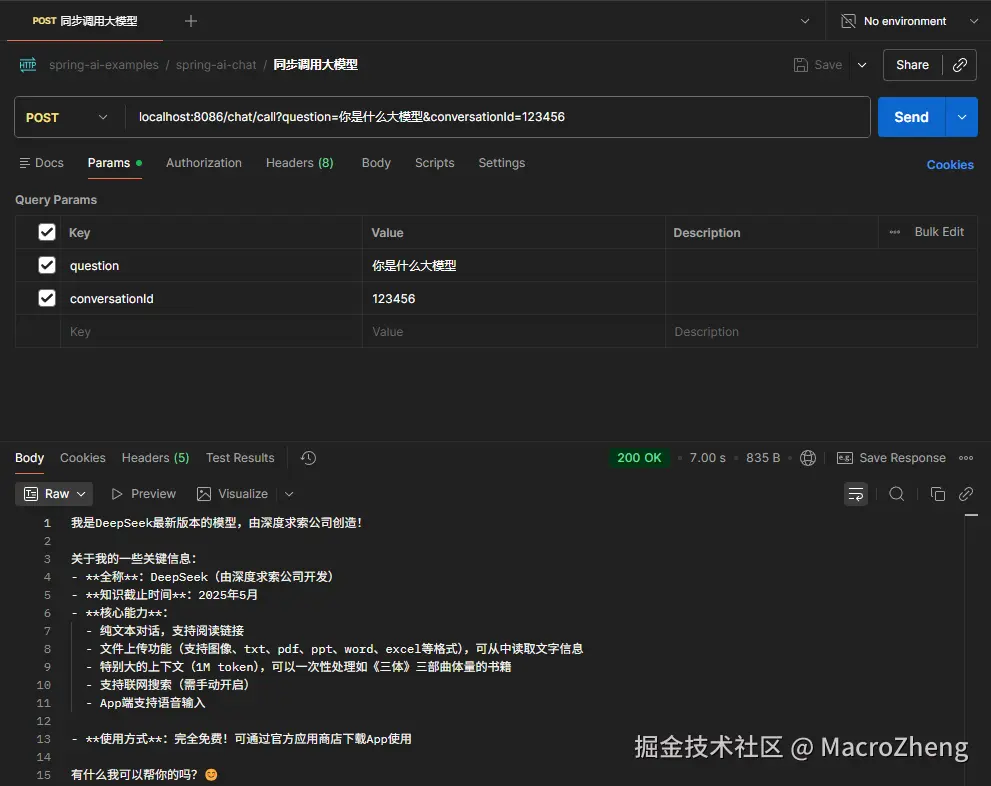
}- 这里我们使用Postman测试下同步调用的call接口,可以发现响应比较慢,会一次性返回所有信息;
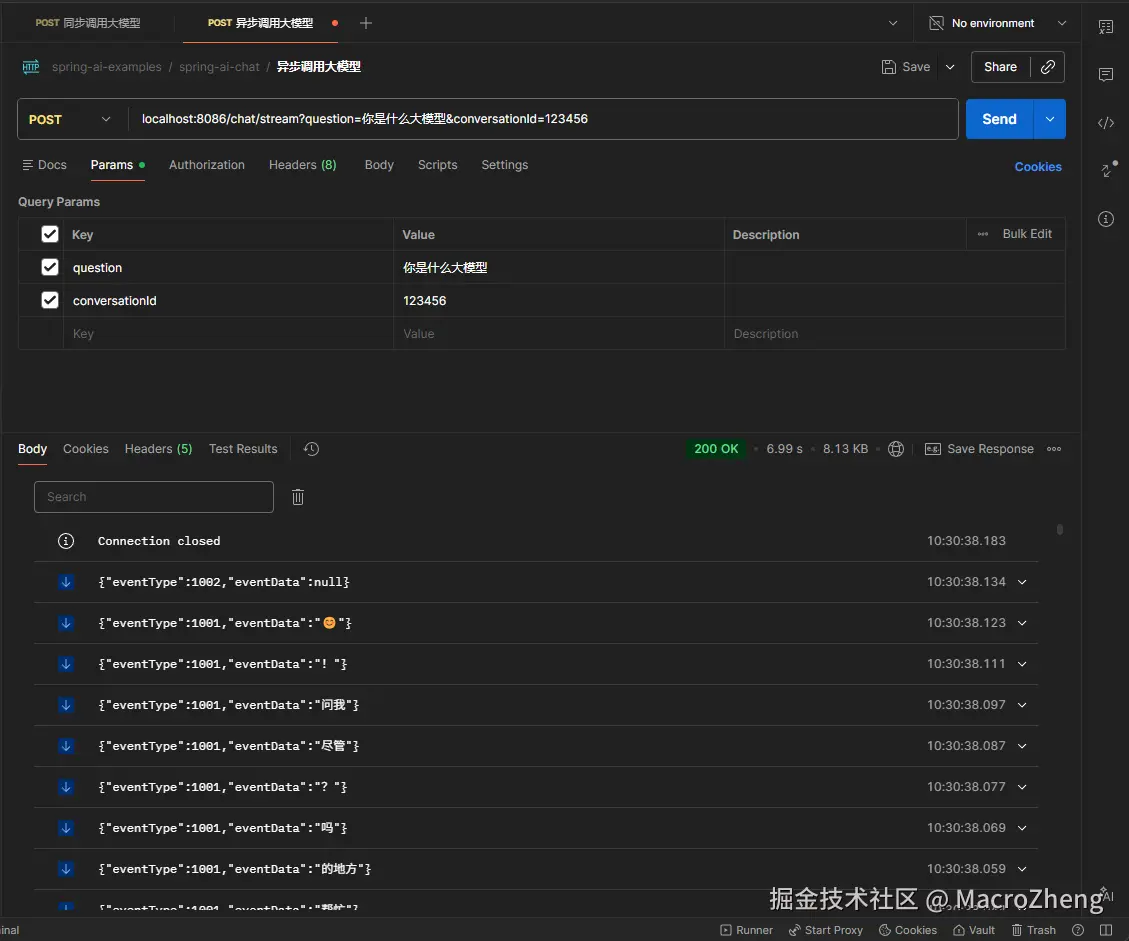
- 再测试下异步调用的stream接口,会逐步返回JSON格式的信息;
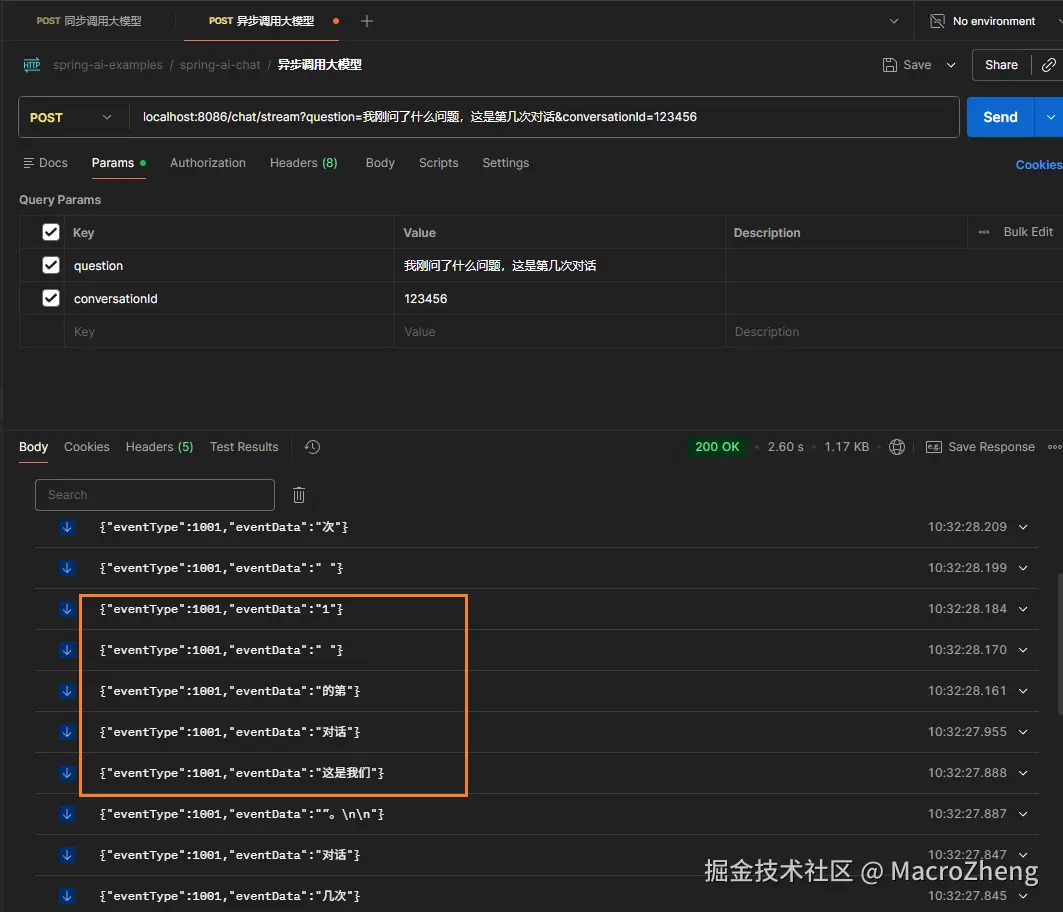
- 接着上面的对话询问:我刚问了什么问题,这是第几次对话,大模型会回复我们这是第一次对话,说明目前还没有对话记忆功能。
实现对话记忆
那么如何实现对话记忆功能呢,Spring AI支持多种类型的记忆存储,以适应不同的使用场景,例如内存、JDBC、Neo4j、MongoDB、Redis等。这里就以Redis为例,介绍下如何实现对话记忆功能。
- Redis对话记忆功能需要使用redis-stack,而不是普通的redis版本,这里使用的是redis-stack的7.4.0版本,docker运行命令如下;
bash
docker run --name redis-stack \
-p 6379:6379 \
-p 8001:8001 \
-d redis/redis-stack:7.4.0-v8- 然后在项目的
pom.xml中添加Redis对话记忆对应的Starter;
xml
<!-- Spring AI Redis Chat Memory Repository -->
<dependency>
    <groupId>org.springframework.ai</groupId>
    <artifactId>spring-ai-starter-model-chat-memory-repository-redis</artifactId>
</dependency>- 在
application.yaml中添加Redis的连接配置;
yaml
spring:
  ai:
    chat:
      memory:
        redis:
          host: 192.168.3.101
          port: 6379
          time-to-live: 24h
key-prefix: spring-chat- 在Java配置类中创建RedisChatMemoryRepository和ChatMemory对应的Bean,通过ChatMemory我们可以让AI大模型"记住"同一会话中的历史对话内容,实现真正的多轮对话;
java
/**
 * Spring AI配置类
 * @author macrozheng
 * @since 2026/6/29
 * @see <a href="https://github.com/macrozheng">GitHub</a>
 */
@Configuration
public class SpringAIConfig {

    @Value("${spring.ai.chat.memory.redis.host}")
    private String redisHost;

    @Value("${spring.ai.chat.memory.redis.port}")
    private int redisPort;

    @Bean
    public RedisChatMemoryRepository redisChatMemoryRepository() {
        RedisClient redisClient = RedisClient.builder()
                .hostAndPort(redisHost, redisPort)
                .build();
        return RedisChatMemoryRepository.builder()
                .jedisClient(redisClient)
                .build();
    }

    @Bean
    public ChatMemory chatMemory(RedisChatMemoryRepository repository) {
        return MessageWindowChatMemory.builder()
                .chatMemoryRepository(repository)
                .maxMessages(100)
                .build();
    }
}- 接下来在ChatController中注入ChatMemory,通过它的add方法添加对话记忆,get方法获取对话记忆,clear方法清空对话记忆,所有相关记忆都要绑定到对应的conversationId上。
java
/**
 * 对话功能相关接口
 * @author macrozheng
 * @since 2026/6/29
 * @see <a href="https://github.com/macrozheng">GitHub</a>
 */
@RequiredArgsConstructor
@RestController
@RequestMapping("/chat")
@Tag(name = "ChatController",description = "对话功能相关接口")
public class ChatController {

    private final ChatClient chatClient;
    private final ChatMemory chatMemory;

    @Operation(summary = "同步调用大模型")
    @PostMapping("/call")
    public String call(@RequestParam String question, @RequestParam String conversationId) {
        // 获取历史消息作为上下文
        List<Message> historyMessages = chatMemory.get(conversationId);
        // 手动保存用户消息
        chatMemory.add(conversationId, List.of(new UserMessage(question)));
        // 调用大模型
        String response = this.chatClient.prompt()
                .messages(historyMessages)
                .user(question)
                .call()
                .content();
        // 手动保存助手回复
        chatMemory.add(conversationId, List.of(new AssistantMessage(response)));
        return response;
    }

    @Operation(summary = "流式调用大模型")
    @PostMapping(value = "/stream", produces = MediaType.TEXT_EVENT_STREAM_VALUE)
    public Flux<ChatEventDto> stream(@RequestParam String question, @RequestParam String conversationId) {
        // 获取历史消息作为上下文
        List<Message> historyMessages = chatMemory.get(conversationId);
        // 手动保存用户消息
        chatMemory.add(conversationId, List.of(new UserMessage(question)));
        // 用于收集完整的助手回复
        StringBuilder fullResponse = new StringBuilder();
        return this.chatClient.prompt()
                .messages(historyMessages)
                .user(question)
                .stream()
                .content()
                // 对于流式输出中的每条消息,转化为ChatEventDto对象
                .map(content -> {
                    fullResponse.append(content);
                    return ChatEventDto.builder()
                            .eventType(ChatEventType.DATA.getValue())
                            .eventData(content)
                            .build();
                })
                // 在流式输出结束后追加一条代表STOP的消息
                .concatWith(Flux.just(ChatEventDto.builder()
                        .eventType(ChatEventType.STOP.getValue())
                        .build()))
                .doOnComplete(() -> {
                    // 流完成后手动保存助手回复
                    if (!fullResponse.isEmpty()) {
                        chatMemory.add(conversationId, List.of(new AssistantMessage(fullResponse.toString())));
                    }
                });
    }


    @Operation(summary = "获取对话历史记录")
    @GetMapping("/history")
    public CommonResult<List<Map<String, Object>>> history(@RequestParam String conversationId) {
        var result = chatMemory.get(conversationId).stream()
                .map(msg -> Map.<String, Object>of(
                        "role", msg.getMessageType().name(),
                        "content", msg.getText()
                ))
                .collect(Collectors.toList());
        return CommonResult.success(result);
    }

    @Operation(summary = "清除对话历史记录")
    @PostMapping("/clearHistory")
    public CommonResult<Void> clearHistory(@RequestParam String conversationId) {
        chatMemory.clear(conversationId);
        return CommonResult.success(null);
    }
}
功能测试
我这里用TDesign中的Chatbot组件做了个聊天界面,让我们一起来看下效果。
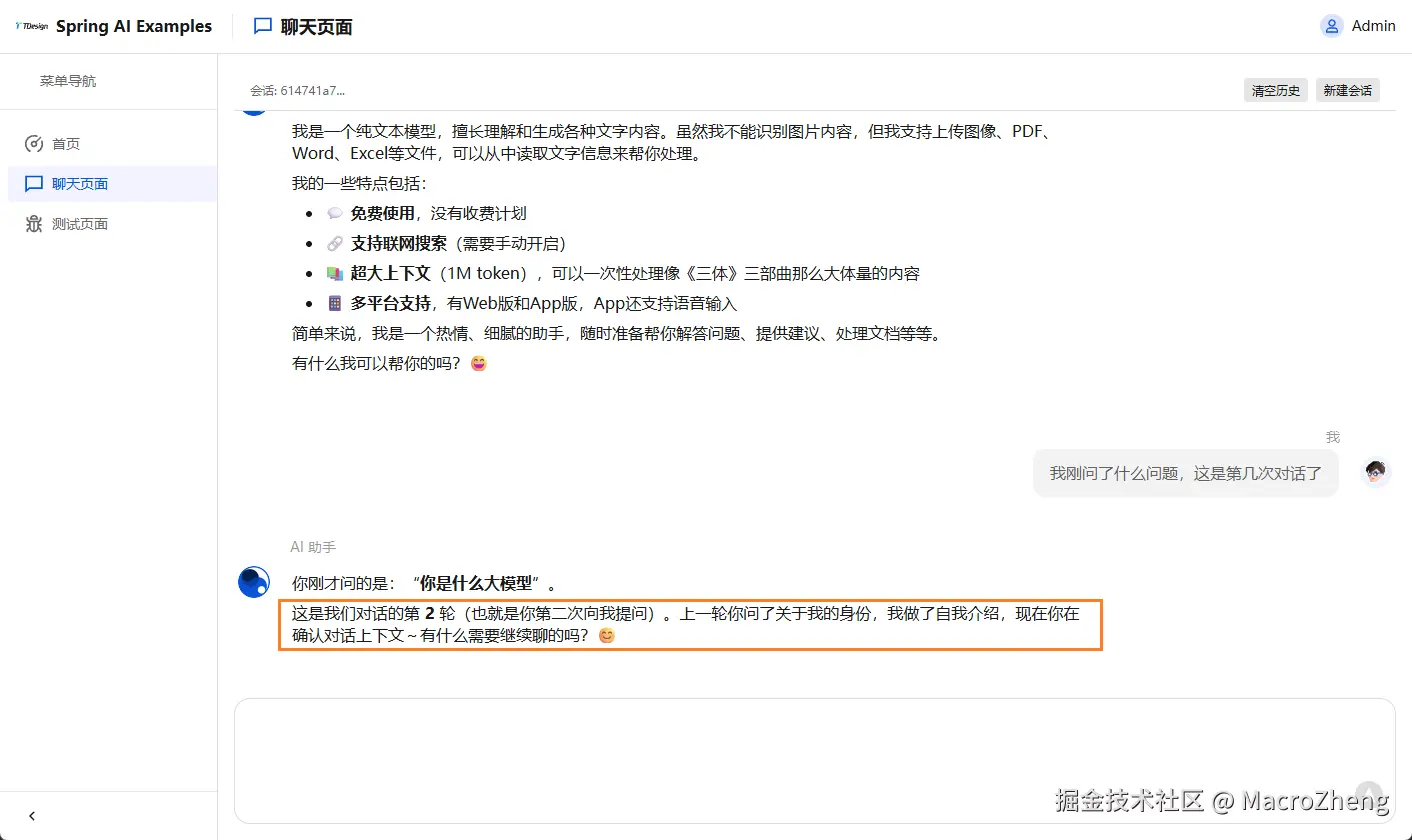
- 首先我们来测试下对话记忆功能,例如我先问它一个问题,再问它
之前问了什么问题,是第几次对话了,大模型正确回答了,说明已经实现了对话记忆;
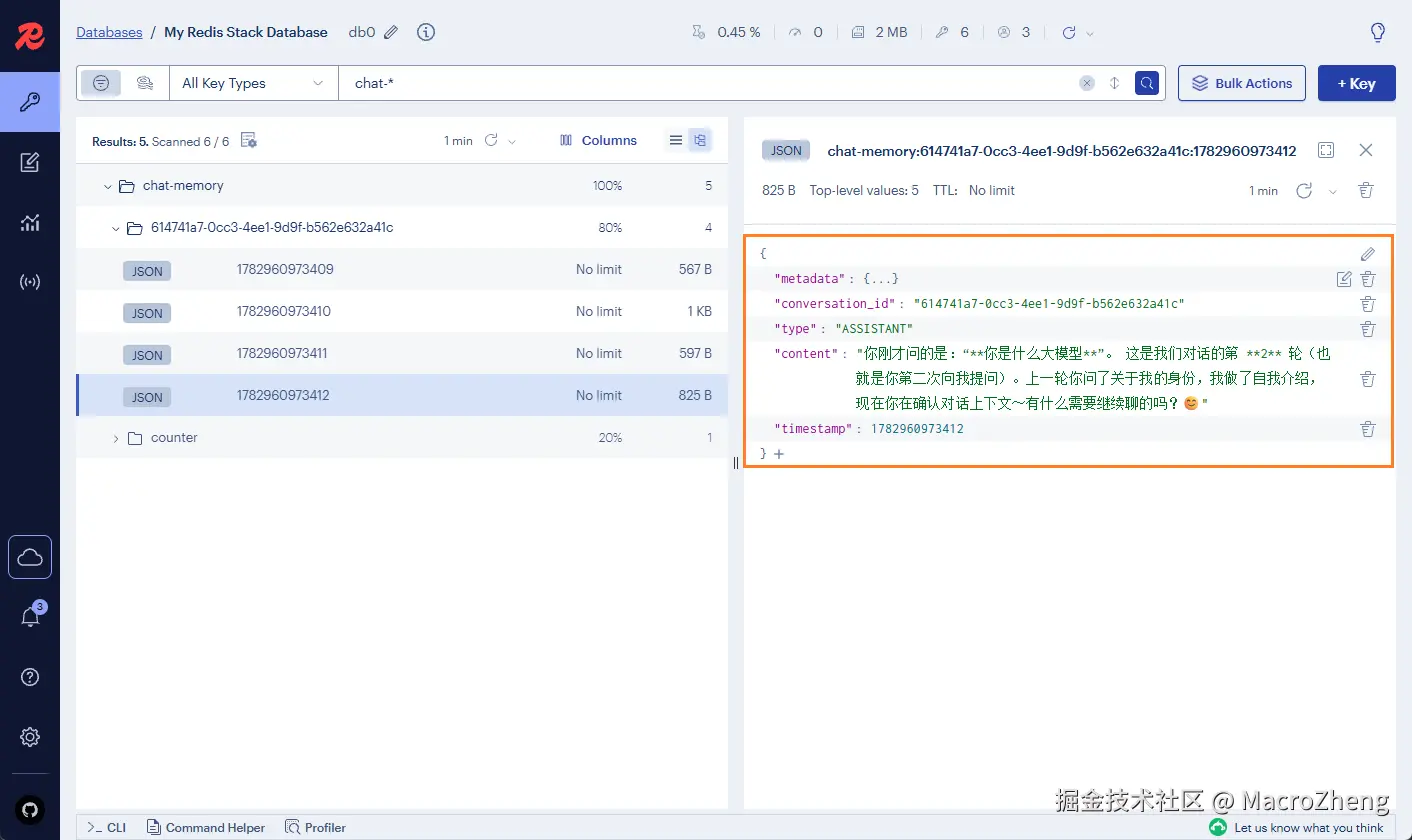
- 打开redis的管理控制台,也可以看到存储的对话记忆数据了;
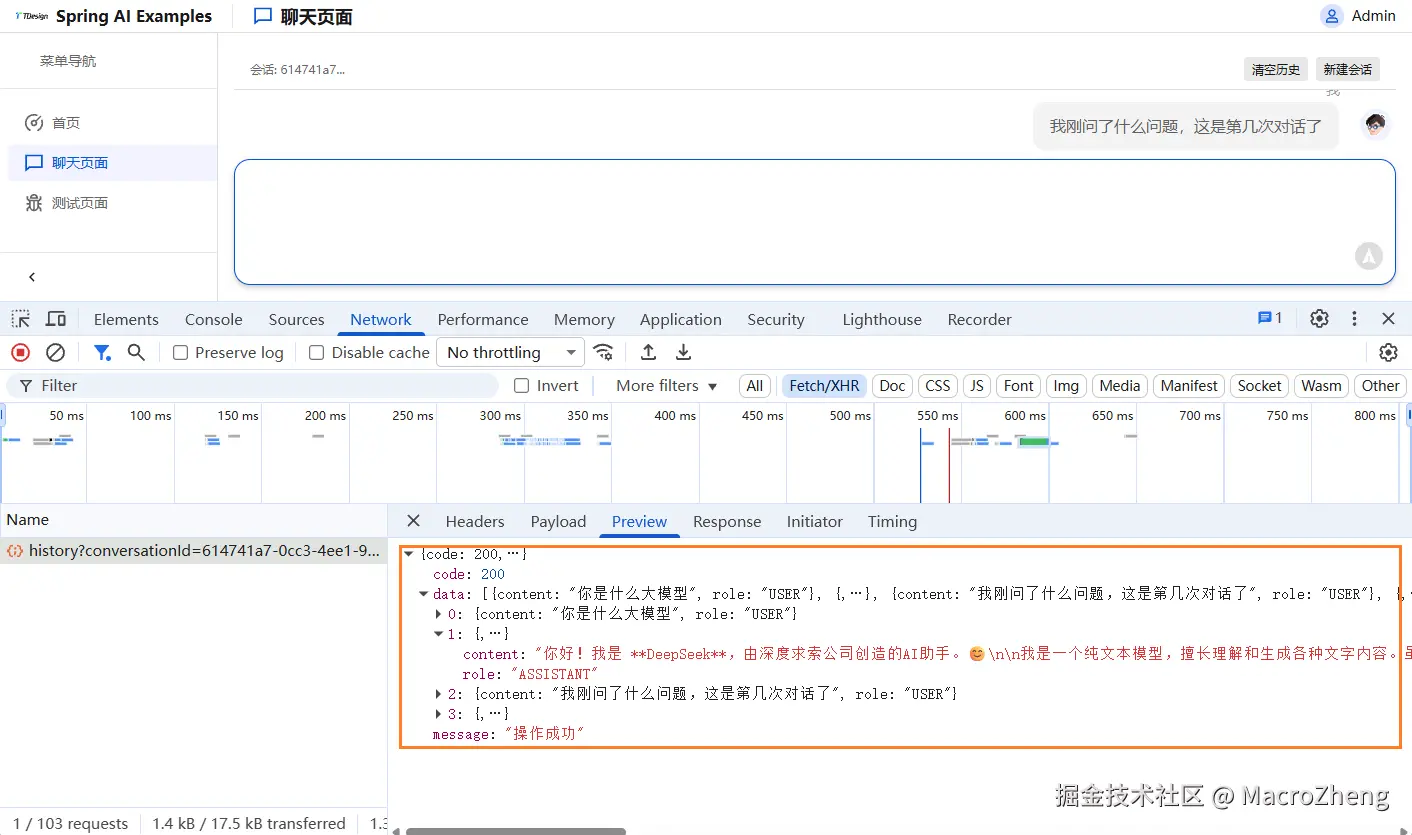
- 在Controller中我们还实现了
获取对话历史记录的接口,刷新下页面,就会根据该接口获取历史记录了。
总结
本文带你从零开始,用Spring AI 2.0搭建了一个具备对话记忆功能的AI对话服务。核心步骤就三步:引入Starter依赖、配置模型参数、注入ChatClient调用,几行代码即可实现同步对话和SSE流式输出。
在此基础上,通过引入ChatMemory并对接Redis,轻松实现了多轮对话记忆,彻底解决了大模型"每次都是第一次聊天"的问题。
Spring AI让你用最熟悉的Spring方式,以最少的代码,将AI能力集成到项目中去,感兴趣的小伙伴可以尝试下!