一句话定位
/summarize 命令:把当前会话的分支转成文本,让 gpt-5.2 生成结构化摘要,再用 Markdown UI 展示------199 行,命令型 + 自定义 UI 的范例。
作用(为什么存在)
上期(custom-compaction)拆过自动压缩,这期的 summarize 也做「总结」------但两者是两种完全不同的东西:
| compact(上期) | summarize(本期) | |
|---|---|---|
| 触发 | 自动(事件) | 手动(命令) |
| 结果 | 替换上下文(summary 进上下文,旧内容清掉) | 旁路(summary 展示给用户,上下文不动) |
| 定位 | 资源层:处理上下文水位问题 | 内容层:对一次交流做总结(复盘/存档) |
一句话:compact 是系统给模型腾空间,summarize 是用户给对话做总结。都调模型写摘要,但动机和影响完全不同------这就是为什么一个自动、一个手动。
关键信息
| 项 | 内容 |
|---|---|
| 源码位置 | examples/extensions/summarize.ts(199 行) |
| 核心 API | registerCommand + ctx.sessionManager.getBranch() + ctx.modelRegistry.find/hasConfiguredAuth/complete + ctx.ui.custom(对象式组件) |
| 插件类型 | 命令型 + 自定义 UI 展示 |
触发流程 / 数据流
scss
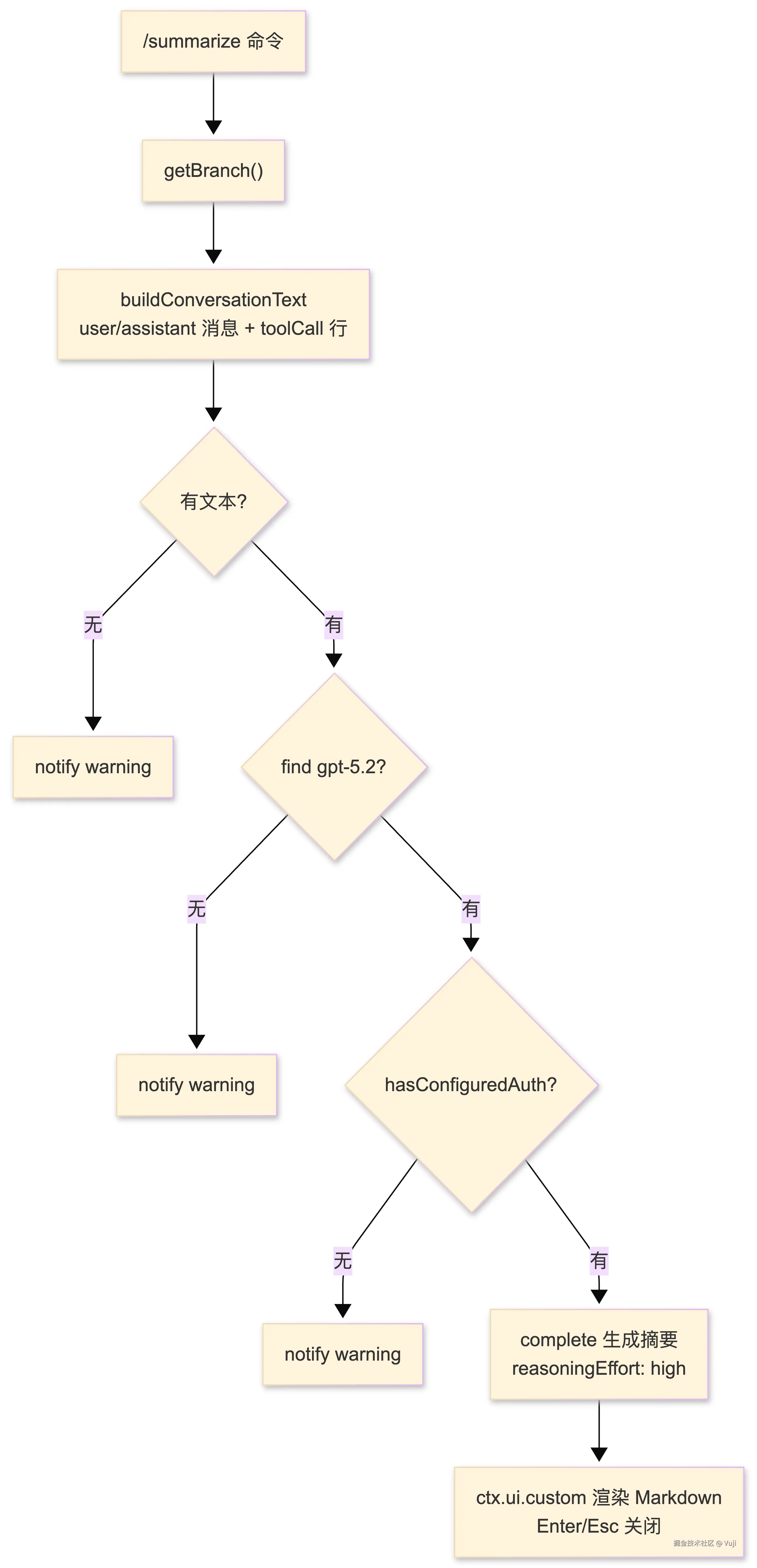
/summarize
  → getBranch() 取当前分支 entries
  → buildConversationText(branch):只取 user/assistant 消息
      → 提取 text 块 → "User: ..." / "Assistant: ..."
      → assistant 里的 toolCall → "Tool X was called with args {...}"
  → 空文本 → notify warning 返回
  → find("openai", "gpt-5.2") → 没有 → warning
  → hasConfiguredAuth(model) → 没配 key → warning
  → complete({reasoningEffort: "high"}) → gpt-5.2 写摘要
  → showSummaryUi:ctx.ui.custom 渲染 Markdown(Enter/Esc 关闭)
架构 / 流程
关键代码解读
typescript
// ① 只取 user/assistant 消息,assistant 里的 toolCall 转成一行摘要
const buildConversationText = (entries) => {
  for (const entry of entries) {
    if (entry.type !== "message" || !entry.message?.role) continue;
    const role = entry.message.role;
    if (role !== "user" && role !== "assistant") continue;  // 跳过 toolResult 等
    // 提取 text 块 → "User: ..." / "Assistant: ..."
    // assistant 额外提取工具调用 → "Tool X was called with args {...}"
  }
};

// ② 双重认证检查:模型存在 ≠ 模型可用
const model = ctx.modelRegistry.find("openai", "gpt-5.2");
if (!model) return;  // 没注册
if (!ctx.modelRegistry.hasConfiguredAuth(model)) return;  // 有模型但没配 key

// ③ 自定义 UI:无状态组件直接返回对象
await ctx.ui.custom((_tui, theme, _kb, done) => {
  const container = new Container();
  container.addChild(new DynamicBorder((s) => theme.fg("accent", s)));
  container.addChild(new Text(theme.fg("accent", theme.bold("Conversation Summary")), 1, 0));
  container.addChild(new Markdown(summary, 1, 1, getMarkdownTheme()));
  return {
    render: (width) => container.render(width),
    invalidate: () => container.invalidate(),
    handleInput: (data) => {
      if (matchesKey(data, "enter") || matchesKey(data, "escape")) done(undefined);
    },
  };
});
亮点 / 踩坑
亮点 1:toolCall 进总结、toolResult 不进。 对 resume 有用的是「LLM 调了什么工具」(意图),不是「工具返回了什么」(细节)。这个过滤让摘要信息密度高且不含噪音。
亮点 2:轻量 UI 组件。 ctx.ui.custom 直接返回 { render, invalidate, handleInput } 对象------对比上上期 todo 的 TodoListComponent 类。选择依据:组件需不需要自己维护状态。无状态就用对象,有状态才用类。
踩坑提示:双重认证检查。 find 到模型 ≠ 能调用------hasConfiguredAuth 检查 key 是否配置,失败时给用户明确提示("No authentication configured"),而不是让 complete 莫名报错。
边界(Limitations)
| 边界 | 表现 |
|---|---|
| 模型依赖 | openai/gpt-5.2 必须已注册 且 已配置认证(双重检查) |
| UI 依赖 | ctx.mode !== "tui" 时 showSummaryUi 直接返回(print/rpc 无 UI,摘要无处展示) |
| 内容过滤 | 只含 user/assistant 文本 + toolCall 行;toolResult 详情、thinking 不进入总结 |
| 对话无损 | 总结是旁路,不改动会话(区别于 compact 的替换) |
场景(Scenarios)
- 能用:tui 模式 + gpt-5.2 已注册 + key 已配 + 会话有文本 → UI 展示结构化摘要
- 提示失败:模型没注册 / key 没配 → notify warning 说明原因
- 无内容:会话无 user/assistant 文本 → notify "No conversation text found"
- 无 UI:非 tui 模式 → 摘要不展示(无输出通道)
可借鉴的模式
- 命令触发 vs 事件触发:用户需要的功能用命令(主动调),系统需要的用事件(自动调)------「内容层 vs 资源层」判断依据。
- 双重认证检查 :
find+hasConfiguredAuth------「模型存在」和「模型可用」是两回事,给用户明确失败原因。 - 轻量 UI 组件 :无状态组件返回对象
{render, invalidate, handleInput};有状态组件才用类(对比 todo)。选择依据 = 是否需要内部状态。 - 过滤摘要内容:toolCall 行保留「调用意图」,toolResult 详情丢弃------resume 需要的是做了什么,不是结果细节。
- 旁路读 session :
getBranch()只读不改,随时可调------命令型插件对会话零副作用。
一句话总结
199 行演示「用户视角的总结」:命令触发、旁路读会话、双重认证检查、无状态 UI 组件------和系统视角的 compact 形成完整对照。