第 2 讲 · spawn Electron:当前进程如何"交棒"
系列 :我在Deepseek harness中增加了桌面版,将逐行代码解析我是怎么增加的,希望你也能创建属于自己的桌面版Agent
本讲目标 :逐行吃透
apps/cli/src/spawn-desktop.ts(130 行全行)------当前 Node 进程如何解析 Electron 二进制、如何把 tsx loader 通过NODE_OPTIONS透传给 Electron 主进程、以及三种不同的缺失报错是如何分工的。逐行文件 :
apps/cli/src/spawn-desktop.ts(130 行,全行)
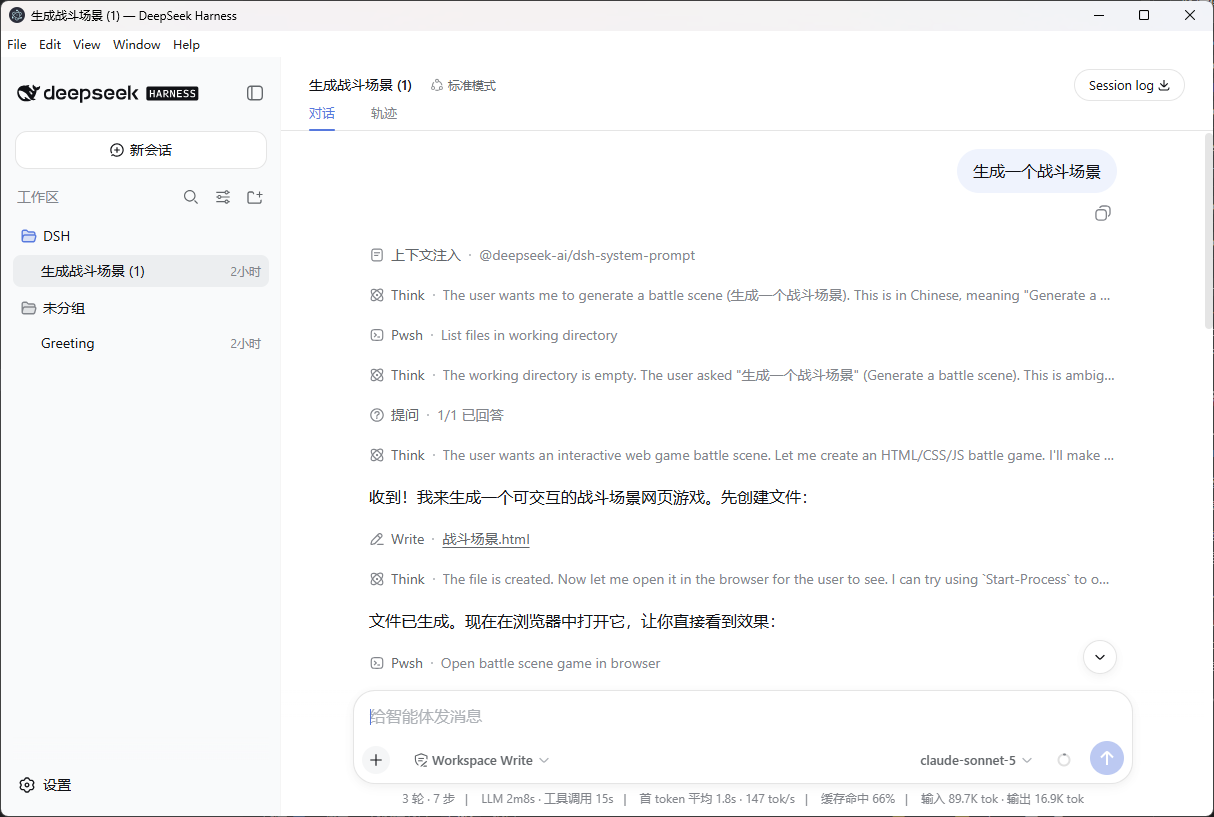
代码仓库 :https://github.com/tslcarmack/deepseek-harness-desktopDesktop App 运行效果图
🎯 本讲地图
bin.ts 的 desktop 分支
    └─► await import('./spawn-desktop.ts')
            └─► spawnDesktop(invocation)
                  ├─► resolveElectron()  ── 定位 electron 二进制(3 种缺失报错)
                  ├─► resolveTsx()       ── 定位 tsx/esm loader
                  ├─► electronArgv()     ── 组装 Electron 参数
                  ├─► electronSpawnEnv() ── NODE_OPTIONS 注入 tsx loader
                  └─► spawn(electron, argv, { env })
                        └─► 等待 exit → process.exit(code)
📁 全行逐行(130 行)
文件:apps/cli/src/spawn-desktop.ts
ts
1  /**
  2   * Spawn Electron for a live `desktop` profile boot. Config dumps stay in Node.
  3   * @module @deepseek-ai/dsh/spawn-desktop
  4   */
  5
  6  import { spawn } from 'node:child_process'
  7  import { createRequire } from 'node:module'
  8  import { join, resolve } from 'node:path'
  9  import { fileURLToPath, pathToFileURL } from 'node:url'
 10
 11  /**
 12   * Overlay paths and leftover app arguments forwarded to Electron main.
 13   * The tsx loader is passed through NODE_OPTIONS: Electron argv `--import` is
 14   * Chromium's bookmark-import switch, not Node's ESM loader.
 15   */
 16  export interface ElectronArgvOptions {
 17    patches: readonly string[]
 18    args: readonly string[]
 19    main: string
 20  }
 21
 22  const DESKTOP_ROOT = fileURLToPath(new URL('../../desktop/', import.meta.url))
 23  const ELECTRON_MISSING = 'dsh: electron is not installed; from the repository root run `pnpm approve-builds` to allow electron, then `pnpm install`'
 24  const ELECTRON_BINARY_MISSING = 'dsh: electron is linked but its platform binary is missing; from the repository root run `pnpm --filter @deepseek-ai/dsh-desktop rebuild` and wait until apps/desktop/node_modules/electron/path.txt exists'
 25
 26  /**
 27   * Map `require('electron')` failure to an operator-facing recovery hint.
 28   * @param cause - the thrown value from the CommonJS require.
 29   * @returns labelled recovery text; never empty.
 30   */
 31  export function describeElectronResolveFailure(cause: unknown): string {
 32    const code = typeof cause === 'object' && cause !== null && 'code' in cause ? cause.code : undefined
 33    if (code === 'MODULE_NOT_FOUND') return ELECTRON_MISSING
 34    const message = cause instanceof Error ? cause.message : String(cause)
 35    if (message.includes('failed to install correctly')) return ELECTRON_BINARY_MISSING
 36    return `dsh: cannot resolve the electron binary: ${message}`
 37  }
 38
 39  /**
 40   * Build Electron argv: desktop main, absolute `--patch` paths, then app args.
 41   * @param options - main path, overlays, and leftover args.
 42   * @returns argv after the Electron binary.
 43   */
 44  export function electronArgv(options: ElectronArgvOptions): string[] {
 45    const argv = [options.main]
 46    for (const patch of options.patches) {
 47      argv.push('--patch', patch)
 48    }
 49    if (options.args.length > 0) argv.push('--', ...options.args)
 50    return argv
 51  }
 52
 53  /**
 54   * Put the tsx ESM loader on NODE_OPTIONS so Electron's Node process loads TypeScript.
 55   * @param tsx - path to `tsx/esm` (absolute from `require.resolve`).
 58   */
 59  export function electronNodeOptions(tsx: string, existing?: string): string {
 60    const flag = `--import=${pathToFileURL(tsx).href}`
 61    if (existing === undefined || existing === '') return flag
 62    return `${existing} ${flag}`
 63  }
 64
 65  /** Repo-root tsconfig: Electron's cwd is not the CLI's, so tsx must not discover tsconfig by walking up. */
 66  export const ELECTRON_TSCONFIG_PATH = fileURLToPath(new URL('../../../tsconfig.json', import.meta.url))
 67
 68  /**
 69   * Environment for the Electron main process: tsx ESM loader plus the repo paths map.
 70   * @param tsx - path to `tsx/esm`.
 71   * @param existing - the parent process environment.
 72   * @returns env for `spawn(electron, argv, { env })`.
 73   */
 74  export function electronSpawnEnv(tsx: string, existing: NodeJS.ProcessEnv = process.env): NodeJS.ProcessEnv {
 75    return {
 76      ...existing,
 77      NODE_OPTIONS: electronNodeOptions(tsx, existing.NODE_OPTIONS),
 78      TSX_TSCONFIG_PATH: ELECTRON_TSCONFIG_PATH,
 79    }
 80  }
 81
 82  function resolveElectron(): string {
 83    const require = createRequire(join(DESKTOP_ROOT, 'package.json'))
 84    try {
 85      const binary = require('electron') as unknown
 86      if (typeof binary === 'string' && binary !== '') return binary
 87    } catch (cause) {
 88      throw new Error(describeElectronResolveFailure(cause))
 89    }
 90    throw new Error(ELECTRON_MISSING)
 91  }
 92
 93  function resolveTsx(): string {
 94    const require = createRequire(join(DESKTOP_ROOT, 'package.json'))
 95    try {
 96      return require.resolve('tsx/esm')
 97    } catch {
 98      throw new Error('dsh: tsx is not installed for the desktop source launch')
 99    }
 100 }
 101
 102 /**
 103  * Spawn the desktop Electron binary and exit with its status. Does not boot the harness in this process.
 104  * @param invocation - live profile boot (`mode: 'profile'`, `profile: 'desktop'`).
 105  * @returns never; this process exits with Electron's status.
 106  */
 107 export async function spawnDesktop(invocation: {
 108   patches: readonly string[]
 109   args: readonly string[]
 110 }): Promise {
 111   const electronBinary = resolveElectron()
 112   const tsx = resolveTsx()
 113   const main = join(DESKTOP_ROOT, 'src', 'main.ts')
 114   const patches = invocation.patches.map(path => resolve(process.cwd(), path))
 115   const argv = electronArgv({ patches, args: invocation.args, main })
 116   process.stderr.write('dsh: launching Electron; the window opens after the desktop profile boots\n')
 117   const child = spawn(electronBinary, argv, {
 118     stdio: 'inherit',
 119     windowsHide: false,
 120     env: electronSpawnEnv(tsx),
 121   })
 122   const code = await new Promise((resolveExit, reject) => {
 123     child.on('error', reject)
 124     child.on('exit', (exitCode, signal) => {
 125       if (signal !== null) reject(new Error(`dsh: electron exited from signal ${signal}`))
 126       else resolveExit(exitCode)
 127     })
 128   })
 129   process.exit(code ?? 1)
 130 }
逐段讲解
第 6-9 行 · 导入
ts
import { spawn } from 'node:child_process'
import { createRequire } from 'node:module'
import { join, resolve } from 'node:path'
import { fileURLToPath, pathToFileURL } from 'node:url'spawn:创建子进程(异步、可流式 I/O)。createRequire:在 ESM 模块里构造 CommonJS 的require------这是 ESM 环境下调用require('electron')的标准做法。pathToFileURL:把绝对路径转成file://URL(第 60 行给--import=用)。
第 16-20 行 · ElectronArgvOptions
ts
export interface ElectronArgvOptions {
  patches: readonly string[]
  args: readonly string[]
  main: string
}patches:--patch覆盖层路径(从第 1 讲的 invocation 透传而来)。args:desktop app 自己的参数(第 1 讲解释过:launcher 只解析自己的 flag,其余透传)。main:Electron 主进程入口文件路径。
第 22-24 行 · 常量(关键)
ts
const DESKTOP_ROOT = fileURLToPath(new URL('../../desktop/', import.meta.url))import.meta.url是spawn-desktop.ts的 URL(apps/cli/src/spawn-desktop.ts)。../../desktop/相对它解析 →apps/desktop/。这就是桌面应用的根目录。
ts
const ELECTRON_MISSING = 'dsh: electron is not installed; ... run `pnpm approve-builds` ...'
const ELECTRON_BINARY_MISSING = 'dsh: electron is linked but its platform binary is missing; ... run `pnpm --filter @deepseek-ai/dsh-desktop rebuild` ...'- 两种错误分工 :
ELECTRON_MISSING:包都没装(MODULE_NOT_FOUND)→ 提示pnpm approve-builds(Electron 的 postinstall 脚本在 pnpm 默认被拦,需 approve)。ELECTRON_BINARY_MISSING:包已链接但平台二进制缺失(failed to install correctly)→ 提示 rebuild 等path.txt出现。
- 这种"针对操作者的恢复提示"(operator-facing recovery hint)是 dsh 代码的一贯风格:报错信息直接告诉你该敲什么命令。
第 31-37 行 · describeElectronResolveFailure
ts
export function describeElectronResolveFailure(cause: unknown): string {
  const code = typeof cause === 'object' && cause !== null && 'code' in cause ? cause.code : undefined
  if (code === 'MODULE_NOT_FOUND') return ELECTRON_MISSING
  const message = cause instanceof Error ? cause.message : String(cause)
  if (message.includes('failed to install correctly')) return ELECTRON_BINARY_MISSING
  return `dsh: cannot resolve the electron binary: ${message}`
}- 防御式类型收窄 :
cause是unknown,先检查是否为对象且含code属性,再取值------不信任调用方。 - 分类逻辑:
MODULE_NOT_FOUND→ 包缺失;failed to install correctly→ 二进制缺失;其他 → 兜底信息。
第 44-51 行 · electronArgv(参数组装)
ts
export function electronArgv(options: ElectronArgvOptions): string[] {
  const argv = [options.main]
  for (const patch of options.patches) {
    argv.push('--patch', patch)
  }
  if (options.args.length > 0) argv.push('--', ...options.args)
  return argv
}- argv 顺序:
[main, --patch p1, --patch p2, --, app args...]。 - 注意:
--是"后面全是 app 参数"的分隔符,防止 app 参数里的--xxx被 Electron 误解析。
第 59-63 行 · electronNodeOptions(tsx loader 透传,核心)
ts
export function electronNodeOptions(tsx: string, existing?: string): string {
  const flag = `--import=${pathToFileURL(tsx).href}`
  if (existing === undefined || existing === '') return flag
  return `${existing} ${flag}`
}- 核心问题 :
--import tsx/esm是 Node 的 ESM loader 参数,但 Electron 的 argv 中--import是 Chromium 的书签导入开关 (第 13-14 行注释点破)!所以不能把--import直接传给 Electron 命令行。 - 解法:通过
NODE_OPTIONS环境变量 注入------NODE_OPTIONS会被 Electron 的 Node 运行时读取,从而加载 tsx loader,而 Electron/Chromium 本身不解析它。 - 保留已有
NODE_OPTIONS(第 62 行):不覆盖父进程的选项,只追加。
第 65-80 行 · electronSpawnEnv(环境组装)
ts
export const ELECTRON_TSCONFIG_PATH = fileURLToPath(new URL('../../../tsconfig.json', import.meta.url))

export function electronSpawnEnv(tsx: string, existing: NodeJS.ProcessEnv = process.env): NodeJS.ProcessEnv {
  return {
    ...existing,
    NODE_OPTIONS: electronNodeOptions(tsx, existing.NODE_OPTIONS),
    TSX_TSCONFIG_PATH: ELECTRON_TSCONFIG_PATH,
  }
}- 第 66 行:
../../../tsconfig.json从apps/cli/src/上溯 → 仓库根tsconfig.json。 - 为什么显式指定 tsconfig :注释说"Electron 的 cwd 不是 CLI 的"------Electron 启动后工作目录可能不同,tsx 如果按 cwd 向上找 tsconfig 会找错,所以用环境变量
TSX_TSCONFIG_PATH锁定仓库根的配置。
第 82-100 行 · 两个 resolve 函数
ts
function resolveElectron(): string {
  const require = createRequire(join(DESKTOP_ROOT, 'package.json'))
  try {
    const binary = require('electron') as unknown
    if (typeof binary === 'string' && binary !== '') return binary
  } catch (cause) {
    throw new Error(describeElectronResolveFailure(cause))
  }
  throw new Error(ELECTRON_MISSING)
}- 关键机制 :
require('electron')在 Node 环境返回的不是模块,而是 Electron 可执行文件的路径字符串 (Electron npm 包的主入口被设计为返回二进制路径)。这就是为什么typeof binary === 'string'的判断。 createRequire(join(DESKTOP_ROOT, 'package.json')):以apps/desktop/package.json为基准做 require 解析------保证找到的是 desktop 应用的 electron,而不是别的目录里的。
ts
function resolveTsx(): string {
  const require = createRequire(join(DESKTOP_ROOT, 'package.json'))
  try {
    return require.resolve('tsx/esm')
  } catch {
    throw new Error('dsh: tsx is not installed for the desktop source launch')
  }
}- 同理用 desktop 的 require 基准解析
tsx/esm的绝对路径。
第 107-130 行 · spawnDesktop(主函数)
ts
export async function spawnDesktop(invocation: {
  patches: readonly string[]
  args: readonly string[]
}): Promise {
  const electronBinary = resolveElectron()
  const tsx = resolveTsx()
  const main = join(DESKTOP_ROOT, 'src', 'main.ts')
  const patches = invocation.patches.map(path => resolve(process.cwd(), path))
  const argv = electronArgv({ patches, args: invocation.args, main })
  process.stderr.write('dsh: launching Electron; the window opens after the desktop profile boots\n')
  const child = spawn(electronBinary, argv, {
    stdio: 'inherit',
    windowsHide: false,
    env: electronSpawnEnv(tsx),
  })
  const code = await new Promise((resolveExit, reject) => {
    child.on('error', reject)
    child.on('exit', (exitCode, signal) => {
      if (signal !== null) reject(new Error(`dsh: electron exited from signal ${signal}`))
      else resolveExit(exitCode)
    })
  })
  process.exit(code ?? 1)
}
逐点拆解:
| 行 | 内容 | 说明 |
|---|---|---|
| 111-112 | 解析两个依赖 | Electron 二进制 + tsx loader,先备齐再动手 |
| 113 | main = apps/desktop/src/main.ts |
Electron 主进程入口(第 3 讲全行) |
| 114 | patches 转绝对路径 |
resolve(process.cwd(), path) 相对当前目录解析 |
| 115 | 组装 argv | [main, --patch ..., --, args...] |
| 116 | stderr 提示 | 因为 stdout 可能被 UI 占用,提示走 stderr |
| 117-121 | spawn(electronBinary, argv, {...}) |
stdio: 'inherit' 让 Electron 输出直通终端;env 注入 tsx loader |
| 122-128 | 等待退出 | 监听 error(启动失败)与 exit(正常退出/信号退出) |
| 129 | process.exit(code ?? 1) |
当前进程完全交棒:以自己的退出码镜像 Electron 的退出码 |
🖼️ 第 2 讲流程图
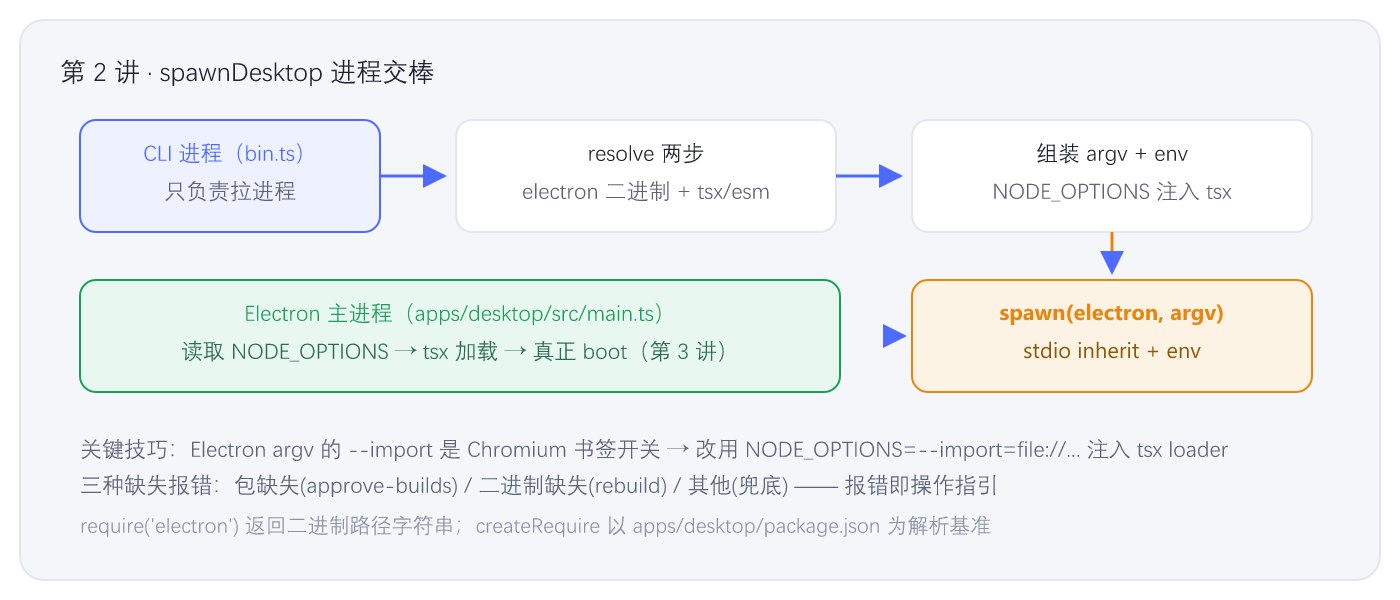
图 2-1 · spawnDesktop 的交棒过程
⚙️ 机制小结
- 进程交棒模型 :CLI 进程不 boot harness,只负责定位 Electron → 组装环境 → spawn → 镜像退出码。真正的 boot 在 Electron 主进程里发生(第 3 讲)。
- tsx loader 的透传技巧 :Electron argv 的
--import是 Chromium 开关,所以改用NODE_OPTIONS=--import=file://...环境变量注入,Electron 的 Node 运行时会自动读取。 - 三种报错各司其职:包缺失(approve-builds)/二进制缺失(rebuild)/其他(兜底)------报错即操作指引。
- ESM 环境下的 require :
createRequire让 ESM 模块能require('electron'),且以apps/desktop/package.json为解析基准。 require('electron')返回二进制路径字符串 ------这是 Electron npm 包的特殊设计,正是这里typeof binary === 'string'的原因。
🧪 动手验证
sh
# 1) 在纯 Node 下看 desktop 组合树(不需要 Electron)
cd D:\code\deepseek-harness
node apps/cli/lib/bin.js --profile desktop --dump-config | head -20

# 2) 验证 electron 是否已安装(会触发 require('electron') 的解析路径)
node -e "const r = require('module').createRequire(require('path').join(process.cwd(),'apps/desktop/package.json')); try { console.log('electron →', r('electron')) } catch(e) { console.log('未安装:', e.code) }"

# 3) 直接跑 desktop(如果 Electron 已装好会弹出窗口;否则看到恢复提示)
node apps/cli/lib/bin.js desktop
💡 若第 3 步报错,正好体验第 22-24 行的两种恢复提示。安装 Electron:
pnpm approve-builds→pnpm install→pnpm --filter @deepseek-ai/dsh-desktop rebuild。
📚 深入指引
| 文件 | 作用 |
|---|---|
apps/cli/src/spawn-desktop.ts |
本讲全行 |
apps/desktop/package.json |
desktop 应用的依赖清单(electron、react 等) |
apps/desktop/src/main.ts |
Electron 主进程(第 3 讲全行) |
apps/desktop/src/argv.ts |
Electron 进程内的 argv 解析(第 3 讲精讲) |
下一讲预告 :Electron 主进程 main.ts------"这个进程就是 harness":它如何调用 runProfile({ profile: 'desktop' }) 真正 boot、如何通过 IPC 与渲染进程通信、为什么它不监听任何 TCP 端口。