一、本篇范围
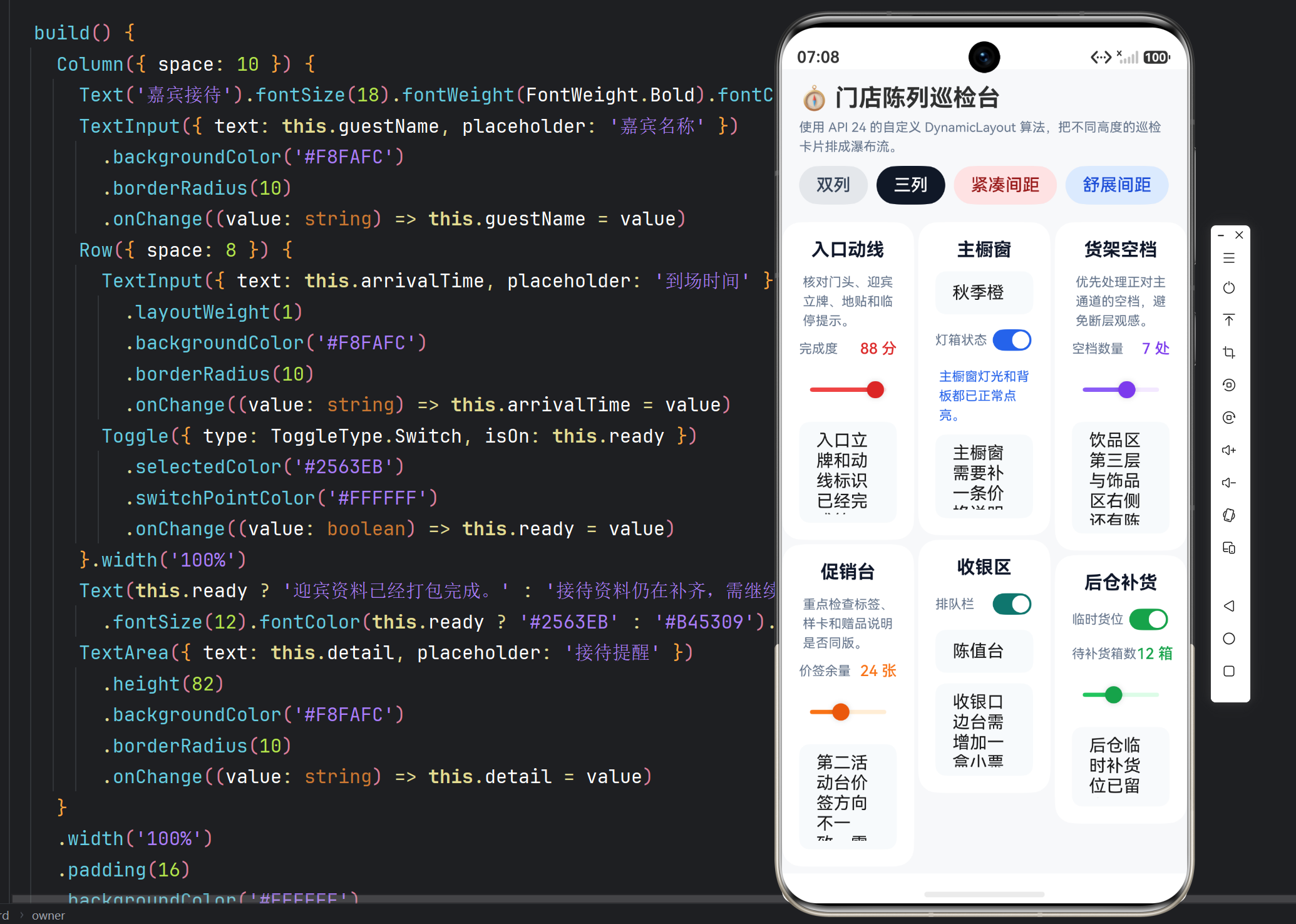
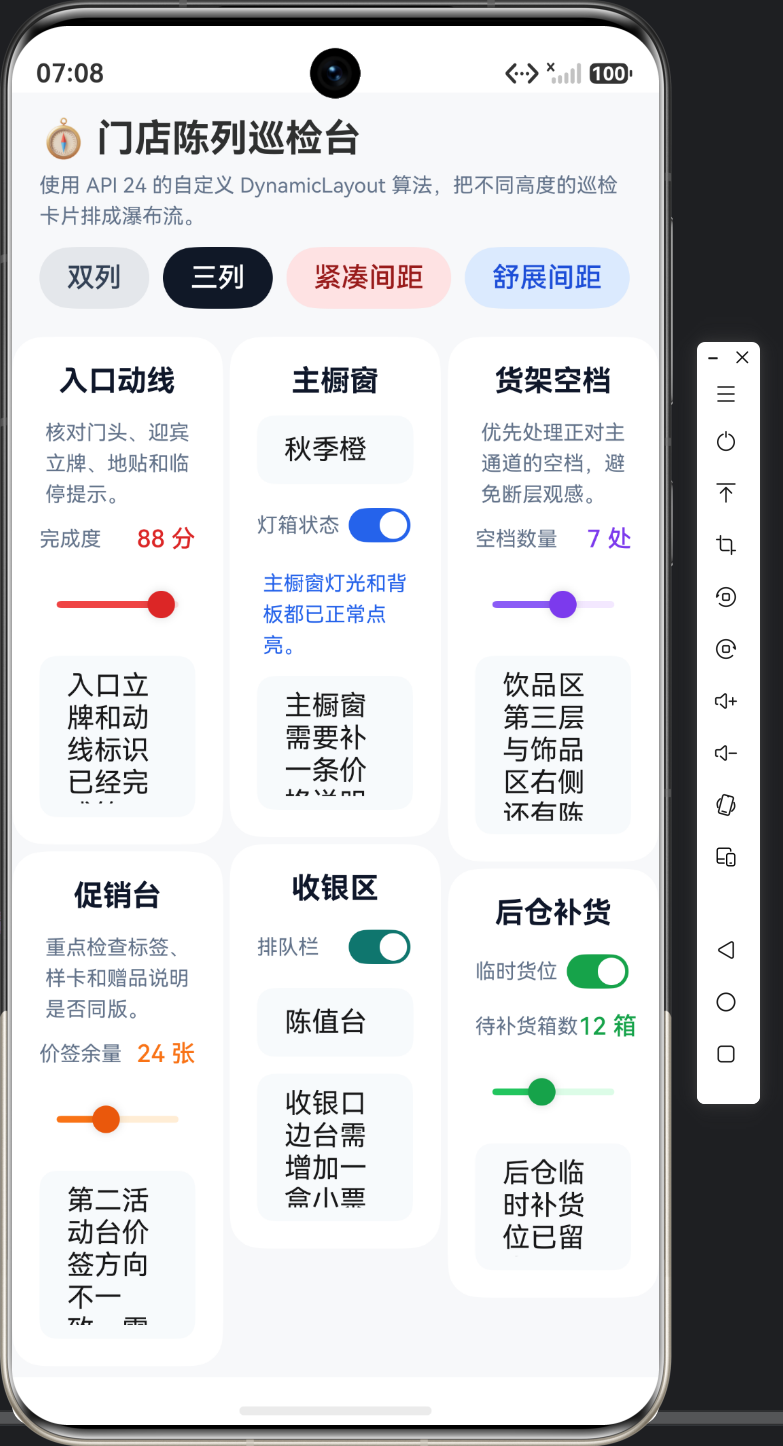
本篇只看巡检卡片组件和页面控制区。六张卡片高度不同,正好适合拿来验证瀑布流的测量和排布结果,因此文章必须给出足够多的卡片代码,而不是只讲结果图。
二、卡片组一:入口动线与主橱窗
typescript
@ComponentV2
struct PatrolEntranceCard {
  @Local score: number = 88;
  @Local note: string = '入口立牌和动线标识已经完成第一次核对。';

  build() {
    Column({ space: 10 }) {
      Text('入口动线').fontSize(17).fontWeight(FontWeight.Bold).fontColor('#0F172A')
      Text('核对门头、迎宾立牌、地贴和临停提示。')
        .fontSize(12).fontColor('#64748B').lineHeight(18)
      Row() {
        Text('完成度').fontSize(12).fontColor('#64748B')
        Blank()
        Text(`${Math.round(this.score)} 分`).fontSize(14).fontWeight(FontWeight.Medium).fontColor('#DC2626')
      }.width('100%')
      Slider({ value: this.score, min: 0, max: 100, step: 1 })
        .selectedColor('#EF4444')
        .trackColor('#FEE2E2')
        .blockColor('#DC2626')
        .onChange((value: number) => this.score = value)
      TextArea({ text: this.note, placeholder: '入口说明' })
        .height(94)
        .backgroundColor('#F8FAFC')
        .borderRadius(10)
        .onChange((value: string) => this.note = value)
    }
    .width('100%')
    .padding(16)
    .backgroundColor('#FFFFFF')
    .borderRadius(18)
  }
}

@ComponentV2
struct PatrolWindowCard {
  @Local mainColor: string = '秋季橙';
  @Local ready: boolean = true;
  @Local remark: string = '主橱窗需要补一条价格说明卡。';

  build() {
    Column({ space: 10 }) {
      Text('主橱窗').fontSize(17).fontWeight(FontWeight.Bold).fontColor('#0F172A')
      TextInput({ text: this.mainColor, placeholder: '主题配色' })
        .backgroundColor('#F8FAFC')
        .borderRadius(10)
        .onChange((value: string) => this.mainColor = value)
      Row() {
        Text('灯箱状态').fontSize(12).fontColor('#64748B')
        Blank()
        Toggle({ type: ToggleType.Switch, isOn: this.ready })
          .selectedColor('#2563EB')
          .onChange((value: boolean) => this.ready = value)
      }.width('100%')
      Text(this.ready ? '主橱窗灯光和背板都已正常点亮。' : '橱窗仍需补测电源与背景灯带。')
        .fontSize(12).fontColor(this.ready ? '#2563EB' : '#B45309').lineHeight(18)
      TextArea({ text: this.remark, placeholder: '补充说明' })
        .height(78)
        .backgroundColor('#F8FAFC')
        .borderRadius(10)
        .onChange((value: string) => this.remark = value)
    }
    .width('100%')
    .padding(16)
    .backgroundColor('#FFFFFF')
    .borderRadius(18)
  }
}
第一组卡片覆盖了 Slider、Toggle、TextInput 和 TextArea 的基本组合。因为瀑布流按卡片真实高度排布,所以卡片内容一多,算法就必须重新平衡列高度。
三、卡片组二:货架空档与收银区
typescript
@ComponentV2
struct PatrolShelfCard {
  @Local gapCount: number = 4;
  @Local note: string = '饮品区第三层与饰品区右侧还有陈列空档。';

  build() {
    Column({ space: 10 }) {
      Text('货架空档').fontSize(17).fontWeight(FontWeight.Bold).fontColor('#0F172A')
      Text('优先处理正对主通道的空档,避免断层观感。')
        .fontSize(12).fontColor('#64748B').lineHeight(18)
      Row() {
        Text('空档数量').fontSize(12).fontColor('#64748B')
        Blank()
        Text(`${Math.round(this.gapCount)} 处`).fontSize(14).fontWeight(FontWeight.Medium).fontColor('#7C3AED')
      }.width('100%')
      Slider({ value: this.gapCount, min: 0, max: 12, step: 1 })
        .selectedColor('#8B5CF6')
        .trackColor('#F3E8FF')
        .blockColor('#7C3AED')
        .onChange((value: number) => this.gapCount = value)
      TextArea({ text: this.note, placeholder: '缺口分布' })
        .height(104)
        .backgroundColor('#F8FAFC')
        .borderRadius(10)
        .onChange((value: string) => this.note = value)
    }
    .width('100%')
    .padding(16)
    .backgroundColor('#FFFFFF')
    .borderRadius(18)
  }
}

@ComponentV2
struct PatrolCashierCard {
  @Local queueReady: boolean = false;
  @Local counterOwner: string = '陈值台';
  @Local note: string = '收银口边台需增加一盒小票纸和一块湿巾。';

  build() {
    Column({ space: 10 }) {
      Text('收银区').fontSize(17).fontWeight(FontWeight.Bold).fontColor('#0F172A')
      Row() {
        Text('排队栏').fontSize(12).fontColor('#64748B')
        Blank()
        Toggle({ type: ToggleType.Switch, isOn: this.queueReady })
          .selectedColor('#0F766E')
          .onChange((value: boolean) => this.queueReady = value)
      }.width('100%')
      TextInput({ text: this.counterOwner, placeholder: '值台负责人' })
        .backgroundColor('#F8FAFC')
        .borderRadius(10)
        .onChange((value: string) => this.counterOwner = value)
      TextArea({ text: this.note, placeholder: '口岸说明' })
        .height(86)
        .backgroundColor('#F8FAFC')
        .borderRadius(10)
        .onChange((value: string) => this.note = value)
    }
    .width('100%')
    .padding(16)
    .backgroundColor('#FFFFFF')
    .borderRadius(18)
  }
}这两张卡片的高度分布更加明显:PatrolShelfCard 用更高的说明区制造列差,PatrolCashierCard 则偏短。技术文写到这里,重点就是让读者看到:算法为什么要找最短列,而不是机械按顺序塞固定网格。
四、卡片组三:促销台与后仓补货
typescript
@ComponentV2
struct PatrolPromoCard {
  @Local badgeCount: number = 24;
  @Local fastFix: string = '第二活动台价签方向不一致,需要统一右上角朝向。';

  build() {
    Column({ space: 10 }) {
      Text('促销台').fontSize(17).fontWeight(FontWeight.Bold).fontColor('#0F172A')
      Text('重点检查标签、样卡和赠品说明是否同版。')
        .fontSize(12).fontColor('#64748B').lineHeight(18)
      Row() {
        Text('价签余量').fontSize(12).fontColor('#64748B')
        Blank()
        Text(`${Math.round(this.badgeCount)} 张`).fontSize(14).fontWeight(FontWeight.Medium).fontColor('#F97316')
      }.width('100%')
      Slider({ value: this.badgeCount, min: 0, max: 60, step: 1 })
        .selectedColor('#F97316')
        .trackColor('#FFEDD5')
        .blockColor('#EA580C')
        .onChange((value: number) => this.badgeCount = value)
      TextArea({ text: this.fastFix, placeholder: '当场处理项' })
        .height(98)
        .backgroundColor('#F8FAFC')
        .borderRadius(10)
        .onChange((value: string) => this.fastFix = value)
    }
    .width('100%')
    .padding(16)
    .backgroundColor('#FFFFFF')
    .borderRadius(18)
  }
}

@ComponentV2
struct PatrolStorageCard {
  @Local backroomReady: boolean = true;
  @Local count: number = 12;
  @Local note: string = '后仓临时补货位已留出两层,今晚可直接入库。';

  build() {
    Column({ space: 10 }) {
      Text('后仓补货').fontSize(17).fontWeight(FontWeight.Bold).fontColor('#0F172A')
      Row() {
        Text('临时货位').fontSize(12).fontColor('#64748B')
        Blank()
        Toggle({ type: ToggleType.Switch, isOn: this.backroomReady })
          .selectedColor('#16A34A')
          .onChange((value: boolean) => this.backroomReady = value)
      }.width('100%')
      Row() {
        Text('待补货箱数').fontSize(12).fontColor('#64748B')
        Blank()
        Text(`${Math.round(this.count)} 箱`).fontSize(14).fontWeight(FontWeight.Medium).fontColor('#16A34A')
      }.width('100%')
      Slider({ value: this.count, min: 0, max: 30, step: 1 })
        .selectedColor('#22C55E')
        .trackColor('#DCFCE7')
        .blockColor('#16A34A')
        .onChange((value: number) => this.count = value)
      TextArea({ text: this.note, placeholder: '补货说明' })
        .height(74)
        .backgroundColor('#F8FAFC')
        .borderRadius(10)
        .onChange((value: string) => this.note = value)
    }
    .width('100%')
    .padding(16)
    .backgroundColor('#FFFFFF')
    .borderRadius(18)
  }
}
最后一组卡片继续扩大了高度和控件组合的差异。对瀑布流来说,卡片是否"好看"不是第一位,能否提供足够真实的高度差才是第一位;否则就无法证明自定义算法的必要性。
五、页面控制区:列数与间距按钮
typescript
Row({ space: 8 }) {
        Button('双列').height(36).backgroundColor(this.layoutAlgorithm.columnCount === 2 ? '#111827' : '#E5E7EB')
          .fontColor(this.layoutAlgorithm.columnCount === 2 ? '#FFFFFF' : '#334155')
          .onClick(() => this.switchColumns(2))
        Button('三列').height(36).backgroundColor(this.layoutAlgorithm.columnCount === 3 ? '#111827' : '#E5E7EB')
          .fontColor(this.layoutAlgorithm.columnCount === 3 ? '#FFFFFF' : '#334155')
          .onClick(() => this.switchColumns(3))
        Button('紧凑间距').height(36).backgroundColor('#FEE2E2').fontColor('#991B1B')
          .onClick(() => this.switchGap(8, 8))
        Button('舒展间距').height(36).backgroundColor('#DBEAFE').fontColor('#1D4ED8')
          .onClick(() => this.switchGap(14, 14))
      }
      .width('100%')
      .padding({ left: 16, right: 16, bottom: 10 })

      Scroll() {
        DynamicLayout(this.layoutAlgorithm) {
          PatrolEntranceCard()
          PatrolWindowCard()
          PatrolShelfCard()
          PatrolCashierCard()
          PatrolPromoCard()
          PatrolStorageCard()
        }
        .width('100%')
        .padding({ left: 16, right: 16, bottom: 24 })
      }
这里把列数按钮、间距按钮和 DynamicLayout 挂载区放到了一起。自定义布局算法只有暴露出可调字段,按钮区才有意义;否则 UI 再多,也只是静态展示。
六、卡片绑定对照表
| 卡片或区域 | 主要控件 | 状态字段 | 页面作用 |
|---|---|---|---|
| 入口动线 | Slider / TextArea | score / note | 入口与导视巡检 |
| 主橱窗 | TextInput / Toggle / TextArea | mainColor / ready / remark | 橱窗主题与灯箱检查 |
| 货架空档 | Slider / TextArea | gapCount / note | 统计空档数量 |
| 收银区 | Toggle / TextInput / TextArea | queueReady / counterOwner / note | 收银动线检查 |
| 促销台 | Slider / TextArea | badgeCount / fastFix | 标签与样卡检查 |
| 后仓补货 | Toggle / Slider / TextArea | backroomReady / count / note | 补货区准备 |
七、本篇小结
第二篇把六张巡检卡片完整摆出来,目的不是堆业务文案,而是让瀑布流算法面对真实高度差。技术文里,卡片高度本身就是算法输入。