核心概念
比 Langchain 更底层的编排框架;用于实现复杂工作流与有状态 Agent 执行,提供流式、持久化、human-in-the-loop 等运行时的能力
create_agent 底层就是基于 langgraph 实现
通过节点、边构建出来的图提供更灵活的流程编排能力 LangGraph 的核心是就是 State、Node、Edge
State:运行过程中的共享数据结构,运行中某一刻的快照,节点之间传递数据的核心Node:LangGraph中具体的执行单元,通常是一个函数,节点会把State作为参数接收,执行对应的逻辑,将返回值作为下一个Node的输入Edge:用于编排Node,决定它们之间的执行顺序和流程,支持固定流程也可以按照条件运行
START -> node_1 -> node_2 -> END
py
from typing import TypedDict
from langgraph.graph.state import END, START, StateGraph

# 1. 定义 schema
class StateSchema(TypedDict):
    status: str

# 2. 定义 node
def order_payment(state: StateSchema):
    state["status"] = "已下单"
    return state

def order_delivery(state: StateSchema):
    state["status"] = "已发货"

# 3. 创建状态图
graph_builder = StateGraph(state_schema=StateSchema)

# 4. 定义图的节点
graph_builder.add_node("payment", order_payment)
graph_builder.add_node("delivery", order_delivery)

# 5. 定义图的边
graph_builder.add_edge(START, "payment")
graph_builder.add_edge("payment", "delivery")
graph_builder.add_edge("delivery", END)

# 6. 编译
graph = graph_builder.compile()
result = graph.invoke({"status": "待下单"})

# print(result)
# print(graph.get_graph().draw_ascii())

# 支持绘制 mermaid
# graph.get_graph().draw_mermaid()
# graph.get_graph().draw_mermaid_png()

# {'status': '已下单'}
# +-----------+
# | __start__ |
# +-----------+
#       *
#       *
#       *
#  +---------+
#  | payment |
#  +---------+
#       *
#       *
#       *
# +----------+
# | delivery |
# +----------+
#       *
#       *
#       *
#  +---------+
#  | __end__ |
#  +---------+
State 的定义支持 @dataclass TypeDict Pydantic 但是因为需要 Annotated 注入的场景,所以 TypeDict 反而成为了主流
不同的方案,在 Node 中取值或者校验失败的错误不一样;
- TypedDict -> KeyError
- dataclass -> TypeError
- Pydantic -> ValidationError
Node 节点
Node 中的 State 默认是覆盖更新,将上一个 Node 的输出作为下一个 Node 的输入,invoke 方法则是传入初始的 State。
State 中的 reducer 用来调整 State 的更新模式,是一个函数(规约函数)通过 Annotated 注入;reducer 可以使用内置也允许自定义 当节点操作指定的 key 时,会遵循规约函数的方案操作该 key 指向的数据。
常用的规约函数有
py
from langgraph.graph.message import add_messages
from operator import add, ...
operator 是一个内置的运算库,包含常规数学运算、比较运算等,add_message 则是增量的往列表中添加消息
py
from typing import Annotated, TypedDict
from langchain.messages import AnyMessage, HumanMessage
from langgraph.graph.message import add_messages
from langgraph.graph.state import END, START, StateGraph

class StateSchema(TypedDict):
    # operator.add 遵循 + 运算,对于列表、字符串会进行拼接,数字增加
    goods_card: Annotated[list[str], add]
    # 1. 如果使用 add_messages 支持元组或者 Message 对象, 最终的输出都会被转换为 Message 对象
    # 2. 在使用时可以给不同的消息指定 ID 进行去重,后面的节点覆盖前面的
    messages: Annotated[list[AnyMessage], add_messages]
    # 没有被操作的节点不会因为没有返回而消失
    default_val: str

def add_goods_1(state: StateSchema):
    state["goods_card"] = ["T恤"]
    # state["messages"] = [("user", "帮我把这个 T恤 添加到购物车")]
    state["messages"] = [HumanMessage("帮我把这个 短裤 添加到购物车", id=1)]
    return state

def add_goods_2(state: StateSchema):
    # state["messages"] = [("user", "帮我把这个 短裤 添加到购物车")]
    return {
        "goods_card": ["短裤"],
        "messages": [HumanMessage("帮我把这个 短裤 添加到购物车", id=1)],
    }

graph_builder = StateGraph(state_schema=StateSchema)
graph_builder.add_node("goods_1", add_goods_1)
graph_builder.add_node("goods_2", add_goods_2)

graph_builder.add_edge(START, "goods_1")
graph_builder.add_edge("goods_1", "goods_2")
graph_builder.add_edge("goods_2", END)

result = graph_builder.compile()

# {
#   'goods_card': ['T恤', '短裤'],
#   'messages': [HumanMessage(content='帮我把这个 短裤 添加到购物车', additional_kwargs={}, response_metadata={}, id='1')],
#   'default_val': 'default'
# }
# print(result.invoke({"goods_card": [], "default_val": "default", "messages": []}))
被 Annotated 注入的内容,框架内部也是通过这个方案获取到并执行的
py
# typing.Annotated[str, <built-in function add>]
print(StateSchema.__annotations__["goods_card"])
# (<built-in function add>,)
print(StateSchema.__annotations__["goods_card"].__metadata__)
# 调用 add 方法
print(StateSchema.__annotations__["goods_card"].__metadata__[0](1, 2))
Overwrite 无视 redecer 逻辑
通过 Overwrite 可以指定节点中的数据不走 reducer 方案,从被 Overwrite 的节点往后继续计算
py
from operator import add
from typing import Annotated, TypedDict
from langgraph.graph.state import END, START, StateGraph
from langgraph.types import Overwrite

class StateSchema(TypedDict):
    counter: Annotated[int, add]

def add_one(state: StateSchema):
    return {"counter": 1}

def add_many(state: StateSchema):
    # 当运行到该节点时,直接复写 10,前面的计算会被全部作废
    # 如果有后续节点的话,从当前节点返回的结果,继续重新计算
    return {"counter": Overwrite(10)}

graph_builder = StateGraph(state_schema=StateSchema)
for node in [add_one, add_many]:
    graph_builder.add_node(node.__name__, node)

graph_builder.add_edge(START, "add_one")
graph_builder.add_edge("add_one", "add_many")
graph_builder.add_edge("add_many", END)

graph = graph_builder.compile()

# {'counter': 10}
print(graph.invoke({"counter": 1}))
内置 State
开始的时候定义该类型存储模型的消息,还有用元组转对象等功能,实际上这个已经被内置了,可以直接使用或者拓展
py
# class StateSchema(TypeDict):
#     messages: Annotated[list[AnyMessage], add_messages]

# MessagesState 就是 StateSchema 类型
from langgraph.graph.message import MessagesState
from langgraph.graph.state import END, START, StateGraph
from langchain.chat_models import init_chat_model
from dotenv import load_dotenv
load_dotenv()

model = init_chat_model(
    model="openai:kimi-k2.6",
    base_url=os.environ.get("OPENAI_BASE_URL"),
    api_key=os.environ.get("OPENAI_API_KEY"),
    extra_body={"thinking": {"type": "disabled"}},
)

class StateSchema(MessagesState):
    username: str
    plain_output: str

def prompt_node(state: StateSchema):
    return {"messages": [("user", f"你好,我是{state['username']}")]}

def model_node(state: StateSchema):
    result = model.invoke(state["messages"])
    return {"plain_output": result.content, "messages": [result]}

graph_builder = StateGraph(state_schema=StateSchema)

graph_builder.add_node("prompt", prompt_node)
graph_builder.add_node("model", model_node)

graph_builder.add_edge(START, "prompt")
graph_builder.add_edge("prompt", "model")
graph_builder.add_edge("model", END)

graph = graph_builder.compile()

# {
#   'messages': [
#       HumanMessage(content='你好,我是海绵宝宝', additional_kwargs={}, response_metadata={}, id='91c09c1b-3cb7-44d3-a11c-fa707c6d34ac'),
#       AIMessage(content='你好呀,海绵宝宝!🍍\n\n准备好去抓水母了吗', additional_kwargs={'refusal': None}, ....],
#   'username': '海绵宝宝',
#   'plain_output': '你好,海绵宝宝!🍍\n\n很高兴见到你!... 😄'
#  }
# print(graph.invoke({"username": "海绵宝宝"}))
此外还有 AgentState 实际上是给 create_agent 使用的,LangGraph 场景一般不使用,函数签名如下
py
from langchain.agents.middleware.types import AgentState, InputAgentState, OutputAgentState

class AgentState(TypedDict, Generic[ResponseT]):
    messages: Required[Annotated[list[AnyMessage], add_messages]]
    jump_to: NotRequired[Annotated[JumpTo | None, EphemeralValue, PrivateStateAttr]]
    structured_response: NotRequired[Annotated[ResponseT, OmitFromInput]]

class InputAgentState(TypedDict):
    messages: Required[Annotated[list[AnyMessage | dict[str, Any]], add_messages]]

class OutputAgentState(TypedDict, Generic[ResponseT]):
    messages: Required[Annotated[list[AnyMessage], add_messages]]
    structured_response: NotRequired[ResponseT]
StateGraph 参数:输入输出的约束
StateGraph 的 input_schema、output_schema 不传递的时候,默认值就是 state_schema
output_schema是最终输出的格式,无论多少字段都会被裁剪成符合该类型的数据input_schema是起始节点接收的数据,在graph.invoke()的时候会按照该类型进行约束
二者的类型一般都是 state_schema 的子集
此外在节点的运行过程中,还允许出现中间态的 State,该类型是所有 State 以外的类型,常用于节点间临时数据的处理,可以有效避免状态被 reducer 干扰
py
from langgraph.graph.message import MessagesState
from typing import TypedDict
from langgraph.graph.state import END, START, StateGraph

class StateSchema(MessagesState):
    user_question: str
    answer: str

class InputState(TypedDict):
    user_question: str

class OutputState(TypedDict):
    answer: str

# 中间态的类型
class TempState(OutputState):
    raw_docs: list[dict[str, str | int]]

def retrive_data(state: InputState):
    # 模拟查询知识库
    question = state["user_question"]
    raw_docs = [{"content": "根据该用户购物习惯,喜欢买 T恤", "score": 90}]

    return {
        # 中间态数据字段
        "raw_docs": raw_docs,
        "messages": [question, ToolMessage("知识库查询完毕", tool_call_id="1")],
    }

def answer(state: TempState):
    return {"answer": state["raw_docs"][0].get("content")}

graph_builder = StateGraph(
    state_schema=StateSchema,
    input_schema=InputState,
    output_schema=OutputState,  # 如果没有这个限制,则会返回 StateSchema 中的所有字段
)

graph_builder.add_node("retrive", retrive_data)
graph_builder.add_node("answer", answer)

graph_builder.add_edge(START, "retrive")
graph_builder.add_edge("retrive", "answer")
graph_builder.add_edge("answer", END)

graph = graph_builder.compile()

print(graph.invoke({"user_question": HumanMessage("海绵宝宝喜欢买什么")}))
StateGraph 返回值
节点、边、编译等都是返回值提供的方法,包括前面一直使用的 add_node | add_edge | complie
py
graph_builder = StateGraph(state_schema=StateSchema)

# 添加 Node 时常用的参数, node 为函数名字符串,action 为函数本身
graph_builder.add_node(node='func_name', action=func)

# 添加 Edge 指定 add_node 中添加的 node 名进行编排
# START 和 END 作为开始和结束的节点
graph_builder.add_edge(start_key=START, end_key="func_name")
graph_builder.add_edge(start_key="func_name", end_key=END)

# compile 负责编译
graph = graph_builder.complie()
目前通过 complie 编译后对象的方法仅设计到 invoke 和一系列 draw_ 开头的绘制方法。
graph_builder 的 add_sequence 方法
接收 Node 的列表,直接绘制成线性边 ,不用额外 add_node 内部会自行处理
py
graph_builder.add_edge(START, "question")
# 在内部会把这两个方法 add_node 然后再 add_edge
graph_builder.add_sequence([question, answer])
graph_builder.add_edge("answer", END)
graph_builder 设置 START、END
通过 set_entry_point | set_finish_point 设置起始边和结束边,底层起始是 add_edge 预填充的 START | END 标识
py
graph_builder.set_entry_point("question")
graph_builder.add_sequence([question, answer])
graph_builder.set_finish_point("answer")
在线性图的执行流程中 END 不是必须的,如果最后一个节点后面没有要执行的时也会终止;不会影响图的流程,可以把他当做一个结束的标识。
py
graph_builder.set_entry_point("question")
graph_builder.add_sequence([question, answer])

# 不用 set_finish_point 或者显示的声明 END 到 answer 也会结束
# graph_builder.set_finish_point("answer")
graph_builder.add_edge(start_key="question", end_key="answer")
Edge 运行分支
由之前的线性结构拓展为图结构
code
START → NODE → END

    START
  ↙       ↘
NODE      NODE  每个 NODE 可能继续分叉
  ↘       ↙
     END
按照官方的说法,边分为四种
Normal Edges普通边,就是线性结构add_edgeConditional Edges通过add_conditional_edges构建出来带条件的边Entry Point入口点,就是通过graph.add_edge(START, "node_a")决定入口的节点Conditional Entry Point条件入口点,同理是通过graph.add_conditional_edges(START, routing_function)确定条件入口的节点
并行分支
- 调度层面上面的并行而非程序上,节点之前互相没有依赖,实际的运行顺序还是看代码的编写顺序
- 执行完成后统一合并的
State如果节点之间操作的是同一个State字段需要合理使用reducer避免出现错误InvalidUpdateError
py
class StateSchema(TypedDict):
    desc: str
    reason: str
    suggest: str
    # 测试 InvalidUpdateError 不指定 reducer 就会报错
    count: Annotated[int, sub]

def node_1(state: StateSchema):
    return {"reason": f"根据你的说法"{state['desc']}"看出来你应该是感冒了", "count": 2}

def node_2(state: StateSchema):
    state["suggest"] = "建议多睡觉"
    state["count"] = 3
    return state

builder = StateGraph(state_schema=StateSchema)
for node in [node_1, node_2, node_3, node_4]:
    builder.add_node(node.__name__, node)

# 核心在于多个边
# 从 start -> node_1 -> end
# 从 start -> node_2 -> end
builder.add_edge(START, "node_1")
builder.add_edge(START, "node_2")

builder.add_edge("node_1", END)
builder.add_edge("node_2", END)

graph = builder.compile()

# {'desc': '很困,四肢无力', 'reason': '根据你的说法"很困,四肢无力"看出来你应该是感冒了', 'suggest': '建议多睡觉'}
#         +-----------+
#         | __start__ |
#         +-----------+
#           *         *
#         **           **
#        *               *
# +--------+          +--------+
# | node_1 |          | node_2 |
# +--------+          +--------+
#           *         *
#            **     **
#              *   *
#           +---------+
#           | __end__ |
#           +---------+
# print(graph.invoke({"desc": "很困,四肢无力"}))
# print(graph.get_graph().draw_ascii())
条件分支
通过 add_conditional_edges 从某个上游节点出发,根据路由函数选择跳转到哪些下游节点;接收三个参数
source起始节点的字符串名称path路由规则一般都是函数,支持返回序列或字符串path_map路由函数返回值与到真实节点的映射关系,可是是字典或者列表,必须是真实节点名
同样以上面 "并行执行" 中 Node 为例
py
def router(state: StateSchema) -> Literal["node_1", "node_2"]:
    if "不提建议" in state["desc"]:
        return "node_1"
    return "node_2"

# 不再连续添加两个 START 而是添加一个,通过 router 指定从哪里作为下一个开始
builder.add_conditional_edges(source=START, path=router)

builder.add_edge("node_1", END)
builder.add_edge("node_2", END)

graph = builder.compile()

# {'desc': '很困,四肢无力', 'suggest': '建议多睡觉', 'count': -3}
# {'desc': '很困,四肢无力, 不提建议', 'reason': '根据你的说法"很困,四肢无力, 不提建议"看出来你应该是感冒了', 'count': -2}
#         +-----------+
#         | __start__ |
#         +-----------+
#           .         .
#         ..           ..   __start__ 到 node 之间由 * 变成了 .
#        .               .  也进一步标识了这是条件节点
# +--------+          +--------+
# | node_1 |          | node_2 |
# +--------+          +--------+
#           *         *
#            **     **
#              *   *
#           +---------+
#           | __end__ |
#           +---------+
print(graph.invoke({"desc": "很困,四肢无力"}))
print(graph.invoke({"desc": "很困,四肢无力, 不提建议"}))
print(graph.get_graph().draw_ascii())
当不期望 router 直接返回节点名时,就可以配合 path_map 参数返回有意义的业务名做映射
py
def router(state: StateSchema) -> Literal["node_1", "node_2"]:
    if "不提建议" in state["desc"]:
        return "no_suggest"
    return "yes_suggest"

builder.add_conditional_edges(
    source=START,
    path=router,
    # 通过 map 映射,让 router 函数更加纯净
    path_map={"no_suggest": "node_1", "yes_suggest": "node_2"}
)
router 支持通过列表返回多个节点,同样的,所有节点都要添加到 edge 中
该场景下最好指定 path_map 有助于 mermaid 的关系绘制
py
def router(state: StateSchema) -> Literal["node_1", "node_2"]:
    if "不提建议" in state["desc"]:
        return ["node_1", "node_3"]
    return ["node_2", "node_4"]

builder.add_conditional_edges(
    source=START,
    path=router,
    path_map={
        "node_1": "node_1",
        "node_2": "node_2",
        "node_3": "node_3",
        "node_4": "node_4",
    },
    # 字典 or 列表
    # path_map=["node_1", "node_2", "node_3", "node_4"],
)

builder.add_edge("node_1", END)
builder.add_edge("node_2", END)
builder.add_edge("node_3", END)
builder.add_edge("node_4", END)
defer 延迟执行
这是 add_node 的参数,默认是 False 如果为 True 时该节点会在最后执行,常用于日志记录、审计、汇总、校验等场景
py
class StateSchema(TypedDict):
    status: str
    mount: Annotated[int, sub]
    log: str

def order_payment(state: StateSchema):
    return {"status": "已下单"}

def order_status():
    return {"mount": 20}

def order_failed(state: StateSchema):
    return {"status": "下单失败", "mount": state["mount"]}

def order_log(state: StateSchema):
    return {"log": f"该商品状态 {state['status']}, 花费 {state['mount']}"}

builder = StateGraph(state_schema=StateSchema)

# 添加节点
builder.add_node(node="payment", action=order_payment)
builder.add_node(node="status", action=order_status)
builder.add_node(node="failed", action=order_failed)
# 该节点会在所有节点执行完毕之后,再执行
builder.add_node(node="log", action=order_log, defer=True)

def router(state: StateSchema):
    if state["mount"] < 20:
        return ["failed", "log"]
    else:
        return ["payment", "status", "log"]

# 添加条件边
builder.add_conditional_edges(
    source=START, path=router, path_map=["payment", "status", "failed", "log"]
)
# 添加边,所有的边都指向 END
builder.add_edge("payment", END)
builder.add_edge("status", END)
builder.add_edge("failed", END)
builder.add_edge("log", END)

graph = builder.compile()

print(graph.invoke({"status": "待下单", "mount": 0}))
print(graph.get_graph().draw_mermaid())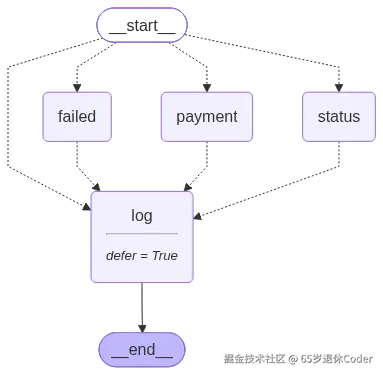
动态并行分支 Send
与编排并行不同,通过 router 函数结合 Send 同时发布多个任务,在节点运行过程中确认确认触发哪些下游任务
不是动态注册 Node 而是动态决定运行那些 Node
Send 接收两个参数节点名和参数
py
from typing import Literal, TypedDict

from langgraph.graph.state import START, StateGraph
from langgraph.types import Send

class StateSchema(TypedDict):
    content: str
    tw: str
    us: str

class TranslateSchema(StateSchema):
    translate: Literal["tw", "us"]

def translate_node(state: TranslateSchema):
    print(state["content"], state["translate"])  # 模拟 content 翻译逻辑
    return {"tw": "妳好"} if state["translate"] == "tw" else {"us": "hello"}

def router(state: StateSchema):
    return [
        # 并行调用 translate_node 完成不一样的翻译任务
        Send(
            node="translate_node",
            arg={"translate": lang, "content": state["content"]},
        )
        for lang in ["us", "tw"]
    ]

builder = StateGraph(state_schema=StateSchema)

# Send 的节点也要被添加之后才可以被 Send
builder.add_node("translate_node", translate_node)
builder.add_conditional_edges(START, path=router)
graph = builder.compile()

# {'content': '你好', 'tw': '妳好', 'us': 'hello'}
print(graph.invoke({"content": "你好"}))
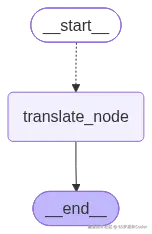
print(graph.get_graph().draw_mermaid())
虽然 translate_node 被执行了 n 遍,但是被合并成了同一个节点
动态条件分支 Command
同样是在 router 的运行过程中,判定下一步应该使用哪个节点,接收四个参数
goto节点完成后跳转的目标节点update更新图状态,等价于更新节点的返回值resume回复被中断的执行,可以用于人工审核阶段graph存在子图时,用于指定跳转发生在哪一层图中,例如从子图跳转到父图
py
from operator import add
from typing import Annotated, TypedDict
from langgraph.graph import END, START, StateGraph
from langgraph.types import Command

class LottoSchema(TypedDict):
    amount: Annotated[int, add]
    action: str

def zero_amount(state):
    return {"amount": -10}

def ten_amount(state):
    return {"amount": 10}

def twenty_amount(state):
    return {"amount": 20}

def start_node(
    state: LottoSchema,
) -> Command[Literal["zero_amount", "ten_amount", "twenty_amount", END]]:  # type: ignore
    # 通过声明返回值类型,帮助 graph 更好的生成
    if state["action"] == "喜相逢":
        return Command(goto="zero_amount")
    if state["action"] == "好运十倍":
        return Command(goto="ten_amount")
    if state["action"] == "百发百中":
        return Command(goto="twenty_amount")
    return Command(goto=END)

builder = StateGraph(state_schema=LottoSchema)
for node in [zero_amount, ten_amount, twenty_amount, start_node]:
    # 添加节点
    builder.add_node(node.__name__, node)
    # 添加边
    if node.__name__ != "start_node":
        builder.add_edge(node.__name__, END)
    else:
        builder.add_edge(START, "start_node")

graph = builder.compile()
print(graph.invoke({"action": "喜相逢"}))
print(graph.get_graph().draw_mermaid())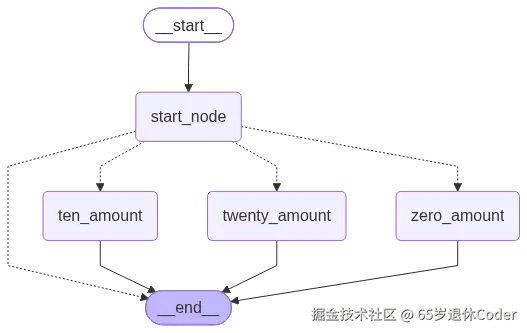
节点执行顺序与执行单元
Node 的第二个 config 参数中可以通过 langgraph_step 来归纳执行单元,可以理解内部的批处理模式,相同的 langgraph_step 操作同样的 State["Field"]就需要配置 reducer 策略
也可以更深入的理解 Node 的执行顺序以及多节点并行场景下, Node 的执行次数
py
# 测试代码
from typing import TypedDict
from langchain_core.runnables import RunnableConfig # config 类型
from langgraph.graph import END, START, StateGraph
from loguru import logger

class EmptyState(TypedDict): pass

def node_1(state, config: RunnableConfig):
    logger.info("node_1 执行 step {}", config["metadata"]["langgraph_step"])
    return state

def node_2(state, config: RunnableConfig):
    logger.info("node_2 执行 step {}", config["metadata"]["langgraph_step"])
    return state

def node_3(state, config: RunnableConfig):
    logger.info("node_3 执行 step {}", config["metadata"]["langgraph_step"])
    return state

def node_4(state, config: RunnableConfig):
    logger.info("node_4 执行 step {}", config["metadata"]["langgraph_step"])
    return state

builder = StateGraph(state_schema=EmptyState)
for node in [node_1, node_2, node_3, node_4]:
    builder.add_node(node.__name__, node)
并行执行,所有的 Node 都在一个执行单元中,并且全部都执行一次,在同一个执行单元下如果操作 State["field"] 就要考虑使用 reducer 去管理
py
builder.add_edge(START, "node_1")
builder.add_edge(START, "node_2")
builder.add_edge(START, "node_3")
builder.add_edge(START, "node_4")
builder.add_edge("node_1", END)
builder.add_edge("node_2", END)
builder.add_edge("node_3", END)
builder.add_edge("node_4", END)

graph = builder.compile()
# 2026-08-27 17:46:32.236 | INFO     | __main__:node_1:371 - node_1 执行 step 1
# 2026-08-27 17:46:32.236 | INFO     | __main__:node_2:376 - node_2 执行 step 1
# 2026-08-27 17:46:32.236 | INFO     | __main__:node_3:381 - node_3 执行 step 1
# 2026-08-27 17:46:32.236 | INFO     | __main__:node_4:386 - node_4 执行 step 1
graph.invoke({})  # 触发日志
print(graph.get_graph().draw_mermaid())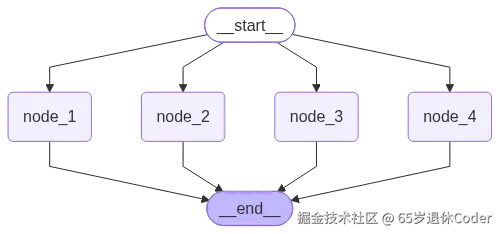
标准的线性结构,每个 Node 都是一个单独的执行单元
py
builder.add_edge(START, "node_1")
builder.add_edge("node_1", "node_2")
builder.add_edge("node_2", "node_3")
builder.add_edge("node_3", "node_4")
builder.add_edge("node_4", END)

graph = builder.compile()
# 2026-08-27 17:51:58.484 | INFO     | __main__:node_1:371 - node_1 执行 step 1
# 2026-08-27 17:51:58.484 | INFO     | __main__:node_2:376 - node_2 执行 step 2
# 2026-08-27 17:51:58.484 | INFO     | __main__:node_3:381 - node_3 执行 step 3
# 2026-08-27 17:51:58.484 | INFO     | __main__:node_4:386 - node_4 执行 step 4
graph.invoke({})  # 触发日志
print(graph.get_graph().draw_mermaid())
并行结构且带有共同的结束非 END 结束节点,则会导致这个非 END 结束节点运行多次
py
# 两个并行开始都是以 node_4 为结尾
# 最终导致在日志中 node_4 在不同的执行单元中运行了多次

builder.add_edge(START, "node_1")
builder.add_edge("node_1", "node_3")
builder.add_edge("node_3", "node_4")

builder.add_edge(START, "node_2")
builder.add_edge("node_2", "node_4")

graph = builder.compile()
# 2026-08-27 17:55:22.918 | INFO     | __main__:node_1:371 - node_1 执行 step 1
# 2026-08-27 17:55:22.919 | INFO     | __main__:node_2:376 - node_2 执行 step 1
# 2026-08-27 17:55:22.919 | INFO     | __main__:node_3:381 - node_3 执行 step 2
# 2026-08-27 17:55:22.919 | INFO     | __main__:node_4:386 - node_4 执行 step 2
# 2026-08-27 17:55:22.920 | INFO     | __main__:node_4:386 - node_4 执行 step 3
graph.invoke({})  # 触发日志
print(graph.get_graph().draw_mermaid())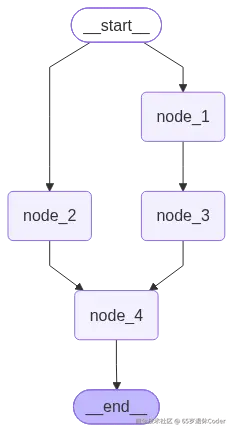
并行结构的节点多次运行可以通过给 add_edge 的第一个参数传入列表解决且最终的图结构也不会被改变
py
builder.add_edge(START, "node_1")
builder.add_edge("node_1", "node_3")

builder.add_edge(START, "node_2")
# 去除 node_3 -> node_4 以及 node_2 -> node_4 的 add_edge
# 直接传入 ["node_2", "node3"] 表示 2 和 3 结束后才会运行 4
builder.add_edge(["node_2", "node_3"], "node_4")

graph = builder.compile()
# 2026-08-27 18:11:49.822 | INFO     | __main__:node_1:371 - node_1 执行 step 1
# 2026-08-27 18:11:49.822 | INFO     | __main__:node_2:376 - node_2 执行 step 1
# 2026-08-27 18:11:49.823 | INFO     | __main__:node_3:381 - node_3 执行 step 2
# 2026-08-27 18:11:49.823 | INFO     | __main__:node_4:386 - node_4 执行 step 3
graph.invoke({})  # 触发日志
print(graph.get_graph().draw_mermaid())
Edge 循环结构
Agent 本身就是 ReAct 推理 + 行动的架构,模型根据问题决定是否调用工具或者MCP,然后调用,再根据结果思考是否还需要再次调用,再思考... 的 loop
add_conditional_edges循环的逻辑主要在 router 函数中,也就是描述边关系的过程中Command动态实现,逻辑都在实际的节点内部中
add_conditional_edges 循环结构
本质还是通过 router 函数控制模型是否进入工具之间的循环
py
import random
from typing import Literal
from langchain.messages import AIMessage, HumanMessage, ToolMessage
from langgraph.graph import END, START, StateGraph
from langgraph.graph.message import MessagesState

class StateSchema(MessagesState):
    question: str
    output: str

def model_node(state: StateSchema):
    # model.invoke 模拟调用
    # 大概率返回 tool_calls
    tool_calls = (
        [{"id": "123", "name": "tool_name", "args": {"a": "1"}}]
        if random.randint(0, 9) < 8
        else []
    )
    return {"messages": [AIMessage("完成问题的回答", tool_calls=tool_calls)]}

def tool_node(state: StateSchema):
    return {"messages": [ToolMessage("调用工具完成", tool_call_id="123")]}

def output_node(state: StateSchema):
    return {"output": state["messages"][-1].content}

def router(state: StateSchema) -> Literal["tool_node", "output_node"]:
    # 有 tool_calls 就走 tool_node
    if state["messages"][-1].tool_calls:
        return "tool_node"
    return "output_node"

builder = StateGraph(state_schema=StateSchema)
for node in [model_node, tool_node, output_node]:
    builder.add_node(node.__name__, node)

builder.add_edge(START, "model_node")
# model_node 结束后,就根据 mode_node 中是否存在 tool_calls 决定是否调用 tool_node
# 没有 tool_calls 的时候就到了 output_node 即循环结束
builder.add_conditional_edges("model_node", router)
# 还要绘制出来从 tool_node 到 model_node 的边,
# tool_node 运行结束就走 model_node
builder.add_edge("tool_node", "model_node")
builder.add_edge("output_node", END)

graph = builder.compile()
print(graph.invoke({"messages": [HumanMessage("你好")]}))
print(graph.get_graph().draw_mermaid())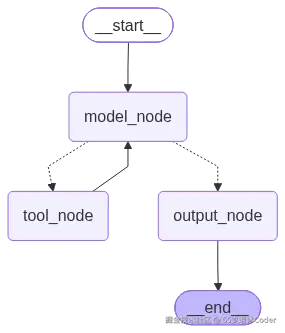
Command 循环结构
得益于 Command 的使用场景,可以将判断逻辑调整到实际的 Node 中达到循环结构的目的;仅需要改进一下节点的实现即可
py
# 注意返回值的注解,会影响最终图的绘制
def model_node(state: StateSchema) -> Command[Literal["tool_node", "output_node"]]:
    tool_calls = (
        [{"id": "123", "name": "tool_name", "args": {"a": "1"}}]
        if random.randint(0, 9) < 8
        else []
    )
    # 基于随机逻辑调整为 Command 跳转
    if tool_calls:
        return Command(
            goto="tool_node",
            update={"messages": [AIMessage("完成问题的回答", tool_calls=tool_calls)]},
        )
    return Command(goto="output_node", update={"messages": [AIMessage("完成问题的回答")]})

def tool_node(state: StateSchema):
    # 工具节点就无脑往模型节点跳转
    return Command(
        goto="model_node",
        update={"messages": [ToolMessage("调用工具完成", tool_call_id="123")]},
    )

# 绘制的阶段,去除 router 但仍需保留 tool_node -> model_node
builder.add_edge(START, "model_node")
# builder.add_conditional_edges("model_node", router)
builder.add_edge("tool_node", "model_node")
builder.add_edge("output_node", END)
循环限制
实际上是在配置之前在节点中通过 config["metadata"]["langgraph_step"] 的上限,在循环的节点中防止进入死循环。该类型为 from langchain_core.runnables import RunnableConfig
通过 graph.invoke() 的第 config 参数传递,默认值 25,超出异常 GraphRecursionError
在 State 中也可以接收一个 remaining_steps 的参数可以获取到超出异常的倒计数,可以根据该数字判定是否结束节点的运行
上限是指整个图运行中的 step 上限,而不是某个节点
py
from typing import Literal, TypedDict
from langchain_core.runnables import RunnableConfig
from langgraph.errors import GraphRecursionError # 超出的异常
from langgraph.graph import END, StateGraph
from langgraph.managed import RemainingSteps # 倒计的 step
from langgraph.types import Command
from loguru import logger

class StateSchema(TypedDict):
    remaining_steps: RemainingSteps

def node_1(state: StateSchema, config: RunnableConfig) -> Command[Literal["node_1"]]:
    # 获取 cur_step,remaining_step
    cur_step = config["metadata"]["langgraph_step"]
    remaining_step = state["remaining_steps"]

    logger.info("node_1 当前 step {}, 剩余 step {}", cur_step, remaining_step)
    # 自循环逻辑,该方案当快没有 step 的时候就终止
    if remaining_step < 2:
        return Command(goto=END)
    return Command(goto="node_1")

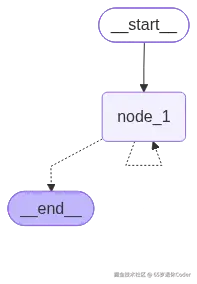
builder = StateGraph(state_schema=StateSchema)
builder.add_node("node_1", node_1)
builder.set_entry_point("node_1")
builder.set_finish_point("node_1")
graph = builder.compile()

# 就算没有内部的处理逻辑,到这里也可以被捕获错误
try:
    graph.invoke({}, config={"recursion_limit": 10})
except GraphRecursionError as e:
    logger.error("超出循环限制 {}", e)

print(graph.get_graph().draw_mermaid())

# 提前跳转到 END 就会出现异常
# 2026-08-28 11:45:04.966 | INFO     | __main__:node_1:18 - node_1 当前 step 1, 剩余 step 9
# 2026-08-28 11:45:04.966 | INFO     | __main__:node_1:18 - node_1 当前 step 2, 剩余 step 8
# 2026-08-28 11:45:04.966 | INFO     | __main__:node_1:18 - node_1 当前 step 3, 剩余 step 7
# 2026-08-28 11:45:04.967 | INFO     | __main__:node_1:18 - node_1 当前 step 4, 剩余 step 6
# 2026-08-28 11:45:04.967 | INFO     | __main__:node_1:18 - node_1 当前 step 5, 剩余 step 5
# 2026-08-28 11:45:04.967 | INFO     | __main__:node_1:18 - node_1 当前 step 6, 剩余 step 4
# 2026-08-28 11:45:04.967 | INFO     | __main__:node_1:18 - node_1 当前 step 7, 剩余 step 3
# 2026-08-28 11:45:04.967 | INFO     | __main__:node_1:18 - node_1 当前 step 8, 剩余 step 2
# 2026-08-28 11:45:04.967 | INFO     | __main__:node_1:18 - node_1 当前 step 9, 剩余 step 1
# 2026-08-28 11:45:04.967 | INFO     | __main__:node_1:18 - node_1 当前 step 10, 剩余 step 0
# 2026-08-28 11:45:04.967 | ERROR    | __main__:<module>:34 - 超出循环限制 Recursion limit of 10 reached without hitting a stop condition. You can increase the limit by setting the `recursion_limit` config key.
# For troubleshooting, visit: https://docs.langchain.com/oss/python/langgraph/errors/GRAPH_RECURSION_LIMIT