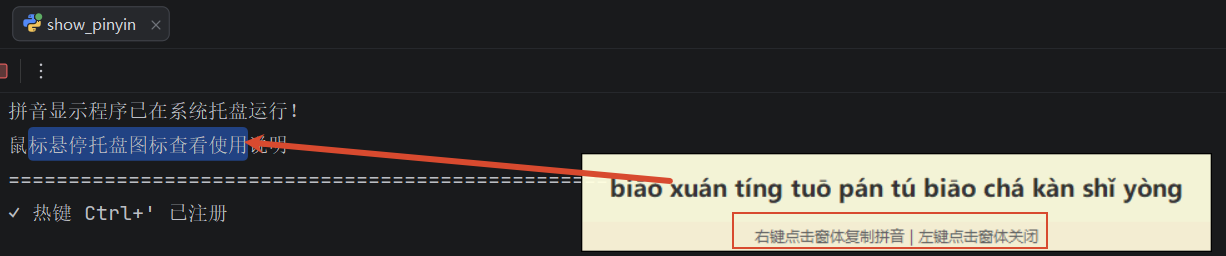
之前做过一个查拼音程序,只能查一个字,并且无法复制查到的拼音,今天对它升个级,可以查任意多字符,并且可复制拼音,运行效果如图:
程序代码:
python
# show_pinyin.py
import sys
import os
import keyboard
import pyperclip
from pypinyin import pinyin, Style
import tkinter as tk
import threading
import time
import re
import ctypes
from queue import Queue
import pystray
from PIL import Image, ImageDraw
import signal


class PinyinDisplay:
    def __init__(self):
        # 主Tk根窗口(隐藏),确保在主线程创建并运行
        self.tk_root = tk.Tk()
        self.tk_root.withdraw()

        # 弹出窗口引用(Toplevel),在主线程中创建/销毁
        self.popup_win = None
        self.popup_label = None
        self.window_open = False

        # 请求队列:后台线程放入显示请求,主线程(tk)处理
        self.request_queue = Queue()

        self.is_running = True
        self.current_pinyin = ""  # 存储当前显示的拼音
        self.tray_icon = None
        self.tray_thread = None
        # 用于在主循环中等待退出信号
        self.stop_event = threading.Event()

    def create_tray_icon(self):
        """创建系统托盘图标"""
        # 创建一个简单的图标
        image = self.create_icon_image()

        # 创建托盘图标
        self.tray_icon = pystray.Icon(
            "pinyin_display",
            image,
            "拼音显示工具",
            menu=pystray.Menu(
                pystray.MenuItem("显示拼音 (Ctrl+')", lambda icon, item: self.show_pinyin()),
                pystray.MenuItem("退出程序", lambda icon, item: self.quit_program())
            )
        )

        # 设置鼠标悬停提示
        self.tray_icon.title = self.get_tooltip_text()

        # 在新线程中运行托盘图标
        # 使用非 daemon 线程,这样可以在退出时 join 等待其正确清理图标
        self.tray_thread = threading.Thread(target=self.tray_icon.run, daemon=False)
        self.tray_thread.start()

    def create_icon_image(self):
        """创建托盘图标图像"""
        # 创建一个简单的图标 - 一个带有"拼"字的图标
        size = 64
        image = Image.new('RGBA', (size, size), (0, 0, 0, 0))
        draw = ImageDraw.Draw(image)

        # 绘制圆形背景
        draw.ellipse([4, 4, size - 4, size - 4], fill=(0, 255, 0, 255))

        # 绘制"拼"字
        from PIL import ImageFont
        try:
            # 尝试使用系统中文字体
            font = ImageFont.truetype("msyh.ttf", 40)  # Microsoft YaHei
        except:
            try:
                font = ImageFont.truetype("simhei.ttf", 40)  # SimHei
            except:
                try:
                    font = ImageFont.truetype("arial.ttf", 40)
                except:
                    font = ImageFont.load_default()

        # 计算文字位置
        text = "拼"
        bbox = draw.textbbox((0, 0), text, font=font)
        text_width = bbox[2] - bbox[0]
        text_height = bbox[3] - bbox[1]
        x = (size - text_width) // 2
        y = (size - text_height) // 2 - 2

        draw.text((x, y), text, fill=(255, 0, 0, 255), font=font)

        return image

    def get_tooltip_text(self):
        """获取托盘图标提示文本"""
        tooltip_lines = [
            "拼音显示工具",
            "━━━━━━━━━━━━━━━━━━━",
            "按下 Ctrl+' 显示选中中文的拼音",
            "右键点击拼音窗口 -> 复制拼音",
            "左键点击拼音窗口 -> 关闭窗口"
        ]
        return "\n".join(tooltip_lines)


    def quit_program(self):
        """退出程序"""
        print("\n正在退出程序...")
        self.is_running = False
        # 发送停止信号给监听循环
        try:
            self.stop_event.set()
        except Exception:
            pass
        self.cleanup()
        # 强制退出(保底)
        try:
            os._exit(0)
        except Exception:
            pass

    def get_selected_text(self):
        """获取当前选中的文本"""
        try:
            # 保存当前剪贴板内容
            original_clipboard = pyperclip.paste()

            # 模拟Ctrl+C复制选中的文本
            keyboard.press_and_release('ctrl+c')

            # 等待剪贴板变化(最多等待0.5秒),防止长时间阻塞
            end = time.time() + 0.5
            selected_text = None
            while time.time() < end:
                try:
                    cur = pyperclip.paste()
                except Exception:
                    cur = None
                if cur is not None and cur != original_clipboard:
                    selected_text = cur
                    break
                time.sleep(0.05)

            # 恢复原始剪贴板内容(尽量恢复)
            try:
                pyperclip.copy(original_clipboard)
            except Exception:
                pass

            # 如果没有检测到剪贴板变化,认为没有新的选中内容
            if not selected_text:
                return None

            return selected_text.strip()
        except Exception as e:
            print(f"获取选中文本时出错: {e}")
            return None

    def is_chinese_text(self, text):
        """检查文本是否包含中文"""
        if not text:
            return False
        # 检查是否包含中文字符
        # chinese_pattern = re.compile(r'[\u4e00-\u9fff]')
        # 一个较为完整的Unicode汉字区块匹配范围
        chinese_pattern = re.compile(r'[\u3400-\u4DBF\u4E00-\u9FFF\uF900-\uFAFF\u20000-\u2A6DF]')
        return bool(chinese_pattern.search(text))

    def text_to_pinyin(self, text):
        """将中文文本转换为拼音(带声调)"""
        if not text:
            return ""

        # 使用pypinyin转换,保留声调
        result = pinyin(text, style=Style.TONE, heteronym=False)
        # 将结果转换为字符串
        pinyin_list = [item[0] for item in result if item]
        return ' '.join(pinyin_list)

    def process_queue(self):
        """主线程(tk)定期调用,处理显示请求队列"""
        try:
            while not self.request_queue.empty():
                selected_text, pinyin_text, cursor_x, cursor_y = self.request_queue.get_nowait()
                # 若已有窗口打开,先关闭它
                if self.window_open:
                    self.close_window()
                # 创建Toplevel窗口在主线程
                self.popup_win = tk.Toplevel(self.tk_root)
                self.popup_win.overrideredirect(True)
                self.popup_win.attributes('-topmost', True)
                self.popup_win.attributes('-alpha', 0.95)

                frame = tk.Frame(self.popup_win, bg="#FFFFE0", bd=1, relief="solid")
                frame.pack(fill="both", expand=True)

                self.popup_label = tk.Label(
                    frame,
                    text=pinyin_text,
                    font=("Microsoft YaHei", 14, "bold"),
                    bg="#FFFFE0",
                    fg="#333333",
                    padx=20,
                    pady=12,
                    wraplength=600,
                    justify="left",
                    cursor="hand2"
                )
                self.popup_label.pack(fill="both", expand=True)

                hint = tk.Label(frame, text="右键点击窗体复制拼音 | 左键点击窗体关闭", font=("Microsoft YaHei", 9), bg="#FFF8DC", fg="#666666")
                hint.pack(fill="x")

                # 绑定事件
                self.popup_win.bind('<Button-1>', lambda e: self.close_window())
                self.popup_win.bind('<Button-3>', lambda e: (pyperclip.copy(pinyin_text), self.show_message("✓ 已复制到剪贴板")))

                # 位置计算
                self.popup_win.update_idletasks()
                w = self.popup_win.winfo_width()
                h = self.popup_win.winfo_height()
                screen_w = self.popup_win.winfo_screenwidth()
                screen_h = self.popup_win.winfo_screenheight()

                x_pos = int(cursor_x + 20)
                y_pos = int(cursor_y + 20)
                if x_pos + w > screen_w:
                    x_pos = int(cursor_x - w - 20)
                if y_pos + h > screen_h:
                    y_pos = int(cursor_y - h - 20)
                if x_pos < 0:
                    x_pos = 10
                if y_pos < 0:
                    y_pos = 10

                self.popup_win.geometry(f"+{x_pos}+{y_pos}")
                self.window_open = True
                self.current_pinyin = pinyin_text
        except Exception:
            pass
        finally:
            # 继续轮询
            try:
                self.tk_root.after(100, self.process_queue)
            except Exception:
                pass

    def get_cursor_position(self):
        """获取鼠标当前位置(用于定位窗口),使用 Win32 API 获得全局坐标"""
        try:
            class POINT(ctypes.Structure):
                _fields_ = [("x", ctypes.c_long), ("y", ctypes.c_long)]
            pt = POINT()
            ctypes.windll.user32.GetCursorPos(ctypes.byref(pt))
            return int(pt.x), int(pt.y)
        except Exception:
            # 退回到 tkinter 获取(如果可用)或默认值
            try:
                return self.tk_root.winfo_pointerx(), self.tk_root.winfo_pointery()
            except Exception:
                return 100, 100

    def show_message(self, message):
        """在弹窗上显示临时消息(线程安全):将 UI 更新通过 tk_root.after 安排到主线程执行"""
        try:
            if self.popup_label and self.window_open:
                original_text = self.popup_label.cget('text')
                original_fg = self.popup_label.cget('fg')
                self.popup_label.config(text=message, fg="#0066CC")
                # 1秒后恢复显示拼音
                self.tk_root.after(1000, lambda: self.popup_label.config(text=original_text, fg=original_fg))
        except Exception:
            pass

    def close_window(self):
        """关闭拼音显示窗口(在主线程调用)"""
        try:
            if self.popup_win and self.window_open:
                try:
                    self.popup_win.destroy()
                except Exception:
                    pass
                self.popup_win = None
                self.popup_label = None
                self.window_open = False
                self.current_pinyin = ""
        except Exception:
            pass

    def check_outside_click(self):
        """轮询检测:当拼音窗口打开时,若鼠标左键在窗口外被按下则关闭窗口。
        使用 Win32 API(GetAsyncKeyState + GetCursorPos)保证在 overrideredirect 窗口下也可靠。"""
        try:
            if self.window_open and self.popup_win:
                # VK_LBUTTON = 0x01;最高位为 1 表示按键当前处于按下状态
                state = ctypes.windll.user32.GetAsyncKeyState(0x01)
                if state & 0x8000:
                    cursor_x, cursor_y = self.get_cursor_position()
                    try:
                        win_x = self.popup_win.winfo_x()
                        win_y = self.popup_win.winfo_y()
                        win_w = self.popup_win.winfo_width()
                        win_h = self.popup_win.winfo_height()
                    except Exception:
                        win_x = win_y = win_w = win_h = 0
                    inside = (win_x <= cursor_x <= win_x + win_w and
                              win_y <= cursor_y <= win_y + win_h)
                    if not inside:
                        self.close_window()
        except Exception:
            pass
        finally:
            try:
                self.tk_root.after(50, self.check_outside_click)
            except Exception:
                pass

    def show_pinyin(self):
        """热键或托盘菜单触发的显示入口:在后台线程执行,采集文本并把显示请求放入队列,由主线程(tk)处理弹窗。"""
        # 如果拼音窗口已经打开,直接返回
        if self.window_open:
            # print("拼音已显示在拼音窗口")
            return

        selected_text = self.get_selected_text()
        if not selected_text:
            # print("未选中任何文本")
            return
        if not self.is_chinese_text(selected_text):
            # print("未检测到中文文本")
            return

        pinyin_text = self.text_to_pinyin(selected_text)
        if not pinyin_text:
            return

        # print(f"原文: {selected_text}")
        # print(f"拼音: {pinyin_text}")

        # 获取鼠标位置(在后台线程用Win32 API)
        try:
            cursor_x, cursor_y = self.get_cursor_position()
        except Exception:
            cursor_x, cursor_y = 100, 100

        # 将请求放到队列,主线程会在 process_queue 中处理
        try:
            self.request_queue.put((selected_text, pinyin_text, cursor_x, cursor_y))
        except Exception as e:
            print(f"请求入队失败: {e}")


    def start_listener(self):
        """启动热键监听"""
        print("=" * 50)
        print("拼音显示程序已在系统托盘运行!")
        print("鼠标悬停托盘图标查看使用说明")
        print("=" * 50)

        # 创建系统托盘图标
        self.create_tray_icon()

        # 注册热键(回调在后台线程执行)
        try:
            keyboard.add_hotkey("ctrl+'", self.show_pinyin)
            print("✓ 热键 Ctrl+' 已注册")
        except Exception as e:
            print(f"✗ 注册热键失败: {e}")
            print("请确保以管理员权限运行程序")
            return

        # 启动主线程的队列轮询(Tk主循环中)
        try:
            self.tk_root.after(100, self.process_queue)
        except Exception:
            pass

        # 启动窗口外点击检测轮询(用于点击窗口外关闭拼音窗口)
        try:
            self.tk_root.after(50, self.check_outside_click)
        except Exception:
            pass

        # 运行Tk主循环(阻塞,确保所有Tk窗口在主线程创建/销毁)
        try:
            self.tk_root.deiconify()  # 确保tk主循环就绪(窗口仍保持隐藏)
            self.tk_root.withdraw()
            self.tk_root.mainloop()
        except KeyboardInterrupt:
            pass
        finally:
            print("\n程序正在退出...")
            self.cleanup()

    def cleanup(self):
        """清理资源"""
        self.is_running = False
        try:
            self.close_window()
        except Exception:
            pass

        # 移除所有热键
        try:
            keyboard.unhook_all_hotkeys()
        except Exception:
            pass

        # 关闭托盘图标并等待线程退出,避免图标残留
        if self.tray_icon:
            try:
                # 尝试先设置不可见
                try:
                    self.tray_icon.visible = False
                except Exception:
                    pass
                # 请求停止托盘图标循环
                try:
                    self.tray_icon.stop()
                except Exception:
                    pass
            finally:
                # 等待托盘线程结束
                try:
                    if self.tray_thread and self.tray_thread.is_alive():
                        self.tray_thread.join(timeout=2)
                except Exception:
                    pass
                self.tray_icon = None
                self.tray_thread = None

        # 退出Tk主循环(如果在运行)
        try:
            if self.tk_root:
                self.tk_root.quit()
                self.tk_root.destroy()
        except Exception:
            pass

        print("程序已退出")

def signal_handler(signum, frame):
    """信号处理函数"""
    print("\n收到退出信号,正在退出...")
    sys.exit(0)


def main():
    # 注册信号处理
    signal.signal(signal.SIGINT, signal_handler)
    signal.signal(signal.SIGTERM, signal_handler)

    # 创建实例并启动
    app = PinyinDisplay()
    try:
        app.start_listener()
    except KeyboardInterrupt:
        pass
    except Exception as e:
        print(f"程序运行出错: {e}")
    finally:
        app.cleanup()


if __name__ == "__main__":
    main()
程序运行前提:
pip install keyboard pyperclip pypinyin pillow pystray
cx_Freeze打包为exe脚本:
python
from cx_Freeze import setup, Executable

setup(
    name="search_pinyin",
    version="1.0",
    description="查拼音",
    options={
        "build_exe": {
            "packages": ["tkinter",
                         "pyperclip",
                         "pypinyin",
                         "keyboard",
                         "pystray",
                         "PIL",
                         'ctypes',
                         "os",
                         "sys",
                         "threading",
                         "time"],  # 程序所使用的依赖包
            "excludes": ["unittest", "email", "html", "http", "xmlrpc", "pydoc"],  # 排除不必要的包
            "optimize": 2  # 优化级别
        }
    },
    executables=[
        Executable(
            "show_pinyin.py",
            target_name="show_pinyin.exe",
            base="gui"  # 使用GUI以避免显示控制台窗口
        )
    ]
)