文章目录
- 查看主机和网卡信息
-
- hostname:查看主机名
- [ip:查看 IP 地址和网卡信息](#ip:查看 IP 地址和网卡信息)
- [nmcli:管理 NetworkManager](#nmcli:管理 NetworkManager)
- 测试网络连通性
- 查看路由和邻居信息
-
- [ip route:查看路由表](#ip route:查看路由表)
- [ip neigh:查看 ARP/邻居表](#ip neigh:查看 ARP/邻居表)
- [DNS 查询与排查](#DNS 查询与排查)
-
- [dig:查询 DNS 记录](#dig:查询 DNS 记录)
- [nslookup 和 host:快速查询域名](#nslookup 和 host:快速查询域名)
- [查看系统 DNS 配置](#查看系统 DNS 配置)
- 查看端口和连接
- 测试端口和应用服务
-
- [nc:测试 TCP/UDP 端口](#nc:测试 TCP/UDP 端口)
- [curl:测试 HTTP/HTTPS 服务](#curl:测试 HTTP/HTTPS 服务)
- [openssl:检查 TLS 证书与握手过程](#openssl:检查 TLS 证书与握手过程)
- 抓包和流量观察
-
- tcpdump:抓取网络数据包
- [iftop / nload:实时查看流量](#iftop / nload:实时查看流量)
- [防火墙和 NAT](#防火墙和 NAT)
-
- [firewall-cmd:管理 firewalld](#firewall-cmd:管理 firewalld)
- [ufw:Ubuntu 常用防火墙工具](#ufw:Ubuntu 常用防火墙工具)
- [nft:查看 nftables 规则](#nft:查看 nftables 规则)
- 常用排障流程
- 快速命令表
查看主机和网卡信息
hostname:查看主机名
bash
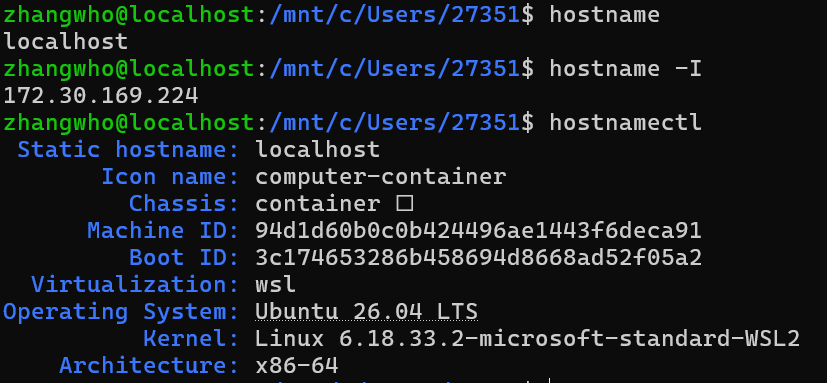
# 查看主机名
hostname

# 查看所有本机 IP 地址
hostname -I

# 查看更完整的主机信息
hostnamectl
示例:
ip:查看 IP 地址和网卡信息
ip 是现代 Linux 推荐使用的网络管理命令,可替代传统的 ifconfig、route 和 arp
bash
# 查看所有网卡及其状态
ip link show

# 查看所有 IP 地址
ip address show

# 简写形式
ip addr
ip a

# 只查看 IPv4 地址
ip -4 addr

# 查看指定网卡
ip addr show eth0

# 启用或禁用网卡
sudo ip link set eth0 up
sudo ip link set eth0 down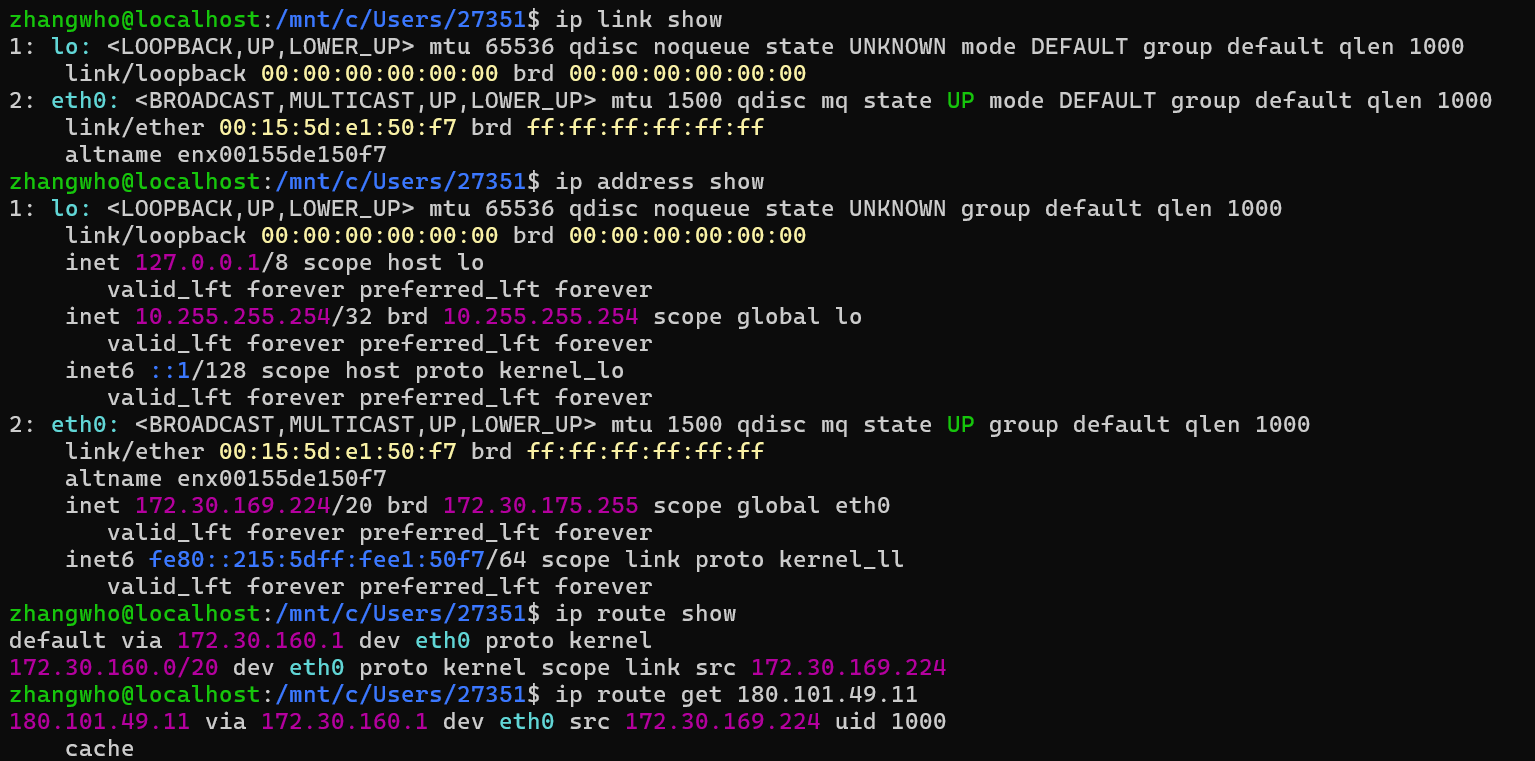
nmcli:管理 NetworkManager
bash
# 查看设备状态
nmcli device status

# 查看已有连接
nmcli connection show

# 查看当前活动连接
nmcli connection show --active

# 重新连接网卡
nmcli device disconnect eth0
nmcli device connect eth0
下面是查看主机和网卡信息的整体流程:
#mermaid-svg-G5ouWEzCr8IUWcEG{font-family:"trebuchet ms",verdana,arial,sans-serif;font-size:16px;fill:#333;}@keyframes edge-animation-frame{from{stroke-dashoffset:0;}}@keyframes dash{to{stroke-dashoffset:0;}}#mermaid-svg-G5ouWEzCr8IUWcEG .edge-animation-slow{stroke-dasharray:9,5!important;stroke-dashoffset:900;animation:dash 50s linear infinite;stroke-linecap:round;}#mermaid-svg-G5ouWEzCr8IUWcEG .edge-animation-fast{stroke-dasharray:9,5!important;stroke-dashoffset:900;animation:dash 20s linear infinite;stroke-linecap:round;}#mermaid-svg-G5ouWEzCr8IUWcEG .error-icon{fill:#552222;}#mermaid-svg-G5ouWEzCr8IUWcEG .error-text{fill:#552222;stroke:#552222;}#mermaid-svg-G5ouWEzCr8IUWcEG .edge-thickness-normal{stroke-width:1px;}#mermaid-svg-G5ouWEzCr8IUWcEG .edge-thickness-thick{stroke-width:3.5px;}#mermaid-svg-G5ouWEzCr8IUWcEG .edge-pattern-solid{stroke-dasharray:0;}#mermaid-svg-G5ouWEzCr8IUWcEG .edge-thickness-invisible{stroke-width:0;fill:none;}#mermaid-svg-G5ouWEzCr8IUWcEG .edge-pattern-dashed{stroke-dasharray:3;}#mermaid-svg-G5ouWEzCr8IUWcEG .edge-pattern-dotted{stroke-dasharray:2;}#mermaid-svg-G5ouWEzCr8IUWcEG .marker{fill:#333333;stroke:#333333;}#mermaid-svg-G5ouWEzCr8IUWcEG .marker.cross{stroke:#333333;}#mermaid-svg-G5ouWEzCr8IUWcEG svg{font-family:"trebuchet ms",verdana,arial,sans-serif;font-size:16px;}#mermaid-svg-G5ouWEzCr8IUWcEG p{margin:0;}#mermaid-svg-G5ouWEzCr8IUWcEG .label{font-family:"trebuchet ms",verdana,arial,sans-serif;color:#333;}#mermaid-svg-G5ouWEzCr8IUWcEG .cluster-label text{fill:#333;}#mermaid-svg-G5ouWEzCr8IUWcEG .cluster-label span{color:#333;}#mermaid-svg-G5ouWEzCr8IUWcEG .cluster-label span p{background-color:transparent;}#mermaid-svg-G5ouWEzCr8IUWcEG .label text,#mermaid-svg-G5ouWEzCr8IUWcEG span{fill:#333;color:#333;}#mermaid-svg-G5ouWEzCr8IUWcEG .node rect,#mermaid-svg-G5ouWEzCr8IUWcEG .node circle,#mermaid-svg-G5ouWEzCr8IUWcEG .node ellipse,#mermaid-svg-G5ouWEzCr8IUWcEG .node polygon,#mermaid-svg-G5ouWEzCr8IUWcEG .node path{fill:#ECECFF;stroke:#9370DB;stroke-width:1px;}#mermaid-svg-G5ouWEzCr8IUWcEG .rough-node .label text,#mermaid-svg-G5ouWEzCr8IUWcEG .node .label text,#mermaid-svg-G5ouWEzCr8IUWcEG .image-shape .label,#mermaid-svg-G5ouWEzCr8IUWcEG .icon-shape .label{text-anchor:middle;}#mermaid-svg-G5ouWEzCr8IUWcEG .node .katex path{fill:#000;stroke:#000;stroke-width:1px;}#mermaid-svg-G5ouWEzCr8IUWcEG .rough-node .label,#mermaid-svg-G5ouWEzCr8IUWcEG .node .label,#mermaid-svg-G5ouWEzCr8IUWcEG .image-shape .label,#mermaid-svg-G5ouWEzCr8IUWcEG .icon-shape .label{text-align:center;}#mermaid-svg-G5ouWEzCr8IUWcEG .node.clickable{cursor:pointer;}#mermaid-svg-G5ouWEzCr8IUWcEG .root .anchor path{fill:#333333!important;stroke-width:0;stroke:#333333;}#mermaid-svg-G5ouWEzCr8IUWcEG .arrowheadPath{fill:#333333;}#mermaid-svg-G5ouWEzCr8IUWcEG .edgePath .path{stroke:#333333;stroke-width:2.0px;}#mermaid-svg-G5ouWEzCr8IUWcEG .flowchart-link{stroke:#333333;fill:none;}#mermaid-svg-G5ouWEzCr8IUWcEG .edgeLabel{background-color:rgba(232,232,232, 0.8);text-align:center;}#mermaid-svg-G5ouWEzCr8IUWcEG .edgeLabel p{background-color:rgba(232,232,232, 0.8);}#mermaid-svg-G5ouWEzCr8IUWcEG .edgeLabel rect{opacity:0.5;background-color:rgba(232,232,232, 0.8);fill:rgba(232,232,232, 0.8);}#mermaid-svg-G5ouWEzCr8IUWcEG .labelBkg{background-color:rgba(232, 232, 232, 0.5);}#mermaid-svg-G5ouWEzCr8IUWcEG .cluster rect{fill:#ffffde;stroke:#aaaa33;stroke-width:1px;}#mermaid-svg-G5ouWEzCr8IUWcEG .cluster text{fill:#333;}#mermaid-svg-G5ouWEzCr8IUWcEG .cluster span{color:#333;}#mermaid-svg-G5ouWEzCr8IUWcEG div.mermaidTooltip{position:absolute;text-align:center;max-width:200px;padding:2px;font-family:"trebuchet ms",verdana,arial,sans-serif;font-size:12px;background:hsl(80, 100%, 96.2745098039%);border:1px solid #aaaa33;border-radius:2px;pointer-events:none;z-index:100;}#mermaid-svg-G5ouWEzCr8IUWcEG .flowchartTitleText{text-anchor:middle;font-size:18px;fill:#333;}#mermaid-svg-G5ouWEzCr8IUWcEG rect.text{fill:none;stroke-width:0;}#mermaid-svg-G5ouWEzCr8IUWcEG .icon-shape,#mermaid-svg-G5ouWEzCr8IUWcEG .image-shape{background-color:rgba(232,232,232, 0.8);text-align:center;}#mermaid-svg-G5ouWEzCr8IUWcEG .icon-shape p,#mermaid-svg-G5ouWEzCr8IUWcEG .image-shape p{background-color:rgba(232,232,232, 0.8);padding:2px;}#mermaid-svg-G5ouWEzCr8IUWcEG .icon-shape .label rect,#mermaid-svg-G5ouWEzCr8IUWcEG .image-shape .label rect{opacity:0.5;background-color:rgba(232,232,232, 0.8);fill:rgba(232,232,232, 0.8);}#mermaid-svg-G5ouWEzCr8IUWcEG .label-icon{display:inline-block;height:1em;overflow:visible;vertical-align:-0.125em;}#mermaid-svg-G5ouWEzCr8IUWcEG .node .label-icon path{fill:currentColor;stroke:revert;stroke-width:revert;}#mermaid-svg-G5ouWEzCr8IUWcEG :root{--mermaid-font-family:"trebuchet ms",verdana,arial,sans-serif;} hostname:查看主机名
ip:查看 IP 地址和网卡信息
nmcli:管理 NetworkManager
确认网卡与 IP 配置
测试网络连通性
ping:测试目标是否可达
bash
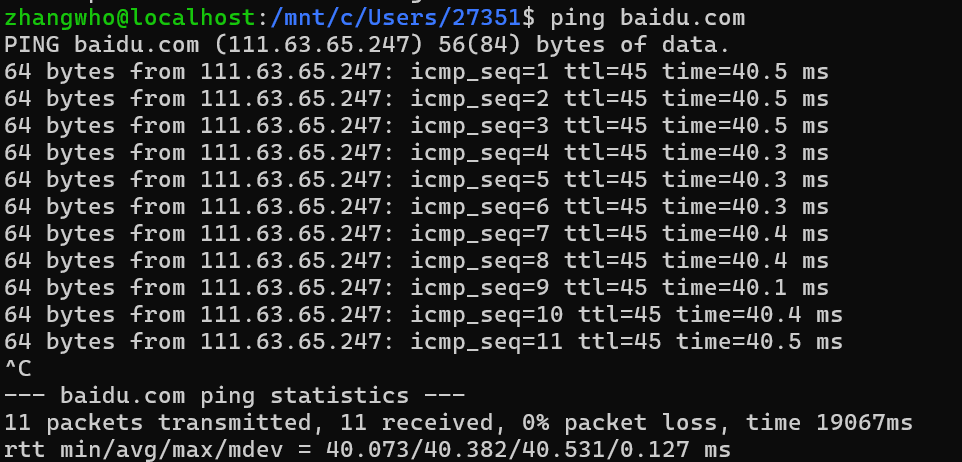
# 持续测试,按 Ctrl+C 停止
ping example.com

# 发送 4 个数据包后停止
ping -c 4 example.com

# 指定数据包大小
ping -c 4 -s 1400 example.com

# 设置每次响应的等待时间为 2 秒
ping -c 4 -W 2 example.com
常见结果:
time=... ms:目标可达,数值表示往返延迟。Destination Host Unreachable:本机或中间路由无法到达目标。Request timeout或无响应:可能存在丢包、防火墙拦截,或目标禁用了 ICMP。ping: ... Name or service not known:通常是 DNS 解析失败。
ping不通不一定代表目标服务不可用,因为服务器或防火墙可能禁止 ICMP。此时应继续测试具体服务端口。
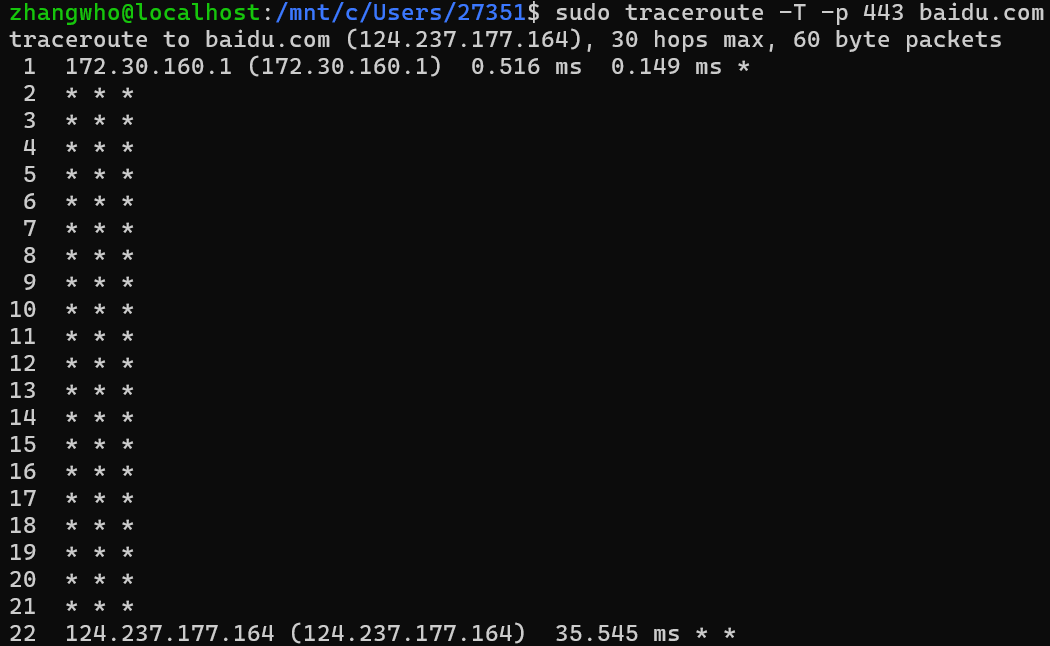
tracepath/traceroute:查看数据包经过的路径
bash
# 通常无需 root 权限
tracepath example.com

# 查看路由路径
traceroute example.com

# 不进行 DNS 反向解析,输出更快
traceroute -n example.com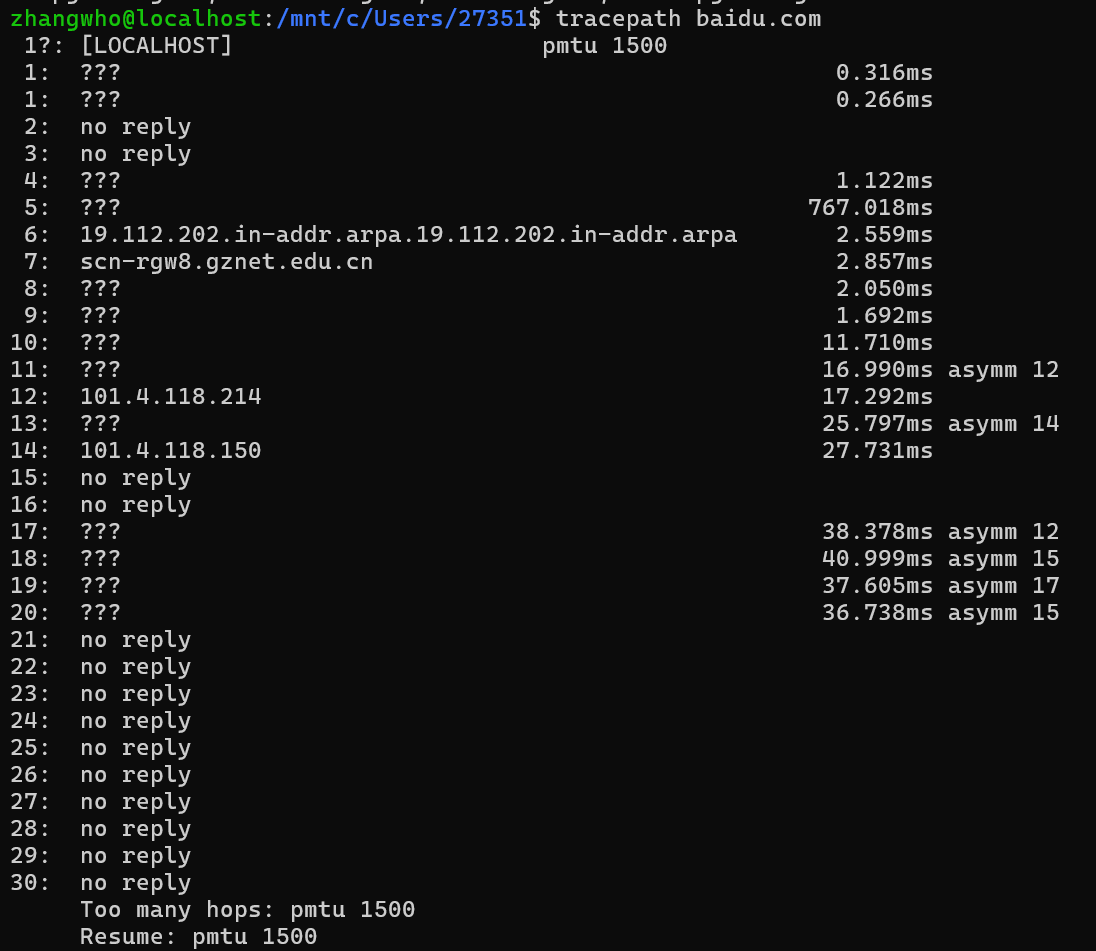
mtr:持续检测链路质量
mtr 结合了 ping 和 traceroute,适合观察每一跳的延迟和丢包情况。
bash
# 交互式检测
mtr example.com

# 发送 10 轮后生成报告
mtr -r -c 10 example.com

# 使用数字 IP,避免 DNS 查询影响结果
mtr -n -r -c 10 example.com
下面是测试网络连通性的整体流程:
#mermaid-svg-QlNykntPmVGBYzyt{font-family:"trebuchet ms",verdana,arial,sans-serif;font-size:16px;fill:#333;}@keyframes edge-animation-frame{from{stroke-dashoffset:0;}}@keyframes dash{to{stroke-dashoffset:0;}}#mermaid-svg-QlNykntPmVGBYzyt .edge-animation-slow{stroke-dasharray:9,5!important;stroke-dashoffset:900;animation:dash 50s linear infinite;stroke-linecap:round;}#mermaid-svg-QlNykntPmVGBYzyt .edge-animation-fast{stroke-dasharray:9,5!important;stroke-dashoffset:900;animation:dash 20s linear infinite;stroke-linecap:round;}#mermaid-svg-QlNykntPmVGBYzyt .error-icon{fill:#552222;}#mermaid-svg-QlNykntPmVGBYzyt .error-text{fill:#552222;stroke:#552222;}#mermaid-svg-QlNykntPmVGBYzyt .edge-thickness-normal{stroke-width:1px;}#mermaid-svg-QlNykntPmVGBYzyt .edge-thickness-thick{stroke-width:3.5px;}#mermaid-svg-QlNykntPmVGBYzyt .edge-pattern-solid{stroke-dasharray:0;}#mermaid-svg-QlNykntPmVGBYzyt .edge-thickness-invisible{stroke-width:0;fill:none;}#mermaid-svg-QlNykntPmVGBYzyt .edge-pattern-dashed{stroke-dasharray:3;}#mermaid-svg-QlNykntPmVGBYzyt .edge-pattern-dotted{stroke-dasharray:2;}#mermaid-svg-QlNykntPmVGBYzyt .marker{fill:#333333;stroke:#333333;}#mermaid-svg-QlNykntPmVGBYzyt .marker.cross{stroke:#333333;}#mermaid-svg-QlNykntPmVGBYzyt svg{font-family:"trebuchet ms",verdana,arial,sans-serif;font-size:16px;}#mermaid-svg-QlNykntPmVGBYzyt p{margin:0;}#mermaid-svg-QlNykntPmVGBYzyt .label{font-family:"trebuchet ms",verdana,arial,sans-serif;color:#333;}#mermaid-svg-QlNykntPmVGBYzyt .cluster-label text{fill:#333;}#mermaid-svg-QlNykntPmVGBYzyt .cluster-label span{color:#333;}#mermaid-svg-QlNykntPmVGBYzyt .cluster-label span p{background-color:transparent;}#mermaid-svg-QlNykntPmVGBYzyt .label text,#mermaid-svg-QlNykntPmVGBYzyt span{fill:#333;color:#333;}#mermaid-svg-QlNykntPmVGBYzyt .node rect,#mermaid-svg-QlNykntPmVGBYzyt .node circle,#mermaid-svg-QlNykntPmVGBYzyt .node ellipse,#mermaid-svg-QlNykntPmVGBYzyt .node polygon,#mermaid-svg-QlNykntPmVGBYzyt .node path{fill:#ECECFF;stroke:#9370DB;stroke-width:1px;}#mermaid-svg-QlNykntPmVGBYzyt .rough-node .label text,#mermaid-svg-QlNykntPmVGBYzyt .node .label text,#mermaid-svg-QlNykntPmVGBYzyt .image-shape .label,#mermaid-svg-QlNykntPmVGBYzyt .icon-shape .label{text-anchor:middle;}#mermaid-svg-QlNykntPmVGBYzyt .node .katex path{fill:#000;stroke:#000;stroke-width:1px;}#mermaid-svg-QlNykntPmVGBYzyt .rough-node .label,#mermaid-svg-QlNykntPmVGBYzyt .node .label,#mermaid-svg-QlNykntPmVGBYzyt .image-shape .label,#mermaid-svg-QlNykntPmVGBYzyt .icon-shape .label{text-align:center;}#mermaid-svg-QlNykntPmVGBYzyt .node.clickable{cursor:pointer;}#mermaid-svg-QlNykntPmVGBYzyt .root .anchor path{fill:#333333!important;stroke-width:0;stroke:#333333;}#mermaid-svg-QlNykntPmVGBYzyt .arrowheadPath{fill:#333333;}#mermaid-svg-QlNykntPmVGBYzyt .edgePath .path{stroke:#333333;stroke-width:2.0px;}#mermaid-svg-QlNykntPmVGBYzyt .flowchart-link{stroke:#333333;fill:none;}#mermaid-svg-QlNykntPmVGBYzyt .edgeLabel{background-color:rgba(232,232,232, 0.8);text-align:center;}#mermaid-svg-QlNykntPmVGBYzyt .edgeLabel p{background-color:rgba(232,232,232, 0.8);}#mermaid-svg-QlNykntPmVGBYzyt .edgeLabel rect{opacity:0.5;background-color:rgba(232,232,232, 0.8);fill:rgba(232,232,232, 0.8);}#mermaid-svg-QlNykntPmVGBYzyt .labelBkg{background-color:rgba(232, 232, 232, 0.5);}#mermaid-svg-QlNykntPmVGBYzyt .cluster rect{fill:#ffffde;stroke:#aaaa33;stroke-width:1px;}#mermaid-svg-QlNykntPmVGBYzyt .cluster text{fill:#333;}#mermaid-svg-QlNykntPmVGBYzyt .cluster span{color:#333;}#mermaid-svg-QlNykntPmVGBYzyt div.mermaidTooltip{position:absolute;text-align:center;max-width:200px;padding:2px;font-family:"trebuchet ms",verdana,arial,sans-serif;font-size:12px;background:hsl(80, 100%, 96.2745098039%);border:1px solid #aaaa33;border-radius:2px;pointer-events:none;z-index:100;}#mermaid-svg-QlNykntPmVGBYzyt .flowchartTitleText{text-anchor:middle;font-size:18px;fill:#333;}#mermaid-svg-QlNykntPmVGBYzyt rect.text{fill:none;stroke-width:0;}#mermaid-svg-QlNykntPmVGBYzyt .icon-shape,#mermaid-svg-QlNykntPmVGBYzyt .image-shape{background-color:rgba(232,232,232, 0.8);text-align:center;}#mermaid-svg-QlNykntPmVGBYzyt .icon-shape p,#mermaid-svg-QlNykntPmVGBYzyt .image-shape p{background-color:rgba(232,232,232, 0.8);padding:2px;}#mermaid-svg-QlNykntPmVGBYzyt .icon-shape .label rect,#mermaid-svg-QlNykntPmVGBYzyt .image-shape .label rect{opacity:0.5;background-color:rgba(232,232,232, 0.8);fill:rgba(232,232,232, 0.8);}#mermaid-svg-QlNykntPmVGBYzyt .label-icon{display:inline-block;height:1em;overflow:visible;vertical-align:-0.125em;}#mermaid-svg-QlNykntPmVGBYzyt .node .label-icon path{fill:currentColor;stroke:revert;stroke-width:revert;}#mermaid-svg-QlNykntPmVGBYzyt :root{--mermaid-font-family:"trebuchet ms",verdana,arial,sans-serif;} ping:测试目标是否可达
tracepath/traceroute:查看数据包路径
mtr:持续检测链路质量
定位丢包与延迟问题
查看路由和邻居信息
ip route:查看路由表
bash
# 查看路由表
ip route show

# 简写形式
ip r

# 查看访问目标时将使用的路由和源地址
ip route get 8.8.8.8

# 添加临时路由,重启后通常失效
sudo ip route add 10.10.0.0/16 via 192.168.1.1

# 删除路由
sudo ip route del 10.10.0.0/16 via 192.168.1.1
ip neigh:查看 ARP/邻居表
bash
# 查看局域网邻居及其 MAC 地址
ip neigh show

# 删除指定邻居缓存,之后会重新探测
sudo ip neigh del 192.168.1.1 dev eth0
下面是查看路由和邻居信息的整体流程:
#mermaid-svg-ARUshX2JaB8KZCLV{font-family:"trebuchet ms",verdana,arial,sans-serif;font-size:16px;fill:#333;}@keyframes edge-animation-frame{from{stroke-dashoffset:0;}}@keyframes dash{to{stroke-dashoffset:0;}}#mermaid-svg-ARUshX2JaB8KZCLV .edge-animation-slow{stroke-dasharray:9,5!important;stroke-dashoffset:900;animation:dash 50s linear infinite;stroke-linecap:round;}#mermaid-svg-ARUshX2JaB8KZCLV .edge-animation-fast{stroke-dasharray:9,5!important;stroke-dashoffset:900;animation:dash 20s linear infinite;stroke-linecap:round;}#mermaid-svg-ARUshX2JaB8KZCLV .error-icon{fill:#552222;}#mermaid-svg-ARUshX2JaB8KZCLV .error-text{fill:#552222;stroke:#552222;}#mermaid-svg-ARUshX2JaB8KZCLV .edge-thickness-normal{stroke-width:1px;}#mermaid-svg-ARUshX2JaB8KZCLV .edge-thickness-thick{stroke-width:3.5px;}#mermaid-svg-ARUshX2JaB8KZCLV .edge-pattern-solid{stroke-dasharray:0;}#mermaid-svg-ARUshX2JaB8KZCLV .edge-thickness-invisible{stroke-width:0;fill:none;}#mermaid-svg-ARUshX2JaB8KZCLV .edge-pattern-dashed{stroke-dasharray:3;}#mermaid-svg-ARUshX2JaB8KZCLV .edge-pattern-dotted{stroke-dasharray:2;}#mermaid-svg-ARUshX2JaB8KZCLV .marker{fill:#333333;stroke:#333333;}#mermaid-svg-ARUshX2JaB8KZCLV .marker.cross{stroke:#333333;}#mermaid-svg-ARUshX2JaB8KZCLV svg{font-family:"trebuchet ms",verdana,arial,sans-serif;font-size:16px;}#mermaid-svg-ARUshX2JaB8KZCLV p{margin:0;}#mermaid-svg-ARUshX2JaB8KZCLV .label{font-family:"trebuchet ms",verdana,arial,sans-serif;color:#333;}#mermaid-svg-ARUshX2JaB8KZCLV .cluster-label text{fill:#333;}#mermaid-svg-ARUshX2JaB8KZCLV .cluster-label span{color:#333;}#mermaid-svg-ARUshX2JaB8KZCLV .cluster-label span p{background-color:transparent;}#mermaid-svg-ARUshX2JaB8KZCLV .label text,#mermaid-svg-ARUshX2JaB8KZCLV span{fill:#333;color:#333;}#mermaid-svg-ARUshX2JaB8KZCLV .node rect,#mermaid-svg-ARUshX2JaB8KZCLV .node circle,#mermaid-svg-ARUshX2JaB8KZCLV .node ellipse,#mermaid-svg-ARUshX2JaB8KZCLV .node polygon,#mermaid-svg-ARUshX2JaB8KZCLV .node path{fill:#ECECFF;stroke:#9370DB;stroke-width:1px;}#mermaid-svg-ARUshX2JaB8KZCLV .rough-node .label text,#mermaid-svg-ARUshX2JaB8KZCLV .node .label text,#mermaid-svg-ARUshX2JaB8KZCLV .image-shape .label,#mermaid-svg-ARUshX2JaB8KZCLV .icon-shape .label{text-anchor:middle;}#mermaid-svg-ARUshX2JaB8KZCLV .node .katex path{fill:#000;stroke:#000;stroke-width:1px;}#mermaid-svg-ARUshX2JaB8KZCLV .rough-node .label,#mermaid-svg-ARUshX2JaB8KZCLV .node .label,#mermaid-svg-ARUshX2JaB8KZCLV .image-shape .label,#mermaid-svg-ARUshX2JaB8KZCLV .icon-shape .label{text-align:center;}#mermaid-svg-ARUshX2JaB8KZCLV .node.clickable{cursor:pointer;}#mermaid-svg-ARUshX2JaB8KZCLV .root .anchor path{fill:#333333!important;stroke-width:0;stroke:#333333;}#mermaid-svg-ARUshX2JaB8KZCLV .arrowheadPath{fill:#333333;}#mermaid-svg-ARUshX2JaB8KZCLV .edgePath .path{stroke:#333333;stroke-width:2.0px;}#mermaid-svg-ARUshX2JaB8KZCLV .flowchart-link{stroke:#333333;fill:none;}#mermaid-svg-ARUshX2JaB8KZCLV .edgeLabel{background-color:rgba(232,232,232, 0.8);text-align:center;}#mermaid-svg-ARUshX2JaB8KZCLV .edgeLabel p{background-color:rgba(232,232,232, 0.8);}#mermaid-svg-ARUshX2JaB8KZCLV .edgeLabel rect{opacity:0.5;background-color:rgba(232,232,232, 0.8);fill:rgba(232,232,232, 0.8);}#mermaid-svg-ARUshX2JaB8KZCLV .labelBkg{background-color:rgba(232, 232, 232, 0.5);}#mermaid-svg-ARUshX2JaB8KZCLV .cluster rect{fill:#ffffde;stroke:#aaaa33;stroke-width:1px;}#mermaid-svg-ARUshX2JaB8KZCLV .cluster text{fill:#333;}#mermaid-svg-ARUshX2JaB8KZCLV .cluster span{color:#333;}#mermaid-svg-ARUshX2JaB8KZCLV div.mermaidTooltip{position:absolute;text-align:center;max-width:200px;padding:2px;font-family:"trebuchet ms",verdana,arial,sans-serif;font-size:12px;background:hsl(80, 100%, 96.2745098039%);border:1px solid #aaaa33;border-radius:2px;pointer-events:none;z-index:100;}#mermaid-svg-ARUshX2JaB8KZCLV .flowchartTitleText{text-anchor:middle;font-size:18px;fill:#333;}#mermaid-svg-ARUshX2JaB8KZCLV rect.text{fill:none;stroke-width:0;}#mermaid-svg-ARUshX2JaB8KZCLV .icon-shape,#mermaid-svg-ARUshX2JaB8KZCLV .image-shape{background-color:rgba(232,232,232, 0.8);text-align:center;}#mermaid-svg-ARUshX2JaB8KZCLV .icon-shape p,#mermaid-svg-ARUshX2JaB8KZCLV .image-shape p{background-color:rgba(232,232,232, 0.8);padding:2px;}#mermaid-svg-ARUshX2JaB8KZCLV .icon-shape .label rect,#mermaid-svg-ARUshX2JaB8KZCLV .image-shape .label rect{opacity:0.5;background-color:rgba(232,232,232, 0.8);fill:rgba(232,232,232, 0.8);}#mermaid-svg-ARUshX2JaB8KZCLV .label-icon{display:inline-block;height:1em;overflow:visible;vertical-align:-0.125em;}#mermaid-svg-ARUshX2JaB8KZCLV .node .label-icon path{fill:currentColor;stroke:revert;stroke-width:revert;}#mermaid-svg-ARUshX2JaB8KZCLV :root{--mermaid-font-family:"trebuchet ms",verdana,arial,sans-serif;} ip route:查看路由表
ip neigh:查看 ARP/邻居表
确认转发路径与邻居可达性
DNS 查询与排查
dig:查询 DNS 记录
bash
# 查询 A 记录
dig example.com

# 只显示查询结果
dig +short example.com

# 查询指定类型的记录
dig example.com A
dig example.com AAAA
dig example.com MX
dig example.com TXT

# 使用指定 DNS 服务器查询
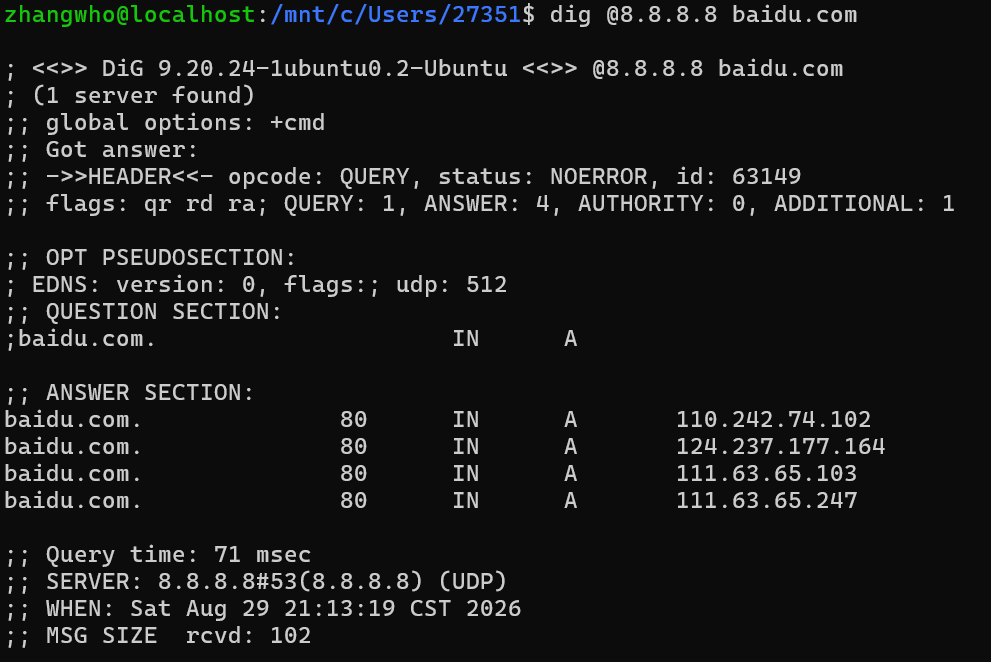
dig @8.8.8.8 example.com

# 跟踪域名的完整 DNS 委派过程
dig +trace example.com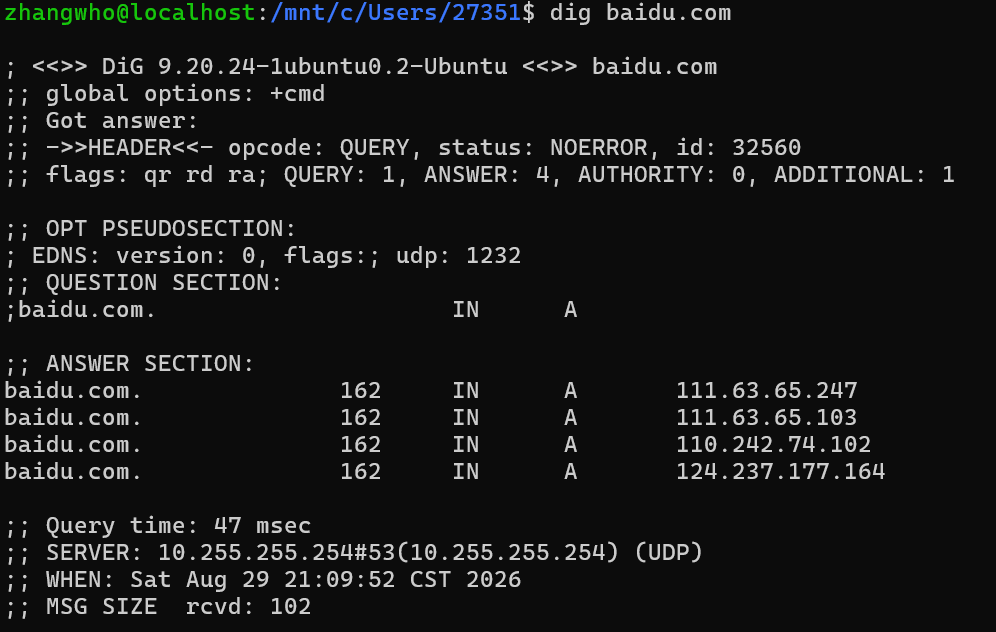

nslookup 和 host:快速查询域名
bash
nslookup example.com
nslookup example.com 8.8.8.8

host example.com
host -t MX example.com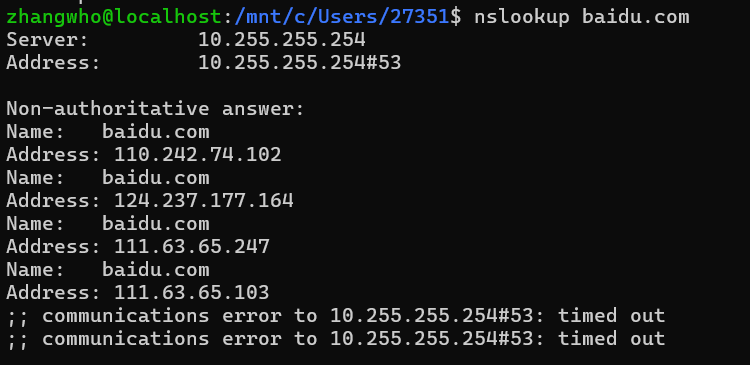
查看系统 DNS 配置
bash
# 查看传统 DNS 配置文件
cat /etc/resolv.conf

# 使用 systemd-resolved 时查看实际 DNS 状态
resolvectl status

# 查询域名
resolvectl query example.com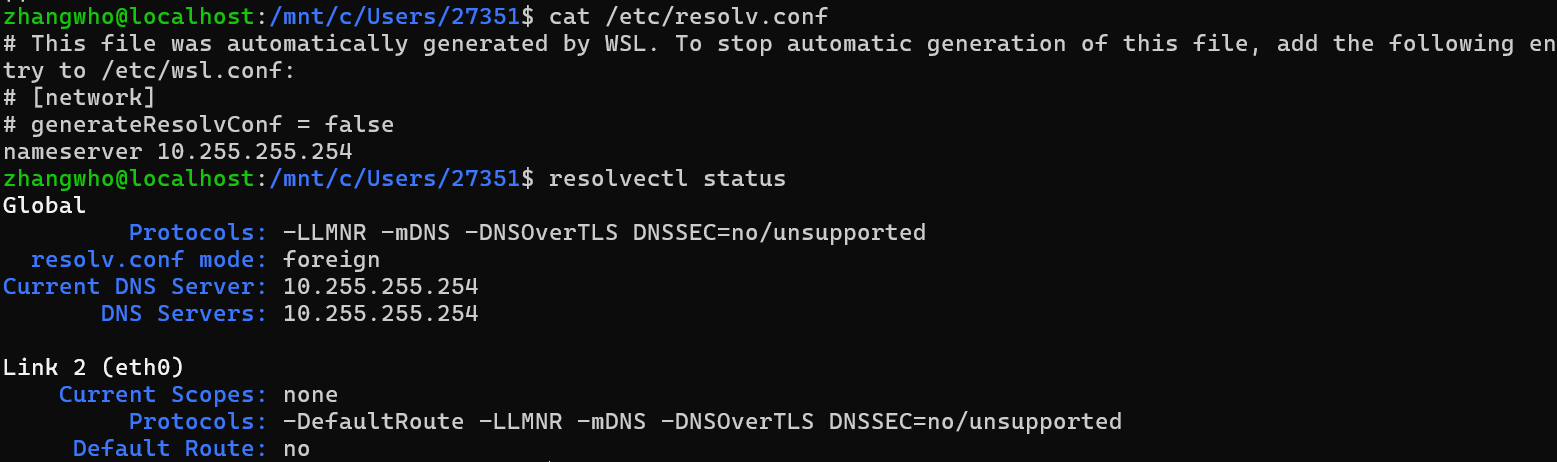
下面是 DNS 查询与排查的整体流程:
#mermaid-svg-HBu1gyizeirlcTLd{font-family:"trebuchet ms",verdana,arial,sans-serif;font-size:16px;fill:#333;}@keyframes edge-animation-frame{from{stroke-dashoffset:0;}}@keyframes dash{to{stroke-dashoffset:0;}}#mermaid-svg-HBu1gyizeirlcTLd .edge-animation-slow{stroke-dasharray:9,5!important;stroke-dashoffset:900;animation:dash 50s linear infinite;stroke-linecap:round;}#mermaid-svg-HBu1gyizeirlcTLd .edge-animation-fast{stroke-dasharray:9,5!important;stroke-dashoffset:900;animation:dash 20s linear infinite;stroke-linecap:round;}#mermaid-svg-HBu1gyizeirlcTLd .error-icon{fill:#552222;}#mermaid-svg-HBu1gyizeirlcTLd .error-text{fill:#552222;stroke:#552222;}#mermaid-svg-HBu1gyizeirlcTLd .edge-thickness-normal{stroke-width:1px;}#mermaid-svg-HBu1gyizeirlcTLd .edge-thickness-thick{stroke-width:3.5px;}#mermaid-svg-HBu1gyizeirlcTLd .edge-pattern-solid{stroke-dasharray:0;}#mermaid-svg-HBu1gyizeirlcTLd .edge-thickness-invisible{stroke-width:0;fill:none;}#mermaid-svg-HBu1gyizeirlcTLd .edge-pattern-dashed{stroke-dasharray:3;}#mermaid-svg-HBu1gyizeirlcTLd .edge-pattern-dotted{stroke-dasharray:2;}#mermaid-svg-HBu1gyizeirlcTLd .marker{fill:#333333;stroke:#333333;}#mermaid-svg-HBu1gyizeirlcTLd .marker.cross{stroke:#333333;}#mermaid-svg-HBu1gyizeirlcTLd svg{font-family:"trebuchet ms",verdana,arial,sans-serif;font-size:16px;}#mermaid-svg-HBu1gyizeirlcTLd p{margin:0;}#mermaid-svg-HBu1gyizeirlcTLd .label{font-family:"trebuchet ms",verdana,arial,sans-serif;color:#333;}#mermaid-svg-HBu1gyizeirlcTLd .cluster-label text{fill:#333;}#mermaid-svg-HBu1gyizeirlcTLd .cluster-label span{color:#333;}#mermaid-svg-HBu1gyizeirlcTLd .cluster-label span p{background-color:transparent;}#mermaid-svg-HBu1gyizeirlcTLd .label text,#mermaid-svg-HBu1gyizeirlcTLd span{fill:#333;color:#333;}#mermaid-svg-HBu1gyizeirlcTLd .node rect,#mermaid-svg-HBu1gyizeirlcTLd .node circle,#mermaid-svg-HBu1gyizeirlcTLd .node ellipse,#mermaid-svg-HBu1gyizeirlcTLd .node polygon,#mermaid-svg-HBu1gyizeirlcTLd .node path{fill:#ECECFF;stroke:#9370DB;stroke-width:1px;}#mermaid-svg-HBu1gyizeirlcTLd .rough-node .label text,#mermaid-svg-HBu1gyizeirlcTLd .node .label text,#mermaid-svg-HBu1gyizeirlcTLd .image-shape .label,#mermaid-svg-HBu1gyizeirlcTLd .icon-shape .label{text-anchor:middle;}#mermaid-svg-HBu1gyizeirlcTLd .node .katex path{fill:#000;stroke:#000;stroke-width:1px;}#mermaid-svg-HBu1gyizeirlcTLd .rough-node .label,#mermaid-svg-HBu1gyizeirlcTLd .node .label,#mermaid-svg-HBu1gyizeirlcTLd .image-shape .label,#mermaid-svg-HBu1gyizeirlcTLd .icon-shape .label{text-align:center;}#mermaid-svg-HBu1gyizeirlcTLd .node.clickable{cursor:pointer;}#mermaid-svg-HBu1gyizeirlcTLd .root .anchor path{fill:#333333!important;stroke-width:0;stroke:#333333;}#mermaid-svg-HBu1gyizeirlcTLd .arrowheadPath{fill:#333333;}#mermaid-svg-HBu1gyizeirlcTLd .edgePath .path{stroke:#333333;stroke-width:2.0px;}#mermaid-svg-HBu1gyizeirlcTLd .flowchart-link{stroke:#333333;fill:none;}#mermaid-svg-HBu1gyizeirlcTLd .edgeLabel{background-color:rgba(232,232,232, 0.8);text-align:center;}#mermaid-svg-HBu1gyizeirlcTLd .edgeLabel p{background-color:rgba(232,232,232, 0.8);}#mermaid-svg-HBu1gyizeirlcTLd .edgeLabel rect{opacity:0.5;background-color:rgba(232,232,232, 0.8);fill:rgba(232,232,232, 0.8);}#mermaid-svg-HBu1gyizeirlcTLd .labelBkg{background-color:rgba(232, 232, 232, 0.5);}#mermaid-svg-HBu1gyizeirlcTLd .cluster rect{fill:#ffffde;stroke:#aaaa33;stroke-width:1px;}#mermaid-svg-HBu1gyizeirlcTLd .cluster text{fill:#333;}#mermaid-svg-HBu1gyizeirlcTLd .cluster span{color:#333;}#mermaid-svg-HBu1gyizeirlcTLd div.mermaidTooltip{position:absolute;text-align:center;max-width:200px;padding:2px;font-family:"trebuchet ms",verdana,arial,sans-serif;font-size:12px;background:hsl(80, 100%, 96.2745098039%);border:1px solid #aaaa33;border-radius:2px;pointer-events:none;z-index:100;}#mermaid-svg-HBu1gyizeirlcTLd .flowchartTitleText{text-anchor:middle;font-size:18px;fill:#333;}#mermaid-svg-HBu1gyizeirlcTLd rect.text{fill:none;stroke-width:0;}#mermaid-svg-HBu1gyizeirlcTLd .icon-shape,#mermaid-svg-HBu1gyizeirlcTLd .image-shape{background-color:rgba(232,232,232, 0.8);text-align:center;}#mermaid-svg-HBu1gyizeirlcTLd .icon-shape p,#mermaid-svg-HBu1gyizeirlcTLd .image-shape p{background-color:rgba(232,232,232, 0.8);padding:2px;}#mermaid-svg-HBu1gyizeirlcTLd .icon-shape .label rect,#mermaid-svg-HBu1gyizeirlcTLd .image-shape .label rect{opacity:0.5;background-color:rgba(232,232,232, 0.8);fill:rgba(232,232,232, 0.8);}#mermaid-svg-HBu1gyizeirlcTLd .label-icon{display:inline-block;height:1em;overflow:visible;vertical-align:-0.125em;}#mermaid-svg-HBu1gyizeirlcTLd .node .label-icon path{fill:currentColor;stroke:revert;stroke-width:revert;}#mermaid-svg-HBu1gyizeirlcTLd :root{--mermaid-font-family:"trebuchet ms",verdana,arial,sans-serif;} dig:查询 DNS 记录
nslookup 和 host:快速查询域名
查看系统 DNS 配置
定位解析失败或解析异常
查看端口和连接
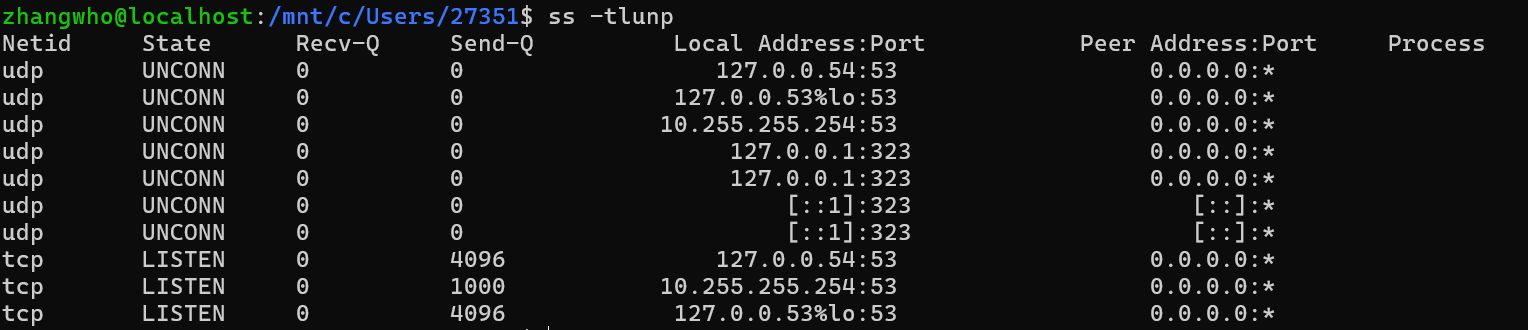
ss:查看套接字状态
ss 是现代 Linux 推荐使用的端口查看工具,可替代 netstat。
bash
# 查看所有 TCP、UDP 监听端口及进程
sudo ss -tulnp

# 查看所有 TCP 连接
ss -tan

# 查看已建立的 TCP 连接
ss -tan state established

# 查看 8080 端口
sudo ss -ltnp 'sport = :8080'

# 查看连接统计
ss -s
常用参数:
| 参数 | 含义 |
|---|---|
-t |
显示 TCP |
-u |
显示 UDP |
-l |
只显示监听端口 |
-n |
直接显示数字地址和端口 |
-p |
显示对应进程 |
-a |
显示监听和非监听套接字 |
lsof:查看端口被哪个进程占用
bash
# 查看占用 8080 端口的进程
sudo lsof -i :8080

# 查看 TCP 监听进程
sudo lsof -nP -iTCP -sTCP:LISTEN

# 查看指定进程打开的网络连接
sudo lsof -nP -a -p 1234 -i
下面是查看端口和连接的整体流程:
#mermaid-svg-cIWYqkZvxjjDjfNl{font-family:"trebuchet ms",verdana,arial,sans-serif;font-size:16px;fill:#333;}@keyframes edge-animation-frame{from{stroke-dashoffset:0;}}@keyframes dash{to{stroke-dashoffset:0;}}#mermaid-svg-cIWYqkZvxjjDjfNl .edge-animation-slow{stroke-dasharray:9,5!important;stroke-dashoffset:900;animation:dash 50s linear infinite;stroke-linecap:round;}#mermaid-svg-cIWYqkZvxjjDjfNl .edge-animation-fast{stroke-dasharray:9,5!important;stroke-dashoffset:900;animation:dash 20s linear infinite;stroke-linecap:round;}#mermaid-svg-cIWYqkZvxjjDjfNl .error-icon{fill:#552222;}#mermaid-svg-cIWYqkZvxjjDjfNl .error-text{fill:#552222;stroke:#552222;}#mermaid-svg-cIWYqkZvxjjDjfNl .edge-thickness-normal{stroke-width:1px;}#mermaid-svg-cIWYqkZvxjjDjfNl .edge-thickness-thick{stroke-width:3.5px;}#mermaid-svg-cIWYqkZvxjjDjfNl .edge-pattern-solid{stroke-dasharray:0;}#mermaid-svg-cIWYqkZvxjjDjfNl .edge-thickness-invisible{stroke-width:0;fill:none;}#mermaid-svg-cIWYqkZvxjjDjfNl .edge-pattern-dashed{stroke-dasharray:3;}#mermaid-svg-cIWYqkZvxjjDjfNl .edge-pattern-dotted{stroke-dasharray:2;}#mermaid-svg-cIWYqkZvxjjDjfNl .marker{fill:#333333;stroke:#333333;}#mermaid-svg-cIWYqkZvxjjDjfNl .marker.cross{stroke:#333333;}#mermaid-svg-cIWYqkZvxjjDjfNl svg{font-family:"trebuchet ms",verdana,arial,sans-serif;font-size:16px;}#mermaid-svg-cIWYqkZvxjjDjfNl p{margin:0;}#mermaid-svg-cIWYqkZvxjjDjfNl .label{font-family:"trebuchet ms",verdana,arial,sans-serif;color:#333;}#mermaid-svg-cIWYqkZvxjjDjfNl .cluster-label text{fill:#333;}#mermaid-svg-cIWYqkZvxjjDjfNl .cluster-label span{color:#333;}#mermaid-svg-cIWYqkZvxjjDjfNl .cluster-label span p{background-color:transparent;}#mermaid-svg-cIWYqkZvxjjDjfNl .label text,#mermaid-svg-cIWYqkZvxjjDjfNl span{fill:#333;color:#333;}#mermaid-svg-cIWYqkZvxjjDjfNl .node rect,#mermaid-svg-cIWYqkZvxjjDjfNl .node circle,#mermaid-svg-cIWYqkZvxjjDjfNl .node ellipse,#mermaid-svg-cIWYqkZvxjjDjfNl .node polygon,#mermaid-svg-cIWYqkZvxjjDjfNl .node path{fill:#ECECFF;stroke:#9370DB;stroke-width:1px;}#mermaid-svg-cIWYqkZvxjjDjfNl .rough-node .label text,#mermaid-svg-cIWYqkZvxjjDjfNl .node .label text,#mermaid-svg-cIWYqkZvxjjDjfNl .image-shape .label,#mermaid-svg-cIWYqkZvxjjDjfNl .icon-shape .label{text-anchor:middle;}#mermaid-svg-cIWYqkZvxjjDjfNl .node .katex path{fill:#000;stroke:#000;stroke-width:1px;}#mermaid-svg-cIWYqkZvxjjDjfNl .rough-node .label,#mermaid-svg-cIWYqkZvxjjDjfNl .node .label,#mermaid-svg-cIWYqkZvxjjDjfNl .image-shape .label,#mermaid-svg-cIWYqkZvxjjDjfNl .icon-shape .label{text-align:center;}#mermaid-svg-cIWYqkZvxjjDjfNl .node.clickable{cursor:pointer;}#mermaid-svg-cIWYqkZvxjjDjfNl .root .anchor path{fill:#333333!important;stroke-width:0;stroke:#333333;}#mermaid-svg-cIWYqkZvxjjDjfNl .arrowheadPath{fill:#333333;}#mermaid-svg-cIWYqkZvxjjDjfNl .edgePath .path{stroke:#333333;stroke-width:2.0px;}#mermaid-svg-cIWYqkZvxjjDjfNl .flowchart-link{stroke:#333333;fill:none;}#mermaid-svg-cIWYqkZvxjjDjfNl .edgeLabel{background-color:rgba(232,232,232, 0.8);text-align:center;}#mermaid-svg-cIWYqkZvxjjDjfNl .edgeLabel p{background-color:rgba(232,232,232, 0.8);}#mermaid-svg-cIWYqkZvxjjDjfNl .edgeLabel rect{opacity:0.5;background-color:rgba(232,232,232, 0.8);fill:rgba(232,232,232, 0.8);}#mermaid-svg-cIWYqkZvxjjDjfNl .labelBkg{background-color:rgba(232, 232, 232, 0.5);}#mermaid-svg-cIWYqkZvxjjDjfNl .cluster rect{fill:#ffffde;stroke:#aaaa33;stroke-width:1px;}#mermaid-svg-cIWYqkZvxjjDjfNl .cluster text{fill:#333;}#mermaid-svg-cIWYqkZvxjjDjfNl .cluster span{color:#333;}#mermaid-svg-cIWYqkZvxjjDjfNl div.mermaidTooltip{position:absolute;text-align:center;max-width:200px;padding:2px;font-family:"trebuchet ms",verdana,arial,sans-serif;font-size:12px;background:hsl(80, 100%, 96.2745098039%);border:1px solid #aaaa33;border-radius:2px;pointer-events:none;z-index:100;}#mermaid-svg-cIWYqkZvxjjDjfNl .flowchartTitleText{text-anchor:middle;font-size:18px;fill:#333;}#mermaid-svg-cIWYqkZvxjjDjfNl rect.text{fill:none;stroke-width:0;}#mermaid-svg-cIWYqkZvxjjDjfNl .icon-shape,#mermaid-svg-cIWYqkZvxjjDjfNl .image-shape{background-color:rgba(232,232,232, 0.8);text-align:center;}#mermaid-svg-cIWYqkZvxjjDjfNl .icon-shape p,#mermaid-svg-cIWYqkZvxjjDjfNl .image-shape p{background-color:rgba(232,232,232, 0.8);padding:2px;}#mermaid-svg-cIWYqkZvxjjDjfNl .icon-shape .label rect,#mermaid-svg-cIWYqkZvxjjDjfNl .image-shape .label rect{opacity:0.5;background-color:rgba(232,232,232, 0.8);fill:rgba(232,232,232, 0.8);}#mermaid-svg-cIWYqkZvxjjDjfNl .label-icon{display:inline-block;height:1em;overflow:visible;vertical-align:-0.125em;}#mermaid-svg-cIWYqkZvxjjDjfNl .node .label-icon path{fill:currentColor;stroke:revert;stroke-width:revert;}#mermaid-svg-cIWYqkZvxjjDjfNl :root{--mermaid-font-family:"trebuchet ms",verdana,arial,sans-serif;} ss:查看套接字状态
lsof:查看端口被哪个进程占用
确认监听端口与对应进程
测试端口和应用服务
nc:测试 TCP/UDP 端口
nc 也称 Netcat,适合快速判断目标端口能否建立连接。
bash
# 测试 TCP 端口,超时为 3 秒
nc -zv -w 3 example.com 443

# 扫描一段 TCP 端口
nc -zv example.com 80-90

# 测试 UDP 53 端口
nc -zvu -w 3 8.8.8.8 53

# 临时监听本机 9000 端口
nc -l 9000
UDP 没有 TCP 握手,因此 nc 的 UDP 测试结果不能完全证明服务正常。

curl:测试 HTTP/HTTPS 服务
bash
# 请求页面并输出响应内容
curl https://example.com

# 只查看响应头
curl -I https://example.com

# 显示请求、连接和 TLS 过程
curl -v https://example.com

# 自动跟随重定向
curl -L https://example.com

# 设置连接和总超时时间
curl --connect-timeout 3 --max-time 10 https://example.com

# 仅输出 HTTP 状态码
curl -sS -o /dev/null -w '%{http_code}\n' https://example.com

# 将域名临时解析到指定 IP,便于测试尚未生效的 DNS
curl --resolve example.com:443:192.0.2.10 https://example.com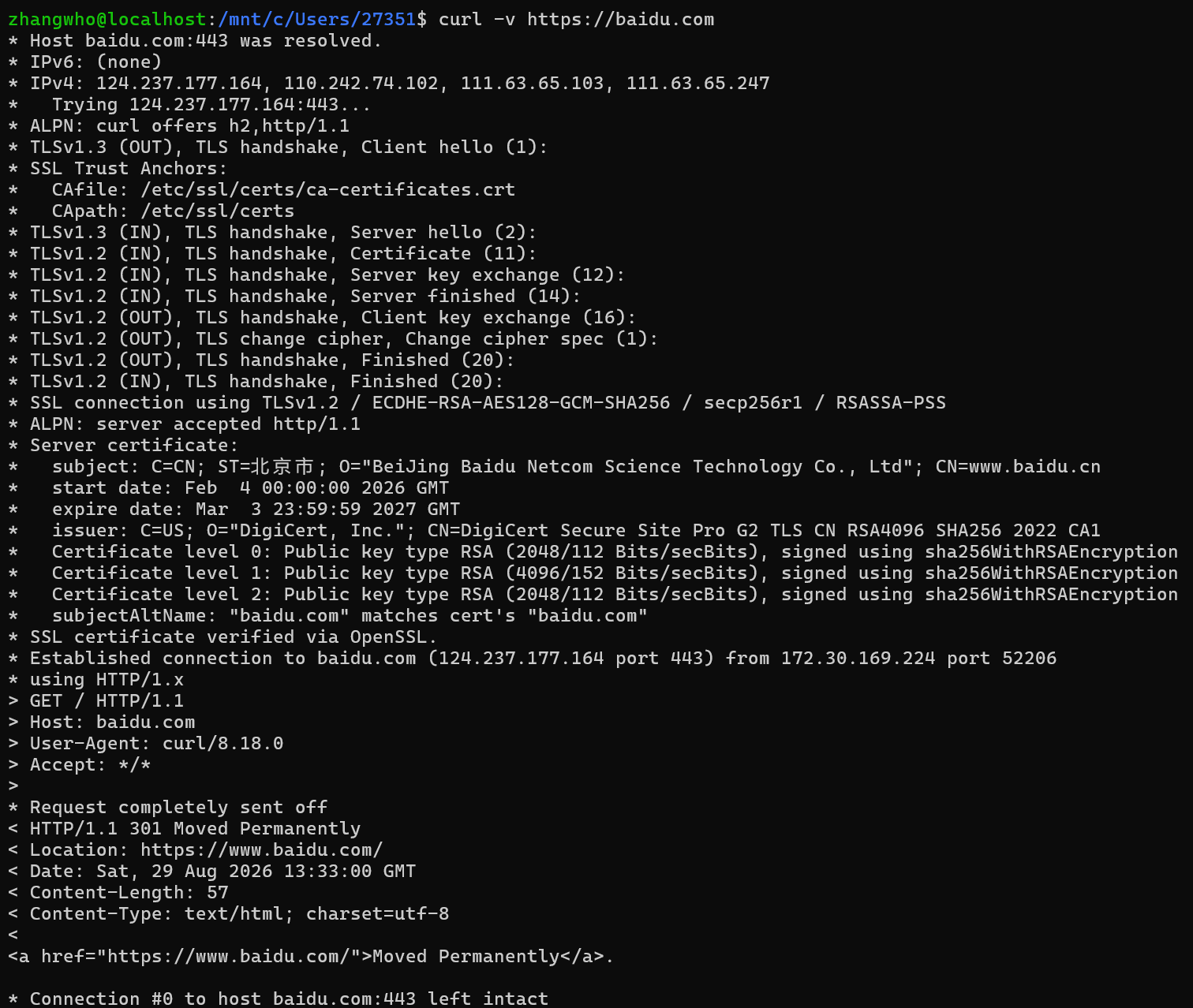
过程解析
- DNS 解析
- Host baidu.com:443 was resolved.
- IPv6: (none)
- IPv4: 124.237.177.164, 110.242.74.102, 111.63.65.103, 111.63.65.247
含义:
- baidu.com:443 已成功解析。
- 没有解析到 IPv6 地址。
- 解析到了 4 个 IPv4 地址,可能用于负载均衡或故障切换。
- 本次连接实际选择了第一个地址:
124.237.177.164
- TCP 连接
- Trying 124.237.177.164:443...
表示正在连接目标服务器的 443 端口,也就是 HTTPS 服务。
- Established connection to baidu.com (124.237.177.164 port 443) from 172.30.169.224 port 52206
表示 TCP 连接建立成功:
- 目标地址:124.237.177.164:443
- 本机地址:172.30.169.224
- 本机临时端口:52206
- TLS 握手
- TLSv1.3 (OUT), TLS handshake, Client hello (1):
客户端首先发送 TLS ClientHello,并且支持 TLS 1.3。
- TLSv1.2 (IN), TLS handshake, Server hello (2):
服务器最终选择了 TLS 1.2,而不是 TLS 1.3。
- SSL connection using TLSv1.2 / ECDHE-RSA-AES128-GCM-SHA256 / secp256r1 / RSASSA-PSS
本次 HTTPS 加密连接使用:
- TLS 版本:TLSv1.2
- 密码套件:ECDHE-RSA-AES128-GCM-SHA256
- 密钥交换曲线:secp256r1
- RSA 签名算法:RSASSA-PSS
- HTTP 协议协商
- ALPN: curl offers h2,http/1.1
- ALPN: server accepted http/1.1
客户端支持:
- HTTP/2:h2
- HTTP/1.1
服务器选择了:
http/1.1
所以本次请求使用 HTTP/1.1,而不是 HTTP/2。
- 证书验证
- Server certificate:
- subject: ... CN=www.baidu.cn
证书主体的 CN 是 www.baidu.cn。
真正用于域名匹配的是 SAN,即 Subject Alternative Name。这里明确显示:
baidu.com matches cert's baidu.com
所以证书对当前访问的 baidu.com 有效。
- SSL certificate verified via OpenSSL.
表示:
- 本机找到了可信 CA。
- 证书链验证成功。
- 域名验证成功。
- TLS 证书没有问题。
证书有效期为:
start date: Feb 4 00:00:00 2026 GMT
expire date: Mar 3 23:59:59 2027 GMT
- 客户端发送的 HTTP 请求
GET / HTTP/1.1
Host: baidu.com
User-Agent: curl/8.18.0
Accept: /
含义:
- 请求方法:GET
- 请求路径:/
- HTTP 版本:HTTP/1.1
- Host:baidu.com
- 客户端:curl/8.18.0
- Accept: /:接受任意类型的响应内容
- 百度返回 HTTP 301
< HTTP/1.1 301 Moved Permanently
服务器返回:
301 Moved Permanently
表示当前地址永久重定向到另一个地址。
Location: https://www.baidu.com/
重定向目标是:
也就是说:
被转到了:
其他响应头:
Content-Length: 57
Content-Type: text/html; charset=utf-8
表示:
- 响应体长度为 57 字节。
- 内容类型是 HTML。
- 字符编码是 UTF-8。
响应正文:
< a href="https://www.baidu.com/">Moved Permanently.
-
总结
这次请求的完整过程是:
DNS 解析成功
↓
TCP 连接成功
↓
TLS 握手成功,使用 TLS 1.2
↓
证书验证成功
↓
HTTP 请求发送成功
↓
服务器返回 301
↓
openssl:检查 TLS 证书与握手过程
bash
# 连接 HTTPS 服务并显示证书链
openssl s_client -connect example.com:443 -servername example.com

# 提取并查看证书主要信息
openssl s_client -connect example.com:443 -servername example.com </dev/null 2>/dev/null | openssl x509 -noout -subject -issuer -dates
抓包和流量观察
tcpdump:抓取网络数据包
bash
# 查看网卡名称
tcpdump -D

# 抓取 eth0 上的流量
sudo tcpdump -i eth0

# 不解析主机名和端口名
sudo tcpdump -nn -i eth0

# 只抓取访问 443 端口的流量
sudo tcpdump -nn -i eth0 port 443

# 只抓取与指定主机相关的流量
sudo tcpdump -nn -i eth0 host 192.168.1.10

# 抓取指定目标网络的 TCP 流量
sudo tcpdump -nn -i eth0 tcp and dst net 10.0.0.0/8

# 保存到文件,供 Wireshark 分析
sudo tcpdump -nn -i eth0 -w network.pcap

# 读取抓包文件
tcpdump -nn -r network.pcap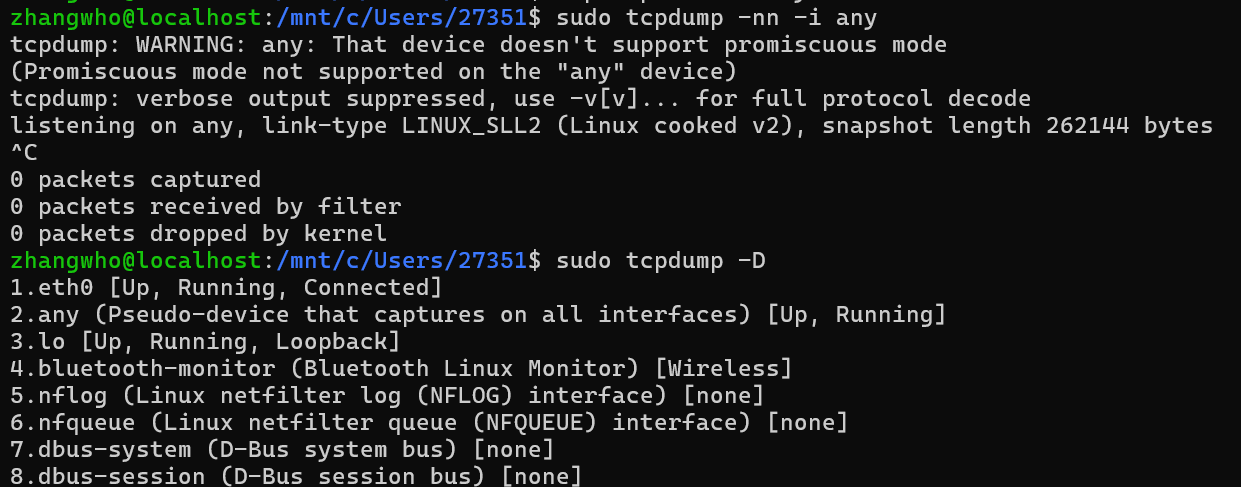
iftop / nload:实时查看流量
bash
# 按连接查看实时带宽占用
sudo iftop -i eth0

# 按网卡查看上传和下载速率
nload eth0
防火墙和 NAT
不同发行版可能使用不同的防火墙管理工具。修改规则前应先查看当前配置,远程操作时尤其要避免误封 SSH 端口。
firewall-cmd:管理 firewalld
bash
# 查看 firewalld 状态
sudo firewall-cmd --state

# 查看当前区域的完整配置
sudo firewall-cmd --list-all

# 查看所有区域
sudo firewall-cmd --list-all-zones
ufw:Ubuntu 常用防火墙工具
bash
# 查看状态和规则编号
sudo ufw status numbered

# 查看更详细的状态
sudo ufw status verbose
nft:查看 nftables 规则
bash
# 查看完整规则集
sudo nft list ruleset
常用排障流程
当一项网络服务无法访问时,可以按以下顺序检查:
-
检查网卡和 IP 地址。
baship -br link ip -br addr -
检查路由和默认网关。
baship route ip route get 8.8.8.8 -
分层测试连通性。
bashping -c 4 127.0.0.1 ping -c 4 <本机IP> ping -c 4 <默认网关IP> ping -c 4 8.8.8.8 -
单独检查 DNS。
bashdig +short example.com dig @8.8.8.8 example.com -
测试目标端口和应用协议。
bashnc -zv -w 3 example.com 443 curl -v --connect-timeout 3 https://example.com -
检查本机监听、进程和防火墙。
bashsudo ss -tulnp sudo lsof -i :443 sudo nft list ruleset -
检查路径质量或抓包定位。
bashmtr -n -r -c 10 example.com sudo tcpdump -nn -i any host <目标IP>
快速命令表
| 目的 | 命令 |
|---|---|
| 查看本机 IP | ip -br addr |
| 查看网卡状态 | ip -br link |
| 查看默认网关 | ip route |
| 查看访问目标所用路由 | ip route get <目标IP> |
| 测试主机连通性 | ping -c 4 <主机> |
| 查看链路路径 | traceroute -n <主机> |
| 检查 DNS | dig +short <域名> |
| 查看监听端口 | sudo ss -tulnp |
| 查找端口占用进程 | sudo lsof -i :<端口> |
| 测试 TCP 端口 | nc -zv -w 3 <主机> <端口> |
| 测试 HTTP 服务 | curl -v <URL> |
| 检查 TLS 证书 | openssl s_client -connect <主机>:443 -servername <主机> |
| 实时抓包 | sudo tcpdump -nn -i any |
| 查看网卡收发统计 | ip -s link |