一种为人工智能代理赋予新能力和专业知识的标准化方法。
什么是代理技能
代理技能是一种轻量级、开放格式,用于通过专业知识和工作流扩展 AI 代理的能力。其核心是一个包含 SKILL.md文件。该文件包括元数据( name和 description,至少),以及告诉代理如何执行特定任务的说明。技能还可以捆绑脚本、参考材料、模板和其他资源。
my-skill/
├── SKILL.md          # ✅ 必填:元数据、能力描述、系统指令、入参出参定义
├── scripts/          # 可选项:可执行Python/bash脚本,工具实际业务逻辑
├── references/       # 可选项:参考文档、接口文档、设计文档
├── assets/           # 可选项:提示词模板、json配置、静态资源、schema
└── ...               # 其他自定义目录
1. SKILL.md(核心必填)
Skill 的入口描述文件,框架会读取这个文件,解析:
- metadata:skill 名称、版本、作者、标签、入参 JSON‑Schema
- instructions:给 LLM 的系统提示词,什么时候调用这个 skill、约束、返回格式
- 错误处理规则、鉴权说明
- 工具函数定义(tool calling schema)
框架加载 skill 时优先解析 SKILL.md,没有这个文件无法识别为合法 Skill 包。
---
name: arm_move
version: 0.1.0
description: 机械臂移动工具
parameters:
  target_pose: {"type":"object","desc":"目标位姿 base_link m/rad"}
---
# 能力说明
当用户指令需要机械臂移动时调用本skill。
约束:目标必须在工作空间 radius <=0.28m。
调用scripts/move.py执行真实动作。
2. scripts/
存放真正执行逻辑的脚本:
move_arm.py、detect_object.py、mock 仿真脚本- 可以是 Python、shell;SKILL.md 内通过路径引用调用脚本
mock 模式:调用 mock 脚本;真机模式调用真实硬件接口脚本。
3. references/
放外部参考材料:
- 接口文档、硬件手册、语雀文档摘录、协议说明
- 不被程序执行,供 LLM 检索、开发者查阅。
4. assets/
静态资源:
- tool_schema.json、prompt 模板、scene 配置 json
- few‑shot 样例、提示词片段
和现有项目的对应关系
现在的上层 Agent 项目完全可以封装成一个my‑arm‑skill技能包:
my-arm-skill/
├── SKILL.md               # skill元数据 + LLM调用规则、工具schema
├── scripts/
│   ├── mock_tools/        # 你之前的MockArm、SceneManager
│   └── real_driver/       # 真机ROS/硬件驱动
├── assets/
│   ├── scene.json         # 场景配置
│   └── tool_prompt.jinja2 # 提示词模板
└── references/
    └── 上层Demo实现方案.md
运行逻辑
- Agent 框架读取
SKILL.md,注册工具调用 schema 给 LLM - LLM 输出工具调用 → 框架触发 skill
- skill 内部执行
scripts/下业务脚本(可切换 mock / 真机) - 返回结果给 Agent,写入日志
关键点:SKILL.md 只做描述与规则,业务逻辑全部下沉 scripts,做到描述和实现分离,和你之前 mock 与真机两套代码架构思想完全对齐。
为什么要使用skills代理技能
代理的能力越来越强,但通常没有可靠地完成实际工作所需的上下文。技能可以通过将程序知识以及公司、团队和用户特定上下文打包到可移植的、版本控制的文件夹中来解决这个问题,这些文件夹由代理人按需加载。这为代理人提供了:
- 领域专业知识:将专用知识------从法律审查流程到数据分析管道,再到演示文稿格式------捕获为可重复使用的指令和资源。
- 可重复的工作流:将多步骤任务转化为一致且可审计的流程。
- 交叉产品复用:一次构建技能,即可在任何兼容该技能的代理中复用。
代理技能是如何工作的?
代理通过 渐进式披露,在三个阶段加载技能:
- 发现:在启动时,代理仅加载每个可用技能的名称和描述,足以知道何时可能相关。
- 激活 :当任务与技能的描述匹配时,代理会读取完整
SKILL.md将指令纳入上下文。 - 执行:代理遵循指令,可选地根据需要执行捆绑代码或加载引用的文件。
只有当任务需要全部指令时,才会加载全部指令,因此代理只需少量上下文足迹,就可以在手头保留许多技能。
规范
SKILL.md格式
这 SKILL.md文件必须包含YAML前置内容,然后是 Markdown 内容。
正面材料
| 领域 | 必需的 | 制约因素 |
|---|---|---|
name |
是 | 最多64个字符。只使用小写字母、数字和连字符。不能以连字符开始或结束。 |
description |
是 | 最大1024个字符。非空。描述技能的功能和何时使用。 |
license |
不 | 许可证名称或对捆绑许可证文件的引用。 |
compatibility |
不 | 最多500个字符。指示环境要求(预期产品、系统包、网络访问等)。 |
metadata |
不 | 为其他元数据进行任意键值映射(从字符串键到字符串值的映射)。 |
allowed-tools |
不 | 该技能可能使用的预先批准的工具的空格字符串。(实验) |
最小示例:
---
name: skill-name
description: A description of what this skill does and when to use it.
---
带有可选字段的示例:
---
name: pdf-processing
description: Extract PDF text, fill forms, merge files. Use when handling PDFs.
license: Apache-2.0
metadata:
  author: example-org
  version: "1.0"
---name领域所需的 name领域:
- 必须为1---64个字符
- 可能只包含unicode小写字母数字字符(
a-z,0-9)和连字符(-) - 不得以连字符开头或结尾(
-) - 不得包含连续的连字符(
--) - 必须与父目录名称匹配
有效的例子:
name: pdf-processing

name: data-analysis

name: code-review
无效的例子:
name: PDF-Processing  # uppercase not allowed

name: -pdf  # cannot start with hyphen

name: pdf--processing # consecutive hyphens not alloweddescription领域 所需的 description领域:
- 必须为1---1024个字符
- 应该描述技能的作用以及何时使用它
- 应包括帮助代理确定相关任务的具体关键字
很好的例子:
description: Extracts text and tables from PDF files, fills PDF forms, and merges multiple PDFs. Use when working with PDF documents or when the user mentions PDFs, forms, or document extraction.糟糕的例子:
description: Helps with PDFs.license领域 可选的 license领域:
- 指定适用于该技能的许可证
- 我们建议将其缩短(可以是许可证的名称,也可以是捆绑许可证文件的名称)
示例:
license: Proprietary. LICENSE.txt has complete termscompatibility领域 可选的 compatibility领域:
- 如果有,必须为1-500个字符
- 仅当您的技能对环境有特定要求时,才应包括在内
- 可以指示预期的产品、所需的系统包、网络访问需求等。
例子:
compatibility: Designed for Claude Code (or similar products)

compatibility: Requires git, docker, jq, and access to the internet

compatibility: Requires Python 3.14+ and uv
大多数技能不需要 compatibility场地。
metadata领域 可选的 metadata领域:
- 从字符串键到字符串值的映射
- 客户端可以使用此属性存储代理技能规范未定义的其他属性
- 我们建议将您的关键字名称合理地独特化,以避免意外冲突
示例:
metadata:
  author: example-org
version: "1.0"allowed-tools领域 可选的 allowed-tools领域:
- 预先批准运行的、以空格分隔的工具串
- 实验性。对该字段的支持可能因代理实现而异。
示例:
allowed-tools: Bash(git:*) Bash(jq:*) Read身体含量
位于前记之后的 Markdown 正文包含技能说明。没有格式限制。请提供有助于代理人高效完成任务的中文翻译。推荐章节:
- 分步说明
- 投入和产出的例子
- 常见边缘案例
请注意,一旦代理决定激活技能,它将加载整个文件。请考虑更长时间地分割 SKILL.md将内容转换为引用文件。
可选目录
技能目录可能包含超出所需范围的任何文件和目录。 SKILL.md.以下公约是关于组织常见类型内容的建议。
scripts/
包含代理可以运行的可执行代码。脚本应该:
- 要自成体系或清晰地记录依赖关系
- 包含有用的错误信息
- 优雅地处理边缘箱
支持的语言取决于代理实现。常见的选项包括Python、Bash和JavaScript。
references/
包含代理在需要时可以阅读的其他文档:
REFERENCE.md-详细的技术参考资料FORMS.md-表格模板或结构化数据格式- 特定领域的文件(
finance.md,legal.md,等等)
保持个人 参考文件聚焦。代理按需加载这些内容,因此较小的文件意味着更少的上下文使用。
assets/
包含静态资源:
- 模板(文档模板、配置模板)
- 图像(图表、示例)
- 数据文件(查找表、模式)
逐步披露
代理加载技能 渐进地,只有在任务需要时才会提取更多细节。技能的结构应充分利用这一点:
- 元数据 (约 100 个标记):该
name和description在启动时为所有技能加载字段 - 说明 (建议不超过 5000 个 token):完整
SKILL.md技能激活时身体已加载。 - 资源 (视需要而定):文件(例如那些
scripts/,references/,或assets/)仅在需要时加载
保持你的主键 SKILL.md在500行以下。将详细参考资料移至单独的文件。
文件引用
在技能中引用其他文件时,请使用技能根目录中的相关路径:
See [the reference guide](references/REFERENCE.md) for details.

Run the extraction script:
scripts/extract.py
将文件引用的深度保持在一个层次上 SKILL.md.避免深嵌套的参考链。
skill-creater创建skill
直接发送codex安装prompt指令
请根据 https://skillhub.cn/install/skillhub.md,安装 @clawhub_timyljob2011-sudo/skill-creater。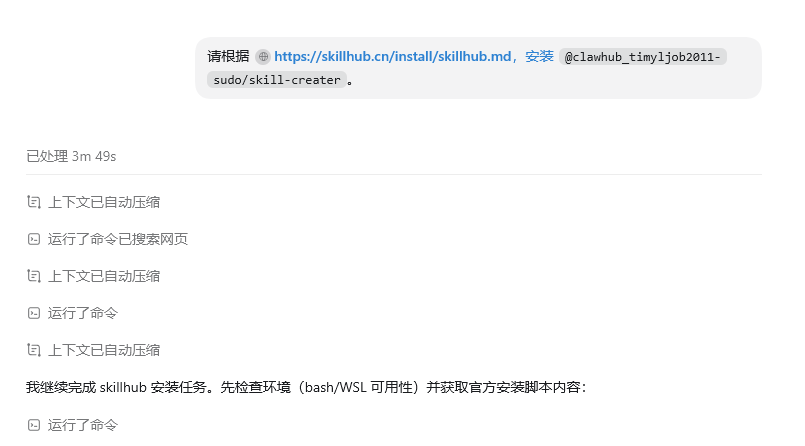
等待安装完成。
然后发送指令,调用这个生成skill的技能对
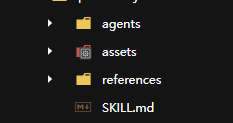
SKILL.md
python
---
name: panthera-joint1-demo
description: Create a runnable Panthera-HT robot arm joint 1 movement demo using the panthera_python SDK. Use when the user asks to write, generate, run, or modify a single-joint demo that moves only joint 1 (base joint) of the Panthera arm, or when they ask for a Panthera joint control example.
---

# Panthera Joint1 Demo

## 用途

生成一个只移动 Panthera 机械臂关节 1、其余关节保持当前角度的 Python demo。默认基于以下项目路径:

```text
/home/ubuntu/Panthera-HT_SDK/panthera_python
```

如果该路径不存在,先搜索 `Panthera_lib/Panthera.py` 或请用户提供 SDK 根目录。

## 关键接口

- `Panthera(config_path=None)`:创建机械臂实例,默认加载 `robot_param/Follower.yaml`。
- `robot.get_current_pos()`:读取当前关节角度。
- `robot.moveJ(pos, duration, max_tqu=None, iswait=True)`:所有关节在指定时间内同步到达目标位置。
- `robot.joint_limits`:关节限位,关节 1 的上下限分别位于 `lower[0]` 和 `upper[0]`。

完整方法说明见 `references/panthera-control.md`。

## 创建 demo

1. 将 `assets/demo_joint1_move.py` 复制到:

```text
/home/ubuntu/Panthera-HT_SDK/panthera_python/scripts/demo_joint1_move.py
```

2. 按用户要求调整参数:

   - `--delta`:关节 1 运动增量,单位 rad,默认 `0.5`。
   - `--duration`:单次运动时间,单位秒,默认 `3.0`。
   - `--config`:如需使用 `Leader.yaml` 或自定义配置时传入绝对路径。
   - `--no-return`:默认会返回初始位置;加此参数则保持目标位置。

3. 确认串口权限后运行:

```bash
cd /home/ubuntu/Panthera-HT_SDK/panthera_python/scripts
sudo chmod -R 777 /dev/ttyACM*
python3 demo_joint1_move.py --delta 0.3 --duration 2.0
```

## 实现约束

- 必须只修改目标角度数组的第 0 个元素,其余关节保持当前角度。
- 先读取当前角度,再把 `current + delta` 裁剪到关节 1 限位内。
- 使用 `moveJ(...)` 或 `Joint_Pos_Vel(...)`,不要直接调用电机底层接口,除非用户明确要求。
- 脚本结束前提示电机会自动掉电。

## 安全注意事项

- 不要在未连接机械臂时直接运行控制脚本。
- 首次运行前建议先运行项目自带的 `0_robot_get_state.py` 检查关节状态。
- 增量不宜过大;建议先使用 `0.2 rad` 左右的小增量确认运动方向和安全距离。
- 关节限位检查只保护位置输入,不代表可以忽略急停、碰撞和现场安全措施。

## API 详情

当需要修改 demo、处理自定义配置文件或排查运动控制问题时,读取 `references/panthera-control.md`。
references/contro
python
# Panthera 关节控制参考

## 项目结构

```text
panthera_python/
├── robot_param/
│   ├── Follower.yaml
│   └── Leader.yaml
└── scripts/
    ├── Panthera_lib/
    │   └── Panthera.py
    └── demo_joint1_move.py  # 本 skill 生成的 demo
```

## 初始化

```python
from Panthera_lib import Panthera

# 默认加载 panthera_python/robot_param/Follower.yaml
robot = Panthera()

# 指定配置,例如 Leader.yaml
robot = Panthera("/home/ubuntu/Panthera-HT_SDK/panthera_python/robot_param/Leader.yaml")
```

`Panthera` 继承自 `hightorque_robot.Robot`。初始化后会加载关节限位、最大力矩、速度/加速度限幅、URDF 模型和电机参数。

## 常用状态读取

```python
positions = robot.get_current_pos()      # np.ndarray,6 个关节角度
velocities = robot.get_current_vel()     # np.ndarray,6 个关节速度
torques = robot.get_current_torque()     # np.ndarray,6 个关节力矩
```

为避免读到旧缓存,可在读取前调用:

```python
robot.send_get_motor_state_cmd()
robot.motor_send_cmd()
```

## 关节 1 运动

只改变目标数组第 0 个元素:

```python
import numpy as np

initial = robot.get_current_pos()
target = initial.copy()
target[0] += 0.3  # 关节 1 增加 0.3 rad

success = robot.moveJ(
    target,
    duration=2.0,       # 所有关节在 2 秒内到达
    max_tqu=None,       # None 使用配置文件中的最大力矩
    iswait=True,        # 阻塞等待到达
    tolerance=0.01,
    timeout=10.0,
)
```

`moveJ()` 内部按 `(target - current) / duration` 计算速度,再调用 `Joint_Pos_Vel()`。若需要为每个关节单独指定速度,可直接使用:

```python
robot.Joint_Pos_Vel(
    pos=target,
    vel=[0.2, 0.0, 0.0, 0.0, 0.0, 0.0],
    max_tqu=None,
    iswait=True,
)
```

## 关节限位

`robot.joint_limits` 是字典:

```python
lower = robot.joint_limits["lower"]  # 长度与电机数量相同
upper = robot.joint_limits["upper"]
```

关节 1 对应索引 0。目标位置超出限位时,`moveJ()` 和 `Joint_Pos_Vel()` 会拒绝执行并返回 `False`。

## Follower.yaml 关键参数示例

```yaml
robot:
  joint_limits:
    lower: [-2.4, -0.1, -0.1, -1.6, -1.7, -2.5]
    upper: [2.4, 3.2, 4.0, 1.6, 1.7, 2.5]
  max_torque: [21.0, 36.0, 36.0, 21.0, 10.0, 10.0]
  velocity_limits: [1.0, 1.0, 1.0, 1.0, 1.0, 1.0]
```

## 运行前置条件

- 安装 `hightorque_robot` 电机 SDK。
- 安装 `pyyaml`、`pin`(不是 `pinocchio`)、`scipy`。
- 连接并识别电机串口:

```bash
ls /dev/ttyACM*
sudo chmod -R 777 /dev/ttyACM*
```

- 首次运行先执行 `0_robot_get_state.py` 确认各关节状态正常。

## 常见问题

- 导入 `Panthera_lib` 失败:demo 脚本会自动把自身所在目录加入 `sys.path`,但 `Panthera_lib` 仍需与 `scripts` 目录结构一致。
- `get_current_pos()` 数值不更新:多发送几次 `send_get_motor_state_cmd()` + `motor_send_cmd()`。
- 电机不动作:检查配置路径是否正确,串口权限是否配置,以及目标位置是否被限位检查拦截。
- 程序结束后电机会自动掉电,这是正常行为;如需保持使能,应在同一循环中持续发送控制指令。
assets/demo.py
python
#!/usr/bin/env python3
"""Panthera 机械臂关节 1 单轴运动 demo 模板。

将本文件复制到 panthera_python/scripts/demo_joint1_move.py 后运行。
默认流程:
  1. 读取当前关节角度;
  2. 关节 1 运动 --delta 弧度,其余关节保持不动;
  3. 返回初始位置(可使用 --no-return 禁用)。
"""

import argparse
import os
import sys
import time


def _setup_import_path():
    script_dir = os.path.dirname(os.path.abspath(__file__))
    if script_dir not in sys.path:
        sys.path.insert(0, script_dir)


_setup_import_path()

from Panthera_lib import Panthera  # noqa: E402


def clamp(value: float, lower: float, upper: float) -> float:
    return max(lower, min(upper, value))


def refresh_motor_state(robot: Panthera, rounds: int = 4) -> None:
    """刷新电机状态,避免使用上一次的状态缓存。"""
    for _ in range(rounds):
        robot.send_get_motor_state_cmd()
        robot.motor_send_cmd()
    time.sleep(0.1)


def format_positions(positions) -> str:
    return ", ".join(f"J{i + 1}={float(positions[i]):.3f}" for i in range(len(positions)))


def parse_args() -> argparse.Namespace:
    parser = argparse.ArgumentParser(
        description="仅移动 Panthera 机械臂关节 1,其他关节保持当前位置。"
    )
    parser.add_argument(
        "--config",
        default=None,
        help="Panthera YAML 配置文件路径;默认使用 Panthera 内部 Follower.yaml。",
    )
    parser.add_argument(
        "--delta",
        type=float,
        default=0.5,
        help="关节 1 正向运动增量,单位 rad。默认 0.5。",
    )
    parser.add_argument(
        "--duration",
        type=float,
        default=3.0,
        help="单次运动时间,单位秒。默认 3.0。",
    )
    parser.add_argument(
        "--tolerance",
        type=float,
        default=0.01,
        help="位置到达容差,单位 rad。默认 0.01。",
    )
    parser.add_argument(
        "--timeout",
        type=float,
        default=15.0,
        help="等待到达超时时间,单位秒。默认 15.0。",
    )
    parser.add_argument(
        "--no-return",
        action="store_true",
        help="仅向目标位置运动一次,不返回初始位置。",
    )
    return parser.parse_args()


def main() -> None:
    args = parse_args()
    robot = Panthera(args.config)

    try:
        print("正在刷新电机状态...")
        refresh_motor_state(robot)

        initial_pos = robot.get_current_pos()
        print(f"初始关节角度: [{format_positions(initial_pos)}] rad")

        target_pos = initial_pos.copy()

        if robot.joint_limits is not None:
            joint1_lower = float(robot.joint_limits["lower"][0])
            joint1_upper = float(robot.joint_limits["upper"][0])
        else:
            joint1_lower, joint1_upper = -2.4, 2.4

        target_pos[0] = clamp(
            float(initial_pos[0]) + args.delta,
            joint1_lower,
            joint1_upper,
        )

        if abs(target_pos[0] - float(initial_pos[0])) < 1e-6:
            print("关节 1 已位于限位边缘,无法继续向指定方向运动。")
            return

        print(
            f"目标关节角度: [{format_positions(target_pos)}] rad "
            f"(关节 1 增量: {target_pos[0] - float(initial_pos[0]):+.3f} rad)"
        )

        success = robot.moveJ(
            target_pos,
            duration=args.duration,
            max_tqu=None,
            iswait=True,
            tolerance=args.tolerance,
            timeout=args.timeout,
        )
        if not success:
            print("关节 1 运动未在超时时间内完成,已停止后续动作。")
            return

        print(f"到达目标后: [{format_positions(robot.get_current_pos())}] rad")

        if args.no_return:
            print("已启用 --no-return,机械臂保持在目标位置。")
            return

        print("准备返回初始位置...")
        time.sleep(0.5)
        success = robot.moveJ(
            initial_pos,
            duration=args.duration,
            max_tqu=None,
            iswait=True,
            tolerance=args.tolerance,
            timeout=args.timeout,
        )
        if success:
            print(f"返回后: [{format_positions(robot.get_current_pos())}] rad")
        else:
            print("返回初始位置未在超时时间内完成。")

    except KeyboardInterrupt:
        print("\n程序被用户中断。")
    except Exception as exc:
        print(f"\n运行出错: {exc}")
    finally:
        print("\nDemo 结束。结束后电机会自动掉电,请注意安全。")


if __name__ == "__main__":
    main()
openai.yaml
python
interface:
  display_name: "Panthera Joint 1 Demo"
  short_description: "Create a Panthera arm joint 1 movement demo"
  default_prompt: "Use $panthera-joint1-demo to create a Panthera robot arm joint 1 movement demo."