前言
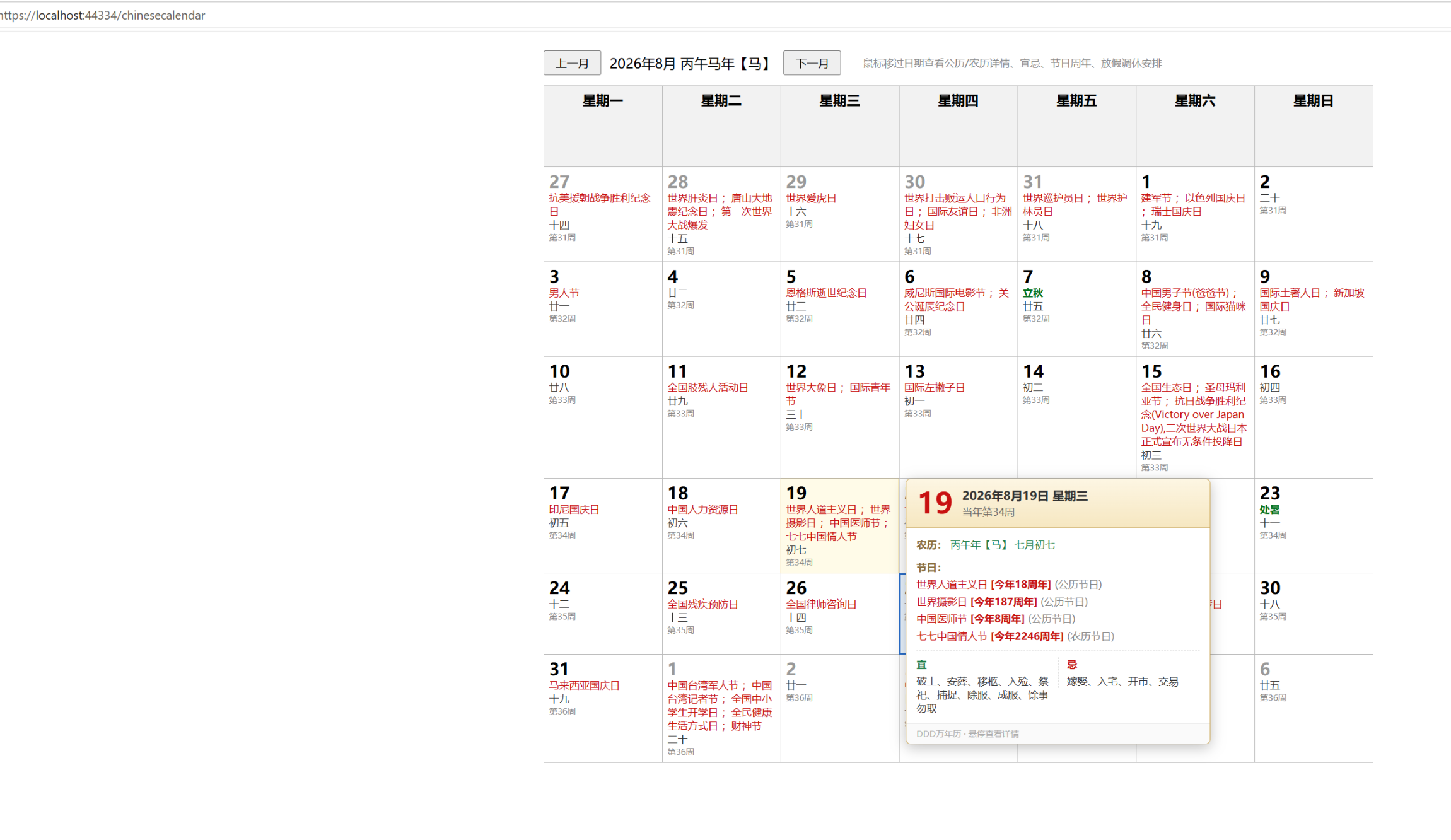
在传统 Web 开发中,万年历、黄历、放假调休等日历功能往往依赖前端静态 JS 文件或硬编码数据,导致数据更新困难、维护成本高。本文基于 DDD(领域驱动设计)分层架构,介绍一套完整的万年历系统实现方案:后端通过 SQL Server 存储节日、黄历宜忌、二十四节气、放假调休等数据,以 HTTP 接口对外提供 JSON 数据;前端页面通过悬停交互展示公历、农历、宜忌、节日周年及放假安排等详情。文章将围绕数据库表设计、后端接口实现、前端交互三个核心部分展开。
一、数据库设计:日历数据的结构化存储
万年历系统的数据来源多样,包括公历节日、农历节日、第 N 周节日、星期节日、黄历宜忌、二十四节气以及放假调休安排。合理的表结构设计是系统稳定运行的基础。
1.1 节日配置表 Calendar_Festival
该表用于存储各类节日信息,支持公历、农历、第 N 周、星期节日四种节日类型,并支持单日、多日、整周三种范围类型。核心字段包括节日名称、节日类型、范围类型、是否放假、公历月日、农历月日、第 N 周索引、目标星期、持续天数等。
1.2 黄历宜忌与二十四节气表
Calendar_Almanac 表存储每日宜忌文本;Calendar_SolarTerm 表存储二十四节气基准数据;Calendar_HuangLi 表按日期维度存储每日的黄历宜忌、冲煞、建除、正冲、胎神等信息,并通过唯一约束保证每年每月每日只有一条记录。
1.3 放假调休表 Calendar_HolidayAdjust
该表按日期存储放假或上班的调休状态,通过 AdjustType 字段区分放假与上班,替代传统前端 workTime.js 静态配置,实现调休数据的数据库驱动和动态更新。
二、后端接口实现:DDD 分层与数据组装
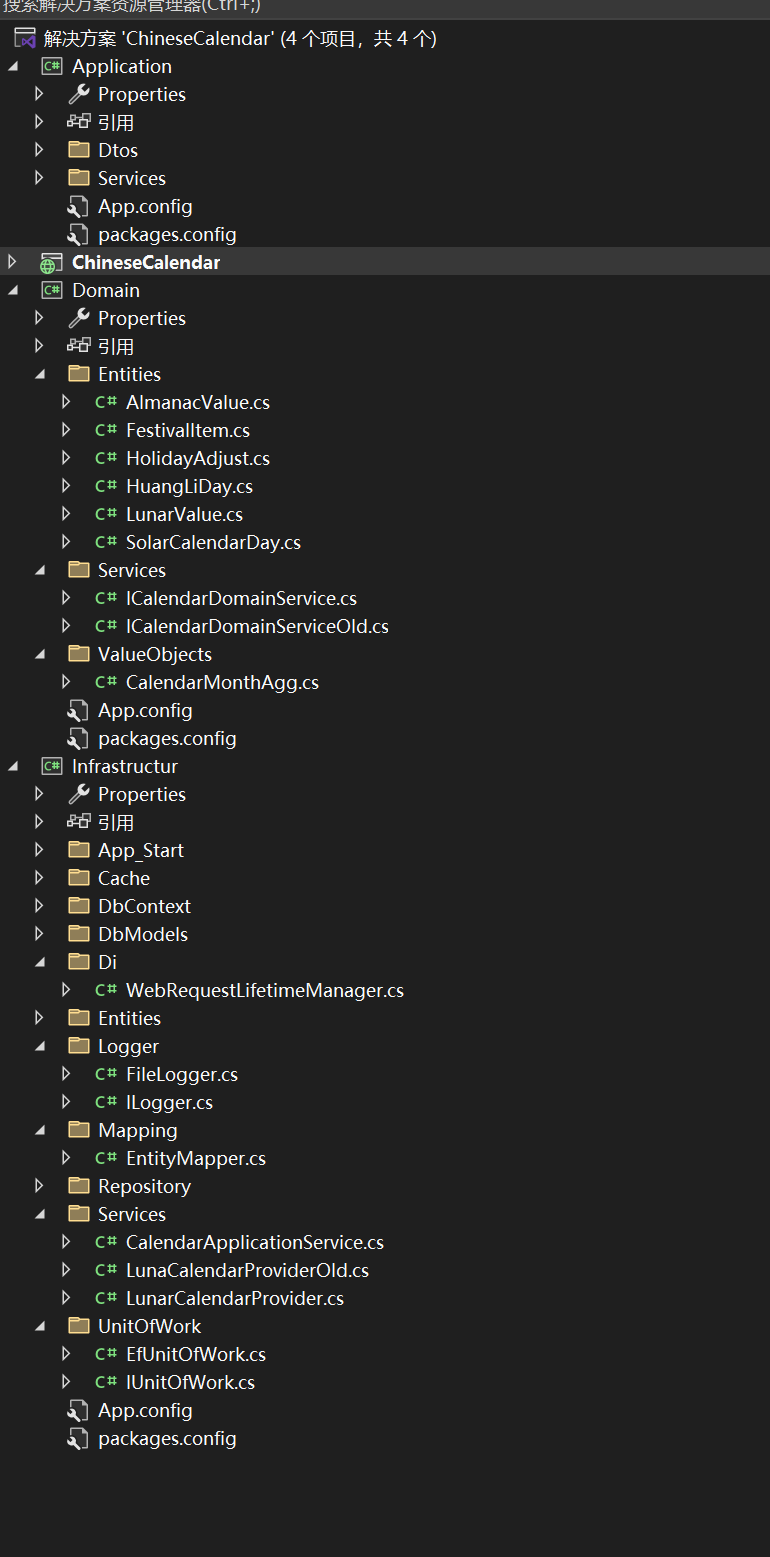
后端采用仓储层、缓存层、领域服务层、应用服务层的分层结构,通过 HTTP 处理器对外提供日历、黄历、放假调休三类 JSON 接口。
2.1 组合根与依赖注入
在 CalendarApi 处理器中,通过组合根方式手动组装仓储、缓存装饰器、领域服务与应用服务,实现各层解耦。仓储层负责 SQL Server 数据访问,缓存层对仓储结果进行缓存装饰,领域服务负责农历转换、节日匹配等核心业务逻辑,应用服务负责跨领域协调与数据组装。
2.2 日历接口与黄历接口
日历接口根据年、月参数返回当月完整日历数据,包括公历、农历、节气、节日、宜忌、放假状态等;黄历接口按年返回全年每日黄历宜忌数据;放假调休接口按年返回全年放假与上班日期列表,供前端按年缓存使用。
2.3 日志与异常处理
接口层通过全局日志记录请求开始、完成与耗时信息,便于排查问题;异常统一捕获并返回 500 状态码与错误信息,保证接口稳定性。
三、前端交互:悬停详情与响应式适配
前端页面通过 jQuery 请求后端接口,动态渲染日历表格,并实现悬停弹出详情、放假调休角标、触摸端抽屉式交互等能力。
3.1 日历渲染与数据绑定
页面加载时请求当月日历数据,按周逐行渲染单元格,每个单元格绑定数据索引。单元格展示公历日、节日、节气、农历日与周数,并通过 CSS 区分本月与非本月日期、标记当天。
3.2 悬停详情弹层
桌面端鼠标悬停单元格时,弹出详情层展示公历、农历、干支生肖、节气、节日列表(含周年与放假标记)、放假调休摘要、宜忌等信息;移出单元格或弹层后延迟隐藏。触摸端则改为点击单元格弹出底部抽屉式详情,点击空白处关闭。
3.3 放假调休的前端聚合逻辑
前端按年缓存放假调休数据,通过聚合算法将连续放假日期合并为区间,并将区间前后 7 天内的上班日归属到最近区间,生成类似"10月1日至7日放假,10月10日上班"的摘要文本,在悬停详情中展示。
总结
本文从数据库表设计、后端接口实现、前端交互三个层面,完整介绍了基于 DDD 架构的万年历系统实现方案。通过数据库驱动节日、黄历与放假调休数据,替代传统静态 JS 配置,显著提升了数据可维护性与更新效率;通过分层架构实现业务逻辑与数据访问解耦,便于后续扩展与维护。前端悬停详情与响应式适配则提升了用户体验。该方案适用于需要动态更新日历数据的 Web 应用场景。
参考资料
- DDD 领域驱动设计:Eric Evans 著《领域驱动设计:软件核心复杂性应对之道》
- SQL Server 官方文档:表设计与索引优化
- jQuery 官方文档:事件委托与 AJAX 请求
- 农历与二十四节气算法相关资料
项目结构:
sql:
sql
-- =============================================
-- 日历节日配置表:支持4种节日类型:公历、农历、第N周、星期节日;支持单日、多日、整周节日
-- =============================================
CREATE TABLE dbo.Calendar_Festival
(
    Id INT IDENTITY(1,1) PRIMARY KEY,
    FestivalName NVARCHAR(64) NOT NULL,        --节日名称
    FestivalKind NVARCHAR(16) NOT NULL,        --Solar公历|Lunar农历|WeekIndex第N周|WeekDay星期节日
    RangeType NVARCHAR(16) NOT NULL,           --Single单日|MultiDays连续多日|WholeWeek整周
    IsVacation BIT NOT NULL DEFAULT 0,         --是否放假
    Remark NVARCHAR(128) NULL,                 --备注说明
    FoundYear INT NULL,                        -- 创立年份
    SolarMonth INT NULL,                       --公历月(公历节日用)
    SolarDay INT NULL,                         --公历日(公历节日用)
    LunarMonth INT NULL,                      --农历月(农历节日用)
    LunarDay INT NULL,                        --农历日(农历节日用)
    WeekIndex INT NULL,                        --第N周(WeekIndex类型:5月第2周,则WeekIndex=2)
    TargetWeekDay INT NULL,                   --目标星期:1周一~7周日
    MonthOfYear INT NULL,                      --对应月份:5代表5月
    StartOffsetDay INT NULL,                   --多日:持续起始偏移
    LastDays INT NULL,                         --多日:持续天数;WholeWeek固定7天
    IsEnabled BIT NOT NULL DEFAULT 1,
    CreateTime DATETIME DEFAULT GETDATE()
);
GO


-- =============================================
-- 黄历宜忌配置表,模拟多条样本
-- =============================================
CREATE TABLE dbo.Calendar_Almanac
(
    Id INT IDENTITY(1,1) PRIMARY KEY,
    Yi NVARCHAR(200) NOT NULL,
    Ji NVARCHAR(200) NOT NULL,
    IsEnabled BIT NOT NULL DEFAULT 1,
    CreateTime DATETIME DEFAULT GETDATE()
);
GO

-- =============================================
-- 二十四节气表(基准数据,生产可替换高精度节气时刻)
-- =============================================
CREATE TABLE dbo.Calendar_SolarTerm
(
    Id INT IDENTITY(1,1) PRIMARY KEY,
    Month TINYINT NOT NULL,
    Day TINYINT NOT NULL,
    TermName NVARCHAR(16) NOT NULL
);
GO


    CREATE TABLE dbo.Calendar_HuangLi (
        Id INT IDENTITY(1,1) PRIMARY KEY,
        HuangLiYear  INT           NOT NULL,
        HuangLiMonth INT           NOT NULL,
        HuangLiDay   INT           NOT NULL,
        Yi           NVARCHAR(MAX) NULL,
        Ji           NVARCHAR(MAX) NULL,
        Chong        NVARCHAR(32)  NULL,
        Sha          NVARCHAR(8)   NULL,
        JianChu      NVARCHAR(8)   NULL,
        ZhengChong   NVARCHAR(32)  NULL,
        TaiShen      NVARCHAR(64)  NULL,
        CONSTRAINT UQ_Calendar_HuangLi_YearMD UNIQUE (HuangLiYear, HuangLiMonth, HuangLiDay)
    );


    CREATE TABLE dbo.Calendar_HolidayAdjust (
        Id INT IDENTITY(1,1) PRIMARY KEY,
        HolidayYear  INT      NOT NULL,
        HolidayMonth INT      NOT NULL,
        HolidayDay   INT      NOT NULL,
        AdjustType   INT      NOT NULL,
        Remark       NVARCHAR(64) NULL,
        CONSTRAINT UQ_Calendar_HolidayAdjust_YearMD UNIQUE (HolidayYear, HolidayMonth, HolidayDay)
    );
cs
using Application.Services;
using Infrastructur.Cache;
using Infrastructur.Logger;
using Infrastructur.Repository;
using Infrastructur.Services;
using Newtonsoft.Json;
using System;
using System.Collections.Generic;
using System.Configuration;
using System.Linq;
using System.Web;
using System.Web.SessionState;


namespace ChineseCalendar
{
    /// <summary>
    /// CalendarApi
    /// geovindu
    /// </summary>
    public class CalendarApi : IHttpHandler
    {

        /// <summary>
        ///
        /// </summary>
        /// <param name="context"></param>
        public void ProcessRequest(HttpContext context)
        {
            ILogger logger = ChineseCalendar.Global.GlobalLogger;
            DateTime startTime = DateTime.Now;

            try
            {
                context.Response.ContentType = "application/json";
                context.Response.Charset = "utf-8";

                int year, month;
                if (!int.TryParse(context.Request.QueryString["year"], out year))
                    year = DateTime.Now.Year;
                if (!int.TryParse(context.Request.QueryString["month"], out month))
                    month = DateTime.Now.Month;

                logger.Info(string.Format("开始生成日历:{0}年{1}月", year, month));

                // 组合根:仓储 -> 缓存装饰 -> 领域服务 -> 应用服务
                string connStr = ConfigurationManager.ConnectionStrings["CalendarDb"].ConnectionString;
                ICalendarRepository repo = new SqlServerCalendarRepository(connStr);
                ICalendarCacheService cache = new HttpRuntimeCalendarCache(repo);
                var lunarProvider = new Infrastructur.Services.LunarCalendarProvider(repo); //cache
                var appSvc = new Infrastructur.Services.CalendarApplicationService(lunarProvider);

                // 放假调休数据接口(数据库驱动,替代前端 workTime.js)
                string action = context.Request.QueryString["action"] ?? "";
                if (action == "holidays")
                {
                    var holidays = appSvc.GetHolidayAdjusts(year);
                    string hJson = JsonConvert.SerializeObject(holidays, Formatting.Indented);
                    context.Response.Write(hJson);
                    logger.Info(string.Format("放假调休接口完成:{0}年,共{1}条", year, holidays.Count));
                    return;
                }

                // 黄历宜忌接口(数据库驱动,替代前端 js/huangli/YYYY.js)
                if (action == "huangli")
                {
                    var huangli = appSvc.GetHuangLi(year);
                    string hlJson = JsonConvert.SerializeObject(huangli, Formatting.Indented);
                    context.Response.Write(hlJson);
                    logger.Info(string.Format("黄历宜忌接口完成:{0}年,共{1}条", year, huangli.Days.Count));
                    return;
                }

                var result = appSvc.GetCalendar(year, month);
                string json = JsonConvert.SerializeObject(result, Formatting.Indented);
                context.Response.Write(json);

                double ms = (DateTime.Now - startTime).TotalMilliseconds;
                logger.Info(string.Format("日历生成完成:{0}年{1}月,耗时{2}ms", year, month, ms));
            }
            catch (Exception ex)
            {
                logger.Error("日历接口异常", ex);
                context.Response.StatusCode = 500;
                context.Response.Write("{\"error\":\"服务器内部错误\"}");
            }
        }

        public bool IsReusable
        {
            get
            {
                return false;
            }
        }
    }
}
cs
<%@ Page Language="C#" AutoEventWireup="true" CodeBehind="CalendarView.aspx.cs" Inherits="ChineseCalendar.CalendarView" %>

<!DOCTYPE html>
<html xmlns="http://www.w3.org/1999/xhtml">
<head>
<meta http-equiv="Content-Type" content="text/html; charset=utf-8"/>
<meta name="viewport" content="width=device-width, initial-scale=1, viewport-fit=cover"/>
<title>DDD万年历‑悬停详情版</title>
 <meta name="Keywords" content="塗聚文,涂聚文,Geovin Du,geovindu,捷為工作室,万年历,万年历查询,黄历,黄历查询,塗聚文,捷為工作室" />
    <meta name="Description" content="塗聚文,涂聚文,Geovin Du,geovindu,捷為工作室,信息流,物流,人力资源流,资本流的系统解决方案的开发与设计. " />
    <meta name="author" content="geovindu,塗聚文,Geovin Du,涂聚文" />
    <link rel="shortcut icon" href="favicon.ico" type="image/x-icon" />
    <link rel="icon" href="favicon.ico" type="image/ico" />
    <link rel="bookmark" href="favicon.ico" />
<script src="js/jquery-3.6.0.min.js"></script>
<style>
    *{box-sizing:border-box;}
    body{font-family:"Microsoft YaHei",Arial,sans-serif;background:#fff;margin:0;padding:10px;}
    table.calendar{border-collapse:collapse;width:100%;max-width:980px;margin:0 auto;table-layout:fixed;}
    table.calendar th,table.calendar td{border:1px solid #bbbbbb;padding:6px;vertical-align:top;height:96px;width:140px;}
    table.calendar th{background:#f2f2f2;text-align:center;}
    table.calendar td{cursor:pointer;position:relative;}
    table.calendar td:hover{background:#fffbe8;outline:1px solid #e0a800;outline-offset:-1px;}
    .cell-other-month{color:#999999;}
    .cell-today{background:#eaf4ff;outline:2px solid #2a6ec9;outline-offset:-2px;}
    .day-num{font-size:20px;font-weight:bold;line-height:1.1;}
    .cell-other-month .day-num{color:#999999;}
    .text-festival{color:#c81010;font-size:12px;}
    .text-term{color:#00701a;font-size:12px;font-weight:bold;}
    .text-lunar{font-size:12px;color:#333;}
    .text-week{font-size:10px;color:#888;}
    .tool-bar{margin:12px auto;max-width:980px;display:flex;flex-wrap:wrap;align-items:center;gap:6px 10px;}
    .tool-bar button{margin:0;}
    button{padding:4px 12px;margin:0 6px;}

    /* ===== 放假/上班角标(仿参考页 rest / workN)===== */
    .badge-rest,.badge-work{
        position:absolute;top:3px;right:3px;font-size:10px;line-height:1;
        padding:2px 3px;border-radius:2px;color:#fff;
    }
    .badge-rest{background:#c81010;}
    .badge-work{background:#5b7db1;}

    /* ===== 悬停弹出详情层(仿 chinesecalendar.html detailDialog)===== */
    #dayPopup{
        display:none;position:absolute;z-index:999;width:min(360px,92vw);
        background:#fff;border:1px solid #c9a34e;border-radius:6px;
        box-shadow:0 4px 16px rgba(0,0,0,.25);overflow:hidden;
        font-size:12px;color:#333;
    }
    #dayPopup .pop-header{background:linear-gradient(#fdf6e3,#f6e7c1);padding:10px 12px;border-bottom:1px solid #c9a34e;}
    #dayPopup .pop-day{font-size:34px;font-weight:bold;color:#c81010;float:left;line-height:1;margin-right:10px;min-width:44px;text-align:center;}
    #dayPopup .pop-solar{font-size:14px;font-weight:bold;}
    #dayPopup .pop-sub{color:#666;margin-top:3px;}
    #dayPopup .pop-body{padding:10px 12px;}
    #dayPopup .pop-row{margin-bottom:6px;line-height:1.7;}
    #dayPopup .pop-label{color:#8a6d3b;font-weight:bold;margin-right:4px;}
    #dayPopup .pop-lunar{color:#1d7d46;}
    #dayPopup .pop-term{color:#00701a;font-weight:bold;}
    #dayPopup .pop-fest{color:#c81010;}
    #dayPopup .pop-ann{color:#c81010;font-weight:bold;}
    #dayPopup .pop-vacation{display:inline-block;background:#c81010;color:#fff;border-radius:3px;padding:0 4px;font-size:10px;margin-left:4px;}
    #dayPopup .pop-remark{color:#888;margin-left:2px;}
    #dayPopup .pop-work{background:#fff8e8;border:1px dashed #d9a94f;border-radius:4px;padding:4px 8px;color:#8a5a00;}
    #dayPopup .pop-yiji{overflow:hidden;border-top:1px dashed #ddd;padding-top:8px;}
    #dayPopup .pop-yi,.pop-ji{float:left;width:50%;box-sizing:border-box;}
    #dayPopup .pop-ji{border-left:1px dashed #ddd;padding-left:10px;}
    #dayPopup .pop-yi .t{color:#1d7d46;font-weight:bold;margin-bottom:4px;}
    #dayPopup .pop-ji .t{color:#c81010;font-weight:bold;margin-bottom:4px;}
    #dayPopup .pop-footer{clear:both;background:#fafafa;border-top:1px solid #eee;padding:5px 12px;color:#aaa;font-size:10px;}

    /* 触摸端:底部抽屉式弹出,宽度自适应,点击空白处关闭 */
    #dayPopup.mobile-pop{
        position:fixed;left:50%;top:auto;bottom:12px;transform:translateX(-50%);
        width:92vw;max-width:360px;max-height:80vh;overflow:auto;
    }

    /* ===== 响应式:平板 / 手机自适应 ===== */
    @media (max-width:768px){
        body{padding:6px 8px;}
        .tool-bar span{font-size:11px;margin-left:0 !important;}
        table.calendar th,table.calendar td{padding:3px;height:auto;min-height:62px;}
        .day-num{font-size:17px;}
        .text-festival,.text-term,.text-lunar{font-size:10px;}
        .text-week{font-size:9px;}
        .badge-rest,.badge-work{font-size:9px;padding:1px 2px;top:2px;right:2px;}
    }
    @media (max-width:480px){
        table.calendar th{font-size:11px;padding:2px 1px;}
        table.calendar td{min-height:54px;padding:2px;}
        .day-num{font-size:15px;}
        .text-festival,.text-term,.text-lunar{font-size:9px;}
        .text-week{display:none;}
    }
</style>
</head>
<body>
    <div class="tool-bar">
        <button id="btnPrev">上一月</button>
        <span id="pageTitle"></span>
        <button id="btnNext">下一月</button>
        <span style="color:#888;font-size:12px;margin-left:16px;">鼠标移过日期查看公历/农历详情、宜忌、节日周年、放假调休安排</span>
    </div>
    <table class="calendar">
        <thead>
            <tr>
                <th>星期一</th>
                <th>星期二</th>
                <th>星期三</th>
                <th>星期四</th>
                <th>星期五</th>
                <th>星期六</th>
                <th>星期日</th>
            </tr>
        </thead>
        <tbody id="tbContainer"></tbody>
    </table>

    <!-- 悬停弹出详情层 -->
    <div id="dayPopup">
        <div class="pop-header">
            <div class="pop-day" id="popDay">26</div>
            <div class="pop-solar" id="popSolar">2026年8月26日 星期三</div>
            <div class="pop-sub" id="popSub">第35周</div>
            <div style="clear:both;"></div>
        </div>
        <div class="pop-body">
            <div class="pop-row"><span class="pop-label">农历:</span><span class="pop-lunar" id="popLunar"></span></div>
            <div class="pop-row" id="popTermRow" style="display:none;"><span class="pop-label">节气:</span><span class="pop-term" id="popTerm"></span></div>
            <div class="pop-row" id="popFestRow" style="display:none;"><span class="pop-label">节日:</span><span id="popFest"></span></div>
            <div class="pop-row" id="popWorkRow" style="display:none;"><span class="pop-label">放假安排:</span><span class="pop-work" id="popWork"></span></div>
            <div class="pop-yiji">
                <div class="pop-yi"><div class="t">宜</div><div id="popYi"></div></div>
                <div class="pop-ji"><div class="t">忌</div><div id="popJi"></div></div>
            </div>
        </div>
        <div class="pop-footer">DDD万年历 · 悬停查看详情</div>
    </div>

<script>
var curYear,curMonth;
var cellData=[];          //所有单元格数据,td通过data-idx索引
var hideTimer=null;       //延迟隐藏计时器
var weekText=["日","一","二","三","四","五","六"];
//是否触摸设备(无 hover 能力):触摸端改用点击 + 底部抽屉弹出
var isTouch = (window.matchMedia && window.matchMedia('(hover: none)').matches) ||
              ('ontouchstart' in window) || (navigator.maxTouchPoints>0);

$(function(){
    var now=new Date();
    curYear=now.getFullYear();
    curMonth=now.getMonth()+1;
    loadCalendar(curYear,curMonth);

    $("#btnPrev").on("click",function(){
        curMonth--;
        if(curMonth<1){curMonth=12;curYear--;}
        loadCalendar(curYear,curMonth);
    });
    $("#btnNext").on("click",function(){
        curMonth++;
        if(curMonth>12){curMonth=1;curYear++;}
        loadCalendar(curYear,curMonth);
    });

    //交互:桌面用悬停,触摸端用点击(底部抽屉),并点击空白处关闭
    if(!isTouch){
        //事件委托:td悬停显示详情,移出延迟隐藏(鼠标移到弹层上不隐藏)
        $("#tbContainer").on("mouseenter","td",function(){
            if(hideTimer){clearTimeout(hideTimer);hideTimer=null;}
            var idx=$(this).data("idx");
            if(idx===undefined)return;
            showPopup(cellData[idx],$(this));
        }).on("mouseleave","td",function(){
            delayHide();
        });
        $("#dayPopup").on("mouseenter",function(){
            if(hideTimer){clearTimeout(hideTimer);hideTimer=null;}
        }).on("mouseleave",function(){
            delayHide();
        });
    }else{
        //触摸端:点击单元格显示详情,点击弹层外区域关闭
        $("#tbContainer").on("click","td",function(){
            var idx=$(this).data("idx");
            if(idx===undefined)return;
            showPopup(cellData[idx],$(this));
        });
        $(document).on("click touchstart",function(e){
            var $t=$(e.target);
            if($t.closest("#dayPopup").length || $t.closest("td").length)return;
            if(hideTimer){clearTimeout(hideTimer);hideTimer=null;}
            $("#dayPopup").hide();
        });
    }
});

function loadCalendar(y,m){
    //放假调休数据走数据库接口(/CalendarApi.ashx?action=holidays&year=Y),按年缓存
    ensureHolidays(y,function(){
    $.getJSON("CalendarApi.ashx",{year:y,month:m},function(res){
        $("#pageTitle").text(res.SolarYear+"年"+res.SolarMonth+"月 "+res.LunarTitle);
        var html="";
        cellData=[];
        var today=new Date();
        $.each(res.Rows,function(rIdx,rowData){
            html+="<tr>";
            $.each(rowData,function(cIdx,cell){
                var idx=cellData.length;
                cellData.push(cell);
                var cssClass=cell.IsCurrentMonthCell?"":"cell-other-month";
                if(cell.SolarYear===today.getFullYear()&&cell.SolarMonth===(today.getMonth()+1)&&cell.SolarDay===today.getDate()){
                    cssClass+=" cell-today";
                }
                //放假/上班角标(数据库放假调休数据)
                var badge="";
                var wt=dayWorkStatus(cell.SolarYear,cell.SolarMonth,cell.SolarDay);
                if(wt==="放假"){
                    badge="<span class='badge-rest'>休</span>";
                }else if(wt==="上班"){
                    badge="<span class='badge-work'>班</span>";
                }
                var inner="<div class='day-num'>"+cell.SolarDay+"</div>"+badge;
                if(cell.FestivalMergeText){
                    inner+="<div class='text-festival'>"+cell.FestivalMergeText+"</div>";
                }
                if(cell.SolarTerm){
                    inner+="<div class='text-term'>"+cell.SolarTerm+"</div>";
                }
                inner+="<div class='text-lunar'>"+cell.LunarDayText+"</div>";
                inner+="<div class='text-week'>第"+cell.YearWeek+"周</div>";
                html+="<td class='"+cssClass+"' data-idx='"+idx+"'>"+inner+"</td>";
            });
            html+="</tr>";
        });
        $("#tbContainer").html(html);
    });
    });
}

function delayHide(){
    if(hideTimer){clearTimeout(hideTimer);}
    hideTimer=setTimeout(function(){$("#dayPopup").hide();},200);
}

/* ================= 放假调休(数据库驱动)================= */
function pad2(n){return n<10?("0"+n):(""+n);}

//按年缓存的放假调休数据:holidayCache[year] = [{Year,Month,Day,Status}, ...]
var holidayCache={};
var holidayLoading={};   //防止重复请求:year -> [回调函数]

//确保某年放假数据已加载(已缓存则直接回调,否则请求接口)
function ensureHolidays(y,cb){
    if(holidayCache[y]){cb();return;}
    if(holidayLoading[y]){holidayLoading[y].push(cb);return;}
    holidayLoading[y]=[cb];
    $.getJSON("CalendarApi.ashx",{action:"holidays",year:y},function(list){
        holidayCache[y]=(list||[]);
        var cbs=holidayLoading[y];holidayLoading[y]=null;
        $.each(cbs,function(i,f){f();});
    }).fail(function(){
        holidayCache[y]=[];   //接口失败则视为无数据
        var cbs=holidayLoading[y];holidayLoading[y]=null;
        $.each(cbs,function(i,f){f();});
    });
}

//某日的放假/上班状态,无数据返回 ""
function dayWorkStatus(y,m,d){
    try{
        var list=holidayCache[y];
        if(!list)return "";
        for(var i=0;i<list.length;i++){
            if(list[i].Month===m&&list[i].Day===d){
                return list[i].Status===1?"上班":"放假";
            }
        }
    }catch(ex){}
    return "";
}

//某年全部放假调休日期(升序)
function yearWorkDates(y){
    var arr=[];
    try{
        var list=holidayCache[y];
        if(!list)return arr;
        for(var i=0;i<list.length;i++){
            var e=list[i];
            arr.push({date:new Date(y,e.Month-1,e.Day),w:(e.Status===1?"上班":"放假")});
        }
    }catch(ex){}
    arr.sort(function(a,b){return a.date-b.date;});
    return arr;
}

//悬停日的调休摘要:先聚合连续放假区间,再把7天内的上班日归属到最近区间
//如悬停2026年10月1日 -> "10月1日至7日放假,10月10日上班"
function workSummary(y,m,d){
    var all=yearWorkDates(y);
    if(all.length===0)return "";
    var cur=new Date(y,m-1,d);
    var i,hit=null;
    for(i=0;i<all.length;i++){
        if(all[i].date.getTime()===cur.getTime()){hit=all[i];break;}
    }
    if(!hit)return "";

    //1. 聚合连续放假区间
    var runs=[];   //{start,end,workdays:[]}
    i=0;
    while(i<all.length){
        if(all[i].w==="放假"){
            var run={start:all[i].date,end:all[i].date,workdays:[]};
            while(i+1<all.length&&all[i+1].w==="放假"&&
                  (all[i+1].date-all[i].date)/86400000===1){
                i++;run.end=all[i].date;
            }
            runs.push(run);
        }
        i++;
    }
    //2. 上班日归属到7天内最近的放假区间
    for(i=0;i<all.length;i++){
        if(all[i].w!=="上班")continue;
        var best=null,bestDist=8;
        for(var r=0;r<runs.length;r++){
            var distBefore=(runs[r].start-all[i].date)/86400000;  //上班日在区间前
            var distAfter=(all[i].date-runs[r].end)/86400000;     //上班日在区间后
            var dist=(distBefore>0)?distBefore:((distAfter>0)?distAfter:99);
            if(dist>0&&dist<=7&&dist<bestDist){bestDist=dist;best=runs[r];}
        }
        if(best)best.workdays.push(all[i].date);
    }
    //3. 找悬停日所在区间(放假日在区间内;上班日看归属)
    var target=null;
    for(var r2=0;r2<runs.length;r2++){
        if(cur>=runs[r2].start&&cur<=runs[r2].end){target=runs[r2];break;}
    }
    if(!target&&hit.w==="上班"){
        for(var r3=0;r3<runs.length;r3++){
            for(var w2=0;w2<runs[r3].workdays.length;w2++){
                if(runs[r3].workdays[w2].getTime()===cur.getTime()){target=runs[r3];break;}
            }
            if(target)break;
        }
    }
    if(!target)return "";
    //4. 按日期顺序输出:区间文本 + 关联上班日
    var parts=[];
    var sTxt=(target.start.getMonth()+1)+"月"+target.start.getDate()+"日";
    if(target.start.getTime()!==target.end.getTime()){
        sTxt+="至"+((target.end.getMonth()!==target.start.getMonth())?((target.end.getMonth()+1)+"月"):"")+target.end.getDate()+"日";
    }
    sTxt+="放假";
    parts.push({d:target.start,t:sTxt});
    for(var w3=0;w3<target.workdays.length;w3++){
        var wd=target.workdays[w3];
        parts.push({d:wd,t:(wd.getMonth()+1)+"月"+wd.getDate()+"日上班"});
    }
    parts.sort(function(a,b){return a.d-b.d;});
    var out=[];
    for(var p2=0;p2<parts.length;p2++)out.push(parts[p2].t);
    return out.join(",");
}

/* ================= 悬停弹出详情(节日周年全部由后端数据库 FestivalItems 提供)================= */
function showPopup(cell,$td){
    //公历
    $("#popDay").text(cell.SolarDay);
    var d=new Date(cell.SolarYear,cell.SolarMonth-1,cell.SolarDay);
    $("#popSolar").text(cell.SolarYear+"年"+cell.SolarMonth+"月"+cell.SolarDay+"日 星期"+weekText[d.getDay()]);
    $("#popSub").text("当年第"+cell.YearWeek+"周");

    //农历:干支年【生肖】+ 月日
    var lunar=cell.GanZhiYear+"年【"+cell.Animal+"】 "+(cell.IsLeapMonth?"闰":"")+cell.LunarMonthText+cell.LunarDayText;
    $("#popLunar").text(lunar);

    //节气
    if(cell.SolarTerm){
        $("#popTerm").text(cell.SolarTerm);
        $("#popTermRow").show();
    }else{
        $("#popTermRow").hide();
    }

    //节日列表:全部来自后端数据库(含 FoundYear 周年,已在服务端计算好 AnniversaryYears)
    var festHtml="";
    if(cell.FestivalItems&&cell.FestivalItems.length>0){
        $.each(cell.FestivalItems,function(i,f){
            var kindText=f.FestivalKind==="Lunar"?"农历节日":(f.FestivalKind==="Solar"?"公历节日":(f.FestivalKind==="WeekIndex"||f.FestivalKind==="WeekDay"?"周期节日":f.FestivalKind));
            var annYears=f.AnniversaryYears;
            festHtml+="<div class='pop-fest'>"+f.FestivalName;
            if(annYears&&annYears>0){
                festHtml+=" <span class='pop-ann'>[今年"+annYears+"周年]</span>";
            }
            if(f.IsVacation){
                festHtml+="<span class='pop-vacation'>休</span>";
            }
            festHtml+=" <span style='color:#888;font-weight:normal;'>("+kindText+")</span>";
            if(f.Remark){
                festHtml+="<div class='pop-remark'>"+f.Remark+"</div>";
            }
            festHtml+="</div>";
        });
    }
    if(festHtml){
        $("#popFest").html(festHtml);
        $("#popFestRow").show();
    }else{
        $("#popFestRow").hide();
    }

    //放假安排摘要:如"10月1日至7日放假,10月10日上班"
    var ws=workSummary(cell.SolarYear,cell.SolarMonth,cell.SolarDay);
    if(ws){
        $("#popWork").text(ws);
        $("#popWorkRow").show();
    }else{
        $("#popWorkRow").hide();
    }

    //宜忌
    $("#popYi").text(cell.Yi||"");
    $("#popJi").text(cell.Ji||"");

    //定位:桌面显示在单元格侧旁并夹紧视口;触摸端固定底部抽屉(CSS 控制)
    var $pop=$("#dayPopup");
    if(isTouch){
        $pop.addClass("mobile-pop").css({left:"",top:""}).show();
        return;
    }
    $pop.removeClass("mobile-pop").show();
    var tdOff=$td.offset();
    var tdW=$td.outerWidth();
    var popW=$pop.outerWidth();
    var popH=$pop.outerHeight();
    var vw=$(window).width(), vh=$(window).height();
    var sLeft=$(window).scrollLeft(), sTop=$(window).scrollTop();
    var left=tdOff.left+tdW+8;
    if(left+popW>sLeft+vw){
        left=tdOff.left-popW-8;      //右侧放不下,翻到左侧
        if(left<sLeft)left=sLeft+4;
    }
    var top=tdOff.top;
    if(top+popH>sTop+vh){
        top=tdOff.top+ $td.outerHeight()-popH;  //下方放不下,向上对齐
        if(top<sTop)top=sTop+4;
    }
    $pop.css({left:left+"px",top:top+"px"});
}
</script>
</body>
</html>
输出