openGauss数据库中包含各种数据库对象,常见的数据库对象有:数据库、模式、表、索引、视图、存储过程、存储函数和触发器等等。这里将介绍openGauss数据库中常见的数据库对象以及如何使用它们。
| 视频讲解如下 |
|---|
| 【赵渝强老师】高斯数据库(openGauss)的数据库对象 |
一、 数据库与模式
数据库本身也是一个openGauss的数据库对象。数据库对象中包含其他所有的数据库对象,如:模式、表、视图、索引等等。使用命令create database可以创建一个新的数据库,下面展示了该命令的格式:
sql
openGauss=# \h create database;
Command:     CREATE DATABASE
Description: create a new database
Syntax:
CREATE DATABASE [ IF NOT EXISTS ] database_name
    [ [ WITH ] {[ OWNER [=] user_name ]|
           [ TEMPLATE [=] template ]|
           [ ENCODING [=] encoding ]|
           [ LC_COLLATE [=] lc_collate ]|
           [ LC_CTYPE [=] lc_ctype ]|
           [ DBCOMPATIBILITY [=] compatibility_type ]|
           [ TABLESPACE [=] tablespace_name ]|
           [ CONNECTION LIMIT [=] connlimit ]}[...] ];
一个数据库包含一个或多个模式(Schema),模式中又包含了表、函数及操作符等数据库对象。创建新数据库时,PostgreSQL会自动创建名为public的模式。使用命令create schema可以创建一个新的模式,下面展示了该命令的格式:
sql
openGauss=# \h create schema;
Command:     CREATE SCHEMA
Description: define a new schema
Syntax:
CREATE SCHEMA [ IF NOT EXISTS ] schema_name
              [ AUTHORIZATION user_name ]
			  [WITH BLOCKCHAIN]
			  [ schema_element [ ... ] ];
CREATE SCHEMA schema_name
              [ [ DEFAULT ] CHARACTER SET | CHARSET [ = ] default_charset ]
			  [ [ DEFAULT ] COLLATE [ = ] default_collation ];

NOTICE: '[ [ DEFAULT ] CHARACTER SET | CHARSET [ = ] default_charset ] [ [ DEFAULT ] COLLATE [ = ] default_collation ]' is only available in CENTRALIZED mode and B-format database!
在了解到数据库与模式的概念后,下面通过具体的操作来演示如何创建和使用它们。
(1)创建一个新的数据库dbtest。
sql
openGauss=# create database dbtest;(2)查看已存在的数据库列表。
sql
openGauss=# \l
# 输出的信息如下:
                                  List of databases
   Name    |  Owner   | Encoding |   Collate   |......
-----------+----------+----------+-------------+------
 dbtest    | postgres | UTF8     | en_US.UTF-8 |......
 finance   | postgres | UTF8     | en_US.UTF-8 |......
 postgres  | postgres | UTF8     | en_US.UTF-8 |......
 school    | postgres | UTF8     | en_US.UTF-8 |......
 scott     | postgres | UTF8     | en_US.UTF-8 |......
 template0 | postgres | UTF8     | en_US.UTF-8 |......
 template1 | postgres | UTF8     | en_US.UTF-8 |......
(7 rows)
(3)切换到数据库dbtest。
sql
openGauss=# \c dbtest
You are now connected to database "dbtest" as user "postgres".
(4)查看数据库dbtest中的模式。
sql
dbtest=# \dn
# 输出的信息如下:
      List of schemas
      Name       |  Owner
-----------------+----------
 blockchain      | postgres
 cstore          | postgres
 db4ai           | postgres
 dbe_perf        | postgres
 dbe_pldebugger  | postgres
 dbe_pldeveloper | postgres
 dbe_sql_util    | postgres
 pkg_service     | postgres
 public          | postgres
 snapshot        | postgres
 sqladvisor      | postgres
(11 rows)
(5)创建一个新的模式。
sql
dbtest=# create schema firstschema;(6)重新查看数据库dbtest中的模式。
sql
dbtest=# \dn

# 输出的信息如下:
      List of schemas
      Name       |  Owner
-----------------+----------
 blockchain      | postgres
 cstore          | postgres
 db4ai           | postgres
 dbe_perf        | postgres
 dbe_pldebugger  | postgres
 dbe_pldeveloper | postgres
 dbe_sql_util    | postgres
 firstschema     | postgres
 pkg_service     | postgres
 public          | postgres
 snapshot        | postgres
 sqladvisor      | postgres
(12 rows)
二、 创建与管理表
表是一种非常重要的数据库对象。openGauss的数据都是存储在表中。openGauss的表是一种二维结构,由行和列组成。表有列组成,列有列的数据类型。下面通过具体的步骤来演示如何操作openGauss的表。这些操作包括创建表、查看表、修改表和删除表。
(1)创建一张新的表test2.
sql
scott=# create table test2(id int,name varchar(32),age int);

# 由于创建表时没有指定模式的名称,因此表将创建在public模式下。
# 如果要在指定的模式下创建表,可以使用下面的语句:
scott=# create table firstschema.test2(id int,name varchar(32),age int);
# 这里加粗部分的firstschema即是模式的名称。
(2)查看表的结构。
sql
scott=# \d test2

# 输出的信息如下:
            Table "public.test2"
 Column |         Type          | Modifiers
--------+-----------------------+-----------
 id     | integer               |
 name   | character varying(32) |
 age    | integer
|
(3)在表中增加一个字段。
sql
scott=# alter table test2 add gender varchar(1) default 'M';

# 这里增加了一个gender字段用于表示性别,默认是"M"。
(4)重新查看表的结构。
sql
scott=# \d test2

# 输出的信息如下:
                      Table "public.test2"
 Column |         Type          |           Modifiers
--------+-----------------------+--------------------------------
 id     | integer               |
 name   | character varying(32) |
 age    | integer               |
 gender | character varying(1)  | default 'M'::character varying
(5)修改表将gender字段的长度改为10个字符。
sql
scott=# alter table test2 alter gender type varchar(10);(6)删除gender字段。
sql
scott=# alter table test2 drop column gender;(7)删除表test2。
sql
scott=# drop table test2;
三、 在查询时使用索引
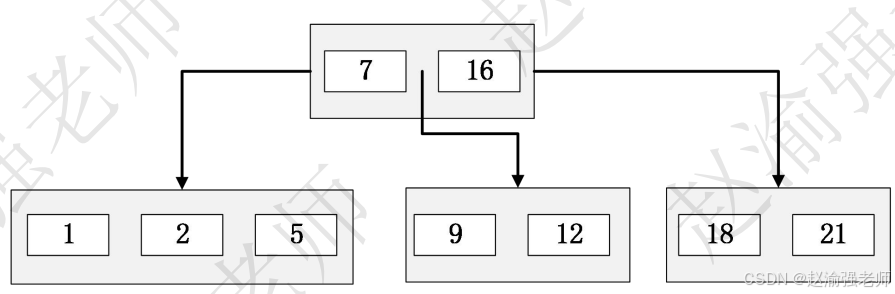
数据库查询是数据库的主要功能之一,最基本的查询算法是顺序查找(linear search)时间复杂度为O(n),显然在数据量很大时效率很低。优化的查找算法如二分查找(binary search)、二叉树查找(binary tree search)等,虽然查找效率提高了。但是各自对检索的数据都有要求:二分查找要求被检索数据有序,而二叉树查找只能应用于二叉查找树上,但是数据本身的组织结构不可能完全满足各种数据结构。所以在数据之外,数据库系统还维护着满足特定查找算法的数据结构。这些数据结构以某种方式指向数据,这样就可以在这些数据结构上实现高级查找算法。这种数据结构就是索引。openGauss官方对索引的定义为:索引(Index)是帮助openGauss高效获取数据的数据结构。索引是一种数据结构。openGauss默认的索引类型是B树索引。下图是一颗简单的B树,可见它与二叉树最大的区别是它允许一个节点有多于2个的元素,每个节点都包含key和数据,查找时可以使用二分的方式快速搜索数据。
在了解到了openGauss索引的基本知识以后,下面将通过具体的步骤演示来说明如何在openGauss中创建索引,并且在查询语句中使用它。
(1)查看模式public中已经创建的索引信息。
sql
scott=# select schemaname,tablename,indexname
         from pg_indexes where schemaname ='public';

# 输出的信息如下:
 schemaname | tablename | indexname
------------+-----------+-----------
 public     | dept      | dept_pkey
 public     | emp       | emp_pkey
(2 rows)

# pg_indexes是一个视图,可以通过它获取某个模式下的索引信息。
(2)如果要获取索引的更多属性信息,则需要通过openGauss的系统表pg_index来获取。例如,获取员工表emp上索引的详细信息。
sql
scott=# \x
scott=# select * from pg_index where indrelid in
        (select oid from pg_class where relname = 'emp');

# 输出的信息如下:
-[ RECORD 1 ]--+------
indexrelid     | 16484 -- 此索引的pg_class项的OID
indrelid       | 16481 -- 此索引的基表的pg_class项的OID
indnatts       | 1     -- 此索引的基表的pg_class项的OID
indisunique    | t     -- 表示是否为唯一索引
indisprimary   | t     -- 表示索引是否表示表的主键
indisexclusion | f     -- 表示索引是否表示表的主键
indimmediate   | t     -- 表示唯一性检查是否在插入时立即被执行
indisclustered | f     -- 如果为真,表示该表最后以此索引进行了聚簇
indisusable    | t
indisvalid     | t     -- 如果为真,此索引当前可以用于查询,
                          为假表示此索引可能不完整。
indcheckxmin   | f     -- 如果为真,表示查询时不能使用此索引。
indisready     | t     -- 如果为真,表示此索引当前可以用于插入。
indkey         | 1     -- 表示了此索引的表列。
                          例如:1 3表示表的第一和第三列组成了索引项。
indcollation   | 0     -- 对于索引键中的每一列,这包含要用于该索引的
                          排序规则的OID,如果该列不是一种可排序数据类型则为零。
indclass       | 1978  -- 对于索引键中的每一列,这里包含了要使用的操作符类的OID。
indoption      | 0     -- 用于存储每列的标志位。
indexprs       |       -- 非简单列引用索引属性的表达式树。
indpred        |       -- 部分索引谓词的表达式树。
indisreplident | f
indnkeyatts    | 1
indisvisible   | t
(3)使用create index命令在员工表emp的薪水sal字段上创建完全索引。
sql
scott=# create index index_full on emp using btree(sal);

# 完全索引会基于该字段上的所有值创建索引。
# 同时,在创建索引的时候会进行锁表的操作,可以使用 CIC (create index concurrently),但创建索引的时间相对较长。
# 例如:
scott=# create index concurrently index1 on emp using btree(sal);
(4)下面的语句将在员工表上创建一个部分索引。
sql
scott=# create index index_part on emp using btree(sal) where sal<3000;

# 部分索引是对于表的部分数据创建索引。
# 如果发现表的某一部分数据查询次数较多时,可以考虑在这部分数据上创建一个部分索引。
# 部分索引相较于完全索引,查询的性能将得到提高,并且部分索引文件所占的空间也会小于全索引。
(5)在员工表emp的员工姓名ename上创建表达式索引。
sql
scott=# create index index_exp on emp(lower(ename));

# 对于表达式索引的维护代价比较高,因为在每一行插入或更新时需要重新计算相应表达式的值
# 但是针对于表达式索引在查询时的效率更高,因为表达式的值会直接存储在索引中。
(6)使用explain语句查看SQL查询时的执行计划。
sql
scott=# explain select * from emp where lower(ename) like 'king';

# 输出的信息如下:
                     QUERY PLAN
----------------------------------------------------
 Seq Scan on emp  (cost=0.00..1.21 rows=1 width=42)
   Filter: (lower((ename)::text) ~~ 'king'::text)
(2 rows)
从输出的执行计划可以看出,此时并没有使用到表达式索引。这是由于openGauss并不能强制使用特定的索引,或者完全阻止openGauss进行Seq Scan的顺序扫描。但可以通过将参数enable_seqscan设置为 off的方式让openGauss尽可能避免执行某些扫描类型,但这样的方式多用于开发和调试中。
(7)禁止openGauss使用顺序扫描。
sql
scott=# set enable_seqscan = off;(8)重新使用explain语句查看SQL查询时的执行计划。
sql
scott=# explain select * from emp where lower(ename) like 'king';

# 输出的信息如下:
                              QUERY PLAN
-------------------------------------------------------------------
 Index Scan using index_exp on emp  (cost=0.00..8.28 rows=1 width=42)
   Index Cond: (lower((ename)::text) = 'king'::text)
   Filter: (lower((ename)::text) ~~ 'king'::text)
(3 rows)
四、 使用视图简化查询语句
当SQL的查询语句比较复杂并且需要反复执行,如果每次都重新书写该SQL语句显然不是很方便。因此openGauss数据库提供了视图用于简化复杂的SQL语句。视图(View)是一种虚表,其本身并不包含数据。它将作为一个select语句保存在数据字典中的。视图依赖的表叫做基表。通过视图可以展现基表的部分数据;视图数据来自定义视图的查询中使用的基表。在openGauss数据库中创建视图的基本语法格式如下:
sql
scott=# \h create view
Command:     CREATE VIEW
Description: define a new view
Syntax:
CREATE [ OR REPLACE ] [ DEFINER = user ] [ SQL SECURITY { DEFINER | INVOKER } ]
    [ TEMP | TEMPORARY ] VIEW view_name [ ( column_name [, ...] ) ]
    [ WITH ( {view_option_name [= view_option_value]} [, ... ] ) ]
    AS query
    [ WITH [ CASCADED | LOCAL ] CHECK OPTION ];
NOTICE: SQL SECURITY option is only available in CENTRALIZED mode and B-format database.
在了解的视图的作用后,下面通过具体的步骤来演示如何使用视图。
(1)基于员工表emp创建视图。
sql
scott=# create or replace view view1
as
select * from emp where deptno=10;

# 视图也可以基于多表进行创建,例如:
scott=# create or replace view view2
as
select emp.ename,emp.sal,dept.dname
from emp,dept
where emp.deptno=dept.deptno;
(2)查看视图view2的结构。
sql
scott=# \d view2

# 输出的信息如下:
            View "public.view2"
 Column |         Type          | Modifiers
--------+-----------------------+-----------
 ename  | character varying(10) |
 sal    | integer               |
 dname  | character varying(10) |
(3)从视图中查询数据。
sql
scott=# select * from view2;

# 输出的信息如下:
 ename  | sal  |   dname
--------+------+------------
 SMITH  |  800 | RESEARCH
 ALLEN  | 1600 | SALES
 WARD   | 1250 | SALES
 MARTIN | 1250 | SALES
 BLAKE  | 2850 | SALES
 CLARK  | 2450 | ACCOUNTING
 SCOTT  | 3000 | RESEARCH
 TURNER | 1500 | SALES
 ADAMS  | 1100 | RESEARCH
 JAMES  |  950 | SALES
 FORD   | 3000 | RESEARCH
 MILLER | 1300 | ACCOUNTING
 JONES  | 3075 | RESEARCH
 KING   | 5000 | ACCOUNTING
(14 rows)
(4)通过视图执行DML操作,例如:给10号部门员工涨100块钱工资。
sql
scott=# update view1 set sal=sal+100;

并不是所有的视图都可以执行DML操作。在视图定义时含义以下内容,视图则不能执行DML操作:
1.  查询子句中包含distinct和组函数
2.  查询语句中包含group by子句和order by子句
3.  查询语句中包含union 、union all等集合运算符
4.  where子句中包含相关子查询
5.  from子句中包含多个表
6.  如果视图中有计算列,则不能执行update操作
7.  如果基表中有某个具有非空约束的列未出现在视图定义中,则不能做insert操作
(5)创建视图时使用WITH CHECK OPTION约束 。
sql
scott=# create or replace view view3
as
select * from emp where sal<1000
with check option;

# WITH CHECK OPTION表示对视图所做的DML操作,不能违反视图的WHERE条件的限制。
(6)在view3上执行update操作。
sql
scott=# update view3 set sal=2000;

# 此时将出现下面的错误信息:
ERROR:  new row violates WITH CHECK OPTION for view "view3"
DETAIL:  Failing row contains (7369, SMITH, CLERK, 7902, 1980/12/17, 2000, null, 20).