大模型的封装调用,希望能帮助你在各种LLM辅助工具开发中快速上手。
引言
我们经常需要调用各种大语言模型(LLM)的API来辅助完成一些计算任务,为了方便复用和快速开发,我封装了一个通用的ChatLLM类,支持:
- 灵活的API配置(URL、Key、Model)
- 可选的历史对话存储(支持上下文连续对话)
- 简单的对话剪枝(防止Token溢出)
- 流式/非流式输出切换
一、ChatLLM类设计
1. 类结构
python
from openai import OpenAI

class ChatLLM:
    def __init__(self,
                 api_key: str,
                 base_url: str = None,
                 system_prompt: str = "You are a helpful assistant",
                 model: str = "deepseek-v3",
                 store_history: bool = False):
        # 初始化客户端、系统提示、模型、历史存储开关
        ...

    def send_message(self, user_message: str, temperature: float = 0.7, stream: bool = False) -> str:
        # 发送消息,返回助手回复
        ...

    def _trim_messages(self, max_rounds: int = 5):
        # 剪枝:只保留最近N轮对话
        ...

    def get_messages(self) -> list:
        # 获取当前历史消息
        ...

    def clear_messages(self):
        # 清空历史(保留system prompt)
        ...
2. 核心参数说明
| 参数 | 说明 |
|---|---|
api_key |
API密钥 |
base_url |
API基础地址 |
system_prompt |
系统提示词,定义模型角色和行为 |
model |
模型名称,如deepseek-v3、qwq-32b、glm-5等 |
store_history |
是否存储历史对话,直接影响连续对话能力 |
三、历史存储与剪枝
1. store_history 的作用
- store_history = False (默认):每次请求只携带当前用户消息 + system prompt,无上下文记忆。适合单轮问答、独立任务。
- store_history = True :自动保存user和assistant消息,支持多轮连续对话。适合聊天机器人、代码辅助、多轮推理等场景。
python
# 启用历史存储
chat = ChatLLM(api_key="sk-xxx", base_url="...", model="deepseek-v3", store_history=True)
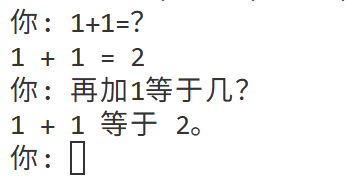
没有启用历史存储,不能连续对话:
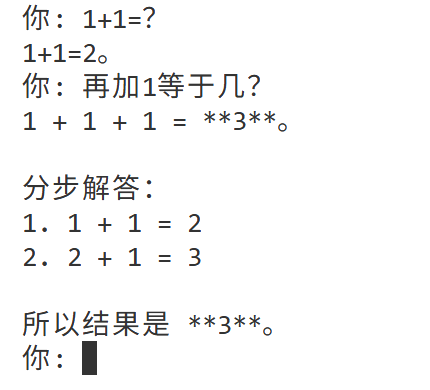
启用历史存储之后,记住了历史对话:
2. 剪枝策略
由于历史消息越长,Token消耗越大,且可能超出模型上下文窗口,设计了简单的按轮数剪枝:
python
def _trim_messages(self, max_rounds: int = 5):
    """只保留最近N轮对话(每轮包含user+assistant各一条)"""
    if len(self.messages) <= 1:
        return
    max_msgs = 1 + max_rounds * 2  # 1条system + N轮*2条
    if len(self.messages) > max_msgs:
del self.messages[1:len(self.messages)-max_msgs]- 默认保留最近5轮对话(共10条消息 + 1条system)
- 你可以通过修改
_trim_messages的max_rounds参数调整
这种剪枝方式简单粗暴,但足以满足大多数应用场景。对于更复杂的需求,可以在此基础上扩展。
四、使用方法
1. 安装依赖
bash
pip install openai2. 基本用法
python
from chat_llm import ChatLLM  # 假设你的类文件名为 chat_llm.py

# 初始化
chat = ChatLLM(
    api_key="sk-your-api-key",
    base_url="https://your-api-endpoint.com/v1",  # 兼容OpenAI格式
    model="deepseek-v3",
    system_prompt="你是一个编程助手,擅长Python",
    store_history=True   # 启用历史,支持连续对话
)

# 发送消息(非流式)
response = chat.send_message("请帮我写一个快速排序算法", temperature=0.7)
print(response)

# 继续对话(自动携带历史)
response2 = chat.send_message("能加上注释吗?")
print(response2)
3. 流式输出
python
# 流式输出,适合实时展示生成过程
response = chat.send_message("讲一个笑话", stream=True)
# 内容会逐字打印,无需额外print
4. 查看/清空历史
python
# 查看当前历史消息
print(chat.get_messages())

# 清空历史(保留system prompt)
chat.clear_messages()
5. 单轮模式(不存储历史)
python
chat_no_history = ChatLLM(
    api_key="sk-xxx",
    base_url="...",
    model="deepseek-v3",
    store_history=False  # 每次独立请求
)

# 每次调用都是独立上下文
chat_no_history.send_message("今天天气怎么样?")
chat_no_history.send_message("刚才我问了什么?")  # 模型不知道上一条
6.作为包导入使用
将ChatLLM类放在一个单独的Python文件中(如llm_utils.py),然后在其他脚本中导入:
python
from llm_utils import ChatLLM

# 在数据分析脚本中
llm = ChatLLM(api_key="xxx", base_url="xxx", model="deepseek-v3")

def analyze_data_with_llm(data):
    prompt = f"请分析以下数据并给出洞察:{data}"
    return llm.send_message(prompt)

# 在代码审查工具中
def review_code(code):
    llm.system_prompt = "你是一个代码审查专家"  # 可以动态修改
    return llm.send_message(f"请审查以下代码:\n{code}")
这种设计使得LLM能力可以轻松嵌入到各种传统工具中(数据处理、代码分析、文本分类、报告生成等)。
五、完整代码
python
from openai import OpenAI

class ChatLLM:
    def __init__(self,
                 api_key: str,
                 base_url: str = None,
                 system_prompt: str = "You are a helpful assistant",
                 model: str = "deepseek-v3",
                 store_history: bool = False):

        self.client = OpenAI(api_key=api_key, base_url=base_url)
        self.system_prompt = system_prompt
        self.model = model
        self.store_history = store_history
        self.messages = [{"role": "system", "content": system_prompt}] if store_history else []

    def _trim_messages(self, max_rounds: int = 5) -> None:
        if len(self.messages) <= 1:
            return
        max_msgs = 1 + max_rounds * 2
        if len(self.messages) > max_msgs:
            del self.messages[1:len(self.messages)-max_msgs]

    def send_message(self, user_message: str, temperature: float = 0.7, stream: bool = False) -> str:
        if self.store_history:
            self.messages.append({"role": "user", "content": user_message})
            self._trim_messages()
            messages_to_send = self.messages
        else:
            messages_to_send = [{"role": "system", "content": self.system_prompt},
                                {"role": "user", "content": user_message}]

        try:
            if stream:
                response = self.client.chat.completions.create(
                    model=self.model,
                    messages=messages_to_send,
                    temperature=temperature,
                    stream=True
                )
                full_text = ""
                for chunk in response:
                    if chunk.choices[0].delta.content:
                        content = chunk.choices[0].delta.content
                        full_text += content
                        print(content, end="", flush=True)
                print()
                assistant_reply = full_text
            else:
                response = self.client.chat.completions.create(
                    model=self.model,
                    messages=messages_to_send,
                    temperature=temperature
                )
                assistant_reply = response.choices[0].message.content

            if self.store_history:
                self.messages.append({"role": "assistant", "content": assistant_reply})

            return assistant_reply

        except Exception as e:
            print(f"API调用错误: {e}")
            return f"Error: {str(e)}"

    def get_messages(self) -> list:
        return self.messages if self.store_history else []

    def clear_messages(self) -> None:
        if self.store_history:
            self.messages = [{"role": "system", "content": self.system_prompt}]
六、结语
这个ChatLLM封装虽然简单,但已经足够覆盖日常开发中80%以上的LLM调用需求。你可以把它当作一个基础组件,快速集成到各种项目中,让AI能力触手可及。如果你有更多定制需求,也可以在这个基础上继续扩展。比如:
- 更智能的剪枝 :可以改为按Token数量剪枝(使用
tiktoken库) - 异步支持 :可以增加
async版本,适应高并发场景 - 重试机制:在API调用失败时自动重试
- 日志记录:记录每次调用的输入输出,便于调试和审计