一、万维网WWW
① 万维网:万维网WWW(WorldWideWeb)并非某种特殊的计算机网络。万维网是一个大规模的、联机式的信息储藏所,英文简称为Web。万维网用链接的方法能非常方便地从因特网上的个站点访问另一个站点(也就是所谓的"链接到另一个站点"),从而主动地按需获取丰富的信息。
②万维网的客户端和服务端的通信方法:
- URL:用于标识万维网上的数据资源,使服务器能够区分不同内容。
- HTTP(超文本传送协议):万维网客户端与服务器之间进行通信所采用的协议。
- HTML(超文本标记语言):客户端请求数据时使用的格式。
③ URL统一资源定位符:
bash<协议>://<主机>:<端口>/<路径>
- 协议:通过协议从服务器获取该资源,常见为http或https。
- 主机:服务器的IP地址,通常以域名形式展示,通过DNS服务器,将域名转换为其对应的IP地址。
- 端口:服务器上的应用程序端口号,端口可省略。HTTP常见端口为80或8080, HTTPS端口443。
- 路径:资源在服务器中存放的位置。
二、HTTP协议
2.1 HTTP介绍
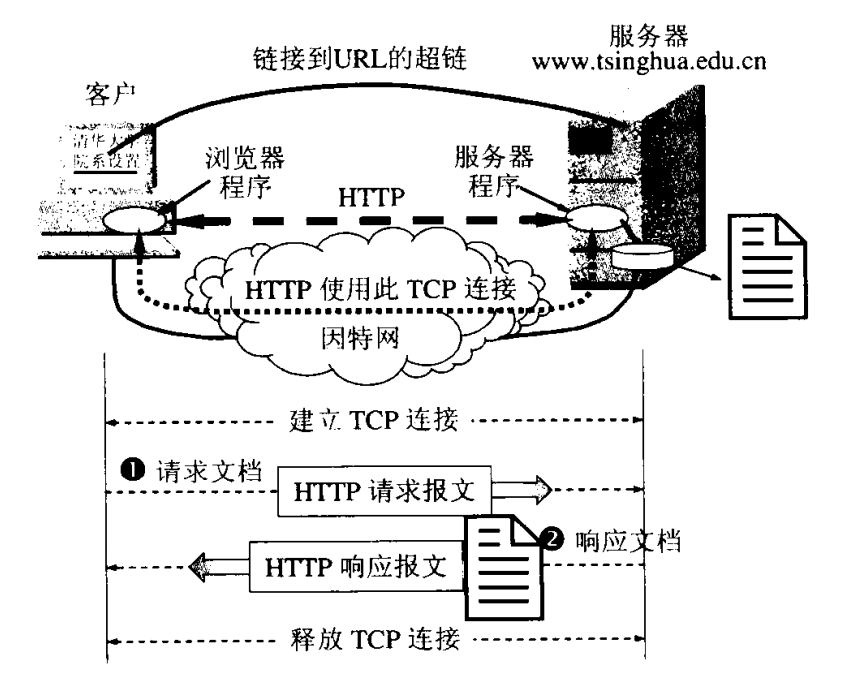
① HTTP:超文本传输协议,是基于TCP的一种应用层协议,用于规定超文本在网络中传输的流程
② C/S模型:客户端/服务器模型
(1)优点:
资源在本地,加载速度快
无需连接服务器,本地也能工作
(2)缺点:占据本地空间
不同的平台,客户端需要单独编写一份代码
资源增加时,需要本地升级版本,或打补丁
③ B/S模型:浏览器/服务器模型
(1)特点:
资源在服务器上
新增资源时,无需更新本地的内容
每次查看资源,都是从服务器上下载最新资源到本地来查看
任何平台都有浏览器,代码可以通用,避免重复开发客户端
2.2 HTTP传输的过程
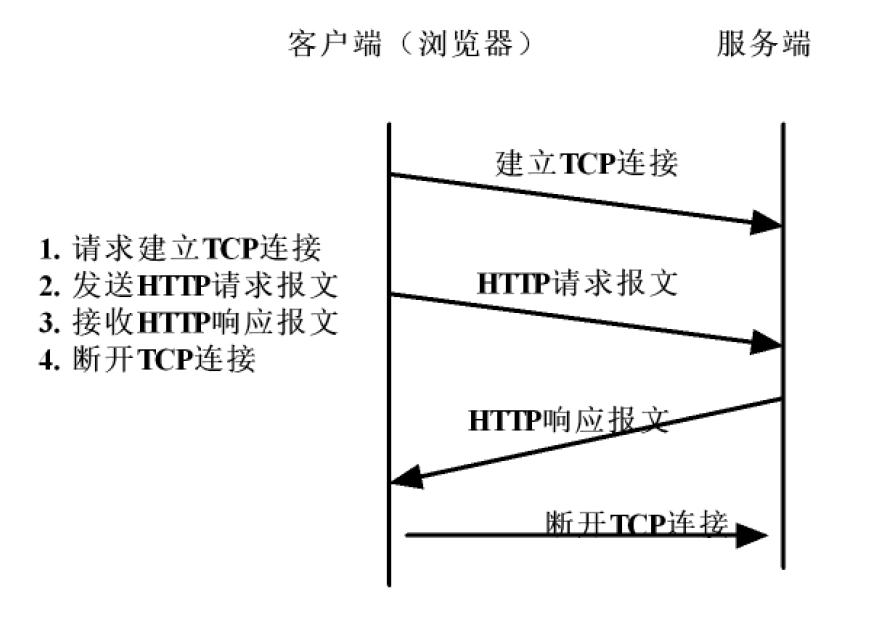
- 在浏览器中输入URL
- 浏览器向URL中对应的IP地址和端口发送TCP连接
- 发送HTTP请求报文
- 回复HTTP响应报文
- 断开TCP连接
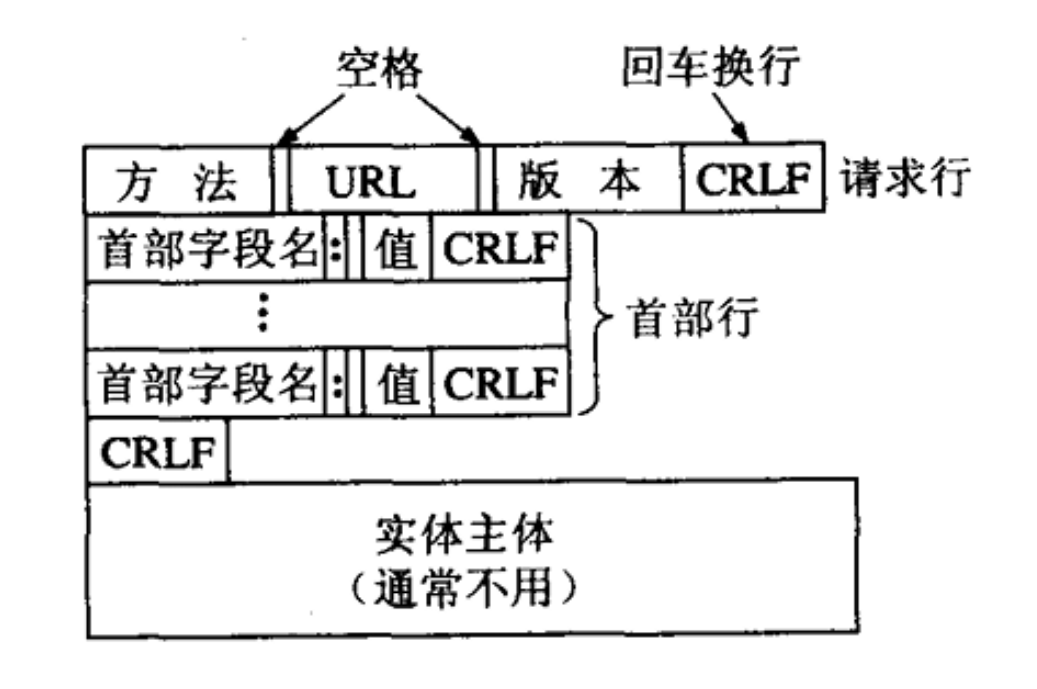
⑤ HTTP请求报文格式
(1)请求行
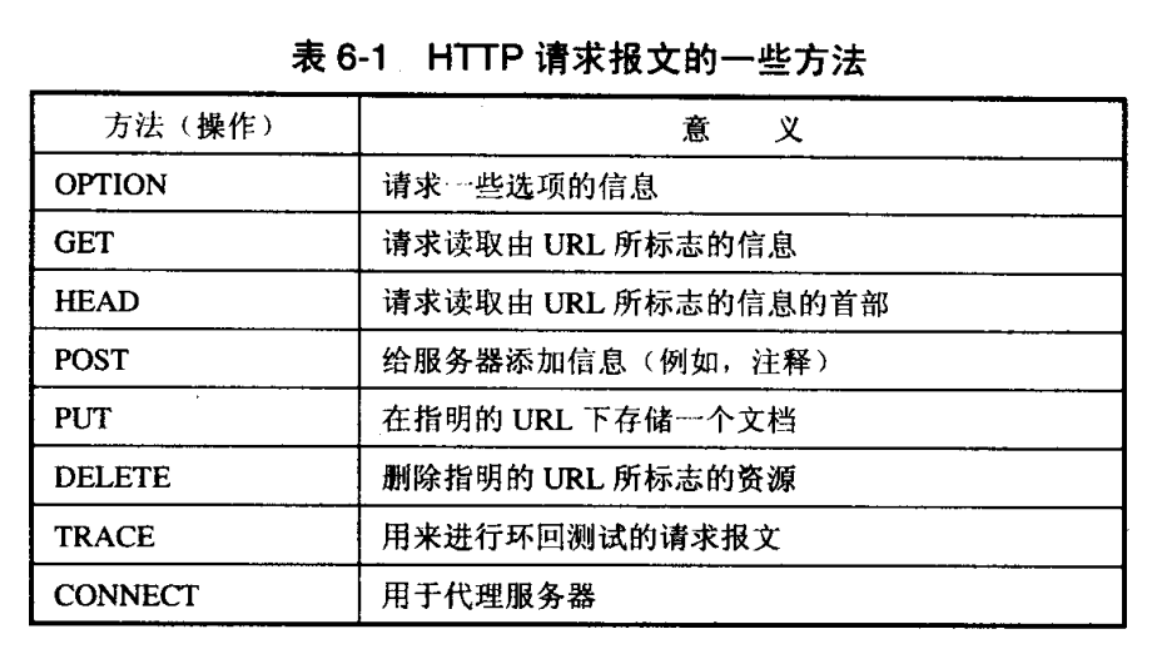
方法:
GET方法:获取服务器资源
POST/PUT方法:向服务器提交资源
URL:
请求获取/提交资源的路径
版本:HTTP/1.1
(2)首部行
用来说明浏览器、服务器或报文主体的一些信息,根据不同的场景使用不同的首部字段
格式:首部字段: 值最后的"CR"和"LF"分别代表"回车"和"换行"。
(3)HTTP的请求方法
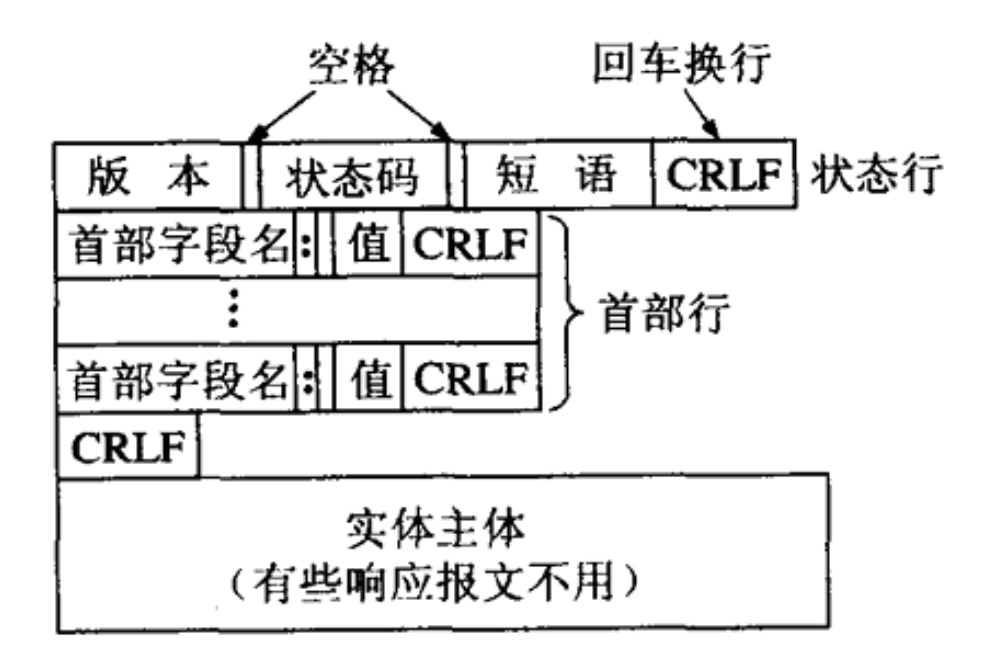
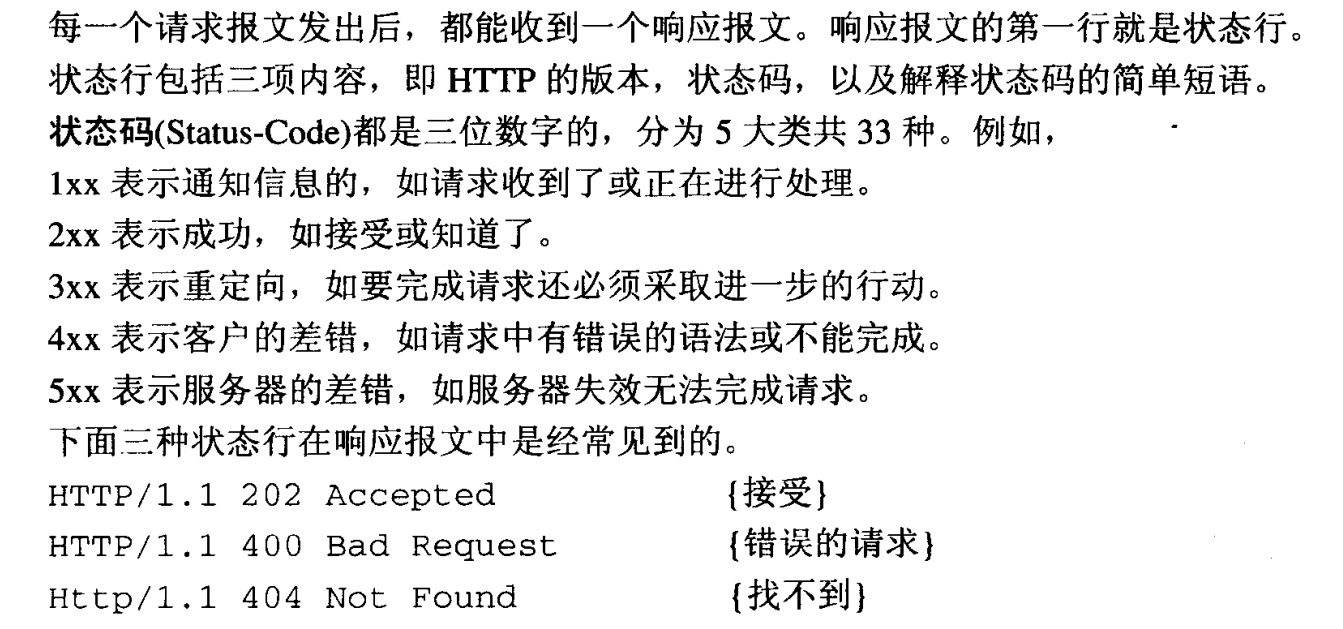
⑥ HTTP响应报文格式
(1)状态行:
版本号: HTTP/1.1
状态码:响应该次请求的结果
2.3 练习:基于HTTP的实时/未来天气信息获取
从nowapi网站获取用户配置城市的实时天气信息及未来一周的天气信息,并将其显示在终端屏幕上。
1. 使用自己的账号对应的APPKey和Sign标识(必须提前开通天气预报功能);
2. 使用手机热点访问,电脑连入手机热点(连入手机热点后,Ubunut需要重启才能获得手机热点提供的IP地址,需要注意有的手机只允许1个设备连入, 现在电脑连入需要2个IP地址,所以需要主机手机可能要修改允许多个设备连入);
3. 通过AI或者CSDN学习JSON数据格式,并利用提供的cJSON.c和cJSON.h实现对JSON数据的解析。
该系统的功能主要包括两部分,第一部分是天气数据查询 ,包括实时天气数据查询 和未来七天的天气数据查询 ;第二部分是打印查询出的天气数据
① 基本原理
HTTP 协议基于 TCP 连接实现
万维网采用典型的客户端-服务器工作模式:每个网站都运行着一个服务器进程,它会持续监听 TCP 的 80 端口,等待客户端(即浏览器,二者为同一概念)发起连接建立请求。一旦监听到请求并成功建立 TCP 连接,浏览器便会向服务器发送页面浏览请求,服务器随后返回所请求的页面作为响应。
万维网的完整工作流程如下图所示:
TCP连接代码示例:
cpp#include "head.h" #include "cJSON.h" #define USR_APPKEY "10003" #define USR_SIGN "b59bc3ef6191eb9f747dd4e83c99f2a4" #define NOWAPI_SERADDR "8.163.63.15" #define NOWAPI_PORT 80 int CreateTcpConnection(const char *pIp, int Port) { int ret = 0; int sockfd = 0; struct sockaddr_in seraddr; sockfd = socket(AF_INET, SOCK_STREAM, 0); if (-1 == sockfd) { perror("fail to socket"); return -1; } seraddr.sin_family = AF_INET; seraddr.sin_port = htons(Port); seraddr.sin_addr.s_addr = inet_addr(pIp); ret = connect(sockfd, (struct sockaddr *)&seraddr, sizeof(seraddr)); if (-1 == ret) { perror("fail to connect"); return -1; } return sockfd; }② 发送请求报文模块
首先要获取请求报文的格式,由于本次使用的是NOWapi这个数据接口,故对这个网站进行抓包来分析请求报文的格式:
这个请求报文是请求"西安""当天"的天气时,浏览器给服务器发送的;
cppGET /?app=weather.today&cityNm=%E8%A5%BF%E5%AE%89&appkey=10003&sign=b59bc3ef6191eb9f747dd4e83c99f2a4&format=json HTTP/1.1 Accept: text/html,application/xhtml+xml,application/xml;q=0.9,image/avif,image/webp,image/apng,*/*;q=0.8,application/signed-exchange;v=b3;q=0.7 Accept-Encoding: gzip, deflate, br, zstd Accept-Language: zh-CN,zh;q=0.9,en;q=0.8,en-GB;q=0.7,en-US;q=0.6 Connection: keep-alive Host: sapi.k780.com Sec-Fetch-Dest: document Sec-Fetch-Mode: navigate Sec-Fetch-Site: none Sec-Fetch-User: ?1 Upgrade-Insecure-Requests: 1 User-Agent: Mozilla/5.0 (Windows NT 10.0; Win64; x64) AppleWebKit/537.36 (KHTML, like Gecko) Chrome/150.0.0.0 Safari/537.36 Edg/150.0.0.0 sec-ch-ua: "Not;A=Brand";v="8", "Chromium";v="150", "Microsoft Edge";v="150" sec-ch-ua-mobile: ?0 sec-ch-ua-platform: "Windows"可以看到对于请求报文来说,最重要的是第一行:请求行,故可以通过改变URL的内容来获取不同的信息。
注意: 这里发送请求报文时,注意 "\r\n" 不能丢,且最后一行有两个 "\r\n"
cppint SendHttpRequest(int sockfd, char *pUrl) { char tmpbuff[4096] = {0}; ssize_t nret = 0; sprintf(tmpbuff, "GET %s HTTP/1.1\r\n", pUrl); sprintf(tmpbuff, "%sHost: api.k780.com\r\n", tmpbuff); sprintf(tmpbuff, "%sUser-Agent: Mozilla/5.0 (X11; Ubuntu; Linux x86_64; rv:109.0) Gecko/20100101 Firefox/113.0\r\n", tmpbuff); sprintf(tmpbuff, "%sAccept: text/html,application/xhtml+xml,application/xml;q=0.9,image/avif,image/webp,*/*;q=0.8\r\n", tmpbuff); sprintf(tmpbuff, "%sAccept-Language: en-US,en;q=0.5\r\n", tmpbuff); sprintf(tmpbuff, "%sAccept-Encoding: gzip, deflate\r\n", tmpbuff); sprintf(tmpbuff, "%sConnection: keep-alive\r\n", tmpbuff); sprintf(tmpbuff, "%s\r\n", tmpbuff); nret = send(sockfd, tmpbuff, strlen(tmpbuff), 0); if (-1 == nret) { perror("fail to send"); return -1; } return 0; }③ 接收响应报文模块
cppint RecvHttpRespone(int sockfd, char *precvbuff, int maxlen) { ssize_t nret = 0; nret = recv(sockfd, precvbuff, maxlen, 0); if (-1 == nret) { perror("fail to recv"); return -1; } return nret; }这里打印出接收到的响应报文如下:
cppHTTP/1.1 200 OK Server: nginx Date: Mon, 06 Jul 2026 09:45:22 GMT Content-Type: application/json; charset=utf-8; Transfer-Encoding: chunked Connection: close Access-Control-Allow-Origin: * 20f {"success":"1","result":{"weaid":"316","days":"2026-07-06","week":"星期一","cityno":"xian","citynm":"西安","cityid":"101110101","temperature":"38℃/26℃","temperature_curr":"38℃","humidity":"37%","aqi":"111","weather":"多云转晴","weather_curr":"晴","weather_icon":"http://api.k780.com/upload/weather/d/0.gif","weather_icon1":"","wind":"东风","winp":"2级","temp_high":"38","temp_low":"26","temp_curr":"38","humi_high":"0","humi_low":"0","weatid":"1","weatid1":"","windid":"2","winpid":"2","weather_iconid":"0"}} 0响应报文的结构表明,服务器返回的实体主体采用 JSON 格式,因此需解析 JSON 后才能显示。
④ JSON 解析模块
(1)JSON 简介
JSON 全称 JavaScript Object Notation(JavaScript 对象表示法),是一种轻量级的文本数据格式,专门用于数据的存储与传输。
主要用途:前后端接口交互、配置文件、数据持久化存储;
核心优点:可读性强(人类易读)、解析效率高(机器易处理)、跨语言通用(C/C++、Python、Java、JavaScript 等主流语言均原生支持);
本质特征:纯文本格式,与具体编程语言无关,仅定义了一套统一的语法规;
(2)JSON 语法规则
JSON 的语法结构简洁清晰,核心规则如下:
数据以 键值对(
"key":"value") 形式组织,键名必须使用双引号包裹;不同数据项之间用逗号
,分隔;大括号
{}表示对象,即一组相关键值对的集合;中括号
[]表示数组,即有序的数据列表;值支持 6 种数据类型:字符串(需加双引号)、数字、布尔值、
null、对象、数组;(3)解析示例代码
JSON 解析的基本流程为:先从 HTTP 请求报文中提取完整的实体主体(body),再对该实体主体按照 JSON 语法规则进行解析,最终得到结构化的数据对象。
cppint shishi(char *recvbuff) { char *p = NULL; char *p1 = NULL; p = strstr(recvbuff, "\r\n\r\n"); p += 9; p1 = strstr(p, "\r\n"); *p1 = 0; // puts(p); // p: char* 指向收到json字符串首地址 cJSON *root = cJSON_Parse(p); if (root == NULL) { const char *err = cJSON_GetErrorPtr(); if (err) { printf("json解析出错位置:%s\n", err); } return -1; } // 取嵌套result对象 cJSON *res_obj = cJSON_GetObjectItemCaseSensitive(root, "result"); if (!cJSON_IsObject(res_obj)) { printf("拿不到result对象\n"); cJSON_Delete(root); return -1; } // 提取字段 cJSON *citynm = cJSON_GetObjectItemCaseSensitive(res_obj, "citynm"); cJSON *days = cJSON_GetObjectItemCaseSensitive(res_obj, "days"); cJSON *week = cJSON_GetObjectItemCaseSensitive(res_obj, "week"); cJSON *temp = cJSON_GetObjectItemCaseSensitive(res_obj, "temp"); cJSON *temp_high = cJSON_GetObjectItemCaseSensitive(res_obj, "temp_high"); cJSON *temp_low = cJSON_GetObjectItemCaseSensitive(res_obj, "temp_low"); cJSON *weather = cJSON_GetObjectItemCaseSensitive(res_obj, "weather"); cJSON *wind = cJSON_GetObjectItemCaseSensitive(res_obj, "wind"); cJSON *winp = cJSON_GetObjectItemCaseSensitive(res_obj, "winp"); cJSON *humidity = cJSON_GetObjectItemCaseSensitive(res_obj, "humidity"); cJSON *aqi = cJSON_GetObjectItemCaseSensitive(res_obj, "aqi"); printf("====================天气信息====================\n"); if (cJSON_IsString(citynm)) printf("城市:%s\n", citynm->valuestring); if (cJSON_IsString(days) && cJSON_IsString(week)) printf("日期:%s %s\n", days->valuestring, week->valuestring); if (cJSON_IsString(temp)) printf("当前温度:%s\n", temp->valuestring); if (cJSON_IsString(temp_high)) printf("最高温度:%s℃\n", temp_high->valuestring); if (cJSON_IsString(temp_low)) printf("最低温度:%s℃\n", temp_low->valuestring); if (cJSON_IsString(weather)) printf("天气状况:%s\n", weather->valuestring); if (cJSON_IsString(wind) && cJSON_IsString(winp)) printf("风向风力:%s %s\n", wind->valuestring, winp->valuestring); if (cJSON_IsString(humidity)) printf("湿度:%s\n", humidity->valuestring); if (cJSON_IsString(aqi)) printf("空气质量AQI:%s\n", aqi->valuestring); printf("================================================\n"); // ⚠️千万记得释放!!! cJSON_Delete(root); }
cppint yizhou(char *recvbuff) { char *p = NULL; char *p1 = NULL; p = strstr(recvbuff, "\r\n\r\n"); p += 9; p1 = strstr(p, "\r\n"); *p1 = 0; // puts(p); // p 已经指向 json第一个 '{' cJSON *root = cJSON_Parse(p); if (root == NULL) { const char *err = cJSON_GetErrorPtr(); if (err) { printf("json解析出错位置:%s\n", err); } return -1; } // 判断success cJSON *success_obj = cJSON_GetObjectItemCaseSensitive(root, "success"); if (!cJSON_IsString(success_obj) || strcmp(success_obj->valuestring, "1") != 0) { printf("接口返回失败!\n"); cJSON_Delete(root); return -1; } cJSON *result_arr = cJSON_GetObjectItemCaseSensitive(root, "result"); if (!cJSON_IsArray(result_arr)) { printf("result不是数组\n"); cJSON_Delete(root); return -1; } int arr_size = cJSON_GetArraySize(result_arr); printf("\n====================未来一周全部天气信息====================\n"); for (int i = 0; i < arr_size; i++) { cJSON *day_obj = cJSON_GetArrayItem(result_arr, i); if (!cJSON_IsObject(day_obj)) continue; // 取出全部字段 cJSON *weaid = cJSON_GetObjectItemCaseSensitive(day_obj, "weaid"); cJSON *days = cJSON_GetObjectItemCaseSensitive(day_obj, "days"); cJSON *week = cJSON_GetObjectItemCaseSensitive(day_obj, "week"); cJSON *cityno = cJSON_GetObjectItemCaseSensitive(day_obj, "cityno"); cJSON *citynm = cJSON_GetObjectItemCaseSensitive(day_obj, "citynm"); cJSON *cityid = cJSON_GetObjectItemCaseSensitive(day_obj, "cityid"); cJSON *temperature = cJSON_GetObjectItemCaseSensitive(day_obj, "temperature"); cJSON *humidity = cJSON_GetObjectItemCaseSensitive(day_obj, "humidity"); cJSON *weather = cJSON_GetObjectItemCaseSensitive(day_obj, "weather"); cJSON *temp_high = cJSON_GetObjectItemCaseSensitive(day_obj, "temp_high"); cJSON *temp_low = cJSON_GetObjectItemCaseSensitive(day_obj, "temp_low"); cJSON *humi_high = cJSON_GetObjectItemCaseSensitive(day_obj, "humi_high"); cJSON *humi_low = cJSON_GetObjectItemCaseSensitive(day_obj, "humi_low"); cJSON *wind = cJSON_GetObjectItemCaseSensitive(day_obj, "wind"); cJSON *winp = cJSON_GetObjectItemCaseSensitive(day_obj, "winp"); printf("\n----------第%d天----------\n", i + 1); if (cJSON_IsString(weaid)) printf("weaid : %s\n", weaid->valuestring); if (cJSON_IsString(days)) printf("日期 : %s\n", days->valuestring); if (cJSON_IsString(week)) printf("星期 : %s\n", week->valuestring); if (cJSON_IsString(cityno)) printf("城市编号 : %s\n", cityno->valuestring); if (cJSON_IsString(citynm)) printf("城市名称 : %s\n", citynm->valuestring); if (cJSON_IsString(cityid)) printf("cityid : %s\n", cityid->valuestring); if (cJSON_IsString(temperature)) printf("温度区间 : %s\n", temperature->valuestring); if (cJSON_IsString(humidity)) printf("湿度区间 : %s\n", humidity->valuestring); if (cJSON_IsString(weather)) printf("天气 : %s\n", weather->valuestring); if (cJSON_IsString(temp_high)) printf("最高温度 : %s℃\n", temp_high->valuestring); if (cJSON_IsString(temp_low)) printf("最低温度 : %s℃\n", temp_low->valuestring); if (cJSON_IsString(humi_high)) printf("最高湿度 : %s\n", humi_high->valuestring); if (cJSON_IsString(humi_low)) printf("最低湿度 : %s\n", humi_low->valuestring); if (cJSON_IsString(wind)) printf("风向 : %s\n", wind->valuestring); if (cJSON_IsString(winp)) printf("风力 : %s\n", winp->valuestring); } printf("\n========================================================\n"); cJSON_Delete(root); }⑤ 主程序
cppint main(void) { int sockfd = 0; char CityName[32] = {0}; char Url[256] = {0}; char recvbuff[4096] = {0}; printf("请输入城市:\n"); fgets(CityName,sizeof(CityName),stdin); CityName[strlen(CityName)-1]='\0'; // gets(CityName); sockfd = CreateTcpConnection(NOWAPI_SERADDR, NOWAPI_PORT); if (-1 == sockfd) { fprintf(stderr, "CreateTcpConnection failed\n"); return -1; } sprintf(Url, "/?app=weather.today&weaid=%s&appkey=%s&sign=%s&format=json", CityName, USR_APPKEY, USR_SIGN); SendHttpRequest(sockfd, Url); RecvHttpRespone(sockfd, recvbuff, sizeof(recvbuff)); char Url1[256] = {0}; char recvbuff1[4096] = {0}; sprintf(Url1, "/?app=weather.future&weaid=%s&appkey=%s&sign=%s&format=json", CityName, USR_APPKEY, USR_SIGN); SendHttpRequest(sockfd, Url1); RecvHttpRespone(sockfd, recvbuff1, sizeof(recvbuff1)); int a = 0; printf("查看一周天气输入1\n查看今天天气输入0\n请输入:"); scanf("%d",&a); if (a == 1) { yizhou(recvbuff1); } else if (a == 0) { shishi(recvbuff); } close(sockfd); return 0; }
- 本文设计并实现了一个基于网络爬虫技术的天气数据查询系统。该系统通过 HTTP 协议与第三方天气 API 接口通信,支持实时天气查询与未来七天天气预报两大核心功能。
- 系统采用模块化架构设计,主要包含五大功能模块:显示模块、TCP 连接模块、请求报文发送模块、响应接收模块和 JSON 解析模块。用户通过交互界面输入城市名称与查询类型后,系统将自动完成请求构建、数据获取、JSON 格式天气信息解析等流程,最终以结构化形式直观展示天气详情。
- 该系统有效解决了传统天气网站数据分散、格式不统一的痛点,为用户提供了便捷、统一的天气查询服务。