发送飞书卡片消息,不通过在卡片搭建工具平台创建卡片的情况下,直接组装JSON格式发送卡片
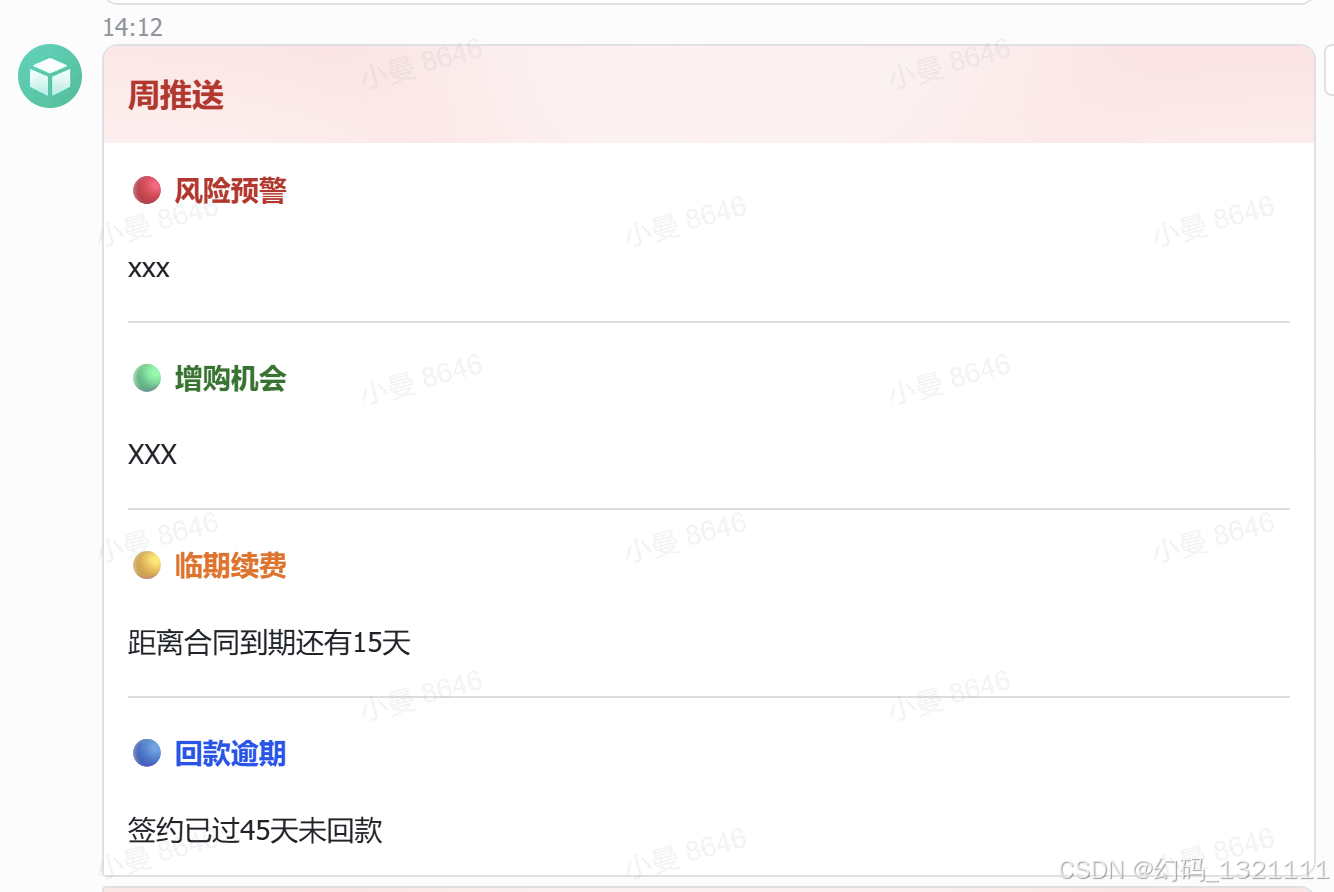
bash
# 使用此指令前,请确保安装必要的Python库,例如使用以下命令安装:
# pip install requests

import json
import requests

from typing import *
try:
    from xbot.app.logging import trace as print
except:
    from xbot import print


def send_feishu_customer_weekly_push(app_id, app_secret, receive_id, receive_id_type, customer_data):
    """
    title: 发送飞书客户情况周推送卡片
    description: 按客户数据 %customer_data% 发送飞书互动卡片;值为空的模块自动不展示,业务模块全为空时不发送。标题固定为「周推送」。
    inputs:
        - app_id (str): 飞书自建应用 App ID,eg: "cli_xxxxxxxxxxxx"
        - app_secret (str): 飞书自建应用 App Secret,eg: "xxxxxxxxxxxx"
        - receive_id (str): 接收者ID(群ID或用户ID),eg: "oc_xxxxxx"
        - receive_id_type (str): ID类型,"chat_id" 或 "open_id" 或 "user_id",eg: "chat_id"
        - customer_data (list): 客户数据列表,eg: [{"客户名称":"XXX","风险预警":"xxx","增购机会":"XXX","临期续费":"距离合同到期还有15天","回款逾期":"签约已过45天未回款"}]
    outputs:
        - response (str): 飞书接口返回的响应字符串,eg: '{"code":0,"msg":"ok"}'
    """

    modules_config = {
        "风险预警": "red",
        "增购机会": "green",
        "临期续费": "orange",
        "回款逾期": "blue",
    }
    icons_config = {"red": "🔴", "green": "🟢", "orange": "🟡", "blue": "🔵"}

    def _get_tenant_token(app_id, app_secret):
        url = "https://open.feishu.cn/open-apis/auth/v3/tenant_access_token/internal"
        res = requests.post(url, json={"app_id": app_id, "app_secret": app_secret}, timeout=15).json()
        if res.get("code") != 0:
            raise Exception(f"获取飞书Token失败: {res.get('msg')}")
        return res["tenant_access_token"]

    def _build_card(data):
        # 兼容处理输入数据
        if isinstance(data, str):
            data = json.loads(data)
        if isinstance(data, (list, tuple)):
            data = data[0] if data else {}
        if not isinstance(data, dict):
            raise TypeError(f"customer_data 需要 dict/list/JSON字符串,收到 {type(data).__name__}")

        # 1. 过滤空模块
        sections = []
        for k, color in modules_config.items():
            val = str(data.get(k) or "").strip()
            if val:
                sections.append((k, val, color))

        if not sections:
            return None

        # 2. 组装元素
        elements = []
        for i, (title, text, color) in enumerate(sections):
            if i > 0:
                elements.append({"tag": "hr"})
            elements.append({
                "tag": "div",
                "text": {
                    "tag": "lark_md",
                    "content": f"**<font color='{color}'>{icons_config[color]} {title}</font>**"
                }
            })
            elements.append({
                "tag": "div",
                "text": {
                    "tag": "lark_md",
                    "content": text
                }
            })

        # 3. 头部模板逻辑
        template = "red" if any(c in ("red", "orange") for _, _, c in sections) else "blue"

        return {
            "config": {"wide_screen_mode": True, "update_multi": True},
            "header": {
                "template": template,
                "title": {"tag": "plain_text", "content": "周推送"},
            },
            "elements": elements,
        }

    def _send_card(token, receive_id, receive_id_type, card):
        url = f"https://open.feishu.cn/open-apis/im/v1/messages?receive_id_type={receive_id_type}"
        headers = {
            "Authorization": f"Bearer {token}",
            "Content-Type": "application/json; charset=utf-8"
        }
        payload = {
            "receive_id": receive_id,
            "msg_type": "interactive",
            "content": json.dumps(card, ensure_ascii=False)
        }
        resp = requests.post(url, headers=headers, json=payload, timeout=15)
        return resp.text

    # 执行逻辑
    card_content = _build_card(customer_data)
    if card_content is None:
        return ""

    tenant_token = _get_tenant_token(app_id, app_secret)
    return _send_card(tenant_token, receive_id, receive_id_type, card_content)