背景描述:
在相机工作时,涉及传感器数据采集、图像处理、编码显示等多个环节。为了确保这些环节能及时响应,相机HAL通常需要将某个关键线程的调度策略设置为实时(Realtime, RT)优先级。将线程设置为RT调度策略,就需要CAP_SYS_NICE能力。
在系统高负载时,如果Camera HAL无法提升线程优先级,可能会导致画面出现卡顿、掉帧或者拍照速度变慢。
调整预览图像处理线程为rt线程,步骤:
1.Camera HAL代码实现中将preview stream处理线程提升为rt线程.
2.修改设备相关的SELinux策略文件(例如hal_camera_default.te),添加允许Camera HAL控制当前进程的优先级.
3.运行相机系统,确认对应线程的状态.
Android15 Camera HAL相机预览线程优先级调整
1.Camera HAL V4L2 Buffer处理线程优先级设置为RT.
cpp
//devices/EmulatedCamera/hwl/EmulatedSensor.h
class EmulatedSensor : private Thread, public virtual RefBase {
...
private:
...
status_t readToRun() override {
struct sched_param param = {};
param.sched_priority = 1;
if (sched_setscheduler(0, SCHED_FIFO | SCHED_RESET_ON_FORK, ¶m) != 0) {
ALOGE("EmulatedSensor: Couldn't set SCHED_FIFO, %d", errno);
}
return Thread:readyToRun();
}
}readToRun()是EmulatedSensor从Thread类继承的,用来在线程运行前进行初始相关设置。如上设置实际是设置threadLoop()这个函数的调度为RT。
2.为Camera HAL添加SELinux策略规则,允许其使用sys_nice能力
aosp中camera hal default te文件位于/system/sepolicy/vendor/hal_camera_default.te,实际产品中需要根据具体情况添加/修改这个策略文件。例如google cuttlefish的策略文件位于device/google/cuttlefish/shared/camera/sepolicy/hal_camera_default.te。
在该文件中添加如下规则:
cpp
#允许Camera HAL控制当前进程的优先级
allow hal_camera_default self:capability sys_nice;
Linux内核在检查权限时,会先检查CAP_SYS_ADMIN能力,再检查CAP_SYS_NICE。init进程(PID 0)通常拥有CAP_SYS_ADMIN,所以即便sys_nice被拒绝,它也能通过其他路径完成操作。对于Camera HAL,如果它没有CAP_SYS_ADMIN,但内核的检查顺序允许它"回退"到检查CAP_SYS_NICE,那么该操作最终可能成功,只是留下一条被拒绝的日志。
如果缺少sys_nice权限而被SELinux拦截会有如下日志:
09-17 01:59:46.955   507   507 W binder:507_3: type=1400 audit(0.0:8): avc:  denied  { sys_nice } for  capability=23  scontext=u:r:hal_camera_default:s0 tcontext=u:r:hal_camera_default:s0 tclass=capability permissive=0
09-17 01:59:46.955   507   507 W binder:507_3: type=1400 audit(0.0:9): avc:  denied  { sys_nice } for  capability=23  scontext=u:r:hal_camera_default:s0 tcontext=u:r:hal_camera_default:s0 tclass=capability permissive=0
09-17 01:59:46.959   507   507 W ImageSensor: type=1400 audit(0.0:10): avc:  denied  { sys_nice } for  capability=23  scontext=u:r:hal_camera_default:s0 tcontext=u:r:hal_camera_default:s0 tclass=capability permissive=0
解释:
avc:denied 这是SELinux的访问向量缓存(AVC)发出的拒绝通知,表示一个操作因为权限不足被阻止了。
{ sys_nice } 这是被拒绝的操作。sys_nice对应Linux能力编号23,即CAP_SYS_NICE。拥有此能力允许进程提升自己的调度优先级或设置其他进程的优先级。
scontext=u:r:hal_camera_default:s0 这是源上下文,表示发起操作的进程,即Camera HAL的域(domain)。
tcontext=u:r:hal_camera_default:s0 这是目标上下文,与源上下文相同,说明Camera HAL是在尝试对自身进程应用该能力。
permissive=0 表示系统当前处于Enforcing(强制)模式,SELinux会实际阻止该操作。
查看Android15 Camera HAL线程状态
1.查看Camera HAL进程号

2.使用top命令动态显示系统资源占用,查看Camera HAL进程的线程情况

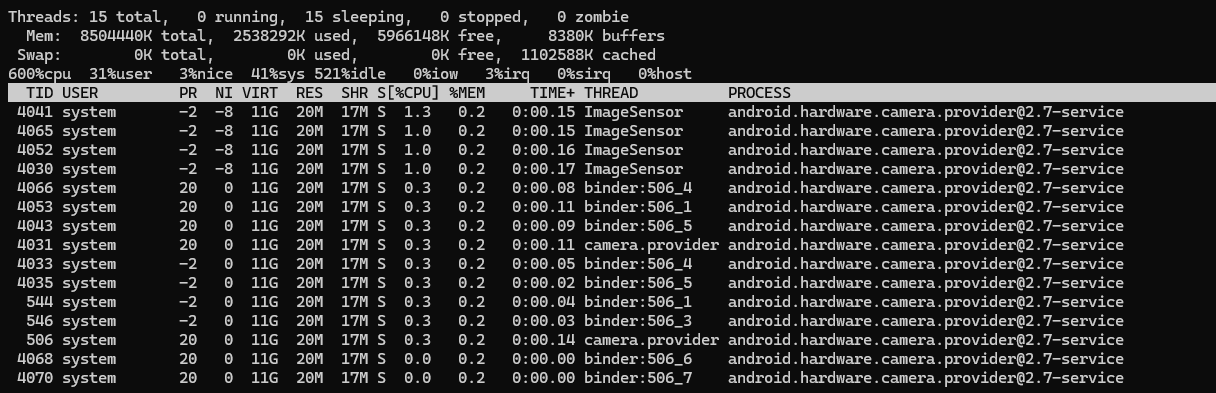
PR : 优先级。在Android的top中,负数通常表示实时线程(调度策略为SCHED_FIFO或SCHED_RR),正数(如20)表示普通线程(SCHED_OTHER)。
NI: nice值。对于实时线程来说,nice值基本不影响调度,但可能保留创建时的设置。
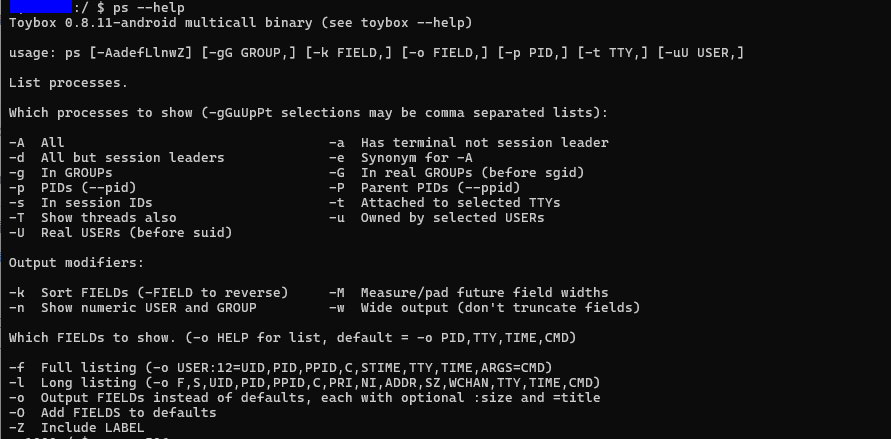
3.使用ps命令查看进程和线程信息
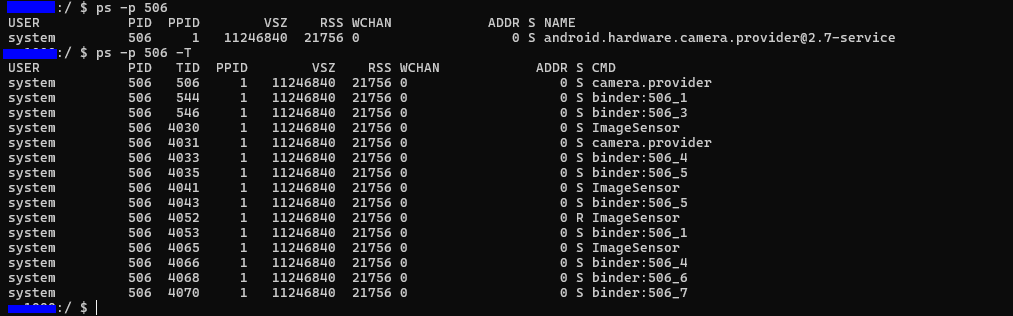
android ps命令使用,
4.cat /proc/<PID>/task/<TID>/sched查看某个线程的具体调度
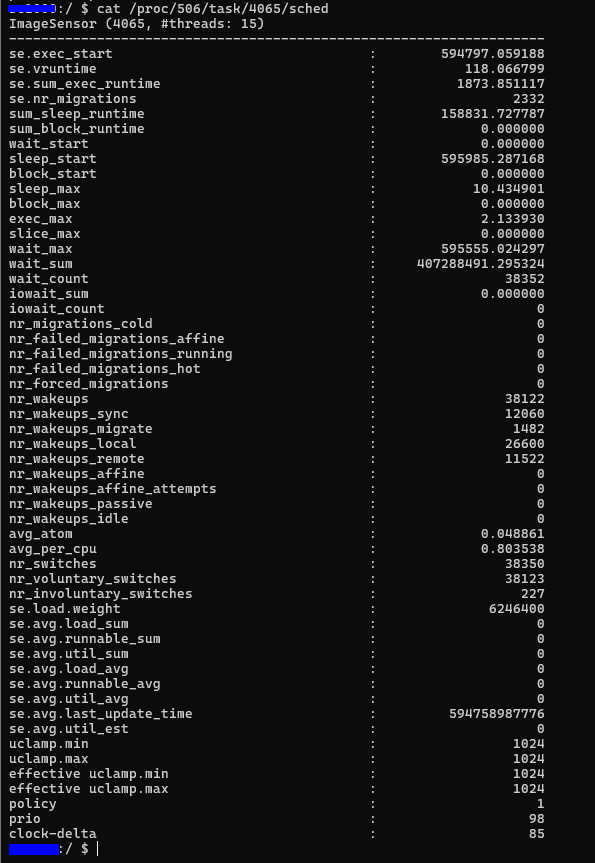
policy字段,对应调度策略:
- 0:SCHED_OTHER (普通)
- 1:SCHED_FIFO (实时)
- 2:SCHED_RR (实时)
- 3:SCHED_BATCH
- 5:SCHED_IDLE
- 6:SCHED_DEADLINE
Android15 Thread实现
cpp
//system/core/libutils/include/utils/ThreadDefs.h
//Android Thread priority级别定义
enum {
    PRIORITY_LOWEST = ANDROID_PRIORITY_LOWEST,
    PRIORITY_BACKGROUND = ANDROID_PRIORITY_BACKGROUND,
    PRIORITY_NORMAL = ANDROID_PRIORITY_NORMAL,
    PRIORITY_FOREGROUND = ANDROID_PRIORITY_FOREGROUND,
    PRIORITY_DISPLAY = ANDROID_PRIORITY_DISPLAY,
    PRIORITY_URGENT_DISPLAY = ANDROID_PRIORITY_URGENT_DISPLAY,
    PRIORITY_AUDIO = ANDROID_PRIORITY_AUDIO,
    PRIORITY_URGENT_AUDIO = ANDROID_PRIORITY_URGENT_AUDIO,
    PRIORITY_HIGHEST = ANDROID_PRIORITY_HIGHEST,
    PRIORITY_DEFAULT = ANDROID_PRIORITY_DEFAULT,
    PRIORITY_MORE_FAVORABLE = ANDROID_PRIORITY_MORE_FAVORABLE,
    PRIORITY_LESS_FAVORABLE = ANDROID_PRIORITY_LESS_AVRORABLE,
};

//system/core/libutils/include/utils/Thread.h
class Thread : virtual public RefBase
{
public:
    //Create a Thread object, but doesn't create or start the associated
    //thread. See the run() method. This object must be used with RefBase/sp,
    //like any other RefBase object, because they are conventionally promoted
    //from bare pointers (Thread::run is particularly problematic here).
    explicit Thread(bool canCallJava = true);
    virtual ~Thread();

    //Start the thread in threadLoop() which needs to be implemented.
    //NOLINTNEXTLINE(google-default-arguments)
    virtual status_t run( const char *name,
                          int32_t priority = PRIORITY_DEFAULT,
                          size_t stack = 0);

    //Ask this object's thread to exit. This function is asynchronous, when the
    //function returns the thread might still be running. Of course, this function
    //can be called from a different thread.
    virtual void requestExit();

    //Good place to do one-time initializations
    virtual status_t readyToRun();

    //Call requestExit() and wait until this object's thread exits.
    //BE VERY CAREFUL of deadlocks. In particular, it would be silly to call
    //this function from this object's thread. Will return WOULD_BLOCK in
    //that case.
    status_t requestExitAndWait();

    //Wait until this object's thread exits. Returns immediately if not yet running.
    //Do not call from this object's thread; will return WOULD_BLOCK in that case.
    status_t join();

    //Indicates whether this thread is running or not.
    bool isRunning() const;

#if defined(__ANDROID__)
    //Return the thread's kernel ID, same as the thread itself calling gettid(),
    //or -1 if the thread is not running.
    pid_t getTid() const;
#endif

protected:
    //exitPending() reutrns true if requestExit() has been called.
    bool exitPending() const;

private:
    //Derived class must implement threadLoop(). The thread starts its life
    //here. There are two ways of using the Thread object:
    //1)loop: if threadLoop() returns true, it will be called again if
    //        requestExit() wasn't called.
    //2)once: if threadLoop() returns false, the thread will exit upon return.
    virtual bool threadLoop() = 0;

private:
    Thread& operator=(const Thread&);
    static int _threadLoop(void* user);
    const bool mCanCallJava;

    //always hold mLock when reading or writing
    thread_id_t mThread;
    mutable Mutex mLock;
    Condition mThreadExitedCondition;
    status_t mStatus;

    //note that all accesses of mExitPending and mRunning
    volatile bool mExitPending;
    volatile bool mRunning;
    sp<Thread> mHoldSelf;
#if defined(__ANDROID__)
    //legacy for debugging, not used bu getTid() as it is set by the child thread
    //and so is not initialized until the child reaches that point
    pid_t mTid;
#endif
}
Thread线程是如何运行的,
cpp
//system/core/libutils/Threads.cpp
status_t Thread::run(const char* name, int32_t priority, size_t stack)
{
    LOG_ALWAYS_FATAL_IF(name == nullptr, "thread name not provided to Thread::run");

    Mutex::Autolock _l(mLock);

    //这里防止重复启动
    if (mRunning) {
        //thread already started
        return INVALID_OPERATION;
    }

    //reset status and exitPending to their default value, so we can
    //try again after an error happened (either below, or in readyToRun())
    mStatus = OK;
    mExitPending = false;
    mThread = thread_id_t(-1);

    //hold a strong reference on ourself
    mHoldSelf = sp<Thread>::fromExisting(this);

    //创建线程
    mRunning = true;
    bool res;
    if (mCanCallJava) {
        res = createThreadEtc(_threadLoop,
                this, name, priority, stack, &mThread);
    } else {
        res = androidCameraRawThreadEtc(_threadLoop,
                this, name, priority, stack, &mThread);
    }

    //
    if (res == false) {
        mStatus = UNKNOWN_ERROR;   //something happened!
        mRunning = false;
        mThread = thread_id_t(-1);
        mHoldSelf.clear();         //"this" may have gone away after this.

        return UNKNOWN_ERROR;
    }

    //Do not refer to mStatus here: The thread is already running(may, in fact
    //already have exited with a valid mStatus result). The OK indication
    //here merely indicates successfully starting the thread and does not
    //imply successful termination/execution.
    return OK;

    //Exiting scope of mLock is memory barrier and allows new thread to run
}

int Thread::_threadLoop(void* user)
{
    Thread* const self = static_cast<Thread*>(user);

    sp<Thread> strong(self->mHoldSelf);
    wp<Thread> weak(strong);
    self->mHoldSelf.clear();

#if defined(__ANDROID__)
    //this is very useful for debugging with gdb
    self->mTid = gettid();
#endif

    bool first = true;

    do {
        bool result;
        if (first) {
            first = false;
            self->mStatus = self->readyToRun();
            result = (self->mStatus == OK);

            if (result && !self->exitPending()) {
                //Binder threads (and maybe others) rely on threadLoop
                //running at least once after a successful ::readyToRun()
                //(unless, of course, the thread has already been asked to exit
                // at that point).
                //This is because threads are essentially used like this:
                // (new ThreadSubclass())->run();
                //The caller therefore does not retain a strong reference to
                //the thread and the thread would simply disappear after the
                //successfule ::readyToRun() call instead of entering the
                //threadLoop at least once.
                result = self->threadLoop();
            }
        } else {
                result = self->threadLoop();
        }

        //establish a scope for mLock
        {
        Mutex::Autolock _l(self->mLock);
        if (result == false || self->mExitPending) {
            self->mExitPending = true;
            self->mRunning = false;
            //clear thread ID so that requestExitAndWait() does not exit if
            //called by a new thread using the same thread ID as this one.
            self->mThread = thread_id_t(-1);
            //note that interested observers blocked in requestExitAndWait are
            //awoken by broadcast, but blocked on mLock until break exits scope
            self->mThreadExitedCondition.broadcast();
            break;
        }
        }

        //Release our strong reference, to let a chance to the thread
        //to die a peaceful death.
        strong.clear();
        //And immediately, re-acquire a strong reference for the next loop
        strong = weak.promote();
    } while (strong != nullptr);

    return 0;
}