Unity 万能物理检测工具:射线检测 / 范围检测 / 层级过滤 / 编辑器可视化(可直接拿去用)
一套开箱即用的 Unity 物理检测封装:射线、扫掠、球形/盒形/扇形范围检测,支持指定层级、指定距离、忽略自身、Generic 泛型查询,编辑器模式下也能实时看到射线和命中结果。附完整源码 + 使用教程 + 避坑指南。
一、前言:为什么要自己封装一套?
做 Unity 项目,几乎每天都要跟 Physics.Raycast / Physics.OverlapSphere 打交道。但原生的 API 用起来有几处很啰嗦的地方:
| 痛点 | 原生写法 | 本工具写法 |
|---|---|---|
| 只想拿"最近"的命中,却得到一堆杂乱结果 | Physics.RaycastAll 返回数组不排序,还要自己遍历找最小 distance |
PhysicsDetectUtil.Raycast(...) 直接 out 最近命中 |
| 每次检测都产生 GC | RaycastAll / OverlapSphere 每次 new 一个数组 |
内部用 NonAlloc + 复用缓冲区,运行时零 GC |
| 老是打中自己 | 手动 if (hit.collider.gameObject == gameObject) continue; |
一个 ignoreRoot 参数搞定(含所有子物体) |
| 调试全靠猜 | 只能 Debug.DrawLine,运行时看不见 |
Scene 视图直接画射线、范围、命中点、命中信息 |
| 编辑器里调距离/半径要反复输数字 | 手改 Inspector 数值,改完切回 Scene 看效果 | Scene 视图里直接拖手柄调节 |
于是就有了这一套东西。它不依赖任何第三方插件,纯 UnityEngine,Unity 2019 ~ Unity 6 都能用。
二、功能特性一览
① 射线检测
- 单条射线取最近命中 / 取全部命中(自动按距离排序)
- 屏幕点击射线(鼠标拾取)、屏幕中心射线(准星射击)
- 两点线检测
Linecast、视线遮挡判断HasLineOfSight
② 扫掠检测
SphereCast(球形扫掠)/BoxCast(盒形扫掠,支持旋转)/CapsuleCast(胶囊扫掠)CheckSphere(点周围是否有碰撞体,比 Overlap 更省)
③ 范围检测
- 球形
OverlapSphere/ 盒形OverlapBox/ 胶囊OverlapCapsule - 扇形(视锥)
OverlapCone------怪物视野、扇形技能范围 - 泛型版
OverlapSphere<T>:一次直接拿到范围内所有挂载了某组件/接口的对象
④ 过滤器(全部方法通用)
layerMask指定层级distance指定距离triggerInteraction是否检测触发器ignoreRoot忽略自身及全部子物体
⑤ 结果后处理
SortByDistance按距离排序、GetNearestCollider取最近ToRootTransforms按根物体去重(打中一个角色的 3 个碰撞体只算 1 次)FindNearest<T>找最近的敌人
⑥ 编辑器可视化
- 运行时 + 编辑器模式都能实时绘制射线 / 球形 / 盒形 / 扇形 / 命中点 / 命中法线 / 命中信息文字
- 自定义 Inspector 面板:一键"立即检测"、"检测并打印"
- Scene 视图手柄:直接拖拽调整检测原点 / 检测距离 / 检测半径
- 支持
Undo撤销
效果预览(Scene 视图里能看到什么)
把 PhysicsDetector 组件挂到物体上之后,不用进入 Play 模式,Scene 视图就会实时显示:
- 🟢 未命中:绿色射线 + 末端小圆点
- 🔴 命中:红色射线 + 命中点实心球 + 法线方向短线
- 🟠 范围检测:球形 / 盒形 / 扇形线框,范围内每个命中碰撞体都会画出红色包围盒和指引线
- ❓ 信息文字:跟随在检测末端,实时显示「命中 XXX / 距离 X.XX」
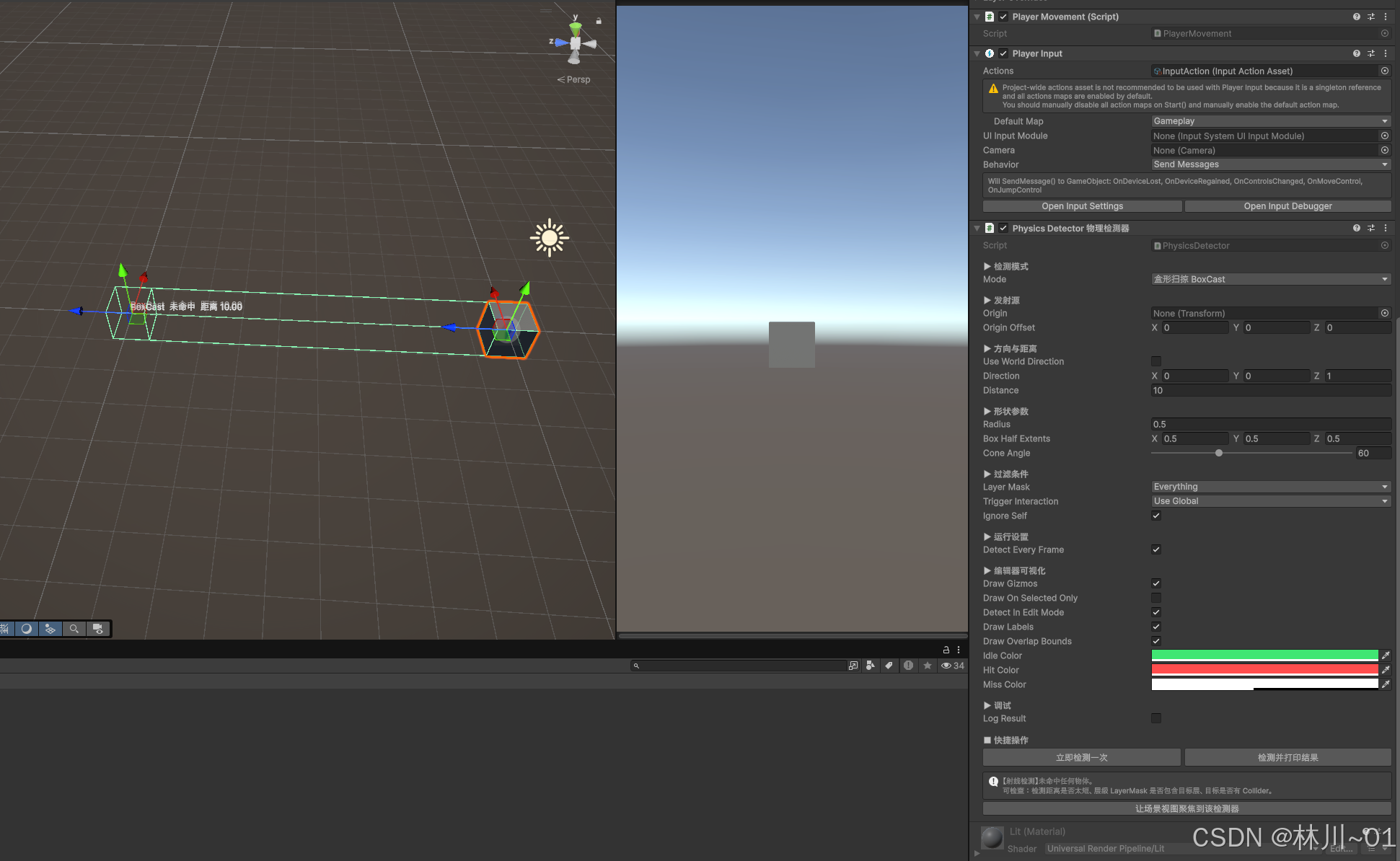
三、文件结构与安装(3 步)
Assets/
└── XKTools/
    └── Detection/
        ├── PhysicsDetectUtil.cs          ← 核心工具类(必须)
        ├── PhysicsDetector.cs            ← 可视化检测组件(必须)
        ├── PhysicsDetectDemo.cs          ← 使用示例(可选,学完可删)
        └── Editor/
└── PhysicsDetectorEditor.cs ← 编辑器扩展(可选,但要放 Editor 文件夹)-
在
Assets下新建文件夹XKTools/Detection;或者直接将本文附带的资源下载放在Assets文件下 -
把下面 4 个脚本按上面的路径丢进去(
Editor文件夹的名字必须 叫Editor,否则打包会报错); -
回到 Unity 等待编译完成。任意脚本顶部加
using XKTools.Detection;即可调用。
⚠️ 注意:
Editor文件夹在 Unity 里是特殊目录,里面的脚本不会被打进最终包体,只用于编辑器。
四、核心脚本 ①:PhysicsDetectUtil.cs(工具类)
纯静态类,不需要挂载到任何物体,PhysicsDetectUtil.XXX() 直接调用。
csharp
// =============================================================================
// PhysicsDetectUtil.cs
// Unity 物理检测工具 ------ 核心工具类(射线检测 / 扫掠检测 / 范围检测)
// · 纯静态类,无需挂载,任何脚本中直接调用
// · 所有方法均支持「指定层级 LayerMask + 指定距离 + 触发器过滤 + 忽略自身」
// · 内部使用 NonAlloc 接口 + 复用缓冲区,运行时零 GC Alloc
// 依赖:UnityEngine 内置 Physics,无任何第三方插件
// =============================================================================
using System;
using System.Collections.Generic;
using UnityEngine;
namespace XKTools.Detection
{
public static class PhysicsDetectUtil
{
/// <summary>默认缓冲区大小:单次检测最多返回的命中数量</summary>
public const int DefaultBufferSize = 64;
private static readonly RaycastHit[] HitBuffer = new RaycastHit[DefaultBufferSize];
private static readonly Collider[] ColliderBuffer = new Collider[DefaultBufferSize];
private static readonly RaycastHit[] EmptyHits = new RaycastHit[0];
private static readonly Collider[] EmptyColliders = new Collider[0];
/// <summary>排序用的临时点(避免每次排序产生闭包 GC)</summary>
private static Vector3 _comparePoint;
#region ==================== 一、射线检测(Ray) ====================
/// <summary>
/// 发射一条射线,返回距离「最近」的那个命中物体(最常用)
/// </summary>
/// <param name="origin">发射点(世界坐标)</param>
/// <param name="direction">射线方向(世界坐标,无需提前归一化)</param>
/// <param name="distance">检测距离</param>
/// <param name="hit">最近的命中信息</param>
/// <param name="layerMask">层级过滤,如 1 << 8 或 LayerMask 变量</param>
/// <param name="triggerInteraction">是否检测触发器</param>
/// <param name="ignoreRoot">忽略该物体及其全部子物体(常用于忽略自身)</param>
/// <returns>是否命中</returns>
public static bool Raycast(Vector3 origin, Vector3 direction, float distance, out RaycastHit hit,
int layerMask = Physics.AllLayers,
QueryTriggerInteraction triggerInteraction = QueryTriggerInteraction.UseGlobal,
Transform ignoreRoot = null)
{
hit = default(RaycastHit);
if (direction.sqrMagnitude < 1e-8f || distance <= 0f) return false;
int count = Physics.RaycastNonAlloc(origin, direction.normalized, HitBuffer,
distance, layerMask, triggerInteraction);
return PickNearest(count, ignoreRoot, out hit);
}
/// <summary>
/// 发射一条射线,返回「所有」命中并按距离从近到远排序
/// </summary>
public static RaycastHit[] RaycastAll(Vector3 origin, Vector3 direction, float distance,
int layerMask = Physics.AllLayers,
QueryTriggerInteraction triggerInteraction = QueryTriggerInteraction.UseGlobal,
Transform ignoreRoot = null)
{
if (direction.sqrMagnitude < 1e-8f || distance <= 0f) return EmptyHits;
int count = Physics.RaycastNonAlloc(origin, direction.normalized, HitBuffer,
distance, layerMask, triggerInteraction);
List<RaycastHit> list = new List<RaycastHit>(count);
for (int i = 0; i < count; i++)
{
RaycastHit h = HitBuffer[i];
if (h.collider == null) continue;
if (IsIgnored(h.collider.transform, ignoreRoot)) continue;
list.Add(h);
}
RaycastHit[] result = list.ToArray();
Array.Sort(result, CompareHitByDistance);
return result;
}
/// <summary>
/// 从相机屏幕点发射射线(鼠标点击拾取、拖拽对象必用)
/// </summary>
public static bool RaycastFromScreenPoint(Camera camera, Vector3 screenPoint, float distance,
out RaycastHit hit,
int layerMask = Physics.AllLayers,
QueryTriggerInteraction triggerInteraction = QueryTriggerInteraction.UseGlobal,
Transform ignoreRoot = null)
{
hit = default(RaycastHit);
if (camera == null) return false;
Ray ray = camera.ScreenPointToRay(screenPoint);
if (distance <= 0f) distance = camera.farClipPlane;
return Raycast(ray.origin, ray.direction, distance, out hit, layerMask, triggerInteraction, ignoreRoot);
}
/// <summary>从屏幕正中心发射射线(准星射击、第一人称交互必用)</summary>
public static bool RaycastFromCameraCenter(Camera camera, float distance, out RaycastHit hit,
int layerMask = Physics.AllLayers,
QueryTriggerInteraction triggerInteraction = QueryTriggerInteraction.UseGlobal,
Transform ignoreRoot = null)
{
Vector3 center = new Vector3(Screen.width * 0.5f, Screen.height * 0.5f, 0f);
return RaycastFromScreenPoint(camera, center, distance, out hit,
layerMask, triggerInteraction, ignoreRoot);
}
/// <summary>直接使用 Ray 结构体检测</summary>
public static bool Raycast(Ray ray, float distance, out RaycastHit hit,
int layerMask = Physics.AllLayers,
QueryTriggerInteraction triggerInteraction = QueryTriggerInteraction.UseGlobal,
Transform ignoreRoot = null)
{
return Raycast(ray.origin, ray.direction, distance, out hit, layerMask, triggerInteraction, ignoreRoot);
}
/// <summary>两点之间做线检测(返回最近的障碍物)</summary>
public static bool Linecast(Vector3 start, Vector3 end, out RaycastHit hit,
int layerMask = Physics.AllLayers,
QueryTriggerInteraction triggerInteraction = QueryTriggerInteraction.UseGlobal,
Transform ignoreRoot = null)
{
Vector3 dir = end - start;
return Raycast(start, dir, dir.magnitude, out hit, layerMask, triggerInteraction, ignoreRoot);
}
/// <summary>
/// 视线是否通畅(之间没有任何遮挡)
/// 注意:默认忽略触发器,只看实体碰撞体
/// </summary>
public static bool HasLineOfSight(Vector3 start, Vector3 end,
int layerMask = Physics.AllLayers,
Transform ignoreRoot = null)
{
RaycastHit hit;
return !Linecast(start, end, out hit, layerMask, QueryTriggerInteraction.Ignore, ignoreRoot);
}
#endregion
#region ==================== 二、扫掠检测(Cast) ====================
/// <summary>球形扫掠:把一个球沿方向推出,返回最近命中</summary>
public static bool SphereCast(Vector3 origin, float radius, Vector3 direction, float distance,
out RaycastHit hit,
int layerMask = Physics.AllLayers,
QueryTriggerInteraction triggerInteraction = QueryTriggerInteraction.UseGlobal,
Transform ignoreRoot = null)
{
hit = default(RaycastHit);
if (direction.sqrMagnitude < 1e-8f || distance <= 0f || radius <= 0f) return false;
int count = Physics.SphereCastNonAlloc(origin, radius, direction.normalized, HitBuffer,
distance, layerMask, triggerInteraction);
return PickNearest(count, ignoreRoot, out hit);
}
/// <summary>球形扫掠,返回所有命中并按距离排序</summary>
public static RaycastHit[] SphereCastAll(Vector3 origin, float radius, Vector3 direction, float distance,
int layerMask = Physics.AllLayers,
QueryTriggerInteraction triggerInteraction = QueryTriggerInteraction.UseGlobal,
Transform ignoreRoot = null)
{
if (direction.sqrMagnitude < 1e-8f || distance <= 0f || radius <= 0f) return EmptyHits;
int count = Physics.SphereCastNonAlloc(origin, radius, direction.normalized, HitBuffer,
distance, layerMask, triggerInteraction);
List<RaycastHit> list = new List<RaycastHit>(count);
for (int i = 0; i < count; i++)
{
RaycastHit h = HitBuffer[i];
if (h.collider == null) continue;
if (IsIgnored(h.collider.transform, ignoreRoot)) continue;
list.Add(h);
}
RaycastHit[] result = list.ToArray();
Array.Sort(result, CompareHitByDistance);
return result;
}
/// <summary>胶囊体扫掠(角色移动、近战攻击判定)</summary>
public static bool CapsuleCast(Vector3 point1, Vector3 point2, float radius, Vector3 direction,
float distance, out RaycastHit hit,
int layerMask = Physics.AllLayers,
QueryTriggerInteraction triggerInteraction = QueryTriggerInteraction.UseGlobal,
Transform ignoreRoot = null)
{
hit = default(RaycastHit);
if (direction.sqrMagnitude < 1e-8f || distance <= 0f || radius <= 0f) return false;
int count = Physics.CapsuleCastNonAlloc(point1, point2, radius, direction.normalized, HitBuffer,
distance, layerMask, triggerInteraction);
return PickNearest(count, ignoreRoot, out hit);
}
/// <summary>盒形扫掠(带旋转)</summary>
public static bool BoxCast(Vector3 center, Vector3 halfExtents, Vector3 direction, Quaternion orientation,
float distance, out RaycastHit hit,
int layerMask = Physics.AllLayers,
QueryTriggerInteraction triggerInteraction = QueryTriggerInteraction.UseGlobal,
Transform ignoreRoot = null)
{
hit = default(RaycastHit);
if (direction.sqrMagnitude < 1e-8f || distance <= 0f) return false;
int count = Physics.BoxCastNonAlloc(center, halfExtents, direction.normalized, HitBuffer,
orientation, distance, layerMask, triggerInteraction);
return PickNearest(count, ignoreRoot, out hit);
}
/// <summary>盒形扫掠(不旋转)</summary>
public static bool BoxCast(Vector3 center, Vector3 halfExtents, Vector3 direction, float distance,
out RaycastHit hit,
int layerMask = Physics.AllLayers,
QueryTriggerInteraction triggerInteraction = QueryTriggerInteraction.UseGlobal,
Transform ignoreRoot = null)
{
return BoxCast(center, halfExtents, direction, Quaternion.identity, distance, out hit,
layerMask, triggerInteraction, ignoreRoot);
}
/// <summary>
/// 判断某个点周围是否有碰撞体(掉坑、陷地、脚下有无地面判定)
/// 比 OverlapSphere 更轻量,只返回 bool
/// </summary>
public static bool CheckSphere(Vector3 position, float radius,
int layerMask = Physics.AllLayers,
QueryTriggerInteraction triggerInteraction = QueryTriggerInteraction.UseGlobal)
{
return Physics.CheckSphere(position, radius, layerMask, triggerInteraction);
}
#endregion
#region ==================== 三、范围检测(Overlap) ====================
/// <summary>
/// 球形范围检测:返回范围内的所有碰撞体
/// </summary>
/// <param name="center">球心(世界坐标)</param>
/// <param name="radius">半径</param>
/// <param name="sortByDistance">是否按距离从近到远排序</param>
public static Collider[] OverlapSphere(Vector3 center, float radius,
int layerMask = Physics.AllLayers,
QueryTriggerInteraction triggerInteraction = QueryTriggerInteraction.UseGlobal,
Transform ignoreRoot = null,
bool sortByDistance = true)
{
if (radius <= 0f) return EmptyColliders;
int count = Physics.OverlapSphereNonAlloc(center, radius, ColliderBuffer, layerMask, triggerInteraction);
Collider[] result = CopyColliders(count, ignoreRoot);
if (sortByDistance) SortByDistance(center, result);
return result;
}
/// <summary>球形范围检测 + 泛型版:直接拿到挂载了指定组件(或接口)的对象</summary>
public static T[] OverlapSphere<T>(Vector3 center, float radius,
int layerMask = Physics.AllLayers,
QueryTriggerInteraction triggerInteraction = QueryTriggerInteraction.UseGlobal,
Transform ignoreRoot = null,
bool sortByDistance = true) where T : class
{
Collider[] colliders = OverlapSphere(center, radius, layerMask, triggerInteraction, ignoreRoot, sortByDistance);
List<T> list = new List<T>(colliders.Length);
for (int i = 0; i < colliders.Length; i++)
{
// GetComponentInParent 可以兼容「碰撞体在子物体、脚本在父物体」的常见结构
T item = colliders[i].GetComponentInParent<T>();
if (item != null && !list.Contains(item)) list.Add(item);
}
return list.ToArray();
}
/// <summary>盒形范围检测(可带旋转)</summary>
public static Collider[] OverlapBox(Vector3 center, Vector3 halfExtents, Quaternion orientation,
int layerMask = Physics.AllLayers,
QueryTriggerInteraction triggerInteraction = QueryTriggerInteraction.UseGlobal,
Transform ignoreRoot = null,
bool sortByDistance = true)
{
int count = Physics.OverlapBoxNonAlloc(center, halfExtents, ColliderBuffer, orientation,
layerMask, triggerInteraction);
Collider[] result = CopyColliders(count, ignoreRoot);
if (sortByDistance) SortByDistance(center, result);
return result;
}
/// <summary>盒形范围检测(不旋转)</summary>
public static Collider[] OverlapBox(Vector3 center, Vector3 halfExtents,
int layerMask = Physics.AllLayers,
QueryTriggerInteraction triggerInteraction = QueryTriggerInteraction.UseGlobal,
Transform ignoreRoot = null,
bool sortByDistance = true)
{
return OverlapBox(center, halfExtents, Quaternion.identity, layerMask, triggerInteraction,
ignoreRoot, sortByDistance);
}
/// <summary>胶囊体范围检测(角色周围、走廊型范围判定)</summary>
public static Collider[] OverlapCapsule(Vector3 point0, Vector3 point1, float radius,
int layerMask = Physics.AllLayers,
QueryTriggerInteraction triggerInteraction = QueryTriggerInteraction.UseGlobal,
Transform ignoreRoot = null,
bool sortByDistance = true)
{
if (radius <= 0f) return EmptyColliders;
int count = Physics.OverlapCapsuleNonAlloc(point0, point1, radius, ColliderBuffer,
layerMask, triggerInteraction);
Collider[] result = CopyColliders(count, ignoreRoot);
if (sortByDistance) SortByDistance((point0 + point1) * 0.5f, result);
return result;
}
/// <summary>
/// 扇形(视锥)范围检测:常用于怪物视野、扇形范围攻击
/// 先用球形范围筛出候选,再用夹角过滤,避免 O(n) 全场景遍历
/// </summary>
/// <param name="origin">扇形顶点</param>
/// <param name="direction">扇形朝向</param>
/// <param name="radius">扇形半径</param>
/// <param name="angle">扇形总夹角(1~179 度)</param>
public static Collider[] OverlapCone(Vector3 origin, Vector3 direction, float radius, float angle,
int layerMask = Physics.AllLayers,
QueryTriggerInteraction triggerInteraction = QueryTriggerInteraction.UseGlobal,
Transform ignoreRoot = null,
bool sortByDistance = true)
{
if (radius <= 0f) return EmptyColliders;
Collider[] candidates = OverlapSphere(origin, radius, layerMask, triggerInteraction, ignoreRoot, false);
if (candidates.Length == 0) return candidates;
direction = direction.normalized;
float halfAngle = Mathf.Clamp(angle, 0f, 360f) * 0.5f;
List<Collider> list = new List<Collider>(candidates.Length);
for (int i = 0; i < candidates.Length; i++)
{
Vector3 to = candidates[i].bounds.center - origin;
// 顶点就在碰撞体内部,直接算命中
if (to.sqrMagnitude < 1e-6f) { list.Add(candidates[i]); continue; }
if (Vector3.Angle(direction, to) <= halfAngle) list.Add(candidates[i]);
}
Collider[] result = list.ToArray();
if (sortByDistance) SortByDistance(origin, result);
return result;
}
#endregion
#region ==================== 四、结果处理辅助 ====================
/// <summary>在碰撞体数组中找到离某点最近的一个</summary>
public static Collider GetNearestCollider(Vector3 point, Collider[] colliders)
{
if (colliders == null || colliders.Length == 0) return null;
Collider nearest = null;
float min = float.MaxValue;
for (int i = 0; i < colliders.Length; i++)
{
if (colliders[i] == null) continue;
float d = SqrDistanceTo(colliders[i], point);
if (d < min) { min = d; nearest = colliders[i]; }
}
return nearest;
}
/// <summary>把碰撞体数组按距离从近到远原地排序(基于包围盒,兼容非凸网格碰撞体)</summary>
public static Collider[] SortByDistance(Vector3 point, Collider[] colliders)
{
if (colliders == null || colliders.Length < 2) return colliders;
_comparePoint = point;
Array.Sort(colliders, CompareColliderByDistance);
return colliders;
}
/// <summary>点到碰撞体的平方距离(直接用包围盒,性能好且对 MeshCollider 安全)</summary>
public static float SqrDistanceTo(Collider collider, Vector3 point)
{
if (collider == null) return float.MaxValue;
Bounds bounds = collider.bounds;
return (bounds.ClosestPoint(point) - point).sqrMagnitude;
}
/// <summary>
/// 把碰撞体数组转换成 Transform 数组(按根物体去重)
/// 例如一次爆炸打中同一个角色的头 / 身体 / 武器三个碰撞体,这里只会返回一次
/// </summary>
public static Transform[] ToRootTransforms(Collider[] colliders, bool distinct = true)
{
if (colliders == null || colliders.Length == 0) return new Transform[0];
List<Transform> list = new List<Transform>(colliders.Length);
for (int i = 0; i < colliders.Length; i++)
{
if (colliders[i] == null) continue;
Transform root = colliders[i].transform.root;
if (distinct && list.Contains(root)) continue;
list.Add(root);
}
return list.ToArray();
}
/// <summary>在球形范围内查找最近的、挂载了 T 组件(或实现了接口 T)的对象</summary>
public static T FindNearest<T>(Vector3 origin, float radius,
int layerMask = Physics.AllLayers,
QueryTriggerInteraction triggerInteraction = QueryTriggerInteraction.UseGlobal,
Transform ignoreRoot = null) where T : class
{
Collider[] colliders = OverlapSphere(origin, radius, layerMask, triggerInteraction, ignoreRoot, true);
for (int i = 0; i < colliders.Length; i++)
{
T item = colliders[i].GetComponentInParent<T>();
if (item != null) return item;
}
return null;
}
#endregion
#region ==================== 五、调试可视化(运行时) ====================
/// <summary>运行时绘制射线(需在 Scene 视图开启 Gizmos)</summary>
public static void DebugDrawRay(Vector3 origin, Vector3 direction, float distance, Color color,
float duration = 0f)
{
if (direction.sqrMagnitude < 1e-8f) return;
Debug.DrawLine(origin, origin + direction.normalized * distance, color, duration);
}
/// <summary>运行时绘制十字标记(标记命中点非常好用)</summary>
public static void DebugDrawCross(Vector3 position, float size, Color color, float duration = 0f)
{
Debug.DrawLine(position + Vector3.left * size, position + Vector3.right * size, color, duration);
Debug.DrawLine(position + Vector3.down * size, position + Vector3.up * size, color, duration);
Debug.DrawLine(position + Vector3.back * size, position + Vector3.forward * size, color, duration);
}
/// <summary>运行时绘制球形范围(用三个正交圆近似)</summary>
public static void DebugDrawSphere(Vector3 center, float radius, Color color, float duration = 0f,
int segments = 32)
{
float step = Mathf.PI * 2f / segments;
for (int i = 0; i < segments; i++)
{
float a = step * i;
float b = step * (i + 1);
Debug.DrawLine(center + new Vector3(Mathf.Cos(a), Mathf.Sin(a), 0f) * radius,
center + new Vector3(Mathf.Cos(b), Mathf.Sin(b), 0f) * radius, color, duration);
Debug.DrawLine(center + new Vector3(Mathf.Cos(a), 0f, Mathf.Sin(a)) * radius,
center + new Vector3(Mathf.Cos(b), 0f, Mathf.Sin(b)) * radius, color, duration);
Debug.DrawLine(center + new Vector3(0f, Mathf.Cos(a), Mathf.Sin(a)) * radius,
center + new Vector3(0f, Mathf.Cos(b), Mathf.Sin(b)) * radius, color, duration);
}
}
#endregion
#region ==================== 内部实现 ====================
/// <summary>从缓冲区里挑出最近的一个命中</summary>
private static bool PickNearest(int count, Transform ignoreRoot, out RaycastHit hit)
{
hit = default(RaycastHit);
float nearest = float.MaxValue;
bool found = false;
for (int i = 0; i < count; i++)
{
RaycastHit h = HitBuffer[i];
if (h.collider == null) continue;
if (IsIgnored(h.collider.transform, ignoreRoot)) continue;
if (h.distance < nearest)
{
nearest = h.distance;
hit = h;
found = true;
}
}
return found;
}
/// <summary>把缓冲区里的碰撞体拷贝出来并做忽略过滤</summary>
private static Collider[] CopyColliders(int count, Transform ignoreRoot)
{
List<Collider> list = new List<Collider>(count);
for (int i = 0; i < count; i++)
{
Collider c = ColliderBuffer[i];
if (c == null) continue;
if (IsIgnored(c.transform, ignoreRoot)) continue;
list.Add(c);
}
return list.ToArray();
}
/// <summary>是否属于需要忽略的层级(自身或自身的子物体)</summary>
private static bool IsIgnored(Transform target, Transform ignoreRoot)
{
if (ignoreRoot == null || target == null) return false;
return target == ignoreRoot || target.IsChildOf(ignoreRoot);
}
private static int CompareHitByDistance(RaycastHit a, RaycastHit b)
{
return a.distance.CompareTo(b.distance);
}
private static int CompareColliderByDistance(Collider a, Collider b)
{
float da = SqrDistanceTo(a, _comparePoint);
float db = SqrDistanceTo(b, _comparePoint);
return da.CompareTo(db);
}
#endregion
}
}五、核心脚本 ②:PhysicsDetector.cs(可视化检测组件)
挂到任意物体上,在 Inspector 里配置参数,Scene 视图立刻就能看到检测射线和命中结果。编辑器模式下也会实时检测。
csharp
// =============================================================================
// PhysicsDetector.cs
// Unity 物理检测工具 ------ 可视化检测组件
// · 在 Inspector 里配置:检测模式 / 方向 / 距离 / 半径 / 层级 / 触发器
// · 运行时(Play)实时检测,编辑器模式(Edit)也能实时预览射线
// · Scene 视图直接绘制:射线、球形 / 盒形范围、命中点、命中法线、命中信息文字
// · 提供 HasHit / Hit / OverlapResults 以及 OnRayHit / OnOverlapDetected 事件
// =============================================================================
using System;
using UnityEngine;
namespace XKTools.Detection
{
[ExecuteAlways]
[DisallowMultipleComponent]
[AddComponentMenu("XKTools/Physics Detector 物理检测器")]
public class PhysicsDetector : MonoBehaviour
{
/// <summary>检测模式</summary>
public enum DetectMode
{
[InspectorName("射线 Ray")] Ray = 0,
[InspectorName("球形扫掠 SphereCast")] SphereCast = 1,
[InspectorName("盒形扫掠 BoxCast")] BoxCast = 2,
[InspectorName("球形范围 OverlapSphere")] OverlapSphere = 3,
[InspectorName("盒形范围 OverlapBox")] OverlapBox = 4,
[InspectorName("扇形范围 OverlapCone")] OverlapCone = 5,
}
// ------------------------------------------------------------------
// 检测配置
// ------------------------------------------------------------------
[Header("▶ 检测模式")]
[Tooltip("选择本次检测的类型:射线 / 扫掠 / 范围")]
public DetectMode mode = DetectMode.Ray;
[Header("▶ 发射源")]
[Tooltip("留空则使用当前物体自身作为发射源")]
public Transform origin;
[Tooltip("在发射源局部坐标系下的偏移量")]
public Vector3 originOffset;
[Header("▶ 方向与距离")]
[Tooltip("勾选后 direction 视为世界方向,否则视为发射源的局部方向")]
public bool useWorldDirection;
[Tooltip("检测方向")]
public Vector3 direction = Vector3.forward;
[Tooltip("检测距离(范围检测模式下作为可视化长度参考)")]
public float distance = 10f;
[Header("▶ 形状参数")]
[Tooltip("球形扫掠 / 球形范围 / 扇形范围的半径")]
public float radius = 0.5f;
[Tooltip("盒形扫掠 / 盒形范围的半尺寸")]
public Vector3 boxHalfExtents = new Vector3(0.5f, 0.5f, 0.5f);
[Range(1f, 179f)]
[Tooltip("扇形范围的总夹角(度)")]
public float coneAngle = 60f;
[Header("▶ 过滤条件")]
[Tooltip("只检测这些层级的物体")]
public LayerMask layerMask = ~0;
[Tooltip("是否把触发器也纳入检测")]
public QueryTriggerInteraction triggerInteraction = QueryTriggerInteraction.UseGlobal;
[Tooltip("忽略自身(含所有子物体),一般保持勾选")]
public bool ignoreSelf = true;
[Header("▶ 运行设置")]
[Tooltip("运行时是否每帧自动检测;关闭后可在代码里手动调用 Detect()")]
public bool detectEveryFrame = true;
[Header("▶ 编辑器可视化")]
[Tooltip("是否绘制 Gizmos")]
public bool drawGizmos = true;
[Tooltip("只在选中该物体时绘制,场景物体多的时候建议勾选")]
public bool drawOnSelectedOnly;
[Tooltip("编辑器(非运行)模式下是否也实时执行检测")]
public bool detectInEditMode = true;
[Tooltip("是否绘制命中信息文字")]
public bool drawLabels = true;
[Tooltip("是否把范围内命中的碰撞体包围盒画出来")]
public bool drawOverlapBounds = true;
public Color idleColor = new Color(0.25f, 0.9f, 0.45f, 1f);
public Color hitColor = new Color(1f, 0.3f, 0.3f, 1f);
public Color missColor = new Color(1f, 1f, 1f, 0.45f);
[Header("▶ 调试")]
[Tooltip("命中时是否打印日志")]
public bool logResult;
// ------------------------------------------------------------------
// 检测结果(只读)
// ------------------------------------------------------------------
/// <summary>最近一次检测是否命中</summary>
public bool HasHit { get; private set; }
/// <summary>最近一次检测的命中信息(范围检测模式下为 default)</summary>
public RaycastHit Hit { get; private set; }
/// <summary>范围检测命中的碰撞体数组</summary>
public Collider[] OverlapResults { get; private set; } = EmptyColliders;
private static readonly Collider[] EmptyColliders = new Collider[0];
/// <summary>命中的物体(未命中返回 null)</summary>
public Transform HitTransform { get { return Hit.collider != null ? Hit.collider.transform : null; } }
/// <summary>命中点(未命中返回 null)</summary>
public Vector3? HitPoint { get { return Hit.collider != null ? (Vector3?)Hit.point : null; } }
/// <summary>射线类检测命中时触发</summary>
public event Action<PhysicsDetector, RaycastHit> OnRayHit;
/// <summary>范围类检测完成时触发(即使没命中也会触发,数组长度为 0)</summary>
public event Action<PhysicsDetector, Collider[]> OnOverlapDetected;
// ------------------------------------------------------------------
// 对外接口
// ------------------------------------------------------------------
/// <summary>实际使用的发射源 Transform</summary>
public Transform OriginTransform
{
get { return origin != null ? origin : transform; }
}
/// <summary>取世界空间的发射点</summary>
public Vector3 GetWorldOrigin()
{
return OriginTransform.TransformPoint(originOffset);
}
/// <summary>取世界空间的检测方向(已归一化)</summary>
public Vector3 GetWorldDirection()
{
if (useWorldDirection)
{
return direction.sqrMagnitude < 1e-8f ? Vector3.forward : direction.normalized;
}
Vector3 dir = OriginTransform.TransformDirection(direction);
return dir.sqrMagnitude < 1e-8f ? OriginTransform.forward : dir.normalized;
}
/// <summary>当前模式是否属于「范围检测」</summary>
public bool IsOverlapMode
{
get
{
return mode == DetectMode.OverlapSphere
|| mode == DetectMode.OverlapBox
|| mode == DetectMode.OverlapCone;
}
}
/// <summary>执行一次检测,返回是否命中</summary>
public bool Detect()
{
Vector3 o = GetWorldOrigin();
Vector3 d = GetWorldDirection();
float dist = Mathf.Max(0f, distance);
Transform ignore = ignoreSelf ? transform.root : null;
if (IsOverlapMode)
{
switch (mode)
{
case DetectMode.OverlapSphere:
OverlapResults = PhysicsDetectUtil.OverlapSphere(o, radius, layerMask,
triggerInteraction, ignore, true);
break;
case DetectMode.OverlapBox:
OverlapResults = PhysicsDetectUtil.OverlapBox(o, boxHalfExtents, GetBoxRotation(),
layerMask, triggerInteraction, ignore, true);
break;
case DetectMode.OverlapCone:
OverlapResults = PhysicsDetectUtil.OverlapCone(o, d, radius, coneAngle,
layerMask, triggerInteraction, ignore, true);
break;
}
Hit = default(RaycastHit);
HasHit = OverlapResults != null && OverlapResults.Length > 0;
if (OnOverlapDetected != null) OnOverlapDetected(this, OverlapResults);
if (logResult && HasHit)
{
Debug.Log(string.Format("[PhysicsDetector] {0} 命中 {1} 个碰撞体({2})",
mode, OverlapResults.Length, name), this);
}
return HasHit;
}
RaycastHit h;
bool result;
switch (mode)
{
case DetectMode.SphereCast:
result = PhysicsDetectUtil.SphereCast(o, radius, d, dist, out h,
layerMask, triggerInteraction, ignore);
break;
case DetectMode.BoxCast:
result = PhysicsDetectUtil.BoxCast(o, boxHalfExtents, d, GetBoxRotation(), dist, out h,
layerMask, triggerInteraction, ignore);
break;
default: // DetectMode.Ray
result = PhysicsDetectUtil.Raycast(o, d, dist, out h,
layerMask, triggerInteraction, ignore);
break;
}
Hit = result ? h : default(RaycastHit);
HasHit = result;
OverlapResults = EmptyColliders;
if (result)
{
if (OnRayHit != null) OnRayHit(this, Hit);
if (logResult)
{
Debug.Log(string.Format("[PhysicsDetector] {0} 命中 {1},距离 {2:F2},命中点 {3}",
mode, Hit.collider.name, Hit.distance, Hit.point), this);
}
}
else if (logResult)
{
Debug.Log(string.Format("[PhysicsDetector] {0} 未命中任何物体", mode), this);
}
return result;
}
/// <summary>执行一次检测并把结果打印到 Console</summary>
public void DetectAndLog()
{
bool r = Detect();
if (!r)
{
Debug.Log(string.Format("[PhysicsDetector] {0} 结果:未命中(距离 {1},层级掩码 {2})",
mode, distance, layerMask.value), this);
return;
}
if (IsOverlapMode)
{
string names = "";
for (int i = 0; i < OverlapResults.Length; i++)
{
if (i > 0) names += ", ";
names += OverlapResults[i].name;
}
Debug.Log(string.Format("[PhysicsDetector] {0} 结果:命中 {1} 个 → {2}",
mode, OverlapResults.Length, names), this);
}
else
{
Debug.Log(string.Format("[PhysicsDetector] {0} 结果:命中 {1}(Tag: {2} / Layer: {3})距离 {4:F2}",
mode, Hit.collider.name, Hit.collider.tag,
LayerMask.LayerToName(Hit.collider.gameObject.layer), Hit.distance), this);
}
}
/// <summary>盒形检测使用的旋转</summary>
public Quaternion GetBoxRotation()
{
return useWorldDirection ? Quaternion.identity : OriginTransform.rotation;
}
// ------------------------------------------------------------------
// 生命周期
// ------------------------------------------------------------------
private void Update()
{
if (!Application.isPlaying) return;
if (!detectEveryFrame) return;
Detect();
}
private void OnDrawGizmos()
{
if (!drawGizmos || drawOnSelectedOnly) return;
RunEditModeDetect();
DrawGizmosInternal();
}
private void OnDrawGizmosSelected()
{
if (!drawGizmos) return;
if (drawOnSelectedOnly) RunEditModeDetect();
DrawGizmosInternal();
}
private void RunEditModeDetect()
{
#if UNITY_EDITOR
if (Application.isPlaying) return;
if (!detectInEditMode) return;
if (!isActiveAndEnabled) return;
Detect();
#endif
}
// ------------------------------------------------------------------
// Gizmos 绘制
// ------------------------------------------------------------------
private void DrawGizmosInternal()
{
if (!isActiveAndEnabled) return;
Vector3 o = GetWorldOrigin();
Vector3 d = GetWorldDirection();
float dist = Mathf.Max(0.001f, distance);
Color mainColor = Application.isPlaying
? (HasHit ? hitColor : missColor)
: (HasHit ? hitColor : idleColor);
Matrix4x4 cache = Gizmos.matrix;
Gizmos.matrix = Matrix4x4.identity;
// ---------------- 发射点 ----------------
Gizmos.color = idleColor;
Gizmos.DrawWireSphere(o, 0.07f);
// ---------------- 各模式形状 ----------------
switch (mode)
{
case DetectMode.Ray:
{
float len = HasHit ? Mathf.Max(Hit.distance, 0f) : dist;
Gizmos.color = mainColor;
Gizmos.DrawLine(o, o + d * len);
Gizmos.DrawWireSphere(o + d * len, 0.05f);
break;
}
case DetectMode.SphereCast:
{
float len = HasHit ? Mathf.Max(Hit.distance, 0f) : dist;
Vector3 end = o + d * len;
Gizmos.color = mainColor;
Gizmos.DrawWireSphere(o, radius);
Gizmos.DrawWireSphere(end, radius);
// 扫掠路径的四条轮廓线(先求两个与方向垂直的向量,避免方向平行于 up 时退化)
Vector3 aid = Vector3.up;
if (Mathf.Abs(Vector3.Dot(d, aid)) > 0.99f) aid = Vector3.right;
Vector3 perp1 = Vector3.Cross(d, aid).normalized;
Vector3 perp2 = Vector3.Cross(d, perp1).normalized;
DrawSweepLine(o, end, perp1, radius);
DrawSweepLine(o, end, perp2, radius);
break;
}
case DetectMode.BoxCast:
{
float len = HasHit ? Mathf.Max(Hit.distance, 0f) : dist;
Quaternion rot = GetBoxRotation();
Gizmos.color = mainColor;
Gizmos.matrix = Matrix4x4.TRS(o, rot, Vector3.one);
Gizmos.DrawWireCube(Vector3.zero, boxHalfExtents * 2f);
Gizmos.matrix = Matrix4x4.TRS(o + d * len, rot, Vector3.one);
Gizmos.DrawWireCube(Vector3.zero, boxHalfExtents * 2f);
Gizmos.matrix = Matrix4x4.identity;
Vector3 right = rot * Vector3.right;
Vector3 up = rot * Vector3.up;
Vector3 fwd = rot * Vector3.forward;
DrawCornerLines(o, o + d * len, right, up, fwd, boxHalfExtents);
break;
}
case DetectMode.OverlapSphere:
{
Gizmos.color = mainColor;
Gizmos.DrawWireSphere(o, radius);
break;
}
case DetectMode.OverlapBox:
{
Gizmos.color = mainColor;
Gizmos.matrix = Matrix4x4.TRS(o, GetBoxRotation(), Vector3.one);
Gizmos.DrawWireCube(Vector3.zero, boxHalfExtents * 2f);
Gizmos.matrix = Matrix4x4.identity;
break;
}
case DetectMode.OverlapCone:
{
Gizmos.color = mainColor;
Gizmos.DrawWireSphere(o, radius);
DrawCone(o, d, radius, coneAngle);
break;
}
}
// ---------------- 命中点 ----------------
if (!IsOverlapMode && HasHit && Hit.collider != null)
{
Gizmos.color = hitColor;
Gizmos.DrawSphere(Hit.point, 0.08f);
Gizmos.DrawLine(Hit.point, Hit.point + Hit.normal * 0.6f);
Gizmos.DrawWireSphere(Hit.point + Hit.normal * 0.6f, 0.04f);
}
// ---------------- 范围内命中的碰撞体 ----------------
if (drawOverlapBounds && OverlapResults != null && OverlapResults.Length > 0)
{
for (int i = 0; i < OverlapResults.Length; i++)
{
Collider c = OverlapResults[i];
if (c == null) continue;
Gizmos.color = hitColor;
Gizmos.DrawWireCube(c.bounds.center, c.bounds.size);
Gizmos.color = new Color(hitColor.r, hitColor.g, hitColor.b, 0.6f);
Gizmos.DrawLine(o, c.bounds.center);
}
}
Gizmos.matrix = cache;
// ---------------- 文字标签 ----------------
DrawLabel(o, d, dist);
}
private void DrawSweepLine(Vector3 from, Vector3 to, Vector3 offsetDir, float radius)
{
Gizmos.DrawLine(from + offsetDir * radius, to + offsetDir * radius);
Gizmos.DrawLine(from - offsetDir * radius, to - offsetDir * radius);
}
private void DrawCornerLines(Vector3 from, Vector3 to, Vector3 right, Vector3 up, Vector3 fwd, Vector3 half)
{
for (int sx = -1; sx <= 1; sx += 2)
{
for (int sy = -1; sy <= 1; sy += 2)
{
for (int sz = -1; sz <= 1; sz += 2)
{
Vector3 offset = right * half.x * sx + up * half.y * sy + fwd * half.z * sz;
Gizmos.DrawLine(from + offset, to + offset);
}
}
}
}
private void DrawCone(Vector3 origin, Vector3 dir, float radius, float angle)
{
Vector3 axis = OriginTransform.up;
if (Vector3.Cross(dir, axis).sqrMagnitude < 1e-6f) axis = OriginTransform.right;
float half = Mathf.Clamp(angle, 0f, 360f) * 0.5f;
Vector3 leftDir = Quaternion.AngleAxis(-half, axis) * dir;
Vector3 rightDir = Quaternion.AngleAxis(half, axis) * dir;
Gizmos.DrawLine(origin, origin + leftDir * radius);
Gizmos.DrawLine(origin, origin + rightDir * radius);
// 弧线
int segments = 24;
Vector3 prev = origin + leftDir * radius;
for (int i = 1; i <= segments; i++)
{
float a = -half + (half * 2f) * i / segments;
Vector3 cur = origin + (Quaternion.AngleAxis(a, axis) * dir) * radius;
Gizmos.DrawLine(prev, cur);
prev = cur;
}
}
private void DrawLabel(Vector3 o, Vector3 d, float dist)
{
#if UNITY_EDITOR
if (!drawLabels) return;
string text;
if (IsOverlapMode)
{
text = string.Format("{0} 半径 {1:F2} 命中 {2}",
mode, radius, OverlapResults != null ? OverlapResults.Length : 0);
}
else if (HasHit && Hit.collider != null)
{
text = string.Format("命中 {0}\n距离 {1:F2}", Hit.collider.name, Hit.distance);
}
else
{
text = string.Format("{0} 未命中 距离 {1:F2}", mode, dist);
}
UnityEditor.Handles.color = HasHit ? hitColor : Color.white;
UnityEditor.Handles.Label(o + d * dist + Vector3.up * 0.25f, text);
#endif
}
}
}六、编辑器扩展:Editor/PhysicsDetectorEditor.cs
给 PhysicsDetector 加上快捷按钮和 Scene 视图拖拽手柄。
csharp
// =============================================================================
//  PhysicsDetectorEditor.cs
//  Unity 物理检测工具 ------ 编辑器扩展
//  · Inspector 底部增加「立即检测 / 检测并打印」按钮,实时查看结果
//  · Scene 视图中可以直接拖拽:检测原点、检测距离、检测半径
//  注意:必须放在任意名为 Editor 的文件夹内(如 Assets/Tools/Editor/)
// =============================================================================
#if UNITY_EDITOR
using UnityEditor;
using UnityEngine;

namespace XKTools.Detection.EditorTools
{
    [CustomEditor(typeof(PhysicsDetector))]
    [CanEditMultipleObjects]
    public class PhysicsDetectorEditor : Editor
    {
        private const float HandleSize = 0.12f;

        public override void OnInspectorGUI()
        {
            DrawDefaultInspector();

            PhysicsDetector detector = target as PhysicsDetector;
            if (detector == null) return;

            EditorGUILayout.Space(8);
            EditorGUILayout.LabelField("■ 快捷操作", EditorStyles.boldLabel);

            EditorGUILayout.BeginHorizontal();
            if (GUILayout.Button("立即检测一次", GUILayout.Height(26)))
            {
                detector.Detect();
                SceneView.RepaintAll();
                EditorUtility.SetDirty(detector);
            }
            if (GUILayout.Button("检测并打印结果", GUILayout.Height(26)))
            {
                detector.DetectAndLog();
            }
            EditorGUILayout.EndHorizontal();

            EditorGUILayout.Space(4);

            // 实时结果面板
            if (detector.IsOverlapMode)
            {
                int count = detector.OverlapResults != null ? detector.OverlapResults.Length : 0;
                EditorGUILayout.HelpBox(count > 0
                        ? string.Format("【范围检测】当前命中 {0} 个碰撞体,最近的是:{1}", count, detector.OverlapResults[0].name)
                        : "【范围检测】范围内没有命中任何碰撞体",
                    count > 0 ? MessageType.Warning : MessageType.Info);
            }
            else if (detector.HasHit && detector.Hit.collider != null)
            {
                EditorGUILayout.HelpBox(string.Format(
                        "【射线检测】命中 {0}\n距离:{1:F3}\n命中点:{2:F2}, {3:F2}, {4:F2}\n法线:{5:F2}, {6:F2}, {7:F2}",
                        detector.Hit.collider.name,
                        detector.Hit.distance,
                        detector.Hit.point.x, detector.Hit.point.y, detector.Hit.point.z,
                        detector.Hit.normal.x, detector.Hit.normal.y, detector.Hit.normal.z),
                    MessageType.Warning);
            }
            else
            {
                EditorGUILayout.HelpBox("【射线检测】未命中任何物体。\n可检查:检测距离是否太短、层级 LayerMask 是否包含目标层、目标是否有 Collider。",
                    MessageType.Info);
            }

            if (GUILayout.Button("让场景视图聚焦到该检测器"))
            {
                SceneView.lastActiveSceneView?.FrameSelected();
            }
        }

        private void OnSceneGUI()
        {
            PhysicsDetector detector = target as PhysicsDetector;
            if (detector == null) return;

            // 若 Gizmos 没有在持续刷新(关闭绘制 / 仅选中时绘制),这里补一次检测,保证手柄和文字实时
            if (!Application.isPlaying && (!detector.drawGizmos || detector.drawOnSelectedOnly))
            {
                detector.Detect();
            }

            Vector3 origin = detector.GetWorldOrigin();
            Vector3 dir = detector.GetWorldDirection();
            Transform originT = detector.OriginTransform;

            // ---------------- 拖拽:检测原点 ----------------
            EditorGUI.BeginChangeCheck();
            Vector3 newOrigin = Handles.PositionHandle(origin, Quaternion.identity);
            if (EditorGUI.EndChangeCheck())
            {
                Undo.RecordObject(detector, "移动检测原点");
                detector.originOffset = originT.InverseTransformPoint(newOrigin);
                EditorUtility.SetDirty(detector);
            }

            Handles.color = detector.HasHit ? detector.hitColor : detector.idleColor;

            // ---------------- 拖拽:检测距离(末端点,只沿方向生效) ----------------
            if (!detector.IsOverlapMode || detector.mode == PhysicsDetector.DetectMode.OverlapCone)
            {
                Vector3 endPoint = origin + dir * Mathf.Max(0.01f, detector.distance);
                EditorGUI.BeginChangeCheck();
                Vector3 dragged = Handles.PositionHandle(endPoint, Quaternion.LookRotation(dir, Vector3.up));
                if (EditorGUI.EndChangeCheck())
                {
                    Undo.RecordObject(detector, "调整检测距离");
                    detector.distance = Mathf.Max(0.01f, Vector3.Dot(dragged - origin, dir));
                    EditorUtility.SetDirty(detector);
                }
            }

            // ---------------- 拖拽:检测半径 ----------------
            if (detector.mode == PhysicsDetector.DetectMode.SphereCast
                || detector.mode == PhysicsDetector.DetectMode.OverlapSphere
                || detector.mode == PhysicsDetector.DetectMode.OverlapCone)
            {
                EditorGUI.BeginChangeCheck();
                float newRadius = Handles.RadiusHandle(Quaternion.identity, origin, detector.radius);
                if (EditorGUI.EndChangeCheck())
                {
                    Undo.RecordObject(detector, "调整检测半径");
                    detector.radius = Mathf.Max(0.01f, newRadius);
                    EditorUtility.SetDirty(detector);
                }
            }

            // ---------------- 结果文字(不勾选 Gizmos 也能看到) ----------------
            string label;
            if (detector.IsOverlapMode)
            {
                int count = detector.OverlapResults != null ? detector.OverlapResults.Length : 0;
                label = string.Format("{0}  半径 {1:F2}  命中 {2}", detector.mode, detector.radius, count);
            }
            else if (detector.HasHit && detector.Hit.collider != null)
            {
                label = string.Format("命中 {0}  距离 {1:F2}", detector.Hit.collider.name, detector.Hit.distance);
            }
            else
            {
                label = string.Format("{0}  未命中  距离 {1:F2}", detector.mode, detector.distance);
            }

            Handles.Label(origin + dir * Mathf.Max(0.01f, detector.distance) + Vector3.up * 0.35f, label);
        }
    }
}
#endif
七、使用示例:PhysicsDetectDemo.cs
6 个最常见实战场景的完整写法,直接挂到场景物体上就能跑。
csharp
// =============================================================================
//  PhysicsDetectDemo.cs
//  Unity 物理检测工具 ------ 使用示例
//  演示 6 个最常见的实战场景,直接挂到场景任意物体上即可体验:
//   1. 鼠标点击拾取(屏幕射线)
//   2. 第一人称/第三人称准星射击
//   3. 视线遮挡判断(能不能看见目标)
//   4. 范围伤害(爆炸 AOE)
//   5. 怪物扇形视野
//   6. 查找最近的敌人
// =============================================================================
using UnityEngine;

namespace XKTools.Detection
{
    public class PhysicsDetectDemo : MonoBehaviour
    {
        [Header("拾取 / 射击")]
        [Tooltip("留空自动取 Camera.main")]
        public Camera cam;
        [Tooltip("射线最大检测距离")]
        public float shootDistance = 50f;
        [Tooltip("射线检测的层级(地面、敌人、可交互物...)")]
        public LayerMask shootLayerMask = ~0;

        [Header("范围伤害")]
        [Tooltip("爆炸半径")]
        public float explodeRadius = 6f;
        [Tooltip("爆炸影响的层级")]
        public LayerMask damageLayerMask = ~0;

        [Header("扇形视野")]
        [Tooltip("视野半径")]
        public float viewRadius = 12f;
        [Range(1f, 179f)]
        [Tooltip("视野夹角")]
        public float viewAngle = 90f;
        [Tooltip("阻挡视线的层级(墙壁、地形)")]
        public LayerMask obstacleLayerMask = ~0;

        [Header("忽略自身")]
        [Tooltip("勾选后所有检测都会忽略本物体及其子物体")]
        public bool ignoreSelf = true;

        /// <summary>需要忽略的根物体</summary>
        private Transform IgnoreRoot
        {
            get { return ignoreSelf ? transform.root : null; }
        }

        private void Awake()
        {
            if (cam == null) cam = Camera.main;
        }

        private void Update()
        {
#if ENABLE_LEGACY_INPUT_MANAGER
            if (Input.GetMouseButtonDown(0)) PickByMouse();
            if (Input.GetKeyDown(KeyCode.Space)) ShootByCrosshair();
            if (Input.GetKeyDown(KeyCode.E)) Explode();
            if (Input.GetKeyDown(KeyCode.V)) CheckSectorVision();
            if (Input.GetKeyDown(KeyCode.F)) FindClosestEnemy();
#endif
        }

        // ==================================================================
        // 1. 鼠标点击拾取:屏幕 → 世界射线
        // ==================================================================
        public void PickByMouse()
        {
            RaycastHit hit;
            // 一行搞定:指定层级 + 指定距离 + 忽略自身
            if (PhysicsDetectUtil.RaycastFromScreenPoint(cam, Input.mousePosition, shootDistance,
                    out hit, shootLayerMask, QueryTriggerInteraction.Ignore, IgnoreRoot))
            {
                Debug.Log(string.Format("点击命中:{0}(Tag:{1})距离 {2:F2},命中点 {3}",
                    hit.collider.name, hit.collider.tag, hit.distance, hit.point));

                // 在屏幕上标出命中位置(Scene 视图需开启 Gizmos)
                PhysicsDetectUtil.DebugDrawCross(hit.point, 0.3f, Color.red, 3f);
                PhysicsDetectUtil.DebugDrawRay(hit.point, hit.normal, 1f, Color.yellow, 3f);
            }
            else
            {
                Debug.Log("点击没有命中任何物体");
            }
        }

        // ==================================================================
        // 2. 准星射击:从屏幕中心发射
        // ==================================================================
        public void ShootByCrosshair()
        {
            RaycastHit hit;
            if (PhysicsDetectUtil.RaycastFromCameraCenter(cam, shootDistance, out hit,
                    shootLayerMask, QueryTriggerInteraction.Ignore, IgnoreRoot))
            {
                Debug.Log(string.Format("开火命中:{0},距离 {1:F2}", hit.collider.name, hit.distance));

                // 拿到命中物体身上(或父物体上)的组件,做扣血等逻辑
                IDamageable target = hit.collider.GetComponentInParent<IDamageable>();
                if (target != null) target.TakeDamage(10f, hit.point, hit.normal);
            }
        }

        // ==================================================================
        // 3. 视线遮挡:两点之间是否有墙
        // ==================================================================
        public bool CanSee(Transform target)
        {
            if (target == null) return false;

            Vector3 eye = transform.position + Vector3.up * 1.6f;
            Vector3 targetPoint = target.position + Vector3.up * 1.0f;

            // 视线方向只检测「遮挡层」,命中说明被挡住了
            bool blocked = PhysicsDetectUtil.Linecast(eye, targetPoint, out RaycastHit obstacle,
                obstacleLayerMask, QueryTriggerInteraction.Ignore, IgnoreRoot);

            if (blocked)
            {
                Debug.Log(string.Format("视线被 {0} 挡住了", obstacle.collider.name));
            }
            return !blocked;
        }

        // ==================================================================
        // 4. 范围伤害:球形范围检测
        // ==================================================================
        public void Explode()
        {
            Vector3 center = transform.position;

            // 泛型版:一次拿到范围内所有 IDamageable,且已按距离从近到远排序
            IDamageable[] targets = PhysicsDetectUtil.OverlapSphere<IDamageable>(
                center, explodeRadius, damageLayerMask, QueryTriggerInteraction.Ignore, IgnoreRoot, true);

            Debug.Log(string.Format("爆炸命中 {0} 个目标", targets.Length));
            for (int i = 0; i < targets.Length; i++)
            {
                // 距离越远伤害越低(典型的范围衰减)
                Component c = targets[i] as Component;
                float dist = c != null ? Vector3.Distance(center, c.transform.position) : 0f;
                float damage = Mathf.Lerp(100f, 20f, Mathf.Clamp01(dist / explodeRadius));
                targets[i].TakeDamage(damage, c != null ? c.transform.position : center, Vector3.up);
            }

            // 可视化爆炸范围
            PhysicsDetectUtil.DebugDrawSphere(center, explodeRadius, new Color(1f, 0.5f, 0f, 1f), 2f);
        }

        // ==================================================================
        // 5. 扇形视野:怪物 / 摄像头视野判定
        // ==================================================================
        public void CheckSectorVision()
        {
            Vector3 eye = transform.position + Vector3.up * 1.6f;

            // 先做扇形范围筛选
            Collider[] inSector = PhysicsDetectUtil.OverlapCone(eye, transform.forward,
                viewRadius, viewAngle, damageLayerMask, QueryTriggerInteraction.Ignore, IgnoreRoot, true);

            for (int i = 0; i < inSector.Length; i++)
            {
                Transform t = inSector[i].transform;
                // 再做一次视线检测,排除被墙挡住的目标
                bool visible = PhysicsDetectUtil.HasLineOfSight(eye, t.position, obstacleLayerMask, IgnoreRoot);
                Debug.Log(string.Format("目标 {0}:在视野范围内,可见 = {1}", t.name, visible));
            }
            Debug.Log(string.Format("视野内共有 {0} 个碰撞体", inSector.Length));
        }

        // ==================================================================
        // 6. 查找最近的敌人
        // ==================================================================
        public void FindClosestEnemy()
        {
            IDamageable nearest = PhysicsDetectUtil.FindNearest<IDamageable>(
                transform.position, 20f, damageLayerMask, QueryTriggerInteraction.Ignore, IgnoreRoot);

            Component c = nearest as Component;
            Debug.Log(nearest != null ? "最近的敌人是:" + c.name : "20 米内没有敌人");

            // 顺带演示:拿到范围内的全部对象 + 按距离排序
            Collider[] all = PhysicsDetectUtil.OverlapSphere(transform.position, 20f,
                damageLayerMask, QueryTriggerInteraction.Ignore, IgnoreRoot, true);
            for (int i = 0; i < all.Length; i++)
            {
                Debug.Log(string.Format("  第 {0} 近:{1}", i + 1, all[i].name));
            }
        }

        // ==================================================================
        // 自定义编辑器可视化:不挂 PhysicsDetector 也能画线(OnDrawGizmos 里调用)
        // ==================================================================
        private void OnDrawGizmosSelected()
        {
            if (cam == null) return;

            Gizmos.color = Color.cyan;
            Gizmos.DrawWireSphere(transform.position, explodeRadius);

            // 模拟一次射线并把结果画出来(编辑器模式下也能看到)
            RaycastHit hit;
            Vector3 origin = cam.transform.position;
            Vector3 dir = cam.transform.forward;
            if (PhysicsDetectUtil.Raycast(origin, dir, shootDistance, out hit, shootLayerMask,
                    QueryTriggerInteraction.Ignore, IgnoreRoot))
            {
                Gizmos.color = Color.red;
                Gizmos.DrawLine(origin, hit.point);
                Gizmos.DrawWireSphere(hit.point, 0.2f);
            }
            else
            {
                Gizmos.color = new Color(1f, 1f, 1f, 0.3f);
                Gizmos.DrawLine(origin, origin + dir * shootDistance);
            }
        }
    }

    /// <summary>受击接口示例(按需替换成你自己的接口 / 基类)</summary>
    public interface IDamageable
    {
        void TakeDamage(float damage, Vector3 hitPoint, Vector3 hitNormal);
    }
}
八、手把手使用教程
8.1 方式一:纯代码调用(99% 的场景)
第一步:using
csharp
using XKTools.Detection;第二步:调用
csharp
// 射线检测:从 origin 沿 direction 打出 distance 米,只检测 enemyLayer 层,忽略自身
RaycastHit hit;
if (PhysicsDetectUtil.Raycast(transform.position, transform.forward, 20f, out hit,
        enemyLayer, QueryTriggerInteraction.Ignore, transform.root))
{
    Debug.Log("打中了:" + hit.collider.name);
}
就这三行。所有参数都有默认值,用不到的可以省略:
csharp
// 最简写法:检测所有层、检测触发器、不忽略任何物体
PhysicsDetectUtil.Raycast(origin, dir, 10f, out RaycastHit hit);
8.2 方式二:挂组件 + 可视化(调试试错必备)
- 选中场景里的物体 →
Add Component→ 搜索 Physics Detector 物理检测器; - 或者菜单栏
Component→XKTools→Physics Detector 物理检测器; - 在 Inspector 里选择 检测模式 ,设置 层级 / 距离 / 半径;
- 此时 Scene 视图里就已经能看到射线了,不需要进入 Play 模式。
在代码里读取它的结果:
csharp
public class Turret : MonoBehaviour
{
    public PhysicsDetector detector;
    public Transform muzzle;

    private void Awake()
    {
        // 订阅事件:命中时自动回调
        detector.OnRayHit += OnHit;
        detector.OnOverlapDetected += OnOverlap;
    }

    private void OnDestroy()
    {
        // 记得退订,避免内存泄漏
        detector.OnRayHit -= OnHit;
        detector.OnOverlapDetected -= OnOverlap;
    }

    private void OnHit(PhysicsDetector d, RaycastHit hit)
    {
        Debug.Log($"炮塔命中 {hit.collider.name},距离 {hit.distance:F2}");
        // 生成弹孔、火花、伤害数字...
    }

    private void OnOverlap(PhysicsDetector d, Collider[] colliders)
    {
        Debug.Log($"范围内有 {colliders.Length} 个目标");
    }

    private void Update()
    {
        // 也可以每帧把检测器对准枪口
        detector.origin = muzzle;
    }
}
重要 :
detector.origin是Transform类型,可以指向任意物体 。你可以让检测源挂在一个空物体muzzlePoint上,而不是脚本自身。
九、六大实战场景
场景 1:鼠标点击拾取物体
csharp
public Camera cam;
public float maxDistance = 100f;
public LayerMask pickableLayer;

private void Update()
{
    if (Input.GetMouseButtonDown(0))
    {
        RaycastHit hit;
        if (PhysicsDetectUtil.RaycastFromScreenPoint(
                cam, Input.mousePosition, maxDistance, out hit,
                pickableLayer,                        // 只点这些层
                QueryTriggerInteraction.Ignore,       // 忽略触发器
                transform.root))                      // 忽略自己
        {
            Debug.Log("点到了:" + hit.collider.name);
            PhysicsDetectUtil.DebugDrawCross(hit.point, 0.3f, Color.red, 3f);
        }
    }
}
场景 2:第一人称准星射击
csharp
RaycastHit hit;
if (PhysicsDetectUtil.RaycastFromCameraCenter(cam, 100f, out hit,
        shootLayer, QueryTriggerInteraction.Ignore, transform.root))
{
    // 打中了,取它身上(或父物体上)的受击组件
    IDamageable target = hit.collider.GetComponentInParent<IDamageable>();
    target?.TakeDamage(25f, hit.point, hit.normal);
}
场景 3:爆炸 AOE 范围伤害
csharp
Vector3 center = transform.position;
float radius = 6f;

// 泛型版:一次拿到范围内所有 IDamageable,并且已按距离从近到远排好序
IDamageable[] targets = PhysicsDetectUtil.OverlapSphere<IDamageable>(
    center, radius, damageLayer, QueryTriggerInteraction.Ignore, transform.root, true);

foreach (var t in targets)
{
    var c = t as Component;
    float dist = Vector3.Distance(center, c.transform.position);
    float damage = Mathf.Lerp(100f, 20f, dist / radius);   // 距离衰减
    t.TakeDamage(damage, c.transform.position, Vector3.up);
}
💡 为什么用泛型版?因为一个角色身上通常有多个碰撞体(头、身体、武器、脚),
直接遍历
Collider[]会对同一个角色造成多次伤害。泛型版内部用
GetComponentInParent<T>()+ 去重,一个角色只会返回一次。
场景 4:怪物扇形视野(配合视线遮挡)
csharp
Vector3 eye = transform.position + Vector3.up * 1.6f;

// 第一步:扇形范围粗筛
Collider[] inSector = PhysicsDetectUtil.OverlapCone(
    eye, transform.forward, 12f, 90f,               // 半径 12,夹角 90°
    targetLayer, QueryTriggerInteraction.Ignore, transform.root, true);

// 第二步:视线精筛(排除被墙挡住的)
foreach (var col in inSector)
{
    if (PhysicsDetectUtil.HasLineOfSight(eye, col.transform.position, obstacleLayer, transform.root))
    {
        Debug.Log("发现目标:" + col.name);
    }
}
场景 5:两点之间是否被遮挡
csharp
// 返回 true 表示视线通畅
bool visible = PhysicsDetectUtil.HasLineOfSight(
    eye.position, player.position, wallLayer, transform.root);
场景 6:查找最近的敌人
csharp
// 一步到位:范围内最近的、挂载了 Enemy 组件(或 IDamageable 接口)的对象
Enemy nearest = PhysicsDetectUtil.FindNearest<Enemy>(
    transform.position, 25f, enemyLayer, QueryTriggerInteraction.Ignore, transform.root);

if (nearest != null) Debug.Log("最近的敌人:" + nearest.name);
十、API 速查表
10.1 射线检测
| 方法 | 说明 |
|---|---|
Raycast(origin, dir, distance, out hit, layerMask, trigger, ignoreRoot) |
取最近命中,返回 bool |
RaycastAll(origin, dir, distance, layerMask, trigger, ignoreRoot) |
取全部命中,已按距离排序 |
Raycast(ray, distance, out hit, ...) |
直接用 Ray 结构体 |
RaycastFromScreenPoint(cam, screenPoint, distance, out hit, ...) |
屏幕点射线(鼠标拾取) |
RaycastFromCameraCenter(cam, distance, out hit, ...) |
屏幕中心射线(准星射击) |
Linecast(start, end, out hit, ...) |
两点之间线检测 |
HasLineOfSight(start, end, layerMask, ignoreRoot) |
视线是否通畅(忽略触发器) |
10.2 扫掠检测
| 方法 | 说明 |
|---|---|
SphereCast(origin, radius, dir, distance, out hit, ...) |
球形扫掠取最近命中 |
SphereCastAll(origin, radius, dir, distance, ...) |
球形扫掠取全部(已排序) |
CapsuleCast(p1, p2, radius, dir, distance, out hit, ...) |
胶囊扫掠(角色移动检测) |
BoxCast(center, halfExtents, dir, orientation, distance, out hit, ...) |
盒形扫掠(带旋转) |
BoxCast(center, halfExtents, dir, distance, out hit, ...) |
盒形扫掠(不旋转) |
CheckSphere(position, radius, layerMask, trigger) |
点周围是否有碰撞体(轻量) |
10.3 范围检测
| 方法 | 说明 |
|---|---|
OverlapSphere(center, radius, layerMask, trigger, ignoreRoot, sort) |
球形范围,返回 Collider[] |
OverlapSphere<T>(center, radius, ...) |
泛型版,返回 T[],自动去重 |
OverlapBox(center, halfExtents, orientation, ...) |
盒形范围(带旋转) |
OverlapBox(center, halfExtents, ...) |
盒形范围(不旋转) |
OverlapCapsule(p0, p1, radius, ...) |
胶囊范围 |
OverlapCone(origin, dir, radius, angle, ...) |
扇形范围,直接给角度 |
10.4 结果处理 & 调试
| 方法 | 说明 |
|---|---|
GetNearestCollider(point, colliders) |
数组中离某点最近的碰撞体 |
SortByDistance(point, colliders) |
原地按距离排序 |
SqrDistanceTo(collider, point) |
点到碰撞体的平方距离 |
ToRootTransforms(colliders, distinct) |
转成根物体 Transform 并按根去重 |
FindNearest<T>(origin, radius, ...) |
找最近的挂载了 T 的对象 |
DebugDrawRay / DebugDrawCross / DebugDrawSphere |
运行时画射线 / 十字 / 球 |
十一、可视化组件参数详解
| 分组 | 参数 | 说明 |
|---|---|---|
| 检测模式 | mode |
射线 / 球形扫掠 / 盒形扫掠 / 球形范围 / 盒形范围 / 扇形范围 |
| 发射源 | origin |
留空用自身;也可指定枪口、眼睛等任意 Transform |
originOffset |
在发射源局部坐标系下的偏移 | |
| 方向与距离 | useWorldDirection |
勾选则 direction 为世界方向,否则为发射源局部方向 |
direction |
检测方向,默认 (0,0,1) 即物体正前方 |
|
distance |
检测距离 | |
| 形状参数 | radius |
球形扫掠 / 球形范围 / 扇形范围的半径 |
boxHalfExtents |
盒形的半尺寸(不是完整尺寸!) | |
coneAngle |
扇形总夹角(1~179 度) | |
| 过滤条件 | layerMask |
只检测勾选的层级 |
triggerInteraction |
是否把 Trigger 也算进去,默认 UseGlobal |
|
ignoreSelf |
忽略自身及所有子物体,一般保持勾选 | |
| 运行设置 | detectEveryFrame |
关掉后需在代码里手动调用 Detect() |
| 可视化 | drawGizmos |
是否绘制 |
drawOnSelectedOnly |
只在选中时绘制(场景物体多时建议开) | |
detectInEditMode |
编辑器模式下也实时检测 | |
drawLabels |
是否显示命中信息文字 | |
drawOverlapBounds |
是否画范围内命中碰撞体的包围盒 | |
idleColor / hitColor / missColor |
未命中 / 命中 / 运行未命中 的颜色 | |
| 调试 | logResult |
命中时打印日志 |
只读结果 & 事件
csharp
detector.HasHit          // 是否命中
detector.Hit             // RaycastHit 命中信息(范围检测模式下无意义)
detector.OverlapResults  // 范围检测命中的 Collider[]
detector.HitTransform    // 命中物体的 Transform
detector.OnRayHit        // event Action<PhysicsDetector, RaycastHit>
detector.OnOverlapDetected // event Action<PhysicsDetector, Collider[]>
detector.Detect()        // 手动检测一次,返回 bool
detector.DetectAndLog()  // 检测并打印结果
十二、性能与避坑指南
1. LayerMask 千万别填错
csharp
// ✅ 推荐几种写法
public LayerMask enemyLayer;                       // Inspector 里勾选,最推荐
PhysicsDetectUtil.Raycast(o, d, 10f, out h, 1 << 8);        // 只检测第 8 层
PhysicsDetectUtil.Raycast(o, d, 10f, out h, ~(1 << 8));     // 检测除第 8 层外所有层
PhysicsDetectUtil.Raycast(o, d, 10f, out h, LayerMask.GetMask("Enemy", "Ground"));  // 按名字

// ❌ 常见错误:把 GameObject.layer(int 层号)直接当 mask 传
PhysicsDetectUtil.Raycast(o, d, 10f, out h, gameObject.layer);   // 错!应为 1 << gameObject.layer
2. 让射线忽略自身
两种方式,任选其一:
csharp
// 方式 A:传 ignoreRoot(会忽略该物体及其所有子物体)
PhysicsDetectUtil.Raycast(o, d, 10f, out RaycastHit h,
    mask, QueryTriggerInteraction.Ignore, transform.root);

// 方式 B:把玩家放到单独的 Layer,然后用 mask 排除它(性能更好,推荐)
3. QueryTriggerInteraction 的选择
| 取值 | 含义 |
|---|---|
UseGlobal |
跟随 Project Settings → Physics → Queries Hit Triggers(默认) |
Collide |
强制检测 Trigger,做"拾取道具"时用 |
Ignore |
强制忽略 Trigger,做"子弹射击""视线遮挡"时用 |
4. 关于 GC Alloc
RaycastAll / OverlapSphere 这类原生 API 每次调用都会 new 一个数组 。本工具内部统一使用 Physics.XXXNonAlloc 接口 + 静态复用缓冲区,运行时零 GC。
但要注意两点:
- 工具类里的缓冲区是
static的(大小为 64),所以不要在多线程中调用; - 同一帧内不要嵌套调用 (比如在
RaycastAll的循环里又调用RaycastAll),否则缓冲区数据会被覆盖------本工具的所有方法都先把结果拷贝出来再返回,正常使用不会踩坑; - 如果一次检测真的可能命中超过 64 个碰撞体(比如超大范围 AOE),可以把
PhysicsDetectUtil.DefaultBufferSize改大。
5. 编辑器模式检测的性能
PhysicsDetector 在编辑器模式下会随着 Scene 视图重绘而实时检测。场景里挂了几十个的话,可能会感觉 Scene 视图有点卡,此时:
- 打开
drawOnSelectedOnly(只在选中时绘制); - 或者关掉
detectInEditMode; - 或者关掉
drawGizmos,直接用面板上的"立即检测"按钮。
6. 打包注意事项
PhysicsDetector.cs 里用 #if UNITY_EDITOR 包住了 Handles.Label,PhysicsDetectorEditor.cs 整个文件也包在 #if UNITY_EDITOR 里并且放在 Editor 文件夹,打包不会报错,可以放心使用。
7. 常见"检测不到"排查清单
按顺序检查:
- 目标物体上有没有 Collider ?(Mesh 需要勾选
Convex或换成 Box/Sphere 才适合做查询); - Layer 是否在
layerMask里?(重点怀疑对象); distance是不是太短了?- 方向对不对?(
transform.forward是物体蓝轴 ;UI/2D 项目前方向可能是transform.up); - 是不是被自己挡住了?→ 加
ignoreRoot; - 目标在 Trigger 上而查询用了
Ignore?→ 改成Collide; - 目标物体被禁用了(
SetActive(false))?物理系统查不到它。
十三、FAQ
Q1:这套工具支持 2D 吗?
不支持开箱即用。2D 项目请把 Physics.XXX 换成 Physics2D.XXX(方法名基本一致,RaycastHit 换成 RaycastHit2D)。思路完全一样,照着改即可。
Q2:为什么 Hit.distance 显示 0?
常见于 SphereCast / BoxCast 起点已经和碰撞体重叠 的情况,此时 Physics 会返回一个距离为 0、法线为零向量、point 为 (0,0,0) 的命中。判断方式:
csharp
if (hit.distance == 0f && hit.normal == Vector3.zero)
{
    // 起点就重叠了,不是正常的表面命中
}Q3:boxHalfExtents 填多少?
填半 尺寸。想要一个 2×2×2 的立方体检测范围,就填 (1,1,1)。
Q4:OverlapCone 对超大物体判定不准?
是的。扇形检测用碰撞体的 bounds.center 计算夹角,所以对特别巨大且离检测点很近 的物体可能误判。解决方式:把大物体拆成多个带 Collider 的子物体,或者改用"先 OverlapSphere 粗筛 + 对关键点 Linecast 精筛"的组合。
Q5:可以用新版 Input System 吗?
可以。本工具与输入系统完全无关,只是示例脚本 PhysicsDetectDemo.cs 用了老版 Input(已用 #if ENABLE_LEGACY_INPUT_MANAGER 条件编译包住)。你只要把触发时机换成自己的输入回调即可。
Q6:能不能在 FixedUpdate 里调用?
可以。物理查询本身不受帧率影响,但如果你想和刚体运动严格同步,建议放在 FixedUpdate。
十四、结语
这套工具的核心其实就一句话:把"重复啰嗦的物理查询 + 调试可视化"一次性封装掉。
实际项目里,我的使用习惯是:
- 写逻辑 :用
PhysicsDetectUtil静态方法,一行一个检测; - 调参数 :挂一个
PhysicsDetector,在 Scene 视图里拖手柄把距离、半径、角度调舒服,再把数值抄到逻辑代码里,最后删掉组件; - 查 bug :临时挂一个
PhysicsDetector,命中/未命中一目了然,比打一堆Debug.Log快得多。
如果这篇文章帮到了你,点个赞再走~ 有问题欢迎评论区交流 👇
本文代码均基于 Unity 内置物理系统,无需任何第三方插件。