文章目录
- [1. 字段规则](#1. 字段规则)
- [2. 消息类型的定义和使用](#2. 消息类型的定义和使用)
-
- [2.1 定义](#2.1 定义)
- [2.2 使用](#2.2 使用)
- [2.3 通讯录2.0版本](#2.3 通讯录2.0版本)
- [3. enum类型](#3. enum类型)
-
- [3.1 语法规则](#3.1 语法规则)
- [3.2 枚举规则](#3.2 枚举规则)
- [3.3 通讯录2.1版本](#3.3 通讯录2.1版本)
- [4. Any类型](#4. Any类型)
-
- [4.1 protobuf语法](#4.1 protobuf语法)
- [4.2 通讯录2.2版本](#4.2 通讯录2.2版本)
- [5. oneof类型](#5. oneof类型)
-
- [5.1 语法](#5.1 语法)
- [5.2 通讯录2.3版本](#5.2 通讯录2.3版本)
- [6. map类型](#6. map类型)
-
- [6.1 语法](#6.1 语法)
- [6.2 通讯录2.4版本](#6.2 通讯录2.4版本)
- [7. 默认值](#7. 默认值)
1. 字段规则
在上一篇文章中,我们了解了protobuf的基本使用和结构定义,明确了在C++中,任意的内置类型都能在protobuf中找到对应类型 ,但是有一个问题:如果在一个message中,要存储某个类型的数组怎么办?
消息的字段可以用以下两种类型来表示:
- singular:message中可以包含该字段0次或者1次。proto3语法中字段默认是这个属性
- repeated:message中可以包含该字段任意次(包含0次),其中重复的值将会按顺序保留。也就是说可以理解成一个数组。
实践:一个联系人可以包含多个电话号
使用repeated修饰电话号这个字段即可
protobufsyntax = "proto3"; package contacts; message PersonInfo { string name = 1; int32 age = 2; repeated string phone_number = 3; }
2. 消息类型的定义和使用
2.1 定义
在单个.proto文件中,可以定义多个message结构,并且支持message结构嵌套定义(任意多层嵌套)。在不同消息体中,字段编号可以重复。
实践:将phone_number单独作为一个消息结构
protobufsyntax = "proto3"; package contacts; // 嵌套写法 message PersonInfo { string name = 1; int32 age = 2; message Phone { string number = 1; } } // 非嵌套写法 message Phone { string number = 1; } message PersonInfo { string name = 1; int32 age = 2; }
2.2 使用
- 在同一个proto文件中定义的message结构可以认为是一个类型,用于在另一个message结构中定义字段
protobuf
syntax = "proto3";
package contacts;

message Phone {
  string number = 1;
}
message PersonInfo {
  string name = 1;
  int32 age = 2;
  repeated Phone phone = 3;
}- 在一个proto文件中定义的message结构,如果在另一个message结构中想使用,需要通过import引入
protobuf
// phone.proto文件
syntax = "proto3";
package phone;
message Phone {
  string number = 1;
}

// contacts.proto文件
syntax = "proto3";
package contacts;
import "phone.proto"; // 使用import引入,会在当前工作路径和编译时-I制定的路径中查找
message PersonInfo {
  string name = 1;
  int32 age = 2;
  repeated Phone phone = 3;
}
在proto3语法的文件中可以导入proto2语法的message结构,反之亦然。
2.3 通讯录2.0版本
1. 新增联系人
在2.0版本中,我们计划做一下升级:
- 对PersonInfo中新增phone_number字段,允许一个person存在若干个phone_number
- 一个通讯录中应该存在若干个person,而不是只能存储一个personInfo
加上了这两条,看起来才算是一个像样点的通讯录
那么按照上述需求,我们首先修改contacts.proto文件
protobuf
syntax = "proto3";
package contacts;

// 把Phone字段单独拿出来
message Phone {
  string number = 1;
}
// 定义一个联系人的结构
message PersonInfo {
  string name = 1;
  int32 age = 2;
  repeated Phone phone = 3;
}
// 整个通讯录
message Contacts {
  repeated PersonInfo personInfo = 1;
}
然后重新进行一次编译
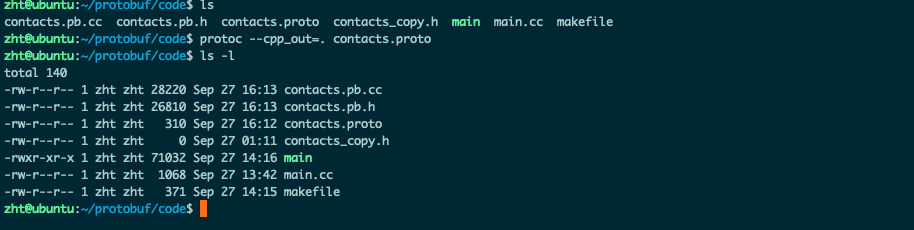
如果打开产生的contacts.pb.h查看的话,可以看到多了一个Phone类和对应的属性设置/获取接口,并且在PersonInfo中会多了一个类似数组的phone字段 。
按照我们之前的总结,任意内置类型字段,如果要设置他的值,使用set_{fieldName}接口即可,但是如果是一个message字段,应该使用mutable_{fieldId} 方法,返回值为消息类型的指针,这类方法会为我们开辟好空间,可以直接对这块空间的内容进行修改。
例如:
cpp
::contacts::PersonInfo* mutable_personinfo(int index);对于使用repeated修饰的字段,pb给我们提供了add_{fieldId}的方法,同样也是开辟好空间之后返回一个指针,我们直接对这个指针指向的空间进行修改,同时也提供了{fieldId}_size方法用于获取这个数组的元素个数
cpp
::contacts::PersonInfo* add_personinfo();
int personinfo_size() const;
接下来就是C++代码实现了,涉及到Protobuf接口的使用,会在注释中进行讲解,自行取用
cpp
// 新增联系人 write.cc
#include <iostream>
#include <string>
#include <fstream>
#include "contacts.pb.h"

using namespace std;
using namespace contacts;


/**
 * 新增联系人
 */
void addPersonInfo(PersonInfo* personInfoPtr)
{
    cout << "--------------新增联系人信息----------------" << endl;

    cout << "请输入联系人姓名:" << endl;
    string name;
    getline(cin, name);
    personInfoPtr->set_name(name); // set_*设置属性

    cout << "请输入联系人年龄:" << endl;
    int age;
    cin >> age;
    personInfoPtr->set_age(age);
    cin.ignore(256, '\n');

    for(int i = 1; ; i++)
    {
        cout << "请输入联系人电话(" << i << ")(只输入回车结束新增):" << endl;
        string phon_number;
        getline(cin, phon_number);
        if(phon_number.empty())
        {
            break;
        }

        Phone* phone = personInfoPtr->add_phone(); // add_*获取新增数组元素指针
        phone->set_number(phon_number);
    }

    cout << "--------------新增联系人信息完成----------------" << endl;
}

int main(int argc, char* argv[])
{
    // GOOGLE_PROTOBUF_VERIFY_VERSION宏,用于验证没有意外链接到与头文件产物不兼容的库版本
    // 如果检测到版本不匹配将打印错误信息并终止程序运行。
    // 对于每个.pb.cc文件,在启动时都会自动调用这个宏。
    // 这是一个推荐做法,但不是必要的
    GOOGLE_PROTOBUF_VERIFY_VERSION;

    if(argc < 2)
    {
        cerr << "Usage: " << argv[0] << " <contacts_file>" << endl;
        return -1;
    }

    // 读取联系人信息文件
    Contacts contacts;

    fstream input(argv[1], ios::in | ios::binary);
    if(!input)
    {
        cout << argv[1] << ":not found. Create a new file"  << endl;
    }
    else if(!contacts.ParseFromIstream(&input)) // 解析联系人信息文件
    {
        cerr << "Failed to parse contacts." << endl;
        input.close();
        return -2;
    }

    // 新增联系人信息
    PersonInfo* personInfoPtr = contacts.add_personinfo(); // add_*获取新增数组元素指针
    addPersonInfo(personInfoPtr);

    // 将联系人信息写入文件
    fstream output(argv[1], ios::out | ios::trunc | ios::binary);
    if(!contacts.SerializeToOstream(&output)) // 序列化联系人信息
    {
        cerr << "Failed to write contacts." << endl;
        output.close();
        input.close();
        return -3;
    }

    input.close();
    output.close();

    google::protobuf::ShutdownProtobufLibrary();
    // 在程序结束时调用 ShutdownProtobufLibrary(),为了删除 Protocol Buffer 库分配的所有全局对象。
    // 对于大多数程序来说这不是必要的,因为该过程无论如何都要退出,并且操作系统将负责回收其所有内存。
    // 但是,如果你使用了内存泄漏检查程序,该程序需要释放每个最后对象,或者你正在编写可以由单个进程多次加载和卸载的库,那么你可能希望强制使用 Protocol Buffers 来清理所有内容。

    return 0;
}
makefile
write:write.cc contacts.pb.cc
	g++ $^ -o $@ -std=c++11 -lprotobuf

.PHONY:clean
clean:
	rm -f write
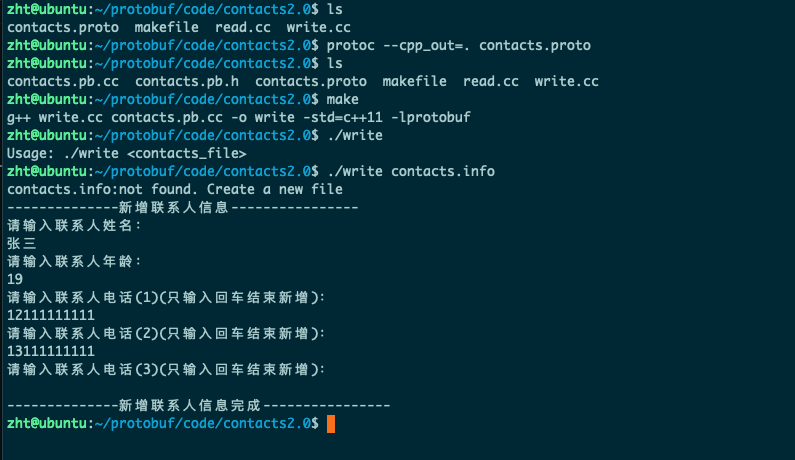
编译运行之后结果如下:
分别使用cat和hexdump查看下catacts.info中的内容
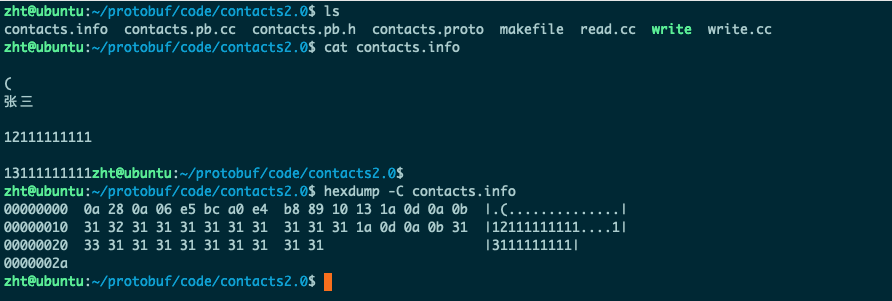
可以看到使用cat按照文本编码的形式打开,内容有乱码,表示确实是以二进制的形式存入的,使用hexdump查看16进制内容也能查看到一些。
2. 读取联系人并打印
cpp
#include "contacts.pb.h"
#include <iostream>
#include <fstream>

using namespace std;
using namespace contacts;

void PrintPersonInfo(const Contacts& contacts)
{
    cout << "--------------联系人信息----------------" << endl;
    for(int i = 0; i < contacts.personinfo_size(); i++) // 通过*_size()获取数组元素个数
    {
        cout << "--------------联系人(" << i + 1 << ")----------------" << endl;
        const PersonInfo& personInfo = contacts.personinfo(i); // 通过传入index获取指定下标的数组元素
        cout << "姓名:" << personInfo.name() << endl;
        cout << "年龄:" << personInfo.age() << endl;

        for(int j = 0; j < personInfo.phone_size(); j++)
        {
            const Phone& phone = personInfo.phone(j);
            cout << "电话(" << j + 1 << "):" << phone.number() << endl;
        }
    }
    cout << "--------------联系人信息输出完成----------------" << endl;
}

int main(int argc, char* argv[])
{
    GOOGLE_PROTOBUF_VERIFY_VERSION;

    if(argc < 2)
    {
        cerr << "Usage: " << argv[0] << " <contacts_file>" << endl;
        return -1;
    }

    // 读取联系人信息文件
    Contacts contacts;
    fstream input(argv[1], ios::in | ios::binary);
    if(!input)
    {
        cerr << argv[1] << ": not found." << endl;
        return -2;
    }
    if(!contacts.ParseFromIstream(&input))
    {
        cerr << "Failed to parse contacts." << endl;
        input.close();
        return -3;
    }

    // 输出联系人信息
    PrintPersonInfo(contacts);

    input.close();

    google::protobuf::ShutdownProtobufLibrary();
    return 0;
}
makefile
all:temp write read

temp: contacts.proto
	protoc --cpp_out=. contacts.proto

write:write.cc contacts.pb.cc
	g++ $^ -o $@ -std=c++11 -lprotobuf

read:read.cc contacts.pb.cc
	g++ $^ -o $@ -std=c++11 -lprotobuf

.PHONY:clean
clean:
	rm -f write read contacts.pb.cc contacts.pb.h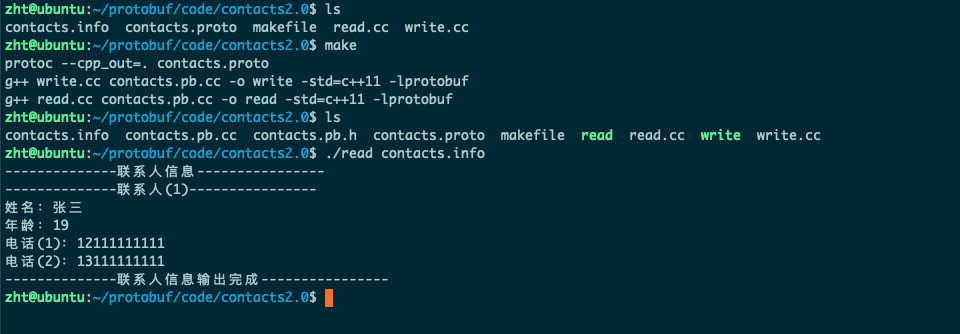
看到能够正常打印之前存储的内容。
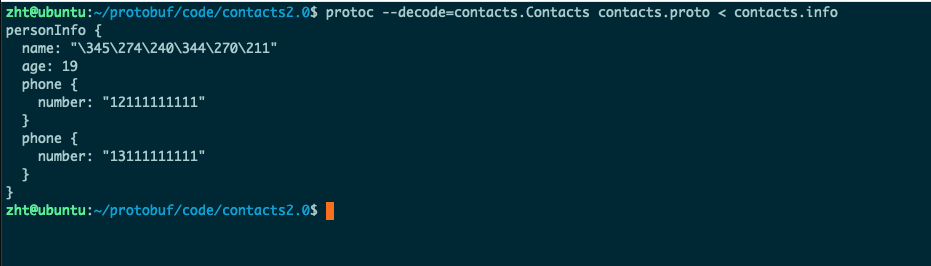
另一种验证存储正确的方法
我们们可以用
protoc -h命令来查看 ProtoBuf 为我们提供的所有命令 option。其中 ProtoBuf提供一个命令选项 --decode,表示从标准输入中读取给定类型的二进制消息,并将其以文本格式写入标准输出。 消息类型必须在 .proto 文件或导入的文件中定义。
3. enum类型
3.1 语法规则
protobuf语法支持我们使用enum定义并使用枚举类型,语法规则和规范如下
- 枚举类型名称 :大驼峰,例如
MyEnum - 常量值名称 :全大写字母,使用下划线连接,例如
ENUM_CONST = 0;
在我们的通讯录中,可以对Phone提供一个类型属性,说明是手机还是座机,定义如下
protobuf
enum PhonyType {
  MP = 0; // 手机类型
  TEL = 1; // 座机类型
}
要注意枚举类型的定义有以下几种规则:
-
0值常量必须存在,且要作为第一个元素。这是为了与 proto2 的语义兼容:第一个元素作为默认值,且值为 0。
-
枚举类型可以在消息外定义,也可以在消息体内定义(嵌套)。
-
枚举的常量值在 32 位整数的范围内。但因负值无效因而不建议使用(与编码规则有关)。
3.2 枚举规则
将两个'具有相同枚举值名称' 的枚举类型放在单个 .proto 文件下测试时,编译后会报错:某某某常 量已经被定义!所以这里要注意:
- 同级(同层)的枚举类型,各个枚举类型中的常量不能重名。
- 单个 .proto 文件下,最外层枚举类型和嵌套枚举类型,不算同级。
- 多个 .proto 文件下,若一个文件引入了其他文件,且每个文件都未声明 package,每个 proto 文件中的枚举类型都在最外层,算同级。
- 多个 .proto 文件下,若一个文件引入了其他文件,并且每个文件都声明了package,不算同级
例如:
protobuf
// *** 情况1:同文件、同级枚举相同枚举常量 ***
enum PhoneType {
  MP = 0;
  TEL = 1;
}
enum PhoneTypeCopy {
  MP = 0;   // 编译报错,MP已定义
}
// *** 情况2:同文件、不同级枚举相同枚举常量 ***
enum PhoneTypeCopy {
  MP = 0;
}
message Phone {
  string number = 1;
  enum PhoneType {
      MP = 0;  // 不同级枚举,正确
      TEL = 1;
    }
}
// *** 情况3:不同文件、多文件都未声明package ***
// phone1.proto
enum PhoneTypeCopy {
  MP = 0;
}
// phone2.proto
import "phone1.proto";
enum PhoneType {
  MP = 0; // 编译报错,MP已定义
  TEL = 1;
}
// *** 情况2:同文件、不同级枚举相同枚举常量 ***
// phone1.proto
package phone1;
enum PhoneTypeCopy {
  MP = 0;
}
// phone2.proto
import "phone1.proto";
package phone2.proto;
enum PhoneType {
  MP = 0; // 用法正确
  TEL = 1;
}
3.3 通讯录2.1版本
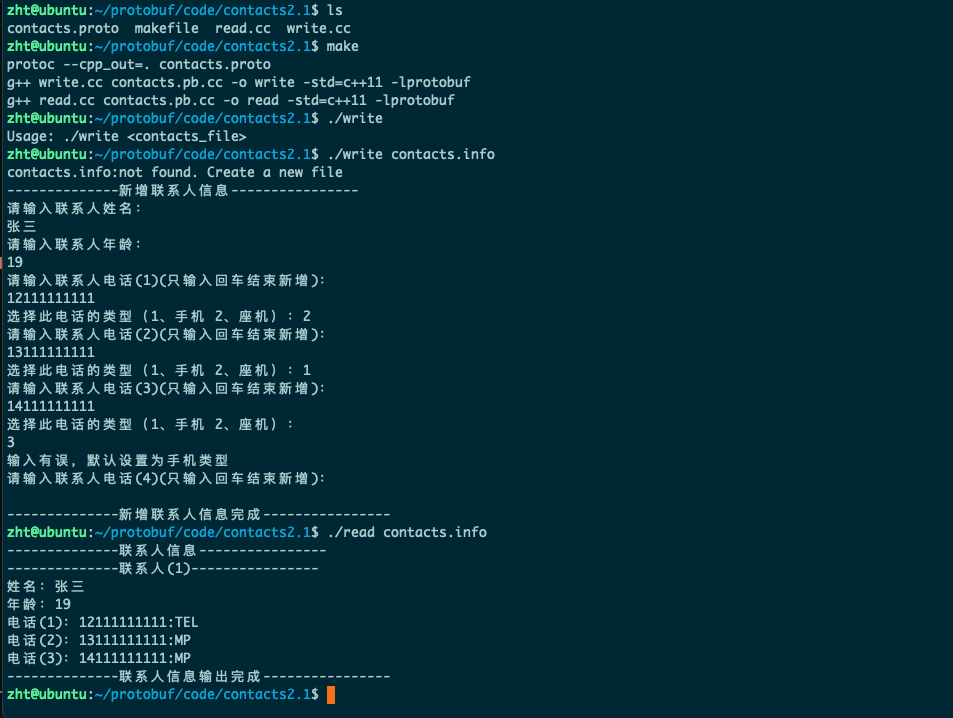
使用enum更行结果如下
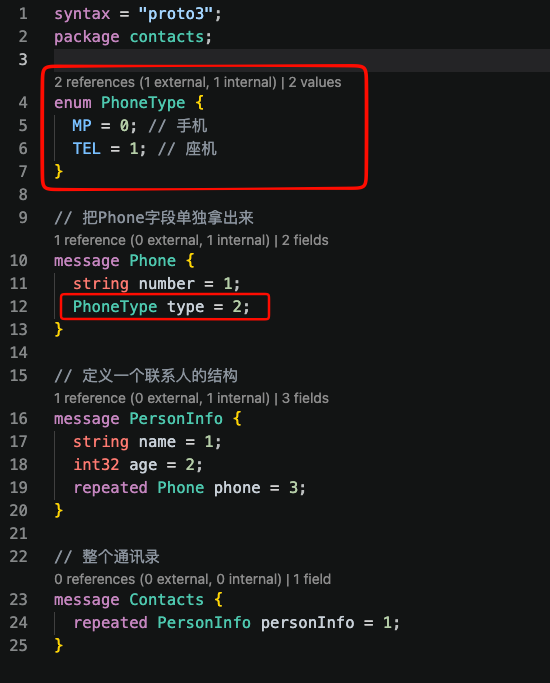
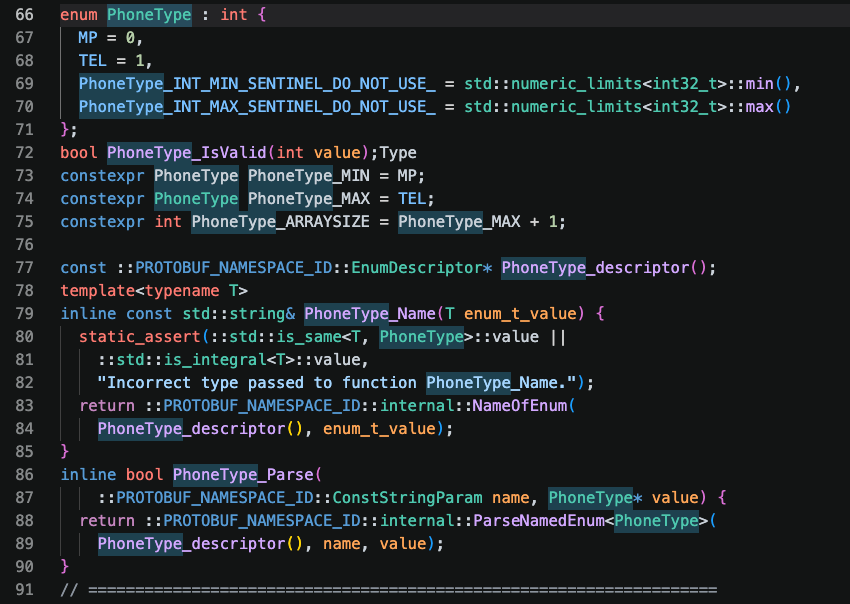
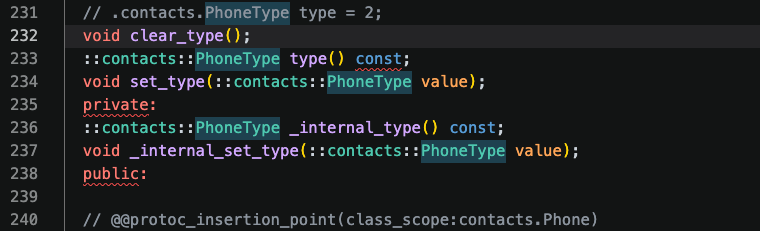
产生的文件变化
- 新生成的PhoneType类型
-
新增属性的设置和获取
在上述的代码中:
- 对于在.proto文件中定义的枚举类型,编译生成的代码中会含有与之对应的枚举类型、校验枚举值是否有效的方法 _IsValid、以及获取枚举值名称的方法 _Name。
- 对于使用了枚举类型的字段,包含设置和获取字段的方法,以及清空字段的方法clear_
cpp
// write.cc
#include <iostream>
#include <string>
#include <fstream>
#include "contacts.pb.h"

using namespace std;
using namespace contacts;


/**
 * 新增联系人
 */
void addPersonInfo(PersonInfo* personInfoPtr)
{
    cout << "--------------新增联系人信息----------------" << endl;

    cout << "请输入联系人姓名:" << endl;
    string name;
    getline(cin, name);
    personInfoPtr->set_name(name); // set_*设置属性

    cout << "请输入联系人年龄:" << endl;
    int age;
    cin >> age;
    personInfoPtr->set_age(age);
    cin.ignore(256, '\n');

    for(int i = 1; ; i++)
    {
        cout << "请输入联系人电话(" << i << ")(只输入回车结束新增):" << endl;
        string phon_number;
        getline(cin, phon_number);
        if(phon_number.empty())
        {
            break;
        }

        Phone* phone = personInfoPtr->add_phone(); // add_*获取新增数组元素指针
        phone->set_number(phon_number);

        cout << "选择此电话的类型(1、手机 2、座机):";
        int type;
        cin >> type;
        cin.ignore(256, '\n');
        switch(type)
        {
            case 1:
                phone->set_type(contacts::MP);
                break;
            case 2:
                phone->set_type(contacts::TEL);
                break;
            default:
                cout << "输入有误,默认设置为手机类型" << endl;
                break;
        }
    }

    cout << "--------------新增联系人信息完成----------------" << endl;
}

int main(int argc, char* argv[])
{
    // GOOGLE_PROTOBUF_VERIFY_VERSION宏,用于验证没有意外链接到与头文件产物不兼容的库版本
    // 如果检测到版本不匹配将打印错误信息并终止程序运行。
    // 对于每个.pb.cc文件,在启动时都会自动调用这个宏。
    // 这是一个推荐做法,但不是必要的
    GOOGLE_PROTOBUF_VERIFY_VERSION;

    if(argc < 2)
    {
        cerr << "Usage: " << argv[0] << " <contacts_file>" << endl;
        return -1;
    }

    // 读取联系人信息文件
    Contacts contacts;

    fstream input(argv[1], ios::in | ios::binary);
    if(!input)
    {
        cout << argv[1] << ":not found. Create a new file"  << endl;
    }
    else if(!contacts.ParseFromIstream(&input)) // 解析联系人信息文件
    {
        cerr << "Failed to parse contacts." << endl;
        input.close();
        return -2;
    }

    // 新增联系人信息
    PersonInfo* personInfoPtr = contacts.add_personinfo(); // add_*获取新增数组元素指针
    addPersonInfo(personInfoPtr);

    // 将联系人信息写入文件
    fstream output(argv[1], ios::out | ios::trunc | ios::binary);
    if(!contacts.SerializeToOstream(&output)) // 序列化联系人信息
    {
        cerr << "Failed to write contacts." << endl;
        output.close();
        input.close();
        return -3;
    }

    input.close();
    output.close();

    google::protobuf::ShutdownProtobufLibrary();
    // 在程序结束时调用 ShutdownProtobufLibrary(),为了删除 Protocol Buffer 库分配的所有全局对象。
    // 对于大多数程序来说这不是必要的,因为该过程无论如何都要退出,并且操作系统将负责回收其所有内存。
    // 但是,如果你使用了内存泄漏检查程序,该程序需要释放每个最后对象,或者你正在编写可以由单个进程多次加载和卸载的库,那么你可能希望强制使用 Protocol Buffers 来清理所有内容。

    return 0;
}
cpp
// read.cc
#include "contacts.pb.h"
#include <iostream>
#include <fstream>

using namespace std;
using namespace contacts;

void PrintPersonInfo(const Contacts& contacts)
{
    cout << "--------------联系人信息----------------" << endl;
    for(int i = 0; i < contacts.personinfo_size(); i++) // 通过*_size()获取数组元素个数
    {
        cout << "--------------联系人(" << i + 1 << ")----------------" << endl;
        const PersonInfo& personInfo = contacts.personinfo(i); // 通过传入index获取指定下标的数组元素
        cout << "姓名:" << personInfo.name() << endl;
        cout << "年龄:" << personInfo.age() << endl;

        for(int j = 0; j < personInfo.phone_size(); j++)
        {
            const Phone& phone = personInfo.phone(j);
            string number = phone.number();
            string type = contacts::PhoneType_Name(phone.type());
            cout << "电话(" << j + 1 << "):" << number <<":" << type << endl;
        }
    }
    cout << "--------------联系人信息输出完成----------------" << endl;
}

int main(int argc, char* argv[])
{
    GOOGLE_PROTOBUF_VERIFY_VERSION;

    if(argc < 2)
    {
        cerr << "Usage: " << argv[0] << " <contacts_file>" << endl;
        return -1;
    }

    // 读取联系人信息文件
    Contacts contacts;
    fstream input(argv[1], ios::in | ios::binary);
    if(!input)
    {
        cerr << argv[1] << ": not found." << endl;
        return -2;
    }
    if(!contacts.ParseFromIstream(&input))
    {
        cerr << "Failed to parse contacts." << endl;
        input.close();
        return -3;
    }

    // 输出联系人信息
    PrintPersonInfo(contacts);

    input.close();

    google::protobuf::ShutdownProtobufLibrary();
    return 0;
}
4. Any类型
4.1 protobuf语法
protobuf的message字段也可以声明为Any类型,我们可以理解为任意类型。
- 使用Any可以存储任意的消息类型
- Any类型也可以使用repeated修饰
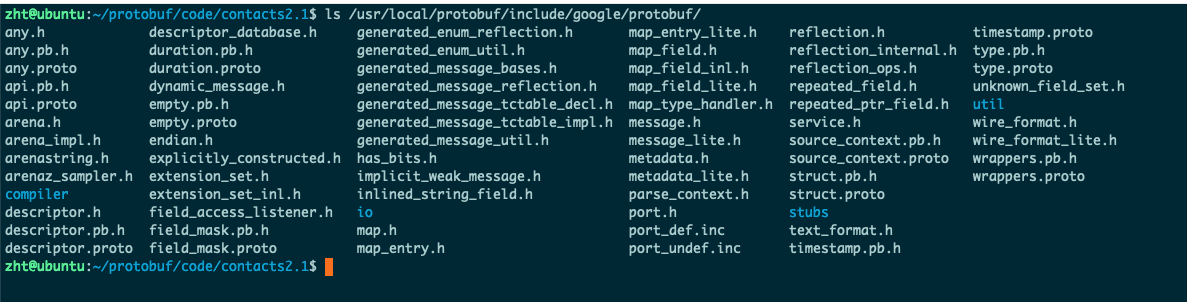
Any类型是安装的时候就已经提供的,我们可以在安装目录下的include目录查找预置的proto文件
4.2 通讯录2.2版本
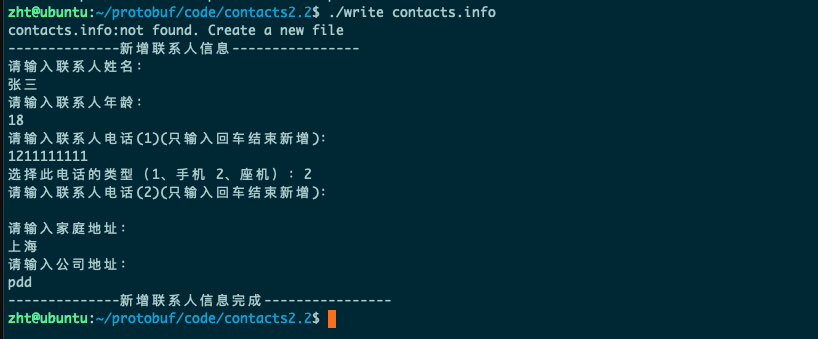
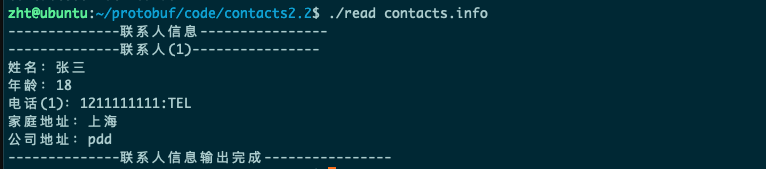
在2.2版本中,我们给每个PersonInfo中新增一个Any类型的字段,用来存储地址信息。
所以最终将contacts.proto文件更新成如下情况
protobuf
syntax = "proto3";
package contacts;

import "google/protobuf/any.proto"; // 引入Any类型

enum PhoneType {
  MP = 0; // 手机
  TEL = 1; // 座机
}

// 新增Address字段
message Address {
  string home = 1; // 家庭地址
  string company = 2; // 公司地址
}

// 把Phone字段单独拿出来
message Phone {
  string number = 1;
  PhoneType type = 2;
}

// 定义一个联系人的结构
message PersonInfo {
  string name = 1;
  int32 age = 2;
  repeated Phone phone = 3;
  google.protobuf.Any data = 4; // 新增未知类型,目前我们用来存储地址
}

// 整个通讯录
message Contacts {
  repeated PersonInfo personInfo = 1;
}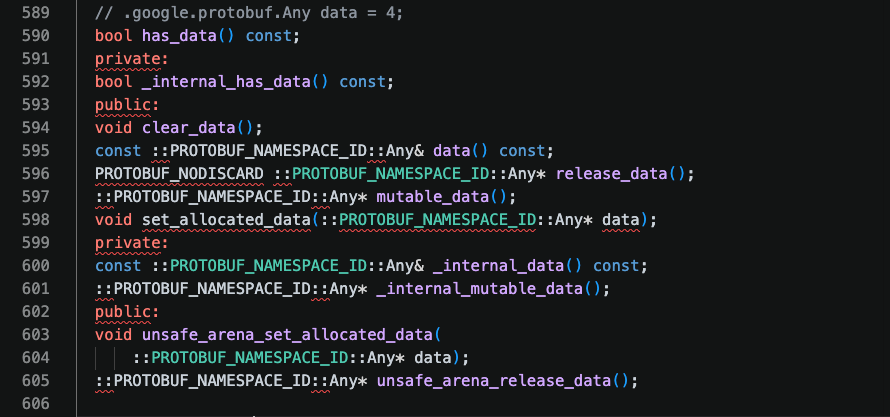
可以看到新增了Any类型相关的字段内容,对于Any类型字段设置和获取:
- 获取方法的方法名称与小写字段名称完全相同。
- 设置方法可以使用 mutable_ 方法,返回值为Any类型的指针,这类方法会为我们开辟好空间,可以直接对这块空间的内容进行
修改。
可以看下安装目录的Ang.pb.h中针对any类型的处理
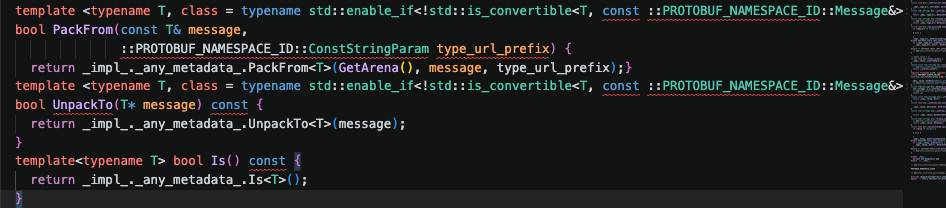
核心就是三个接口
- PackFrom: 将任意消息类型转为 Any 类型。
- UnpackTo: Any 类型转回之前设置的任意消息类型
- Is:判断存放的消息类型是否为 typename T
cpp
#include <iostream>
#include <string>
#include <fstream>
#include "contacts.pb.h"

using namespace std;
using namespace contacts;


/**
 * 新增联系人
 */
void addPersonInfo(PersonInfo* personInfoPtr)
{
    cout << "--------------新增联系人信息----------------" << endl;

    cout << "请输入联系人姓名:" << endl;
    string name;
    getline(cin, name);
    personInfoPtr->set_name(name); // set_*设置属性

    cout << "请输入联系人年龄:" << endl;
    int age;
    cin >> age;
    personInfoPtr->set_age(age);
    cin.ignore(256, '\n');

    for(int i = 1; ; i++)
    {
        cout << "请输入联系人电话(" << i << ")(只输入回车结束新增):" << endl;
        string phon_number;
        getline(cin, phon_number);
        if(phon_number.empty())
        {
            break;
        }

        Phone* phone = personInfoPtr->add_phone(); // add_*获取新增数组元素指针
        phone->set_number(phon_number);

        cout << "选择此电话的类型(1、手机 2、座机):";
        int type;
        cin >> type;
        cin.ignore(256, '\n');
        switch(type)
        {
            case 1:
                phone->set_type(contacts::MP);
                break;
            case 2:
                phone->set_type(contacts::TEL);
                break;
            default:
                cout << "输入有误,默认设置为手机类型" << endl;
                break;
        }
    }

    // 新增地址信息
    Address address;
    cout << "请输入家庭地址:" << endl;
    string home_address;
    getline(cin, home_address);
    address.set_home(home_address);
    cout << "请输入公司地址:" << endl;
    string company_address;
    getline(cin, company_address);
    address.set_company(company_address);

    // 获取data字段的指针,往里面放东西就行
    google::protobuf::Any* data = personInfoPtr->mutable_data(); // 已经开辟好空间
    data->PackFrom(address); // 将Address类型打包到Any类型中

    cout << "--------------新增联系人信息完成----------------" << endl;
}

int main(int argc, char* argv[])
{
    // GOOGLE_PROTOBUF_VERIFY_VERSION宏,用于验证没有意外链接到与头文件产物不兼容的库版本
    // 如果检测到版本不匹配将打印错误信息并终止程序运行。
    // 对于每个.pb.cc文件,在启动时都会自动调用这个宏。
    // 这是一个推荐做法,但不是必要的
    GOOGLE_PROTOBUF_VERIFY_VERSION;

    if(argc < 2)
    {
        cerr << "Usage: " << argv[0] << " <contacts_file>" << endl;
        return -1;
    }

    // 读取联系人信息文件
    Contacts contacts;

    fstream input(argv[1], ios::in | ios::binary);
    if(!input)
    {
        cout << argv[1] << ":not found. Create a new file"  << endl;
    }
    else if(!contacts.ParseFromIstream(&input)) // 解析联系人信息文件
    {
        cerr << "Failed to parse contacts." << endl;
        input.close();
        return -2;
    }

    // 新增联系人信息
    PersonInfo* personInfoPtr = contacts.add_personinfo(); // add_*获取新增数组元素指针
    addPersonInfo(personInfoPtr);

    // 将联系人信息写入文件
    fstream output(argv[1], ios::out | ios::trunc | ios::binary);
    if(!contacts.SerializeToOstream(&output)) // 序列化联系人信息
    {
        cerr << "Failed to write contacts." << endl;
        output.close();
        input.close();
        return -3;
    }

    input.close();
    output.close();

    google::protobuf::ShutdownProtobufLibrary();
    // 在程序结束时调用 ShutdownProtobufLibrary(),为了删除 Protocol Buffer 库分配的所有全局对象。
    // 对于大多数程序来说这不是必要的,因为该过程无论如何都要退出,并且操作系统将负责回收其所有内存。
    // 但是,如果你使用了内存泄漏检查程序,该程序需要释放每个最后对象,或者你正在编写可以由单个进程多次加载和卸载的库,那么你可能希望强制使用 Protocol Buffers 来清理所有内容。

    return 0;
}
read.cc更新
cpp
#include "contacts.pb.h"
#include <iostream>
#include <fstream>

using namespace std;
using namespace contacts;

void PrintPersonInfo(const Contacts& contacts)
{
    cout << "--------------联系人信息----------------" << endl;
    for(int i = 0; i < contacts.personinfo_size(); i++) // 通过*_size()获取数组元素个数
    {
        cout << "--------------联系人(" << i + 1 << ")----------------" << endl;
        const PersonInfo& personInfo = contacts.personinfo(i); // 通过传入index获取指定下标的数组元素
        cout << "姓名:" << personInfo.name() << endl;
        cout << "年龄:" << personInfo.age() << endl;

        for(int j = 0; j < personInfo.phone_size(); j++)
        {
            const Phone& phone = personInfo.phone(j);
            string number = phone.number();
            string type = contacts::PhoneType_Name(phone.type());
            cout << "电话(" << j + 1 << "):" << number <<":" << type << endl;
        }

        // 判断是否有data字段并且data字段是否是所需类型
        if(personInfo.has_data() && personInfo.data().Is<Address>())
        {
            Address address;
            // 将Any类型的data解包到address中
            personInfo.data().UnpackTo(&address);
            if(!address.home().empty())
                cout << "家庭地址:" << address.home() << endl;
            if(!address.company().empty())
                cout << "公司地址:" << address.company() << endl;
        }
    }
    cout << "--------------联系人信息输出完成----------------" << endl;
}

int main(int argc, char* argv[])
{
    GOOGLE_PROTOBUF_VERIFY_VERSION;

    if(argc < 2)
    {
        cerr << "Usage: " << argv[0] << " <contacts_file>" << endl;
        return -1;
    }

    // 读取联系人信息文件
    Contacts contacts;
    fstream input(argv[1], ios::in | ios::binary);
    if(!input)
    {
        cerr << argv[1] << ": not found." << endl;
        return -2;
    }
    if(!contacts.ParseFromIstream(&input))
    {
        cerr << "Failed to parse contacts." << endl;
        input.close();
        return -3;
    }

    // 输出联系人信息
    PrintPersonInfo(contacts);

    input.close();

    google::protobuf::ShutdownProtobufLibrary();
    return 0;
}
5. oneof类型
5.1 语法
如果消息中有很多可选字段,并且将来只会有一个字段会被设置值,那么就可以使用oneof来修饰,也能达到减小message大小的目的。
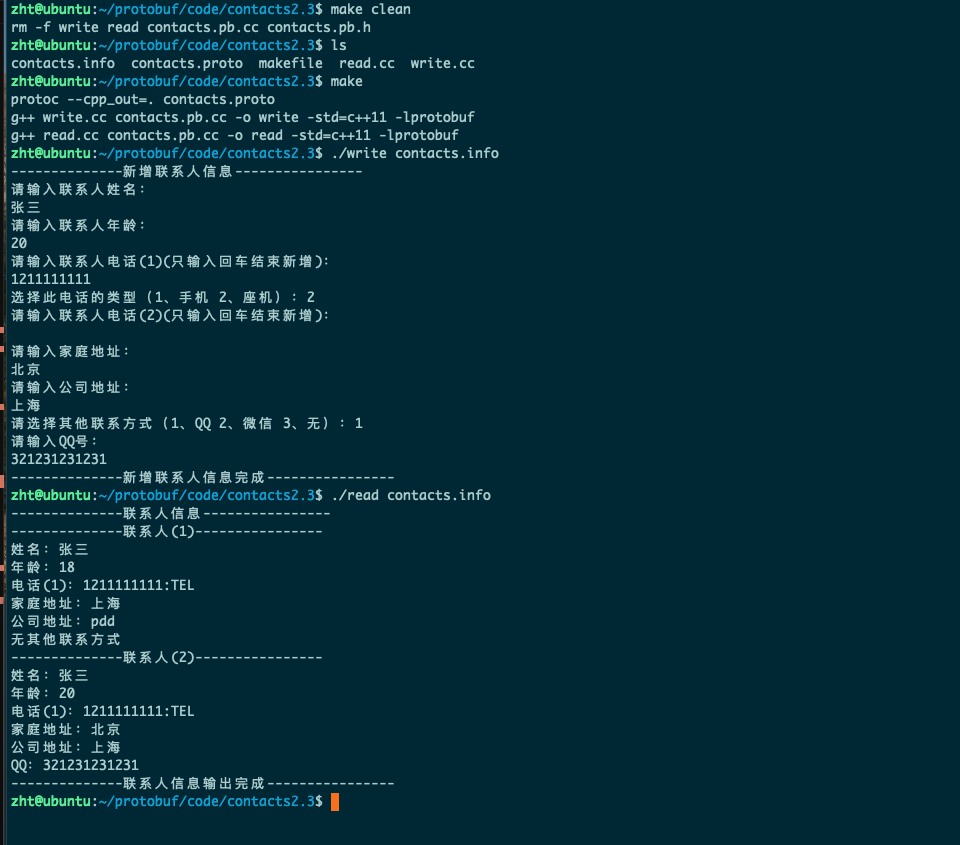
例如:在通讯录中新增一个其他联系方式字段,有且仅有QQ或者微信,那么就可以使用oneof这个字段来修饰。
所以可以理解成oneof类似C/C++中的union结构。
结构语法:
protobuf
message MessageName {
  oneof Content {
    string text = 1;
    bytes image = 2;
    int32 video_id = 3;
  }
  string other = 4;
}
当然使用oneof的时候也有一些注意事项:
- 可选字段和同一message内其他字段共享FieldId,所以不能冲突
- oneof不能使用repeated修饰
- oneof不支持map类型(map后面会讲)
- 对于编译产物的内容,如果给对应字段赋值,原来的值会被覆盖
5.2 通讯录2.3版本
protobuf
syntax = "proto3";
package contacts;

import "google/protobuf/any.proto"; // 引入Any类型

enum PhoneType {
  MP = 0; // 手机
  TEL = 1; // 座机
}

// 新增Address字段
message Address {
  string home = 1; // 家庭地址
  string company = 2; // 公司地址
}

// 把Phone字段单独拿出来
message Phone {
  string number = 1;
  PhoneType type = 2;
}

// 定义一个联系人的结构
message PersonInfo {
  string name = 1;
  int32 age = 2;
  repeated Phone phone = 3;
  google.protobuf.Any data = 4;
  oneof other_contact { // 其他联系方式,多选一
    string qq = 5;
    string wechat = 6;
  }
}

// 整个通讯录
message Contacts {
  repeated PersonInfo personInfo = 1;
}
编译之后会发现有如下这些东西:
cpp
enum OtherContactCase {
	kQq = 5,
	kWeixin = 6,
    OTHER_CONTACT_NOT_SET = 0,
};
// string qq = 5;
bool has_qq() const;
void clear_qq();
const std::string& qq() const;
template <typename ArgT0 = const std::string&, typename... ArgT>
void set_qq(ArgT0&& arg0, ArgT... args);
std::string* mutable_qq();
PROTOBUF_NODISCARD std::string* release_qq();
void set_allocated_qq(std::string* qq);
// string wechat = 6;
bool has_weixin() const;
void clear_weixin();
const std::string& weixin() const;
template <typename ArgT0 = const std::string&, typename... ArgT>
void set_weixin(ArgT0&& arg0, ArgT... args);
std::string* mutable_weixin();
PROTOBUF_NODISCARD std::string* release_weixin();
void set_allocated_weixin(std::string* weixin);
void clear_other_contact();
OtherContactCase other_contact_case() const;
write.cc更新
cpp
#include <iostream>
#include <string>
#include <fstream>
#include "contacts.pb.h"

using namespace std;
using namespace contacts;

/**
 * 新增联系人
 */
void addPersonInfo(PersonInfo *personInfoPtr)
{
    cout << "--------------新增联系人信息----------------" << endl;

    cout << "请输入联系人姓名:" << endl;
    string name;
    getline(cin, name);
    personInfoPtr->set_name(name); // set_*设置属性

    cout << "请输入联系人年龄:" << endl;
    int age;
    cin >> age;
    personInfoPtr->set_age(age);
    cin.ignore(256, '\n');

    for (int i = 1;; i++)
    {
        cout << "请输入联系人电话(" << i << ")(只输入回车结束新增):" << endl;
        string phon_number;
        getline(cin, phon_number);
        if (phon_number.empty())
        {
            break;
        }

        Phone *phone = personInfoPtr->add_phone(); // add_*获取新增数组元素指针
        phone->set_number(phon_number);

        cout << "选择此电话的类型(1、手机 2、座机):";
        int type;
        cin >> type;
        cin.ignore(256, '\n');
        switch (type)
        {
        case 1:
            phone->set_type(contacts::MP);
            break;
        case 2:
            phone->set_type(contacts::TEL);
            break;
        default:
            cout << "输入有误,默认设置为手机类型" << endl;
            break;
        }
    }

    // 新增地址信息
    Address address;
    cout << "请输入家庭地址:" << endl;
    string home_address;
    getline(cin, home_address);
    address.set_home(home_address);
    cout << "请输入公司地址:" << endl;
    string company_address;
    getline(cin, company_address);
    address.set_company(company_address);

    // 获取data字段的指针,往里面放东西就行
    google::protobuf::Any *data = personInfoPtr->mutable_data(); // 已经开辟好空间
    data->PackFrom(address);                                     // 将Address类型打包到Any类型中

    // 新增其他联系方式
    cout << "请选择其他联系方式(1、QQ 2、微信 3、无):";
    int type;
    string ohter_contact;
    cin >> type;
    cin.ignore(256, '\n');
    switch (type)
    {
    case 1:
        cout << "请输入QQ号:" << endl;
        getline(cin, ohter_contact);
        personInfoPtr->set_qq(ohter_contact);
        break;
    case 2:
        cout << "请输入微信号:" << endl;
        getline(cin, ohter_contact);
        personInfoPtr->set_wechat(ohter_contact);
        break;
    case 3:
        break;
    default:
        cout << "输入有误,默认设置为无" << endl;
        break;
    }

    cout << "--------------新增联系人信息完成----------------" << endl;
}

int main(int argc, char *argv[])
{
    // GOOGLE_PROTOBUF_VERIFY_VERSION宏,用于验证没有意外链接到与头文件产物不兼容的库版本
    // 如果检测到版本不匹配将打印错误信息并终止程序运行。
    // 对于每个.pb.cc文件,在启动时都会自动调用这个宏。
    // 这是一个推荐做法,但不是必要的
    GOOGLE_PROTOBUF_VERIFY_VERSION;

    if (argc < 2)
    {
        cerr << "Usage: " << argv[0] << " <contacts_file>" << endl;
        return -1;
    }

    // 读取联系人信息文件
    Contacts contacts;

    fstream input(argv[1], ios::in | ios::binary);
    if (!input)
    {
        cout << argv[1] << ":not found. Create a new file" << endl;
    }
    else if (!contacts.ParseFromIstream(&input)) // 解析联系人信息文件
    {
        cerr << "Failed to parse contacts." << endl;
        input.close();
        return -2;
    }

    // 新增联系人信息
    PersonInfo *personInfoPtr = contacts.add_personinfo(); // add_*获取新增数组元素指针
    addPersonInfo(personInfoPtr);

    // 将联系人信息写入文件
    fstream output(argv[1], ios::out | ios::trunc | ios::binary);
    if (!contacts.SerializeToOstream(&output)) // 序列化联系人信息
    {
        cerr << "Failed to write contacts." << endl;
        output.close();
        input.close();
        return -3;
    }

    input.close();
    output.close();

    google::protobuf::ShutdownProtobufLibrary();
    // 在程序结束时调用 ShutdownProtobufLibrary(),为了删除 Protocol Buffer 库分配的所有全局对象。
    // 对于大多数程序来说这不是必要的,因为该过程无论如何都要退出,并且操作系统将负责回收其所有内存。
    // 但是,如果你使用了内存泄漏检查程序,该程序需要释放每个最后对象,或者你正在编写可以由单个进程多次加载和卸载的库,那么你可能希望强制使用 Protocol Buffers 来清理所有内容。

    return 0;
}
read.cc更新
cpp
#include "contacts.pb.h"
#include <iostream>
#include <fstream>

using namespace std;
using namespace contacts;

void PrintPersonInfo(const Contacts& contacts)
{
    cout << "--------------联系人信息----------------" << endl;
    for(int i = 0; i < contacts.personinfo_size(); i++) // 通过*_size()获取数组元素个数
    {
        cout << "--------------联系人(" << i + 1 << ")----------------" << endl;
        const PersonInfo& personInfo = contacts.personinfo(i); // 通过传入index获取指定下标的数组元素
        cout << "姓名:" << personInfo.name() << endl;
        cout << "年龄:" << personInfo.age() << endl;

        for(int j = 0; j < personInfo.phone_size(); j++)
        {
            const Phone& phone = personInfo.phone(j);
            string number = phone.number();
            string type = contacts::PhoneType_Name(phone.type());
            cout << "电话(" << j + 1 << "):" << number <<":" << type << endl;
        }

        // 判断是否有data字段并且data字段是否是所需类型
        if(personInfo.has_data() && personInfo.data().Is<Address>())
        {
            Address address;
            // 将Any类型的data解包到address中
            personInfo.data().UnpackTo(&address);
            if(!address.home().empty())
                cout << "家庭地址:" << address.home() << endl;
            if(!address.company().empty())
                cout << "公司地址:" << address.company() << endl;
        }
        // 1. has_*()方法判断oneof类型的字段是否存在
        // if(personInfo.has_qq())
        //     cout << "QQ:" << personInfo.qq() << endl;
        // if(personInfo.has_wechat())
        //     cout << "微信:" << personInfo.wechat() << endl;
        // 2. 通过oneof类型的字段枚举值判断
        switch(personInfo.other_contact_case())
        {
        case PersonInfo::kQq:
            cout << "QQ:" << personInfo.qq() << endl;
            break;
        case PersonInfo::kWechat:
            cout << "微信:" << personInfo.wechat() << endl;
            break;
        default:
            cout << "无其他联系方式" << endl;
            break;
        }
    }
    cout << "--------------联系人信息输出完成----------------" << endl;
}

int main(int argc, char* argv[])
{
    GOOGLE_PROTOBUF_VERIFY_VERSION;

    if(argc < 2)
    {
        cerr << "Usage: " << argv[0] << " <contacts_file>" << endl;
        return -1;
    }

    // 读取联系人信息文件
    Contacts contacts;
    fstream input(argv[1], ios::in | ios::binary);
    if(!input)
    {
        cerr << argv[1] << ": not found." << endl;
        return -2;
    }
    if(!contacts.ParseFromIstream(&input))
    {
        cerr << "Failed to parse contacts." << endl;
        input.close();
        return -3;
    }

    // 输出联系人信息
    PrintPersonInfo(contacts);

    input.close();

    google::protobuf::ShutdownProtobufLibrary();
    return 0;
}
6. map类型
6.1 语法
protobuf语法支持创建一个关联映射字段,类似C++的map和unordered_map的使用体验,格式为
protobuf
message MessageType {
  map<key_type, value_type> map_fieldName = fieldId;
}
注意:
- key_type可以是非float和double外的任意标量类型,value_type可以是任意类型
- map字段不可以使用repeated修饰
- map中存入的元素是无序的
对于我们刚接触,可以把它理解成类unordered_map的容器使用,但是实际生底层并不是unordered_map也不是map.
6.2 通讯录2.4版本
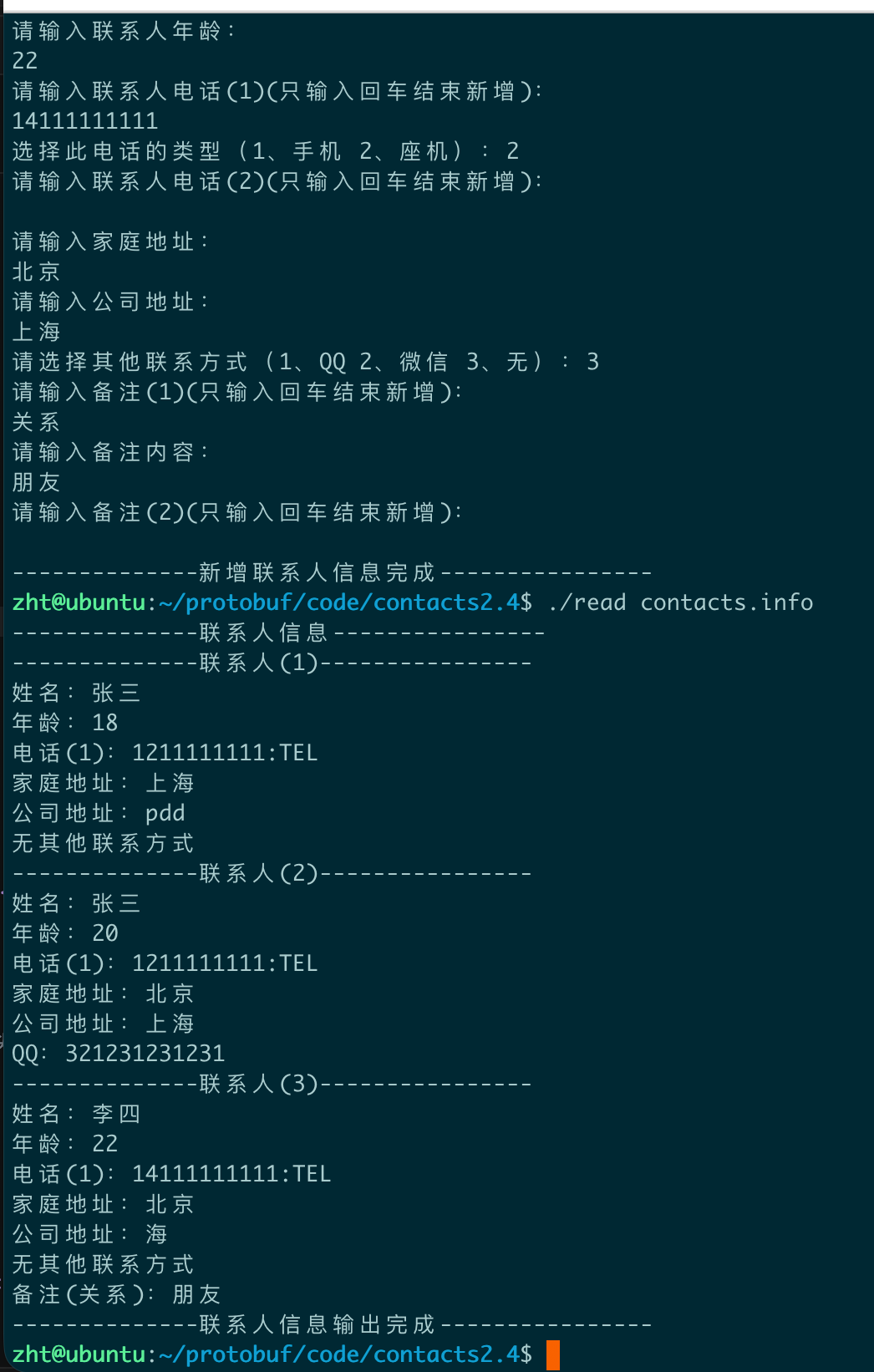
使用兼职对的形式给每个联系人新增描述字段
protobuf
syntax = "proto3";
package contacts;

import "google/protobuf/any.proto"; // 引入Any类型

enum PhoneType {
  MP = 0; // 手机
  TEL = 1; // 座机
}

// 新增Address字段
message Address {
  string home = 1; // 家庭地址
  string company = 2; // 公司地址
}

// 把Phone字段单独拿出来
message Phone {
  string number = 1;
  PhoneType type = 2;
}

// 定义一个联系人的结构
message PersonInfo {
  string name = 1;
  int32 age = 2;
  repeated Phone phone = 3;
  google.protobuf.Any data = 4;
  oneof other_contact {
    string qq = 5;
    string wechat = 6;
  }
  map<string, string> remark = 7; // 备注
}

// 整个通讯录
message Contacts {
  repeated PersonInfo personInfo = 1;
}
cpp
#include <iostream>
#include <string>
#include <fstream>
#include "contacts.pb.h"

using namespace std;
using namespace contacts;

/**
 * 新增联系人
 */
void addPersonInfo(PersonInfo *personInfoPtr)
{
    cout << "--------------新增联系人信息----------------" << endl;

    cout << "请输入联系人姓名:" << endl;
    string name;
    getline(cin, name);
    personInfoPtr->set_name(name); // set_*设置属性

    cout << "请输入联系人年龄:" << endl;
    int age;
    cin >> age;
    personInfoPtr->set_age(age);
    cin.ignore(256, '\n');

    for (int i = 1;; i++)
    {
        cout << "请输入联系人电话(" << i << ")(只输入回车结束新增):" << endl;
        string phon_number;
        getline(cin, phon_number);
        if (phon_number.empty())
        {
            break;
        }

        Phone *phone = personInfoPtr->add_phone(); // add_*获取新增数组元素指针
        phone->set_number(phon_number);

        cout << "选择此电话的类型(1、手机 2、座机):";
        int type;
        cin >> type;
        cin.ignore(256, '\n');
        switch (type)
        {
        case 1:
            phone->set_type(contacts::MP);
            break;
        case 2:
            phone->set_type(contacts::TEL);
            break;
        default:
            cout << "输入有误,默认设置为手机类型" << endl;
            break;
        }
    }

    // 新增地址信息
    Address address;
    cout << "请输入家庭地址:" << endl;
    string home_address;
    getline(cin, home_address);
    address.set_home(home_address);
    cout << "请输入公司地址:" << endl;
    string company_address;
    getline(cin, company_address);
    address.set_company(company_address);

    // 获取data字段的指针,往里面放东西就行
    google::protobuf::Any *data = personInfoPtr->mutable_data(); // 已经开辟好空间
    data->PackFrom(address);                                     // 将Address类型打包到Any类型中

    // 新增其他联系方式
    cout << "请选择其他联系方式(1、QQ 2、微信 3、无):";
    int type;
    string ohter_contact;
    cin >> type;
    cin.ignore(256, '\n');
    switch (type)
    {
    case 1:
        cout << "请输入QQ号:" << endl;
        getline(cin, ohter_contact);
        personInfoPtr->set_qq(ohter_contact);
        break;
    case 2:
        cout << "请输入微信号:" << endl;
        getline(cin, ohter_contact);
        personInfoPtr->set_wechat(ohter_contact);
        break;
    case 3:
        break;
    default:
        cout << "输入有误,默认设置为无" << endl;
        break;
    }

    // 新增备注信息
    for(int i = 1; ; ++i)
    {
        cout << "请输入备注(" << i << ")(只输入回车结束新增):" << endl;
        string remark_key;
        getline(cin, remark_key);
        if (remark_key.empty())
            break;
        cout << "请输入备注内容:" << endl;
        string remark_value;
        getline(cin, remark_value);
        // mutable_remark()获取map的指针
        personInfoPtr->mutable_remark()->insert({remark_key, remark_value});
    }

    cout << "--------------新增联系人信息完成----------------" << endl;
}

int main(int argc, char *argv[])
{
    // GOOGLE_PROTOBUF_VERIFY_VERSION宏,用于验证没有意外链接到与头文件产物不兼容的库版本
    // 如果检测到版本不匹配将打印错误信息并终止程序运行。
    // 对于每个.pb.cc文件,在启动时都会自动调用这个宏。
    // 这是一个推荐做法,但不是必要的
    GOOGLE_PROTOBUF_VERIFY_VERSION;

    if (argc < 2)
    {
        cerr << "Usage: " << argv[0] << " <contacts_file>" << endl;
        return -1;
    }

    // 读取联系人信息文件
    Contacts contacts;

    fstream input(argv[1], ios::in | ios::binary);
    if (!input)
    {
        cout << argv[1] << ":not found. Create a new file" << endl;
    }
    else if (!contacts.ParseFromIstream(&input)) // 解析联系人信息文件
    {
        cerr << "Failed to parse contacts." << endl;
        input.close();
        return -2;
    }

    // 新增联系人信息
    PersonInfo *personInfoPtr = contacts.add_personinfo(); // add_*获取新增数组元素指针
    addPersonInfo(personInfoPtr);

    // 将联系人信息写入文件
    fstream output(argv[1], ios::out | ios::trunc | ios::binary);
    if (!contacts.SerializeToOstream(&output)) // 序列化联系人信息
    {
        cerr << "Failed to write contacts." << endl;
        output.close();
        input.close();
        return -3;
    }

    input.close();
    output.close();

    google::protobuf::ShutdownProtobufLibrary();
    // 在程序结束时调用 ShutdownProtobufLibrary(),为了删除 Protocol Buffer 库分配的所有全局对象。
    // 对于大多数程序来说这不是必要的,因为该过程无论如何都要退出,并且操作系统将负责回收其所有内存。
    // 但是,如果你使用了内存泄漏检查程序,该程序需要释放每个最后对象,或者你正在编写可以由单个进程多次加载和卸载的库,那么你可能希望强制使用 Protocol Buffers 来清理所有内容。

    return 0;
}
cpp
#include "contacts.pb.h"
#include <iostream>
#include <fstream>

using namespace std;
using namespace contacts;

void PrintPersonInfo(const Contacts& contacts)
{
    cout << "--------------联系人信息----------------" << endl;
    for(int i = 0; i < contacts.personinfo_size(); i++) // 通过*_size()获取数组元素个数
    {
        cout << "--------------联系人(" << i + 1 << ")----------------" << endl;
        const PersonInfo& personInfo = contacts.personinfo(i); // 通过传入index获取指定下标的数组元素
        cout << "姓名:" << personInfo.name() << endl;
        cout << "年龄:" << personInfo.age() << endl;

        for(int j = 0; j < personInfo.phone_size(); j++)
        {
            const Phone& phone = personInfo.phone(j);
            string number = phone.number();
            string type = contacts::PhoneType_Name(phone.type());
            cout << "电话(" << j + 1 << "):" << number <<":" << type << endl;
        }

        // 判断是否有data字段并且data字段是否是所需类型
        if(personInfo.has_data() && personInfo.data().Is<Address>())
        {
            Address address;
            // 将Any类型的data解包到address中
            personInfo.data().UnpackTo(&address);
            if(!address.home().empty())
                cout << "家庭地址:" << address.home() << endl;
            if(!address.company().empty())
                cout << "公司地址:" << address.company() << endl;
        }
        // 1. has_*()方法判断oneof类型的字段是否存在
        // if(personInfo.has_qq())
        //     cout << "QQ:" << personInfo.qq() << endl;
        // if(personInfo.has_wechat())
        //     cout << "微信:" << personInfo.wechat() << endl;
        // 2. 通过oneof类型的字段枚举值判断
        switch(personInfo.other_contact_case())
        {
        case PersonInfo::kQq:
            cout << "QQ:" << personInfo.qq() << endl;
            break;
        case PersonInfo::kWechat:
            cout << "微信:" << personInfo.wechat() << endl;
            break;
        default:
            cout << "无其他联系方式" << endl;
            break;
        }
        // 输出备注信息
        for(auto& remark : personInfo.remark())
        {
            cout << "备注(" << remark.first << "):" << remark.second << endl;
        }
    }
    cout << "--------------联系人信息输出完成----------------" << endl;
}

int main(int argc, char* argv[])
{
    GOOGLE_PROTOBUF_VERIFY_VERSION;

    if(argc < 2)
    {
        cerr << "Usage: " << argv[0] << " <contacts_file>" << endl;
        return -1;
    }

    // 读取联系人信息文件
    Contacts contacts;
    fstream input(argv[1], ios::in | ios::binary);
    if(!input)
    {
        cerr << argv[1] << ": not found." << endl;
        return -2;
    }
    if(!contacts.ParseFromIstream(&input))
    {
        cerr << "Failed to parse contacts." << endl;
        input.close();
        return -3;
    }

    // 输出联系人信息
    PrintPersonInfo(contacts);

    input.close();

    google::protobuf::ShutdownProtobufLibrary();
    return 0;
}
7. 默认值
反序列化消息时,如果被反序列化的二进制序列中不包含某个字段,反序列化对象中相应字段时,就会设置为该字段的默认值。不同的类型对应的默认值不同:
- 对于字符串(string),默认值为空字符串。
- 对于字节(bytes),默认值为空字节。
- 对于布尔值(bool),默认值为 false。
- 对于数值类型(int32,int64,uint32...),默认值为 0。
- 对于枚举(enum),默认值是第一个定义的枚举值,必须为 0。
- 对于消息字段(message),未设置该字段。它的取值是依赖于语言。
- 对于设置了repeated 的字段的默认值是空的( 通常是相应语言的一个空列表 )。
- 对于 消息字段 、 oneof字段和 any字段 ,C++和Java语言中都有
has_方法用于判定对应字段是否被设置。
本节完...