1 实验 0(准备)
工具链搭建 ------ Android 上没有 v4l2-ctl / media-ctl
Android 系统本身不带 v4l-utils。板子上只有 /dev/video0~13、/dev/media0~1、/dev/v4l-subdev0~5 这些节点,没有配套命令行工具。
解决过程(在编译服务器 192.168.1.2 上交叉编译):
源码:https://linuxtv.org/downloads/v4l-utils/v4l-utils-1.24.1.tar.bz2
工具链:prebuilts/gcc/linux-x86/aarch64/gcc-arm-10.2-2020.11(aarch64-none-linux-gnu-gcc)
踩了三个坑:
|----------------------|----------------------------------------------------------------------------------------------------------------|------------------------------------------------------------|
| 坑 | 现象 | 解法 |
| v4l2-ctl 是 C++ 写的 | CXX = g++ 用了宿主编译器,Relocations in generic ELF (EM: 183) | configure 时同时指定交叉 CC 和 CXX |
| make 后没重新编译 | 改了 CXX 仍报错 | make clean 后重编 |
| libtool 吞掉 -static | CFLAGS/LDFLAGS=-static 编出来仍是动态链接(依赖 /lib/ld-linux-aarch64.so.1,Android 没有 → 运行报 No such file or directory) | 链接阶段用 make LDFLAGS='-all-static'(libtool 专用参数)并删除旧产物强制重链 |
最终产物(静态 glibc,可直接 push 到 Android 运行):
v4l2-ctl(22.6 MB,含 debug_info)
media-ctl(3.7 MB)
部署:adb push → /data/local/tmp/,chmod 755,另需 adb root(打开 /dev/videoX 需要 root,shell 用户不在 camera 组)。
v4l2-ctl是 Video4Linux2(V4L2) 框架配套的命令行工具,运行在 Linux(Ubuntu 等)系统,多用于调试摄像头、MIPI/USB 图像采集设备;不需要图形界面。 它可以枚举系统里的视频设备、查看驱动能力、获取 / 修改分辨率、帧率、像素格式(YUYV/MJPEG 等)、调节曝光 / 白平衡 / 增益,抓取图像帧,还能直接查询设备支持的控制参数。嵌入式、安卓 BSP 开发中常用来验证图像驱动是否正常,提前排查硬件采集链路问题,是 V4L2 驱动调试最基础的工具。
media-ctl是 Linux Media Controller 子系统配套的命令行调试工具,常和 v4l2-ctl 搭配用于嵌入式摄像头、MIPI CSI、ISP 图像链路调试。它可以枚举媒体设备拓扑,查看链路里的实体(传感器、CSI 接收器、ISP 模块)、端口与路由关系,配置硬件数据流路由,设置实体参数,用来打通从图像传感器到 V4L2 视频节点的数据通路,是 BSP 开发中排查图像采集链路连通性、调试多节点流水线的核心工具;相比 v4l2-ctl 聚焦视频节点参数,media-ctl 负责管理整个图像硬件链路的连接。
2 实验 1:盘点 /dev/video* 与设备清单
v4l2-ctl --list-devices 结果(全部节点归属两大 media 设备):
完整结果:
rk3568_s:/ # v4l2-ctl --list-devices
rkisp-statistics (platform: rkisp):
/dev/video12
/dev/video13
rkcif (platform:rkcif_mipi_lvds):
/dev/video0
/dev/video1
/dev/video2
/dev/video3
/dev/video4
rkisp_mainpath (platform:rkisp-vir0):
/dev/video5
/dev/video6
/dev/video7
/dev/video8
/dev/video9
/dev/video10
/dev/video11
这里RKCIF = ISP 主通路,经过 ISP 全套图像处理后的图像输出。
RKISP mainpath:ISP 主通路,经过 ISP 全套图像处理后的图像输出。
rkisp-statistics (platform: rkisp): /dev/video12 /video13
|------------------|------------------------|------------|------------------|-----------------------------------------------------------------|
| 节点 | 名称 | 驱动 | 类型 | 作用 |
| /dev/video0~3 | stream_cif_mipi_id0~3 | rkcif | Capture MP | CIF 四路输出(id0 为主 RAW 通路) |
| /dev/video4 | rkcif-mipi-luma | rkcif | Metadata Capture | 亮度统计 |
| /dev/video5 | rkisp_mainpath | rkisp_v5 | Capture MP | ISP 主路(YUV 输出) |
| /dev/video6 | rkisp_selfpath | rkisp_v5 | Capture MP | ISP 自路(小分辨率) |
| /dev/video7~9 | rkisp_rawwr0/2/3 | rkisp_v5 | Capture MP | RAW 写回 |
| /dev/video10~11 | rkisp_rawrd0_m/2_s | rkisp_v5 | Output MP | RAW 读回(回灌 ISP) |
| /dev/video12 | rkisp-statistics | rkisp_v5 | Metadata Capture | 3A 统计输出,输出 ISP 统计信息,直方图、AE/AWB/AF 统计数据,给 RKAIQ(3A 算法库)自动调曝光白平衡。 |
| /dev/video13 | rkisp-input-params | rkisp_v5 | Metadata Output | 3A 参数输入,用户态下发 ISP 参数给内核 ISP。 |
| /dev/media0 | rkcif_mipi_lvds | rkcif | media controller | sensor→CIF 拓扑 |
| /dev/media1 | rkisp0 | rkisp-vir0 | media controller | CIF→ISP 拓扑 |
subdev 清单:rockchip-mipi-csi2(subdev0)、rockchip-csi2-dphy0(subdev1)、m00_b_imx415 4-001a-1(subdev2)、rkisp-isp-subdev(subdev3)、rkisp-csi-subdev(subdev4)、rkcif_mipi_lvds(subdev5)。
V4L2 子系统 :负责创建
/dev/videoX,提供视频捕获 / 输出的 v4l2 ioctl 接口(v4l2-ctl 就是调用这套 ioctl)
要点:这不是 UVC 那种"一个 /dev/video0 搞定"的相机,sensor→DPHY→CSI2→CIF→ISP 是一条由多个 entity 组成的 pipeline,必须用 media controller 配合。
3 实验 2:media-ctl -p ------ Entity / Pad / Link
这里分为CIF(Camera Interface / RKCIF for Rockchip,只管 "收数据",MIPI 接收 + 搬运 RAW 原始图像,不做画质处理)和ISP(Image Signal Processor,图像信号处理器,把难看的 Bayer RAW 处理成正常YUV画面)。
CIF = Camera Interface,摄像头接收接口控制器 ,RK 平台叫 RKCIF(Rockchip Camera Interface)。 它本质是MIPI CSI / 并口图像接收硬件 ,只做一件事:接收传感器发来的原始图像数据(Bayer RAW),做数据解串、校验、DMA 搬运到内存。
核心特点
- 不做图像处理:不降噪、不调色、不做去拜耳,原样收下 Sensor 输出的 RAW Bayer 原始数据。
- 只负责数据搬运:MIPI 差分信号 → 转换成并行像素流 → 通过 DMA 把 RAW 帧丢到 DDR 内存。
- 属于前端采集硬件 ,流水线最上游:
Sensor → MIPI → CIF- 在 Media 拓扑里,CIF 的输出是 RAW 图像,你拿到的画面是 Bayer 原始点阵,人眼无法直接正常观看。
RKCIF 支持 MIPI CSI-2,支持多虚拟通道,可以同时接多路 MIPI 摄像头。
ISP(Image Signal Processor,图像信号处理器)
ISP = 图像信号处理器,图像处理硬件流水线 ,RK 平台叫 RKISP。 它接收 CIF 送来的 Bayer RAW 数据,硬件流水线完成一系列图像信号处理,输出人眼可用的 YUV 图像。
ISP 硬件处理链路(简化)
RAW Bayer → 黑电平校正 → 去坏点 → 去拜耳(Demosaic) → 降噪 → 色彩校正、Gamma、对比度 → AE/AWB/AF 统计 → 输出 YUV (NV12 等)
核心特点
- 专门做图像质量修复与转换,是图像处理引擎;
- 会输出两类东西:
- 处理完成 YUV 图像(给预览、录像、AI 推理)
- ISP 统计直方图(给 3A 算法:自动曝光 AE、自动白平衡 AWB、自动对焦 AF)
- 位置:
CIF → ISP
查看media的完整的输出:
rk3568_s:/ # media-ctl -p -d /dev/media0
Opening media device /dev/media0
Enumerating entities
Found 8 entities
Enumerating pads and links
Media controller API version 0.0.255
Media device information
driver rkcif
model rkcif_mipi_lvds
serial
bus info
hw revision 0x0
driver version 0.0.255
Device topology
- entity 1: stream_cif_mipi_id0 (1 pad, 4 links)
type Node subtype V4L
device node name /dev/video0
pad0: Sink
<- "rockchip-mipi-csi2":1 ENABLED
<- "rockchip-mipi-csi2":2 \[\]
<- "rockchip-mipi-csi2":3 \[\]
<- "rockchip-mipi-csi2":4 \[\]
- entity 5: stream_cif_mipi_id1 (1 pad, 4 links)
type Node subtype V4L
device node name /dev/video1
pad0: Sink
<- "rockchip-mipi-csi2":1 \[\]
<- "rockchip-mipi-csi2":2 ENABLED
<- "rockchip-mipi-csi2":3 \[\]
<- "rockchip-mipi-csi2":4 \[\]
- entity 9: stream_cif_mipi_id2 (1 pad, 4 links)
type Node subtype V4L
device node name /dev/video2
pad0: Sink
<- "rockchip-mipi-csi2":1 \[\]
<- "rockchip-mipi-csi2":2 \[\]
<- "rockchip-mipi-csi2":3 ENABLED
<- "rockchip-mipi-csi2":4 \[\]
- entity 13: stream_cif_mipi_id3 (1 pad, 4 links)
type Node subtype V4L
device node name /dev/video3
pad0: Sink
<- "rockchip-mipi-csi2":1 \[\]
<- "rockchip-mipi-csi2":2 \[\]
<- "rockchip-mipi-csi2":3 \[\]
<- "rockchip-mipi-csi2":4 ENABLED
- entity 17: rkcif-mipi-luma (0 pad, 0 link)
type Node subtype V4L
device node name /dev/video4
- entity 20: rockchip-mipi-csi2 (5 pads, 17 links)
type V4L2 subdev subtype Unknown
device node name /dev/v4l-subdev0
pad0: Sink
[fmt:SGBRG12/3864x2192
crop.bounds:(12,16)/3840x2160
crop:(12,16)/3840x2160]
<- "rockchip-csi2-dphy0":1 ENABLED
pad1: Source
[fmt:SGBRG12/3864x2192
crop.bounds:(12,16)/3840x2160
crop:(12,16)/3840x2160]
-> "stream_cif_mipi_id0":0 ENABLED
-> "stream_cif_mipi_id1":0 \[\]
-> "stream_cif_mipi_id2":0 \[\]
-> "stream_cif_mipi_id3":0 \[\]
pad2: Source
[fmt:SGBRG12/3864x2192
crop.bounds:(12,16)/3840x2160
crop:(12,16)/3840x2160]
-> "stream_cif_mipi_id0":0 \[\]
-> "stream_cif_mipi_id1":0 ENABLED
-> "stream_cif_mipi_id2":0 \[\]
-> "stream_cif_mipi_id3":0 \[\]
pad3: Source
[fmt:SGBRG12/3864x2192
crop.bounds:(12,16)/3840x2160
crop:(12,16)/3840x2160]
-> "stream_cif_mipi_id0":0 \[\]
-> "stream_cif_mipi_id1":0 \[\]
-> "stream_cif_mipi_id2":0 ENABLED
-> "stream_cif_mipi_id3":0 \[\]
pad4: Source
[fmt:SGBRG12/3864x2192
crop.bounds:(12,16)/3840x2160
crop:(12,16)/3840x2160]
-> "stream_cif_mipi_id0":0 \[\]
-> "stream_cif_mipi_id1":0 \[\]
-> "stream_cif_mipi_id2":0 \[\]
-> "stream_cif_mipi_id3":0 ENABLED
- entity 26: rockchip-csi2-dphy0 (2 pads, 2 links)
type V4L2 subdev subtype Unknown
device node name /dev/v4l-subdev1
pad0: Sink
[fmt:SGBRG12/3864x2192
crop.bounds:(12,16)/3840x2160]
<- "m00_b_imx415 4-001a-1":0 ENABLED
pad1: Source
[fmt:SGBRG12/3864x2192
crop.bounds:(12,16)/3840x2160]
-> "rockchip-mipi-csi2":0 ENABLED
- entity 31: m00_b_imx415 4-001a-1 (1 pad, 1 link)
type V4L2 subdev subtype Sensor
device node name /dev/v4l-subdev2
pad0: Source
[fmt:SGBRG12/3864x2192
crop.bounds:(12,16)/3840x2160]
-> "rockchip-csi2-dphy0":0 ENABLED
media-ctl -d /dev/media0 -p 完整输出(CIF 侧):
m00_b_imx415(pad0,Source) ──SGBRG12_1X12/3864x2192──▶ rockchip-csi2-dphy0(pad0,Sink)
rockchip-csi2-dphy0(pad1,Source) ──▶ rockchip-mipi-csi2(pad0,Sink)
rockchip-mipi-csi2(pad1~4,Source) ──▶ stream_cif_mipi_id0~3(pad0,Sink)   ← 4 个虚拟通道
media-ctl -d /dev/media1 -p 摘录(ISP 侧):
rkcif_mipi_lvds(pad0) ──SGBRG12_1X12/3840x2160@30──▶ rkisp-isp-subdev(pad0,Sink)
rkisp-isp-subdev(pad2,Source,YUYV8_2X8) ──▶ rkisp_mainpath(/dev/video5)
                                        └─▶ rkisp_selfpath(/dev/video6)
rkisp-isp-subdev(pad3) ──▶ rkisp-statistics(video12)
rkisp-input-params(video13) ──▶ rkisp-isp-subdev(pad1)
rkisp-csi-subdev ──▶ rkisp_rawwr0/2/3
三个核心概念(结合实测理解):
- Entity:pipeline 中的一个功能块。两类:V4L2 subdev(sensor、DPHY、CSI2、ISP,挂在 /dev/v4l-subdevX)和 Node(/dev/videoX,数据进出口)。
- Pad :entity 的引脚,Sink=输入,Source=输出,每个 pad 上记录当前 mbus 格式(如
SGBRG12_1X12/3864x2192)和 crop。
- Link:pad 与 pad 之间的连线,有 ENABLED/DISABLED 状态。CSI2 的 4 个 source pad 分别默认接到 4 个 CIF 虚拟通道(虚拟通道对应 MIPI 的 VC0~VC3)。
关键观察:
- sensor 实际输出 3864x2192 ,ISP 侧 pad0 是 3840x2160 ------ 中间靠 crop(csi2 pad 上有
crop:(12,16)/3840x2160)。
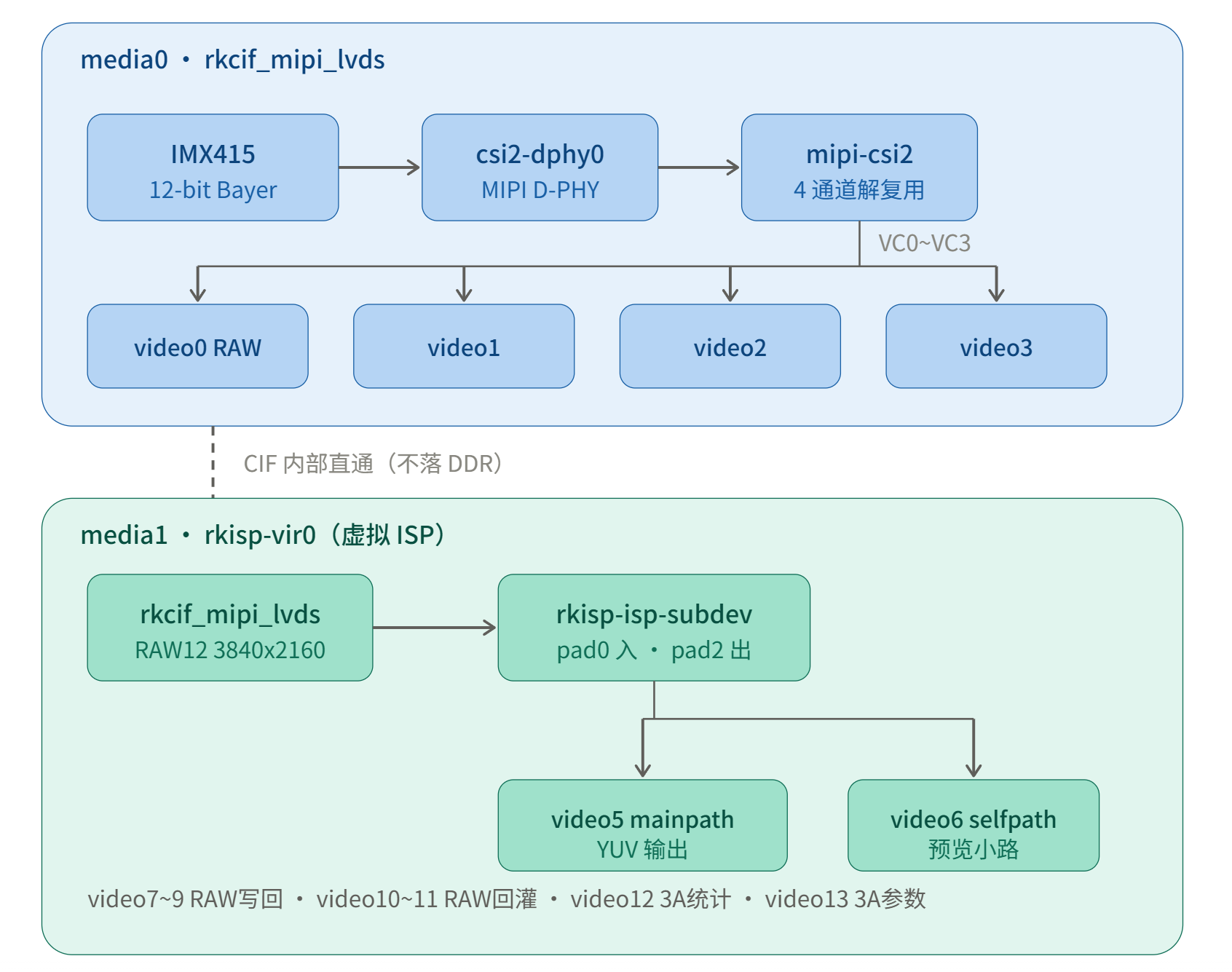
rkcif_mipi_lvds(subdev5) 是 CIF→ISP 的内部桥,rkisp 是"虚拟 ISP"(isp-vir0),数据不经过 DDR 出 video0 再进 video5,而是在 CIF 内部直通 ISP(也可以通过 rawrd/rawwr 离线回灌)。
拓扑图
                ┌─────────────── media0 (rkcif) ────────────────┐
 IMX415 ──4lane MIPI──▶ csi2-dphy0 ──▶ mipi-csi2 ─┬─VC0▶ video0 (RAW主路)
                │                                   ├─VC1▶ video1
                │                                   ├─VC2▶ video2
                │                                   └─VC3▶ video3
                └─────────────── media1 (rkisp-vir0) ───────────┐
 rkcif_mipi_lvds ──RAW12/3840x2160──▶ isp-subdev.p0 ┐
 video13(params) ─────────────────▶ isp-subdev.p1   │ ISP
 isp-subdev.p2 ──YUYV──┬▶ video5 mainpath           │
                       └▶ video6 selfpath           │
 isp-subdev.p3 ──stats──▶ video12                   │
 csi-subdev ──▶ video7/8/9 (rawwr)  ◀─┘            │
 video10/11 (rawrd) ──▶ isp-subdev.p0 (回灌)        │
至于这些模块的实现过程,查了一下如下:
在这里瑞芯微工程师要写驱动代码,把 RKCIF、RKISP、sensor 这些硬件,注册进内核 Media 子系统:
- 在驱动里定义 entity、pad;
- 描述实体之间可以建立的 link;
- 注册对应的
/dev/videoX、/dev/v4l-subdevX。拓扑的连接关系(谁能连谁),是瑞芯微驱动 + 设备树里描述好,注册到 Media 内核框架。 Media 子系统只是提供 "容器和规则",硬件拓扑描述由芯片厂商驱动实现。
4 实验 3:--list-formats-ext ------ 理解 RAW 与 YUV
/dev/video0(CIF 直通)
bash
rk3568_s:/ # v4l2-ctl -d /dev/video0 --list-formats-ext
ioctl: VIDIOC_ENUM_FMT
        Index       : 0
        Type        : Video Capture Multiplanar
        Pixel Format: 'NV16'
        Name        : Y/CbCr 4:2:2
                Size: Stepwise 64x64 - 3864x2192 with step 8/8

        Index       : 1
        Type        : Video Capture Multiplanar
        Pixel Format: 'NV61'
        Name        : Y/CrCb 4:2:2
                Size: Stepwise 64x64 - 3864x2192 with step 8/8

        Index       : 2
        Type        : Video Capture Multiplanar
        Pixel Format: 'NV12'
        Name        : Y/CbCr 4:2:0
                Size: Stepwise 64x64 - 3864x2192 with step 8/8

        Index       : 3
        Type        : Video Capture Multiplanar
        Pixel Format: 'NV21'
        Name        : Y/CrCb 4:2:0
                Size: Stepwise 64x64 - 3864x2192 with step 8/8

        Index       : 4
        Type        : Video Capture Multiplanar
        Pixel Format: 'YUYV'
        Name        : YUYV 4:2:2
                Size: Stepwise 64x64 - 3864x2192 with step 8/8

        Index       : 5
        Type        : Video Capture Multiplanar
        Pixel Format: 'YVYU'
        Name        : YVYU 4:2:2
                Size: Stepwise 64x64 - 3864x2192 with step 8/8

        Index       : 6
        Type        : Video Capture Multiplanar
        Pixel Format: 'UYVY'
        Name        : UYVY 4:2:2
                Size: Stepwise 64x64 - 3864x2192 with step 8/8

        Index       : 7
        Type        : Video Capture Multiplanar
        Pixel Format: 'VYUY'
        Name        : VYUY 4:2:2
                Size: Stepwise 64x64 - 3864x2192 with step 8/8

        Index       : 8
        Type        : Video Capture Multiplanar
        Pixel Format: 'RGB3'
        Name        : 24-bit RGB 8-8-8
                Size: Stepwise 64x64 - 3864x2192 with step 8/8

        Index       : 9
        Type        : Video Capture Multiplanar
        Pixel Format: 'RGBP'
        Name        : 16-bit RGB 5-6-5
                Size: Stepwise 64x64 - 3864x2192 with step 8/8

        Index       : 10
        Type        : Video Capture Multiplanar
        Pixel Format: 'BGRH'
        Name        : 18-bit BGRX 6-6-6-14
                Size: Stepwise 64x64 - 3864x2192 with step 8/8

        Index       : 11
        Type        : Video Capture Multiplanar
        Pixel Format: 'RGGB'
        Name        : 8-bit Bayer RGRG/GBGB
                Size: Stepwise 64x64 - 3864x2192 with step 8/8

        Index       : 12
        Type        : Video Capture Multiplanar
        Pixel Format: 'GRBG'
        Name        : 8-bit Bayer GRGR/BGBG
                Size: Stepwise 64x64 - 3864x2192 with step 8/8

        Index       : 13
        Type        : Video Capture Multiplanar
        Pixel Format: 'GBRG'
        Name        : 8-bit Bayer GBGB/RGRG
                Size: Stepwise 64x64 - 3864x2192 with step 8/8

        Index       : 14
        Type        : Video Capture Multiplanar
        Pixel Format: 'BA81'
        Name        : 8-bit Bayer BGBG/GRGR
                Size: Stepwise 64x64 - 3864x2192 with step 8/8

        Index       : 15
        Type        : Video Capture Multiplanar
        Pixel Format: 'RG10'
        Name        : 10-bit Bayer RGRG/GBGB
                Size: Stepwise 64x64 - 3864x2192 with step 8/8

        Index       : 16
        Type        : Video Capture Multiplanar
        Pixel Format: 'BA10'
        Name        : 10-bit Bayer GRGR/BGBG
                Size: Stepwise 64x64 - 3864x2192 with step 8/8

        Index       : 17
        Type        : Video Capture Multiplanar
        Pixel Format: 'GB10'
        Name        : 10-bit Bayer GBGB/RGRG
                Size: Stepwise 64x64 - 3864x2192 with step 8/8

        Index       : 18
        Type        : Video Capture Multiplanar
        Pixel Format: 'BG10'
        Name        : 10-bit Bayer BGBG/GRGR
                Size: Stepwise 64x64 - 3864x2192 with step 8/8

        Index       : 19
        Type        : Video Capture Multiplanar
        Pixel Format: 'RG12'
        Name        : 12-bit Bayer RGRG/GBGB
                Size: Stepwise 64x64 - 3864x2192 with step 8/8

        Index       : 20
        Type        : Video Capture Multiplanar
        Pixel Format: 'BA12'
        Name        : 12-bit Bayer GRGR/BGBG
                Size: Stepwise 64x64 - 3864x2192 with step 8/8

        Index       : 21
        Type        : Video Capture Multiplanar
        Pixel Format: 'GB12'
        Name        : 12-bit Bayer GBGB/RGRG
                Size: Stepwise 64x64 - 3864x2192 with step 8/8

        Index       : 22
        Type        : Video Capture Multiplanar
        Pixel Format: 'BG12'
        Name        : 12-bit Bayer BGBG/GRGR
                Size: Stepwise 64x64 - 3864x2192 with step 8/8

        Index       : 23
        Type        : Video Capture Multiplanar
        Pixel Format: 'BYR2'
        Name        : 16-bit Bayer BGBG/GRGR
                Size: Stepwise 64x64 - 3864x2192 with step 8/8

        Index       : 24
        Type        : Video Capture Multiplanar
        Pixel Format: 'Y16 '
        Name        : 16-bit Greyscale
                Size: Stepwise 64x64 - 3864x2192 with step 8/8

        Index       : 25
        Type        : Video Capture Multiplanar
        Pixel Format: 'GREY'
        Name        : 8-bit Greyscale
                Size: Stepwise 64x64 - 3864x2192 with step 8/8

        Index       : 26
        Type        : Video Capture Multiplanar
        Pixel Format: 'EBD8' (compressed)
        Name        : Embedded data 8-bit
                Size: Stepwise 64x64 - 3864x2192 with step 8/8

        Index       : 27
        Type        : Video Capture Multiplanar
        Pixel Format: 'SPD6' (compressed)
        Name        : Shield pix data 16-bit
                Size: Stepwise 64x64 - 3864x2192 with step 8/8
支持 28 种格式,混合三类:
- Bayer RAW:8/10/12-bit × RGGB/GRBG/GBRG/BGGR + 16-bit BYR2
- YUV 直通格式(NV12/NV16/YUYV...)------ 注意:CIF 不做格式转换,选 YUV 格式只是按那种字节布局存 RAW 数据,实际仍是 Bayer 像素流
- RGB / 灰度 / EBD8(embedded data)/ SPD6
/dev/video5(ISP mainpath) 支持真正的处理输出:
bash
rk3568_s:/ # v4l2-ctl -d /dev/video5 --list-formats-ext
ioctl: VIDIOC_ENUM_FMT
        Index       : 0
        Type        : Video Capture Multiplanar
        Pixel Format: 'UYVY'
        Name        : UYVY 4:2:2
                Size: Stepwise 32x16 - 3840x2160 with step 8/8

        Index       : 1
        Type        : Video Capture Multiplanar
        Pixel Format: '422P'
        Name        : Planar YUV 4:2:2
                Size: Stepwise 32x16 - 3840x2160 with step 8/8

        Index       : 2
        Type        : Video Capture Multiplanar
        Pixel Format: 'NV16'
        Name        : Y/CbCr 4:2:2
                Size: Stepwise 32x16 - 3840x2160 with step 8/8

        Index       : 3
        Type        : Video Capture Multiplanar
        Pixel Format: 'NV61'
        Name        : Y/CrCb 4:2:2
                Size: Stepwise 32x16 - 3840x2160 with step 8/8

        Index       : 4
        Type        : Video Capture Multiplanar
        Pixel Format: 'YM16'
        Name        : Planar YUV 4:2:2 (N-C)
                Size: Stepwise 32x16 - 3840x2160 with step 8/8

        Index       : 5
        Type        : Video Capture Multiplanar
        Pixel Format: 'NV21'
        Name        : Y/CrCb 4:2:0
                Size: Stepwise 32x16 - 3840x2160 with step 8/8

        Index       : 6
        Type        : Video Capture Multiplanar
        Pixel Format: 'NV12'
        Name        : Y/CbCr 4:2:0
                Size: Stepwise 32x16 - 3840x2160 with step 8/8

        Index       : 7
        Type        : Video Capture Multiplanar
        Pixel Format: 'NM21'
        Name        : Y/CrCb 4:2:0 (N-C)
                Size: Stepwise 32x16 - 3840x2160 with step 8/8

        Index       : 8
        Type        : Video Capture Multiplanar
        Pixel Format: 'NM12'
        Name        : Y/CbCr 4:2:0 (N-C)
                Size: Stepwise 32x16 - 3840x2160 with step 8/8

        Index       : 9
        Type        : Video Capture Multiplanar
        Pixel Format: 'YU12'
        Name        : Planar YUV 4:2:0
                Size: Stepwise 32x16 - 3840x2160 with step 8/8

        Index       : 10
        Type        : Video Capture Multiplanar
        Pixel Format: 'YM24'
        Name        : Planar YUV 4:4:4 (N-C)
                Size: Stepwise 32x16 - 3840x2160 with step 8/8

        Index       : 11
        Type        : Video Capture Multiplanar
        Pixel Format: 'RGGB'
        Name        : 8-bit Bayer RGRG/GBGB
                Size: Stepwise 32x16 - 3840x2160 with step 8/8

        Index       : 12
        Type        : Video Capture Multiplanar
        Pixel Format: 'GRBG'
        Name        : 8-bit Bayer GRGR/BGBG
                Size: Stepwise 32x16 - 3840x2160 with step 8/8

        Index       : 13
        Type        : Video Capture Multiplanar
        Pixel Format: 'GBRG'
        Name        : 8-bit Bayer GBGB/RGRG
                Size: Stepwise 32x16 - 3840x2160 with step 8/8

        Index       : 14
        Type        : Video Capture Multiplanar
        Pixel Format: 'BA81'
        Name        : 8-bit Bayer BGBG/GRGR
                Size: Stepwise 32x16 - 3840x2160 with step 8/8

        Index       : 15
        Type        : Video Capture Multiplanar
        Pixel Format: 'RG10'
        Name        : 10-bit Bayer RGRG/GBGB
                Size: Stepwise 32x16 - 3840x2160 with step 8/8

        Index       : 16
        Type        : Video Capture Multiplanar
        Pixel Format: 'BA10'
        Name        : 10-bit Bayer GRGR/BGBG
                Size: Stepwise 32x16 - 3840x2160 with step 8/8

        Index       : 17
        Type        : Video Capture Multiplanar
        Pixel Format: 'GB10'
        Name        : 10-bit Bayer GBGB/RGRG
                Size: Stepwise 32x16 - 3840x2160 with step 8/8

        Index       : 18
        Type        : Video Capture Multiplanar
        Pixel Format: 'BG10'
        Name        : 10-bit Bayer BGBG/GRGR
                Size: Stepwise 32x16 - 3840x2160 with step 8/8

        Index       : 19
        Type        : Video Capture Multiplanar
        Pixel Format: 'RG12'
        Name        : 12-bit Bayer RGRG/GBGB
                Size: Stepwise 32x16 - 3840x2160 with step 8/8

        Index       : 20
        Type        : Video Capture Multiplanar
        Pixel Format: 'BA12'
        Name        : 12-bit Bayer GRGR/BGBG
                Size: Stepwise 32x16 - 3840x2160 with step 8/8

        Index       : 21
        Type        : Video Capture Multiplanar
        Pixel Format: 'GB12'
        Name        : 12-bit Bayer GBGB/RGRG
                Size: Stepwise 32x16 - 3840x2160 with step 8/8

        Index       : 22
        Type        : Video Capture Multiplanar
        Pixel Format: 'BG12'
        Name        : 12-bit Bayer BGBG/GRGR
Size: Stepwise 32x16 - 3840x2160 with step 8/8- YUV 系列:UYVY/NV12/NV21/NV16/YU12/YM24 等(这才是 ISP 转换后的颜色格式)
- 也有 Bayer 输出(ISP bypass)
- 分辨率 32x16 ~ 3840x2160,stepwise 8
/dev/video6(selfpath) 额外支持 RGB565/XR24/FBCG(Rockchip 压缩格式),说明 selfpath 常用于预览/显示。
sensor (v4l-subdev2) 只有一个 mbus code:0x3010 MEDIA_BUS_FMT_SGBRG12_1X12,当前格式 3864x2192。media-ctl 显示帧率 10000/300000 = 1/30s → 30fps。
RAW vs YUV 的要点(实测归纳):
- RAW(Bayer):每个像素只有 R/G/B 一个分量,4 像素一组才凑齐一个完整颜色单元;本机是 12-bit,打包后 1.5 字节/像素;直接看是一张"马赛克噪点图",必须去马赛克(demosaic)才能成彩色图。
- YUV(NV12 等):ISP 做 demosaic + 白平衡 + 降噪 + 色彩矩阵后的成品,Y 平面 + UV 平面,1.5 字节/像素(NV12),可直接显示/编码。
- 帧率枚举:RK 节点是 stepwise(无 discrete interval 表),实际帧率用
--get-parm/抓流实测(见 Day4:30fps)。
5 实验 4:抓帧实验
5.1 CIF 直通抓 RAW(成功)
adb root
v4l2-ctl -d /dev/video0 --set-fmt-video=width=3864,height=2192,pixelformat=BG12 \
--stream-mmap=3 --stream-count=1 --stream-to=/data/local/tmp/raw_cif.bin- 返回 RC=0,文件 12,718,080 字节 = bytesperline(5888) × 2160。
- 注意:宽 3864×12bit/8=5796,stride 对齐到 256 字节边界=5888;高度虽然 sensor 输出 2192,sizeimage 只按 2160 行算(与 ISP crop 2160 一致)。
- 连续抓流实测 30.00 fps (
<<<<<<<<<< 30.00 fps, dropped buffers: N的 N 是用户态取流太慢导致的丢帧计数,写文件 12.7MB/帧 跟不上 30fps 很正常)。
- dmesg 证据链:
imx415 s_stream: 1. 3864x2192, hdr:0, bpp:12→data_rate_mbps 892→ CIF streaming。
5.2 数据有效性检查(发现重大问题)
对抓到的 RAW 做了解析验证:
|----------------------------|--------------------|
| 检查项 | 结果 |
| 文件大小 = sizeimage | ✅ 12718080 |
| 行尾 padding 全 0(5796~5888) | ✅ 符合 stride |
| 两帧 md5 | 不同 → 数据非静态填充 |
| 行均值(每 100 行采样) | ~110,波动 ±3%,无场景结构 |
但两个决定性测试失败:
- 曝光不改变数据 :
v4l2-ctl -d /dev/v4l-subdev2 -c exposure=4(dmesg 确认set exposure(shr0) 2246 = cur_vts(2250)-val(4),曝光时长变化 280 倍),抓到的帧数据统计与短曝光几乎一样。
- 数据存在强规律:每 3 字节第 3 字节恒为 0x0C,第 1 字节稳定在 0xC5~0xCB,第 2 字节大幅波动 ------ 不符合真实图像噪声/场景分布。
结论:裸 V4L2 路径下,CIF 收到的不是有效 sensor 数据 。sensor 完成了 s_stream(I2C 配置成功、DPHY 报了 data_rate),但 MIPI 数据链路没有真正打通。结合 4.3/4.4 的现象,最可能是:RK 平台上 ISP/CIF 的完整数据通路需要 rkaiq(3A) 服务参与初始化 (Android 上由 camera HAL 拉起;vendor.cam.librkaiq.ver = AIQ v3.0x8.8 存在但相机未打开时未运行)。
5.3 ISP mainpath 抓 YUV(STREAMON 成功但无帧输出)
已做配置:
media-ctl -d /dev/media1 --set-v4l2 '"rkisp-isp-subdev":0[fmt:SGBRG12_1X12/3840x2160]'
media-ctl -d /dev/media1 --set-v4l2 '"rkisp-isp-subdev":2[fmt:YUYV8_2X8/1920x1080]'
v4l2-ctl -d /dev/video5 --set-fmt-video=width=1920,height=1080,pixelformat=NV12 \
  --stream-mmap=4 --stream-count=1 --stream-to=/data/local/tmp/mp_nv12.yuv
--verbose 显示 REQBUFS/QBUF/STREAMON 全部成功,然后卡死在 DQBUF(5s select 超时,无帧);内核日志 rkisp-vir0: rkisp_stream_stop id:0 timeout。尝试过的变量:ISP pad0/pad2 格式、sensor 输出 3840x2160、CIF 后台先出流再抓 ISP ------ 都不出帧。
5.4 对比验证(结论佐证)
通过 Android 相机 App 验证 HAL 链路(截图确认 App 首启引导页;触摸 input tap 在这块板上不生效,未能进入预览------列为待验证项)。但从架构上判断:HAL 全链路包含 rkaiq 3A(会 open video13 写参数 + video12 读统计),这是裸 v4l2-ctl 做不到的。
Day 4 结论:
- 抓帧工程流程(open→S_FMT→REQBUFS→QBUF→STREAMON→DQBUF→写文件)100% 走通;
- 连续采集 30fps 稳定;
- 数据内容异常 → 得出本项目最有价值的发现:RKISP 通路是"半自动"的,纯 v4l2-ctl 缺 3A 参数流时 ISP 无输出、CIF 出流内容异常;
- 后续方向:a) 打开相机 App 让 HAL+rkaiq 初始化后再在空闲节点验证;b) RAW 回灌模式(先改 link 为
video10(rawrd0_m)→isp-subdev:0,往 video10 写 RAW 文件,同时抓 video5)------不需要 sensor,专门验证 ISP;c) 或在 Linux(buildroot) 固件下跑rkaiq_3A_server。
6 实验 5:自写 v4l2_capture.c
代码:F:\tmp2\v4l2_capture.c(约 230 行,mmap 方式,完整流程 6 步)。
cpp
/*
 * v4l2_capture.c ------ 最简 V4L2 采集程序(MMAP + Multiplanar)
 *
 * 针对本板(RK3568 / rkcif + rkisp)说明:
 *   本板所有 capture 节点都是 Video Capture **Multiplanar**,
 *   所以必须用 V4L2_BUF_TYPE_VIDEO_CAPTURE_MPLANE 和 buf.m.planes,
 *   用单平面那套(VIDIOC_S_FMT + V4L2_BUF_TYPE_VIDEO_CAPTURE)会直接 EINVAL。
 *
 * 用法:
 *   v4l2_capture <device> <width> <height> <fourcc> <frames> <out_prefix>
 * 例:
 *   v4l2_capture /dev/video0 3864 2192 BG12 1 /data/local/tmp/cap
 *   v4l2_capture /dev/video5 1920 1080 NV12 30 /data/local/tmp/mp
 */
#include <stdio.h>
#include <stdlib.h>
#include <string.h>
#include <errno.h>
#include <fcntl.h>
#include <unistd.h>
#include <sys/ioctl.h>
#include <sys/mman.h>
#include <sys/stat.h>
#include <sys/time.h>
#include <sys/types.h>
#include <linux/videodev2.h>

#define MAX_PLANES 3
#define NBUF       4

struct mmap_buf {
    void  *start;
    size_t length;
};

static int xioctl(int fd, unsigned long req, void *arg)
{
    int r;
    do {
        r = ioctl(fd, req, arg);
    } while (r < 0 && errno == EINTR);
    return r;
}

static unsigned int fourcc(const char *s)
{
    /* 把 "BG12" 这种字符串转成 V4L2 的 fourcc(小端存放) */
    return (unsigned int)s[0] | ((unsigned int)s[1] << 8) |
           ((unsigned int)s[2] << 16) | ((unsigned int)s[3] << 24);
}

int main(int argc, char **argv)
{
    if (argc < 7) {
        fprintf(stderr, "usage: %s <dev> <w> <h> <fourcc> <frames> <out_prefix>\n", argv[0]);
        return 1;
    }

    const char *devname = argv[1];
    int width  = atoi(argv[2]);
    int height = atoi(argv[3]);
    unsigned int pixfmt = fourcc(argv[4]);
    int nframes = atoi(argv[5]);
    const char *prefix = argv[6];

    /* ---------- 1. 打开设备 ---------- */
    int fd = open(devname, O_RDWR | O_NONBLOCK);
    if (fd < 0) {
        fprintf(stderr, "open %s: %s\n", devname, strerror(errno));
        return 1;
    }

    struct v4l2_capability cap;
    memset(&cap, 0, sizeof(cap));
    if (xioctl(fd, VIDIOC_QUERYCAP, &cap) < 0) {
        fprintf(stderr, "QUERYCAP: %s\n", strerror(errno));
        return 1;
    }
    printf("device   : %s\n", devname);
    printf("driver   : %s\n", cap.driver);
    printf("card     : %s\n", cap.card);
    printf("bus      : %s\n", cap.bus_info);
    printf("version  : %u.%u.%u\n",
           (cap.version >> 16) & 0xFF, (cap.version >> 8) & 0xFF, cap.version & 0xFF);
    printf("caps     : 0x%08x  %s%s\n", cap.capabilities,
           (cap.capabilities & V4L2_CAP_VIDEO_CAPTURE_MPLANE) ? "[CAPTURE_MPLANE]" : "",
           (cap.capabilities & V4L2_CAP_STREAMING) ? "[STREAMING]" : "");
    if ((cap.capabilities & V4L2_CAP_VIDEO_CAPTURE_MPLANE) == 0) {
        fprintf(stderr, "not a multiplanar capture device, abort\n");
        return 1;
    }

    /* ---------- 2. 设置格式(Multiplanar) ---------- */
    struct v4l2_format fmt;
    memset(&fmt, 0, sizeof(fmt));
    fmt.type = V4L2_BUF_TYPE_VIDEO_CAPTURE_MPLANE;
    fmt.fmt.pix_mp.width       = width;
    fmt.fmt.pix_mp.height      = height;
    fmt.fmt.pix_mp.pixelformat = pixfmt;
    fmt.fmt.pix_mp.field       = V4L2_FIELD_ANY;
    if (xioctl(fd, VIDIOC_S_FMT, &fmt) < 0) {
        fprintf(stderr, "S_FMT: %s\n", strerror(errno));
        return 1;
    }
    /* 驱动可能回改分辨率/格式,必须以回读结果为准 */
    printf("format   : %c%c%c%c %ux%u  planes=%u\n",
           fmt.fmt.pix_mp.pixelformat & 0xFF,
           (fmt.fmt.pix_mp.pixelformat >> 8) & 0xFF,
           (fmt.fmt.pix_mp.pixelformat >> 16) & 0xFF,
           (fmt.fmt.pix_mp.pixelformat >> 24) & 0xFF,
           fmt.fmt.pix_mp.width, fmt.fmt.pix_mp.height,
           fmt.fmt.pix_mp.num_planes);
    for (unsigned i = 0; i < fmt.fmt.pix_mp.num_planes; i++)
        printf("  plane%u : bytesperline=%u sizeimage=%u\n", i,
               fmt.fmt.pix_mp.plane_fmt[i].bytesperline,
               fmt.fmt.pix_mp.plane_fmt[i].sizeimage);

    /* ---------- 3. 申请缓冲区(MMAP) ---------- */
    struct v4l2_requestbuffers req;
    memset(&req, 0, sizeof(req));
    req.count  = NBUF;
    req.type   = V4L2_BUF_TYPE_VIDEO_CAPTURE_MPLANE;
    req.memory = V4L2_MEMORY_MMAP;
    if (xioctl(fd, VIDIOC_REQBUFS, &req) < 0) {
        fprintf(stderr, "REQBUFS: %s\n", strerror(errno));
        return 1;
    }
    printf("buffers  : %u\n", req.count);

    struct mmap_buf bufs[NBUF];
    struct v4l2_plane planes[NBUF][MAX_PLANES];
    for (unsigned i = 0; i < req.count; i++) {
        struct v4l2_buffer buf;
        memset(&buf, 0, sizeof(buf));
        memset(planes[i], 0, sizeof(planes[i]));
        buf.type   = V4L2_BUF_TYPE_VIDEO_CAPTURE_MPLANE;
        buf.memory = V4L2_MEMORY_MMAP;
        buf.index  = i;
        buf.length = MAX_PLANES;
        buf.m.planes = planes[i];
        if (xioctl(fd, VIDIOC_QUERYBUF, &buf) < 0) {
            fprintf(stderr, "QUERYBUF: %s\n", strerror(errno));
            return 1;
        }
        /* 本板是单平面,取 plane0;多平面时只映射 plane0 也够写文件用 */
        bufs[i].length = buf.m.planes[0].length;
        bufs[i].start = mmap(NULL, bufs[i].length,
                             PROT_READ | PROT_WRITE, MAP_SHARED, fd,
                             buf.m.planes[0].m.mem_offset);
        if (bufs[i].start == MAP_FAILED) {
            fprintf(stderr, "mmap: %s\n", strerror(errno));
            return 1;
        }
        printf("  buf%u   : len=%zu  offset=0x%x\n",
               i, bufs[i].length, buf.m.planes[0].m.mem_offset);
        if (xioctl(fd, VIDIOC_QBUF, &buf) < 0) {
            fprintf(stderr, "QBUF: %s\n", strerror(errno));
            return 1;
        }
    }

    /* ---------- 4. 开始流 ---------- */
    enum v4l2_buf_type type = V4L2_BUF_TYPE_VIDEO_CAPTURE_MPLANE;
    if (xioctl(fd, VIDIOC_STREAMON, &type) < 0) {
        fprintf(stderr, "STREAMON: %s\n", strerror(errno));
        return 1;
    }
    printf("streaming: on\n");

    struct timeval t0, t1;
    gettimeofday(&t0, NULL);
    int got = 0;

    /* ---------- 5. 取帧循环(select + DQBUF) ---------- */
    for (int f = 0; f < nframes; f++) {
        fd_set fds;
        struct timeval tv = { .tv_sec = 5, .tv_usec = 0 };
        FD_ZERO(&fds);
        FD_SET(fd, &fds);

        int r = select(fd + 1, &fds, NULL, NULL, &tv);
        if (r < 0) {
            if (errno == EINTR) { f--; continue; }
            fprintf(stderr, "select: %s\n", strerror(errno));
            break;
        }
        if (r == 0) {
            fprintf(stderr, "select timeout: no frame (ISP 没出帧?)\n");
            break;
        }

        struct v4l2_buffer buf;
        struct v4l2_plane pl[MAX_PLANES];
        memset(&buf, 0, sizeof(buf));
        memset(pl, 0, sizeof(pl));
        buf.type   = V4L2_BUF_TYPE_VIDEO_CAPTURE_MPLANE;
        buf.memory = V4L2_MEMORY_MMAP;
        buf.length = MAX_PLANES;
        buf.m.planes = pl;
        if (xioctl(fd, VIDIOC_DQBUF, &buf) < 0) {
            fprintf(stderr, "DQBUF: %s\n", strerror(errno));
            break;
        }

        char path[256];
        snprintf(path, sizeof(path), "%s_%03d.raw", prefix, f);
        FILE *fp = fopen(path, "wb");
        if (fp) {
            size_t bytes = buf.m.planes[0].bytesused;
            fwrite(bufs[buf.index].start, 1, bytes, fp);
            fclose(fp);
            printf("frame %3d  seq=%u  bytesused=%zu  -> %s\n",
                   f, buf.sequence, bytes, path);
        } else {
            fprintf(stderr, "fopen %s: %s\n", path, strerror(errno));
        }

        got++;
        if (xioctl(fd, VIDIOC_QBUF, &buf) < 0) {
            fprintf(stderr, "re-QBUF: %s\n", strerror(errno));
            break;
        }
    }

    gettimeofday(&t1, NULL);
    double elapsed = (t1.tv_sec - t0.tv_sec) + (t1.tv_usec - t0.tv_usec) / 1e6;
    if (got > 0 && elapsed > 0)
        printf("captured : %d frames in %.3f s  (%.2f fps)\n",
               got, elapsed, got / elapsed);

    /* ---------- 6. 收尾 ---------- */
    if (xioctl(fd, VIDIOC_STREAMOFF, &type) < 0)
        fprintf(stderr, "STREAMOFF: %s\n", strerror(errno));
    for (unsigned i = 0; i < req.count; i++)
        munmap(bufs[i].start, bufs[i].length);
    close(fd);
    printf("done.\n");
    return got > 0 ? 0 : 2;
}
针对本板的关键点:RK 所有 capture 节点都是 Multiplanar ,必须用 V4L2_BUF_TYPE_VIDEO_CAPTURE_MPLANE + buf.m.planes,用单平面 API 会直接 EINVAL------这是移植网上例程最常见的翻车点。
程序结构:
1. open(O_RDWR|O_NONBLOCK) + QUERYCAP(校验 CAPTURE_MPLANE|STREAMING)
2. S_FMT(MP):宽高+fourcc → 必须以驱动回读值为准(打印 bytesperline/sizeimage)
3. REQBUFS(4, MMAP) → 逐个 QUERYBUF → mmap(plane0.mem_offset) → QBUF
4. STREAMON
5. 循环:select(5s 超时) → DQBUF → fwrite(bytesused) → 重新 QBUF
6. STREAMOFF → munmap → close
交叉编译(静态):
aarch64-none-linux-gnu-gcc -static -O2 -Wall -o v4l2_capture v4l2_capture.c板子运行结果(抓 5 帧全分辨率 RAW):
format   : BG12 3864x2192  planes=1
  plane0 : bytesperline=5888 sizeimage=12718080
buffers  : 4   (每个 12.7MB,offset 0x0/0xc21000/0x1842000/0x2463000)
frame   0  seq=0  bytesused=12718080 -> mycap_000.raw
...
frame   4  seq=4  bytesused=12718080 -> mycap_004.raw
captured : 5 frames in 0.232 s  (21.55 fps)
sequence 连续 0~4 无丢帧,select 循环 + 5 秒超时机制正常(后续试 video5 时正是靠它干净退出而不是卡死)。21.55fps 是含首轮丢帧等待的均值,稳态即 Day4 实测的 30fps。
7 总结与遗留问题
|---------------------------|-----------------------------------------------|
| 项目 | 状态 |
| v4l2-ctl / media-ctl 工具部署 | ✅ 静态交叉编译,已部署 /data/local/tmp |
| 节点/拓扑/格式盘点 | ✅ 完整 |
| CIF RAW 抓帧 + 连续 30fps | ✅ |
| ISP mainpath YUV 抓帧 | ❌ 无帧输出(缺 3A,待 RAW 回灌验证) |
| RAW 内容真实性 | ⚠️ 不随曝光变化,判定 MIPI 数据未有效到达 CIF,同因:缺 3A/HAL 初始化 |
| 自写 v4l2_capture.c | ✅ 5 帧 21.55fps,逻辑正确 |
遗留清单(按优先级):
- RAW 回灌实验(video10→ISP→video5)------ 不依赖 sensor,可单独验证 ISP;
- 用相机 App(手动点掉首启引导)确认 HAL 链路正常,再关 App 后复测裸 V4L2;
- 抓 HAL 打开相机时的完整 dmesg,对照裸路径缺了哪些初始化步骤;
- RK RAW12 packed 的精确位序(现数据
每3字节第3字节恒0x0C的成因)------ 可在 HAL 正常出流后重新分析。
附录:常用命令速查
adb root                                              # 打开 /dev/videoX 必须
v4l2-ctl --list-devices                               # 设备清单
v4l2-ctl -d /dev/video0 --info                        # 节点能力
v4l2-ctl -d /dev/video0 --list-formats-ext            # 格式/分辨率/帧率
media-ctl -d /dev/media0 -p                           # 拓扑
media-ctl -d /dev/media0 --set-v4l2 '"m00_b_imx415 4-001a-1":0[fmt:SGBRG12_1X12/3840x2160]'
v4l2-ctl -d /dev/v4l-subdev2 -c exposure=4            # sensor 控制
v4l2-ctl -d /dev/video0 --set-fmt-video=w=3864,h=2192,pixelformat=BG12 \
  --stream-mmap=3 --stream-count=1 --stream-to=/data/local/tmp/f.raw
/data/local/tmp/v4l2_capture /dev/video0 3864 2192 BG12 5 /data/local/tmp/mycap
cat /proc/rkcif_mipi_lvds                             # CIF 状态/时钟
dmesg | grep -E 'imx415|csi2|cif|isp'                 # 数据通路证据