上一篇给MCP工具结果加上结构与业务检查。接着沿调用链想一层:工具没有给出可用结果时,Agent应该修改参数、等待更多输入,还是先停止操作?把所有失败都写成"再试一次",会丢掉关键线索。
今天整理MCP工具错误的分层表达。我们用几份模拟响应观察客户端怎样分流,让模型收到可以处理的反馈,同时保留系统对执行边界的判断。
本文依据2026年10月6日核对的MCP2026-07-28规范。示例使用Python3.12.14在本地实际运行,只演示应用处理策略,不连接真实MCP服务器,不代表某个SDK的完整实现。
一、失败发生在哪一层
MCP工具规范区分两种错误:协议错误 用JSON-RPC的error响应表达;工具执行错误 在结果中设置isError: true。未知工具、请求结构问题与工具执行中的校验、API或业务错误,需要分别识别。官方工具错误处理
在这两种服务器反馈之外,客户端也可能遇到本地超时。这时甚至没有收到响应,应保留"结果未知"的状态。下图把可观察到的线索放在不同入口,便于后续处理。
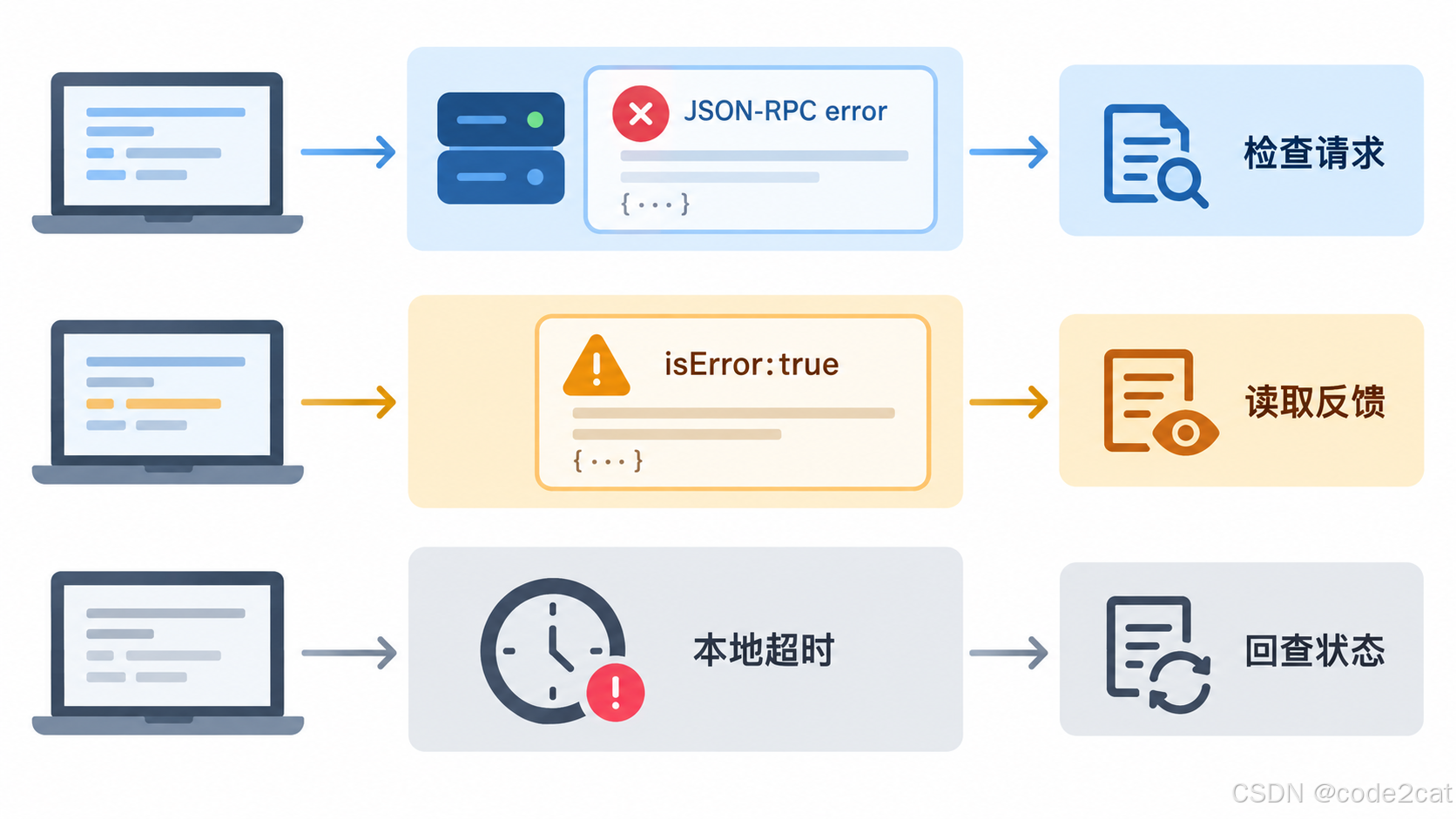
图中超时属于本地观察结果,不能冒充服务器返回的JSON-RPC错误。收到error或isError之后,仍需结合具体反馈判断操作是否留下影响。
二、协议错误:先检查请求与接口
下面展示一份未知工具的错误响应,与官方示例使用相同错误码:
json
{
  "jsonrpc": "2.0",
  "id": 1,
  "error": {
    "code": -32602,
    "message": "Unknown tool: missing_tool"
  }
}JSON-RPC响应的error包含整数code与message;可有data携带额外信息。MCP还对标准错误码和部分服务器错误码范围作了约定,本地实现的超时目前没有被统一分配协议错误码。基础协议与错误码
应用层可以核对工具目录、参数结构和协商版本。遇到未知工具时,原样重复同一请求通常不会得到新结果。错误码也不宜单独充当重试开关,需要结合接口说明与具体故障。
三、工具执行错误:把可修正的信息交给Agent
工具已进入执行过程,发现日期无效时,可以给出下面的结果片段:
json
{
  "jsonrpc": "2.0",
  "id": 2,
  "result": {
    "resultType": "complete",
    "isError": true,
    "content": [
      {"type": "text", "text": "Date must be in the future"}
    ]
  }
}resultType为complete表示请求已经给出最终内容,是否工具执行失败仍要读取isError。当前版本还可能返回input_required;早期版本缺少resultType时按complete处理,未识别的结果种类应视为无效。结果种类说明
规范建议客户端把工具执行错误提供给模型,使其能够根据反馈修正。应用设计上,可以提供简短原因和允许的输入范围;数据库连接串、访问令牌或完整内部堆栈没有必要作为模型反馈公开。
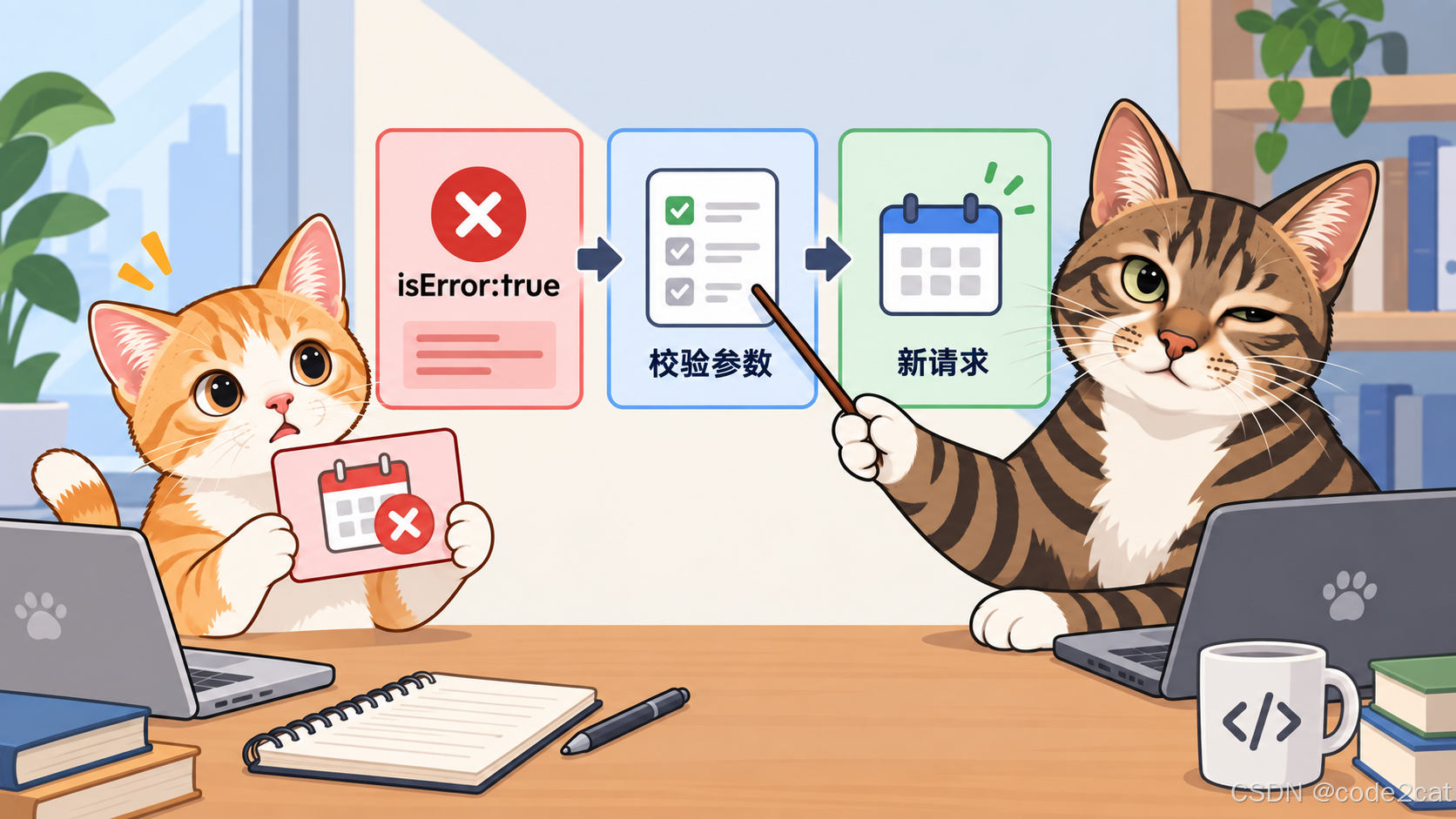
图中反馈先经过应用判断,才进入下一次请求。修正日期的请求表达新的意图;它与超时后原样重放同一次写入,应分别处理。
四、完整示例:六类观察怎样分流
为了只观察分层规则,下面省略网络与SDK接入。kind是本地程序自行定义的事件字段,协议响应放在response里;函数假设响应基本结构已通过前置校验。输出是处理建议,不会自动调用工具。
python
def decide(event):
    # Local illustrative policy: no network calls and no automatic retries.
    if event["kind"] == "timeout":
        return "OUTCOME_UNKNOWN: query status first"
    response = event["response"]
    if "error" in response:
        return "PROTOCOL_ERROR: inspect request and server"
    result = response["result"]
    result_type = result.get("resultType", "complete")
    if result_type == "input_required":
        return "INPUT_REQUIRED: use the negotiated input flow"
    if result_type != "complete":
        return "INVALID_RESULT: stop"
    if result.get("isError", False):
        return "TOOL_ERROR: inspect actionable feedback"
    return "RESULT_READY: validate structure and business state"


cases = [
    ("protocol", {"kind": "response", "response": {
        "jsonrpc": "2.0", "id": 1,
        "error": {"code": -32602, "message": "Unknown tool: missing_tool"}}}),
    ("tool", {"kind": "response", "response": {
        "jsonrpc": "2.0", "id": 2, "result": {
            "resultType": "complete", "isError": True,
            "content": [{"type": "text", "text": "Date must be in the future"}]}}}),
    ("ready", {"kind": "response", "response": {
        "jsonrpc": "2.0", "id": 3, "result": {
            "resultType": "complete", "isError": False,
            "content": [{"type": "text", "text": "Report prepared"}]}}}),
    ("input", {"kind": "response", "response": {
        "jsonrpc": "2.0", "id": 4, "result": {
            "resultType": "input_required", "inputRequests": {
                "details": {"method": "elicitation/create", "params": {
                    "mode": "form", "message": "Provide details",
                    "requestedSchema": {"type": "object"}}}}}}}),
    ("unknown_type", {"kind": "response", "response": {
        "jsonrpc": "2.0", "id": 5, "result": {"resultType": "not_negotiated"}}}),
    ("timeout", {"kind": "timeout"}),
]
for name, event in cases:
    print(f"{name}: {decide(event)}")
保存为error_layers_demo.py并执行:
bash
python error_layers_demo.py本次实际输出:
text
protocol: PROTOCOL_ERROR: inspect request and server
tool: TOOL_ERROR: inspect actionable feedback
ready: RESULT_READY: validate structure and business state
input: INPUT_REQUIRED: use the negotiated input flow
unknown_type: INVALID_RESULT: stop
timeout: OUTCOME_UNKNOWN: query status firstready只进入后续结构与业务检查,尚未宣告业务完成。input交给已协商的补充输入流程;unknown_type停止。timeout也停止自动推进,先查询状态。这样的分流让每一次失败保留自己的处理入口。
五、恢复决策怎样留下边界
| 可观察线索 | 应用可以先做什么 | 需要另行确认什么 |
|---|---|---|
| JSON-RPC error | 检查请求、工具定义与服务端反馈 | 接口是否支持恢复 |
| isError为true | 提取可修正原因并校验新参数 | 是否已经发生部分副作用 |
| input_required | 进入协商过的补充输入流程 | 输入来源与用户意图 |
| 本地超时 | 回查状态或停止推进 | 服务端是否已经执行 |
| 普通完整结果 | 继续结构与业务核验 | 结果是否满足下一步条件 |
重试是应用策略。设置次数预算、整体时限与退避规则,是恢复流程的一部分;这些条件不能保证写入只发生一次。涉及状态变化时,应依据工具契约判断幂等性与回查能力,上一篇讲过的结果校验也要保留。
错误反馈不等于回滚证明。下游API失败前可能已有部分动作完成。工具若能返回任务编号、明确阶段或可查询状态,调用端更容易给出可解释的处理结果;这些业务字段要由工具契约定义。
注解需要可信来源。工具的行为注解可以帮助理解接口,但客户端仍需校验来源与结果。将readOnlyHint或idempotentHint当成某个不可信服务自动获得执行权限的依据,会让应用判断失去约束。
六、落地时补上这些检查
将协议解析、结果分流、业务校验与执行授权分别放在明确入口,日志保存关联ID与决策原因,避免把秘密参数完整写进日志。
给模型的反馈尽量清楚:哪个字段需要调整、允许范围是什么、哪些条件还没确认。下一次调用仍需经过参数校验,不能仅凭模型说"已修复"就直接执行。
生产接入还要校验响应结构、请求ID关联、协议协商结果和错误内容可信度。本文六个用例没有覆盖断线、所有标准错误码或真实服务器恢复行为,不能替代联机验证。
七、🧠 思维导图
#mermaid-svg-Z0aLKua3pR2ZLpUk{font-family:"trebuchet ms",verdana,arial,sans-serif;font-size:16px;fill:#333;}@keyframes edge-animation-frame{from{stroke-dashoffset:0;}}@keyframes dash{to{stroke-dashoffset:0;}}#mermaid-svg-Z0aLKua3pR2ZLpUk .edge-animation-slow{stroke-dasharray:9,5!important;stroke-dashoffset:900;animation:dash 50s linear infinite;stroke-linecap:round;}#mermaid-svg-Z0aLKua3pR2ZLpUk .edge-animation-fast{stroke-dasharray:9,5!important;stroke-dashoffset:900;animation:dash 20s linear infinite;stroke-linecap:round;}#mermaid-svg-Z0aLKua3pR2ZLpUk .error-icon{fill:#552222;}#mermaid-svg-Z0aLKua3pR2ZLpUk .error-text{fill:#552222;stroke:#552222;}#mermaid-svg-Z0aLKua3pR2ZLpUk .edge-thickness-normal{stroke-width:1px;}#mermaid-svg-Z0aLKua3pR2ZLpUk .edge-thickness-thick{stroke-width:3.5px;}#mermaid-svg-Z0aLKua3pR2ZLpUk .edge-pattern-solid{stroke-dasharray:0;}#mermaid-svg-Z0aLKua3pR2ZLpUk .edge-thickness-invisible{stroke-width:0;fill:none;}#mermaid-svg-Z0aLKua3pR2ZLpUk .edge-pattern-dashed{stroke-dasharray:3;}#mermaid-svg-Z0aLKua3pR2ZLpUk .edge-pattern-dotted{stroke-dasharray:2;}#mermaid-svg-Z0aLKua3pR2ZLpUk .marker{fill:#333333;stroke:#333333;}#mermaid-svg-Z0aLKua3pR2ZLpUk .marker.cross{stroke:#333333;}#mermaid-svg-Z0aLKua3pR2ZLpUk svg{font-family:"trebuchet ms",verdana,arial,sans-serif;font-size:16px;}#mermaid-svg-Z0aLKua3pR2ZLpUk p{margin:0;}#mermaid-svg-Z0aLKua3pR2ZLpUk .label{font-family:"trebuchet ms",verdana,arial,sans-serif;color:#333;}#mermaid-svg-Z0aLKua3pR2ZLpUk .cluster-label text{fill:#333;}#mermaid-svg-Z0aLKua3pR2ZLpUk .cluster-label span{color:#333;}#mermaid-svg-Z0aLKua3pR2ZLpUk .cluster-label span p{background-color:transparent;}#mermaid-svg-Z0aLKua3pR2ZLpUk .label text,#mermaid-svg-Z0aLKua3pR2ZLpUk span{fill:#333;color:#333;}#mermaid-svg-Z0aLKua3pR2ZLpUk .node rect,#mermaid-svg-Z0aLKua3pR2ZLpUk .node circle,#mermaid-svg-Z0aLKua3pR2ZLpUk .node ellipse,#mermaid-svg-Z0aLKua3pR2ZLpUk .node polygon,#mermaid-svg-Z0aLKua3pR2ZLpUk .node path{fill:#ECECFF;stroke:#9370DB;stroke-width:1px;}#mermaid-svg-Z0aLKua3pR2ZLpUk .rough-node .label text,#mermaid-svg-Z0aLKua3pR2ZLpUk .node .label text,#mermaid-svg-Z0aLKua3pR2ZLpUk .image-shape .label,#mermaid-svg-Z0aLKua3pR2ZLpUk .icon-shape .label{text-anchor:middle;}#mermaid-svg-Z0aLKua3pR2ZLpUk .node .katex path{fill:#000;stroke:#000;stroke-width:1px;}#mermaid-svg-Z0aLKua3pR2ZLpUk .rough-node .label,#mermaid-svg-Z0aLKua3pR2ZLpUk .node .label,#mermaid-svg-Z0aLKua3pR2ZLpUk .image-shape .label,#mermaid-svg-Z0aLKua3pR2ZLpUk .icon-shape .label{text-align:center;}#mermaid-svg-Z0aLKua3pR2ZLpUk .node.clickable{cursor:pointer;}#mermaid-svg-Z0aLKua3pR2ZLpUk .root .anchor path{fill:#333333!important;stroke-width:0;stroke:#333333;}#mermaid-svg-Z0aLKua3pR2ZLpUk .arrowheadPath{fill:#333333;}#mermaid-svg-Z0aLKua3pR2ZLpUk .edgePath .path{stroke:#333333;stroke-width:2.0px;}#mermaid-svg-Z0aLKua3pR2ZLpUk .flowchart-link{stroke:#333333;fill:none;}#mermaid-svg-Z0aLKua3pR2ZLpUk .edgeLabel{background-color:rgba(232,232,232, 0.8);text-align:center;}#mermaid-svg-Z0aLKua3pR2ZLpUk .edgeLabel p{background-color:rgba(232,232,232, 0.8);}#mermaid-svg-Z0aLKua3pR2ZLpUk .edgeLabel rect{opacity:0.5;background-color:rgba(232,232,232, 0.8);fill:rgba(232,232,232, 0.8);}#mermaid-svg-Z0aLKua3pR2ZLpUk .labelBkg{background-color:rgba(232, 232, 232, 0.5);}#mermaid-svg-Z0aLKua3pR2ZLpUk .cluster rect{fill:#ffffde;stroke:#aaaa33;stroke-width:1px;}#mermaid-svg-Z0aLKua3pR2ZLpUk .cluster text{fill:#333;}#mermaid-svg-Z0aLKua3pR2ZLpUk .cluster span{color:#333;}#mermaid-svg-Z0aLKua3pR2ZLpUk div.mermaidTooltip{position:absolute;text-align:center;max-width:200px;padding:2px;font-family:"trebuchet ms",verdana,arial,sans-serif;font-size:12px;background:hsl(80, 100%, 96.2745098039%);border:1px solid #aaaa33;border-radius:2px;pointer-events:none;z-index:100;}#mermaid-svg-Z0aLKua3pR2ZLpUk .flowchartTitleText{text-anchor:middle;font-size:18px;fill:#333;}#mermaid-svg-Z0aLKua3pR2ZLpUk rect.text{fill:none;stroke-width:0;}#mermaid-svg-Z0aLKua3pR2ZLpUk .icon-shape,#mermaid-svg-Z0aLKua3pR2ZLpUk .image-shape{background-color:rgba(232,232,232, 0.8);text-align:center;}#mermaid-svg-Z0aLKua3pR2ZLpUk .icon-shape p,#mermaid-svg-Z0aLKua3pR2ZLpUk .image-shape p{background-color:rgba(232,232,232, 0.8);padding:2px;}#mermaid-svg-Z0aLKua3pR2ZLpUk .icon-shape .label rect,#mermaid-svg-Z0aLKua3pR2ZLpUk .image-shape .label rect{opacity:0.5;background-color:rgba(232,232,232, 0.8);fill:rgba(232,232,232, 0.8);}#mermaid-svg-Z0aLKua3pR2ZLpUk .label-icon{display:inline-block;height:1em;overflow:visible;vertical-align:-0.125em;}#mermaid-svg-Z0aLKua3pR2ZLpUk .node .label-icon path{fill:currentColor;stroke:revert;stroke-width:revert;}#mermaid-svg-Z0aLKua3pR2ZLpUk :root{--mermaid-font-family:"trebuchet ms",verdana,arial,sans-serif;} MCP工具错误
协议层
JSON-RPC error
执行层
isError反馈
本地观察
超时保留结果未知
结果分流
complete与input_required
恢复策略
校验参数和副作用边界
八、总结
总结要点
先识别错误层次。协议error、工具isError与本地超时提供不同线索,客户端应该保留这些差异。
反馈服务于下一步判断。可修正的信息能帮助Agent调整输入,新的调用仍需校验与授权。
恢复遵守工具契约。收到失败或没有响应,都不能直接推导回滚已经完成;结果核验、状态回查和副作用处理要一起设计。
下一篇继续看MCP工具注解,理解readOnlyHint与idempotentHint能提示什么,以及调用端怎样判断可信度。
👉 如果你觉得这篇文章对你有所帮助,欢迎点赞、收藏、分享!😊