让Agent查询Java资料,看起来只需要一个搜索工具。真正接入时,参数却可能出现不同形态:返回数量写成字符串,搜索词是空白,模型又补了一个服务端从未定义的debug字段。
这些错误适合在工具执行之前处理。inputSchema给出可机器检查的参数约定;服务端把约定落实到校验入口,再交给业务代码处理。之前的工具契约文章介绍过它的用途,这次用一个完整的资料搜索例子,拆解缺失值、null、默认值和额外字段的具体行为。
一、结构介绍:从工具说明到执行入口
MCP工具定义通过inputSchema描述输入参数,客户端发现工具后,能够把这些约束提供给模型;调用时,arguments携带实际参数。Schema指导参数构造,服务端校验负责检查到达入口的真实数据。MCP Tools
一条清晰的处理链是:构造参数→校验结构→检查权限→补齐运行默认值→执行查询。错误发生在哪一步,反馈就指出哪一步的具体问题。
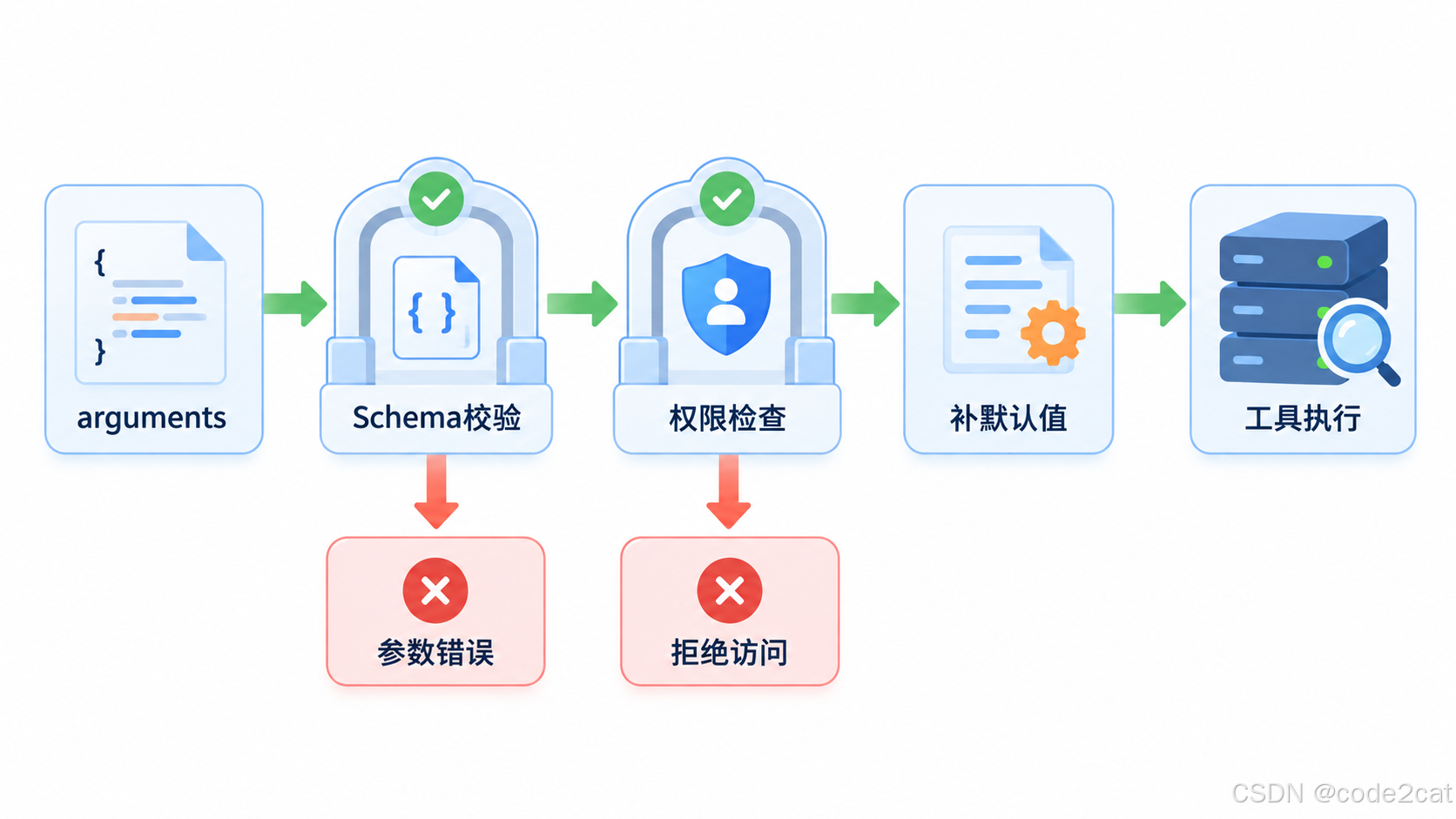
本文的校验使用JSON Schema 2020-12 。MCP没有显式声明方言时默认使用它;本例在Schema中明确填写$schema,校验器也选择对应的Draft202012Validator。MCP Schema规则
二、先把搜索工具的规则写完整
我们设计一个search_notes工具,接受三个参数:搜索词query、范围scope、最多返回条数limit。搜索词必填且至少有一个非空白字符;范围只能是java或backend;limit可省略,传入时必须是1到20的整数。
json
{
  "$schema": "https://json-schema.org/draft/2020-12/schema",
  "type": "object",
  "properties": {
    "query": {
      "type": "string",
      "minLength": 1,
      "maxLength": 80,
      "pattern": "\\S",
      "description": "搜索词,至少包含一个非空白字符"
    },
    "limit": {
      "type": "integer",
      "minimum": 1,
      "maximum": 20,
      "default": 5,
      "description": "最多返回几条;省略时服务端使用5"
    },
    "scope": {
      "type": "string",
      "enum": [
        "java",
        "backend"
      ],
      "description": "搜索范围"
    }
  },
  "required": [
    "query",
    "scope"
  ],
  "additionalProperties": false
}
properties 声明每个字段的规则,required 决定哪些字段必须出现,additionalProperties 决定未声明的字段能否进入。这三个部分各自发挥作用,不能只写properties就认为所有字段都必填。JSON Schema对象约束
query同时使用长度和内容检查:minLength: 1排除空字符串,pattern: "\\S"要求至少出现一个非空白字符。否则三个空格也满足长度大于0,却不能表达有意义的搜索词。
description写给调用方理解参数含义;minimum、maximum、enum这些约束交给校验器执行。把"最多20条"只写在说明里,运行入口就缺少对应的机器检查。
三、几种相似输入,结果完全不同
| 输入 | 处理结果 | 原因 |
|---|---|---|
| 没有query字段 | 拒绝 | query在required中 |
| query为null | 拒绝 | null不符合string类型 |
| query为三个空格 | 拒绝 | 不包含非空白字符 |
| limit为字符串"3" | 拒绝 | 字符串不符合integer |
| limit为21 | 拒绝 | 超过maximum |
| 多传debug字段 | 拒绝 | additionalProperties为false |
| 省略limit | 结构校验通过 | limit没有列入required |
这里最容易混淆的是字段缺失 和null。前者表示没有提供这个字段,后者表示提供了一个值为null的字段。若业务确实接受null,需要显式把null加入允许类型,并设计后续处理;本例没有这样的需求,因此直接拒绝。
另一个常见误解是default。JSON Schema中的default是注解,不会自动修改输入对象。
本例明确由服务端代码在校验通过后补上5,避免不同调用路径各自猜测默认条数。JSON Schema注解
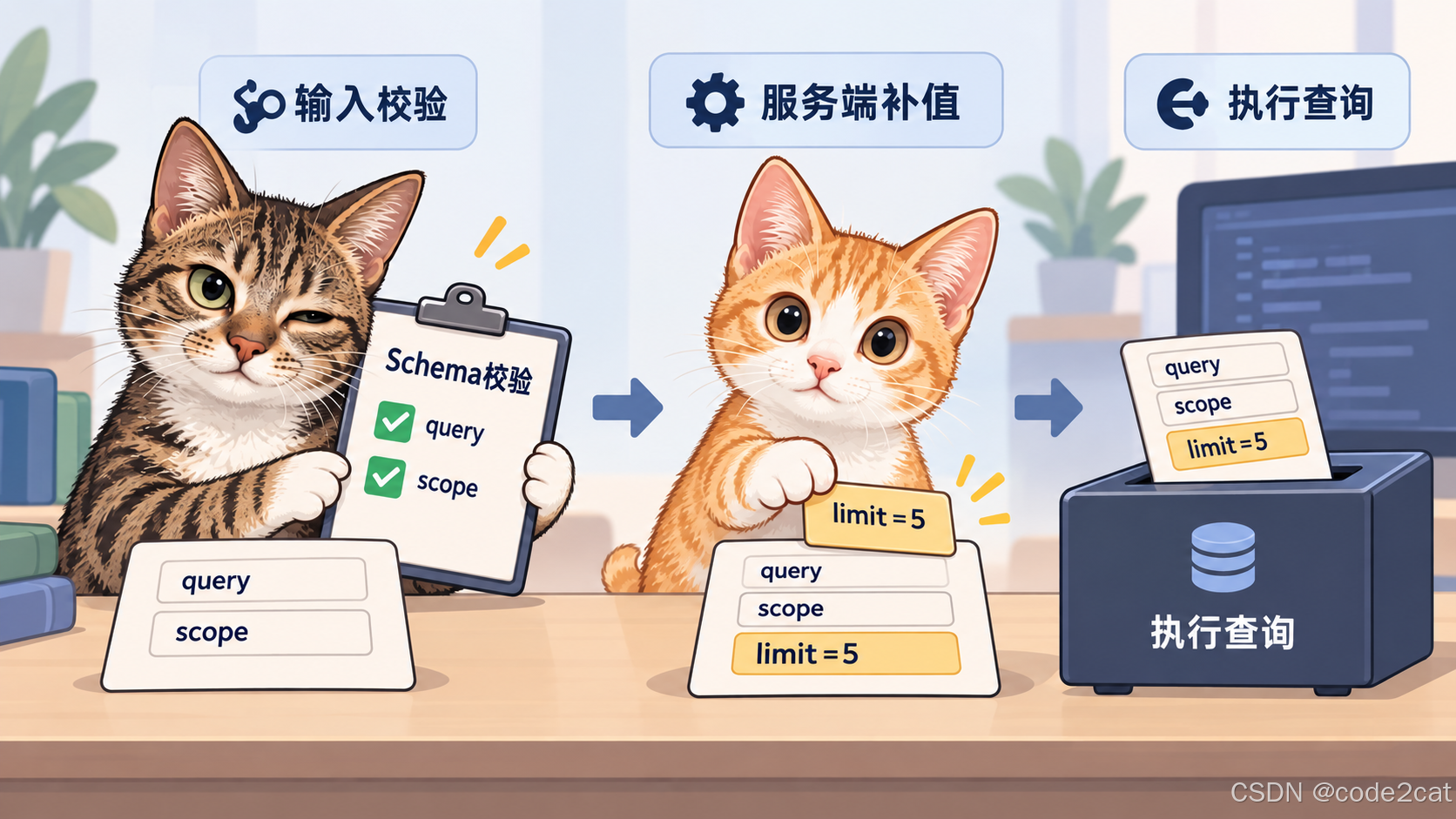
四、完整实例:实际校验九组输入
下面实现工具处理器中的参数准备函数,使用Python的jsonschema库。它检查Schema本身是否合法,再创建可复用校验器。调用时收集字段路径与失败规则,结构通过后继续检查搜索范围权限,最后生成业务函数接收的参数。
安装依赖:
bash
python -m pip install jsonschema保存为schema_demo.py。本例在Python3.12、jsonschema4.23.0环境实际运行,完整代码如下:
python
import json
from jsonschema import Draft202012Validator

SCHEMA = {
    "$schema": "https://json-schema.org/draft/2020-12/schema",
    "type": "object",
    "properties": {
        "query": {"type": "string", "minLength": 1, "maxLength": 80,
                  "pattern": r"\S", "description": "搜索词,至少包含一个非空白字符"},
        "limit": {"type": "integer", "minimum": 1, "maximum": 20,
                  "default": 5, "description": "最多返回几条;省略时服务端使用5"},
        "scope": {"type": "string", "enum": ["java", "backend"],
                  "description": "搜索范围"}
    },
    "required": ["query", "scope"],
    "additionalProperties": False
}

Draft202012Validator.check_schema(SCHEMA)
validator = Draft202012Validator(SCHEMA)

def prepare(arguments, allowed_scopes):
    errors = sorted(validator.iter_errors(arguments),
                    key=lambda e: (str(list(e.absolute_path)), e.message))
    if errors:
        details = []
        for error in errors:
            path = "/" + "/".join(map(str, error.absolute_path))
            details.append(f"{path}:{error.validator}")
        return "INVALID " + ",".join(details)
    if arguments["scope"] not in allowed_scopes:
        return "DENIED scope"
    normalized = {**arguments, "limit": arguments.get("limit", 5)}
    return "READY " + json.dumps(normalized, ensure_ascii=False, sort_keys=True)

cases = [
    ("ok", {"query": "CAS", "scope": "java", "limit": 3}),
    ("missing", {"scope": "java"}),
    ("null", {"query": None, "scope": "java"}),
    ("blank", {"query": "   ", "scope": "java"}),
    ("string_limit", {"query": "CAS", "scope": "java", "limit": "3"}),
    ("too_many", {"query": "CAS", "scope": "java", "limit": 21}),
    ("unknown", {"query": "CAS", "scope": "java", "debug": True}),
    ("default", {"query": "CAS", "scope": "java"}),
    ("permission", {"query": "queue", "scope": "backend"})
]
for name, arguments in cases:
    print(name + " -> " + prepare(arguments, {"java"}))
sample = {"query": "CAS", "scope": "java"}
validator.validate(sample)
print("default_inserted=" + str("limit" in sample))执行python schema_demo.py,输出:
text
ok -> READY {"limit": 3, "query": "CAS", "scope": "java"}
missing -> INVALID /:required
null -> INVALID /query:type
blank -> INVALID /query:pattern
string_limit -> INVALID /limit:type
too_many -> INVALID /limit:maximum
unknown -> INVALID /:additionalProperties
default -> READY {"limit": 5, "query": "CAS", "scope": "java"}
permission -> DENIED scope
default_inserted=Falsemissing指向对象根路径/的required规则;string_limit精确指向/limit的type规则。对Agent的反馈可以据此表达为"limit需要1到20的整数,请把字符串改为整数",比笼统的"参数错误"更容易修正。
default一行已经补出了limit为5,末尾的default_inserted=False又说明:单独调用validator.validate,并没有往原对象写入limit。补默认值的动作来自prepare函数中的显式代码。jsonschema校验接口
五、结构通过后,权限检查继续执行
permission这组参数的scope为backend,它属于enum允许的取值,因此结构校验通过。但当前调用者只获得java范围的访问权限,所以prepare返回DENIED scope,不会进入查询。
这是代码里两道检查的分工:Schema描述工具接受怎样的数据;allowed_scopes描述当前调用者能够访问哪些数据。权限来源应由服务端认证与授权上下文提供,不能让调用者自己在arguments里声明。
在实际MCP处理器中,把校验失败转换成含有字段位置、期望类型或范围的工具错误结果,并保留清晰的业务原因。敏感数据不要拼进错误文本,权限不足也不应通过扩大搜索范围自动重试。
查询阶段继续采用参数化查询和明确的资料范围。Schema验证通过只意味着参数满足已声明的规则,服务端仍要执行自己的查询逻辑。
六、Schema维护中的三个实用选择
第一,收紧规则时同步更新调用方。
把原来可选的字段改为必填,会让旧参数无法通过。发布新定义时,客户端缓存里的旧工具描述也需要及时刷新,避免模型继续按旧约定构造参数。
第二,把默认值放在唯一入口。
Schema的default、描述中的默认说明和prepare里的5保持一致。条数上限也应与后端查询成本相匹配,不能只在文档中限制,真正执行时再放开。
第三,用代表性反例检查规则。
本例的九组数据分别覆盖正常调用、缺失、null、空白、类型错误、越界、额外字段、默认值和权限不足。新加一个参数后,补充能触发它的错误输入,观察反馈是否仍然指向准确位置。
如果参数暂时只涉及几个字段,优先保持平直、清晰的Schema。需要复杂的组合规则时,再加入oneOf等结构,并用明确的案例检验每条分支。
七、🧠 思维导图
#mermaid-svg-G9ZQOHSIaLylW0rI{font-family:"trebuchet ms",verdana,arial,sans-serif;font-size:16px;fill:#333;}@keyframes edge-animation-frame{from{stroke-dashoffset:0;}}@keyframes dash{to{stroke-dashoffset:0;}}#mermaid-svg-G9ZQOHSIaLylW0rI .edge-animation-slow{stroke-dasharray:9,5!important;stroke-dashoffset:900;animation:dash 50s linear infinite;stroke-linecap:round;}#mermaid-svg-G9ZQOHSIaLylW0rI .edge-animation-fast{stroke-dasharray:9,5!important;stroke-dashoffset:900;animation:dash 20s linear infinite;stroke-linecap:round;}#mermaid-svg-G9ZQOHSIaLylW0rI .error-icon{fill:#552222;}#mermaid-svg-G9ZQOHSIaLylW0rI .error-text{fill:#552222;stroke:#552222;}#mermaid-svg-G9ZQOHSIaLylW0rI .edge-thickness-normal{stroke-width:1px;}#mermaid-svg-G9ZQOHSIaLylW0rI .edge-thickness-thick{stroke-width:3.5px;}#mermaid-svg-G9ZQOHSIaLylW0rI .edge-pattern-solid{stroke-dasharray:0;}#mermaid-svg-G9ZQOHSIaLylW0rI .edge-thickness-invisible{stroke-width:0;fill:none;}#mermaid-svg-G9ZQOHSIaLylW0rI .edge-pattern-dashed{stroke-dasharray:3;}#mermaid-svg-G9ZQOHSIaLylW0rI .edge-pattern-dotted{stroke-dasharray:2;}#mermaid-svg-G9ZQOHSIaLylW0rI .marker{fill:#333333;stroke:#333333;}#mermaid-svg-G9ZQOHSIaLylW0rI .marker.cross{stroke:#333333;}#mermaid-svg-G9ZQOHSIaLylW0rI svg{font-family:"trebuchet ms",verdana,arial,sans-serif;font-size:16px;}#mermaid-svg-G9ZQOHSIaLylW0rI p{margin:0;}#mermaid-svg-G9ZQOHSIaLylW0rI .label{font-family:"trebuchet ms",verdana,arial,sans-serif;color:#333;}#mermaid-svg-G9ZQOHSIaLylW0rI .cluster-label text{fill:#333;}#mermaid-svg-G9ZQOHSIaLylW0rI .cluster-label span{color:#333;}#mermaid-svg-G9ZQOHSIaLylW0rI .cluster-label span p{background-color:transparent;}#mermaid-svg-G9ZQOHSIaLylW0rI .label text,#mermaid-svg-G9ZQOHSIaLylW0rI span{fill:#333;color:#333;}#mermaid-svg-G9ZQOHSIaLylW0rI .node rect,#mermaid-svg-G9ZQOHSIaLylW0rI .node circle,#mermaid-svg-G9ZQOHSIaLylW0rI .node ellipse,#mermaid-svg-G9ZQOHSIaLylW0rI .node polygon,#mermaid-svg-G9ZQOHSIaLylW0rI .node path{fill:#ECECFF;stroke:#9370DB;stroke-width:1px;}#mermaid-svg-G9ZQOHSIaLylW0rI .rough-node .label text,#mermaid-svg-G9ZQOHSIaLylW0rI .node .label text,#mermaid-svg-G9ZQOHSIaLylW0rI .image-shape .label,#mermaid-svg-G9ZQOHSIaLylW0rI .icon-shape .label{text-anchor:middle;}#mermaid-svg-G9ZQOHSIaLylW0rI .node .katex path{fill:#000;stroke:#000;stroke-width:1px;}#mermaid-svg-G9ZQOHSIaLylW0rI .rough-node .label,#mermaid-svg-G9ZQOHSIaLylW0rI .node .label,#mermaid-svg-G9ZQOHSIaLylW0rI .image-shape .label,#mermaid-svg-G9ZQOHSIaLylW0rI .icon-shape .label{text-align:center;}#mermaid-svg-G9ZQOHSIaLylW0rI .node.clickable{cursor:pointer;}#mermaid-svg-G9ZQOHSIaLylW0rI .root .anchor path{fill:#333333!important;stroke-width:0;stroke:#333333;}#mermaid-svg-G9ZQOHSIaLylW0rI .arrowheadPath{fill:#333333;}#mermaid-svg-G9ZQOHSIaLylW0rI .edgePath .path{stroke:#333333;stroke-width:2.0px;}#mermaid-svg-G9ZQOHSIaLylW0rI .flowchart-link{stroke:#333333;fill:none;}#mermaid-svg-G9ZQOHSIaLylW0rI .edgeLabel{background-color:rgba(232,232,232, 0.8);text-align:center;}#mermaid-svg-G9ZQOHSIaLylW0rI .edgeLabel p{background-color:rgba(232,232,232, 0.8);}#mermaid-svg-G9ZQOHSIaLylW0rI .edgeLabel rect{opacity:0.5;background-color:rgba(232,232,232, 0.8);fill:rgba(232,232,232, 0.8);}#mermaid-svg-G9ZQOHSIaLylW0rI .labelBkg{background-color:rgba(232, 232, 232, 0.5);}#mermaid-svg-G9ZQOHSIaLylW0rI .cluster rect{fill:#ffffde;stroke:#aaaa33;stroke-width:1px;}#mermaid-svg-G9ZQOHSIaLylW0rI .cluster text{fill:#333;}#mermaid-svg-G9ZQOHSIaLylW0rI .cluster span{color:#333;}#mermaid-svg-G9ZQOHSIaLylW0rI div.mermaidTooltip{position:absolute;text-align:center;max-width:200px;padding:2px;font-family:"trebuchet ms",verdana,arial,sans-serif;font-size:12px;background:hsl(80, 100%, 96.2745098039%);border:1px solid #aaaa33;border-radius:2px;pointer-events:none;z-index:100;}#mermaid-svg-G9ZQOHSIaLylW0rI .flowchartTitleText{text-anchor:middle;font-size:18px;fill:#333;}#mermaid-svg-G9ZQOHSIaLylW0rI rect.text{fill:none;stroke-width:0;}#mermaid-svg-G9ZQOHSIaLylW0rI .icon-shape,#mermaid-svg-G9ZQOHSIaLylW0rI .image-shape{background-color:rgba(232,232,232, 0.8);text-align:center;}#mermaid-svg-G9ZQOHSIaLylW0rI .icon-shape p,#mermaid-svg-G9ZQOHSIaLylW0rI .image-shape p{background-color:rgba(232,232,232, 0.8);padding:2px;}#mermaid-svg-G9ZQOHSIaLylW0rI .icon-shape .label rect,#mermaid-svg-G9ZQOHSIaLylW0rI .image-shape .label rect{opacity:0.5;background-color:rgba(232,232,232, 0.8);fill:rgba(232,232,232, 0.8);}#mermaid-svg-G9ZQOHSIaLylW0rI .label-icon{display:inline-block;height:1em;overflow:visible;vertical-align:-0.125em;}#mermaid-svg-G9ZQOHSIaLylW0rI .node .label-icon path{fill:currentColor;stroke:revert;stroke-width:revert;}#mermaid-svg-G9ZQOHSIaLylW0rI :root{--mermaid-font-family:"trebuchet ms",verdana,arial,sans-serif;} MCP输入Schema
定义约定
properties字段规则
required必填字段
限制额外字段
辨别输入
缺失与null分开
类型与范围检查
空白内容单独限制
处理链
校验结构
服务端检查权限
显式补默认值
执行业务查询
工程质量
错误指向字段和规则
定义与实现同步
用反例验证约定
八、总结
总结要点
inputSchema把输入约定交给机器检查。字段规则、必填要求和额外字段策略一起写清楚,服务端就能在工具执行前拦住具体参数错误。
缺失、null、空白和错误类型分别处理。default只表达默认意图,实际补值由服务端入口完成,所有调用路径才能得到一致行为。
参数结构检查与权限检查按顺序配合,错误反馈指出字段和修正方向。工具契约由此成为可执行、可验证、可维护的一部分。
下一篇聊MCP工具目录变化后,客户端怎样刷新定义,让Agent使用当前可用的工具。
👉 如果你觉得这篇文章对你有所帮助,欢迎点赞、收藏、分享!😊