1. 这个搜索框为什么没有结果
把 HarmonyOS 少打几个字母,输入 HrmnyOS,搜索页没有出现任何条目。一个写着"模糊匹配"的示例遇到这种情况,很容易让人先怀疑适配出了问题。可同样的输入切换评分方式后,HarmonyOS 相关标题又出现了。真正要查看的是当前策略怎样定义"匹配",以及页面有没有忠实地呈现这个定义。
这次接入 FuzzyKot,把原 Kotlin 匹配实现编译到鸿蒙 Native,再做一个可以切换策略的搜索页。数据只有十二条本地标题,包括鸿蒙、Kotlin、React Native 等关键词。这样的规模方便逐项查看返回结果,也方便保留无结果时的真实状态。
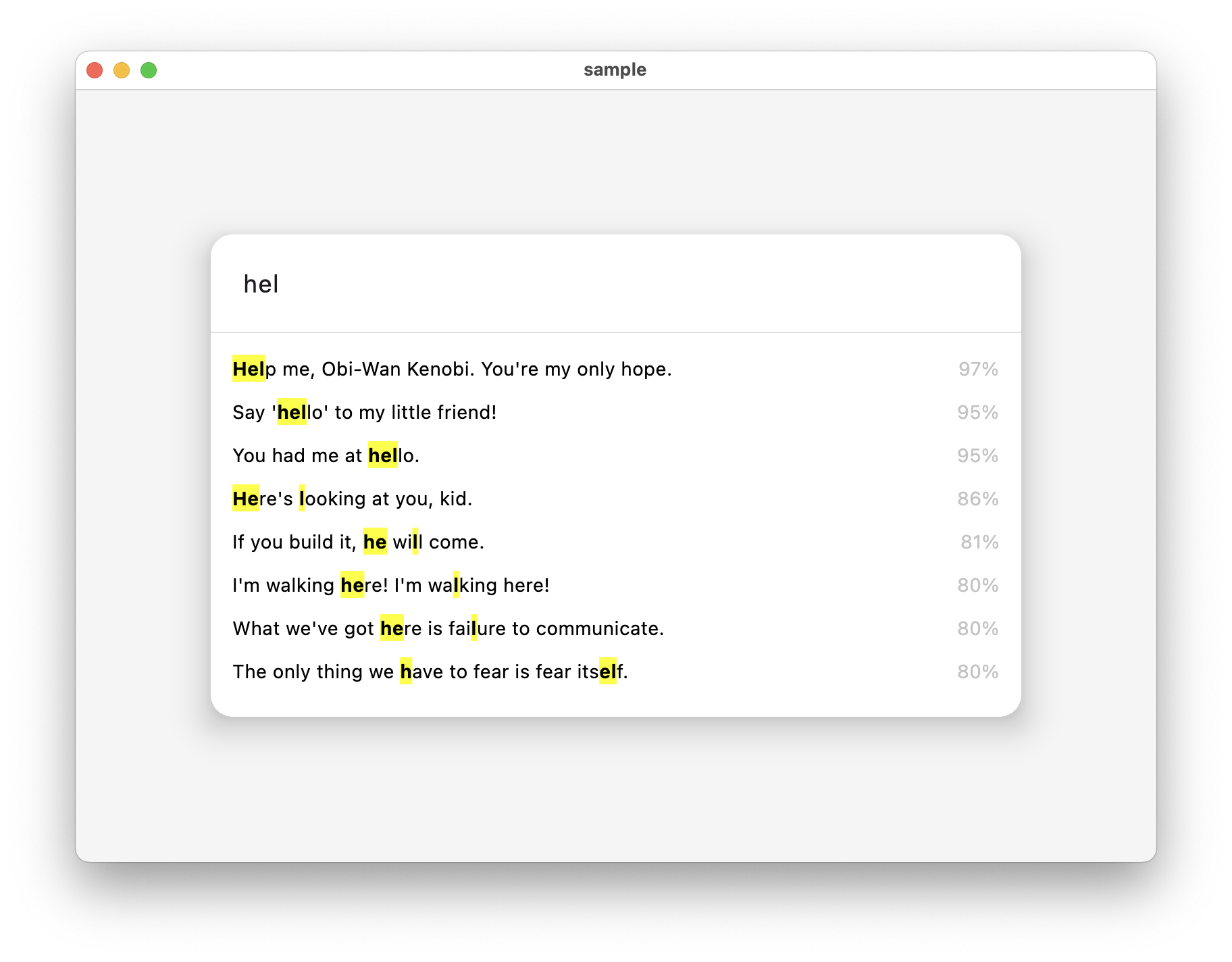
上游 README 的示例图展示了这个库原本的使用场景,作者为 Konstantin Tskhovrebov,版权说明见原仓的 MIT 许可证。本文的鸿蒙操作演示则来自后面的设备录制。
默认入口调用 MicroFuzz.ratio,它使用 SMART 策略。查看原源码可以看到,SMART 关注词首以及具有一定长度的连续片段,因此不能预期任意删掉几个字母都能命中。当前标题集合里,HrmnyOS 得不到合适结果,是这组输入在当前策略下的实际行为。
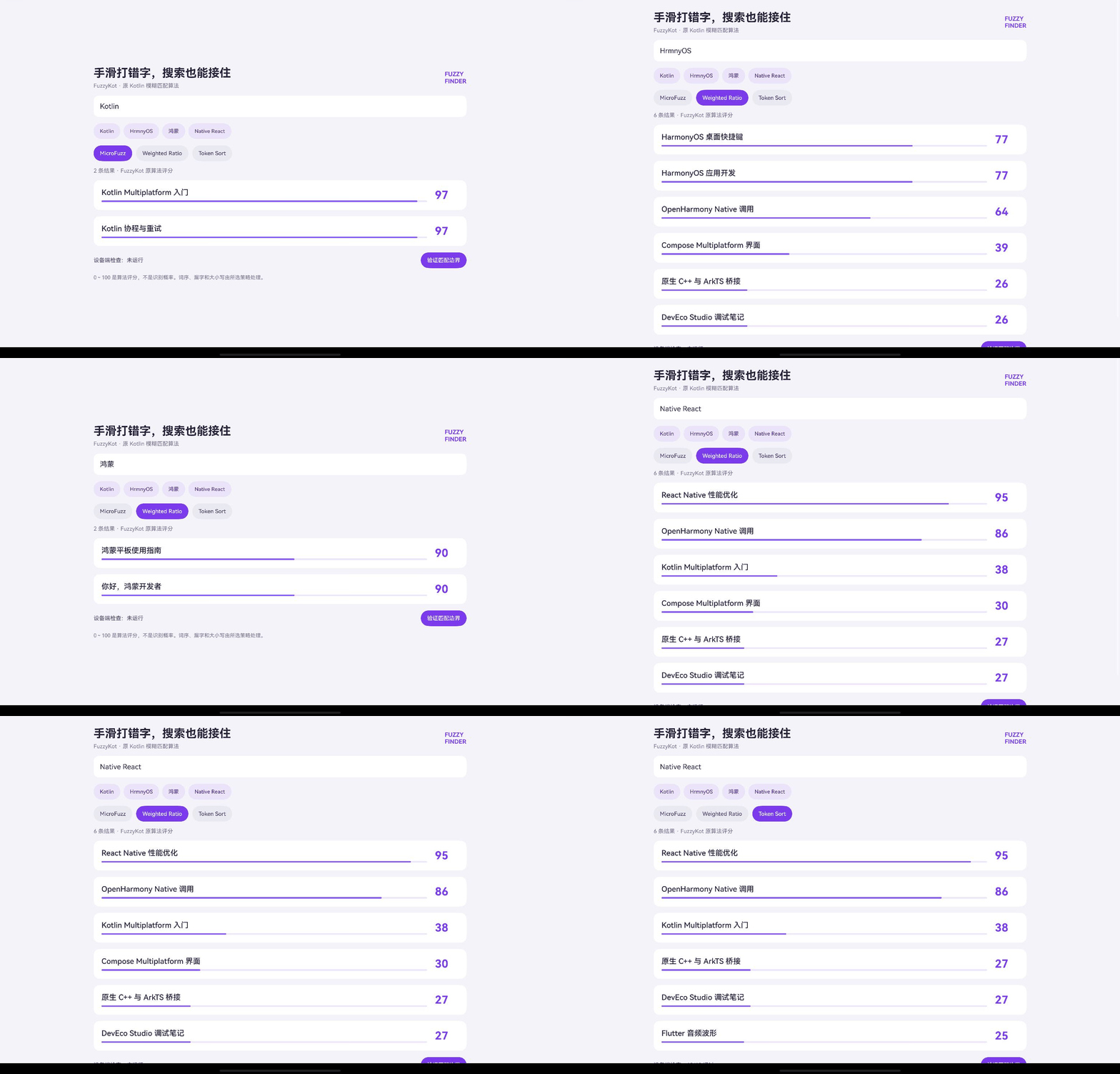
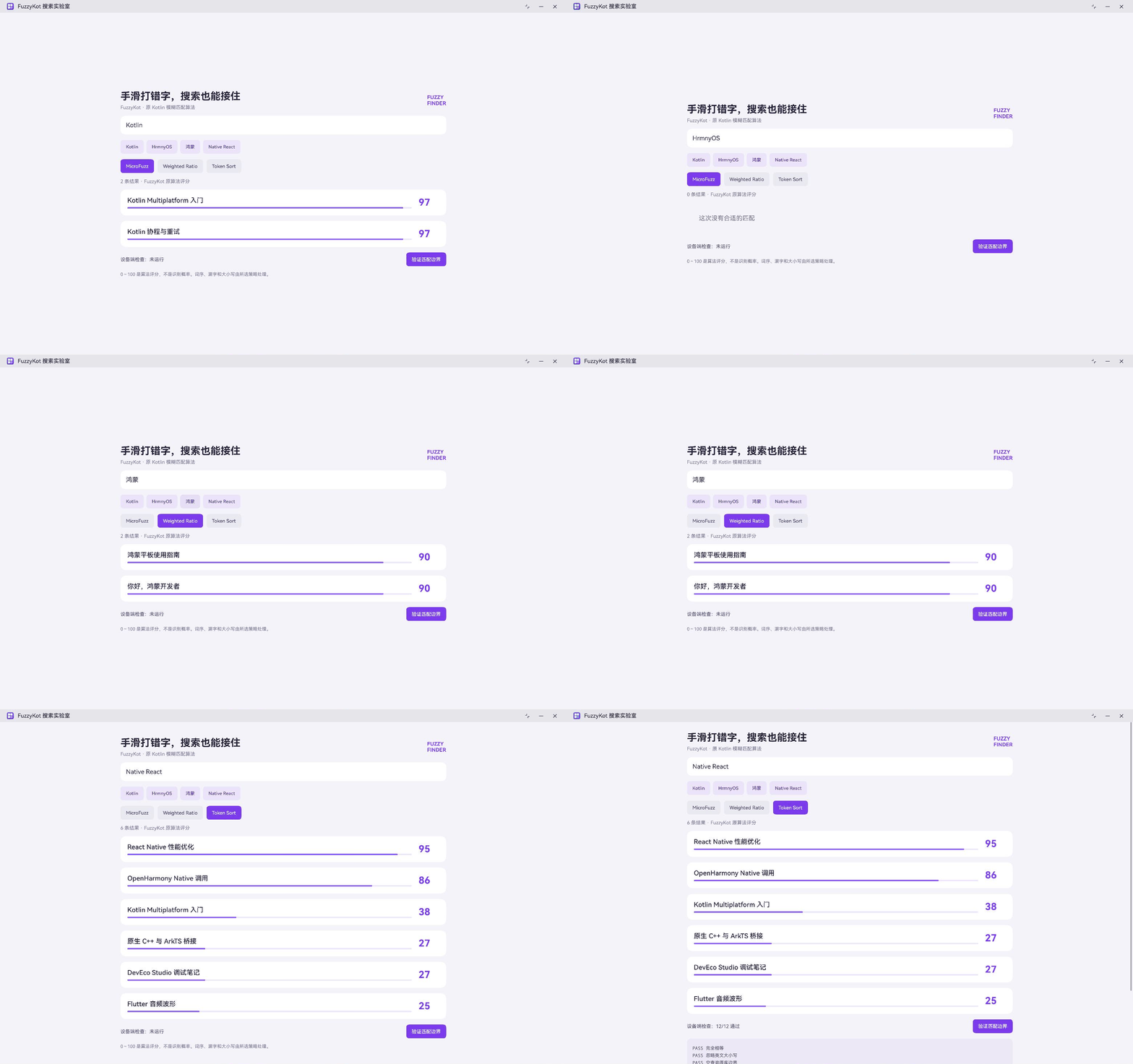
先保留这个空状态,再切换到 Weighted Ratio。MatePad Edge 真机上的操作过程如下,同一个输入得到不同的返回列表。
2. 沿着输入继续试:漏字、中文和换词序
页面提供 MicroFuzz、Weighted Ratio、Token Sort 三个选项,切换时保留关键词。这一点很方便:比较的是同一组候选标题和同一段输入,界面条件不会跟着改变。Weighted Ratio 在这个漏字样例里能返回 HarmonyOS 相关标题,Token Sort 则适合继续观察单词顺序变化。
另一组预设是 Native React。切到 Token Sort 后,React Native 性能优化排在前面。这个策略先处理词序再评分,让词的排列变化对结果产生不同影响。它与前缀、连续片段匹配各有用途,具体选择要结合常见查询的拼写和词序。
|--------------|----------|----------------------------------------------|
| 试验输入 | 观察重点 | 本次示例的行为 |
| HrmnyOS | 漏字后切换策略 | SMART 无合适结果;Weighted Ratio 返回 HarmonyOS 相关标题 |
| 鸿蒙 | 中文标题匹配 | 返回当前本地集合中的相关项 |
| Native React | 单词顺序变化 | Token Sort 返回 React Native 性能优化等标题 |
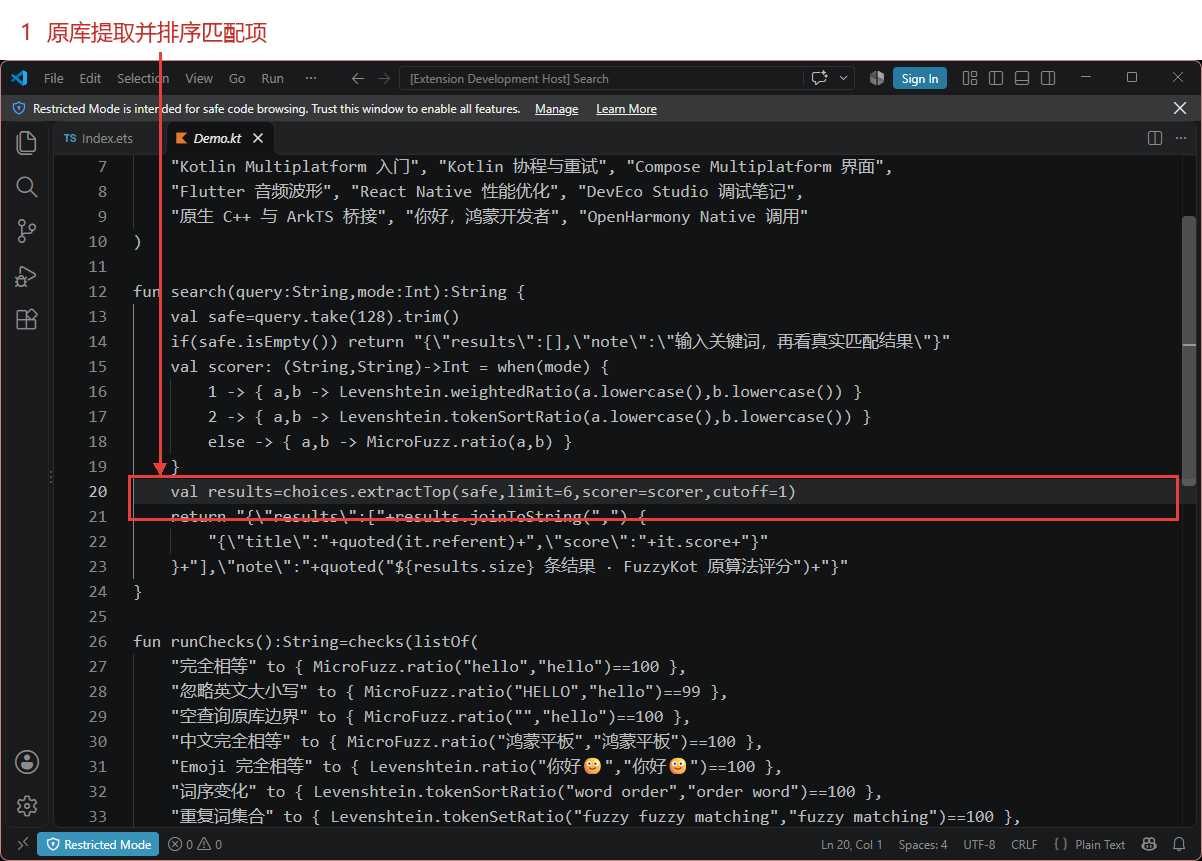
实际入口就在 harmony/src/Demo.kt。查询截取到一百二十八个字符并去掉首尾空白,再交给所选评分函数;extractTop 最多返回六条,cutoff 为一。这个较低的阈值用于观察差别,实际业务应该拿自己的标题和查询样本来选择阈值。
package harmony

import com.github.terrakok.fuzzykot.*

private val choices=listOf(
    "HarmonyOS 应用开发", "HarmonyOS 桌面快捷键", "鸿蒙平板使用指南",
    "Kotlin Multiplatform 入门", "Kotlin 协程与重试", "Compose Multiplatform 界面",
    "Flutter 音频波形", "React Native 性能优化", "DevEco Studio 调试笔记",
    "原生 C++ 与 ArkTS 桥接", "你好,鸿蒙开发者", "OpenHarmony Native 调用"
)

fun search(query:String,mode:Int):String {
    val safe=query.take(128).trim()
    if(safe.isEmpty()) return "{\"results\":[],\"note\":\"输入关键词,再看真实匹配结果\"}"
    val scorer: (String,String)->Int = when(mode) {
        1 -> { a,b -> Levenshtein.weightedRatio(a.lowercase(),b.lowercase()) }
        2 -> { a,b -> Levenshtein.tokenSortRatio(a.lowercase(),b.lowercase()) }
        else -> { a,b -> MicroFuzz.ratio(a,b) }
    }
    val results=choices.extractTop(safe,limit=6,scorer=scorer,cutoff=1)
    return "{\"results\":["+results.joinToString(",") {
        "{\"title\":"+quoted(it.referent)+",\"score\":"+it.score+"}"
    }+"],\"note\":"+quoted("${results.size} 条结果 · FuzzyKot 原算法评分")+"}"
}

fun runChecks():String=checks(listOf(
    "完全相等" to { MicroFuzz.ratio("hello","hello")==100 },
    "忽略英文大小写" to { MicroFuzz.ratio("HELLO","hello")==99 },
    "空查询原库边界" to { MicroFuzz.ratio("","hello")==100 },
    "中文完全相等" to { MicroFuzz.ratio("鸿蒙平板","鸿蒙平板")==100 },
    "Emoji 完全相等" to { Levenshtein.ratio("你好🙂","你好🙂")==100 },
    "词序变化" to { Levenshtein.tokenSortRatio("word order","order word")==100 },
    "重复词集合" to { Levenshtein.tokenSetRatio("fuzzy fuzzy matching","fuzzy matching")==100 },
    "局部匹配" to { Levenshtein.partialRatio("sim","similar")==100 },
    "集合最优项" to { listOf("Java","Kotlin","Swift").extractOne("Kotlin")?.referent=="Kotlin" },
    "Top 0 边界" to { listOf("hello","world").extractTop("hello",limit=0).isEmpty() },
    "界面空串不伪造结果" to { search("",0).contains("\"results\":[]") },
    "所有返回分数在0到100" to { listOf("鸿蒙","HELLO","🙂","x").all { q -> choices.extractAll(q).all{it.score in 0..100} } }
))
这里还有一个容易误解的数字:页面显示零到一百的评分,不能读成"识别正确的概率"。同一策略、同一查询下,可以用它排序;换了策略,评分规则也跟着变化。进度条只是把数值画出来,业务含义仍需要由算法和场景共同决定。
英文大小写归一化在调用 Weighted Ratio、Token Sort 时完成。MicroFuzz 自己也有相应的归一化逻辑,设备检查保留了大小写不同得到九十九分的原库语义。中文查询使用当前标题集合测试。Emoji 检查只覆盖相等字符串;组合字符和字素簇还需要增加专门用例。
3. 空输入怎样处理,页面就怎样显示
删除搜索词之后应该看到什么?原 MicroFuzz 对空查询可以返回满分,直接把它接到列表上,会让没有输入的页面展示一批高分条目。本示例在入口检测到空字符串时返回空集合,并给出"输入关键词"的提示。原算法的行为仍留在检查函数里,应用层另外定义自己的空输入交互。
页面也保留了两种空状态:关键词为空时提示先输入;关键词不为空、返回集合为空时显示"这次没有合适的匹配"。HrmnyOS 在 SMART 下走后者,删除全部输入走前者。这样就能从界面区分尚未搜索和确实没有匹配,不必靠猜测。
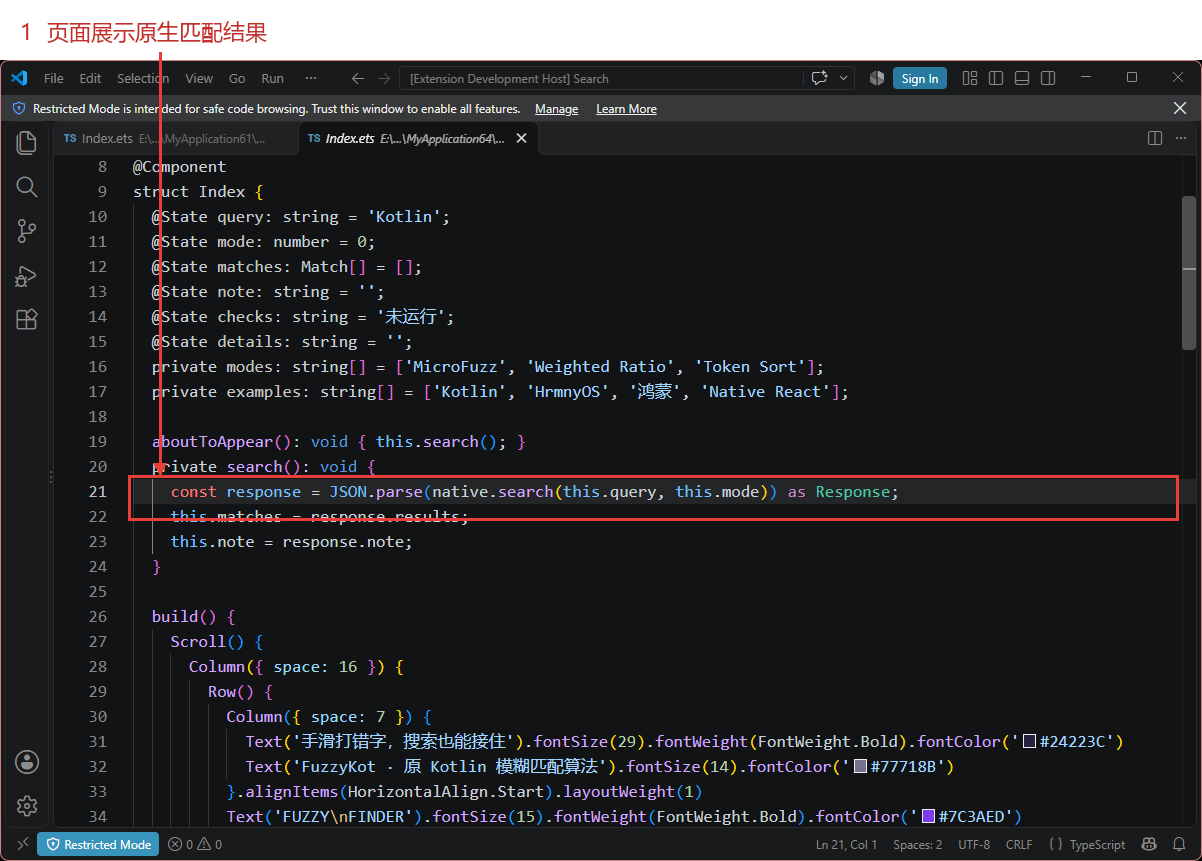
输入变化后,ArkTS 把字符串与模式交给 Native,随后使用返回的标题和评分绘制列表。排序由 Kotlin 原库完成,结果区没有另做一次相似度计算。完整页面如下。
import native from 'libentry.so';

interface Match { title: string; score: number; }
interface Response { results: Match[]; note: string; }
interface Checks { passed: number; total: number; detail: string; }

@Entry
@Component
struct Index {
  @State query: string = 'Kotlin';
  @State mode: number = 0;
  @State matches: Match[] = [];
  @State note: string = '';
  @State checks: string = '未运行';
  @State details: string = '';
  private modes: string[] = ['MicroFuzz', 'Weighted Ratio', 'Token Sort'];
  private examples: string[] = ['Kotlin', 'HrmnyOS', '鸿蒙', 'Native React'];

  aboutToAppear(): void { this.search(); }
  private search(): void {
    const response = JSON.parse(native.search(this.query, this.mode)) as Response;
    this.matches = response.results;
    this.note = response.note;
  }

  build() {
    Scroll() {
      Column({ space: 16 }) {
        Row() {
          Column({ space: 7 }) {
            Text('手滑打错字,搜索也能接住').fontSize(29).fontWeight(FontWeight.Bold).fontColor('#24223C')
            Text('FuzzyKot · 原 Kotlin 模糊匹配算法').fontSize(14).fontColor('#77718B')
          }.alignItems(HorizontalAlign.Start).layoutWeight(1)
          Text('FUZZY\nFINDER').fontSize(15).fontWeight(FontWeight.Bold).fontColor('#7C3AED')
        }.width('100%')

        TextInput({ text: this.query, placeholder: '试试 Kotlin、鸿蒙,或者故意漏几个字母' })
          .height(54).fontSize(18).fontColor('#27233D').placeholderColor('#77718B').backgroundColor(Color.White).borderRadius(14).maxLength(128)
          .onChange((value: string) => { this.query = value; this.search(); })
        Row({ space: 8 }) {
          ForEach(this.examples, (example: string) => {
            Button(example).fontSize(13).backgroundColor('#EAE3FA').fontColor('#57369A')
              .onClick(() => { this.query = example; this.search(); })
          })
        }.width('100%')

        Row({ space: 10 }) {
          ForEach(this.modes, (title: string, index: number) => {
            Button(title).fontSize(14).backgroundColor(this.mode === index ? '#7C3AED' : '#E9EAF1')
              .fontColor(this.mode === index ? Color.White : '#4F4865')
              .onClick(() => { this.mode = index; this.search(); })
          })
        }.width('100%')
        Text(this.note).fontSize(14).fontColor('#77718B').width('100%')

        if (this.matches.length === 0) {
          Text(this.query.length === 0 ? '先输入关键词' : '这次没有合适的匹配')
            .fontSize(18).fontColor('#77718B').padding(35).width('100%')
        }
        ForEach(this.matches, (item: Match) => {
          Row({ space: 20 }) {
            Column({ space: 9 }) {
              Text(item.title).fontSize(19).fontWeight(FontWeight.Medium).fontColor('#27233D').width('100%')
              Progress({ value: item.score, total: 100, type: ProgressType.Linear })
                .color('#8B5CF6').backgroundColor('#ECE5FC').width('100%')
            }.layoutWeight(1)
            Text(`${item.score}`).fontSize(28).fontWeight(FontWeight.Bold).fontColor('#7C3AED').width(60)
          }.padding(20).width('100%').backgroundColor(Color.White).borderRadius(16)
        }, (item: Match) => item.title)

        Row() {
          Text(`设备端检查:${this.checks}`).fontSize(14).fontColor('#4F4865').layoutWeight(1)
          Button('验证匹配边界').backgroundColor('#7C3AED').fontSize(14).onClick(() => {
            const result = JSON.parse(native.runChecks()) as Checks;
            this.checks = `${result.passed}/${result.total} 通过`;
            this.details = result.detail;
          })
        }.width('100%')
        if (this.details.length > 0) {
          Text(this.details).fontSize(13).fontColor('#4F4865').fontFamily('monospace').lineHeight(21).width('100%')
            .padding(16).backgroundColor('#ECE8F5').borderRadius(12)
        }
        Text('0~100 是算法评分,不是识别概率。词序、漏字和大小写由所选策略处理。')
          .fontSize(13).fontColor('#77718B').width('100%')
      }.padding(28).width('100%').constraintSize({ maxWidth: 1000 })
    }.width('100%').height('100%').backgroundColor('#F5F3FA')
  }
}
当前只有十二条本地标题,所以输入变化时同步调用 Native,便于演示即时反馈。数据增长到数万条时,应该重新测量耗时,并考虑输入防抖、后台执行和丢弃过时结果。这个示例没有访问远程搜索服务,也没有测过大规模索引。
调用边界的代码负责检查参数、转换字符串和释放返回值。查询与评分模式传入 Kotlin 后,返回 JSON 字符串;C++ 创建 N-API 字符串后调用 DisposeString,页面再解析它。发生参数异常时先返回到调用方,避免继续用无效参数运行搜索。
#include "napi/native_api.h"
#include "fuzzykot_api.h"
#include <string>

// The strings returned by Kotlin/Native have to be released by DisposeString.
static napi_value ReturnString(napi_env env, const char* text) {
    napi_value value;
    napi_create_string_utf8(env,text?text:"",NAPI_AUTO_LENGTH,&value);
    if(text) fuzzykot_symbols()->DisposeString(text);
    return value;
}
static std::string ReadString(napi_env env, napi_value value) {
    size_t length=0;
    if(napi_get_value_string_utf8(env,value,nullptr,0,&length)!=napi_ok || length>4096) {
        napi_throw_type_error(env,nullptr,"Expected a string up to 4096 UTF-8 bytes");
        return "";
    }
    std::string result(length+1,'\0');
    napi_get_value_string_utf8(env,value,result.data(),result.size(),&length);
    result.resize(length);
    return result;
}
static napi_value Run(napi_env env, napi_callback_info info) {
    size_t argc=2; napi_value args[2];
    napi_get_cb_info(env,info,&argc,args,nullptr,nullptr);
    if(argc!=2) { napi_throw_type_error(env,nullptr,"Wrong number of arguments"); return nullptr; }
    auto query=ReadString(env,args[0]);int32_t mode=0;
    if(napi_get_value_int32(env,args[1],&mode)!=napi_ok){napi_throw_type_error(env,nullptr,"Expected numeric mode");return nullptr;}
    bool pending=false;napi_is_exception_pending(env,&pending);if(pending)return nullptr;
    return ReturnString(env,fuzzykot_symbols()->kotlin.root.harmony.search(query.c_str(),mode));
}
static napi_value Check(napi_env env, napi_callback_info info) {
    return ReturnString(env,fuzzykot_symbols()->kotlin.root.harmony.runChecks());
}
static napi_value Init(napi_env env, napi_value exports) {
    napi_property_descriptor methods[]={
        {"search",nullptr,Run,nullptr,nullptr,nullptr,napi_default,nullptr},
        {"runChecks",nullptr,Check,nullptr,nullptr,nullptr,napi_default,nullptr}
    };
    napi_define_properties(env,exports,2,methods);
    return exports;
}
static napi_module module={1,0,nullptr,Init,"entry",nullptr,{0}};
extern "C" __attribute__((constructor)) void RegisterEntry(){ napi_module_register(&module); }
JSON 辅助函数处理了标题中的引号、换行、反斜杠等字符,也把设备检查包装成可以直接展示的结果。即便目前的标题固定,调用边界仍要把这些转义规则写清楚,后续更换标题来源时才容易核对。
package harmony

internal fun quoted(s: String): String = "\"" + buildString {
    for (c in s) when(c) {
        '\\' -> append("\\\\")
        '"' -> append("\\\"")
        '\n' -> append("\\n")
        '\r' -> append("\\r")
        '\t' -> append("\\t")
        else -> if(c.code < 32) append(" ") else append(c)
    }
} + "\""

internal fun checks(tests: List<Pair<String, () -> Boolean>>): String {
    val lines=tests.map { (name, test) ->
        val ok=try { test() } catch(e: Throwable) { false }
        name to ok
    }
    return "{\"passed\":"+lines.count{it.second}+",\"total\":"+lines.size+
        ",\"detail\":"+quoted(lines.joinToString("\n") { (n,ok) -> (if(ok) "PASS " else "FAIL ")+n })+"}"
}
4. 平台改动和最后一次复核
FuzzyKot 1.0.0 的算法集中在 fuzzykot/src/commonMain,库本身没有外部依赖。这次保留原共享源码,新增 harmony 来配置 ohosArm64、ohosX64 目标及调用入口;完整鸿蒙程序放在原仓的 example/harmony,方便从库目录直接找到页面和 N-API 桥。
平台环境按 CPF-KMP-CMP 官方快速开始准备。本次实际编译器为鸿蒙 Kotlin/Native 2.2.21-1.1.0,应用和设备验证为 API 24。下面的配置描述共享源码接入两种鸿蒙目标的关系,实际产物由命令行编译器生成,再参与 DevEco 的 HAP 构建;Gradle 发布流程尚未运行验证。
plugins { kotlin("multiplatform") version "2.2.21-1.1.0" }

kotlin {
    val ohosTargets=listOf(ohosArm64(),ohosX64())
    ohosTargets.forEach { target ->
        target.binaries.sharedLib { baseName="fuzzykot" }
    }
    sourceSets {
        commonMain { kotlin.srcDir("../fuzzykot/src/commonMain/kotlin") }
        val ohosMain by creating {
            dependsOn(commonMain.get())
            kotlin.srcDir("src")

        }
        ohosArm64Main { dependsOn(ohosMain) }
        ohosX64Main { dependsOn(ohosMain) }
        commonTest {
            kotlin.srcDir("../fuzzykot/src/commonTest/kotlin")
            dependencies { implementation(kotlin("test")) }
        }
    }
}
新增文件各自处理一件事:harmony/src/Demo.kt 选择策略并提取候选项,JsonAndChecks.kt 序列化结果和运行用例,example/harmony 中的 napi_init.cpp 建立 ArkTS 调用入口,Index.ets 负责搜索交互与结果显示。MicroFuzz 和 Levenshtein 的原实现没有改写,算法边界可以对照上游源码检查。
同一份最终构建在 x86_64 模拟器与 MatePad Edge arm64 真机上分别执行,均核对了 SMART 无结果、切换后的相关标题、中文查询和词序变化。两端设备的原生检查均返回十二项通过。下面是模拟器的实际操作与真机检查位置。
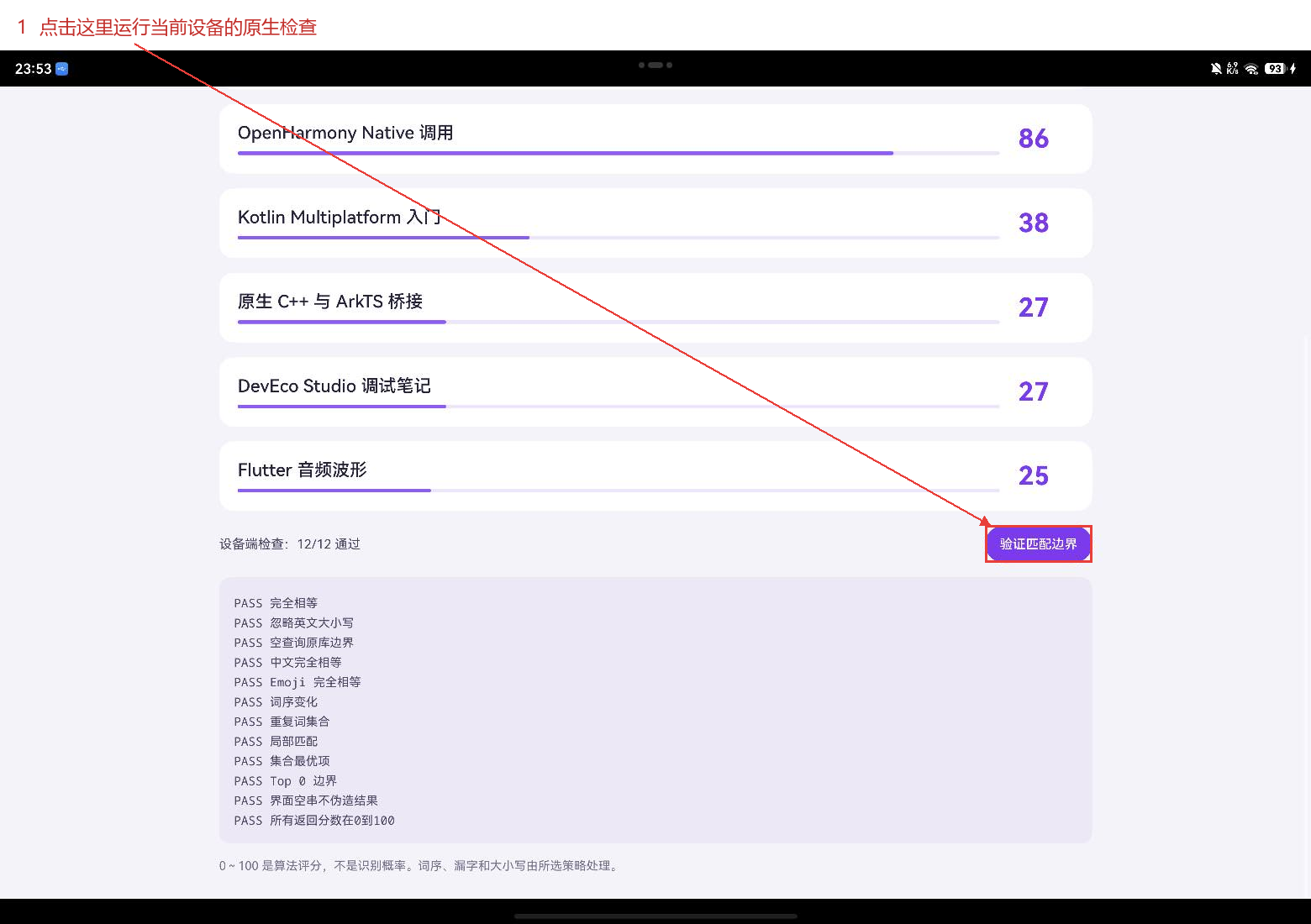
十二项用例除了相等字符串和分数范围,还包含原库空查询行为、示例空输入处理、大小写、中文、Emoji 相等、词序变化、重复词集合、局部匹配、最优项提取和返回数量为零。把原库空查询与页面空输入分开检查,正好记录了这一层应用包装的职责。
这次搜索页最有用的观察其实就是开头的空列表。它让人看到默认策略的边界,也让切换策略有了明确的理由。用于具体产品时,先收集用户常见的查询,再看是需要补全词首、容忍漏字,还是忽略词序;选择之后继续保留无结果状态和回归用例,才便于维护搜索体验。
库的 API、原实现与可交互 Web 示例见 FuzzyKot 上游仓库,鸿蒙目标和集成资料见 CPF-KMP-CMP。
项目源码:harmonyos-crossplatform-libs。本文示例位于 libraries/fuzzykot,构建步骤见 适配说明。