曼陀罗2-曼陀罗图案自由创制App
前段时间在本站发布了曼陀罗图案创制系列课题文章。今天给大家提供一个可以自由创制曼陀罗图案的App的程序源码。此App可以让你随意创制曼陀罗图案,开启创意的思路,理解图案的图形变化和色彩变化。
程序设计展示了各个功能设计方法:
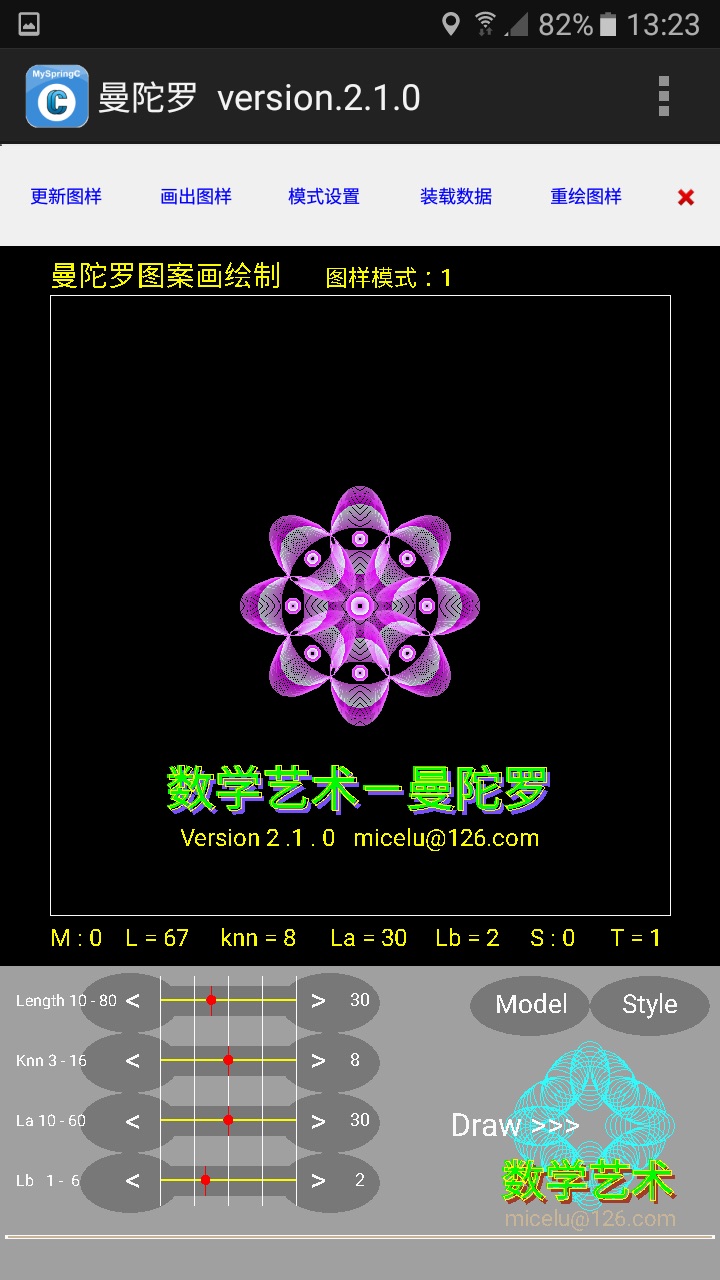
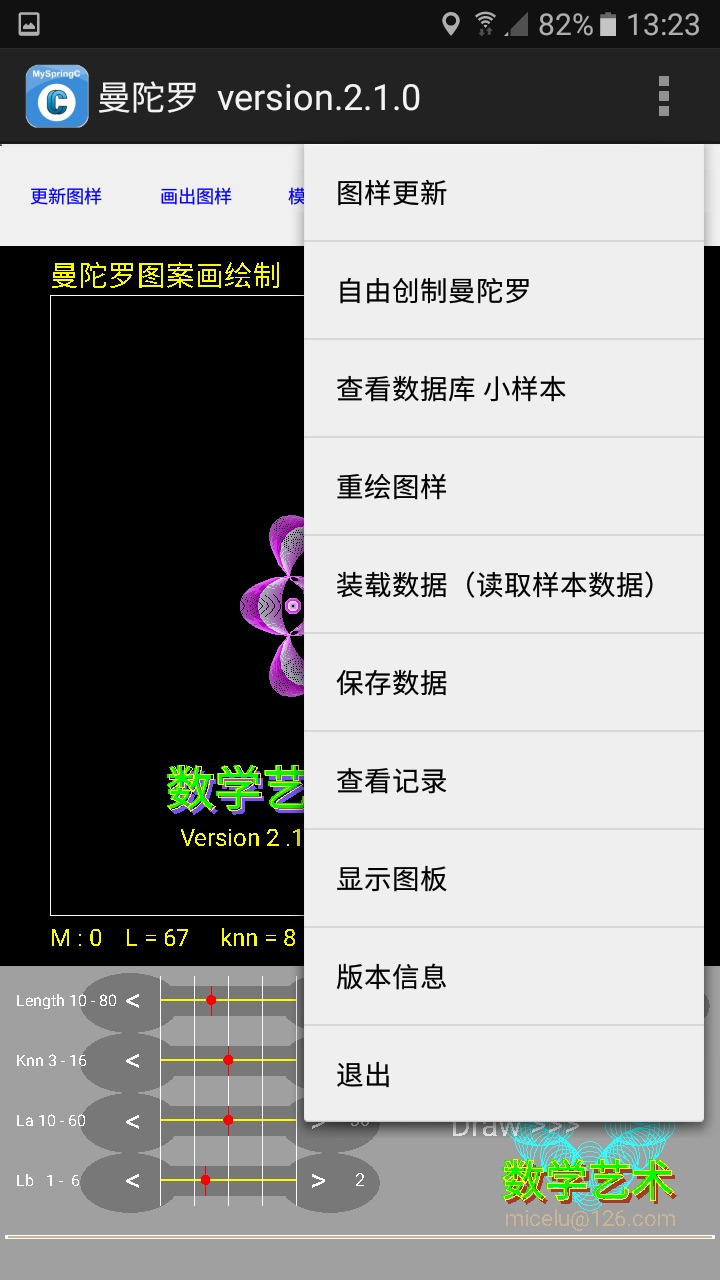
有程序的启动页面和下拉菜单
有参数操作功能区设计,用户可点击设置参数来绘制图案
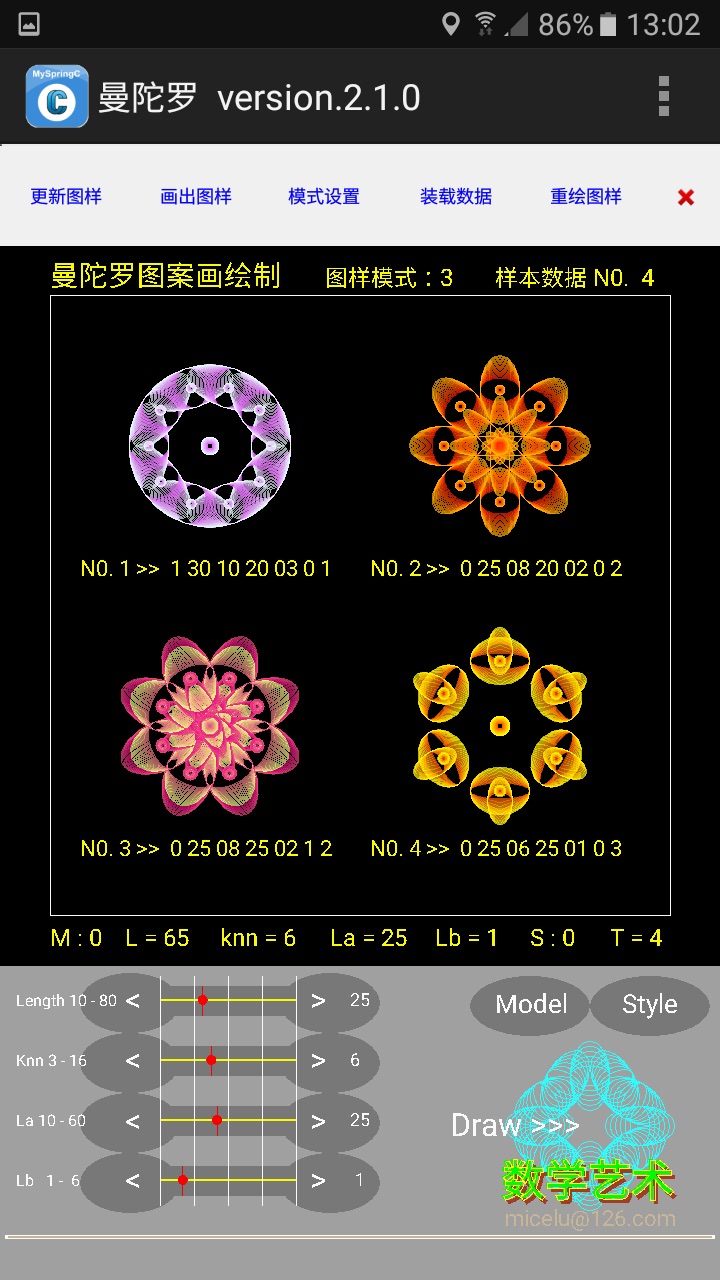
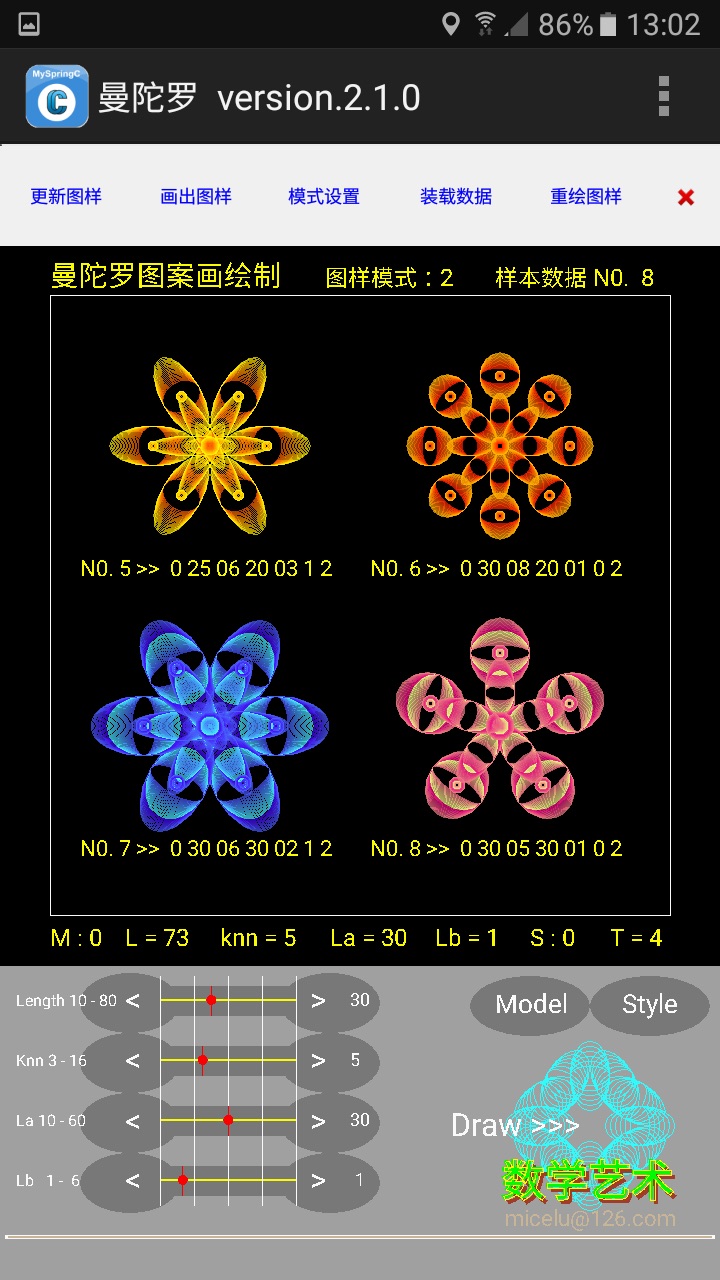
设置图样数据读取,依数据绘制图样,展示四方连图样示例
设计按操作过程重新绘制曼陀罗图样的重绘功能redraw
设计图样图片和绘制数据存储,只设计了图片保存,暂未设置数据文件的保存
设计智能自由创制曼陀罗图样功能
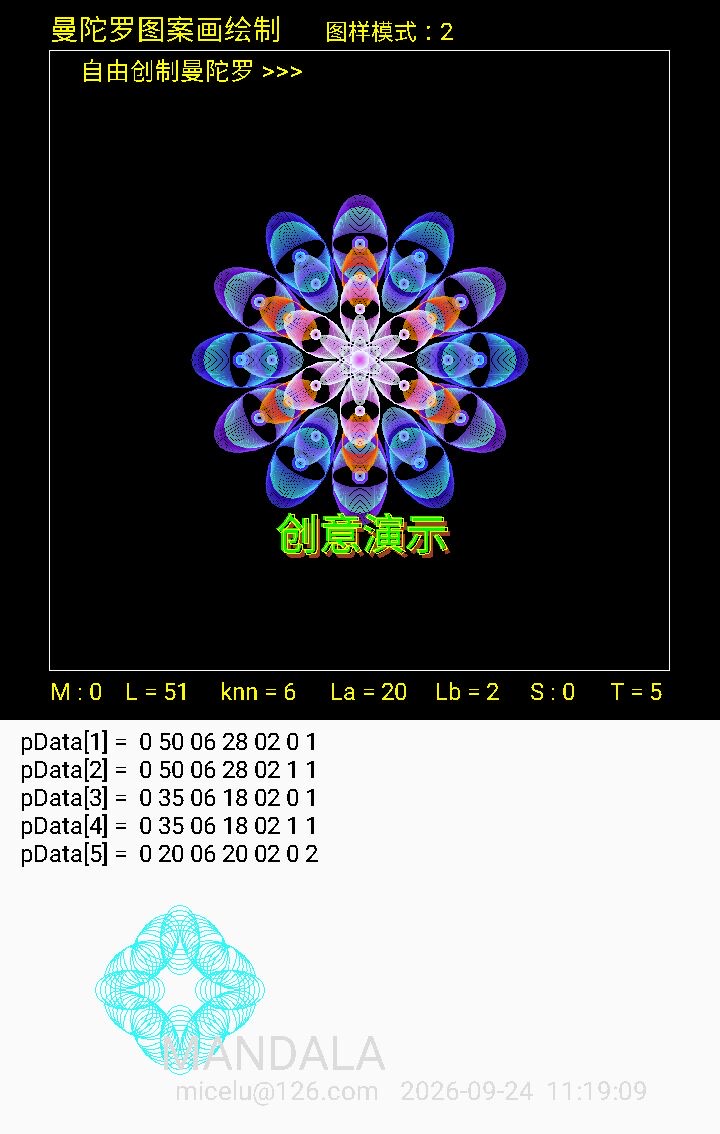
新增加自由创制图案的演示功能
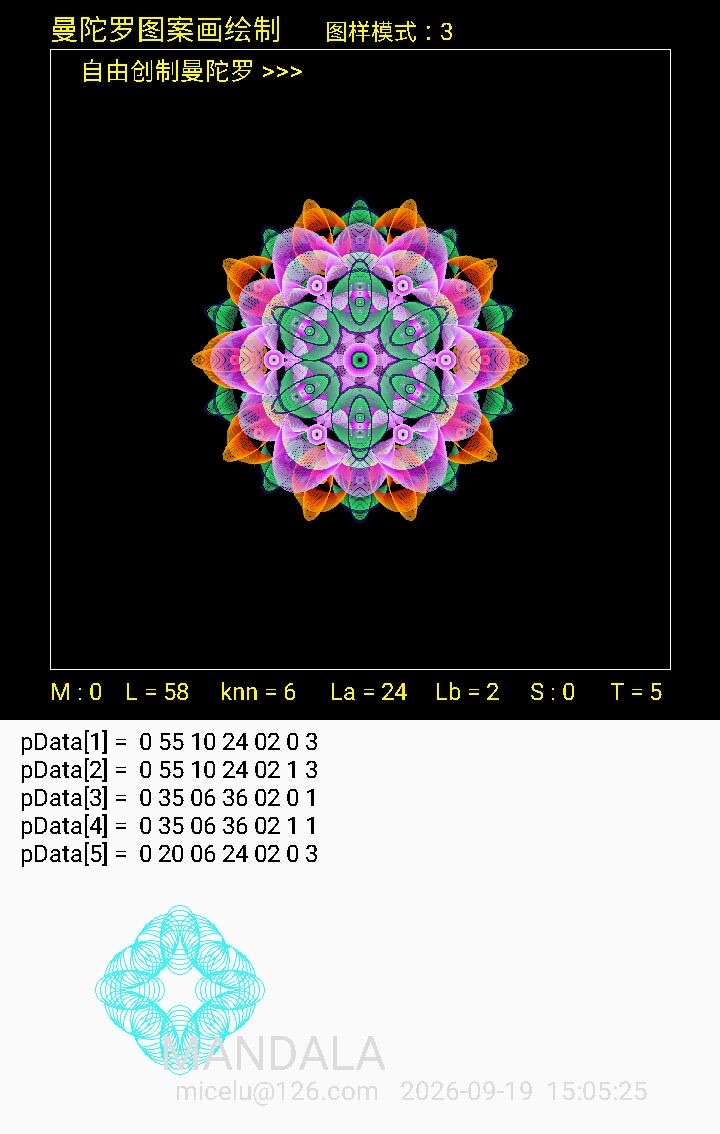
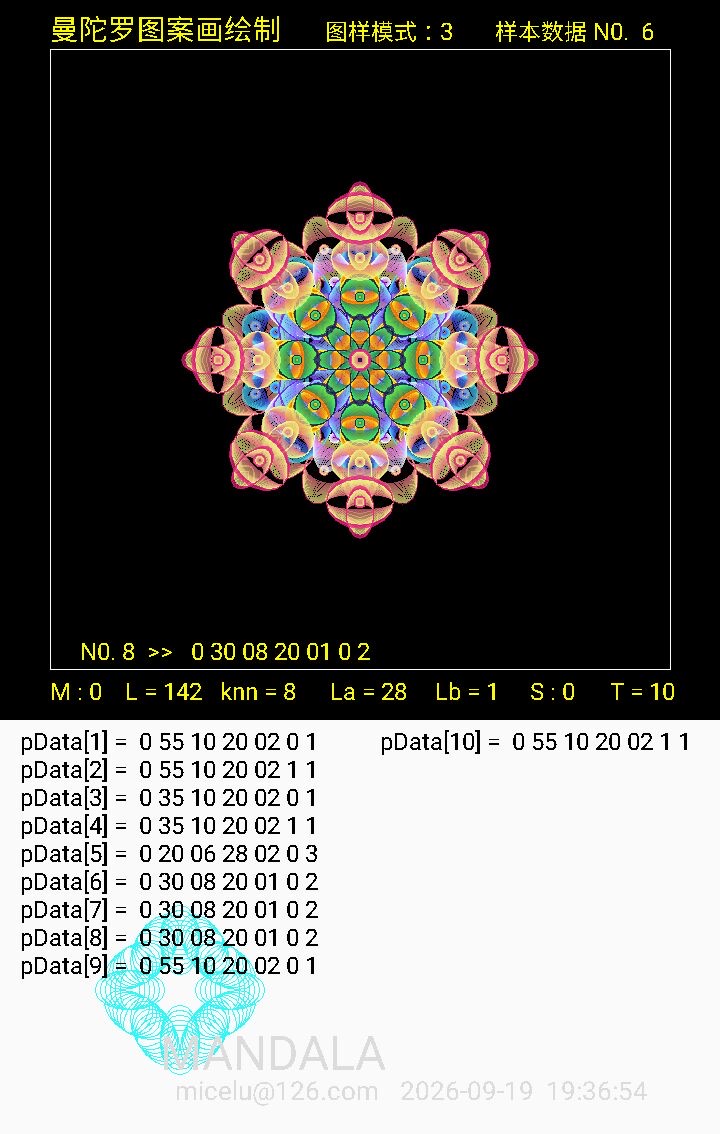
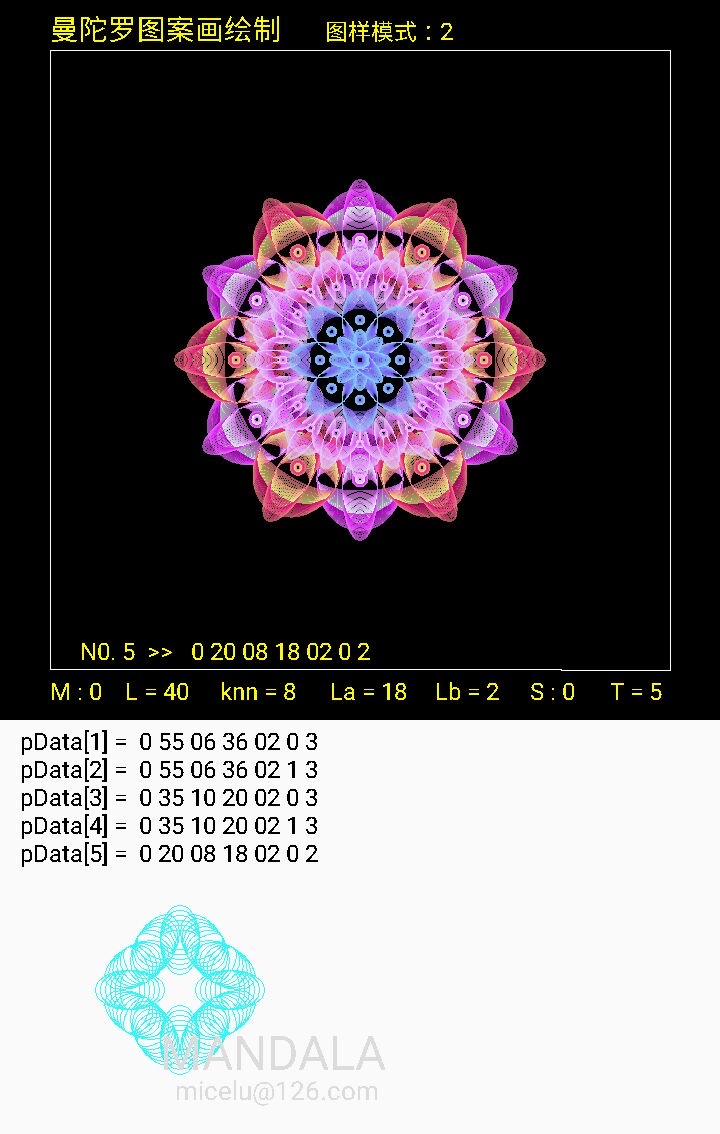
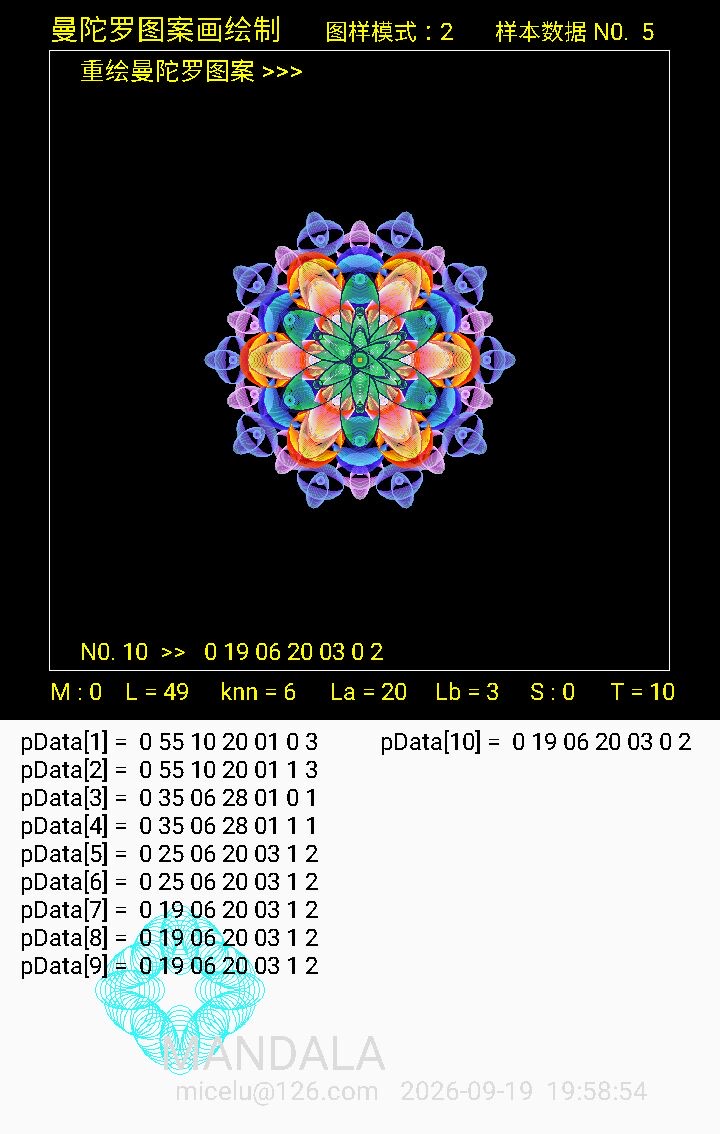
图例:
启动页面,程序界面和下拉菜单
四方连小图样示例
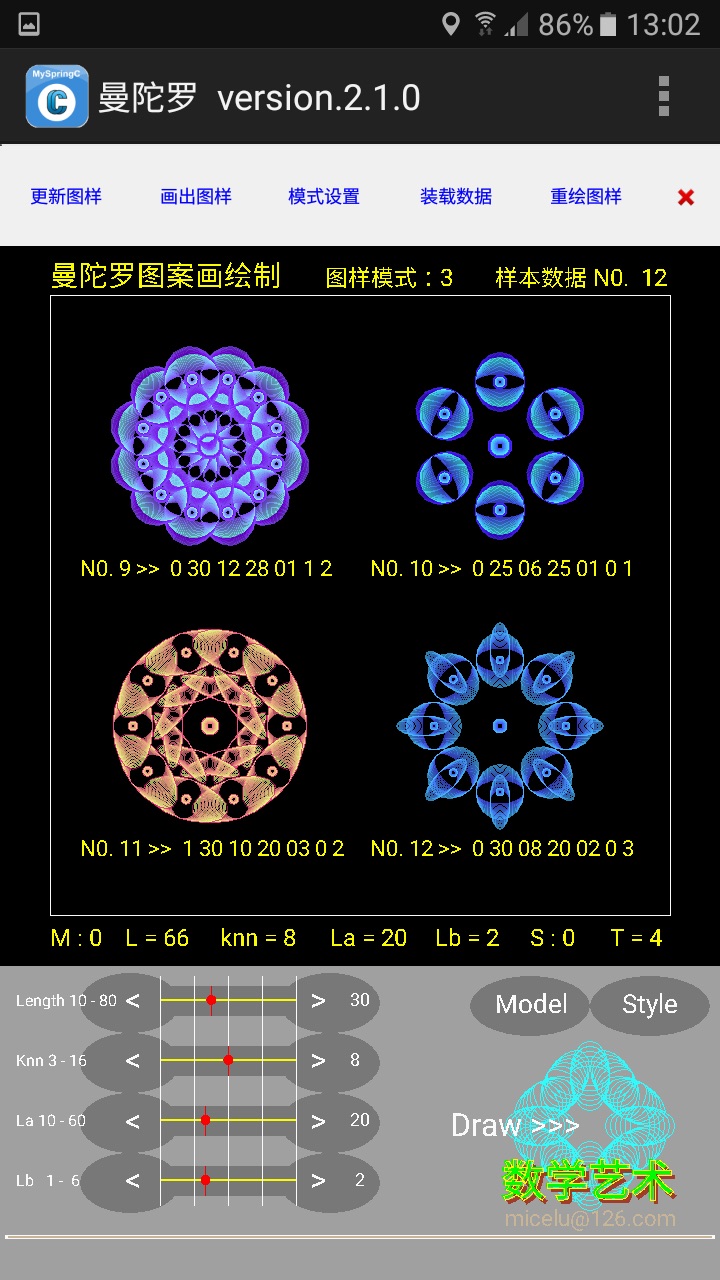
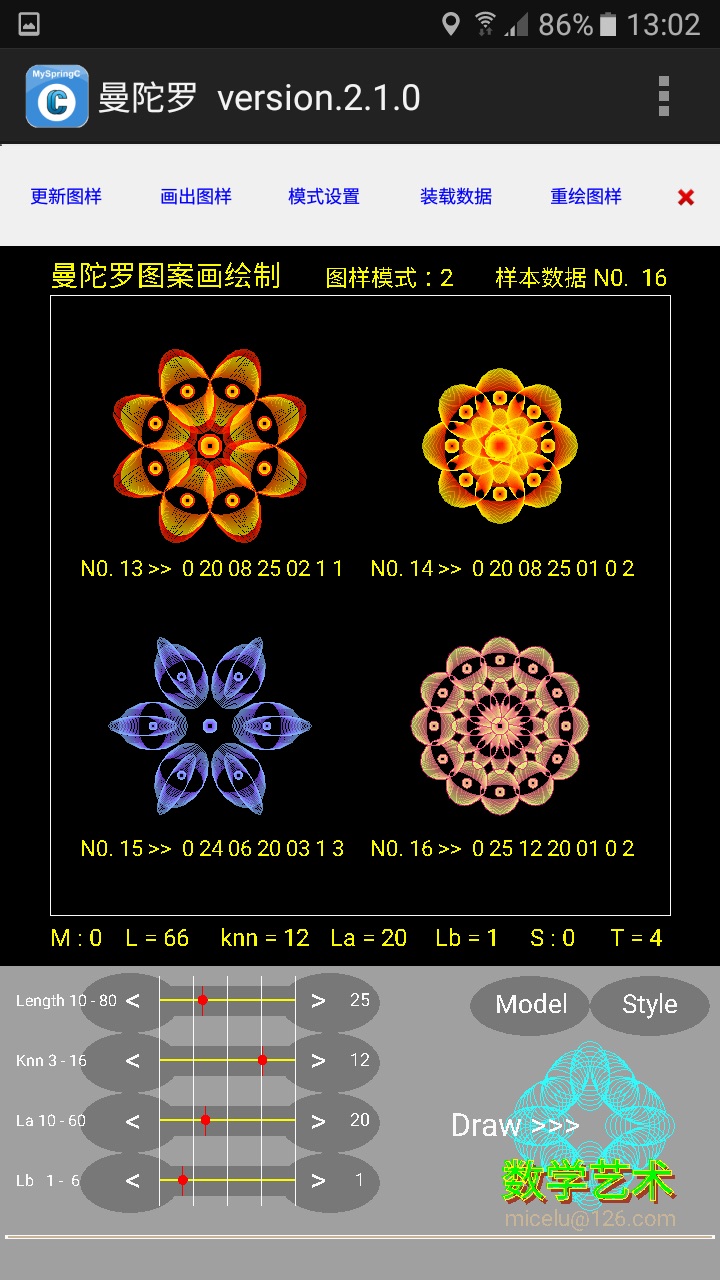
过程图例
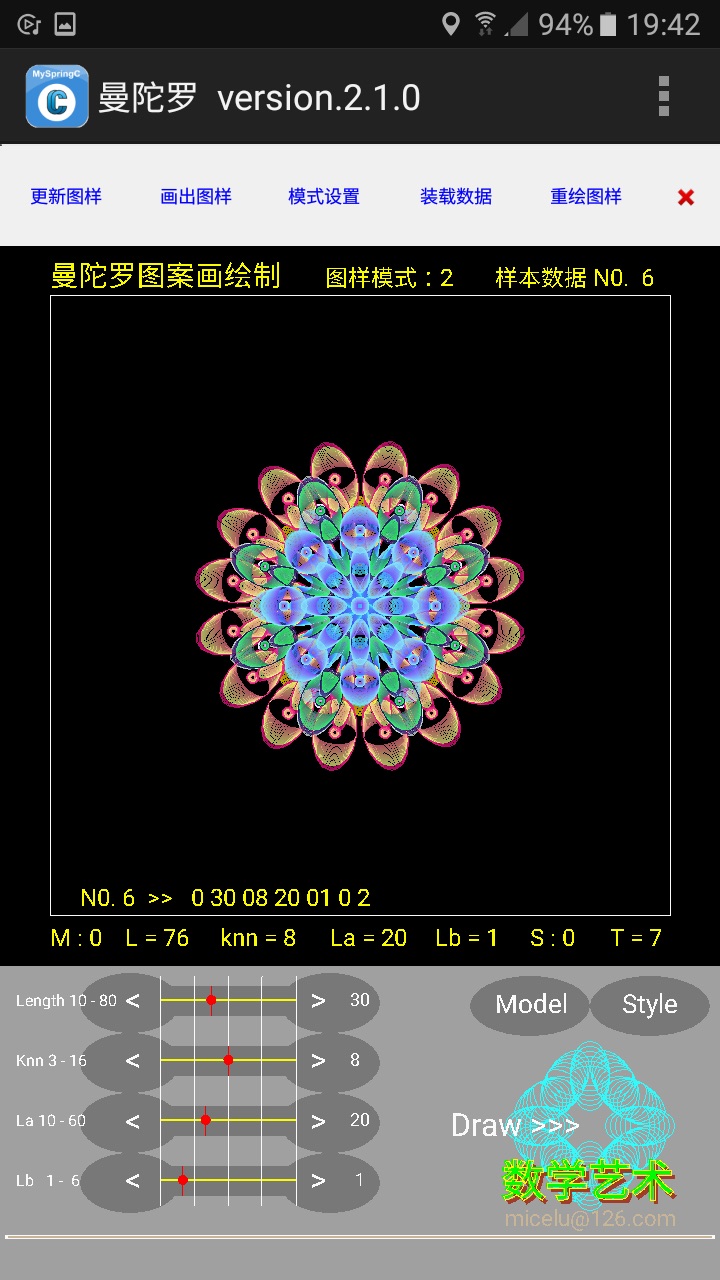
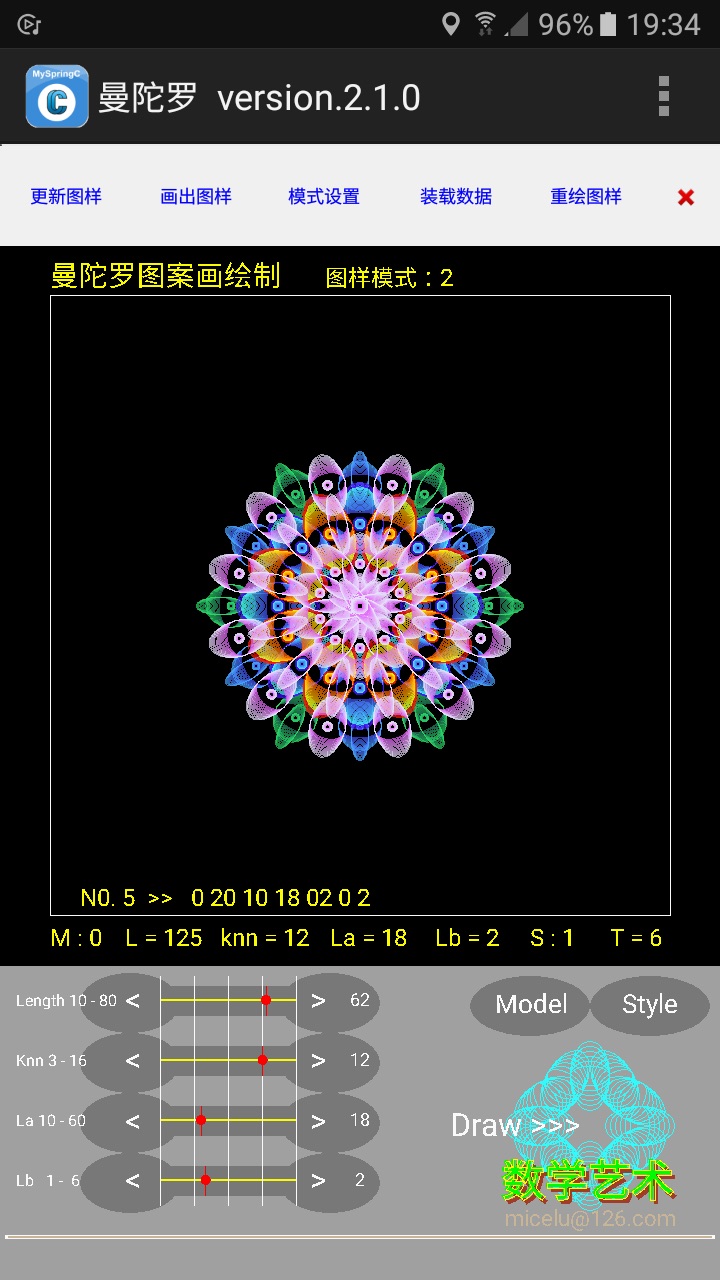
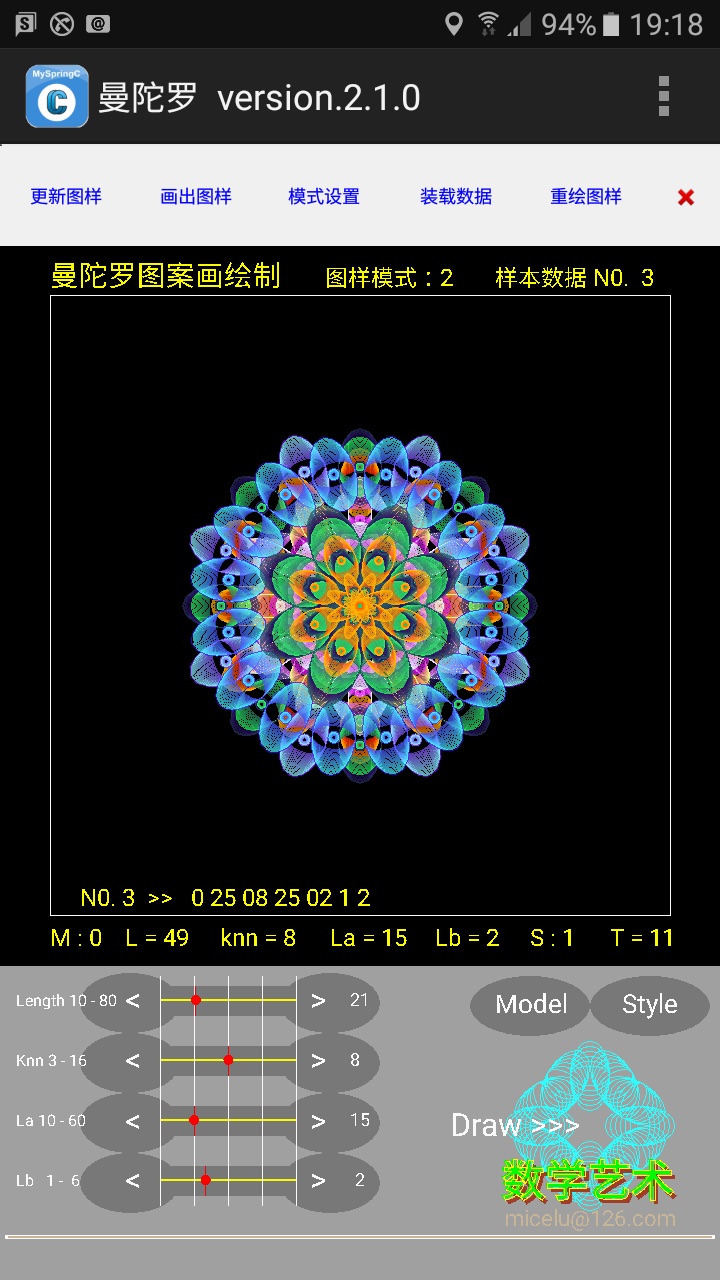
重绘曼陀罗图样
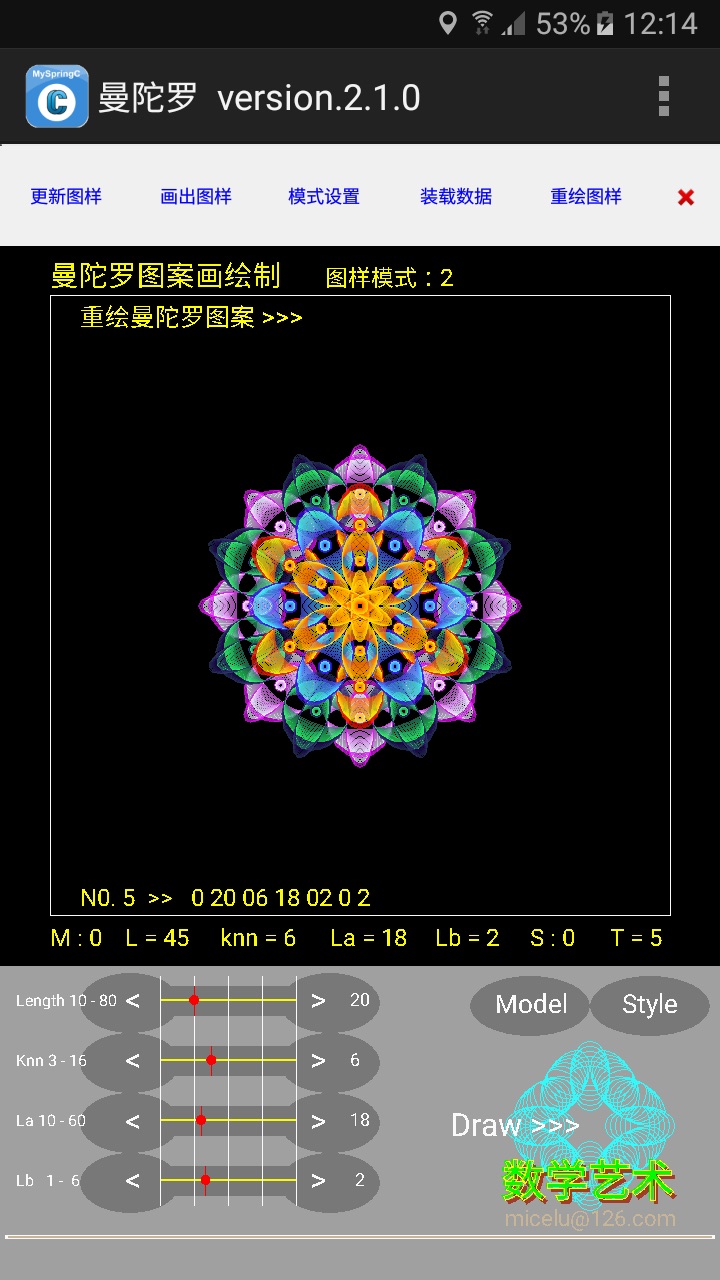
自由创制曼陀罗图样
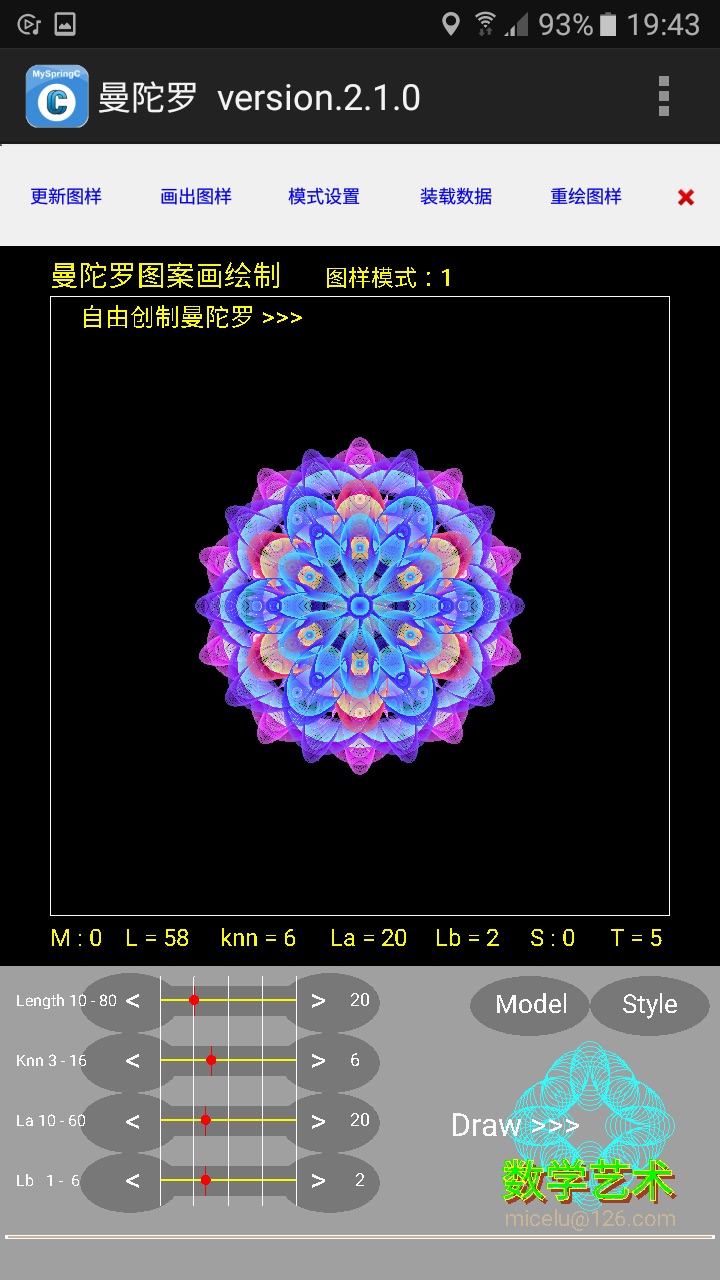
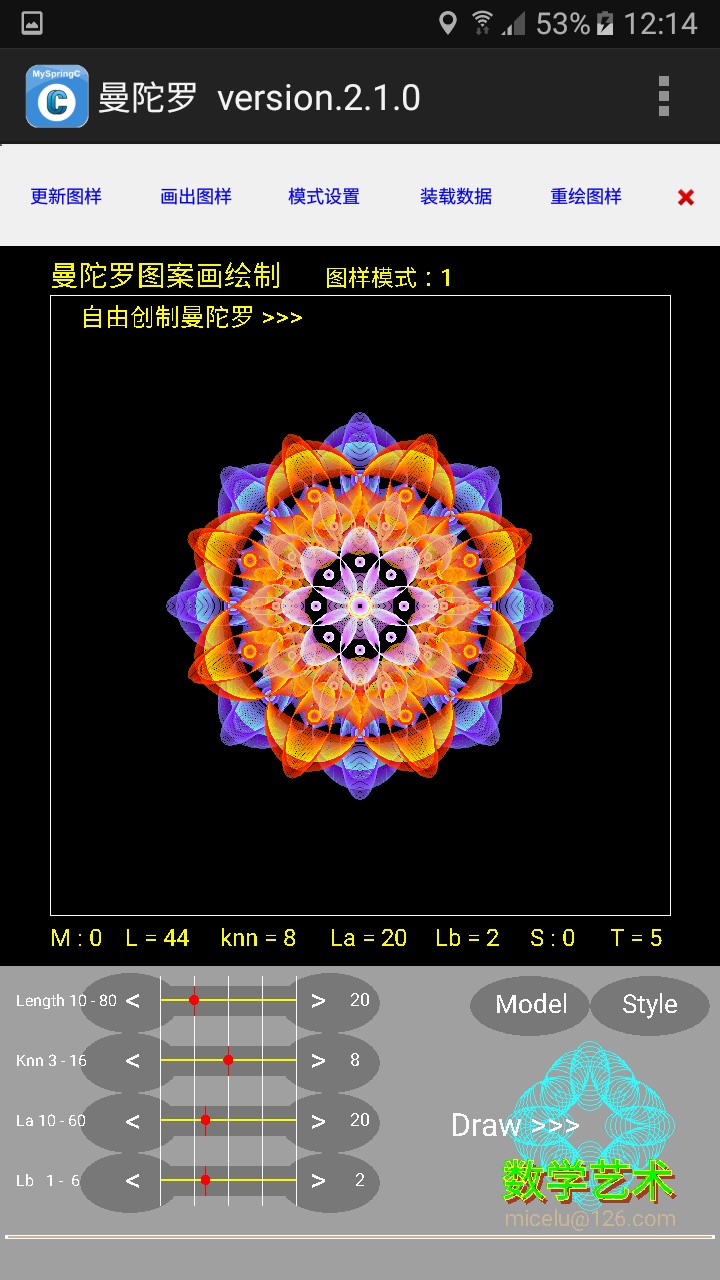
//自由创制曼陀罗演示
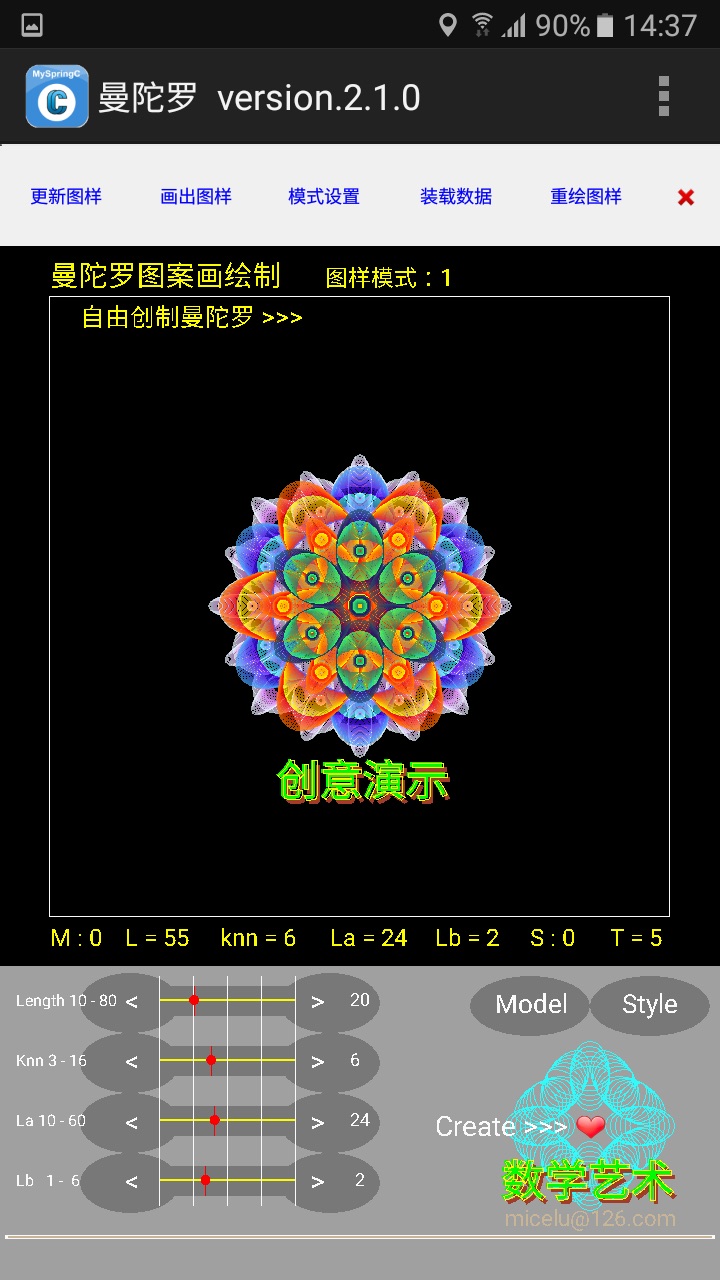
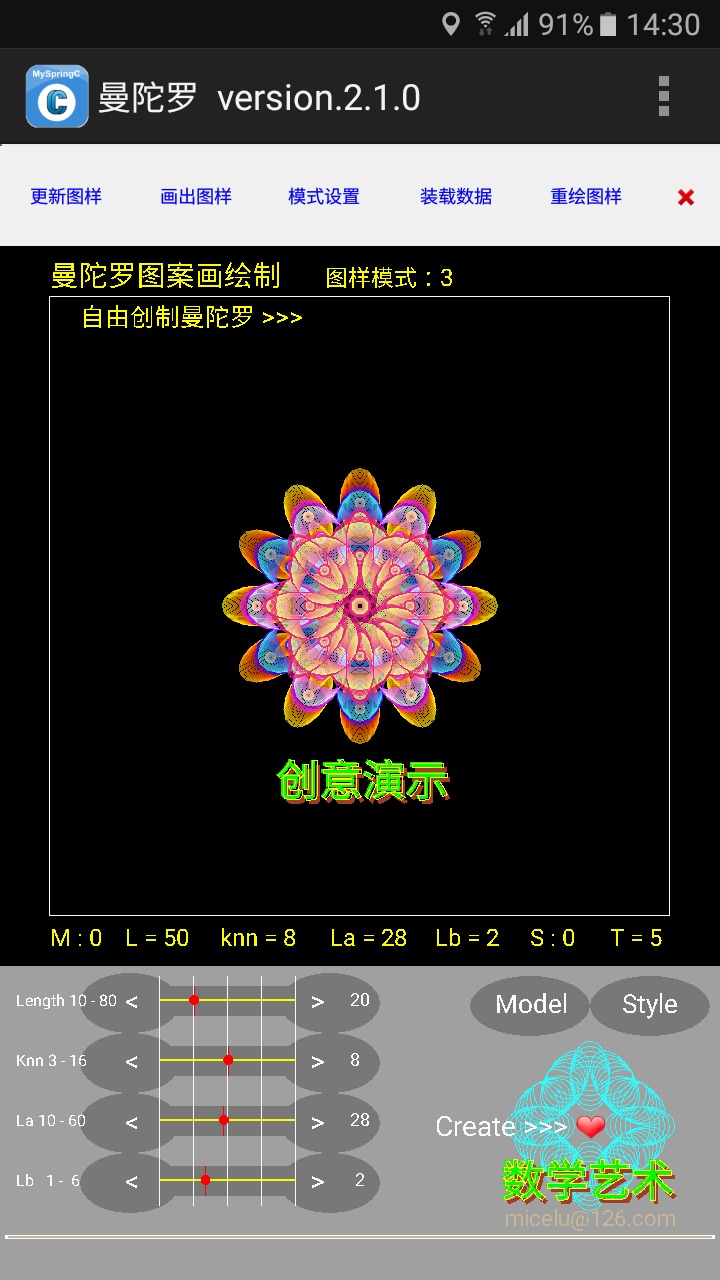
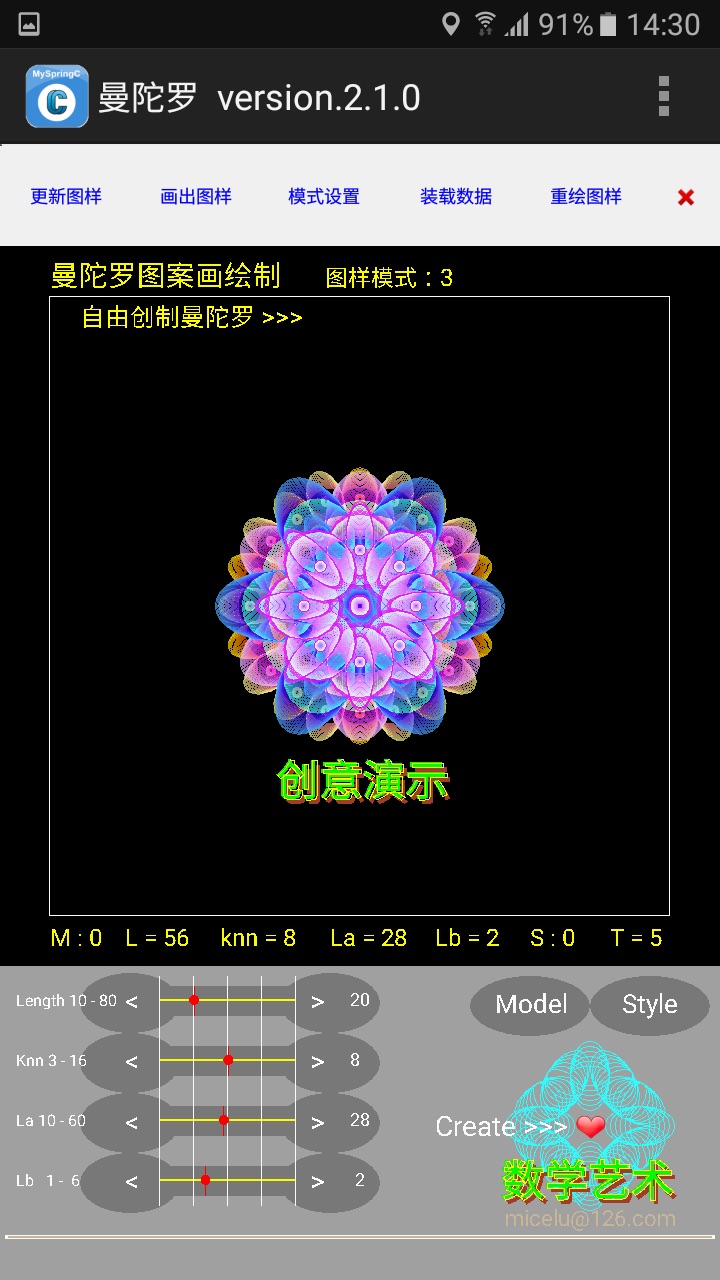
保存曼陀罗图片和绘制数据
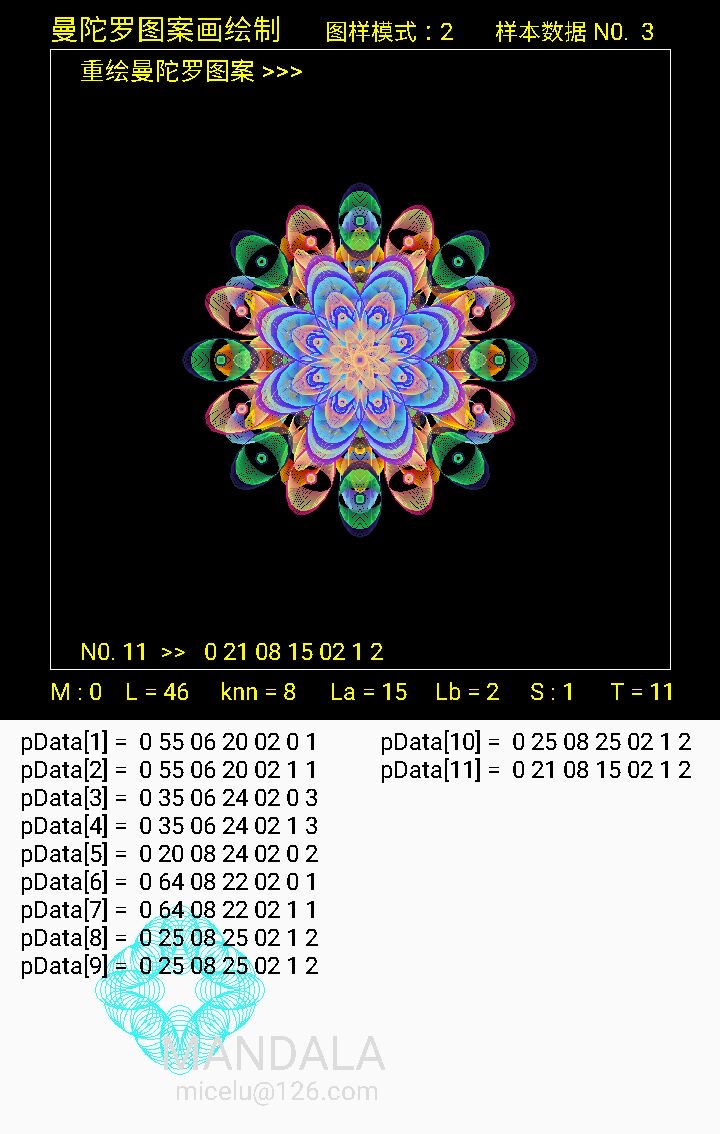
MySpringC是一种简单的C语言编译器,可让普通用户用C语言控制手机,编写出意想不到的适合自己使用的应用程序。v.2.7是目前的完善版本。遗憾的是该编译器是简单的,有些高级的东西就难以用它来实现。
下面的程序代码就是用它在安卓手机上编写的,故程序是手机界面,可制作成安卓手机桌面app应用程序。此样例可复制黏贴到编译器直接使用,亦可用VB6 ,VC , java 改写。
下面是有注释的完整源码:
//程序设计各函数简要说明:
//main (){ //启动界面,启动时绘出图案 }
//mycanvasProc (int context.....){ //屏幕触控设置 }
//show_screen (){ //** 界面图形区绘制和更新 }
//show_status (){ //** 界面绘图区显示参数 }
//draw_inputbox (){ //** 绘制和重绘界面 input 区域 }
//getcolor (){ //预设置调色板 (七个色调)}
//draw_figure (){ //** 依 7 个参数 model, L, knn, La, Lb, style, mode,绘制图形,输出曼陀罗图案 }
//此程序起先提供图案绘制模式 draw_figure (),后扩展增加到3个模式
//Load_pData (){ //** 读取图样数据 }
//pData_draw (){ //** 依读取的数据,数据转换,画出图样 }
//show_sample (){ //** 查看数据库四方连小样本 }
//redraw (){ //** 依操作记录复现曼陀罗图案 }
//**本程序绘制图样有色调参数和图形中心距L的参数变化,故不能重画出同样的图案,重绘的图案色彩有变化。
//auto_drawing (){ //** 自动创制曼陀罗图案 }
//**随机设置外圈、中圈和中心圈三层图形参数 ps1 to ps7,依参数变化绘制图案
//savefigure (){ //**保存曼陀罗图片和绘制数据 }
//autoshow (){ //** 自动创制曼陀罗图案演示 (新增加功能) }
//*************************************'
// 数学艺术画-曼陀罗 2.1.0
// 数学艺术绘画程序 ( Mandala )
// 编制:张纯叔 micelu@126.com
//*************************************
//** 设置变量
Canvas cbak;
string sBarDes10; //菜单按钮
int nBarId10;
string sMenu50;
int nMenu50;
float src4; //ClearDraw (cls) clear screen
int context; //canvasProc 触控
int obj;
int id;
int event; //canvasProc
FileInput fbox; //file input box
string fname; // filename$
int r1,g1,b1; //调色板 (A, R, G, B)
double Rn; //random number
int i, j, k, sn ;
int kn; //set color mode 1 -- 7
int t, nn, n1; //t = times, nn = number
int n ; //图形叠加次数,操作数据记录,redraw
int gn, gnn; //get number
//** 设置全局变量或局部变量
Canvas cs;
float pi=3.1415926535;
string s,s1,s2,s3,s4,s5,s6; //print text $
string ss,ss1,ss2,ss3,ss4,ss5,ss6,ss7 ;
string ss8,ss9, t; //print
float x0,y0,x1,y1 ; //draw X, Y
float x2,y2,x3,y3 ;
float sx0,sy0,sx1,sy1,sx2,sy2,sx3,sy3;
float sx,sy, px,py, dx,dy; //center point, put X, Y
float gx; //set get screen X
int L ; //图形到画布中心长度 L, length
float r, d ,d1 ; //sin (a) angle, r : radius, d : degree
float La, Lb ; //椭圆长短轴
float a, b; //计算 sin(a)
int knn; //设置分形图边角数
int ps1,ps2,ps3,ps4,ps5,ps6,ps7 ; //曼陀罗7要素
int model, style ; //ps1 , ps5
string pData99; //样本数据,记录
string Da; //read pData
string dd$; //数据转换
double dn; //input data
int mode; //扩展模式 1--3
int tts; //tts 绘出累计次数,撤销操作
string df50; //本次创制绘图数据
int stat; //显示重绘和自由创制状态
string dat; //添加水印date+time $
main(){
setDisplay(1);
cs.SetBackground(160,160,160);
cs.Active();
sBarDes0="更新图样";
nBarId0=100;
sBarDes1="画出图样";
nBarId1=101;
sBarDes2="模式设置 ";
nBarId2=102;
sBarDes3="装载数据";
nBarId3=103;
sBarDes4="重绘图样";
nBarId4=104;
sBarDes5="❌";
nBarId5=105;
// setToolBarHeight(1);
setToolBarBackgroundColor(255,240,240,240);
setButtonTextSize(12);
setButtonColor(255,240,240,240);
setButtonTextColor(255,0,0,250);
setToolBar(100,myToolBarProc,sBarDes,nBarId,6);
sMenu0="图样更新";
nMenu0=200;
sMenu1="自由创制曼陀罗";
nMenu1=201;
sMenu2="查看数据库 小样本";
nMenu2=202;
sMenu3="重绘图样";
nMenu3=203;
sMenu4="装载数据(读取样本数据)";
nMenu4=204;
sMenu5="保存数据";
nMenu5=205;
sMenu6="查看记录";
nMenu6=206;
sMenu7="显示图板";
nMenu7=207;
sMenu8="版本信息";
nMenu8=208;
sMenu9="退出";
nMenu9=209;
setMenu(100,myMenuProc,sMenu,nMenu,10);
setTitle("曼陀罗 version.2.1.0 ");
cs.SetProc (context, mycanvasProc);
//**********
sx=360; sy=360; //center point
readData (); //启动时读入数据
draw_inputbox (); //set input box
show_screen (); //set figure area
show_cover (); // show cover at start
Da$=" 0 35 12 30 02 0 1 ";
pData_draw (); //预设初始图样数据绘图样
while (){}
}//main ()
mycanvasProc (int context,int obj,int id,int event,float x,float y){
nn=nn+1; //延时, 减少闪屏
if ((nn-nn/2*2)==0){ nn=0; }else{ return; }
//** 可改设置为 mouse_click, move
dx=(int)(x/10)*10 ;
dy=(int)(y/10)*10 ;
//** 可改设置为 mouse_click, move
//** 设置标尺和按钮
//** set L, knn, La, Lb
if (x>80&&x<170&&y>730&&y<790){ //L--
ps2=ps2-2;
if (ps2<10) ps2=10;
L=ps2;
show_status ();
draw_inputbox (); }
if (x>290&&x<380&&y>730&&y<800){ //L+
ps2=ps2+2;
if (ps2>80) ps2=80;
L=ps2;
show_status ();
draw_inputbox (); }
if (x>80&&x<170&&y>800&&y<860){ //knn--
ps3=ps3-1;
if (ps3<3) ps3=3;
knn=ps3;
show_status ();
draw_inputbox (); }
if (x>290&&x<380&&y>800&&y<860){ //knn+
ps3=ps3+1;
if (ps3>16) ps3=16;
knn=ps3;
show_status ();
draw_inputbox (); }
if (x>80&&x<170&&y>860&&y<920){ //La--
ps4=ps4-2;
if (ps4<10) ps4=10;
La=ps4;
show_status ();
draw_inputbox (); }
if (x>290&&x<380&&y>860&&y<920){ //La+
ps4=ps4+2;
if (ps4>60) ps4=60;
La=ps4 ;
show_status ();
draw_inputbox (); }
if (x>80&&x<170&&y>920&&y<980){ //Lb--
ps5=ps5-1;
if (ps5<1) ps5=1;
show_status ();
draw_inputbox (); }
if (x>290&&x<380&&y>920&&y<980){ //Lb+
ps5=ps5+1;
if (ps5>6) ps5=6;
show_status ();
draw_inputbox (); }
//** set model and style
if (x>460&&x<600&&y>730&&y<800){
ps1=ps1+1; //model
if (ps1>1) ps1=0;
model=ps1;
show_status ();
draw_inputbox (); }
if (x>590&&x<720&&y>730&&y<800){
ps6=ps6+1; //style
if (ps6>1) ps6=0;
style=ps6;
show_status ();
draw_inputbox (); }
if (x>460&&x<720&&y>820&&y<950){
autoshow (); //autoshow
// showfigure (); //Draw >>>
}
}//myCanvas ()
autoshow (){
//** 自动创制曼陀罗图案演示
t=0; //init times
refresh:
t=t+1;
for (nn=1; nn<210; nn++){
cs.SetFillMode (1);//0不填色,1填色
cs.SetColor (255,0,0,0);
cs.DrawCircle (360,360, nn); //清屏
cs.Update (); }
ss="Round "+intToString (t);
cs.SetColor (255,0,250,250);
cs.SetTextSize (36);
cs.DrawText (ss,300,355);
cs.Update ();
sleep (500);
auto_drawing (); //演示
sleep (500);
if (t==5) goto printtext ; //finished
if (t<5) goto refresh ; //continue
return;
//****************
printtext:
ss="创意演示";
dx=275; dy=550;
put_text ();
cs.Update ();
}//autoshow
auto_drawing (){
//** 设置自由创制曼陀罗图案
//** 随机设置外圈、中圈和中心圈三层图形参数 ps1 to ps7,依参数变化绘制图案
show_screen ();
stat=2; //提示自由创制状态
//** 外圈 L=100+
ps1=0; model=0;
ps2=50; L=50;
Rn=random()*5;
gn=(int) Rn;
if (gn==0||gn==1) ps3=6;
if (gn==2||gn==3) ps3=8;
if (gn==4||gn==5) ps3=10;
knn=ps3;
Rn=random()*6+1;
gn=(int) Rn;
if (gn==1) ps4=18;
if (gn==2) ps4=20;
if (gn==3) ps4=24;
if (gn==4) ps4=28;
if (gn==5) ps4=36;
if (gn==6) ps4=40;
La=ps4;
Rn=random()*1;
gn=(int) Rn;
ps6=gn; style=ps6;
Rn=random()*3+1;
gn=(int) Rn;
ps7=gn; mode=ps7;
show_status (); //更新状态提示
draw_inputbox (); //更新操作参数
showfigure (); //绘制,显示图形
ps6=ps6+1;
if (ps6>1) ps6=0;
style=ps6;
showfigure (); //绘制,显示图形
//** 中圈 L=70+
ps2=35; L=35;
Rn=random()*1 ;
gn=(int) Rn;
ps1=gn; model=ps1;
Rn=random()*5;
gn=(int) Rn;
if (gn==0||gn==1) ps3=6;
if (gn==2||gn==3) ps3=8;
if (gn==4||gn==5) ps3=10;
knn=ps3;
Rn=random()*5+1;
gn=(int) Rn;
if (gn==1) ps4=18;
if (gn==2) ps4=20;
if (gn==3) ps4=24;
if (gn==4) ps4=28;
if (gn==5) ps4=36;
La=ps4;
Rn=random()*1;
gn=(int) Rn;
ps6=gn; style=ps6;
Rn=random()*3+1;
gn=(int) Rn;
ps7=gn; mode=ps7;
show_status (); //更新状态提示
draw_inputbox (); //更新操作参数
showfigure (); //绘制,显示图形
ps6=ps6+1;
if (ps6>1) ps6=0;
style=ps6;
showfigure (); //绘制,显示图形
//** 中心圈 L=40+
ps2=20; L=20;
ps1=0; mode=0;
Rn=random()*5;
gn=(int) Rn;
if (gn==0||gn==1) ps3=6;
if (gn==2||gn==3) ps3=8;
if (gn==4||gn==5) ps3=10;
knn=ps3;
Rn=random()*4+1;
gn=(int) Rn;
if (gn==1) ps4=18;
if (gn==2) ps4=20;
if (gn==3) ps4=24;
if (gn==4) ps4=28;
La=ps4;
Rn=random()*1;
gn=(int) Rn;
ps6=gn; style=ps6;
Rn=random()*3+1;
gn=(int) Rn;
ps7=gn; mode=ps7;
show_status (); //更新状态提示
draw_inputbox (); //更新操作参数
showfigure (); //绘制,显示图形
stat=0 ; //复原绘图状态
}//auto Draw figure
show_sample (){
//** 查看数据库四方连小样本
dn=doubleInput (" 查看样本数据 ",
" 输入样本编号 \n 例: 1,2,3,4,5 ...... N \n ( 输入数字 )\n 输入( 0 )或 空 退出 " ) ;
if (dn==0){
disMsg(0, "样本不存在" );
return; }
gn=(int) dn ; //起始样本编号
tts=0; n=0;
clearOutput ();
//** 清屏
cs.SetFillMode (1);//0不填色,1填色
cs.SetColor (255,0,0,0);
cs.DrawRect(55,55,665,665); //清屏
//** 画出四方连样本图
for (nn=1; nn<=4; nn++){
if (nn-nn/2*2==1) sx= 210 ;
if (nn-nn/2*2==0) sx= 500 ;
if (nn <= 2) sy= 200 ;
if (nn > 2) sy= 480 ;
ss9="样本数据 N0. "+intToString (gn+nn-1);
Da$=pDatagn+nn-1;
pData_draw () ; //依数据画出图样
cs.SetFillMode (1);
cs.SetTextSize (22);
ss="N0. "+intToString (gn+nn-1)+" >> "+Da$;
cs.DrawText (ss, sx-130, sy+130); //显示数据
} //画出样本
cs.SetColor (255,0,0,0);
cs.DrawRect(60,635,400,665); //clear data
cs.Update ();
sx=360; sy=360; //复原
return;
//**************************
//** 下面是初稿时的代码
//** show data draw small figures
cs.SetTextSize (20);
cs.SetColor (255,0,250,250);
sx=210; sy=200;
Da$=pDatan;
pData_draw ();
ss="N0."+intToString (n-1)+" >> "+Da$;
cs.DrawText (ss, sx-130, sy+120); //显示数据
sx=500; sy=200;
Da$=pDatan;
pData_draw ();
ss="N0."+intToString (n-1)+" >> "+Da$;
cs.DrawText (ss, sx-130, sy+120); //显示数据
sx=210; sy=480;
Da$=pDatan;
pData_draw ();
ss="N0."+intToString (n-1)+" >> "+Da$;
cs.DrawText (ss, sx-130, sy+120); //显示数据
sx=500; sy=480;
Da$=pDatan;
pData_draw ();
ss="N0."+intToString (n-1)+" >> "+Da$;
cs.DrawText (ss, sx-130, sy+120); //显示数据
cs.SetFillMode (1);//0不填色,1填色
cs.SetColor (255,0,0,0);
cs.DrawRect(60,635,360,665); //clear print
cs.Update ();
sx=360; sy=360; //复原
}//show sample
setMode (){
//** 设置模式,1 -- 3 滚动选择
mode=mode+1;
if (mode>3) mode=1;
ps7=mode;
show_status ();
}//set mode
showfigure (){
//** 提示重绘和自由创制状态
if (stat==0) ss=" ";
if (stat==1) ss= "重绘曼陀罗图案 >>> " ;
if (stat==2) ss= "自由创制曼陀罗 >>> " ;
cs.SetFillMode (1);//0不填色,1填色
cs.SetColor (255,0,0,0);
cs.DrawRect (55,55,360,85); //clear data
cs.SetColor (255,255,255,0);
cs.SetTextSize (26);
cs.DrawText (ss, 80, 80); //显示数据
//** 按 3 类模式,绘制图形,显示图形
if (mode==1) draw_figure1 ();
if (mode==2) draw_figure2 ();
if (mode==3) draw_figure3 ();
}//draw and show figure
show_status (){
//** 屏幕绘图区显示参数
cs.SetFillMode (1);//0不填色,1填色
cs.SetColor (255,0,0,0);
cs.DrawRect(40,675,690,715); //clear print
cs.DrawRect(290,5,470,45); //clear mode
s=intToString (ps1); //model
ss1="M : "+s;
s=intToString (L);
ss2="L = "+s;
s=intToString (knn);
ss3="knn = "+s;
s=intToString (ps4);
ss4="La = "+s;
s=intToString (ps5) ;
ss5="Lb = "+s;
s=intToString (ps6);
ss6="S : "+s;
s=intToString (mode);
ss7="图样模式:"+s;
s=intToString (tts); //"T = ", n
ss8="T = "+s;
cs.SetColor (255,250,250,0);
cs.SetTextSize (30);
cs.DrawText (t$,50,40); // title
cs.SetTextSize (24);
cs.DrawText (ss1,50,700);
cs.DrawText (ss2,125,700);
cs.DrawText (ss3,220,700);
cs.DrawText (ss4,330,700);
cs.DrawText (ss5,435,700);
cs.DrawText (ss6,530,700);
cs.DrawText (ss7,325,40); // mode
cs.DrawText (ss8,610,700);
cs.Update ();
}//status
//** 曼陀罗绘制 7个 参数 psN 要点详解
// 1)model = ps1 >> 0 -- 1,图形式样设置:0 上下, 1 左右。按 Lb 设置逐线展开绘制椭圆。
// 2)Length = ps2 >> 10 -- 80,设置分形图形中心到图形区中心距长度。依中心距逐圈逐层画出图形。
// 3)knn = ps3 >> 3 -- 16,设置分形图边角数。
// 4)La = ps4 >> 10 -- 60,设置分形小图椭圆的长轴半径大小。
// 5)Lb = ps5 >> 1 -- 6,设置分形小图椭圆的短轴半径。随 k 循环绘制时 k系数的按预设值上下左右扩展画出图形。图形颜色逐线叠加变化。
// 6)style = ps6 >> 0 -- 1,图形样色设置:0 按12点钟方向绘制分形,1 按12点钟方向增加knn边角数的一半度数绘制分形。
// 7)mode = ss7 >> 1 -- 3 draw figure n , 3 个模式
draw_figure1 (){
//** 6 参数 >>>>model, L, knn, La, Lb, style
setDisplay (1); //显示图形区
n=n+1; //calculate times and show
tts=tts+1; //操作次数
cs.SetFillMode (0);//0不填色,1填色
Rn=random()*20+ps2*2;
L=(int)Rn; //20-180;
d=360/knn;
if (style==0) d1=0;
if (style==1) d1=360/knn/2 ;
//** set Lb= ps5 >>> Lb= 0.8 or 2.5
if (ps5==1) Lb=0.8 ;
if (ps5==2) Lb=1.2 ;
if (ps5==3) Lb=1.5 ;
if (ps5==4) Lb=1.8 ;
if (ps5==5) Lb=2.0 ;
if (ps5==6) Lb=2.5 ;
//** draw figure ********
getcolor ();
for(i=0;i<knn;i++){ //knn=N 角
if (d1==0) a=2*pi/knn*i ;
if (d1>0) a=2*pi/knn*i+pi/knn ;
//a=pi/180*i*72-pi/180*90
// if (model==1&&knn==5) a=pi/180*72*i-pi/180*180 ;
if (model==0){
sx1=(float)(L*sin(a))+sx;
sy1=(float)(-L*cos(a))+sy; }
if (model==1){
sx1=(float)(L*cos(a))+sx;
sy1=(float)(L*sin(a))+sy; }
for (k=10;k<La*1.5;k++){
cs.SetColor (180,r1+10,g1+k*8,250-b1);
cs.DrawOval (sx1,sy1,La,k*Lb,i*d+d1);
cs.DrawCircle (sx1,sy1,k/5);
//cs.DrawOval (sx2,sy2,La/2,k*Lb,i*d+d1);
cs.DrawCircle (sx,sy,k/3);
} }
cs.Update ();
show_status ();
//** 记录数据
ss1=" "+intToString (ps1);
ss2=" "+intToString (ps2);
ss3=" "+intToString (ps3);
if (ps3<10) ss3=" 0"+intToString (ps3);
ss4=" "+intToString (ps4);
ss5=" "+intToString (ps5);
if (ps5<10) ss5=" 0"+intToString (ps5);
ss6=" "+intToString (ps6);
ss7=" "+intToString (mode);
Da$=ss1+ss2+ss3+ss4+ss5+ss6+ss7 ;
s=intToString (tts);
print "pData"+s+" = "+Da$; //记录数据
dfn=Da$; //操作数据记录
}//draw_figure1 ()
//***********
draw_figure2 (){
//** 6 参数 >>>>model, L, knn, La, Lb, style
setDisplay (1); //显示图形区
n=n+1; //calculate times and show
tts=tts+1;
cs.SetFillMode (0);//0不填色,1填色
Rn=random()*20+ps2*2;
L=(int)Rn; //20-180;
d=360/knn;
if (style==0) d1=0;
if (style==1) d1=360/knn/2 ;
//** set Lb= ps5 >>> Lb= 0.8 or 2.5
if (ps5==1) Lb=0.8 ;
if (ps5==2) Lb=1.2 ;
if (ps5==3) Lb=1.5 ;
if (ps5==4) Lb=1.8 ;
if (ps5==5) Lb=2.0 ;
if (ps5==6) Lb=2.5 ;
//** draw figure ********
getcolor ();
for(i=0;i<knn;i++){ //knn=N 角
if (d1==0) a=2*pi/knn*i ;
if (d1>0) a=2*pi/knn*i+pi/knn ;
if (model==0){
sx1=(float)(L*sin(a))+sx;
sy1=(float)(-L*cos(a))+sy;
sx2=(float)((L-40)*sin(a))+sx;
sy2=(float)(-(L-40)*cos(a))+sy; }
if (model==1){
sx1=(float)(L*cos(a))+sx;
sy1=(float)(L*sin(a))+sy;
sx2=(float)((L-40)*cos(a))+sx;
sy2=(float)((L-40)*sin(a))+sy; }
for (k=10;k<La*1.5;k++){
cs.SetColor (180,r1+10,g1+k*8,250-b1);
cs.DrawOval (sx1,sy1,La,k*Lb,i*d+d1);
cs.DrawCircle (sx1,sy1,k/5);
cs.DrawOval (sx2,sy2,La/2,k*Lb,i*d+d1);
cs.DrawCircle (sx,sy,k/3);
} }
cs.Update ();
show_status ();
//** 记录数据
ss1=" "+intToString (ps1);
ss2=" "+intToString (ps2);
ss3=" "+intToString (ps3);
if (ps3<10) ss3=" 0"+intToString (ps3);
ss4=" "+intToString (ps4);
ss5=" "+intToString (ps5);
if (ps5<10) ss5=" 0"+intToString (ps5);
ss6=" "+intToString (ps6);
ss7=" "+intToString (mode);
Da$=ss1+ss2+ss3+ss4+ss5+ss6+ss7 ;
s=intToString (tts);
print "pData"+s+" = "+Da$; //记录数据
dfn=Da$; //操作数据记录
}//draw_figure2 ()
//***********
draw_figure3 (){
//** 6 参数 >>>>model, L, knn, La, Lb, style
setDisplay (1); //显示图形区
n=n+1; //calculate times and show
tts=tts+1;
cs.SetFillMode (0);//0不填色,1填色
Rn=random()*20+ps2*2;
L=(int)Rn; //20-180;
d=360/knn;
if (style==0) d1=0;
if (style==1) d1=360/knn/2 ;
//** set Lb= ps5 >>> Lb= 0.8 or 2.5
if (ps5==1) Lb=0.8 ;
if (ps5==2) Lb=1.2 ;
if (ps5==3) Lb=1.5 ;
if (ps5==4) Lb=1.8 ;
if (ps5==5) Lb=2.0 ;
if (ps5==6) Lb=2.5 ;
//** draw figure ********
getcolor ();
for(i=0;i<knn;i++){ //knn=N 角
if (d1==0) a=2*pi/knn*i ;
if (d1>0) a=2*pi/knn*i+pi/knn ;
if (model==0){
sx1=(float)(L*sin(a))+sx;
sy1=(float)(-L*cos(a))+sy;
sx2=(float)((L+10)*sin(a))+sx;
sy2=(float)(-(L+10)*cos(a))+sy; }
if (model==1){
sx1=(float)(L*cos(a))+sx;
sy1=(float)(L*sin(a))+sy;
sx2=(float)((L+15)*cos(a))+sx;
sy2=(float)((L+15)*sin(a))+sy; }
for (k=10;k<La*1.2;k++){
cs.SetColor (180,r1+10,g1+k*8,250-b1);
cs.DrawOval (sx1,sy1,La*1.2,k*Lb,i*d+d1);
cs.DrawCircle (sx1,sy1,k/5);
cs.DrawOval (sx2,sy2,La/2,k*Lb,i*d+d1);
cs.DrawCircle (sx,sy,k/3);
} }
cs.Update ();
show_status ();
//** 记录数据
ss1=" "+intToString (ps1);
ss2=" "+intToString (ps2);
ss3=" "+intToString (ps3);
if (ps3<10) ss3=" 0"+intToString (ps3);
ss4=" "+intToString (ps4);
ss5=" "+intToString (ps5);
if (ps5<10) ss5=" 0"+intToString (ps5);
ss6=" "+intToString (ps6);
ss7=" "+intToString (mode);
Da$=ss1+ss2+ss3+ss4+ss5+ss6+ss7 ;
s=intToString (tts);
print "pData"+s+" = "+Da$; //记录数据
dfn=Da$; //操作数据记录
}//draw_figure3 ()
//***********
show_screen (){
//** 图形区绘制和更新 New or Renew
setDisplay (1);
clearOutput(); //清除原图样数据
t$="曼陀罗图案画绘制 ";
n=0; tts=0; // init times
for (i=1; i<50; i++){ df i =" " ; } //renew df$
//** 重绘屏幕,页面重置,清屏
cs.SetStrokeWidth (1);
cs.SetFillMode (1);//0不填色,1填色
cs.SetColor (255,0,0,0);
cs.DrawRect (0,0,720,720); //页面重置,清屏
//** 屏幕打印状态提示
cs.SetColor (255,250,250,0);
cs.SetTextSize (30);
cs.DrawText (t$, 50,40);
//** 图形区域框线
cs.SetFillMode (0);//0不填色,1填色
cs.SetColor (255,250,250,250);
cs.DrawRect(50,50,670,670); //框线
cs.Update ();
draw_inputbox ();
}//show_screen ()
draw_inputbox (){
//** 绘制和重绘 input 区域
cs.SetFillMode (1);//0不填色,1填色
cs.SetColor (255,160,160,160);
cs.DrawRect (0,720,720,1040); //重置
dx=590; dy=880;
draw_flower (); //画小花图
//** 画标尺,画游标
cs.SetFillMode (1);//0不填色,1填色
cs.SetColor (255,250,250,250);
cs.SetStrokeWidth(1);
//** 画标尺标线
cs.SetFillMode (1);//0不填色,1填色
cs.SetStrokeWidth(1);
for (i=0; i<4; i++){ //画标尺标线
dy= i*10+740 ;
cs.SetFillMode (1);//0不填色,1填色
cs.SetColor (255, 120, 120, 120 ) ;
cs.DrawRect (160, dy+i*50,300,dy+30+i*50);
cs.DrawOval (130, dy+i*50+17, 50, 30, 0);
cs.DrawOval (330, dy+i*50+17, 50, 30, 0);
cs.SetColor (255, 250, 250, 0 ) ;
cs.DrawRect (160,dy+i*50+13,296,dy+i*50+15);
}
cs.SetColor (255, 120, 120, 120 ) ;
cs.DrawOval (530, 760, 60, 30, 0); //model
cs.DrawOval (650, 760, 60, 30, 0); //style
cs.SetColor (255,250,250,250);
for (i=0; i<=4; i++){ //画标线
dx=i*34 ;
cs.DrawLine (dx+160,730,dx+160,960);
} //标线
cs.SetFillMode (1) ;
cs.SetTextStyle (0) ;
cs.SetTextSize (16);
cs.DrawText ("Length 10 - 80 ", 16,760);
cs.DrawText ("Knn 3 - 16 ", 16,820);
cs.DrawText ("La 10 - 60 ", 16,880);
cs.DrawText ("Lb 1 - 6 ", 16,940);
cs.SetTextSize (28);
cs.DrawText ("Create >>> ❤", 435,890);
cs.DrawText ("< ", 125,765);
cs.DrawText ("< ", 125,825);
cs.DrawText ("< ", 125,886);
cs.DrawText ("< ", 125,945);
cs.DrawText ("> ", 310,765);
cs.DrawText ("> ", 310,825);
cs.DrawText ("> ", 310,886);
cs.DrawText ("> ", 310,945);
cs.SetTextSize (26);
cs.DrawText ("Model ", 495,767);
cs.DrawText ("Style ", 622,767);
//** input 标出设置值
cs.SetTextSize (18);
ss=intToString (ps2) ; //10 to 80
cs.DrawText (ss, 350,760);
ss=intToString (knn) ;
cs.DrawText (ss, 350,820);
ss=intToString (ps4) ;
cs.DrawText (ss, 350,880);
ss=intToString (ps5) ;
cs.DrawText (ss, 355,940);
//** draw standard point
//** 计算标尺标点(游标)
cs.SetColor (255,250,0,0);
dx=(34.2*4/80)*ps2+160 ;
cs.DrawCircle (dx,754, 5);
cs.DrawLine (dx,740,dx,770);
dx=(34.2*4/16)*knn+160 ;
cs.DrawCircle (dx,814, 5);
cs.DrawLine (dx,800,dx,830);
dx=(34.2*4/60)*La+160 ;
cs.DrawCircle (dx,874, 5);
cs.DrawLine (dx,860,dx,890);
dx=(34.2*4/6)*ps5+160 ;
cs.DrawCircle (dx,934, 5);
cs.DrawLine (dx,920,dx,950);
//** draw title ****
cs.SetTextSize (22);
cs.SetTextStyle (0);
cs.SetFillMode (1);//0不填色,1填色
cs.SetColor(255,250,250,250);
cs.DrawRect (5,989,715,993);
cs.SetColor(255,200,180,150);
cs.DrawRect (8,990,712,992);
cs.DrawText (ss,505,980);
ss="数学艺术";
dx=500; dy=950;
put_text ();
cs.Update ();
}//draw_inputbox
put_text (){
//ss="数学艺术";
cs.SetTextStyle (1);
cs.SetTextSize (45);
cs.SetColor(255,160,60,40);
cs.DrawText (ss,dx+5,dy+5);
cs.SetColor(255,0,250,0);
cs.DrawText (ss,dx,dy);
cs.SetFillMode (0);//0不填色,1填色
cs.SetColor(255,250,250,0);
cs.DrawText (ss,dx+2,dy+1);
cs.SetTextStyle (0);
}//put text
show_cover (){
//** 显示版本信息
ss="数学艺术-曼陀罗";
cs.SetFillMode (1);//0不填色,1填色
cs.SetTextStyle (1);
cs.SetTextSize (50);
cs.SetColor(255,120,80,250);
cs.DrawText (ss,170,565);
cs.SetColor(255,0,250,0);
cs.DrawText (ss,165,560);
cs.SetFillMode (0);//0不填色,1填色
cs.SetColor(255,250,250,0);
cs.DrawText (ss,167,561);
s="Version 2 .1 . 0 micelu@126.com ";
cs.SetFillMode (1);//0不填色,1填色
cs.SetTextStyle (0);
cs.SetTextSize (24);
cs.DrawText (s,180,600);
cs.Update ();
}//cover
Load_pData (){
//** 装载样本数据
//** 此设置是读取预设样本数据库数据,可另加打开样本数据文件 ( OpenFile ) 。
dn=doubleInput (" 装载样本数据 "," 读取样本数据 \n 例: 1,2,3,4,5 ...... N \n ( 输入数字 )\n 输入( 0 )或 空 退出 " ) ;
if (dn==0){
//print "输入为 ( 0 ) 或 空,请重新输入。 " ;
disMsg(0, "样本不存在" );
return; }
gn=(int) dn;
ss9="样本数据 N0. "+intToString (gn);
Da$=pDatagn;
dftts=Da$;
pData_draw () ; //依数据画出图样
}//read figure data
pData_draw (){
//** 读取数据,数据转换,画出图样
//** load and read Data to draw figure
cs.SetFillMode (1);//0不填色,1填色
cs.SetColor (255,0,0,0);
cs.DrawRect (460,15,680,45); //clear text
cs.DrawRect (60,635,400,665); //clear text
cs.SetTextSize (24); //24
cs.SetColor(255,250,250,0);
//** load and read Da$=pDatan;
ss="N0. "+intToString (gn)+" >> "+Da$;
cs.DrawText (ss, 80,660); //屏幕显示数据
//print ss ; //数据记录 N0.+ Da$
cs.DrawText (ss9, 495,40); //样本号
cs.Update ();
//** 读取数据,数据转换 >>>>
dd=subString(Da, 0, 2);
dn=stringToDouble (dd$);
ps1=(int) dn ;
dd=subString(Da, 2, 3);
dn=stringToDouble (dd$);
ps2=(int) dn ;
dd=subString(Da, 5, 3);
dn=stringToDouble (dd$);
ps3=(int) dn ;
dd=subString(Da, 8, 3);
dn=stringToDouble (dd$);
ps4=(int) dn ;
dd=subString(Da, 11, 3);
dn=stringToDouble (dd$);
ps5=(int) dn ;
dd=subString(Da, 14, 2);
dn=stringToDouble (dd$);
ps6=(int) dn ;
dd=subString(Da, 16, 2);
dn=stringToDouble (dd$);
ps7=(int) dn ;
//** Draw figure *******
model=ps1;
L=ps2;
knn=ps3;
La=ps4;
// Lb=ps5 绘制图样时另设置
style=ps6;
mode=ps7;
show_status (); //更新状态提示
draw_inputbox (); //更新操作参数
showfigure (); //绘制,显示图形
}//load and read pData to draw figure
redraw (){
//** 本程序绘制图样有色调参数和图形中心距L的系数变化,故不能重画出同样的图案。要另加操作记录色调,以及绘制时中心距不加变化系数才能重画图案。
//** 现重绘的图案色彩有变化。若要 undo 和 redo 这 3 个绘图模式的函数要改为 L 值不变的函数,或另写3个函数,以及色调参数要加入图样数据,保持原色调。
clearOutput(); //清除原记录
cs.SetFillMode (1);//0不填色,1填色
cs.SetColor (255,0,0,0);
cs.DrawRect (55,55,665,665); //clear region
cs.DrawRect (460,15,680,45); //clear text
stat=1; //提示重绘状态
gn=tts ; tts=0;
gnn=gn;
for (nn=1; nn<=gn ; nn++){
Da$=dfnn;
pData_draw () ; //依数据画出图样
}
tts=gnn ; stat=0; //复原:操作, 次数
}//redraw figure
draw_flower (){
//** 绘制屏幕题头小花图案
cs.SetFillMode (0); //0不填色,1填色
for(i=0;i<13;i++){ // 十二边形
a=2*pi/12*i;
L=50;
sx1=(float)(L*sin(a))+dx; //590;
sy1=(float)(L*cos(a))+dy; //880;
for (k=10;k<40;k++){
cs.SetColor (255, 50, 250, 250);
if ((k-k/5*5)==0){
cs.DrawOval (sx1,sy1,20, k, i*30); } } }
cs.Update ();
}//draw_flower
savefigure (){
//** 保存图样和数据为图片文件
fbox.SetTitle("保存图片文件(*.bmp; *.jpg ; )");
fbox.SetFilter(".bmp; .jpg;");
fbox.SetMode(1);
fbox.Show();
if(fbox.GetCount()==1){
add_data (); //添加图样数据
fname=fbox.GetFileName(0);
cs.SaveBitmap(fname); }
} //save figure and data ()
add_data (){
//** 图片文件加水印和日期时间戳
cs.SetFillMode (1);//0不填色,1填色
cs.SetColor (255,250,250,250);
cs.DrawRect (0,720, 720,1200); //clear inputbox
dx=180; dy=990;
draw_flower (); //加小花
cs.SetFillMode (1);//0不填色,1填色
cs.SetColor (255,220,220,220); //加水印
cs.SetTextSize (48);
ss="MANDALA ";
cs.DrawText (ss, 160, 1070);
cs.SetTextSize (26);
cs.DrawText (ss, 175, 1100);
show_date_time (); //添加日期时间戳
cs.DrawText (dat, 400, 1100);
cs.SetColor (255,0,0,0);
cs.SetTextSize (24);
for (nn=0; nn<tts; nn++){
if (nn < 9 ) { dx=20; dy= nn*28+750 ; }
if (nn >= 9 ) { dx=380; dy= (nn-9)*28+750 ; }
Da$=dfnn+1;
s=intToString (nn+1);
ss= "pData"+s+" = "+Da$; //打印记录数据
cs.DrawText (ss, dx, dy);
}
cs.Update ();
}//add data
show_date_time (){
//** 添加日期时间戳
int d3;
int dy,dm,dd;
string dys,dms,dds;
int tim3;
int ghh,gmm,gss;
string hhts,mmts,ssts;
//** 取得日期
getDate(d);
dy=d0;
dm=d1;
dd=d2;
dys=intToString (d0);
dms=intToString (d1);
dds=intToString (d2);
if (dm<10) dms="0"+dms;
if (dd<10) dds="0"+dds;
dat=dys+"-"+dms+"-"+dds;
//** 取得时间
getTime (tim);
ghh=tim0;
gmm=tim1;
gss=tim2;
hhts=intToString (tim0);
mmts=intToString (tim1);
ssts=intToString (tim2);
if (ghh<10) hhts="0"+hhts;
if (gmm<10) mmts="0"+mmts;
if (gss<10) ssts="0"+ssts;
dat=dat+" "+hhts+":"+mmts+":"+ssts;
//** return dat $;
}//show date time
myToolBarProc(int nBtn,int nContext){
if(nBtn==100){ //New or Renew ...
show_screen ();
}
if(nBtn==101){ //Auto Create >>>
showfigure ();
}
if(nBtn==102){ //设置模式
setMode ();
}
if(nBtn==103){ // 装载数据,画出图样
Load_pData ();
}
if(nBtn==104){ //redraw 重绘图样
redraw ();
}
if(nBtn==105){ //退出程序
cs.ClearDraw (0,src);
setDisplay (0);
exit (0);
}
}//myToolBar ()
myMenuProc(int nMen,int nContext){
if(nMen==200){ //New or Renew
show_screen ();
}
if(nMen==201){ //auto Draw figure
setDisplay (1);
auto_drawing ();
}
if(nMen==202){ //查看 4方连 样本数据
show_sample ();
}
if(nMen==203){ //重绘图样
redraw ();
}
if (nMen==204){ //装载数据,画出图样
Load_pData();
}
if (nMen==205){ //保存图样
savefigure ();
}
if(nMen==206){ //关闭画板,查看记录
add_data ();
setDisplay (0);
}
if(nMen==207){ //显示画板
draw_inputbox ();
setDisplay (1);
}
if(nMen==208){ //版本信息
show_cover ();
setDisplay (1);
}
if (nMen==209){ //Exit
clearOutput();
cs.ClearDraw (0,src);
exit (0);
}
}//myMenu()
getcolor (){
//** 预设置调色板 (七个色调)
Rn=random()*7+1; //color select
kn=(int)Rn;
if (kn==1){r1=245; g1=-50; b1=250; } //red
if (kn==2){r1=220; g1=20; b1=0; } //pink
if (kn==3){r1=60; g1=0; b1=0; } //blue
if (kn==4){r1=120; g1=0; b1=0; } //purple
if (kn==5){r1=30; g1=50; b1=150; }//green
if (kn==6){r1=225;g1=30;b1=120; } //orange
if (kn==7){r1=245;g1=10;b1=250; } //yellow
//** return >>> color ( R, G, B ) = r1, g1, b1
}//getcolor ()
readData (){
//** 预设置样本数据库
pData1=" 1 30 10 20 03 0 1 ";
pData2=" 0 25 08 20 02 0 2 ";
pData3=" 0 25 08 25 02 1 2 ";
pData4=" 0 25 06 25 01 0 3 ";
pData5=" 0 25 06 20 03 1 2 ";
pData6=" 0 30 08 20 01 0 2 ";
pData7=" 0 30 06 30 02 1 2 ";
pData8=" 0 30 05 30 01 0 2 ";
pData9=" 0 30 12 28 01 1 2 ";
pData10=" 0 25 06 25 01 0 1 ";
pData11=" 1 30 10 20 03 0 2 ";
pData12=" 0 30 08 20 02 0 3 ";
pData13=" 0 20 08 25 02 1 1 ";
pData14=" 0 20 08 25 01 0 2 ";
pData15=" 0 24 06 20 03 1 3 ";
pData16=" 0 25 12 20 01 0 2 ";
pData17=" 0 16 08 20 04 1 2 ";
pData18=" 0 30 05 30 03 0 3 ";
}//read pData
//**** 2026年08月稿于上海
App