零、写在前面
📌 本系列教程完整目录 :ArcGIS JS 系列基础教程(100个项目常用热门功能)
💡 在线示例 :完整可运行的 HTML 示例,无需任何环境配置,可直接在浏览器中打开体验 🗂️ 专栏导航 :收藏 + 关注,专栏文章第一时间送达 ❤️ 一键三连:点赞 + 评论 + 收藏
一、功能介绍
VoxelLayer 除了空间三维,还可以承载时间维度 ,这类体数据叫时间感知体数据,比如随时间变化的地下污染物扩散、大气或海洋时序场。
体积类型(VoxelVolume.volumeType)决定了时间如何表达:
| volumeType | 含义 | 能否用 TimeSlider |
|---|---|---|
xyz |
纯地理三维,无时间 | ❌ |
xyzt |
第四维是时间 t ,图层具备 timeInfo,是真正的时间感知体 |
✅ |
xyt |
时间被"编码"在 z(高度)维度上 | ❌(不能用 TimeSlider 过滤时间) |
对 xyzt 体,只要把 TimeSlider 与 SceneView 绑定,SDK 就会按当前时间瞬间渲染对应的体切片,不需要手动设置时间。
📌 重要 :时间感知体数据在 ArcGIS Online / Enterprise 上通常作为 WebScene 的一部分 发布。正确做法是先
new WebScene({ portalItem })加载整个场景,再用webscene.layers.find(l => l.type === "voxel")取出体数据图层。不要直接用new VoxelLayer({ portalItem })指向那个 WebScene 的 item:该 item 的类型是 Web Scene 而非 Voxel Layer,图层会加载失败。
参考:VoxelLayer API(timeInfo/timeExtent/useViewTime) | 官方示例 VoxelLayer and time
二、功能实现
2.1 判断体积类型并读取时间信息
javascript
const WebScene = await $arcgis.import("@arcgis/core/WebScene.js");

// 时间感知体数据通常封装在一个 WebScene 中(其体素自带正确的空间参考与底图)
const webscene = new WebScene({ portalItem: { id: "220c04143e704fbe8b17cb3d30639f3b" } });
const view = new SceneView({ container, map: webscene, viewingMode: "local" });

webscene.when(() => {
    // 从 WebScene 中取出体数据图层
    const voxelLayer = webscene.layers.find(l => l.type === "voxel");
    voxelLayer.when(() => {
        const vol = voxelLayer.getVolume(null);
        const volumeType = vol.volumeType;        // "xyz" | "xyzt" | "xyt"

        if (volumeType === "xyzt") {
            // 时间感知体:timeInfo 提供完整时间范围与所有时间瞬点
            const full = voxelLayer.timeInfo.fullTimeExtent; // TimeExtent
            const stops = voxelLayer.timeInfo.stops;         // Date[] 时间瞬点
            console.log(full.start, full.end, stops.length);
        }
    });
});
2.2 用 TimeSlider 驱动时间维度
把 TimeSlider 绑定到 view,并将 fullTimeExtent / stops 设为 timeInfo 的值即可:
javascript
const TimeSlider = await $arcgis.import("@arcgis/core/widgets/TimeSlider.js");

const timeSlider = new TimeSlider({ view, mode: "instant", playRate: 2000 });
view.ui.add(timeSlider, "bottom-left");

// 图层加载后填充滑块的时间范围与刻度
timeSlider.fullTimeExtent = voxelLayer.timeInfo.fullTimeExtent;
timeSlider.stops = { dates: voxelLayer.timeInfo.stops };
timeSlider.tickConfigs = [{
    mode: "position",
    values: voxelLayer.timeInfo.stops.map(d => d.getTime()),
    labelsVisible: true,
    labelFormatFunction: (value) => new Date(value).getUTCFullYear().toString()
}];
⚠️ 官方自 5.0 起已把
TimeSliderwidget 标记为弃用,推荐改用<arcgis-time-slider>Web 组件。本课为与前面几课保持一致,仍沿用 widget 写法。
2.3 时间联动原理(useViewTime)
VoxelLayer 默认 useViewTime = true:图层会跟随 view.timeExtent 渲染对应时间切片。而 TimeSlider(绑定了 view、mode:"instant")在拖动/播放时会改写 view.timeExtent,于是体数据自动随时间更新。这就是"时间动画"的全部耦合机制,不需要额外调用。
javascript
voxelLayer.useViewTime = true; // 默认即 true,跟随视图时间
// 也可手动设置(不依赖 TimeSlider):
// voxelLayer.timeExtent = new TimeExtent({ start: someDate, end: someDate });
若想让体数据相对真实时间整体偏移,可用
voxelLayer.timeOffset(TimeInterval)。
三、功能应用
| 应用场景 | 实现要点 |
|---|---|
| 污染物随时间扩散 | xyzt 体 + TimeSlider mode:"instant" 播放 |
| 时序海洋/大气场 | timeInfo.stops 作为滑块刻度,跟随 view.timeExtent |
| 任意时间瞬点定格 | 拖动 TimeSlider 或 timeSlider.timeExtent |
| 时间偏移对齐 | voxelLayer.timeOffset |
四、核心代码
📦 完整代码 已保存至
sample/lesson35_voxel_time.html,可直接在浏览器打开。
html
<!DOCTYPE html>
<html lang="zh-CN">
<head>
    <meta charset="UTF-8">
    <meta name="viewport" content="width=device-width, initial-scale=1.0">
    <title>第35课:VoxelLayer 时间维度动画</title>
    <link rel="stylesheet" href="https://js.arcgis.com/5.0/esri/themes/light/main.css">
    <script type="module" src="https://js.arcgis.com/5.0/"></script>
    <style>
        * { margin: 0; padding: 0; box-sizing: border-box; }
        body { font-family: "Microsoft YaHei", sans-serif; }
        #mapContainer { width: 100vw; height: 100vh; }
        .page-title {
            position: absolute; top: 20px; left: 50%; transform: translateX(-50%);
            background: rgba(255,255,255,0.95); padding: 10px 24px; border-radius: 6px;
            font-size: 18px; font-weight: bold; z-index: 100;
            box-shadow: 0 2px 8px rgba(0,0,0,0.15);
        }
        .info-card {
            position: absolute; top: 80px; right: 20px;
            background: rgba(255,255,255,0.95); padding: 12px 14px; border-radius: 8px;
            box-shadow: 0 2px 12px rgba(0,0,0,0.15);
            z-index: 100; min-width: 240px; font-size: 12px; line-height: 1.7;
            border-left: 3px solid #1890ff;
        }
        .info-card .val { font-weight: bold; color: #1890ff; }
        .status-text {
            position: absolute; bottom: 90px; left: 50%; transform: translateX(-50%);
            background: rgba(0,0,0,0.7); color: white; padding: 8px 20px;
            border-radius: 20px; font-size: 13px; z-index: 100; pointer-events: none;
            white-space: nowrap;
        }
    </style>
</head>
<body>
<h1 class="page-title">第35课:VoxelLayer 时间维度动画</h1>

<div class="info-card">
    <div>体积类型:<span class="val" id="volType">加载中...</span></div>
    <div>时间瞬点数:<span class="val" id="stopCount">-</span></div>
    <div>当前时间:<span class="val" id="curTime">-</span></div>
    <div style="margin-top:6px;color:#888;">拖动底部 TimeSlider 播放时序</div>
</div>

<div class="status-text" id="statusText">VoxelLayer 时间维度 | xyzt 体积 + TimeSlider</div>

<div id="mapContainer"></div>

<script type="module">
    const WebScene = await $arcgis.import("@arcgis/core/WebScene.js");
    const SceneView = await $arcgis.import("@arcgis/core/views/SceneView.js");
    const TimeSlider = await $arcgis.import("@arcgis/core/widgets/TimeSlider.js");

    // 海牙地下土壤污染物随时间的体数据,打包在一个 WebScene 中
    // (其空间参考为荷兰 RD New 28992,自带底图,避免与天地图 3857 冲突)
    const webscene = new WebScene({
        portalItem: { id: "220c04143e704fbe8b17cb3d30639f3b" }
    });

    const view = new SceneView({
        container: "mapContainer",
        map: webscene,
        viewingMode: "local"
    });
    // TimeSlider 组件(绑定到 view,instant 模式即按时间瞬间过滤)
    const timeSlider = new TimeSlider({
        view: view,
        mode: "instant",
        playRate: 2000
    });
    view.ui.add(timeSlider, "bottom-left");

    webscene.when(() => {
        // 从 WebScene 中找到体数据图层(type === "voxel")
        const voxelLayer = webscene.layers.find(l => l.type === "voxel");
        if (!voxelLayer) {
            document.getElementById("statusText").textContent = "WebScene 中未找到体数据图层";
            return;
        }
        voxelLayer.popupEnabled = true;

        voxelLayer.when(() => {
            const vol = voxelLayer.getVolume(null);
            const volumeType = vol.volumeType;
            document.getElementById("volType").textContent = volumeType;

            // 仅当体积类型为 xyzt 时,才用 TimeSlider 驱动时间维度
            if (volumeType === "xyzt") {
                timeSlider.fullTimeExtent = voxelLayer.timeInfo.fullTimeExtent;
                timeSlider.stops = { dates: voxelLayer.timeInfo.stops };
                timeSlider.tickConfigs = [{
                    mode: "position",
                    values: voxelLayer.timeInfo.stops.map(d => d.getTime()),
                    labelsVisible: true,
                    labelFormatFunction: (value) => {
                        const date = new Date(value);
                        return date.getUTCFullYear().toString(); // 仅显示年份
                    }
                }];

                document.getElementById("stopCount").textContent = voxelLayer.timeInfo.stops.length;

                timeSlider.watch("timeExtent", () => {
                    const t = timeSlider.timeExtent;
                    if (t) {
                        const d = new Date(t.start);
                        document.getElementById("curTime").textContent =
                            d.getUTCFullYear() + "-" +
                            String(d.getUTCMonth() + 1).padStart(2, "0");
                    }
                });

                view.goTo(voxelLayer.fullExtent, { duration: 2000 });
            } else {
                document.getElementById("statusText").textContent = "该体数据非 xyzt,无时间维度";
            }
        }).catch(err => {
            document.getElementById("statusText").textContent = "体数据加载失败";
            console.error(err);
        });
    }).catch(err => {
        document.getElementById("statusText").textContent = "WebScene 加载失败";
        console.error(err);
    });
</script>
</body>
</html>
五、在线示例
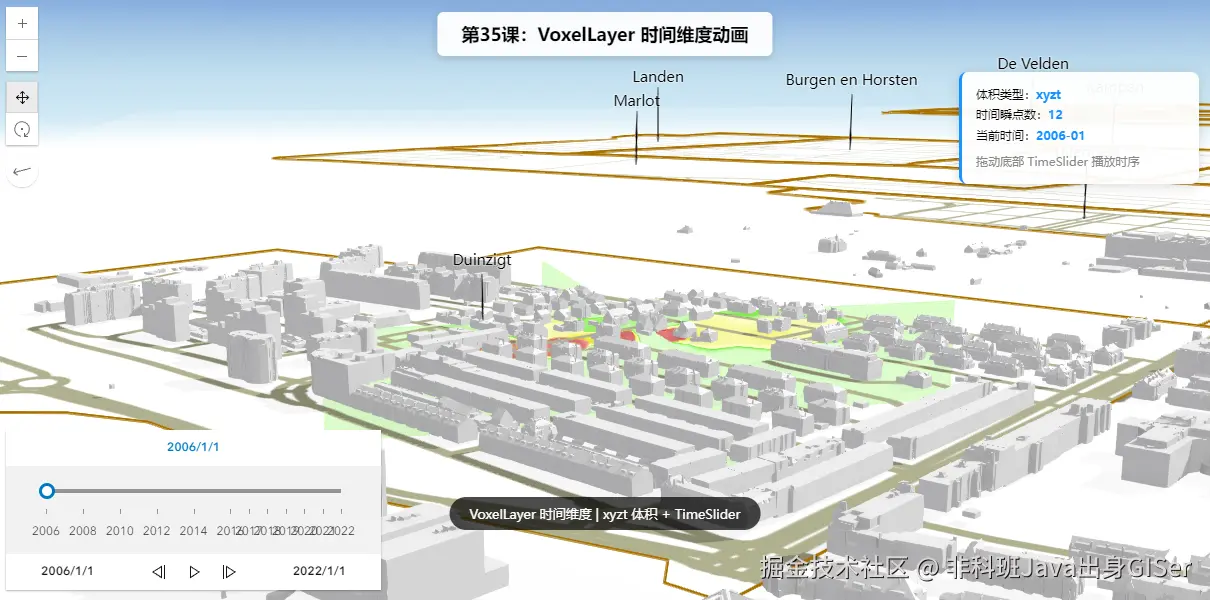
操作说明:
- 场景加载后,信息卡显示
volumeType(应为xyzt)与时间瞬点数量。- 拖动底部
TimeSlider或点击播放按钮,观察体数据随时间变化(本例为海牙地下土壤污染物扩散)。- 点击体素可弹出该处各变量值(已启用
popupEnabled)。
六、关键 API 说明
| API | 说明 |
|---|---|
voxelLayer.getVolume(null).volumeType |
体积类型,"xyzt" 才是时间感知体 |
voxelLayer.timeInfo |
只读 TimeInfo:fullTimeExtent / stops(Date\[\] 时间瞬点) |
voxelLayer.timeExtent |
手动设置图层时间范围(不依赖 TimeSlider 时) |
voxelLayer.useViewTime |
默认 true,跟随 view.timeExtent 渲染时间切片 |
voxelLayer.timeOffset |
TimeInterval,整体时间偏移 |
TimeSlider 组件 |
fullTimeExtent / stops / mode:"instant" / tickConfigs / playRate,绑定 view 即可驱动体数据(widget 自 5.0 起弃用,建议迁移到 arcgis-time-slider 组件) |
参考链接: VoxelLayer(timeInfo/timeExtent/useViewTime) | 官方示例 VoxelLayer and time
七、系列导航
💡 小贴士 :时间维度的前提是
volumeType === "xyzt";若你的体数据是xyt(时间藏在 z 里),timeInfo为空,TimeSlider 无法过滤时间 ,只能靠verticalExaggeration之类的方式"拉开"不同时间层。动手前先console.log(volumeType)确认类型,能省下大量排查时间。