Hive3.1.3编译
- 1.编译原因
- 2.环境部署
- 3.拉取Hive源码
- 4.Hive源码编译
-
- 4.1环境测试
-
- 1.测试方法------编译
- 2.问题及解决方案
-
- [💥问题1:下载不到 pentaho-aggdesigner-algorithm-5.1.5-jhyde.jar](#💥问题1:下载不到 pentaho-aggdesigner-algorithm-5.1.5-jhyde.jar)
- 💥问题2:阿里云镜像没有被使用
- 💥问题3:jdk版本冲突,<2.环境部署>做的不细致
- 4.2解决Guava版本冲突问题
-
- 1.修改内容
- 2.问题及解决方案
-
- 💥问题1:`Futures.addCallback()`方法27.0-jre中3个参数,19.0中2个参数
- [💥问题2:Iterators的 `emptyIterator` 方法过时了](#💥问题2:Iterators的
emptyIterator方法过时了)
- 4.3开启MetaStore之后StatsTask报错
- 4.4Spark兼容问题
- 4.5编译成功
各组件版本选择:
hadoop-3.3.2
hive-3.1.3
spark-3.3.4 Scala version 2.12.15 (spark-3.3.4依赖hadoop-3.3.2)
1.编译原因
1.1Guava依赖冲突
shell
tail -200 /tmp/root/hive.log > /home/log/hive-200.loghive的github地址
https://github.com/apache/hive
查询guava依赖
https://github.com/apache/hive/blob/rel/release-3.1.3/pom.xml
<guava.version>19.0</guava.version>
hadoop的github地址
https://github.com/apache/hadoop
查询guava依赖
https://github.com/apache/hadoop/blob/rel/release-3.3.2/hadoop-project/pom.xml
<guava.version>27.0-jre</guava.version>
1.2开启MetaStore后运行有StatsTask报错
FAILED: Execution Error, return code 1 from org.apache.hadoop.hive.ql.exec.StatsTask
MapReduce Jobs Launched:
1.3Spark版本过低
Hive3.1.3默认支持Spark2.3.0,版本过低很多新的高效方法都没用到,所以替换为spark-3.3.4(Hadoop3.3.2支持的最高spark版本)
xml
<spark.version>2.3.0</spark.version>2.环境部署
2.1jdk安装
已安装1.8版本
shell
(base) [root@bigdata01 opt]# java -version
java version "1.8.0_301"
Java(TM) SE Runtime Environment (build 1.8.0_301-b09)
Java HotSpot(TM) 64-Bit Server VM (build 25.301-b09, mixed mode)
2.2maven部署
下载3.6.3安装包 https://archive.apache.org/dist/maven/maven-3/3.6.3/binaries/
shell
(base) [root@bigdata01 ~]# cd /opt
(base) [root@bigdata01 opt]# tar -zxvf apache-maven-3.6.3-bin.tar.gz
(base) [root@bigdata01 opt]# mv apache-maven-3.6.3 maven
(base) [root@bigdata01 opt]# vim /etc/profile
# 增加MAVEN_HOME
export MAVEN_HOME=/opt/maven
export PATH=$MAVEN_HOME/bin:$PATH
(base) [root@bigdata01 opt]# source /etc/profile
监测 maven 是否安装成功
shell
(base) [root@bigdata01 opt]# mvn -version
Apache Maven 3.6.3 ()
Maven home: /opt/maven
Java version: 1.8.0_301, vendor: Oracle Corporation, runtime: /opt/jdk/jre
Default locale: zh_CN, platform encoding: UTF-8
OS name: "linux", version: "4.18.0-365.el8.x86_64", arch: "amd64", family: "unix"
配置仓库镜像,阿里云公共仓库
vim /opt/maven/conf/settings.xml
xml
<?xml version="1.0" encoding="UTF-8"?>
<settings xmlns="http://maven.apache.org/SETTINGS/1.0.0"
          xmlns:xsi="http://www.w3.org/2001/XMLSchema-instance"
          xsi:schemaLocation="http://maven.apache.org/SETTINGS/1.0.0 http://maven.apache.org/xsd/settings-1.0.0.xsd">
  <localRepository>/repo</localRepository>
  <mirrors>
	<mirror>
		<id>aliyunmaven</id>
		<mirrorOf>central</mirrorOf>
		<name>阿里云公共仓库</name>
		<url>https://maven.aliyun.com/repository/public</url>
	</mirror>
  </mirrors>
</settings>
2.3安装图形化桌面
采用带图形界面的Centos,卸载多余的jdk,避免版本冲突。这里的操作非常重要,不处理会报稀奇古怪的错误。例如:Fatal error compiling: 无效的目标发行版: 1.11 ,报错java1.11没有这个版本,即使升了java11也没有用。
找到多余安装的jdk
shell
(base) [root@bigdata01 ~]# yum list installed |grep jdk
copy-jdk-configs.noarch                            4.0-2.el8                                                  @appstream
java-1.8.0-openjdk.x86_64                          1:1.8.0.362.b08-3.el8                                      @appstream
java-1.8.0-openjdk-devel.x86_64                    1:1.8.0.362.b08-3.el8                                      @appstream
java-1.8.0-openjdk-headless.x86_64                 1:1.8.0.362.b08-3.el8                                      @appstream
卸载多余安装的jdk
shell
(base) [root@bigdata01 ~]# yum remove -y copy-jdk-configs.noarch java-1.8.0-openjdk.x86_64 java-1.8.0-openjdk-devel.x86_64 java-1.8.0-openjdk-headless.x86_64验证当前的jdk
shell
(base) [root@bigdata01 ~]# java -version
java version "1.8.0_301"
Java(TM) SE Runtime Environment (build 1.8.0_301-b09)
Java HotSpot(TM) 64-Bit Server VM (build 25.301-b09, mixed mode)
2.4安装Git
安装第三方仓库
shell
(base) [root@bigdata01 opt]# yum install https://repo.ius.io/ius-release-el7.rpm https://dl.fedoraproject.org/pub/epel/epel-release-latest-7.noarch.rpm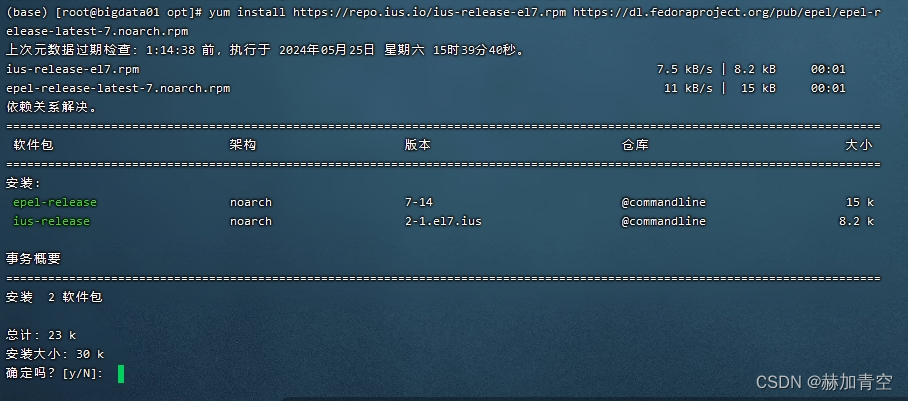
安装Git
shell
(base) [root@bigdata01 opt]# yum install -y gitgit版本检查
shell
(base) [root@bigdata01 ~]# git -v
git version 2.43.0
2.5安装IDEA
https://download.jetbrains.com.cn/idea/ideaIU-2021.1.3.tar.gz 下载 linux版
shell
(base) [root@bigdata01 opt]# tar -zxvf ideaIU-2021.1.3.tar.gz启动IDEA,启动图形化界面要在VMware中
shell
cd /opt/idea-IU-211.7628.21
./bin/idea.sh
这里试用30天
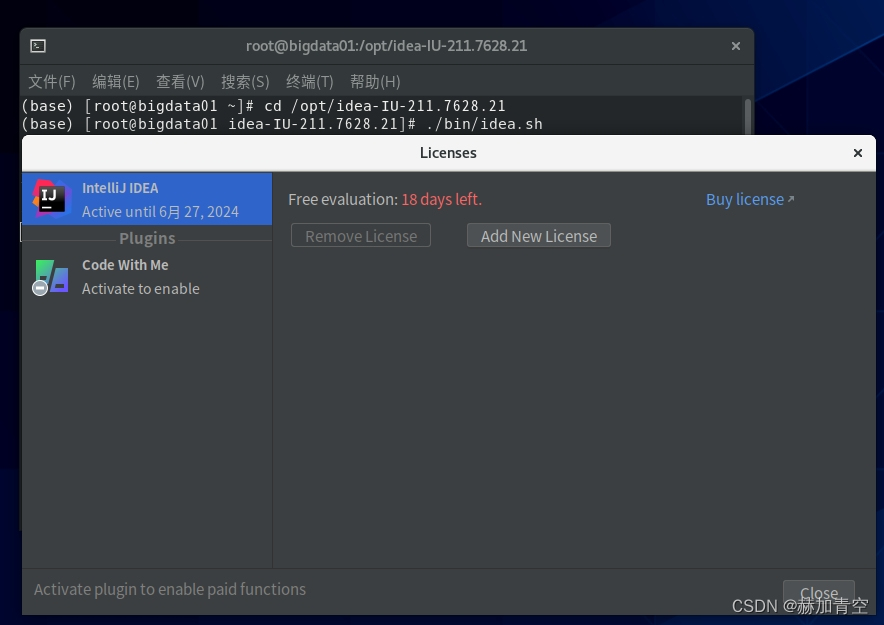
配置 maven,settings.xml中已配置阿里云公共仓库地址
设置 idea 快捷图标(这里的 bluetooth-sendto.desktop 是随便复制了一个,可以任意换)
shell
(base) [root@bigdata01 bin]# cd /usr/share/applications
(base) [root@bigdata01 applications]# cp bluetooth-sendto.desktop idea.desktop
(base) [root@bigdata01 applications]# vim idea.desktop
# 删掉原有的,补充这个内容
[Desktop Entry]
Name=idea
Exec=sh /opt/idea-IU-211.7628.21/bin/idea.sh
Terminal=false
Type=Application
Icon=/opt/idea-IU-211.7628.21/bin/idea.png
Comment=idea
Categories=Application;
3.拉取Hive源码
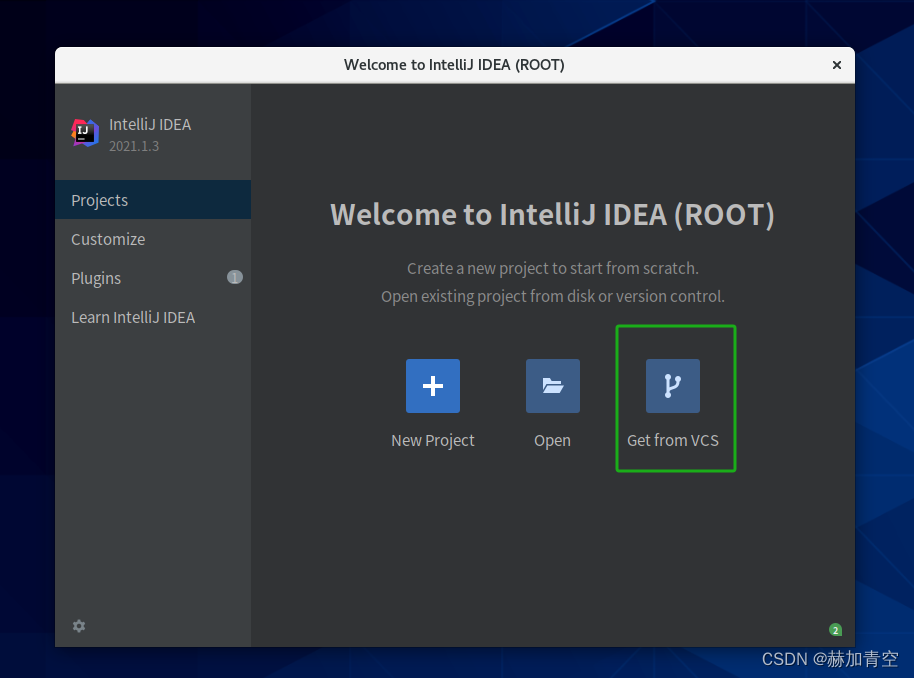
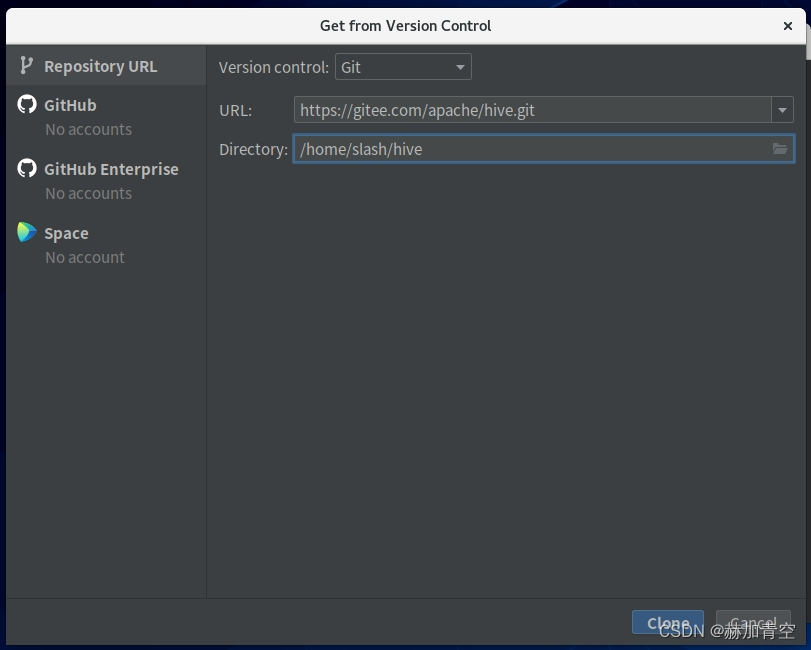
Get from VCS拉取hive源码,拉取的全过程大约需要1小时
配置URL https://gitee.com/apache/hive.git,并设置文件地址
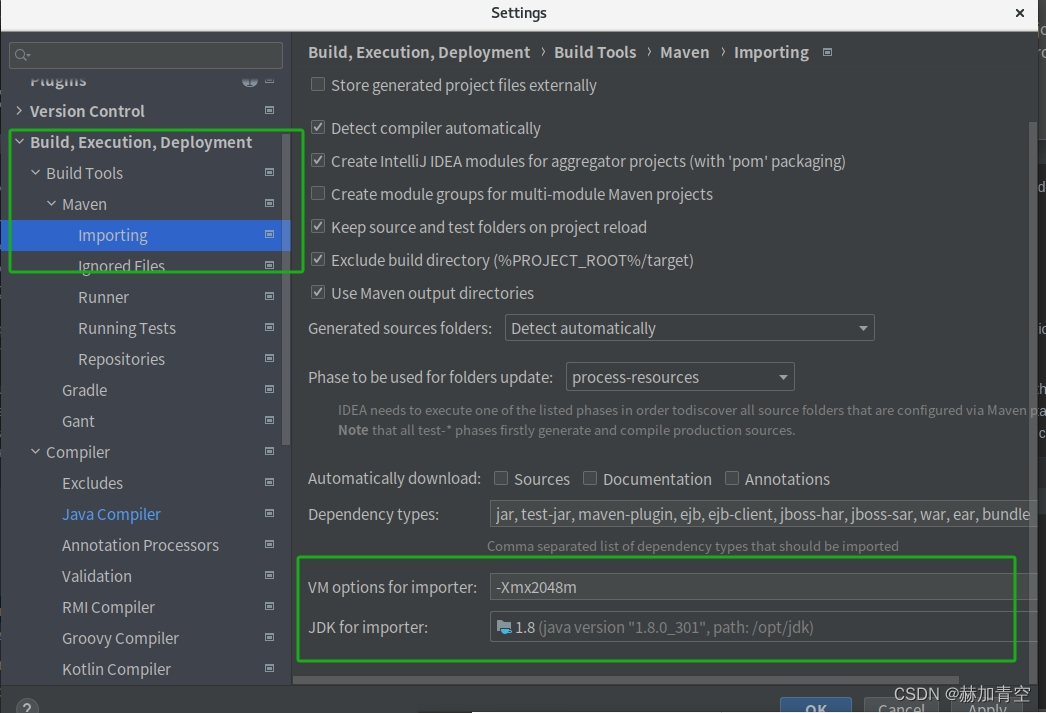
信任项目 后注意配置,这里按图填,否则容易jdk版本异常造成错误(-Xmx2048m)
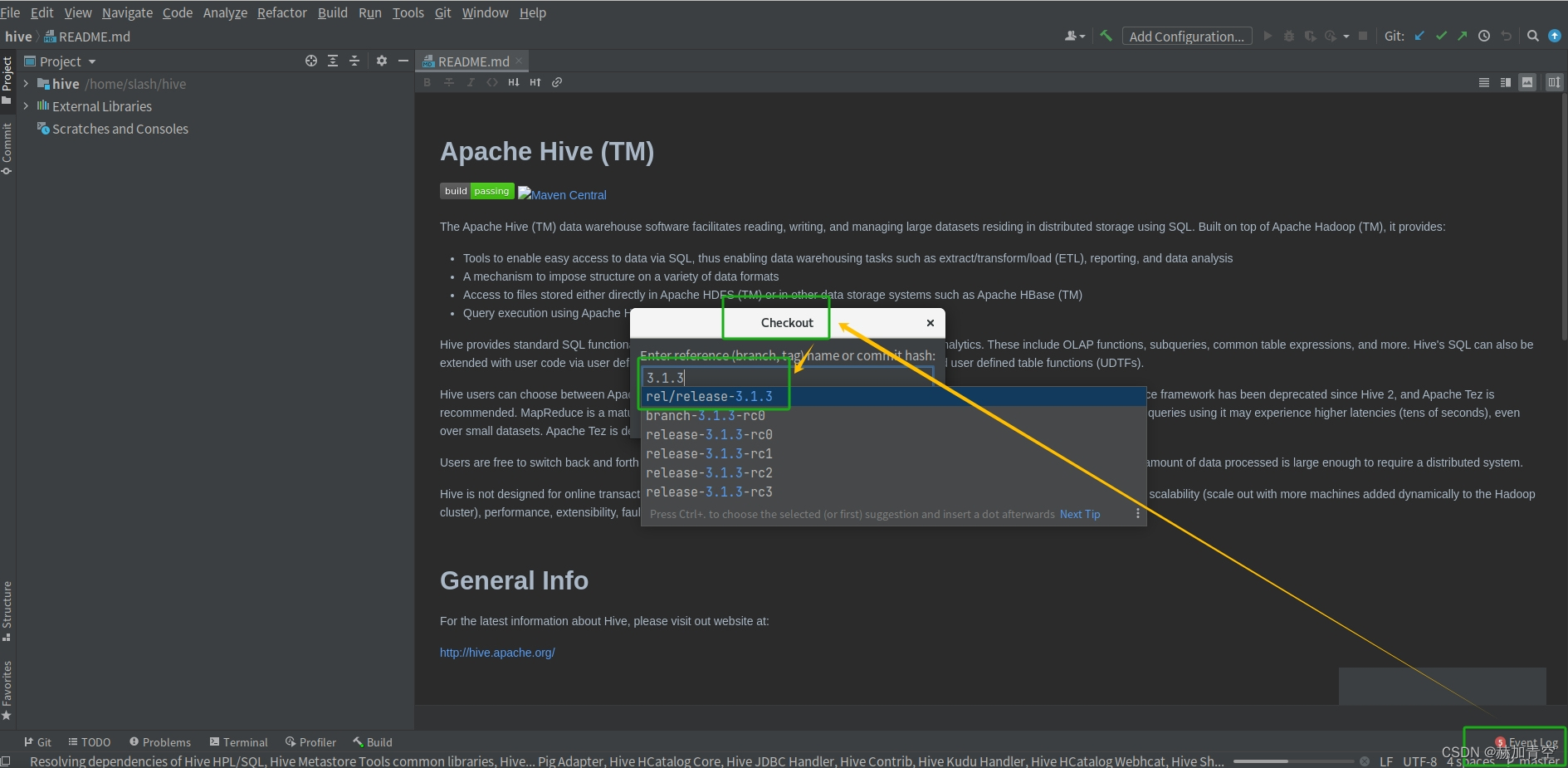
加载hive3.1.3
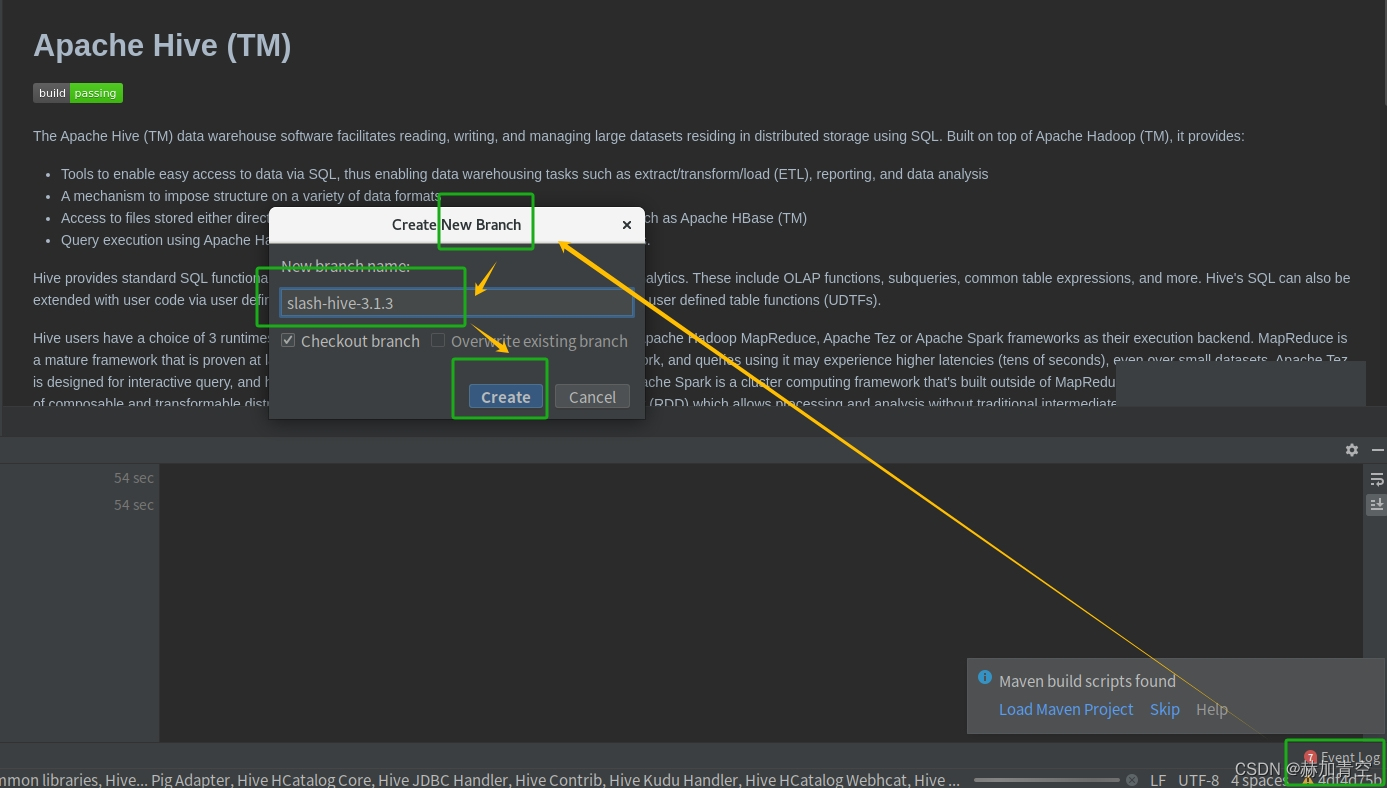
并建立分支 slash-hive-3.1.3
4.Hive源码编译
4.1环境测试
1.测试方法------编译
https://hive.apache.org/development/gettingstarted/ 点击Getting Started Guide
https://cwiki.apache.org/confluence/display/Hive/GettingStarted#GettingStarted-BuildingHivefromSource 点击Building Hive from Source
获得编码方式,执行在 Terminal 终端执行,运行成功的7min左右
shell
mvn clean package -Pdist -DskipTests -Dmaven.javadoc.skip=true2.问题及解决方案
💥问题1:下载不到 pentaho-aggdesigner-algorithm-5.1.5-jhyde.jar
ERROR Failed to execute goal on project hive-upgrade-acid: Could not resolve dependencies for project org.apache.hive:hive-upgrade-acid:jar:3.1.3
Downloading from conjars: http://conjars.org/repo/org/pentaho/pentaho-aggdesigner-algorithm/5.1.5-jhyde/pentaho-aggdesigner-algorithm-5.1.5-jhyde.pom 下载不到 pentaho-aggdesigner-algorithm-5.1.5-jhyde.jar
这个问题是一个已知问题,它是由于Pentaho公司的Maven存储库服务器已被永久关闭,所以无法从该仓库获取它的依赖项导致的。
解决方案,先修改 /opt/maven/conf/setting.xml 文件如下
xml<?xml version="1.0" encoding="UTF-8"?> <settings xmlns="http://maven.apache.org/SETTINGS/1.0.0" xmlns:xsi="http://www.w3.org/2001/XMLSchema-instance" xsi:schemaLocation="http://maven.apache.org/SETTINGS/1.0.0 http://maven.apache.org/xsd/settings-1.0.0.xsd"> <localRepository>/repo</localRepository> <mirrors> <!-- 添加这个镜像仓库在阿里云公共仓库前面 --> <mirror> <id>aliyunmaven</id> <mirrorOf>*</mirrorOf> <name>spring-plugin</name> <url>https://maven.aliyun.com/repository/spring-plugin</url> </mirror> <mirror> <id>aliyunmaven</id> <mirrorOf>central</mirrorOf> <name>阿里云公共仓库</name> <url>https://maven.aliyun.com/repository/public</url> </mirror> </mirrors> </settings>成功下载 /org/pentaho/ 相关内容后再改回去!!!!
💥问题2:阿里云镜像没有被使用
ERROR Failed to execute goal on project hive-upgrade-acid: Could not resolve dependencies for project org.apache.hive:hive-upgrade-acid:jar:3.1.3
Downloading from conjars: https://maven.glassfish.org/content/groups/glassfish/asm/asm/3.1/asm-3.1.jar 下载不到 asm-3.1.jar
修改/opt/maven/conf/settings.xml文件,之前的阿里云镜像没有被使用。复制如下内容,覆盖整个settings.xml文件
xml<?xml version="1.0" encoding="UTF-8"?> <settings xmlns="http://maven.apache.org/SETTINGS/1.0.0" xmlns:xsi="http://www.w3.org/2001/XMLSchema-instance" xsi:schemaLocation="http://maven.apache.org/SETTINGS/1.0.0 http://maven.apache.org/xsd/settings-1.0.0.xsd"> <localRepository>/repo</localRepository> <mirrors> <mirror> <id>aliyunmaven</id> <mirrorOf>central</mirrorOf> <name>阿里云公共仓库</name> <url>https://maven.aliyun.com/repository/public</url> </mirror> </mirrors> </settings>配置后重启服务,阿里云镜像被成功使用
💥问题3:jdk版本冲突,<2.环境部署>做的不细致
ERROR\] Failed to execute goal org.apache.maven.plugins:maven-compiler-plugin:3.5.1:compile (default-compile) on project hive-upgrade-acid: Fatal error compiling: 无效的目标发行版: 1.11 -\> \[Help 1
报这个错误是jdk版本冲突了,Linux版尽管
java -version都显示了 1.8版本,但图形化、IDEA没做处理就会有很多jdk存在,需要做的就是重新做<2.环境部署><3.拉取Hive源码>
4.2解决Guava版本冲突问题
1.修改内容
修改pom.xml中的guava.version的版本为 27.0-jre
xml
# 原来版本
<guava.version>19.0</guava.version>
# 修改后版本
<guava.version>27.0-jre</guava.version>
修改版本后执行编译 mvn clean package -Pdist -DskipTests -Dmaven.javadoc.skip=true
结果保存:/home/slash/hive/packaging/target/apache-hive-3.1.3-bin.tar.gz
2.问题及解决方案
💥问题1:Futures.addCallback()方法27.0-jre中3个参数,19.0中2个参数
[ERROR] Failed to execute goal org.apache.maven.plugins:maven-compiler-plugin:3.6.1:compile (default-compile) on project hive-llap-common: Compilation failure: Compilation failure:
[ERROR] /home/slash/hive/llap-common/src/java/org/apache/hadoop/hive/llap/AsyncPbRpcProxy.java:[173,16] 无法将类 com.google.common.util.concurrent.Futures中的方法 addCallback应用到给定类型;
[ERROR]   需要: com.google.common.util.concurrent.ListenableFuture<V>,com.google.common.util.concurrent.FutureCallback<? super V>,java.util.concurrent.Executor
[ERROR]   找到: com.google.common.util.concurrent.ListenableFuture<U>,org.apache.hadoop.hive.llap.AsyncPbRpcProxy.ResponseCallback<U>
[ERROR]   原因: 无法推断类型变量 V
[ERROR]     (实际参数列表和形式参数列表长度不同)
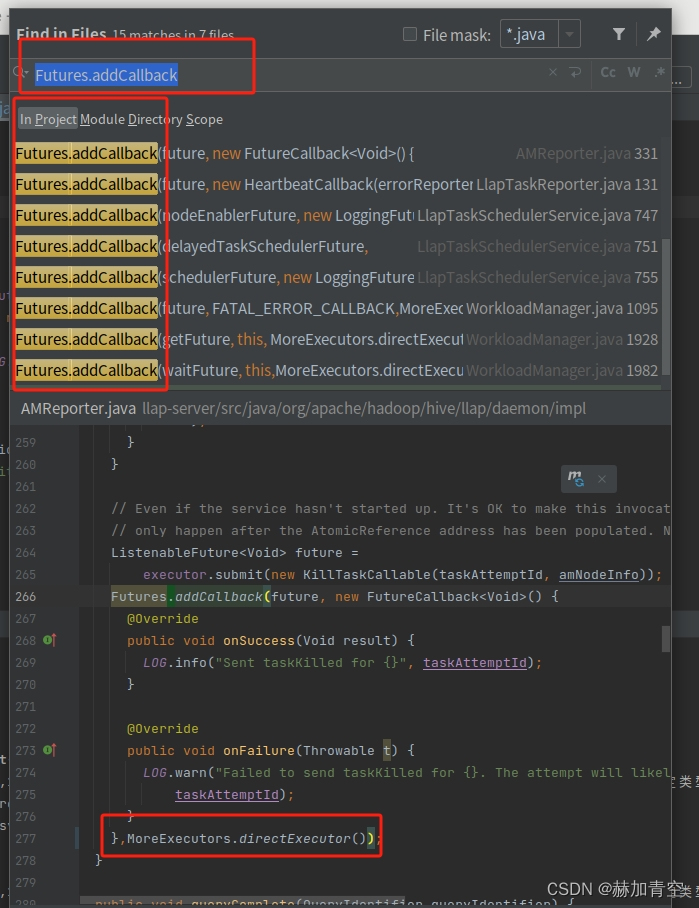
修改 Futures.addCallback(),为其增加第3个参数,MoreExecutors.directExecutor(),这个修改大概15处,方法相同
java
// 原来的
@VisibleForTesting
      <T extends Message , U extends Message> void submitToExecutor(
          CallableRequest<T, U> request, LlapNodeId nodeId) {
        ListenableFuture<U> future = executor.submit(request);
        Futures.addCallback(future, new ResponseCallback<U>(
            request.getCallback(), nodeId, this));
      }

// 修改后的
@VisibleForTesting
      <T extends Message , U extends Message> void submitToExecutor(
          CallableRequest<T, U> request, LlapNodeId nodeId) {
        ListenableFuture<U> future = executor.submit(request);
        Futures.addCallback(future, new ResponseCallback<U>(
            request.getCallback(), nodeId, this),MoreExecutors.directExecutor());
      }
过程中如果出现 "找不到MoreExecutors方法"的问题可以手动 import 这个方法,具体方法可以拷贝其他文件中的 import
💥问题2:Iterators的 emptyIterator 方法过时了
[ERROR] Failed to execute goal org.apache.maven.plugins:maven-compiler-plugin:3.6.1:compile (default-compile) on project hive-druid-handler: Compilation failure
[ERROR] /home/slash/hive/druid-handler/src/java/org/apache/hadoop/hive/druid/serde/DruidScanQueryRecordReader.java:[46,61] <T>emptyIterator()在com.google.common.collect.Iterators中不是公共的; 无法从外部程序包中对其进行访问
修改Iterators中的emptyIterator方法
shell
# org.apache.hadoop.hive.druid.serde.DruidScanQueryRecordReader
# 原始代码
  private Iterator<List<Object>> compactedValues = Iterators.emptyIterator();
# 修改后代码
  private Iterator<List<Object>> compactedValues = ImmutableSet.<List<Object>>of().iterator();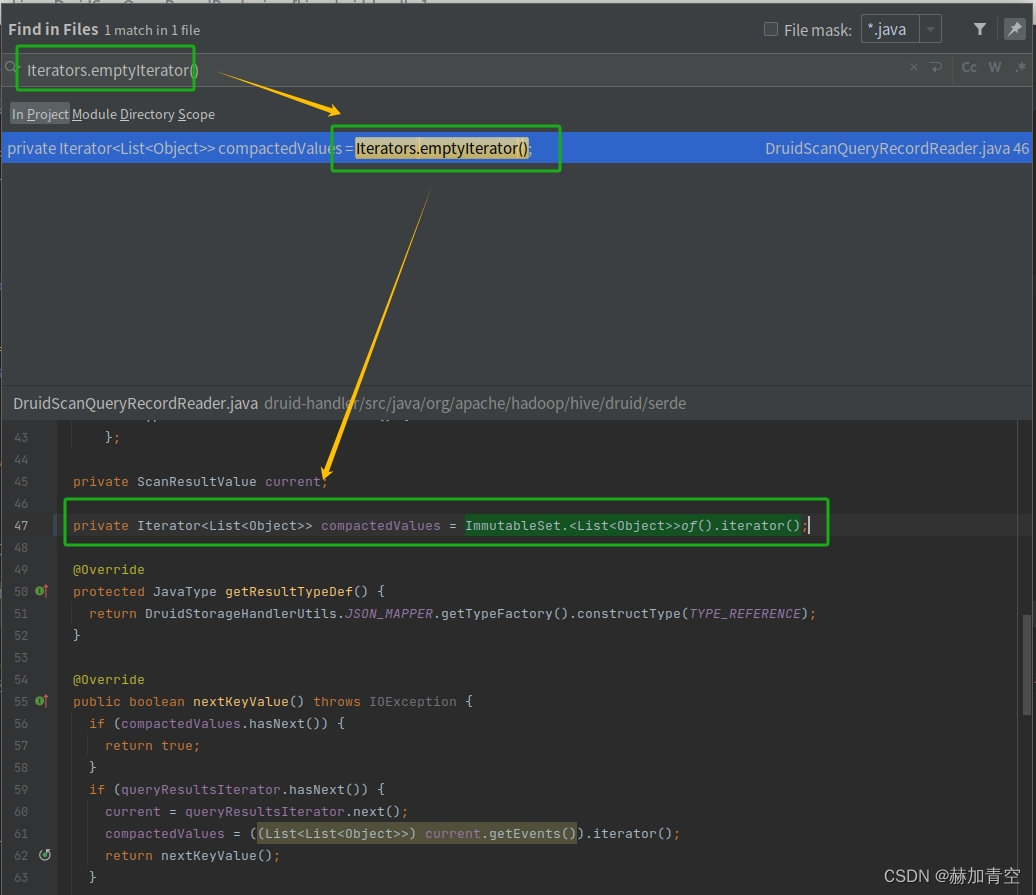
4.3开启MetaStore之后StatsTask报错
1.修改内容
shell
# 错误信息
FAILED: Execution Error, return code 1 from org.apache.hadoop.hive.ql.exec.StatsTask
MapReduce Jobs Launched:

# 错误日志 /tmp/root/hive.log
exec.StatsTask: Failed to run stats task
org.apache.hadoop.hive.ql.metadata.HiveException: org.apache.thrift.transport.TTransp
ortException
错误分析见 https://issues.apache.org/jira/browse/HIVE-19316
IDEA点击 Cherry-pick,将StatsTask fails due to ClassCastException的补丁合并到当前分支

修改版本后执行编译 mvn clean package -Pdist -DskipTests -Dmaven.javadoc.skip=true
结果保存:/home/slash/hive/packaging/target/apache-hive-3.1.3-bin.tar.gz
2.问题及解决方案
💥问题1:cherry-pick失败
Cherry-pick failed
3d21bc38 HIVE-19316: StatsTask fails due to ClassCastException (Jaume Marhuenda, reviewed by Jesus Camacho Rodriguez)
Committer identity unknown
*** Please tell me who you are.
Run
git config --global user.email "you@example.com"
git config --global user.name "Your Name"
to set your account's default identity.
Omit --global to set the identity only in this repository.
unable to auto-detect email address (got 'root@bigdata01.(none)')
需要提交修复的版本信息
Cherry-pick failed
3d21bc38 HIVE-19316: StatsTask fails due toClassCastException (Jaume Marhuenda, reviewedby Jesus Camacho Rodriguez)your local changes would be overwritten bycherry-pick.hint: commit your changes or stash them toproceed.cherry-pick failed
工作目录中已经存在一些未提交的更改。git 不允许在未提交更改的情况下进行 cherry-pick
shell
# 提交修复的版本信息
git config --global user.email "写个邮箱地址"
git config --global user.name "slash"

# 添加并commit提交
git add .
git commit -m "resolve conflict  guava"
4.4Spark兼容问题
1.修改内容
修改pom.xml中的 spark.version、scala.version、hadoop.version
xml
<!-- 原始代码 -->
<spark.version>2.3.0</spark.version>
<scala.binary.version>2.11</scala.binary.version>
<scala.version>2.11.8</scala.version>

<!-- 修改后代码 -->
<spark.version>3.3.4</spark.version>
<scala.binary.version>2.12</scala.binary.version>
<scala.version>2.12.15</scala.version>
spark中消除部分hadoop依赖,hive3.1.3依赖的是hadoop3.1.0,不同于spark-3.3.4依赖hadoop3.3.2,不用改hive pom的hadoop依赖
xml
<!-- 修改后代码 -->
<groupId>org.apache.spark</groupId>
<artifactId>spark-core_${scala.binary.version}</artifactId>
<version>${spark.version}</version>
<exclusions>
    <exclusion>
        <groupId>org.apache.hadoop</groupId>
        <artifactId>hadoop-core</artifactId>
    </exclusion>
    <exclusion>
        <groupId>org.apache.hadoop</groupId>
        <artifactId>hadoop-client</artifactId>
    </exclusion>
    <exclusion>
        <groupId>org.apache.hadoop</groupId>
        <artifactId>hadoop-client-api</artifactId>
    </exclusion>
    <exclusion>
        <groupId>org.apache.hadoop</groupId>
        <artifactId>hadoop-client-runtime</artifactId>
    </exclusion>
</exclusions>
2.问题及解决方案
💥问题1:SparkCounter中方法过时,需要替换
[ERROR] Failed to execute goal org.apache.maven.plugins:maven-compiler-plugin:3.6.1:compile (default-compile) on project hive-spark-client: Compilation failure: Compilation failure:
[ERROR] /home/slash/hive/spark-client/src/main/java/org/apache/hive/spark/counter/SparkCounter.java:[22,24] 找不到符号
[ERROR]   符号:   类 Accumulator
[ERROR]   位置: 程序包 org.apache.spark
[ERROR] /home/slash/hive/spark-client/src/main/java/org/apache/hive/spark/counter/SparkCounter.java:[23,24] 找不到符号
[ERROR]   符号:   类 AccumulatorParam
[ERROR]   位置: 程序包 org.apache.spark
[ERROR] /home/slash/hive/spark-client/src/main/java/org/apache/hive/spark/counter/SparkCounter.java:[30,11] 找不到符号
[ERROR]   符号:   类 Accumulator
[ERROR]   位置: 类 org.apache.hive.spark.counter.SparkCounter
[ERROR] /home/slash/hive/spark-client/src/main/java/org/apache/hive/spark/counter/SparkCounter.java:[91,41] 找不到符号
[ERROR]   符号:   类 AccumulatorParam
[ERROR]   位置: 类 org.apache.hive.spark.counter.SparkCounter
移除无用的方法,并修改相关内容,最终结果如下
java
/*
 * Licensed to the Apache Software Foundation (ASF) under one
 * or more contributor license agreements.  See the NOTICE file
 * distributed with this work for additional information
 * regarding copyright ownership.  The ASF licenses this file
 * to you under the Apache License, Version 2.0 (the
 * "License"); you may not use this file except in compliance
 * with the License.  You may obtain a copy of the License at
 * <p/>
 * http://www.apache.org/licenses/LICENSE-2.0
 * <p/>
 * Unless required by applicable law or agreed to in writing, software
 * distributed under the License is distributed on an "AS IS" BASIS,
 * WITHOUT WARRANTIES OR CONDITIONS OF ANY KIND, either express or implied.
 * See the License for the specific language governing permissions and
 * limitations under the License.
 */
package org.apache.hive.spark.counter;

import java.io.Serializable;

import org.apache.spark.api.java.JavaSparkContext;
import org.apache.spark.util.LongAccumulator;

public class SparkCounter implements Serializable {

  private String name;
  private String displayName;
  private LongAccumulator accumulator;

  // Values of accumulators can only be read on the SparkContext side. This field is used when
  // creating a snapshot to be sent to the RSC client.
  private long accumValue;

  public SparkCounter() {
    // For serialization.
  }

  private SparkCounter(
      String name,
      String displayName,
      long value) {
    this.name = name;
    this.displayName = displayName;
    this.accumValue = value;
  }

  public SparkCounter(
    String name,
    String displayName,
    String groupName,
    long initValue,
    JavaSparkContext sparkContext) {

    this.name = name;
    this.displayName = displayName;
    String accumulatorName = groupName + "_" + name;
    this.accumulator = sparkContext.sc().longAccumulator(accumulatorName);
    this.accumulator.setValue(initValue);
  }

  public long getValue() {
    if (accumulator != null) {
      return accumulator.value();
    } else {
      return accumValue;
    }
  }

  public void increment(long incr) {
    accumulator.add(incr);
  }

  public String getName() {
    return name;
  }

  public String getDisplayName() {
    return displayName;
  }

  public void setDisplayName(String displayName) {
    this.displayName = displayName;
  }

  SparkCounter snapshot() {
    return new SparkCounter(name, displayName, accumulator.value());
  }

}
💥问题2:ShuffleWriteMetrics中方法过时,需要替换
[ERROR] Failed to execute goal org.apache.maven.plugins:maven-compiler-plugin:3.6.1:compile (default-compile) on project hive-spark-client: Compilation failure: Compilation failure:
[ERROR] /home/slash/hive/spark-client/src/main/java/org/apache/hive/spark/client/metrics/ShuffleWriteMetrics.java:[50,39] 找不到符号
[ERROR]   符号:   方法 shuffleBytesWritten()
[ERROR]   位置: 类 org.apache.spark.executor.ShuffleWriteMetrics
[ERROR] /home/slash/hive/spark-client/src/main/java/org/apache/hive/spark/client/metrics/ShuffleWriteMetrics.java:[51,36] 找不到符号
[ERROR]   符号:   方法 shuffleWriteTime()
[ERROR]   位置: 类 org.apache.spark.executor.ShuffleWriteMetrics
修改相关方法
java
// 原始代码
public ShuffleWriteMetrics(TaskMetrics metrics) {
    this(metrics.shuffleWriteMetrics().shuffleBytesWritten(),
      metrics.shuffleWriteMetrics().shuffleWriteTime());
  }


// 修改后
public ShuffleWriteMetrics(TaskMetrics metrics) {
    this(metrics.shuffleWriteMetrics().bytesWritten(),
      metrics.shuffleWriteMetrics().writeTime());
  }
💥问题3:TestStatsUtils中方法过时,需要替换
[ERROR] Failed to execute goal org.apache.maven.plugins:maven-compiler-plugin:3.6.1:testCompile (default-testCompile) on project hive-exec: Compilation failure
[ERROR] /home/slash/hive/ql/src/test/org/apache/hadoop/hive/ql/stats/TestStatsUtils.java:[34,39] 程序包org.spark_project.guava.collect不存在
修改相关方法
java
// 原始代码
import org.spark_project.guava.collect.Sets;

// 修改后
import org.sparkproject.guava.collect.Sets;
4.5编译成功
mvn clean package -Pdist -DskipTests -Dmaven.javadoc.skip=true
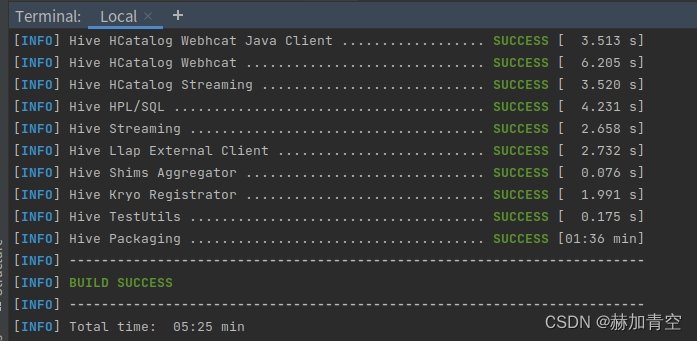
Hive3.1.3-spark-3.3.4-hadoop-3.3.2编译成功,结果保存:/home/slash/hive/packaging/target/apache-hive-3.1.3-bin.tar.gz
声明:本文所载信息不保证准确性和完整性。文中所述内容和意见仅供参考,不构成实际商业建议,可收藏可转发但请勿转载,如有雷同纯属巧合