环境介绍
- windows 11
- python 3.9.9
- 显卡 GTX970 4G显存 (可怜巴巴)
- 内存 24G
一、下载 Langchain-Chatchat
注意:这里先不要执行依赖下载,如果项目是通过 PyCharm 打开,就不要着急下载依赖,跟着往下面走,因为 pip 安装默认不走虚拟环境,如果所有的 python 项目都使用同一个依赖目录,会导致其他项目版本依赖出现问题,这是 pip 安装的一个特新,不像 Java 中 maven 依赖可以管理不同版本的依赖
sh
git clone https://github.com/chatchat-space/Langchain-Chatchat.git二、PyCharm 打开项目并配置解释器和虚拟环境
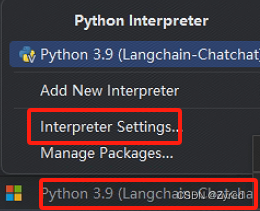
第一步:点击右下角,弹出如下内容,选择 Interpreter Settings
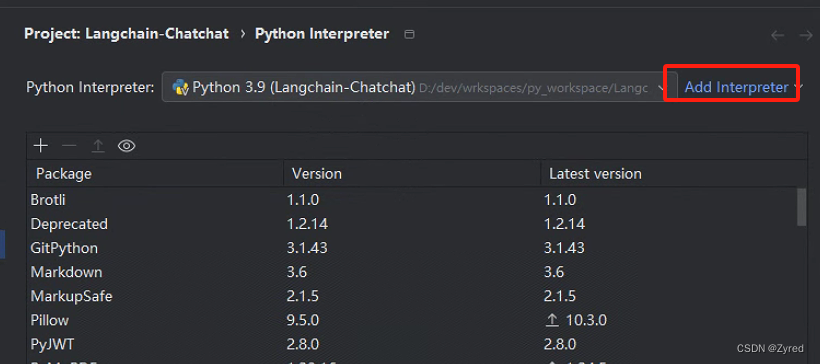
第二步:点击 Add Interpreter
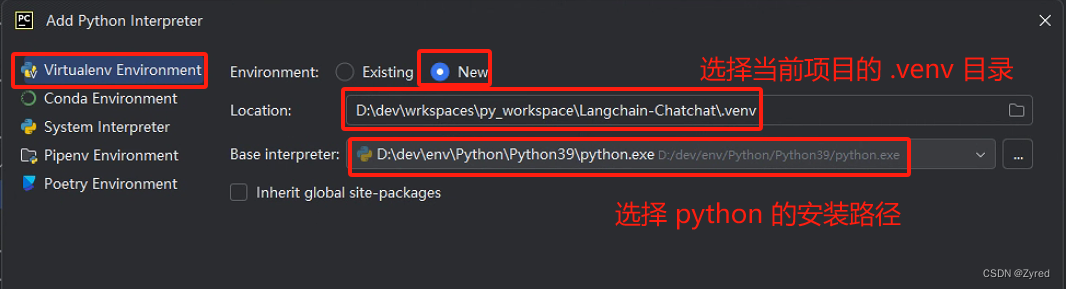
第三步:配置虚拟环境和解释器
三、虚拟环境配置好了之后再下载依赖
sh
# 安装全部依赖
pip install -r requirements.txt
pip install -r requirements_api.txt
pip install -r requirements_webui.txt
四、下载模型
国内下载大模型地址:
- huggingface国内镜像站:www.hf-mirror.com
- 阿里巴巴的模搭社区:www.modelscope.cn
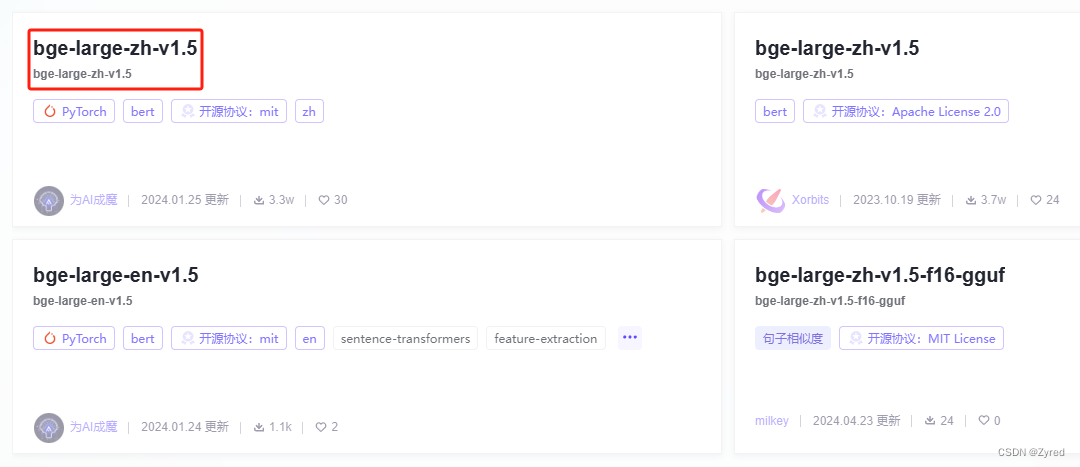
4.1 嵌入模型下载 bge-large-zh-v1.5
可以通过 git 的方式进行下载,但是 git 下载太慢了,还是直接通过浏览器下载
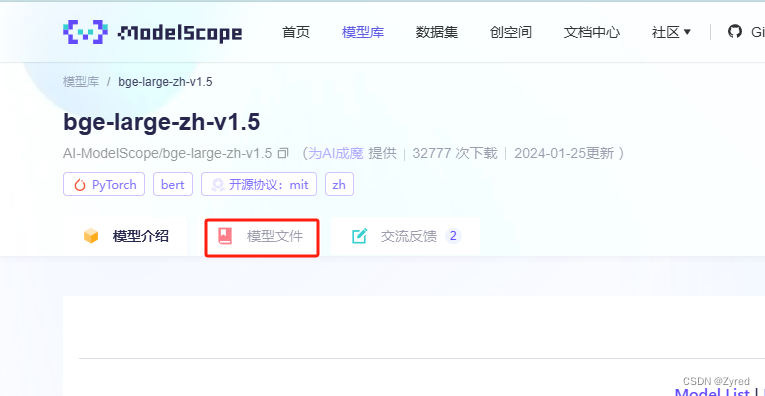
第一步: 点我直接进入下载页面,选择时间最新的进入
第二步:进入后,点击模型文件
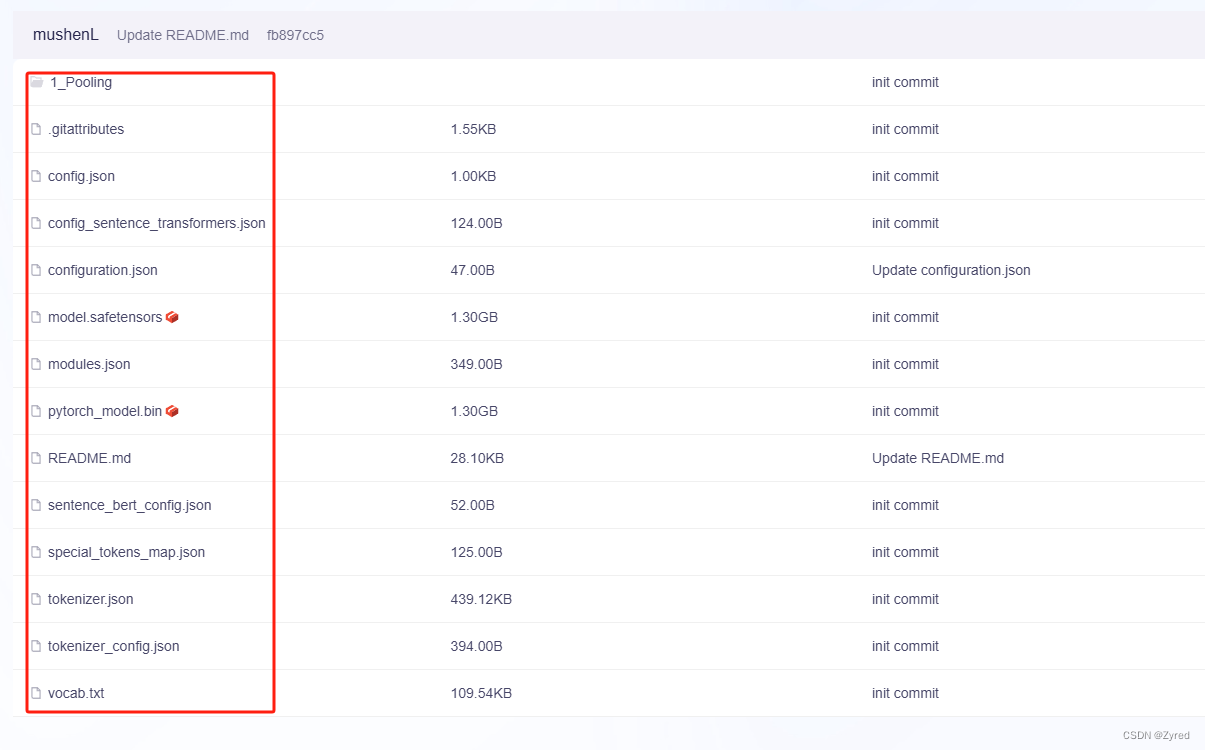
第三步: 选择全部文件进行下载
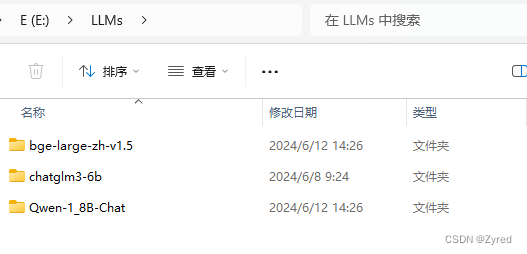
第四步: 下载完毕后,统一使用目录进行管理
例如我的 LLMs 目录下分不同的模型名称
4.2 下载大模型 Qwen-1_8B-Chat
为什么我会选择此模型,而不是选择
chatglm3-6b?因为我的显存只有 4G,在
model_config.py.example第27行注释说明了情况如果读者的显存宽裕的情况下,可以选择官方示例的模型进行下载
下载方式和#4.1一样,只不过这个模型比嵌入模型大了很多,等待时间比较久
五、初始化配置文件
此时
Qwen-1_8B-Chat模型应该还在下载中,我们就并行操作,做不依赖大模型的事情
配置文件存放目录:Langchain-Chatchat -> configs中根目录
Langchain-Chatchat>为执行的路径,后面的才是指令
sh$ Langchain-Chatchat> python copy_config_example.py执行完毕后,
configs文件夹内多了一些.py的文件
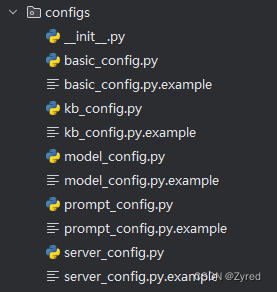
这里就不一一例举文件的作用了,官方给了解答:点我进入配置文件详细介绍
六、初始化本地知识库
本地知识库必须要嵌入模型
bge-large-zh-v1.5下载完毕才能操作,到这一步应该都下载完成了
6.1 model_config.py 配置
关于嵌入模型的配置,一共有两个地方需要修改
第一步: 非必须做(由于笔者显存有限,把嵌入模型的事情交给 CPU 做,减轻 GPU 压力)
python
# 把 auto 修改为 cpu
#EMBEDDING_DEVICE = "auto"
EMBEDDING_DEVICE = "cpu"
第二步: 必须做(配置嵌入模型存放的磁盘位置 #4.1 处存放的位置)
备注:这里只是列出改动的地方,而不是需要你删除多余的配置
python
MODEL_PATH = {
    "embed_model": {
    	# 这里配置 4.1 处存放的位置,我的位置是: E:\\LLMs\\bge-large-zh-v1.5\\
    	# 这里要注意,再 windows 里面用双反斜杠, \b 被视为转义符
    	"bge-large-zh-v1.5": "E:\\LLMs\\bge-large-zh-v1.5\\",
    }
}
6.2 kb_config.py 配置(可选)
该文件主要是配置向量数据库,我使用的是默认的
faiss数据库,所以对我而言,这个文件没有改动,新手不建议轻易改动这些如果想使用其他的向量数据库,需要找到
requirements.txt中对应的依赖下载后才能使用
6.3 初始化本地知识库到向量数据库内
注意执行命令的目录位置:项目根目录 Langchain-Chatchat> 为执行的路径,后面的才是指令
sh
$ Langchain-Chatchat> python init_database.py --recreate-vs现象描述:
Langchain-Chatchat -> knowledge_base -> samples -> content 内的所有内容向量化后保存到
Langchain-Chatchat -> knowledge_base -> samples -> vector_store -> bge-large-zh-v1.5 数据库内
这个过程也比较漫长,耐心等待即可
七、配置大模型 Qwen-1_8B-Chat
大模型配置需要改动两个文件:
7.1 model_config.py 配置
修改
Langchain-Chatchat启动的大模型列表
python
# 1. 配置模型列表
# LLM_MODELS = ["chatglm3-6b", "zhipu-api", "openai-api"]
# 修改上面的内容,改成下这样
# 我有 openai 的 key,可以使用,如果读者没有,就去掉 "openai-api"
LLM_MODELS = ["Qwen-1_8B-Chat", "openai-api"]

# 2. 配置 openai(可选)
# 配置 openai,如果读者没有,则可以跳过这里
ONLINE_LLM_MODEL = {
    "openai-api": {
        "model_name": "gpt-4",
        "api_base_url": "https://api.openai.com/v1",
        "api_key": "sk-ofNUwgIXYXFvCENYEdxxxxxxxxxxxxxxxxxxxxxxxxxxxxxx",
        "openai_proxy": "",
    },
    ......
}

# 3. 配置大模型本地磁盘存放地址
MODEL_PATH = {
	# 忽略这里,只是给你参照,这里配置的是嵌入模型
	"embed_model": {
		......
	},
	# 这里才是配置大模型的地方
	"llm_model": {
		# 大模型存放地址,windows 要使用 \\ 分割
		"Qwen-1_8B-Chat": "E:\\LLMs\\Qwen-1_8B-Chat\\",
		......
	}
}
7.2 server_config.py 配置
python
FSCHAT_MODEL_WORKERS = {
    "default": {
    	......
    }
    # 直接复制这块儿内容
    "Qwen-1_8B-Chat": {
        "device": "cuda",
    },
    ......
}
7.3 执行启动 Langchain-Chatchat 服务
注意执行命令的目录位置:项目根目录 Langchain-Chatchat> 为执行的路径,后面的才是指令
sh
$ Langchain-Chatchat> python startup.py -a八、成功或者失败
8.1 成功(没有经历坎坷的人生是不完整的)
成功后,界面如下,可以进行愉快的聊天了

输出的日志如下:
log
Loading checkpoint shards:   0%|          | 0/2 [00:00<?, ?it/s]
Loading checkpoint shards:  50%|█████     | 1/2 [00:01<00:01,  1.45s/it]
Loading checkpoint shards: 100%|██████████| 2/2 [00:02<00:00,  1.18s/it]
Loading checkpoint shards: 100%|██████████| 2/2 [00:02<00:00,  1.22s/it]
2024-06-12 21:44:50 | ERROR | stderr |
2024-06-12 21:44:52 | INFO | model_worker | Register to controller
2024-06-12 21:44:52 | DEBUG | urllib3.connectionpool | Starting new HTTP connection (1): 127.0.0.1:20001
2024-06-12 21:44:52 | DEBUG | urllib3.connectionpool | http://127.0.0.1:20001 "POST /register_worker HTTP/1.1" 200 4
2024-06-12 21:44:52 | DEBUG | asyncio | Using proactor: IocpProactor
2024-06-12 21:44:58,276 - proactor_events.py[line:623] - DEBUG: Using proactor: IocpProactor
INFO:     Started server process [20188]
INFO:     Waiting for application startup.
INFO:     Application startup complete.
INFO:     Uvicorn running on http://127.0.0.1:7861 (Press CTRL+C to quit)


==============================Langchain-Chatchat Configuration==============================
操作系统:Windows-10-10.0.22631-SP0.
python版本:3.9.9 (tags/v3.9.9:ccb0e6a, Nov 15 2021, 18:08:50) [MSC v.1929 64 bit (AMD64)]
项目版本:v0.2.10
langchain版本:0.0.354. fastchat版本:0.2.35


当前使用的分词器:ChineseRecursiveTextSplitter
当前启动的LLM模型:['Qwen-1_8B-Chat', 'openai-api'] @ cuda
{'device': 'cuda',
 'host': '127.0.0.1',
 'infer_turbo': False,
 'model_path': 'E:\\LLMs\\Qwen-1_8B-Chat',
 'model_path_exists': True,
 'port': 20002}
{"api_base_url": "https://api.openai.com/v1",
 "api_key": "sk-ofNUwgIXYXFvCENYEdxxxxxxxxxxxxxxxxxxxxxxxxxxxxxx",
 'device': 'auto',
 'host': '127.0.0.1',
 'infer_turbo': False,
 'model_name': 'gpt-4',
 'online_api': True,
 'openai_proxy': '',
 'port': 20002}
当前Embbedings模型: bge-large-zh-v1.5 @ cpu


服务端运行信息:
    OpenAI API Server: http://127.0.0.1:20000/v1
    Chatchat  API  Server: http://127.0.0.1:7861
    Chatchat WEBUI Server: http://127.0.0.1:8501
==============================Langchain-Chatchat Configuration==============================


  You can now view your Streamlit app in your browser.

  URL: http://127.0.0.1:8501
8.2 失败(完整的人生)
8.2.1 Torch not compiled with CUDA enabled 错误
log
2024-06-12 21:53:34 | ERROR | stderr | Process model_worker - Qwen-1_8B-Chat:
2024-06-12 21:53:34 | ERROR | stderr | Traceback (most recent call last):
2024-06-12 21:53:34 | ERROR | stderr |   File "D:\dev\env\Python\Python39\lib\multiprocessing\process.py", line 315, in _bootstrap
2024-06-12 21:53:34 | ERROR | stderr |     self.run()
2024-06-12 21:53:34 | ERROR | stderr |   File "D:\dev\env\Python\Python39\lib\multiprocessing\process.py", line 108, in run
2024-06-12 21:53:34 | ERROR | stderr |     self._target(*self._args, **self._kwargs)
2024-06-12 21:53:34 | ERROR | stderr |   File "D:\dev\wrkspaces\py_workspace\Langchain-Chatchat\startup.py", line 391, in run_model_worker
2024-06-12 21:53:34 | ERROR | stderr |     app = create_model_worker_app(log_level=log_level, **kwargs)
2024-06-12 21:53:34 | ERROR | stderr |   File "D:\dev\wrkspaces\py_workspace\Langchain-Chatchat\startup.py", line 219, in create_model_worker_app
2024-06-12 21:53:34 | ERROR | stderr |     worker = ModelWorker(
2024-06-12 21:53:34 | ERROR | stderr |   File "D:\dev\wrkspaces\py_workspace\Langchain-Chatchat\.venv\lib\site-packages\fastchat\serve\model_worker.py", line 77, in __init__
2024-06-12 21:53:34 | ERROR | stderr |     self.model, self.tokenizer = load_model(
2024-06-12 21:53:34 | ERROR | stderr |   File "D:\dev\wrkspaces\py_workspace\Langchain-Chatchat\.venv\lib\site-packages\fastchat\model\model_adapter.py", line 277, in load_model
2024-06-12 21:53:34 | ERROR | stderr |     model, tokenizer = adapter.load_compress_model(
2024-06-12 21:53:34 | ERROR | stderr |   File "D:\dev\wrkspaces\py_workspace\Langchain-Chatchat\.venv\lib\site-packages\fastchat\model\model_adapter.py", line 111, in load_compress_model
2024-06-12 21:53:34 | ERROR | stderr |     return load_compress_model(
2024-06-12 21:53:34 | ERROR | stderr |   File "D:\dev\wrkspaces\py_workspace\Langchain-Chatchat\.venv\lib\site-packages\fastchat\model\compression.py", line 199, in load_compress_model
2024-06-12 21:53:34 | ERROR | stderr |     compressed_state_dict[name] = tmp_state_dict[name].to(
2024-06-12 21:53:34 | ERROR | stderr |   File "D:\dev\wrkspaces\py_workspace\Langchain-Chatchat\.venv\lib\site-packages\torch\cuda\__init__.py", line 289, in _lazy_init
2024-06-12 21:53:34 | ERROR | stderr |     raise AssertionError("Torch not compiled with CUDA enabled")
2024-06-12 21:53:34 | ERROR | stderr | AssertionError: Torch not compiled with CUDA enabled
这是一个非常棘手的问题
错误原因是因为在配置文件
model_config.py和server_config.py中我们都选择大模型运行在GPU上,但是由于windows系统并没有给我们把显卡硬件资源调用给串起来,导致无法在显卡上执行模型的推理
8.2.2 输入一个很大的问题,无法完整返回,并且后端报错如下
提问内容:
springboot 启动原理
图片中显然是没有回答完毕的,查看后端日志如下:

log
2024-06-12 22:04:58,969 - utils.py[line:38] - ERROR: object of type 'NoneType' has no len()
Traceback (most recent call last):
  File "D:\dev\wrkspaces\py_workspace\Langchain-Chatchat\server\utils.py", line 36, in wrap_done
    await fn
  File "D:\dev\wrkspaces\py_workspace\Langchain-Chatchat\.venv\lib\site-packages\langchain\chains\base.py", line 385, in acall
    raise e
  File "D:\dev\wrkspaces\py_workspace\Langchain-Chatchat\.venv\lib\site-packages\langchain\chains\base.py", line 379, in acall
    await self._acall(inputs, run_manager=run_manager)
  File "D:\dev\wrkspaces\py_workspace\Langchain-Chatchat\.venv\lib\site-packages\langchain\chains\llm.py", line 275, in _acall
    response = await self.agenerate([inputs], run_manager=run_manager)
  File "D:\dev\wrkspaces\py_workspace\Langchain-Chatchat\.venv\lib\site-packages\langchain\chains\llm.py", line 142, in agenerate
    return await self.llm.agenerate_prompt(
  File "D:\dev\wrkspaces\py_workspace\Langchain-Chatchat\.venv\lib\site-packages\langchain_core\language_models\chat_models.py", line 554, in agenerate_prompt
    return await self.agenerate(
  File "D:\dev\wrkspaces\py_workspace\Langchain-Chatchat\.venv\lib\site-packages\langchain_core\language_models\chat_models.py", line 514, in agenerate
    raise exceptions[0]
  File "D:\dev\wrkspaces\py_workspace\Langchain-Chatchat\.venv\lib\site-packages\langchain_core\language_models\chat_models.py", line 617, in _agenerate_with_cache
    return await self._agenerate(
  File "D:\dev\wrkspaces\py_workspace\Langchain-Chatchat\.venv\lib\site-packages\langchain_community\chat_models\openai.py", line 525, in _agenerate
    return await agenerate_from_stream(stream_iter)
  File "D:\dev\wrkspaces\py_workspace\Langchain-Chatchat\.venv\lib\site-packages\langchain_core\language_models\chat_models.py", line 87, in agenerate_from_stream
    async for chunk in stream:
  File "D:\dev\wrkspaces\py_workspace\Langchain-Chatchat\.venv\lib\site-packages\langchain_community\chat_models\openai.py", line 496, in _astream
    if len(chunk["choices"]) == 0:
TypeError: object of type 'NoneType' has no len()
2024-06-12 22:04:58,994 - utils.py[line:40] - ERROR: TypeError: Caught exception: object of type 'NoneType' has no len()
这个问题更加离谱,我明明没有使用
openai但是在openai.py文件内报错,进入到.venv\lib\site-packages\langchain_community\chat_models\openai.py文件报错的位置修改代码如下:
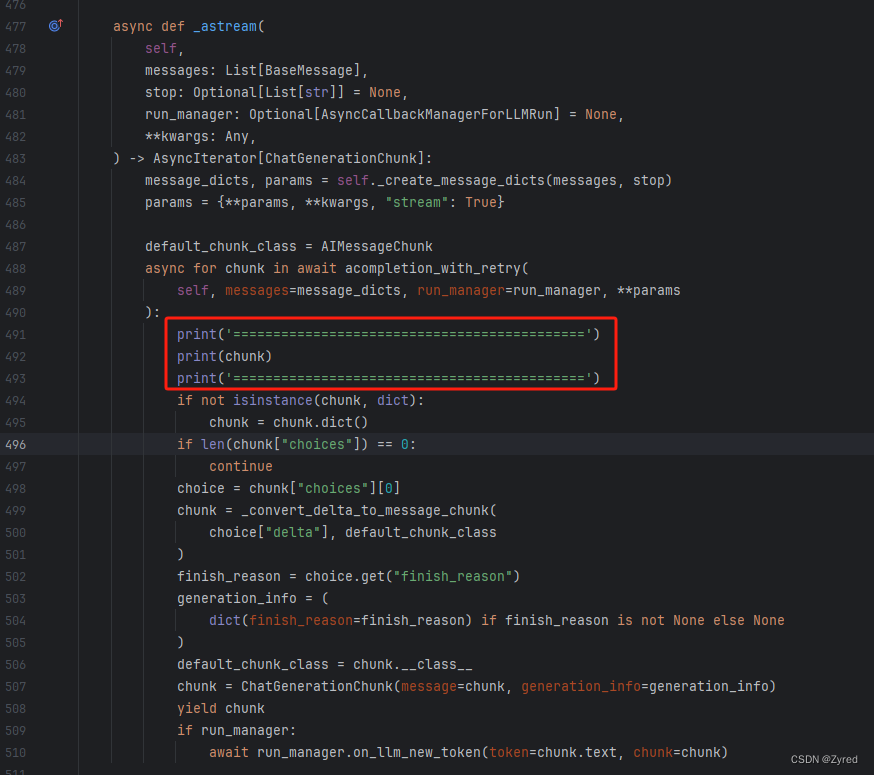
重新启动项目后,继续问相同的问题,观察最后一次输出的内容
log
============================================
ChatCompletionChunk(id=None, choices=None, created=None, model=None, object=None, system_fingerprint=None, text='**NETWORK ERROR DUE TO HIGH TRAFFIC. PLEASE REGENERATE OR REFRESH THIS PAGE.**\n\n(CUDA out of memory. Tried to allocate 2.00 MiB (GPU 0; 4.00 GiB total capacity; 3.49 GiB already allocated; 0 bytes free; 3.54 GiB reserved in total by PyTorch) If reserved memory is >> allocated memory try setting max_split_size_mb to avoid fragmentation.  See documentation for Memory Management and PYTORCH_CUDA_ALLOC_CONF)', error_code=50002)
============================================
根据以上的信息中,描述了错误信息:
text=' **NETWORK ERROR DUE TO HIGH TRAFFIC. PLEASE REGENERATE OR REFRESH THIS PAGE.** \n\n(CUDA out of memory. Tried to allocate 2.00 MiB (GPU 0; 4.00 GiB total capacity; 3.49 GiB already allocated; 0 bytes free; 3.54 GiB reserved in total by PyTorch) If reserved memory is >> allocated memory try setting max_split_size_mb to avoid fragmentation. See documentation for Memory Management and PYTORCH_CUDA_ALLOC_CONF)
哦,原来是我的显存不足导致的
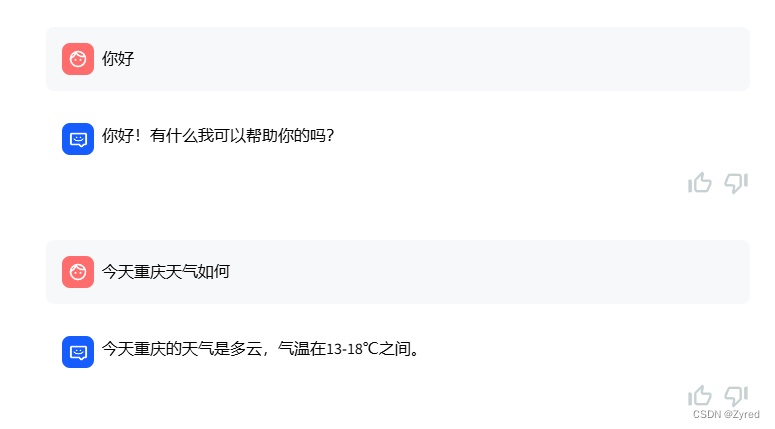
重启后,紧接着换了一些简单问题,回答还是没什么大问题的
九、总结
9.1 换一个好点的显卡,就不用这么折磨了
由于我的显卡显存只有 4G,导致出现奇怪的问题,排查这问题就用了很多时间,不过好在我有足够的耐心去解决问题,而不是放弃。发工资买个好显卡 ~~~
9.2 按着一步一步来,总结出思路
刚入门大模型,没有自己的方法论,一路上踩了不少的坑,通过本文也算是将自己的遭遇记录了一次,方便自己以后看也提供给广大入门的同胞避坑
9.3 试试将大模型跑在 CPU 上
后续抽空试试将 Qwen-1_8B-Chat 跑在 CPU 上试试,目前还没试过,不知道能不能行