合并有序链表
图解
虽然很复杂,但能够很好的理解怎么使用链表,以及对链表的指针类理解
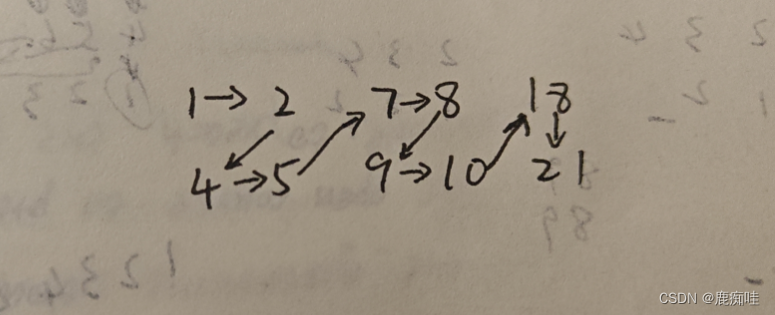
代码如下
cpp
Node* merge_list_two_pointer(List& list1, List& list2)
{
	Node* new_head1 = list1.head;
	Node* new_head2 = list2.head;
	Node* sentinel1 = list1.head;
	Node* sentinel2 = list2.head;
	Node* temp_head1 = NULL;
	Node* temp_head2 = NULL;
	int flage = 1;
	//因为下面是<=,所以以list2优先为空
	if (new_head1->data >= new_head2->data)
	{
		flage = 2;
	}
	while (new_head1 != NULL && new_head2 != NULL)
	{
		while (list1.head != NULL && list1.head->data < list2.head->data)
		{
			temp_head1 = list1.head;
			list1.head = list1.head->next;
		}
		//正常两个有序列表,上面为空,
		//456,123456789
		if (list1.head == NULL && flage == 2)
		{
			temp_head1->next = list2.head;
			return sentinel2;
		}
		//特殊情况列表,全大
		//123,456
		if (list1.head == NULL)
		{
			temp_head1->next = new_head2;
			return sentinel1;
		}
		if (temp_head1 != NULL)
		{
			temp_head1->next = new_head2;
		}

		while (list2.head != NULL && list2.head->data <= list1.head->data)
		{
			temp_head2 = list2.head;
			list2.head = list2.head->next;
		}
		//正常两个有序列表,下面为空
		//123456789,456
		if (list2.head == NULL && flage == 1)
		{
			temp_head2->next = list2.head;
			return sentinel1;
		}
		//特殊情况列表也就是,全小
		//456,123
		if (list2.head == NULL)
		{
			//防止89,89这种类型链表跑空
			temp_head2->next = list1.head;
			return sentinel2;
		}
		//这里不需要判断这个为空。如果为空,则说明已经到达链表尾部
		temp_head2->next = list1.head;

		new_head1 = list1.head;
		new_head2 = list2.head;
	}
}