1:新建 Xcode 工程
2:工程添加 Python.framework
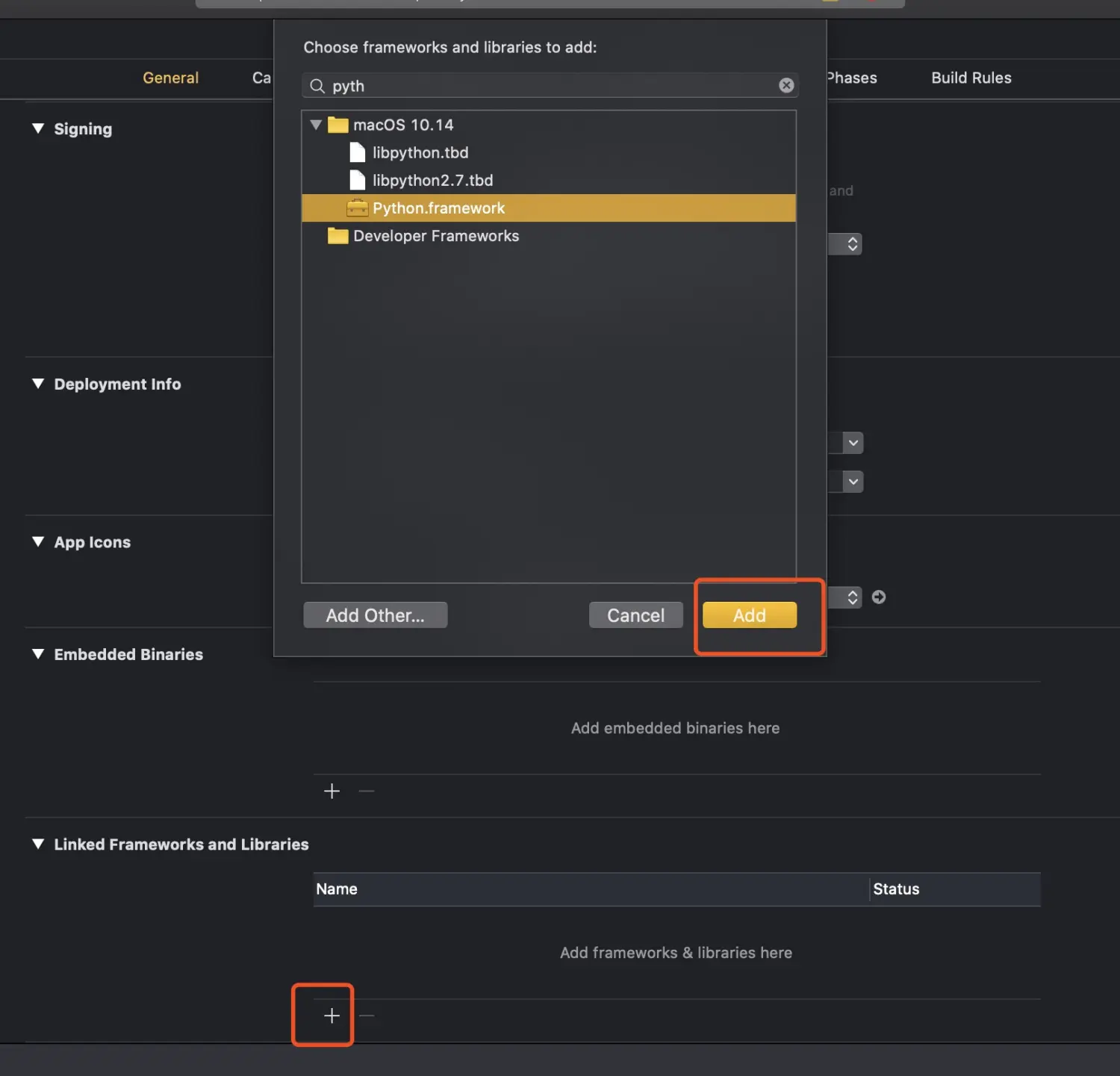
1597052861430.jpg
3:在当前工程下新建一个名字为 googleT 的 python 文件(googleT.py)

1597052584962.jpg
在 googleT.py 文件内写入一个测试 python 函数
def lgf_translate( str ):
    var1 = ' Hello World!'
    print (str + var1)
    return (str + var1)
4:新建一个 OC 类 GoogleTranslate 名字随意
直接上代码
.h
//
//  GoogleTranslate.h
//  LGFFY
//
//  Created by lai on 2020/7/23.
//  Copyright © 2020 victor. All rights reserved.
//

#import <Foundation/Foundation.h>

NS_ASSUME_NONNULL_BEGIN

@interface GoogleTranslate : NSObject
- (NSString *)pyCallWithModule:(char *)module funcKey:(char *)funcKey Args:(char *)args;
@end

NS_ASSUME_NONNULL_END
.m
//
//  GoogleTranslate.m
//  LGFFY
//
//  Created by lai on 2020/7/23.
//  Copyright © 2020 victor. All rights reserved.
//

#import "GoogleTranslate.h"
#import <Python/Python.h>

@interface GoogleTranslate()
@end
@implementation GoogleTranslate

/**
 OC 调用 Python (基于 c/c++ 调用 Python)

 @param module python 模块名称
 @param funcKey 函数名称
 @param args 函数参数
 @return 返回值
 */
- (NSString *)pyCallWithModule:(char * _Nonnull)module funcKey:(char * _Nonnull)funcKey Args:(char * _Nonnull)args {

    // 初始化 python 解释器
    Py_Initialize();
    if (!Py_IsInitialized()) {
        return @"error: 初始化环境失败";
    }

    // 新增 python 路径这里的新增路径是 xcode 内 python 文件的路径, 这一步很关键, 不设置 python 环境将无法检测到 xcode 工程下的 python 模块
    PySys_SetPath((char *)[[NSString stringWithFormat:@"%s:%@", Py_GetPath(), [[NSBundle mainBundle] resourcePath]] UTF8String]);

    // 初始化参数
    PyObject *pModule = NULL, *pFunc = NULL, *pDict = NULL, *pValue = NULL, *pResult = NULL;

    pModule = PyImport_ImportModule(module);
    if (!pModule) {
        finalize(pModule ,pFunc ,pDict ,pValue, pResult);
        return [NSString stringWithFormat:@"error: %s 模块找不到", module];
    }

    // 使用PyObject* pDict来存储导入模块中的方法字典
    pDict = PyModule_GetDict(pModule);
    if(!pDict) {
        finalize(pModule ,pFunc ,pDict ,pValue, pResult);
        return [NSString stringWithFormat:@"error: %s 模块中未定义方法", module];
    }

    // 获取模块中的函数
    pFunc = PyDict_GetItemString(pDict, funcKey);
    if(!pFunc || !PyCallable_Check(pFunc)) {
        finalize(pModule ,pFunc ,pDict ,pValue, pResult);
        return @"error: 方法获取失败";
    }

    // 函数参数
    pValue = Py_BuildValue("(z)", args);
    if(!pValue) {
        finalize(pModule ,pFunc ,pDict ,pValue, pResult);
        return @"error: 参数转换失败";
    }
    // 调用函数获取 return 值
    pResult = PyObject_CallObject(pFunc, pValue);
    if (!pResult) {
        finalize(pModule ,pFunc ,pDict ,pValue, pResult);
        return @"error: return 值出错";
    }

    //结果处理
    if (PyString_Check(pResult)) {
        finalize(pModule ,pFunc ,pDict ,pValue, pResult);
        return [NSString stringWithUTF8String: PyString_AsString(pResult)];
    } else if (PyInt_Check(pResult)) {
        finalize(pModule ,pFunc ,pDict ,pValue, pResult);
        return [NSString stringWithFormat:@"%ld", PyInt_AsLong(pResult)];
    } else {
        NSDictionary *paramsDic = @{@"success": @"yes", @"msg": @"Python 函数 return 值获取失败"};
        NSError *dataError = nil;
        NSData *data = [NSJSONSerialization dataWithJSONObject:paramsDic options:NSJSONWritingPrettyPrinted error:&dataError];
        NSString *paramsStr = [[NSString alloc] initWithData:data encoding:NSUTF8StringEncoding];
        finalize(pModule ,pFunc ,pDict ,pValue, pResult);
        return paramsStr;
    }

}

void finalize(PyObject *pModule, PyObject *pFunc, PyObject *pDict, PyObject *pValue, PyObject *pResult) {
    PyErr_Print();
    //释放对象
    if (Py_IsInitialized()) {
        Py_Finalize();
    }
}

@end
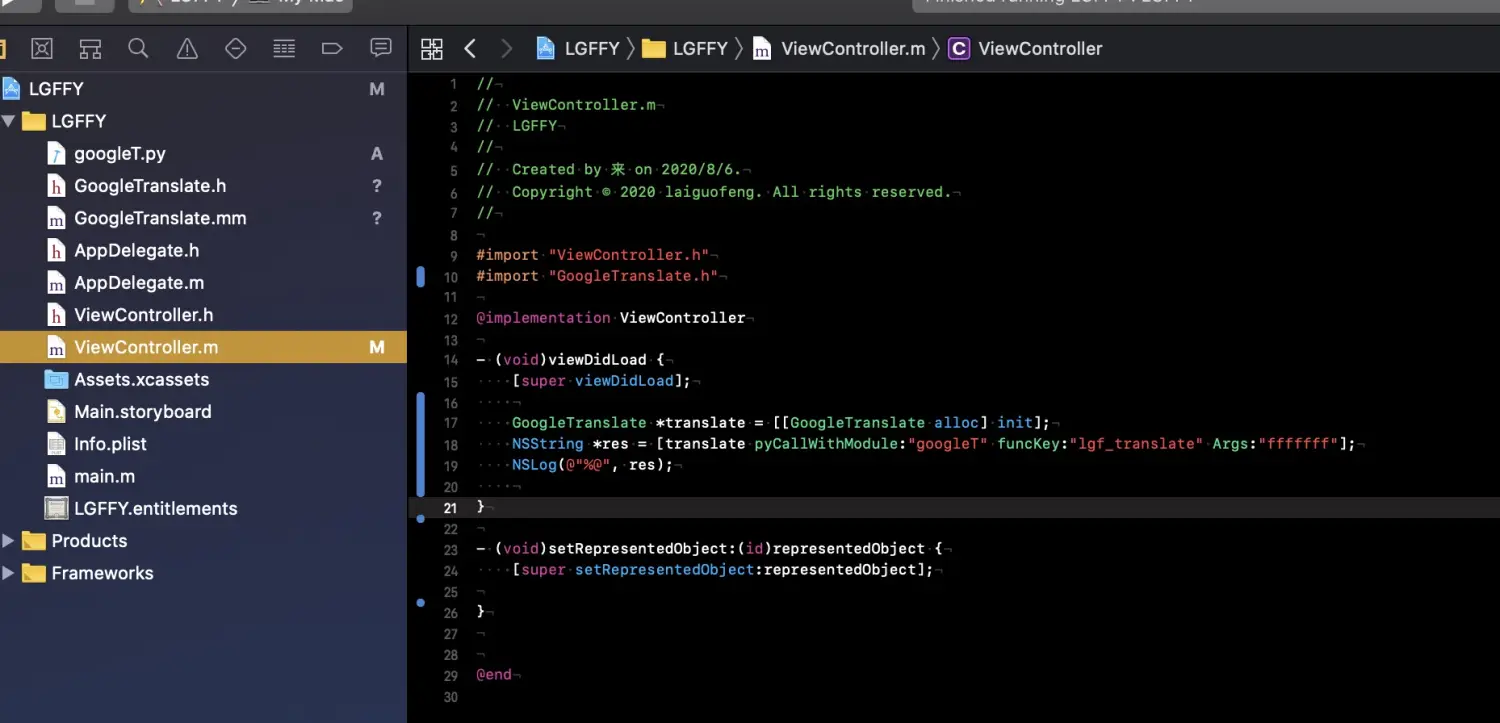
5:在 ViewController 中调用
1597053042535.jpg
GoogleTranslate *translate = [[GoogleTranslate alloc] init];
    NSString *res = [translate pyCallWithModule:"googleT" funcKey:"lgf_translate" Args:"fffffff"];
    NSLog(@"%@", res);
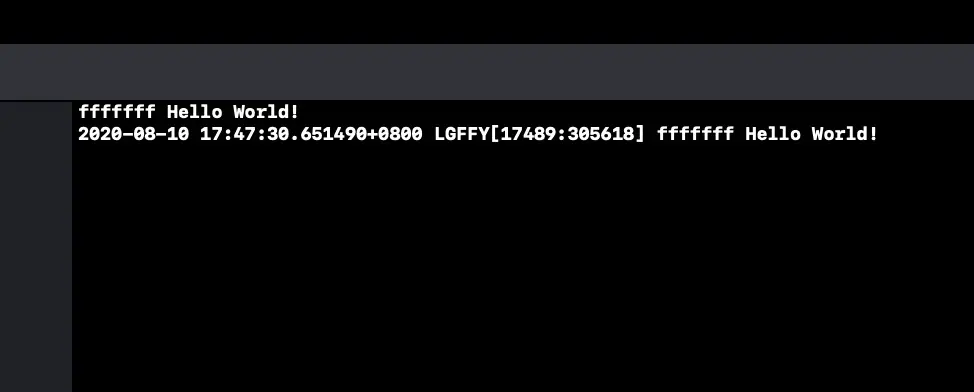
6: 输出:
1597053102385.jpg
这只是一个小模型,python 的开源库有很多好的模块,以后也可以辅助 xcode 项目,是不是很方便
© 著作权归作者所有,转载或内容合作请联系作者

喜欢的朋友记得点赞、收藏、关注哦!!!