CentOS与Ubuntu Shell环境加载机制差异及解决方案
一、问题现象还原
在 Ubuntu 系统中,希望登录时 /etc/profile.d/ipenv.sh 脚本未自动执行,而在 CentOS 上正常工作的根本原因是:
Ubuntu 和 CentOS 采用了不同的 shell 初始化机制,特别是在:
- 默认 shell 的选择
- 登录 shell 的类型判断
- 系统级配置文件的加载顺序
- PAM (Pluggable Authentication Modules) 的默认配置
默认 Shell 差异
| 特性 | CentOS | Ubuntu |
|---|---|---|
/bin/sh 默认链接 |
bash | dash |
| 交互式登录 shell | bash | bash |
| 非交互式 shell | bash | dash |
-
CentOS环境 :
/etc/profile.d/脚本自动生效 -
Ubuntu环境:
bash# 脚本存在但SSH登录不加载 ls /etc/profile.d/ipenv.sh # 存在且可执行 ssh localhost "echo \$PS1" # 无预期输出 # 必须手动source才生效 source /etc/profile.d/ipenv.sh
二、架构级差异剖析
1. 核心配置文件对比
| 文件/目录 | CentOS 7/8 | Ubuntu 20.04+ |
|---|---|---|
| 系统级bash配置 | /etc/bashrc |
/etc/bash.bashrc |
| Profile加载入口 | /etc/profile |
/etc/profile |
| 用户级初始化 | ~/.bash_profile |
~/.profile |
| 模块化配置目录 | /etc/profile.d/ |
/etc/profile.d/ |
2. 关键流程差异图解
CentOS Ubuntu SSH登录 系统类型 加载顺序: /etc/profile → profile.d → ~/.bashrc 加载顺序: /etc/profile(可能跳过) → ~/.profile → ~/.bashrc 所有环境变量生效 需要显式声明加载源
三、根本原因诊断
Ubuntu特有的三重机制
-
PAM配置差异
bash# CentOS的sshd配置明确加载环境 grep pam_env /etc/pam.d/sshd # 通常无输出 # Ubuntu默认配置 grep pam_env /etc/pam.d/sshd # 有输出 -
Shell解释器层级
bash# Ubuntu的默认链接 ls -l /bin/sh # 指向dash # CentOS的默认链接 ls -l /bin/sh # 指向bash -
Profile加载策略
bash# Ubuntu的profile加载逻辑(可能被跳过) if [ "${-#*i}" != "$-" ]; then . /etc/profile # 仅交互式shell加载 fi
四、终极解决方案
bash
# 方案1:双重注册(推荐)
sudo tee /etc/profile.d/ipenv.sh <<'EOF'
·······
EOF

# 同时添加到bashrc加载路径
echo '[ -f /etc/profile.d/ipenv.sh ] && source /etc/profile.d/ipenv.sh' | >> ~/.profile
五、验证与调试指南
1. 环境加载测试命令
# 通用验证方法
ssh -t localhost "bash -l -c 'echo \$PS1'"

# 深度调试(显示加载过程)
PS4='+ [${BASH_SOURCE}:${LINENO}] ' BASH_XTRACEFD=2 bash -lixc exit 2>&1 | grep ipenv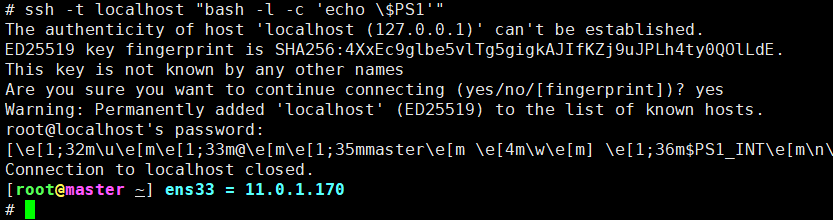
2. 预期结果对照表
Ubuntu配置难题剖析
| 配置方式 | 生效范围 | SSH登录 | VNC登录 | 缺点 |
|---|---|---|---|---|
| /etc/profile | 全局 | ❌ | ❌ | 可能被PAM跳过 |
| /etc/bash.bashrc | 全局 | ❌ | ❌ | 仅交互式Shell加载 |
| ~/.profile 或 ~/.bashrc | 单用户 | ✅ | ✅ | 需逐用户配置 |
| /etc/bash.bashrc.d/ | 全局 | - | - | 默认无此目录需手动创建 |
技术原理对比
| 系统 | 核心加载机制 | 关键配置文件 |
|---|---|---|
| CentOS | 强依赖/etc/profile → 自动加载/etc/profile.d/*.sh |
/etc/profile /etc/bashrc |
| Ubuntu | 混合加载机制: 1. 优先~/.profile 2. 依赖PAM配置 3. 弱化系统级配置 |
/etc/bash.bashrc ~/.profile |
六、技术决策树
是 否 CentOS Ubuntu 需要跨发行版支持? 双重注册方案 目标系统 强化/etc/bashrc PAM+bashrc.d方案 同时写入profile.d和bashrc.d 确保profile.d被引用 激活pam_env+符号链接
七、附录:关键配置文件位置速查
-
CentOS
bash/etc/profile /etc/profile.d/ /etc/bashrc ~/.bash_profile -
Ubuntu
bash/etc/profile /etc/bash.bashrc /etc/bash.bashrc.d/ ~/.profile ~/.bashrc