torch.stack方法详解

Parameters
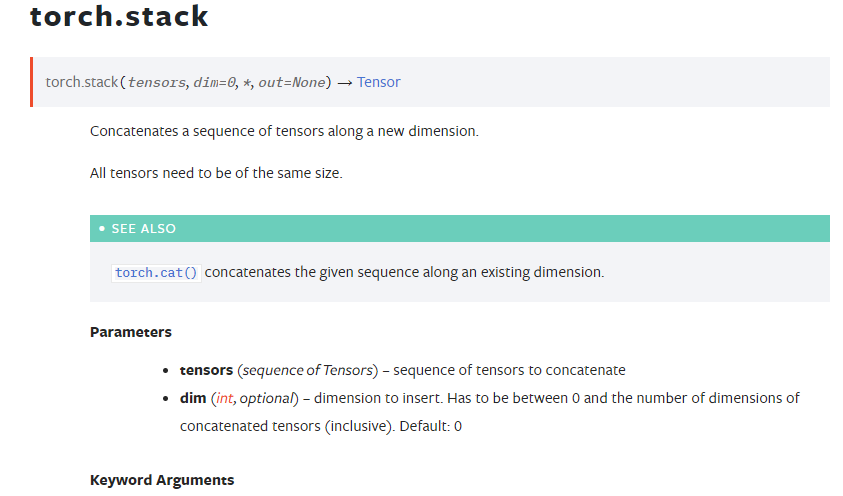
tensors:张量序列,也就是要进行stack操作的对象们,可以有很多个张量。
dim:按照dim的方式对这些张量进行stack操作,也就是你要按照哪种堆叠方式对张量进行堆叠。dim的取值范围为闭区间0,输入Tensor的维数
return
堆叠后的张量
二、例子
2.1 一维tensor进行stack操作
python
import torch as t

x = t.tensor([1, 2, 3, 4])
y = t.tensor([5, 6, 7, 8])

print(x.shape)
print(y.shape)

z1 = t.stack((x, y), dim=0)
print(z1)
print(z1.shape)

z2 = t.stack((x, y), dim=1)
print(z2)
print(z2.shape)
python
torch.Size([4])
torch.Size([4])
tensor([[1, 2, 3, 4],
        [5, 6, 7, 8]])
torch.Size([2, 4])
tensor([[1, 5],
        [2, 6],
        [3, 7],
        [4, 8]])
torch.Size([4, 2])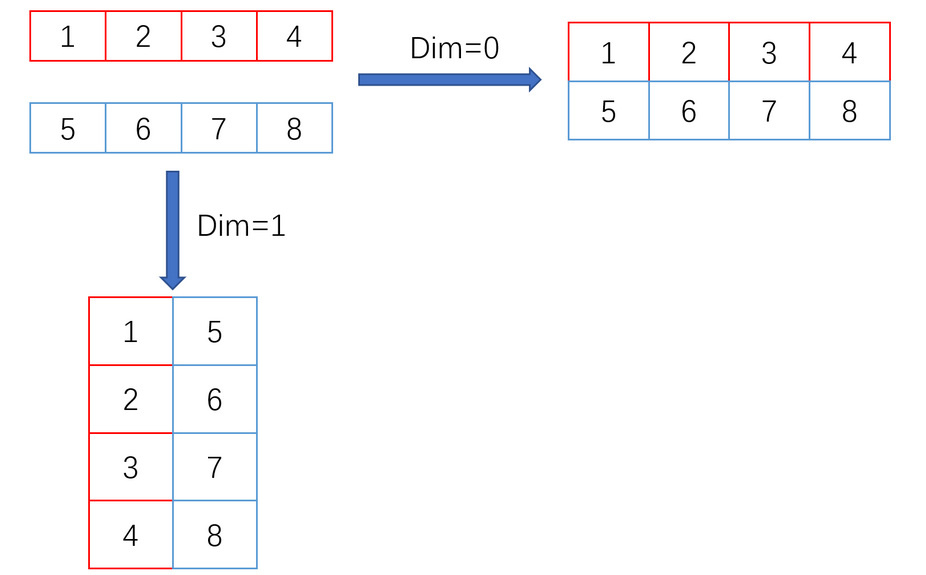
2.2 2个二维tensor进行stack操作
python
 import torch as t
 x = t.tensor([[1,2,3],[4,5,6]])
 y = t.tensor([[7,8,9],[10,11,12]])
 print(x.shape)
 print(y.shape)

 z1 = t.stack((x,y), dim=0)
 print(z1)
 print(z1.shape)

 z2 = t.stack((x,y), dim=1)
 print(z2)
 print(z2.shape)

 z3 = t.stack((x,y), dim=2)
 print(z3)
 print(z3.shape)
python
torch.Size([2, 3])
torch.Size([2, 3])
tensor([[[ 1,  2,  3],
         [ 4,  5,  6]],

        [[ 7,  8,  9],
         [10, 11, 12]]])
torch.Size([2, 2, 3])
tensor([[[ 1,  2,  3],
         [ 7,  8,  9]],

        [[ 4,  5,  6],
         [10, 11, 12]]])
torch.Size([2, 2, 3])
tensor([[[ 1,  7],
         [ 2,  8],
         [ 3,  9]],

        [[ 4, 10],
         [ 5, 11],
         [ 6, 12]]])
torch.Size([2, 3, 2])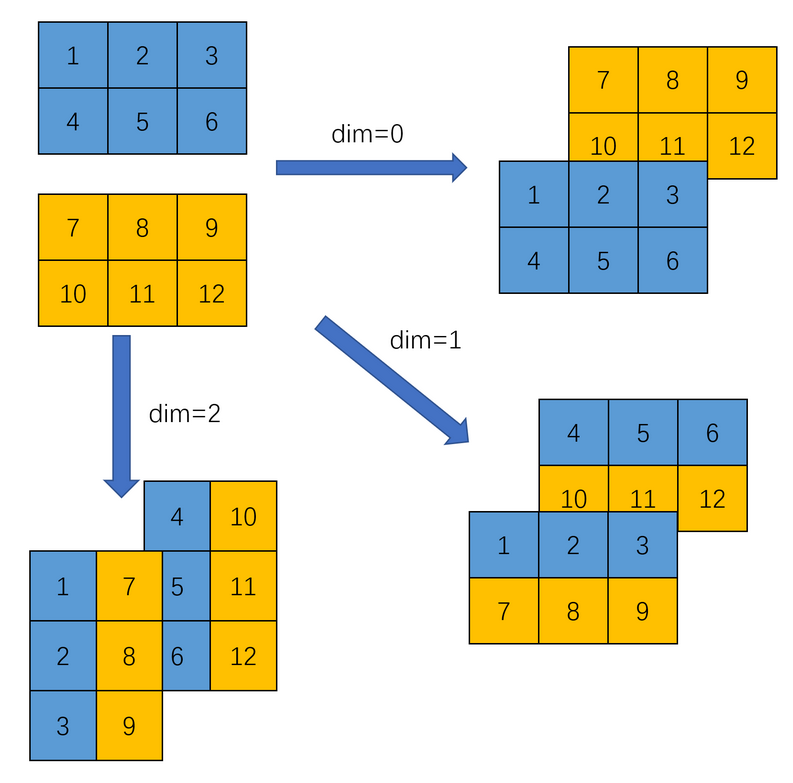
2.3 多个二维tensor进行stack操作
python
import torch

x = torch.tensor([[1,2,3],[4,5,6]])
y = torch.tensor([[7,8,9],[10,11,12]])
z = torch.tensor([[13,14,15],[16,17,18]])
print(x.shape)
print(y.shape)
print(z.shape)

r1 = torch.stack((x,y,z),dim=0)
print(r1)
print(r1.shape)

r2 = torch.stack((x,y,z),dim=1)
print(r2)
print(r2.shape)

r3 = torch.stack((x,y,z),dim=2)
print(r3)
print(r3.shape)
python
torch.Size([2, 3])
torch.Size([2, 3])
torch.Size([2, 3])
tensor([[[ 1,  2,  3],
         [ 4,  5,  6]],

        [[ 7,  8,  9],
         [10, 11, 12]],

        [[13, 14, 15],
         [16, 17, 18]]])
torch.Size([3, 2, 3])
tensor([[[ 1,  2,  3],
         [ 7,  8,  9],
         [13, 14, 15]],

        [[ 4,  5,  6],
         [10, 11, 12],
         [16, 17, 18]]])
torch.Size([2, 3, 3])
tensor([[[ 1,  7, 13],
         [ 2,  8, 14],
         [ 3,  9, 15]],

        [[ 4, 10, 16],
         [ 5, 11, 17],
         [ 6, 12, 18]]])
torch.Size([2, 3, 3])
2.4 2个三维tensor进行stack操作
python
import torch

x= torch.tensor([[[1,2,3],[4,5,6]],
                  [[2,3,4],[5,6,7]]])
y = torch.tensor([[[7,8,9],[10,11,12]],
                  [[8,9,10],[11,12,13]]])
print(x.shape)
print(y.shape)
z1 = torch.stack((x,y),dim=0)
print(z1)
print(z1.shape)
z2 = torch.stack((x,y),dim=1)
print(z2)
print(z2.shape)
z3 = torch.stack((x,y),dim=2)
print(z3)
print(z3.shape)
z4 = torch.stack((x,y),dim=3)
print(z4)
print(z4.shape)
python
torch.Size([2, 2, 3])
torch.Size([2, 2, 3])
tensor([[[[ 1,  2,  3],
          [ 4,  5,  6]],

         [[ 2,  3,  4],
          [ 5,  6,  7]]],


        [[[ 7,  8,  9],
          [10, 11, 12]],

         [[ 8,  9, 10],
          [11, 12, 13]]]])
torch.Size([2, 2, 2, 3])
tensor([[[[ 1,  2,  3],
          [ 4,  5,  6]],

         [[ 7,  8,  9],
          [10, 11, 12]]],


        [[[ 2,  3,  4],
          [ 5,  6,  7]],

         [[ 8,  9, 10],
          [11, 12, 13]]]])
torch.Size([2, 2, 2, 3])
tensor([[[[ 1,  2,  3],
          [ 7,  8,  9]],

         [[ 4,  5,  6],
          [10, 11, 12]]],


        [[[ 2,  3,  4],
          [ 8,  9, 10]],

         [[ 5,  6,  7],
          [11, 12, 13]]]])
torch.Size([2, 2, 2, 3])
tensor([[[[ 1,  7],
          [ 2,  8],
          [ 3,  9]],

         [[ 4, 10],
          [ 5, 11],
          [ 6, 12]]],


        [[[ 2,  8],
          [ 3,  9],
          [ 4, 10]],

         [[ 5, 11],
          [ 6, 12],
          [ 7, 13]]]])
torch.Size([2, 2, 3, 2])