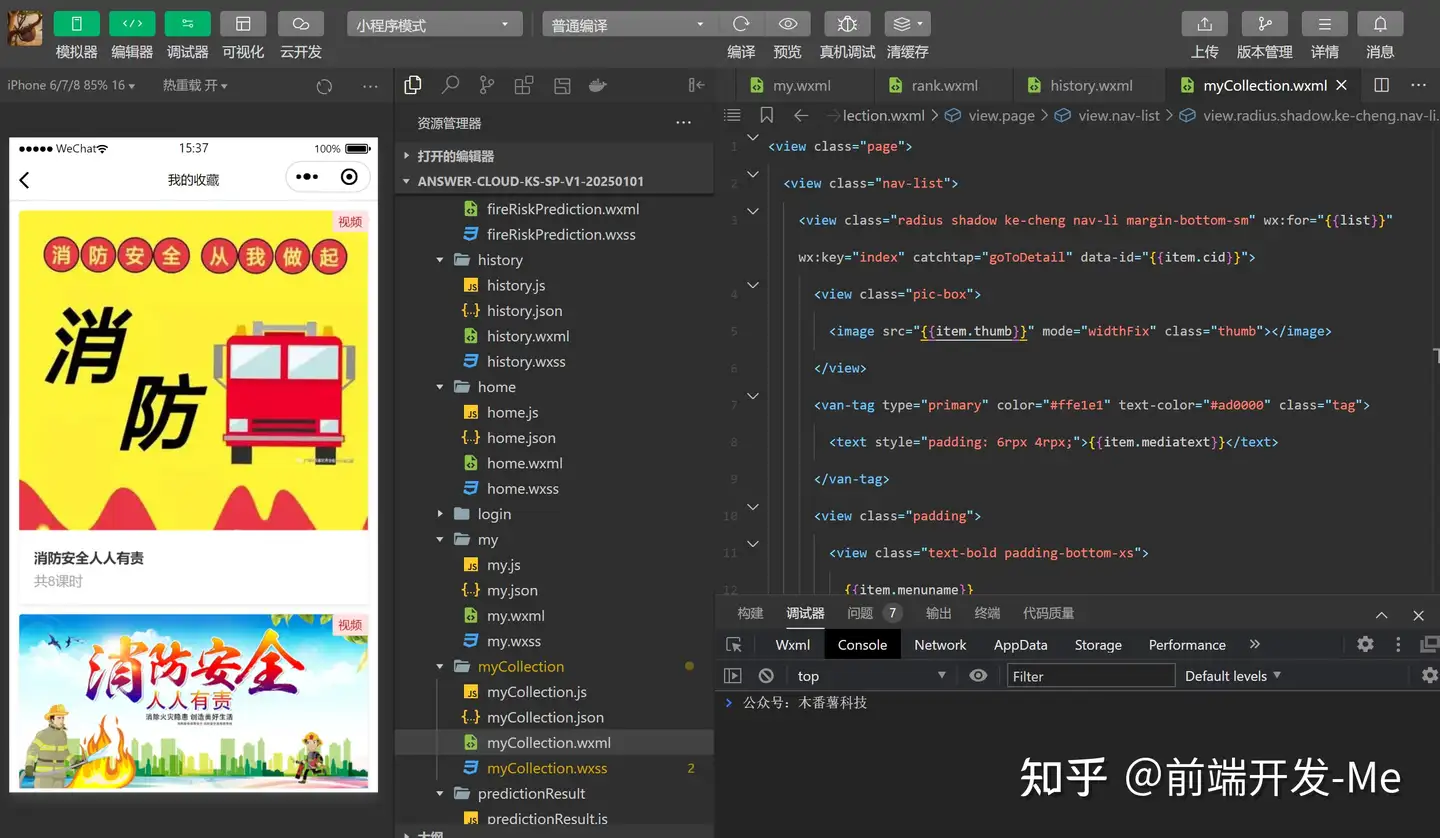
基于微信小程序的消防安全科普互动平台的设计与实现,是关于微信小程序的,知识课程学习,包括学习后答题。
技术栈主要采用微信小程序云开发,有下面的模块:
1.课程学习模块
2.资讯模块
3.答题模块
4.我的模块
还需要有创新点,后面加了一个 火灾风险预测:根据用户输入的场所信息(面积、人员密度、消防设施配备等),运用算法计算火灾风险等级,并针对性地给出预防措施和应急预案建议。
然后我进行了梳理,并整理出两个版本,提供选择,并给出了我的个人建议。
需求梳理版本1:
1.学习模块:分为两大类,分别是:视频学习和图文学习。(学习完成后可以获得积分,可进行分享、收藏,评论)
2.资讯模块:分为政策法规,事故报道
3.答题模块:专项答题(可以获得积分)
4.我的模块:积分统计,我的错题集,我的收藏
5.关于各种灭火器的使用。
灭火器的图片上有1、2、3、4的数字按钮,代表灭火器的使用步骤。按到哪个按钮会有语言,告诉具体应该怎么做以及注意事项
火灾风险预测:根据用户输入的场所信息(面积、人员密度、消防设施配备等),运用算法计算火灾风险等级,并针对性地给出预防措施和应急预案建议。
需求梳理版本2:
1.学习模块:视频学习(学习完成后可以获得积分,可进行分享、收藏,评论)
2.答题模块:专项答题(可以获得积分)
3.我的模块:积分统计,我的错题集,我的收藏
4.关于各种灭火器的使用。
灭火器的图片上有1、2、3、4的数字按钮,代表灭火器的使用步骤。按到哪个按钮会有语言,告诉具体应该怎么做以及注意事项
火灾风险预测:根据用户输入的场所信息(面积、人员密度、消防设施配备等),运用算法计算火灾风险等级,并针对性地给出预防措施和应急预案建议。
然后,视频学习是分专题,专题里面分目录。
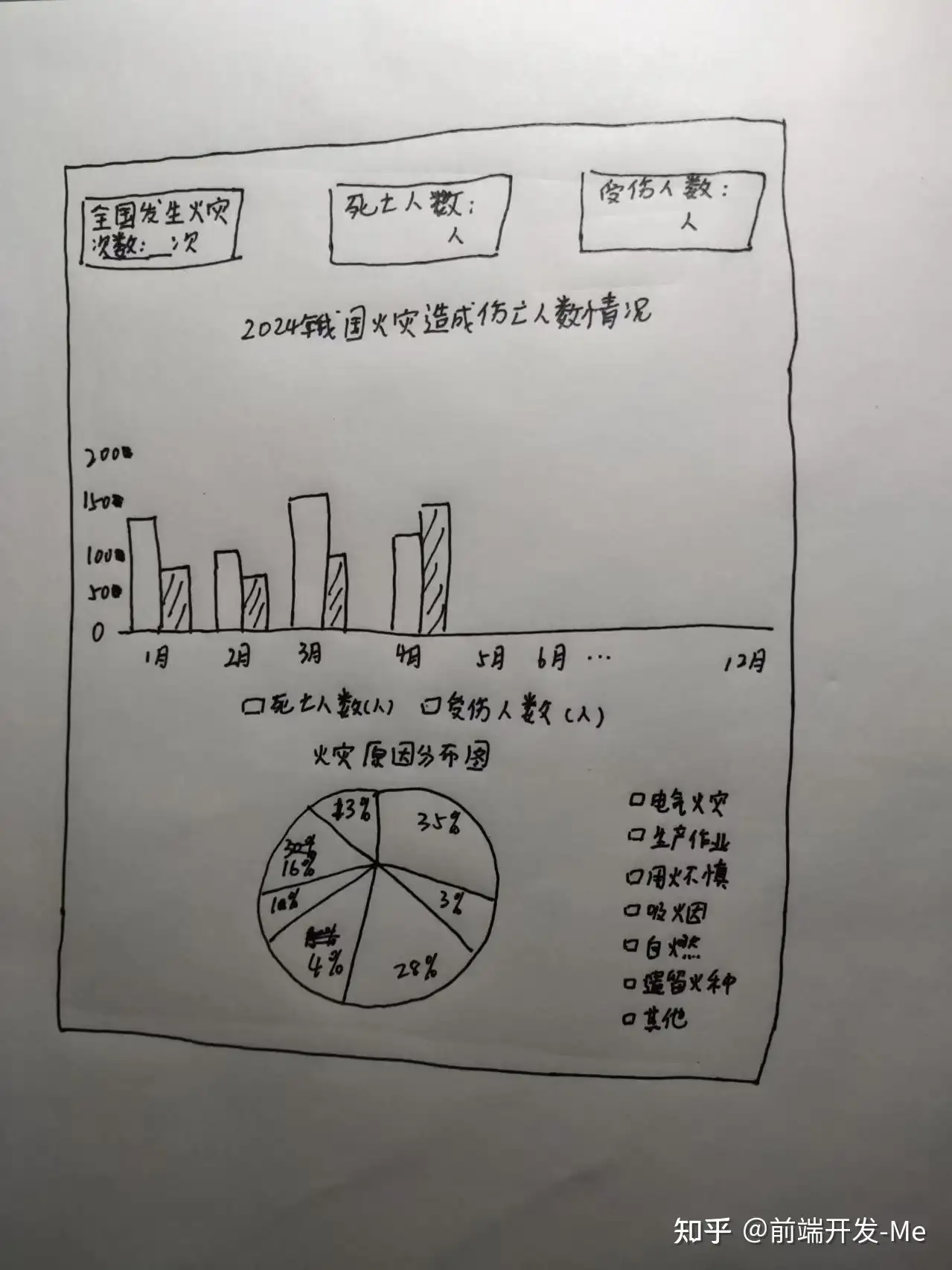
根据人员的学习情况,答题情况,和火灾情况,展示在一个统计图表上。
如果用统计图表分析往年的各类火灾发生情况可以怎么实现,效果是怎样的(火灾发生的月份、火灾原因占比以及不同区域的火灾发生次数)
画了个草图:
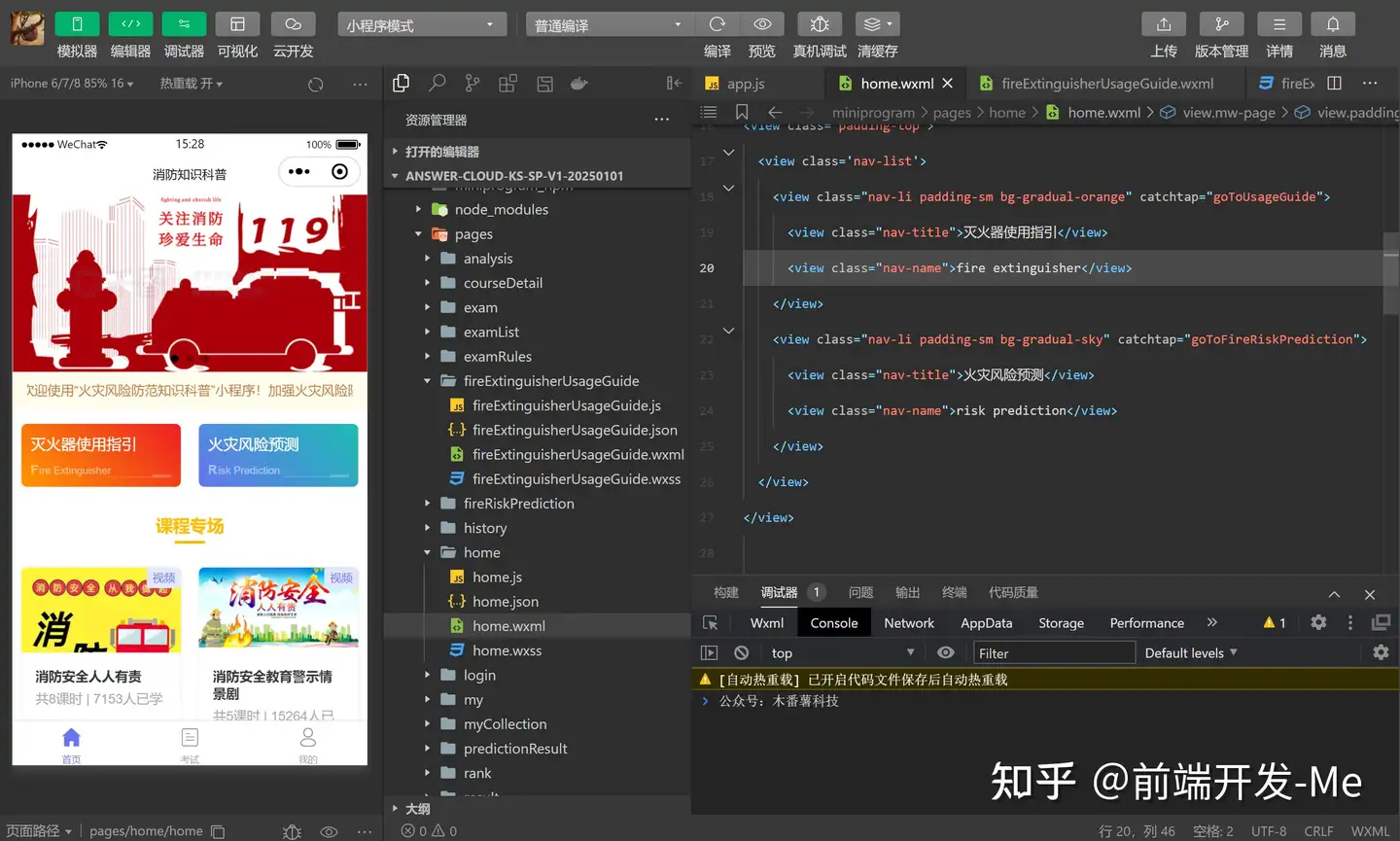
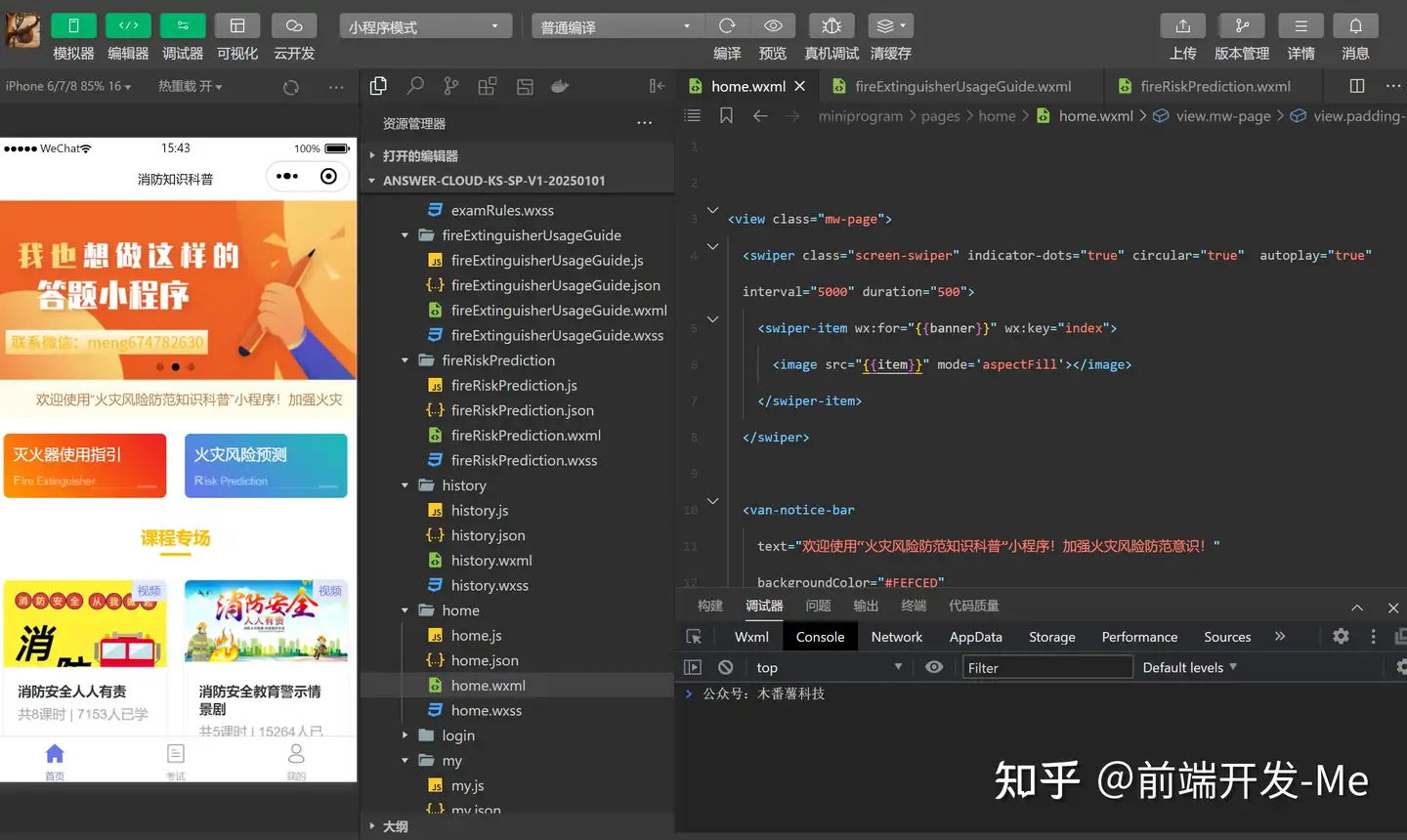
实现之后的界面效果
首页
轮播图,支持左右滑动切换,支持自动切换。
自动播报通告栏目的通知内容。
火灾风险预测和灭火器的使用要拆成两个模块。
课程专场以列表的形式展示。
页面布局
<view class="mw-page">
  <swiper class="screen-swiper" indicator-dots="true" circular="true"  autoplay="true" interval="5000" duration="500">
    <swiper-item wx:for="{{banner}}" wx:key="index">
      <image src="{{item}}" mode='aspectFill'></image>
    </swiper-item>
  </swiper>

  <van-notice-bar
    text="欢迎使用"火灾风险防范知识科普"小程序!加强火灾风险防范意识!"
    backgroundColor="#FEFCED"
    color="#B77F49"
  />

<view class="padding-top">
  <view class='nav-list'>
    <view class="nav-li padding-sm bg-gradual-orange" catchtap="goToUsageGuide">
      <view class="nav-title">灭火器使用指引</view>
      <view class="nav-name">fire extinguisher</view>
    </view>
    <view class="nav-li padding-sm bg-gradual-sky" catchtap="goToFireRiskPrediction">
      <view class="nav-title">火灾风险预测</view>
      <view class="nav-name">risk prediction</view>
    </view>
  </view>
</view>

  <view class="mw-content">
    <view class="cu-bar justify-center">
      <view class='action border-title'>
        <text class='text-xl text-bold text-yellow'>课程专场</text>
        <text class='bg-yellow' style='width:2rem'></text>
      </view>
    </view>
    <view class="margin-top nav-list">
      <view class="radius shadow ke-cheng nav-li" wx:for="{{list}}" wx:key="index" catchtap="goToDetail" data-id="{{item._id}}">
        <view class="pic-box">
          <image src="{{item.thumb}}" mode="widthFix" class="thumb"></image>
        </view>
        <van-tag type="primary" color="#e4e8ff" text-color="#6676EF" class="tag">
          <text style="padding: 6rpx 4rpx;">{{item.mediatext}}</text>
        </van-tag>
        <view class="padding">
          <view class="text-bold padding-bottom-xs">
            {{item.menuname}}
          </view>
          <view class="text-gray">
            共{{item.ksnum}}课时 | {{item.viewnum}}人已学
          </view>
        </view>
      </view>
    </view>
  </view>
</view>
层叠样式
page{
  background-color: #fff;
}
.mw-bg {
  position: absolute;
  top: 0;
  left: 0;
  width: 750rpx;
  height: 100vh;
}
.mw-btn {
  position: absolute;
  bottom: 10rpx;
  left: 0;
  width: 750rpx;
  z-index: 2;
}
.mw-answer {
  padding: 100rpx 150rpx 30rpx;
}
.mw-content {
  padding-bottom: 20rpx;
}
.mw-banner {
  width: 100%;
}
.thumb {
  width: 100%;
}
.ke-cheng {
  position: relative;
  overflow: hidden;
}
.tag {
  position: absolute;
  top: 0;
  right: 0;
}
.pic-box {
  height: 180rpx;
  overflow: hidden;
}

.nav-list {
	display: flex;
	flex-wrap: wrap;
	justify-content: space-between;
}

.nav-li {
	border-radius: 12rpx;
	width: 45%;
	margin: 0 2.5% 40rpx;
	position: relative;
	z-index: 1;
}


.nav-li::after {
	content: "";
	position: absolute;
	z-index: -1;
	background-color: inherit;
	width: 100%;
	height: 100%;
	left: 0;
	bottom: -10%;
	border-radius: 10rpx;
	opacity: 0.2;
	transform: scale(0.9, 0.9);
}

.nav-title {
	font-size: 32rpx;
}

.nav-name {
	font-size: 22rpx;
	text-transform: Capitalize;
	margin-top: 20rpx;
	position: relative;
	opacity: .5;
}

.nav-name::before {
	content: "";
	position: absolute;
	display: block;
	width: 40rpx;
	height: 6rpx;
	background: #fff;
	bottom: 0;
	right: 0;
	opacity: 0.5;
}

.nav-name::after {
	content: "";
	position: absolute;
	display: block;
	width: 100rpx;
	height: 1px;
	background: #fff;
	bottom: 0;
	right: 40rpx;
	opacity: 0.3;
}

.nav-name::first-letter {
	font-weight: bold;
	font-size: 26rpx;
	margin-right: 1px;
}
灭火器的使用指引
包括使用步骤,以及TTS语音播报功能。
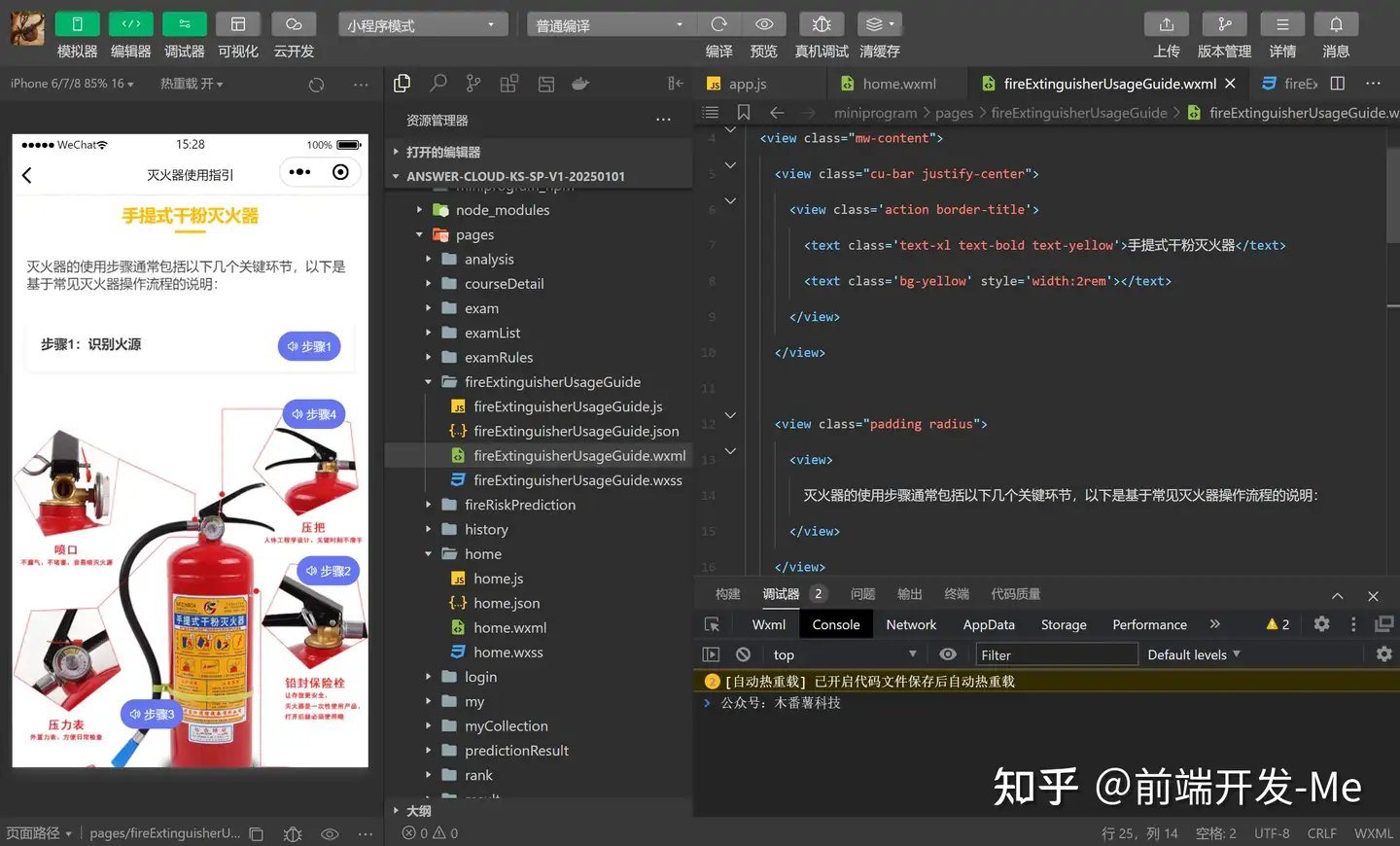
页面布局
<view class="mw-page">
  <view class="mw-content">
    <view class="cu-bar justify-center">
      <view class='action border-title'>
        <text class='text-xl text-bold text-yellow'>手提式干粉灭火器</text>
        <text class='bg-yellow' style='width:2rem'></text>
      </view>
    </view>

    <view class="padding radius">
      <view>
        灭火器的使用步骤通常包括以下几个关键环节,以下是基于常见灭火器操作流程的说明:
      </view>
    </view>

    <view class="padding radius shadow margin" catchtap="playFunc" data-index="{{0}}">
      <view class="step1-box">
        <view class="text-bold padding-bottom-xs">
          {{list[0].name}}
        </view>
        <van-button class="step1" round type="info" color="#6676EF" size="small">
          <text class="icon-notification lg"></text>
          步骤1
        </van-button>
      </view>
    </view>
    <view class="pic-box">
      <image src="/image/f1.jpg" mode='widthFix' class="mw-banner"></image>
      <van-button class="step2" round type="info" color="#6676EF" size="small" catchtap="playFunc" data-index="{{1}}">
        <text class="icon-notification lg"></text>
        步骤2
      </van-button>
      <van-button class="step3" round type="info" color="#6676EF" size="small" catchtap="playFunc" data-index="{{2}}">
        <text class="icon-notification lg"></text>
        步骤3
      </van-button>
      <van-button class="step4" round type="info" color="#6676EF" size="small" catchtap="playFunc" data-index="{{3}}">
        <text class="icon-notification lg"></text>
        步骤4
      </van-button>
    </view>
  </view>
</view>
层叠样式
page{
  background-color: #fff;
}
.mw-bg {
  position: absolute;
  top: 0;
  left: 0;
  width: 750rpx;
  height: 100vh;
}
.mw-btn {
  position: absolute;
  bottom: 10rpx;
  left: 0;
  width: 750rpx;
  z-index: 2;
}
.mw-answer {
  padding: 100rpx 150rpx 30rpx;
}
.mw-content {
  padding-bottom: 10rpx;
}
.mw-banner {
  width: 100%;
}
.pic-box {
  position: relative;
}
.step2 {
  position: absolute;
  top: 360rpx;
  right: 20rpx;
  z-index: 2;
  animation: scaleDrew 1s ease-in-out infinite;
}
.step3 {
  position: absolute;
  bottom: 430rpx;
  left: 230rpx;
  z-index: 2;
  animation: scaleDrew 1s ease-in-out infinite;
}
.step4 {
  position: absolute;
  top: 30rpx;
  right: 50rpx;
  z-index: 2;
  animation: scaleDrew 1s ease-in-out infinite;
}
.step1-box {
  position: relative;
}
.step1 {
  position: absolute;
  top: -6rpx;
  right: 0rpx;
  z-index: 2;
  animation: scaleDrew 1s ease-in-out infinite;
}
@keyframes scaleDrew {
  0% {
    transform: scale(1);
  }

  25% {
    transform: scale(1.05);
  }

  50% {
    transform: scale(1);
  }

  75% {
    transform: scale(1.05);
  }
}
火灾风险预测
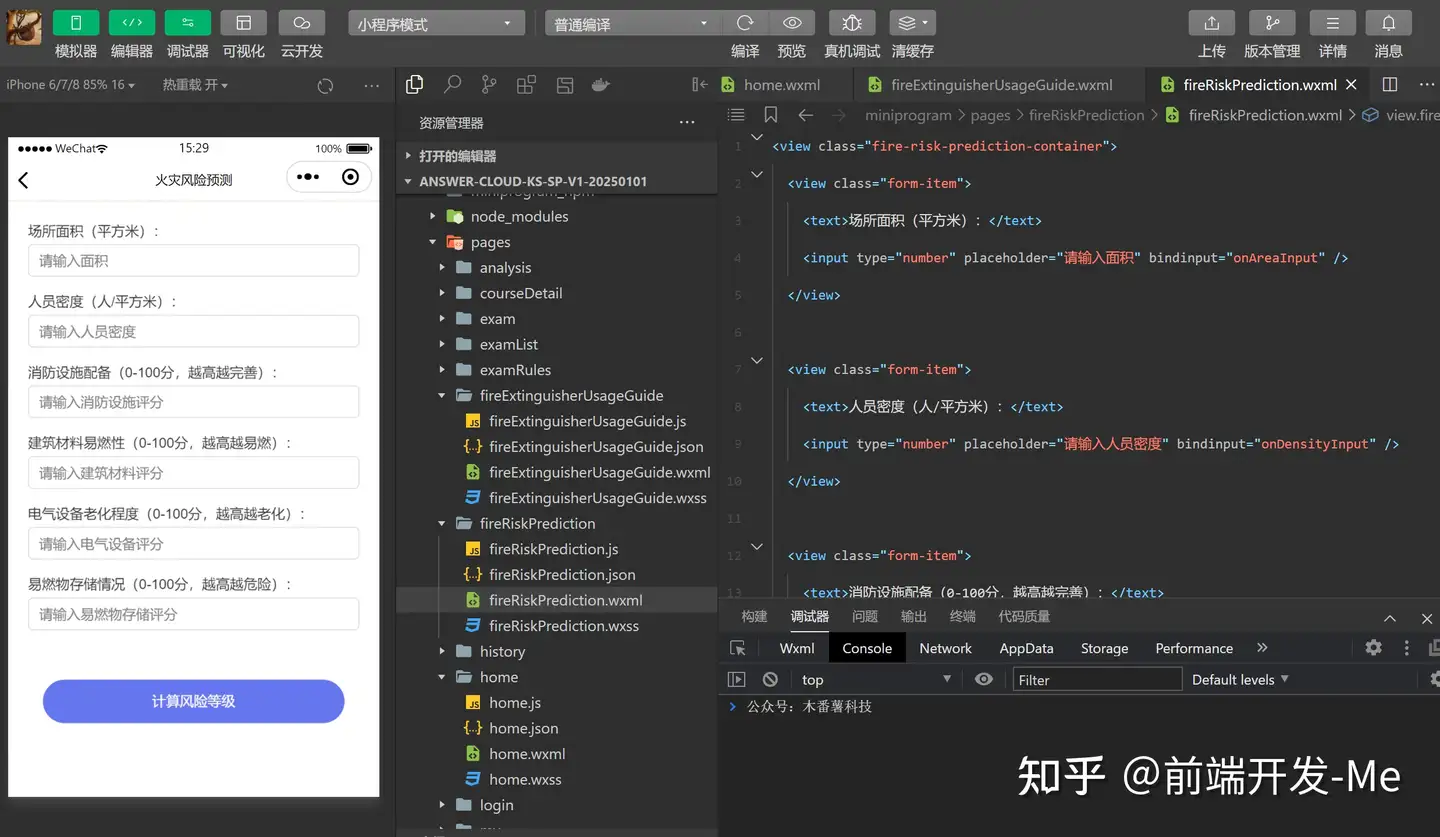
页面布局
<view class="fire-risk-prediction-container">
  <view class="form-item">
    <text>场所面积(平方米):</text>
    <input type="number" placeholder="请输入面积" bindinput="onAreaInput" />
  </view>

  <view class="form-item">
    <text>人员密度(人/平方米):</text>
    <input type="number" placeholder="请输入人员密度" bindinput="onDensityInput" />
  </view>

  <view class="form-item">
    <text>消防设施配备(0-100分,越高越完善):</text>
    <input type="number" placeholder="请输入消防设施评分" bindinput="onFireFacilitiesInput" />
  </view>

  <view class="form-item">
    <text>建筑材料易燃性(0-100分,越高越易燃):</text>
    <input type="number" placeholder="请输入建筑材料评分" bindinput="onMaterialsInput" />
  </view>

  <view class="form-item">
    <text>电气设备老化程度(0-100分,越高越老化):</text>
    <input type="number" placeholder="请输入电气设备评分" bindinput="onElectricalInput" />
  </view>

  <view class="form-item">
    <text>易燃物存储情况(0-100分,越高越危险):</text>
    <input type="number" placeholder="请输入易燃物存储评分" bindinput="onFlammableInput" />
  </view>

  <view class="padding">
    <van-button round block type="info" color="#6676EF" bindtap="calculateRisk">
      计算风险等级
    </van-button>
  </view>
</view>
层叠样式
page{
  background-color: #fff;
}
.fire-risk-prediction-container {
  padding: 20px;
}

.form-item {
  margin-bottom: 15px;
}

input {
  border: 1px solid #ddd;
  padding: 0 20rpx;
  height: 66rpx;
  width: 100%;
  border-radius: 10rpx;
  margin-top: 10rpx;
}

button {
  margin-top: 20px;
  background-color: #007BFF;
  color: white;
}

.result {
  margin-top: 20px;
  padding: 15px;
  background-color: #f9f9f9;
  border: 1px solid #ddd;
}
风险预测结果
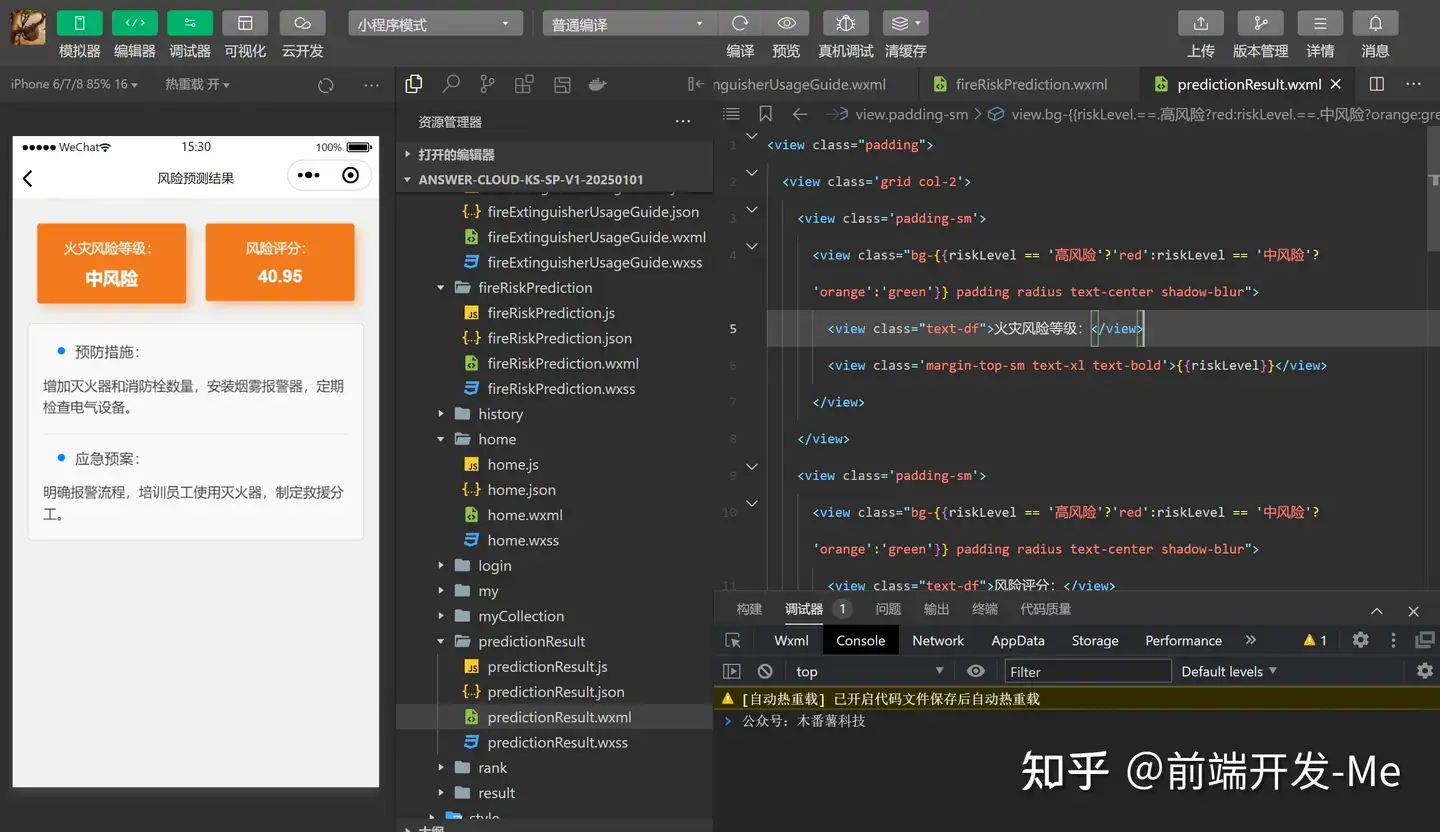
页面布局
<view class="padding">
  <view class='grid col-2'>
    <view class='padding-sm'>
      <view class="bg-{{riskLevel == '高风险'?'red':riskLevel == '中风险'?'orange':'green'}} padding radius text-center shadow-blur">
        <view class="text-df">火灾风险等级:</view>
        <view class='margin-top-sm text-xl text-bold'>{{riskLevel}}</view>
      </view>
    </view>
    <view class='padding-sm'>
      <view class="bg-{{riskLevel == '高风险'?'red':riskLevel == '中风险'?'orange':'green'}} padding radius text-center shadow-blur">
        <view class="text-df">风险评分:</view>
        <view class='margin-top-sm text-xl text-bold'>{{riskScore}}</view>
      </view>
    </view>
  </view>
  <view class="result">
    <view class="cu-bar">
      <view class='action'>
        <text class='icon-title text-blue'></text>预防措施:
      </view>
    </view>
    <view class="text-content">{{preventionMeasures}}</view>

    <view class="solids-top margin-top">
      <view class="cu-bar">
        <view class='action'>
          <text class='icon-title text-blue'></text>应急预案:
        </view>
      </view>
      <view class="text-content">{{emergencyPlan}}</view>
    </view>
  </view>
</view>
层叠样式
page{
  background-color: #f1f1f1;
}
.result {
  margin-top: 20rpx;
  padding: 6rpx 30rpx 30rpx;
  background-color: #f9f9f9;
  border: 2rpx solid #ddd;
  border-radius: 10rpx;
}
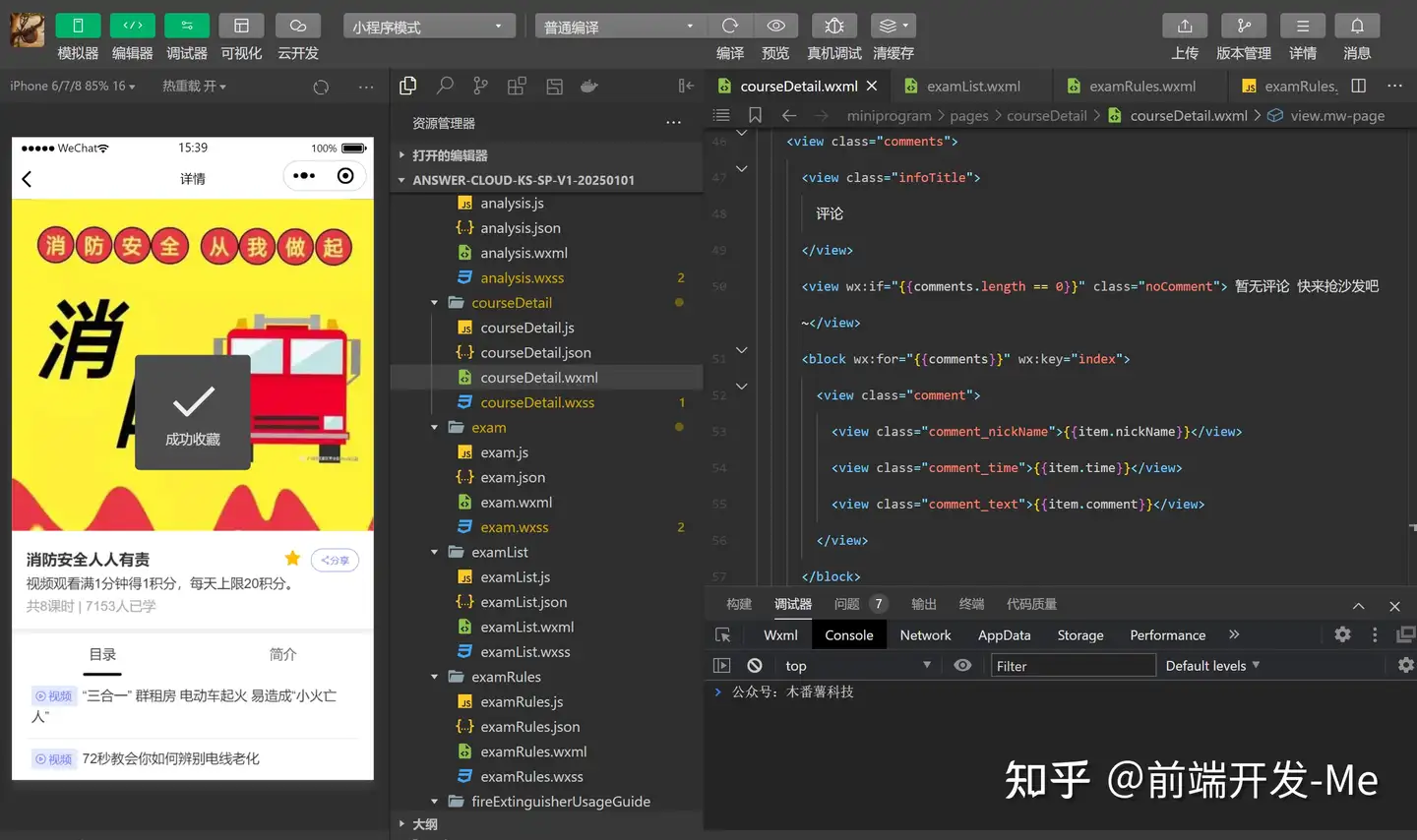
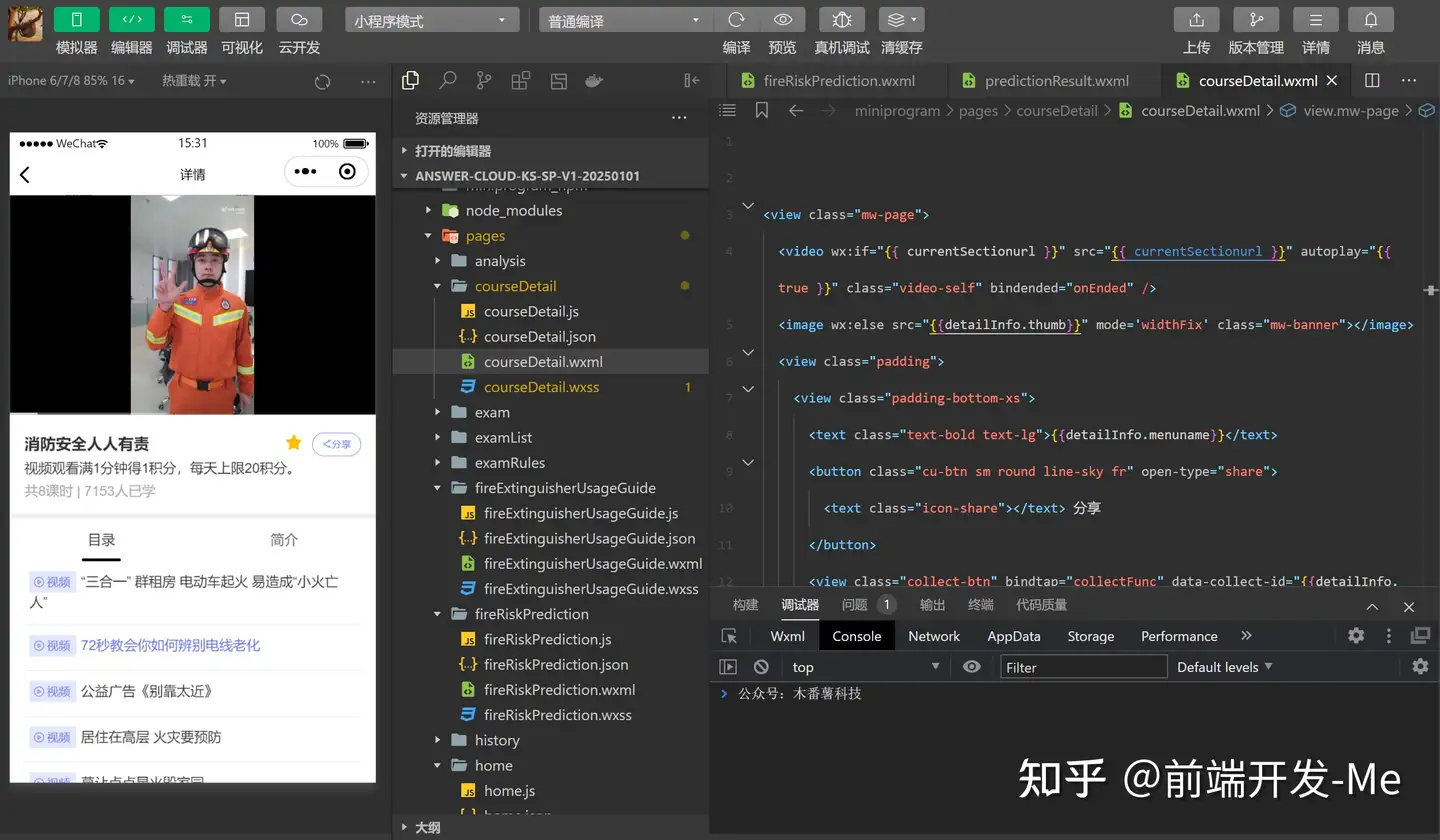
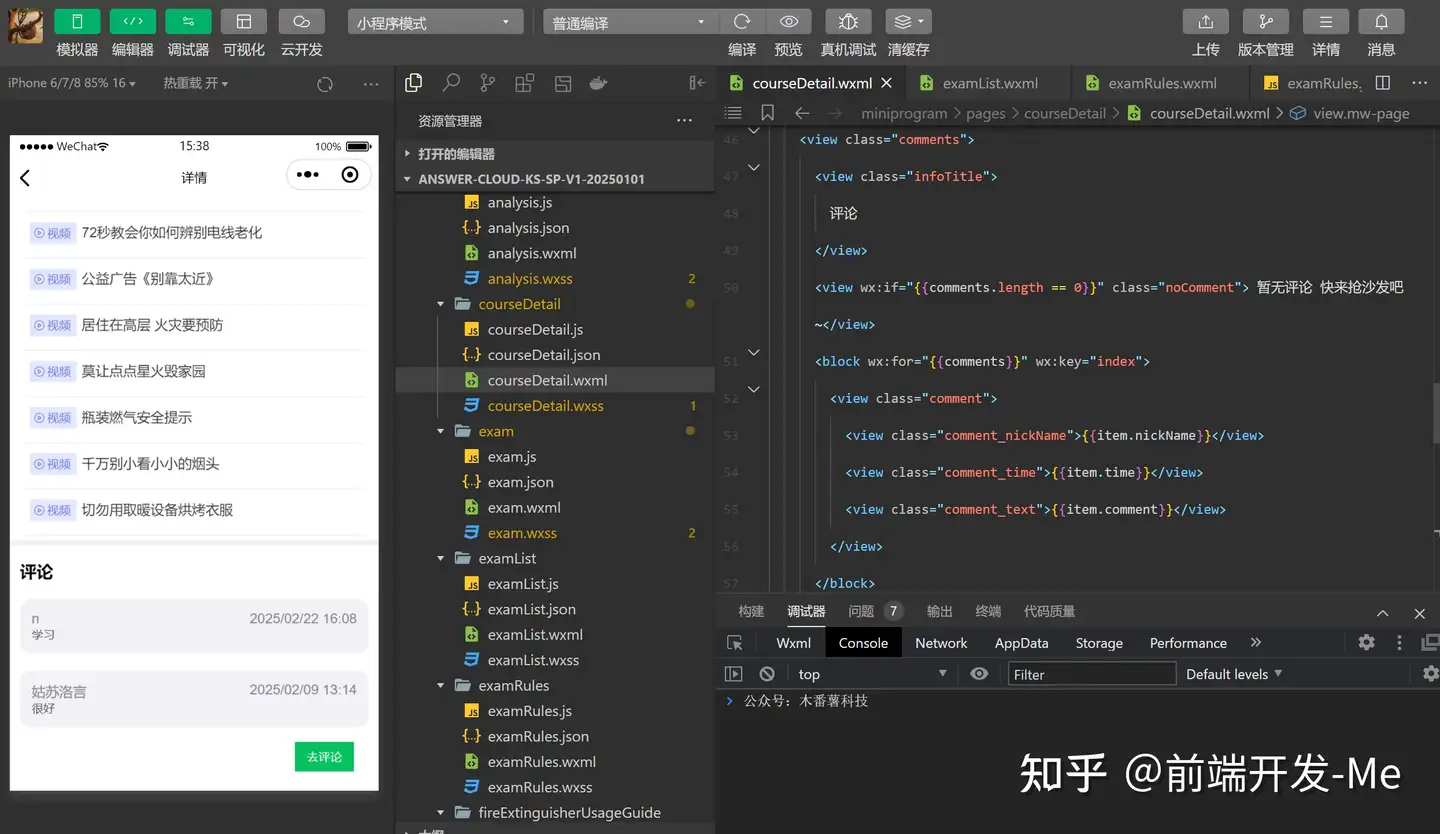
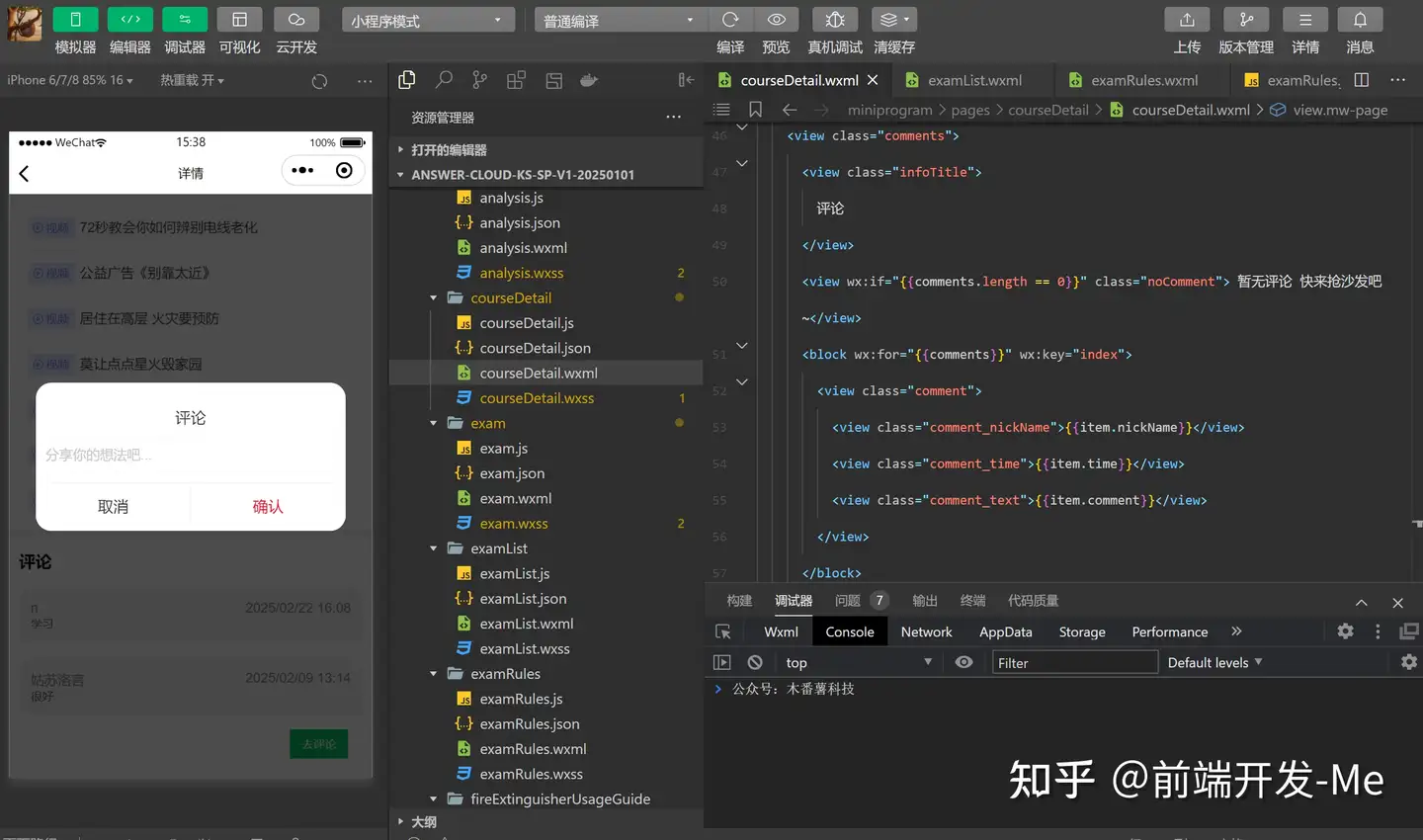
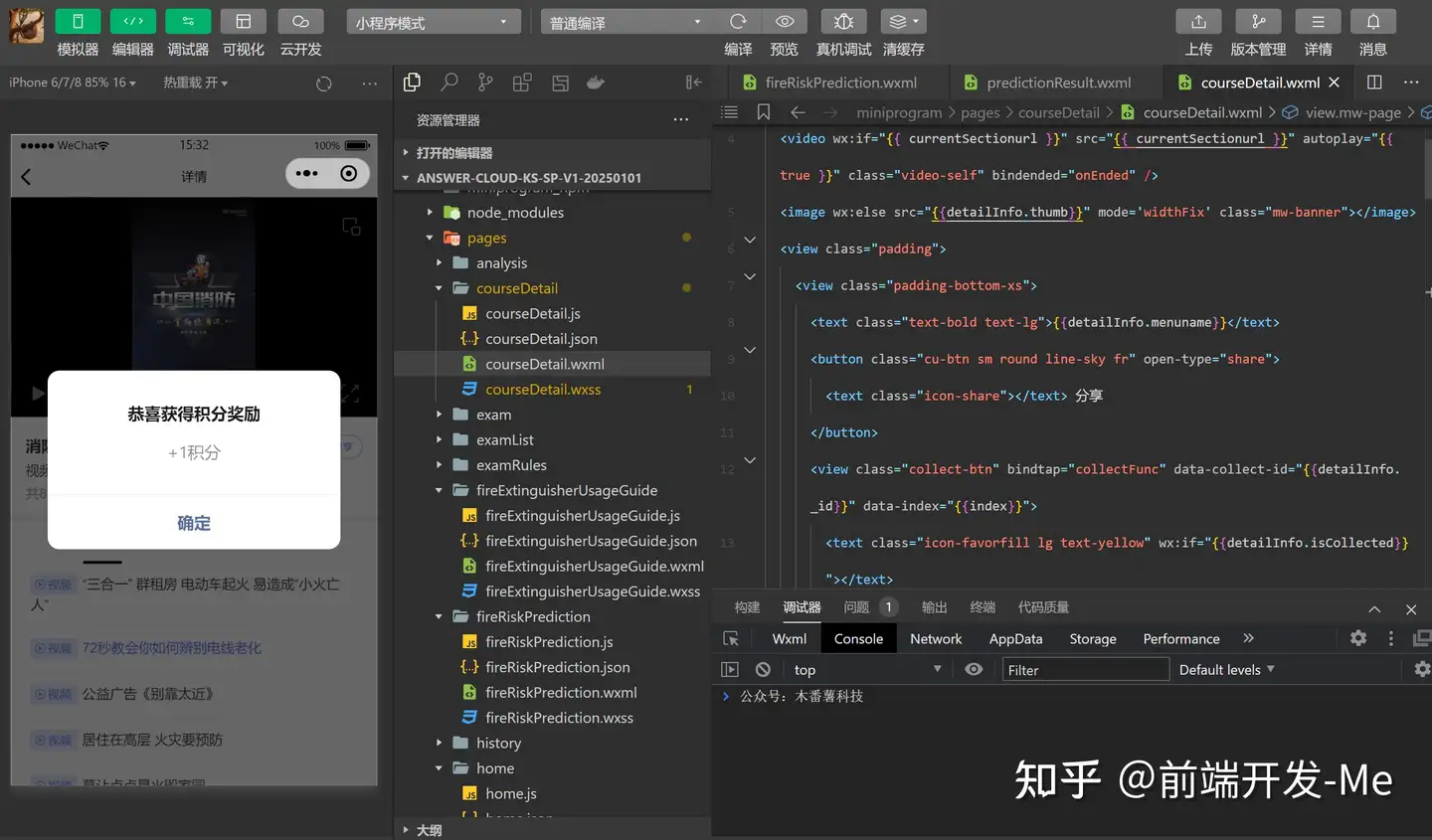
课程详情
支持目录分类
支持收藏、分享功能
看完视频得积分
支持评论功能
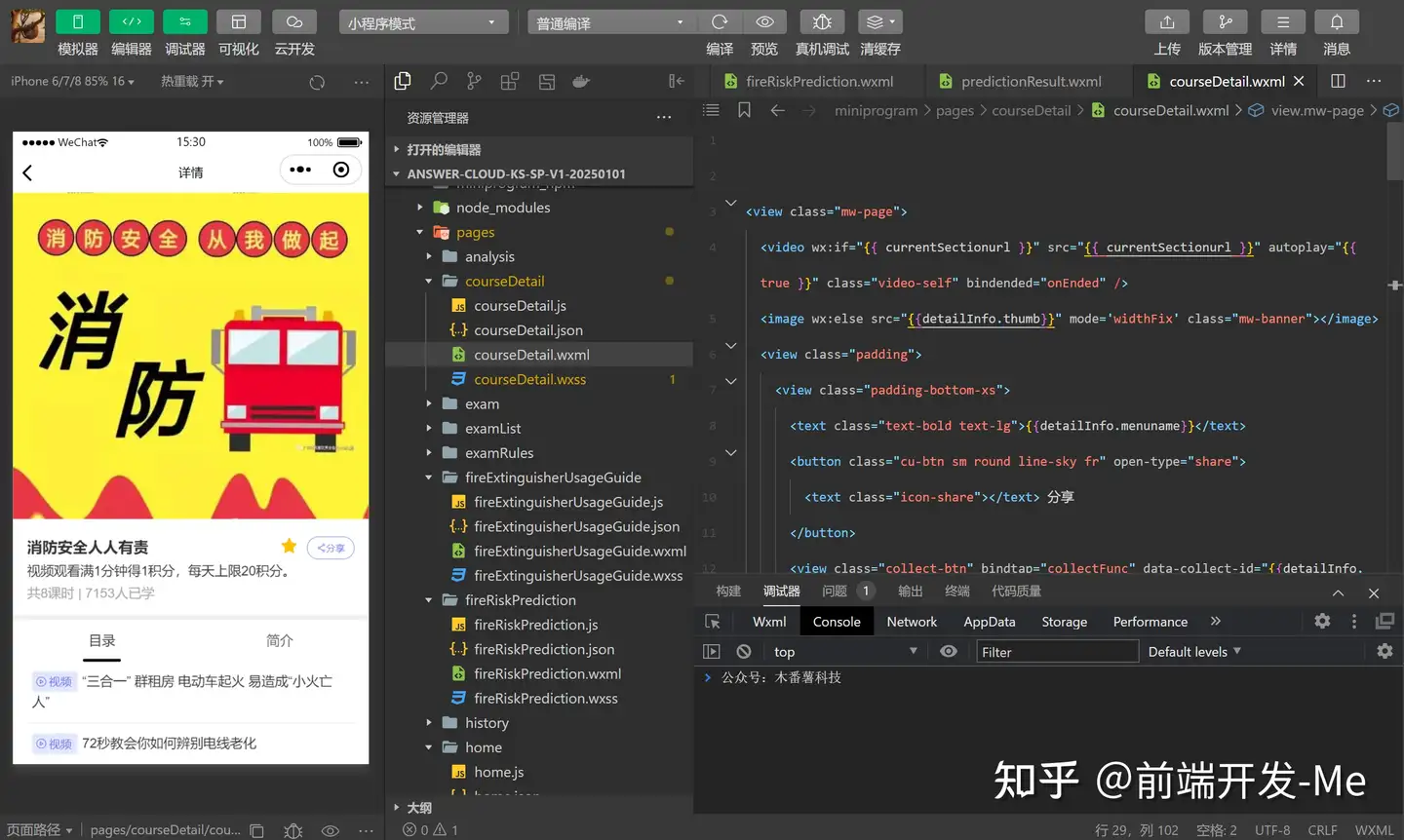
页面布局
<view class="mw-page">
  <video wx:if="{{ currentSectionurl }}" src="{{ currentSectionurl }}" autoplay="{{ true }}" class="video-self" bindended="onEnded" />
  <image wx:else src="{{detailInfo.thumb}}" mode='widthFix' class="mw-banner"></image>
  <view class="padding">
    <view class="padding-bottom-xs">
      <text class="text-bold text-lg">{{detailInfo.menuname}}</text>
      <button class="cu-btn sm round line-sky fr" open-type="share">
        <text class="icon-share"></text> 分享
      </button>
      <view class="collect-btn" bindtap="collectFunc" data-collect-id="{{detailInfo._id}}" data-index="{{index}}">
        <text class="icon-favorfill lg text-yellow" wx:if="{{detailInfo.isCollected}}"></text>
        <text class="icon-favor lg text-yellow" wx:if="{{!detailInfo.isCollected}}"></text>
      </view>
    </view>
    <view class="padding-bottom-xs">
      视频观看满1分钟得1积分,每天上限20积分。
    </view>
    <view class="text-gray">
      共{{detailInfo.ksnum}}课时 | {{detailInfo.viewnum}}人已学
    </view>
  </view>
  <view class="mw-content">
    <van-tabs active="{{ active }}" color="#000">
      <van-tab title="目录">
        <view class="padding-tb-sm padding-lr-xs margin-lr solids-bottom" wx:for="{{detailInfo.directory}}" wx:key="index" catchtap="playFunc" data-sectionurl="{{item.sectionurl}}">
          <view class="padding-bottom-xs">
            <van-tag type="primary" color="#e4e8ff" text-color="#6676EF" class="tag margin-right-xs">
              <text class="icon-video lg"></text>
              <text style="padding: 6rpx 4rpx;">{{detailInfo.mediatext}}</text>
            </van-tag>
            <text class="{{ currentSectionurl == item.sectionurl ? 'text-sky':'' }}">{{item.sectionname}}</text>
          </view>
        </view>
      </van-tab>
      <van-tab title="简介">
        <view class="padding text-black">
          视频观看满1分钟得1积分,每天上限20积分。
        </view>
      </van-tab>
    </van-tabs>
  </view>

  <view class="comments-box">
    <view class="comments">
      <view class="infoTitle">
        评论
      </view>
      <view wx:if="{{comments.length == 0}}" class="noComment"> 暂无评论 快来抢沙发吧~</view>
      <block wx:for="{{comments}}" wx:key="index">
        <view class="comment">
          <view class="comment_nickName">{{item.nickName}}</view>
          <view class="comment_time">{{item.time}}</view>
          <view class="comment_text">{{item.comment}}</view>
        </view>
      </block>
    </view>

    <view class="text-right padding">
      <van-button type="primary" square size="small" bind:click="onClickComment">去评论</van-button>
    </view>

    <van-dialog use-slot title="评论" show="{{ showCommentDialog }}" show-cancel-button bind:confirm="submitComment" bind:cancel="cancelComment">
      <view style="padding:20rpx !important">
        <van-cell-group>
          <van-field input-class="commentContent" value="{{ comment_input }}" type="textarea" placeholder="分享你的想法吧..." autosize
            bind:change="onChangeComment" border="{{ false }}" />
        </van-cell-group>
      </view>
    </van-dialog>
  </view>
</view>
层叠样式
page{
  background-color: #fff;
}
.mw-bg {
  position: absolute;
  top: 0;
  left: 0;
  width: 750rpx;
  height: 100vh;
}
.mw-btn {
  position: absolute;
  bottom: 10rpx;
  left: 0;
  width: 750rpx;
  z-index: 2;
}
.mw-answer {
  padding: 100rpx 150rpx 30rpx;
}
.mw-content {
  padding-bottom: 10rpx;
  border-top: 10rpx solid #eee;
}
.mw-banner {
  width: 100%;
}
.video-self {
	width: 100%;
}


.comments-box {
  border-top: 10rpx solid #eee;
  padding: 30rpx 20rpx 10rpx;
}
.collect-btn {
  float:right;
  padding-right: 20rpx;
}

.collect-btn .lg {
  font-size: 36rpx;
}

/* 评论区 */
.infoTitle{
  font-size: var(--font-size-M);
  font-weight: 600;
  color: #000;
  margin-bottom: 20rpx;
}
.van-cell{
  padding: 10rpx 0 10rpx 0 !important;
  /* position: relative;
  left: -26rpx; */
  /* font-size: var(--font-size-S); */
}

.noComment{
  /* text-align: center; */
  color: #868688;
  margin-top: 50rpx;
  margin-bottom: 50rpx;
}

.comment{
  background-color: #F2F1F6;
  margin-top: var(--font-size-M);
  padding: var(--font-size-S);
  border-radius: var(--font-size-S);
}

.comment_time{
  color: #868688;
  display: inline-block;
  float: right;
}

.comment_nickName{
  display: inline-block;
  color: #868688;
}

.comment_text{
  font-size: 25rpx;
  color: #454547;
}

.commentShell {
  margin-top: 50rpx;
  height: var(--font-size-M);
  margin-bottom: 100rpx;
}

.inputComment{
  border: var(--color-theme) 1px solid;
  border-radius: var(--font-size-S);
  overflow: hidden;
  width: 95%;
}

/* 评论按钮 */
.submitComment{
  display: inline-block;
}
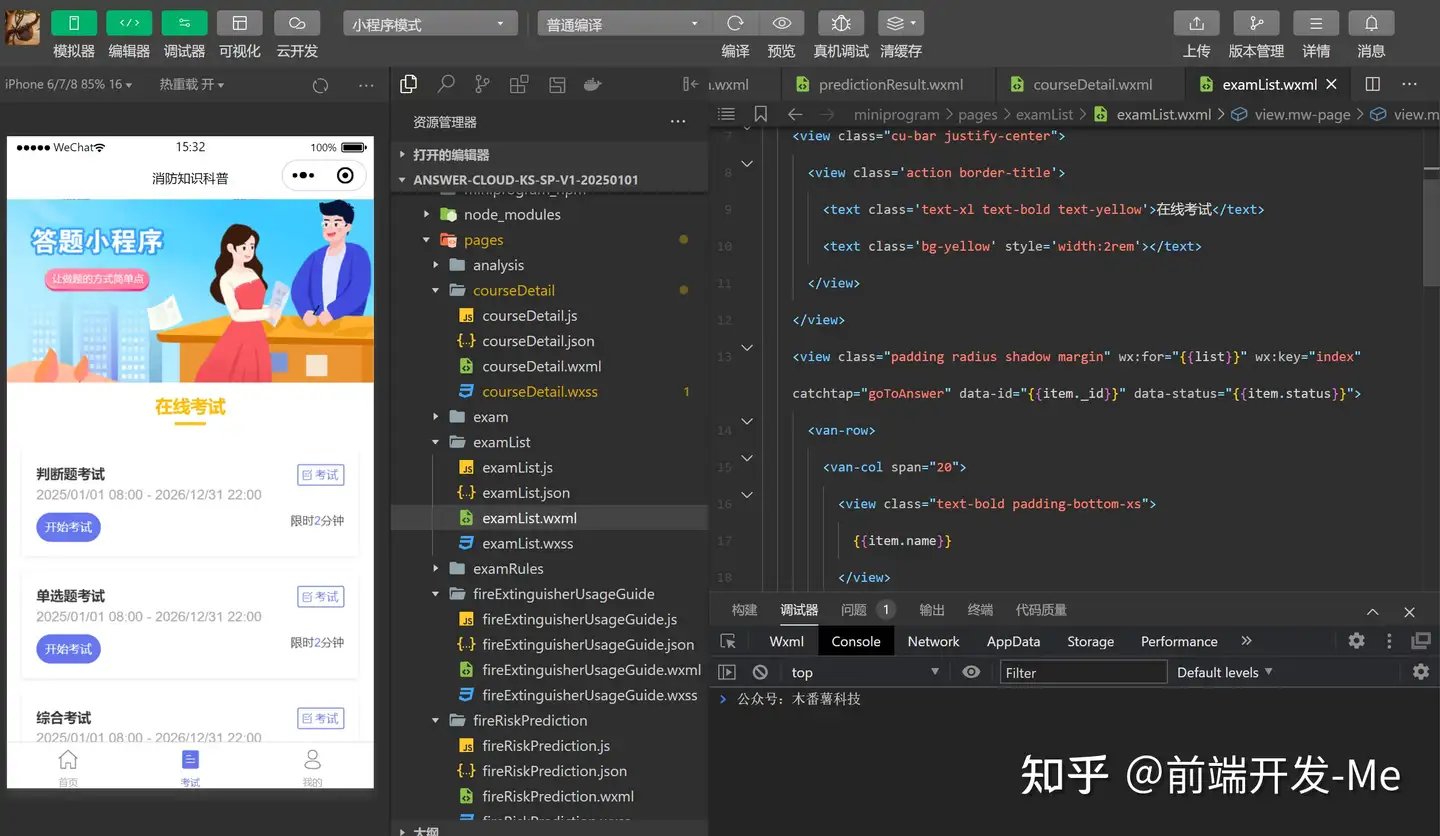
考试列表
消防知识科普,按照题型分类考试,支持单选、多选、判断和综合题型
页面布局
<view class="mw-page">
  <image src="/image/1.png" mode='widthFix' class="mw-banner"></image>

  <view class="mw-content">
    <view class="cu-bar justify-center">
      <view class='action border-title'>
        <text class='text-xl text-bold text-yellow'>在线考试</text>
        <text class='bg-yellow' style='width:2rem'></text>
      </view>
    </view>
    <view class="padding radius shadow margin" wx:for="{{list}}" wx:key="index" catchtap="goToAnswer" data-id="{{item._id}}" data-status="{{item.status}}">
      <van-row>
        <van-col span="20">
          <view class="text-bold padding-bottom-xs">
            {{item.name}}
          </view>
          <view class="text-gray">
            {{item.startDateStr}} - {{item.endDateStr}}
          </view>
        </van-col>
        <van-col span="4" class="text-right">
          <van-tag plain type="primary" color="#6676EF">
            <text class="icon-edit lg"></text>
            <text style="padding: 6rpx 4rpx;">考试</text>
          </van-tag>
        </van-col>
      </van-row>
      <view class="padding-top-sm">
        <van-button round type="info" color="{{item.status == '已结束'?'#cccccc':'#6676EF'}}" size="small" plain="{{item.status == '未开始'?true:false}}">
          {{item.status === '进行中'? '开始考试':item.status}}
        </van-button>
        <view class="fr text-sm">
          限时<text class="text-sky">{{item.time}}</text>分钟
        </view>
      </view>
    </view>
  </view>
</view>
层叠样式
page{
  background-color: #fff;
}
.mw-bg {
  position: absolute;
  top: 0;
  left: 0;
  width: 750rpx;
  height: 100vh;
}
.mw-btn {
  position: absolute;
  bottom: 10rpx;
  left: 0;
  width: 750rpx;
  z-index: 2;
}
.mw-answer {
  padding: 100rpx 150rpx 30rpx;
}
.mw-content {
  padding-bottom: 10rpx;
}
.mw-banner {
  width: 100%;
}
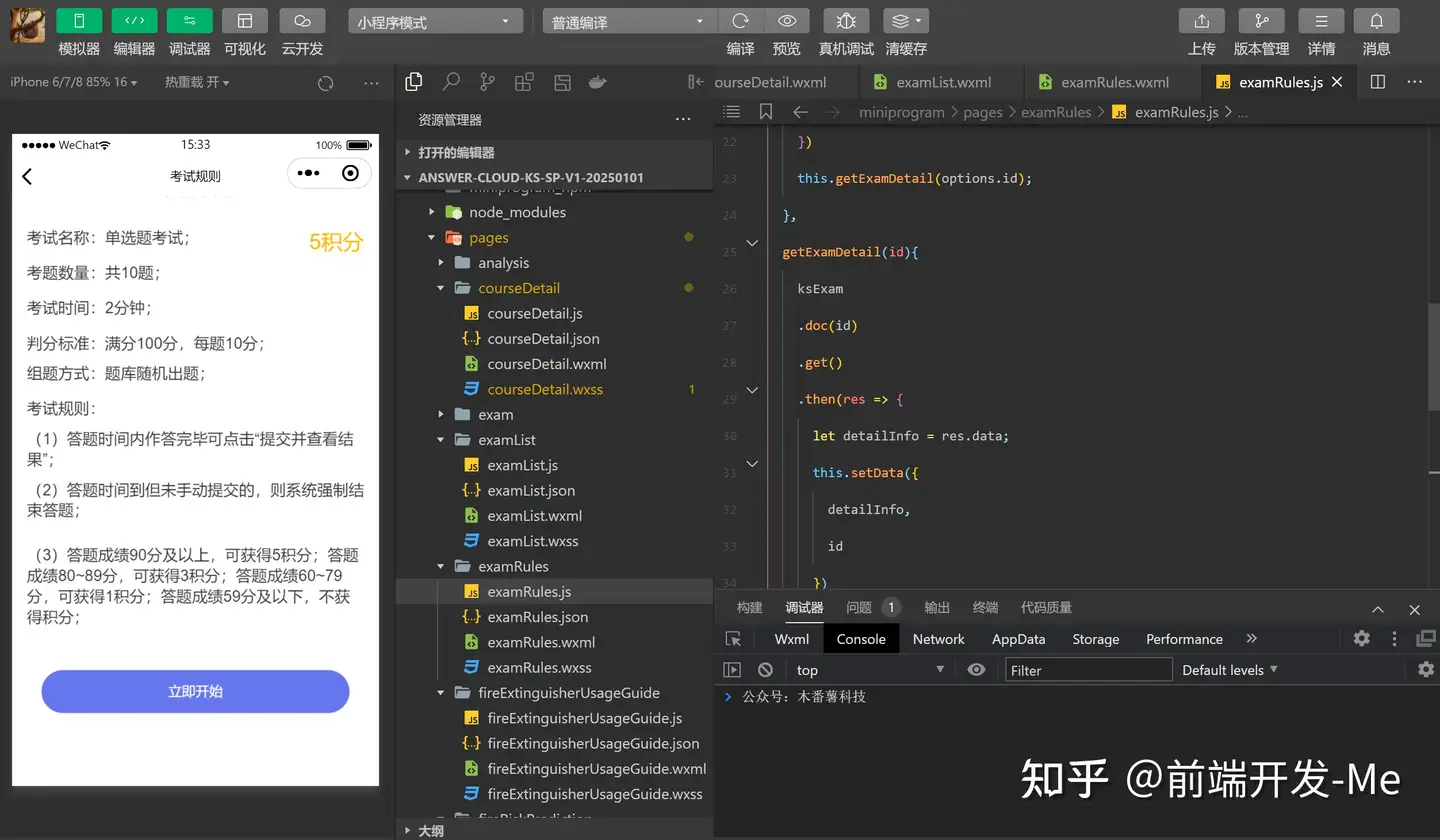
考试规则
考题数量:共10题;考试时间:2分钟;
判分标准:满分100分,每题10分;组题方式:题库随机出题;
考试规则:
(1)答题时间内作答完毕可点击"提交并查看结果";
(2)答题时间到但未手动提交的,则系统强制结束答题;
(3)答题成绩90分及以上,可获得5积分;答题成绩80~89分,可获得3积分;答题成绩60~79分,可获得1积分;答题成绩59分及以下,不获得积分;
页面布局
<view class="mw-rules-page padding text-lg">

  <view class="padding-top text-black">
    考试名称:{{ detailInfo.name }};
    <view class="ranking-head" bindtap="showRanking">
      <view style="font-size: 22px;">5积分</view>
    </view>
  </view>
  <view class="padding-top text-black">
    考题数量:共10题;
  </view>
  <view class="padding-top text-black">
    考试时间:2分钟;
  </view>
  <view class="padding-top text-black">
    判分标准:满分100分,每题10分;
  </view>
  <view class="padding-top-sm text-black">
    组题方式:题库随机出题;
  </view>

  <view class="padding-top text-black">
    考试规则:
  </view>

  <view class="padding-top-sm text-black">
    (1)答题时间内作答完毕可点击"提交并查看结果";
  </view>
  <view class="padding-top-sm text-black padding-bottom">
    (2)答题时间到但未手动提交的,则系统强制结束答题;
  </view>
  <view class="padding-top-sm text-black padding-bottom">
    (3)答题成绩90分及以上,可获得5积分;答题成绩80~89分,可获得3积分;答题成绩60~79分,可获得1积分;答题成绩59分及以下,不获得积分;
  </view>
  <view class="text-center padding-top" wx:if="{{status === '进行中'}}">
    <view class="padding">
      <van-button round block type="info" color="#6676EF" bindtap="beginAnswer">
        立即开始
      </van-button>
    </view>
  </view>
</view>
层叠样式
page {
	background-color: #fff;
  }
.mw-rules-page {
	padding-left: 30rpx;
}
.ranking-head {
	float: right;
	text-align: center;
	color: #FFB900;
	font-size: 24rpx;
}
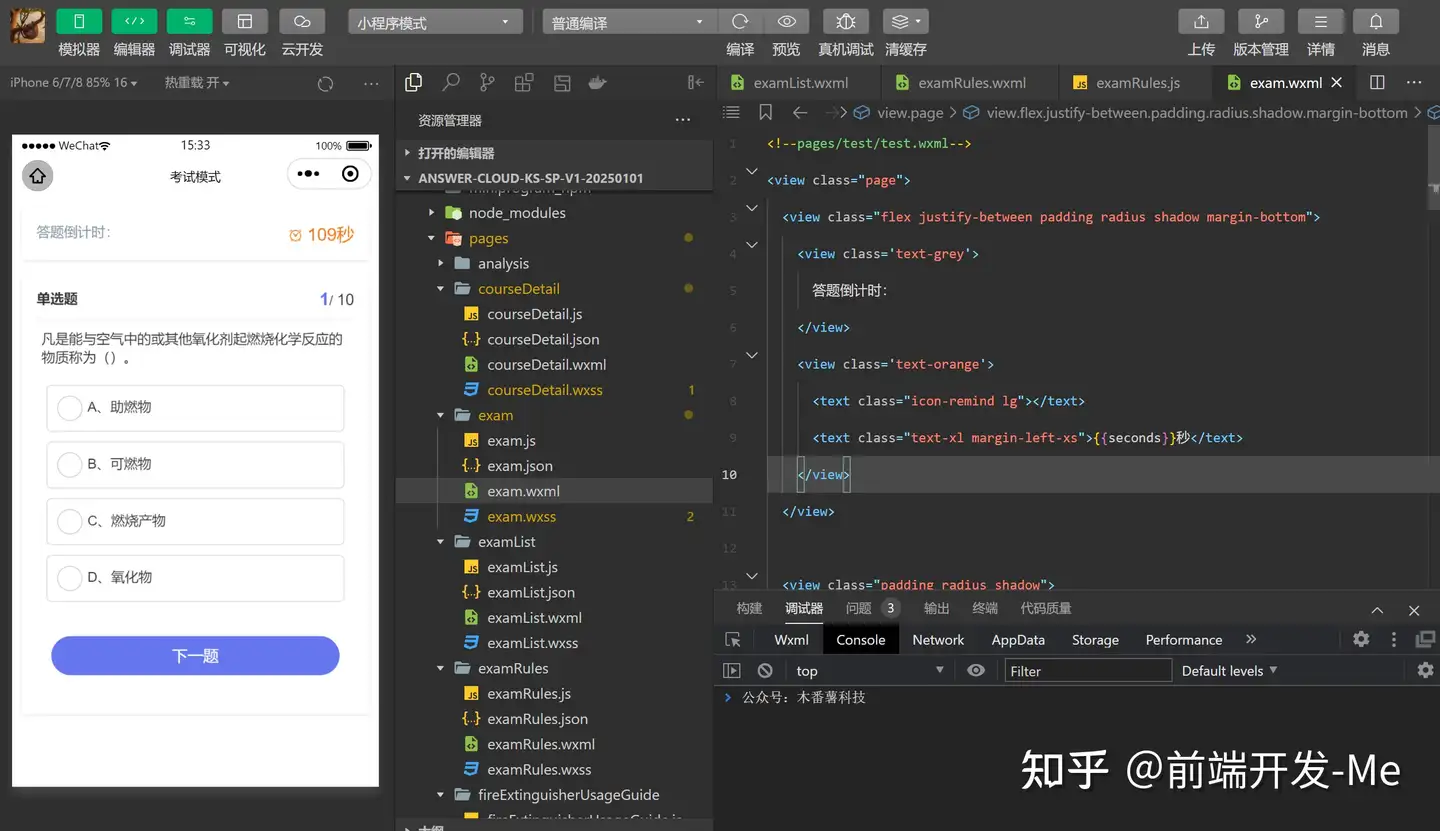
考试模式
答题倒计时,限时交卷
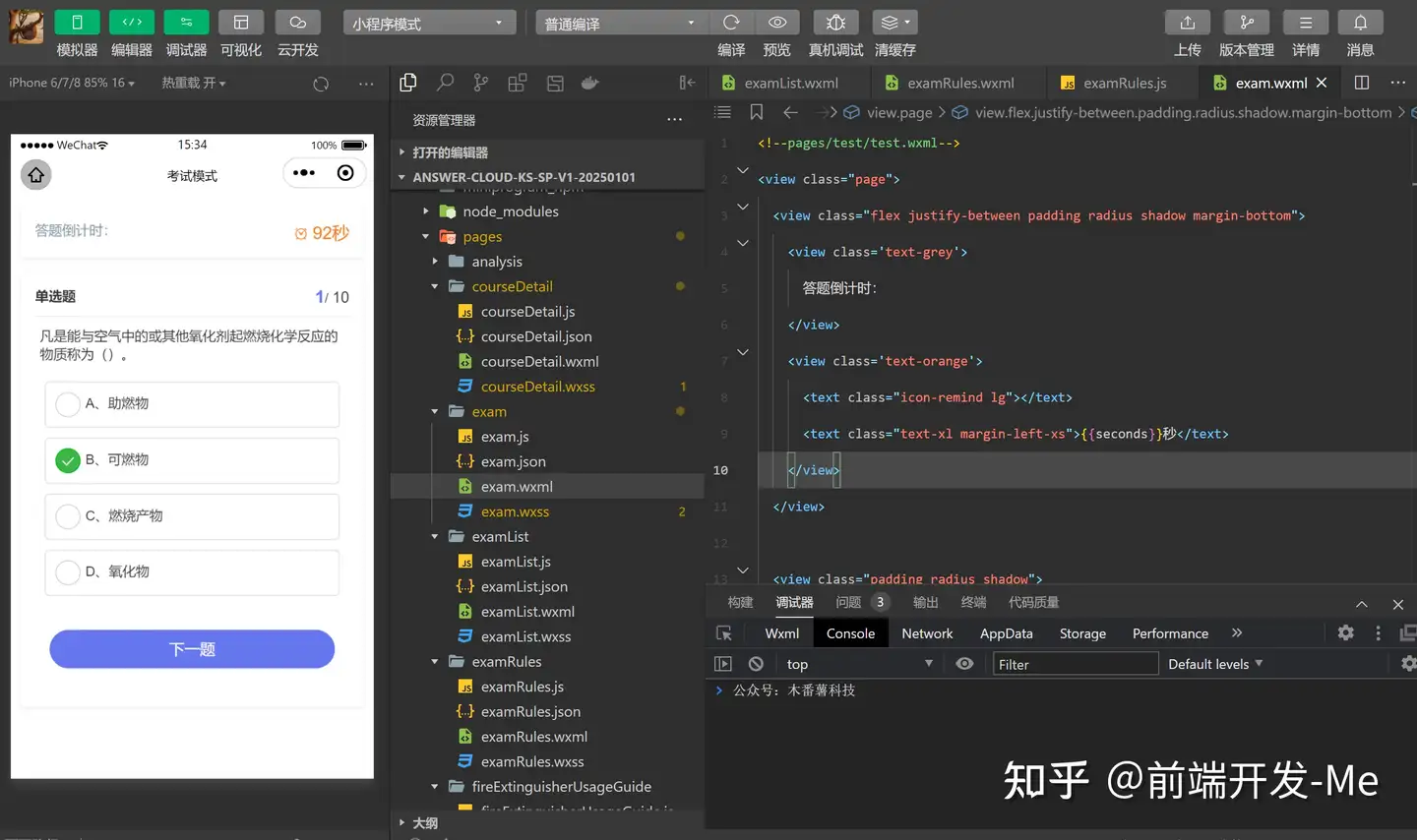
页面布局
<!--pages/test/test.wxml-->
<view class="page">
  <view class="flex justify-between padding radius shadow margin-bottom">
    <view class='text-grey'>
      答题倒计时:
    </view>
    <view class='text-orange'>
      <text class="icon-remind lg"></text>
      <text class="text-xl margin-left-xs">{{seconds}}秒</text>
    </view>
  </view>

  <view class="padding radius shadow">
    <view class="flex justify-between padding-bottom-sm solids-bottom">
      <view>
        <text class="text-bold">{{questionList[index].type == 1?"单选题":questionList[index].type == 2?"多选题":"判断题"}}</text>
      </view>
      <view>
        <text class="text-xl text-bold text-sky">{{index+1}}</text>/
        <text class="text-lg">{{questionList.length}}</text>
      </view>
    </view>
    <view class='padding page-hd'>
      <view class="page-title">
        {{questionList[index].question}}
      </view>
    </view>
    <view class="page-bd">
      <radio-group class="radio-group" bindchange="radioChange" wx:if="{{questionList[index].type == 1 || questionList[index].type == 3}}">
        <label class="radio my-choosebox {{chooseValue[index].indexOf(key) > -1?'checked':''}}" wx:for="{{currQuestionOp}}" wx:for-index="key" wx:for-item="value" wx:key="index">
          <radio value="{{key}}" checked="{{questionList[index].checked}}" />
          <text class="margin-left-xs">{{key}}、{{value}}</text>
        </label>
      </radio-group>
      <checkbox-group class="checkbox-group" bindchange="checkboxChange" wx:elif="{{questionList[index].type == 2}}">
        <label class="checkbox my-choosebox {{chooseValue[index].indexOf(key) > -1?'checked':''}}" wx:for="{{questionList[index].option}}" wx:for-index="key"  wx:for-item="value" wx:key="index">
          <checkbox value="{{key}}" checked="{{questionList[index].checked}}" />
          <text class="margin-left-xs">{{key}}、{{value}}</text>
        </label>
      </checkbox-group>
    </view>
    <view class='page-ft flex flex-direction padding padding-bottom-xl'>
      <button bindtap='okFunc' class="cu-btn lg round bg-sky" wx:if="{{index == questionList.length-1}}">提交并查看结果</button>
      <button bindtap='okFunc' class="cu-btn lg round bg-sky" wx:else>下一题</button>
    </view>
  </view>

</view>
层叠样式
/* pages/test/test.wxss */
page {
  background-color: #fff;
}
.page {
  padding: 20rpx;
}
.page-hd {
  padding: 20rpx 10rpx;
}
.page-bd {
  padding: 20rpx;
}
.page .radio-group, .page .checkbox-group {
  display: block;
}
.my-choosebox {
  display: block;
  margin-bottom: 20rpx;
  border: 2rpx solid #ddd;
  padding: 20rpx;
  border-radius: 10rpx;
  line-height: 1;
}
.my-choosebox.checked {
  border-color: #0760E3;
  background-color: #438FFF;
  color: #fff;
}
.toindex-btn {
  margin-top: 20rpx;
  display:inline-block;
  line-height:2.3;
  font-size:13px;
  padding:0 1.34em;
  color: red;
  float: right;
}

.yi-zuo-da, .wei-zuo-da, .yi-da, .wei-da {
  display: inline-block;
  width: 26rpx;
  height: 26rpx;
  border-radius: 50%;
  margin-right: 6rpx;
}
.yi-zuo-da, .yi-da {
  background-color: #4685FF;
  color: #fff;
}
.wei-zuo-da, .wei-da {
  border: 1px solid #ddd;
}
.yi-da, .wei-da {
  width: 66rpx;
  height: 66rpx;
  line-height: 66rpx;
}


.collect {
  float:right;
  padding-right: 20rpx;
}

.collect .lg {
  font-size: 36rpx;
}

/* 评论区 */
.infoTitle{
  font-size: var(--font-size-M);
  font-weight: 600;
  color: #000;
  margin-bottom: 20rpx;
}
.van-cell{
  padding: 10rpx 0 10rpx 0 !important;
  /* position: relative;
  left: -26rpx; */
  /* font-size: var(--font-size-S); */
}

.noComment{
  /* text-align: center; */
  color: #868688;
  margin-top: 50rpx;
  margin-bottom: 50rpx;
}

.comment{
  background-color: #F2F1F6;
  margin-top: var(--font-size-M);
  padding: var(--font-size-S);
  border-radius: var(--font-size-S);
}

.comment_time{
  color: #868688;
  display: inline-block;
  float: right;
}

.comment_nickName{
  display: inline-block;
  color: #868688;
}

.comment_text{
  font-size: 25rpx;
  color: #454547;
}

.commentShell {
  margin-top: 50rpx;
  height: var(--font-size-M);
  margin-bottom: 100rpx;
}

.inputComment{
  /* display: inline-block; */
  /* background-color: aqua; */
  border: var(--color-theme) 1px solid;
  border-radius: var(--font-size-S);
  overflow: hidden;
  width: 95%;
}

/* 评论按钮 */
.submitComment{
  display: inline-block;
  /* align-items : center; */
  /* display: flex; */
  /* float: right; */
}
考试结果页
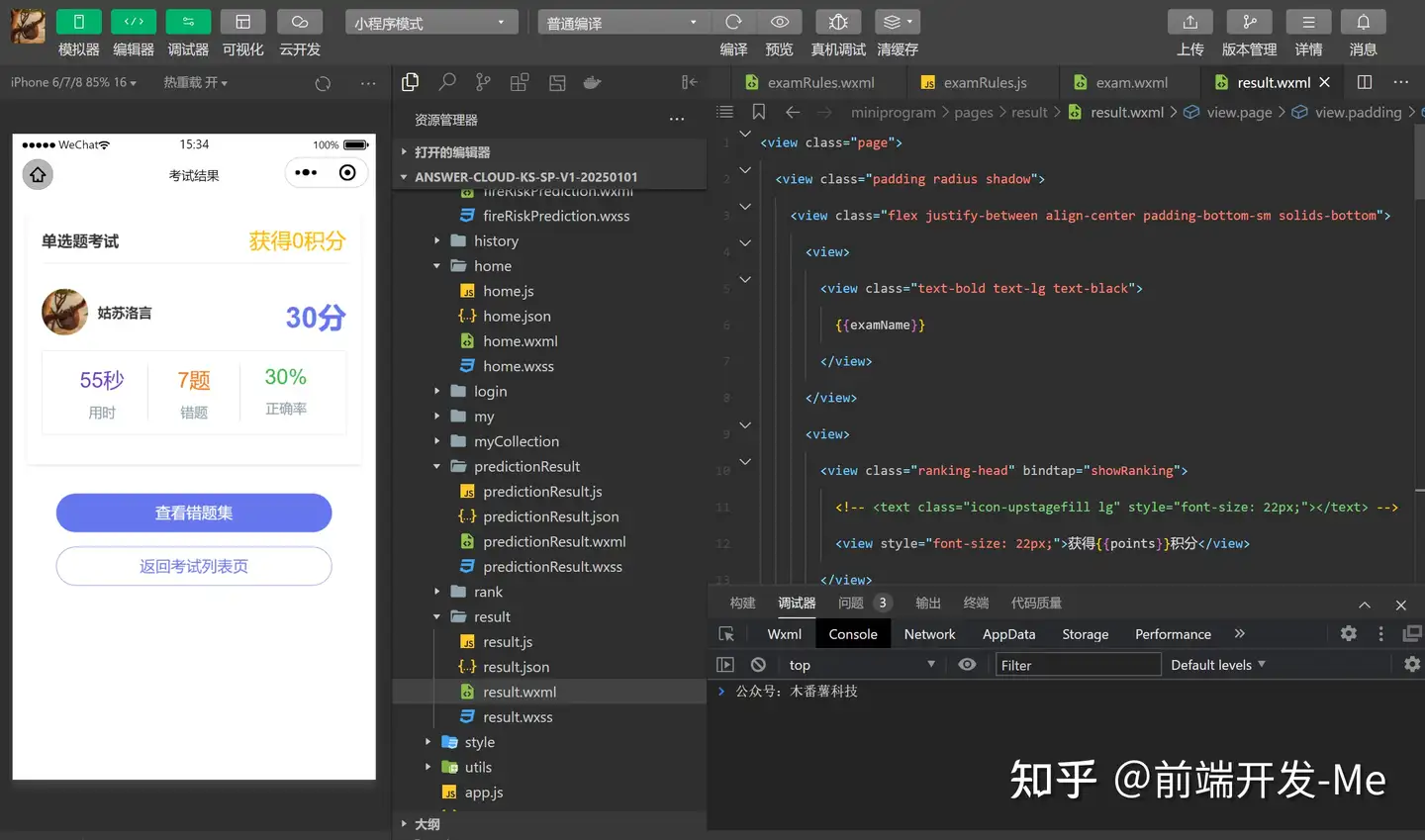
页面布局
<view class="page">
  <view class="padding radius shadow">
    <view class="flex justify-between align-center padding-bottom-sm solids-bottom">
      <view>
        <view class="text-bold text-lg text-black">
          {{examName}}
        </view>
      </view>
      <view>
        <view class="ranking-head" bindtap="showRanking">
          <!-- <text class="icon-upstagefill lg" style="font-size: 22px;"></text> -->
          <view style="font-size: 22px;">获得{{points}}积分</view>
        </view>
      </view>
    </view>
    <view class="flex justify-between align-center padding-top-xl">
      <view class="flex align-center">
        <view class="cu-avatar round lg">
          <image class="avatar" src="{{userInfo.avatarUrl}}" mode="widthFix"></image>
        </view>
        <view class="text-bold text-black padding-left-sm">
          {{userInfo.nickName}}
        </view>
      </view>
      <view class='page-head'>
        <view class='page-score'>
          <text class="score-num text-bold text-sky">{{totalScore}}分</text>
        </view>
      </view>
    </view>
    <view class='page-footer'>
      <view class='flex text-grey text-center margin-bottom padding bg-white radius solids'>
        <view class='solid-right flex flex-direction flex-sub'>
          <view class="text-purple text-xxl">{{totalTime}}秒</view>
          <view class="margin-top-sm">
            用时
          </view>
        </view>
        <view class='solid-right flex flex-direction flex-sub'>
          <view class="text-orange text-xxl">{{wrong}}题</view>
          <view class="margin-top-sm">
            错题
          </view>
        </view>
        <view class='flex flex-direction flex-sub'>
          <view class="text-xxl text-green">
            {{zql}}%
          </view>
          <view class="margin-top-sm">
            正确率
          </view>
        </view>
      </view>
    </view>
  </view>
  <view class="padding">
    <view class="padding flex flex-direction">
      <button bindtap="toAnalysis" class="cu-btn lg round bg-sky"> 查看错题集 </button>
      <button bindtap="toIndex" class="cu-btn lg round line-sky margin-top"> 返回考试列表页 </button>
    </view>
  </view>
</view>
层叠样式
/* pages/results/results.wxss */
page {
  background-color: #fff;
}
.page {
  padding: 30rpx;
}
.page-score {
  display: flex;
  justify-content: center;
  align-items: flex-end;
  padding-top:20rpx;
}
.mw-avatar {
  width: 128rpx;
  height: 128rpx;
  border-radius: 50%;
  overflow: hidden;
}
.page-footer {
  margin-top:30rpx;
  text-align: center;
}
.score-num {
  font-size:60rpx;
}
.ranking-head {
	text-align: center;
	color: #FFB900;
	font-size: 24rpx;
}
错题集
温故而知新
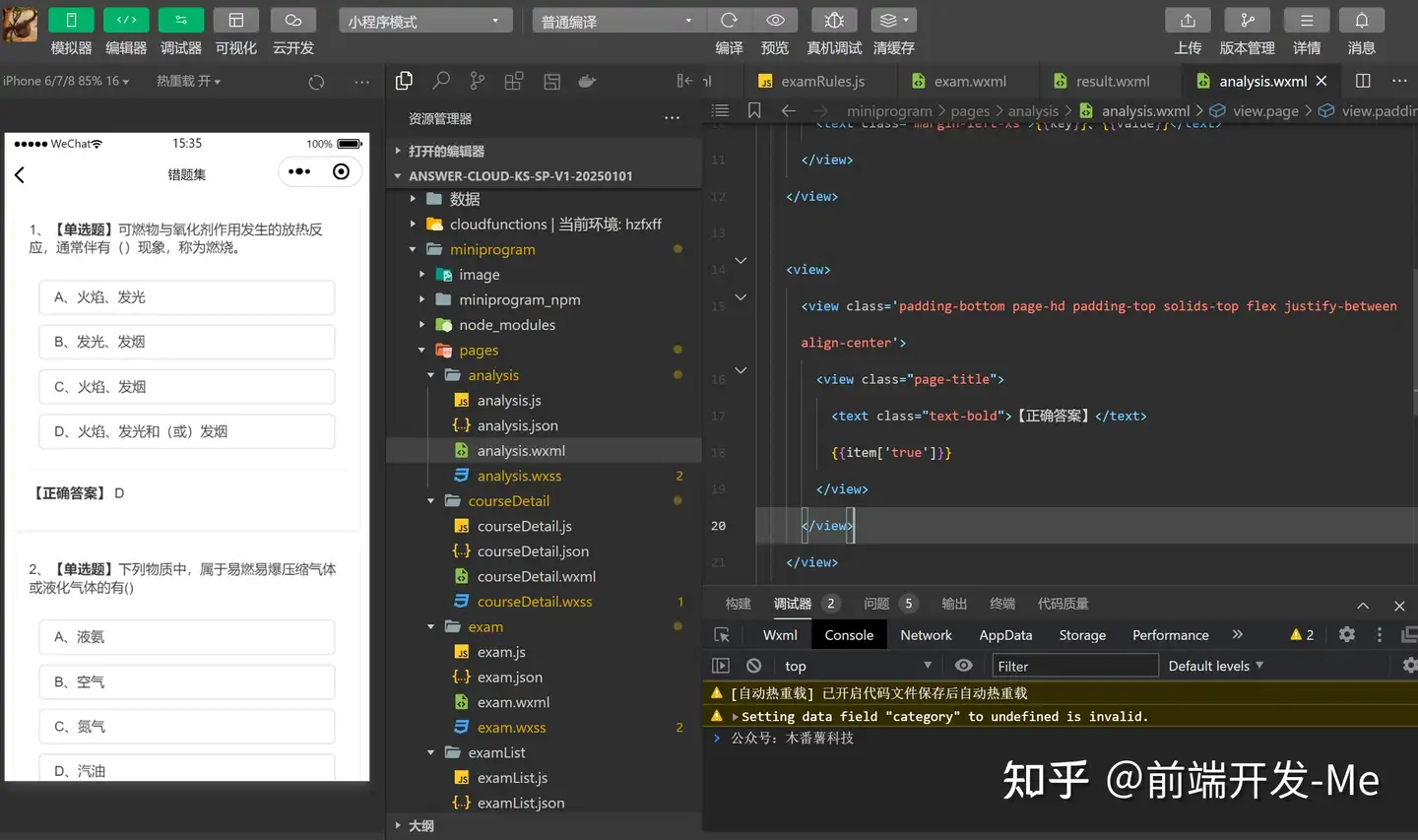
页面布局
<view class="page">
  <view class="padding radius shadow margin-bottom" wx:for="{{wrongQuestionList}}" wx:key="index">
    <view class='padding-bottom page-hd'>
      <view class="page-title">
        {{index+1}}、<text class="text-bold">【{{item.type == 1?"单选题":item.type == 2?"多选题":"判断题"}}】</text>{{item.question}}
      </view>
    </view>
    <view class="page-bd">
      <view class="my-choosebox" wx:for="{{item.option}}" wx:for-index="key" wx:for-item="value" wx:key="index">
        <text class="margin-left-xs">{{key}}、{{value}}</text>
      </view>
    </view>

    <view>
      <view class='padding-bottom page-hd padding-top solids-top flex justify-between align-center'>
        <view class="page-title">
          <text class="text-bold">【正确答案】</text>
          {{item['true']}}
        </view>
      </view>
    </view>
  </view>
</view>
层叠样式
page {
  background-color: #fff;
}
.page {
  padding: 20rpx;
}
.page-bd {
  padding: 20rpx;
}
.page .radio-group, .page .checkbox-group {
  display: block;
}
.my-choosebox {
  display: block;
  margin-bottom: 20rpx;
  border: 2rpx solid #ddd;
  padding: 20rpx;
  border-radius: 10rpx;
  line-height: 1;
}
.my-choosebox.checked {
  border-color: #0760E3;
  background-color: #438FFF;
  color: #fff;
}
.toindex-btn {
  margin-top: 20rpx;
  display:inline-block;
  line-height:2.3;
  font-size:13px;
  padding:0 1.34em;
  color: red;
  float: right;
}

.yi-zuo-da, .wei-zuo-da, .yi-da, .wei-da {
  display: inline-block;
  width: 26rpx;
  height: 26rpx;
  border-radius: 50%;
  margin-right: 6rpx;
}
.yi-zuo-da, .yi-da {
  background-color: #4685FF;
  color: #fff;
}
.wei-zuo-da, .wei-da {
  border: 1px solid #ddd;
}
.yi-da, .wei-da {
  width: 66rpx;
  height: 66rpx;
  line-height: 66rpx;
}


.collect {
  float:right;
  padding-right: 20rpx;
}

.collect .lg {
  font-size: 36rpx;
}

/* 评论区 */
.infoTitle{
  font-size: var(--font-size-M);
  font-weight: 600;
  color: #000;
  margin-bottom: 20rpx;
}
.van-cell{
  padding: 10rpx 0 10rpx 0 !important;
  /* position: relative;
  left: -26rpx; */
  /* font-size: var(--font-size-S); */
}

.noComment{
  /* text-align: center; */
  color: #868688;
  margin-top: 50rpx;
  margin-bottom: 50rpx;
}

.comment{
  background-color: #F2F1F6;
  margin-top: var(--font-size-M);
  padding: var(--font-size-S);
  border-radius: var(--font-size-S);
}

.comment_time{
  color: #868688;
  display: inline-block;
  float: right;
}

.comment_nickName{
  display: inline-block;
  color: #868688;
}

.comment_text{
  font-size: 25rpx;
  color: #454547;
}

.commentShell {
  margin-top: 50rpx;
  height: var(--font-size-M);
  margin-bottom: 100rpx;
}

.inputComment{
  /* display: inline-block; */
  /* background-color: aqua; */
  border: var(--color-theme) 1px solid;
  border-radius: var(--font-size-S);
  overflow: hidden;
  width: 95%;
}

/* 评论按钮 */
.submitComment{
  display: inline-block;
  /* align-items : center; */
  /* display: flex; */
  /* float: right; */
}
个人中心页
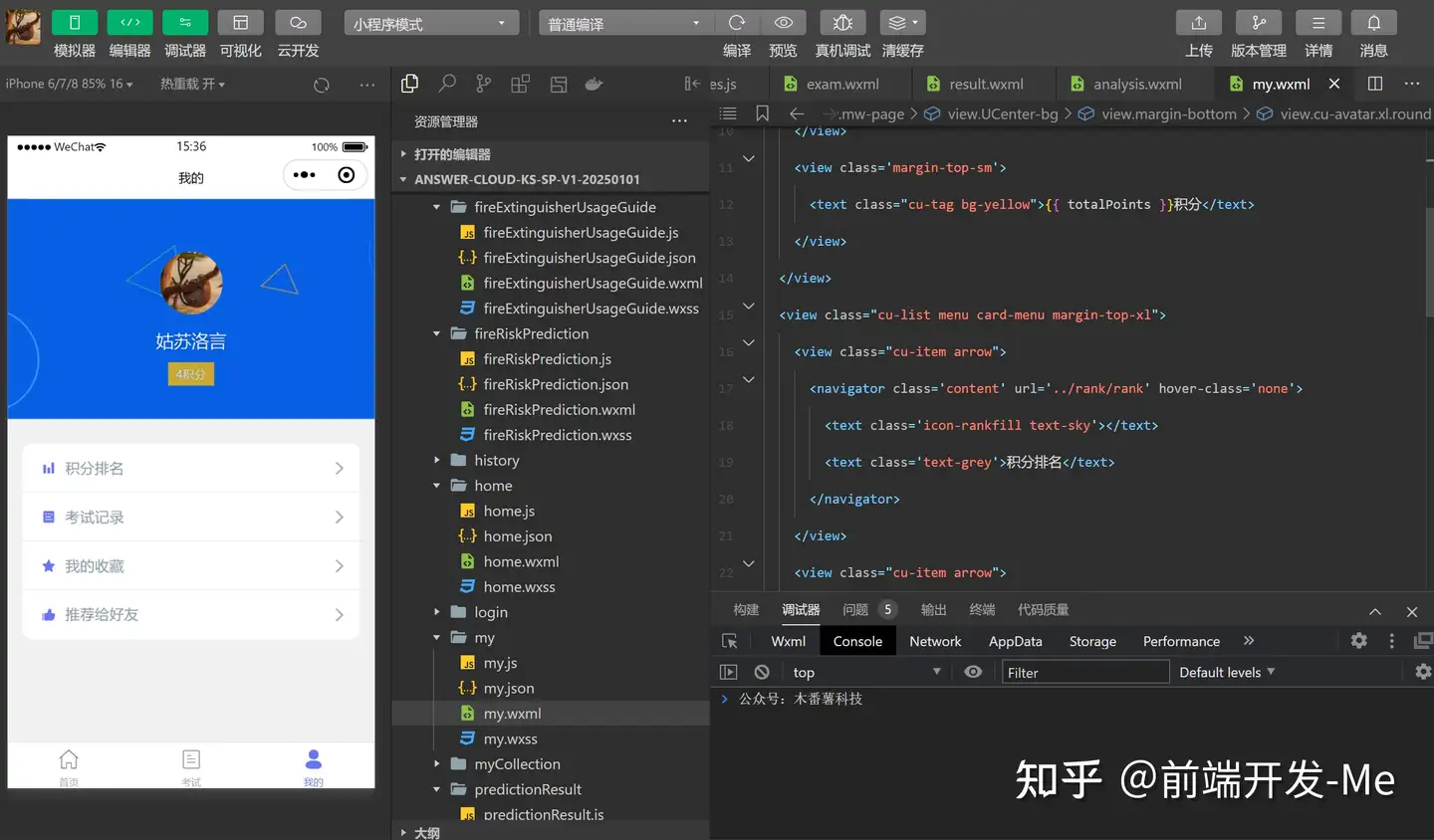
页面布局
<view class='mw-page'>
  <view class='UCenter-bg'>
    <view class="margin-bottom">
      <view class="cu-avatar xl round">
        <image class="avatar" src="{{userInfo.avatarUrl}}" mode="widthFix"></image>
      </view>
    </view>
    <view class='text-xl'>
      {{userInfo.nickName}}
    </view>
    <view class='margin-top-sm'>
      <text class="cu-tag bg-yellow">{{ totalPoints }}积分</text>
    </view>
  </view>
  <view class="cu-list menu card-menu margin-top-xl">
    <view class="cu-item arrow">
      <navigator class='content' url='../rank/rank' hover-class='none'>
        <text class='icon-rankfill text-sky'></text>
        <text class='text-grey'>积分排名</text>
      </navigator>
    </view>
    <view class="cu-item arrow">
      <navigator class='content' url='../history/history' hover-class='none'>
        <text class='icon-formfill text-sky'></text>
        <text class='text-grey'>考试记录</text>
      </navigator>
    </view>
    <view class="cu-item arrow">
      <navigator class='content' url='../myCollection/myCollection' hover-class='none'>
        <text class='icon-favorfill text-sky'></text>
        <text class='text-grey'>我的收藏</text>
      </navigator>
    </view>
    <view class="cu-item arrow">
      <button class='cu-btn content' open-type='share'>
        <text class='icon-appreciatefill text-sky'></text>
        <text class='text-grey'>推荐给好友</text>
      </button>
    </view>
  </view>
</view>
层叠样式
page {
  background-color: #f1f1f1;
}
.UCenter-bg {
  background: url(https://a.jpg?) no-repeat center center;
  background-size: cover;
  height: 450rpx;
  display: flex;
  justify-content: center;
  padding-top: 40rpx;
  overflow: hidden;
  position: relative;
  flex-direction: column;
  align-items: center;
  color: #fff;
  font-weight: 300;
  text-shadow: 0 0 3px rgba(0, 0, 0, 0.3);
}

.UCenter-bg text {
  opacity: 0.8;
}

.UCenter-bg image {
  width: 200rpx;
  height: 200rpx;
}

.UCenter-bg .gif-wave{
  position: absolute;
  width: 100%;
  bottom: 0;
  left: 0;
  z-index: 99;
  mix-blend-mode: screen;
  height: 100rpx;
}

map,.mapBox{
  left: 0;
  z-index: 99;
  mix-blend-mode: screen;
  height: 100rpx;
}

map,.mapBox{
  width: 750rpx;
  height: 300rpx;
}

.mw-weixin.text-center {
  color: rgb(230, 230, 230);
  padding: 30rpx 0 0;
}
积分排行榜
积分由高到低进行排名
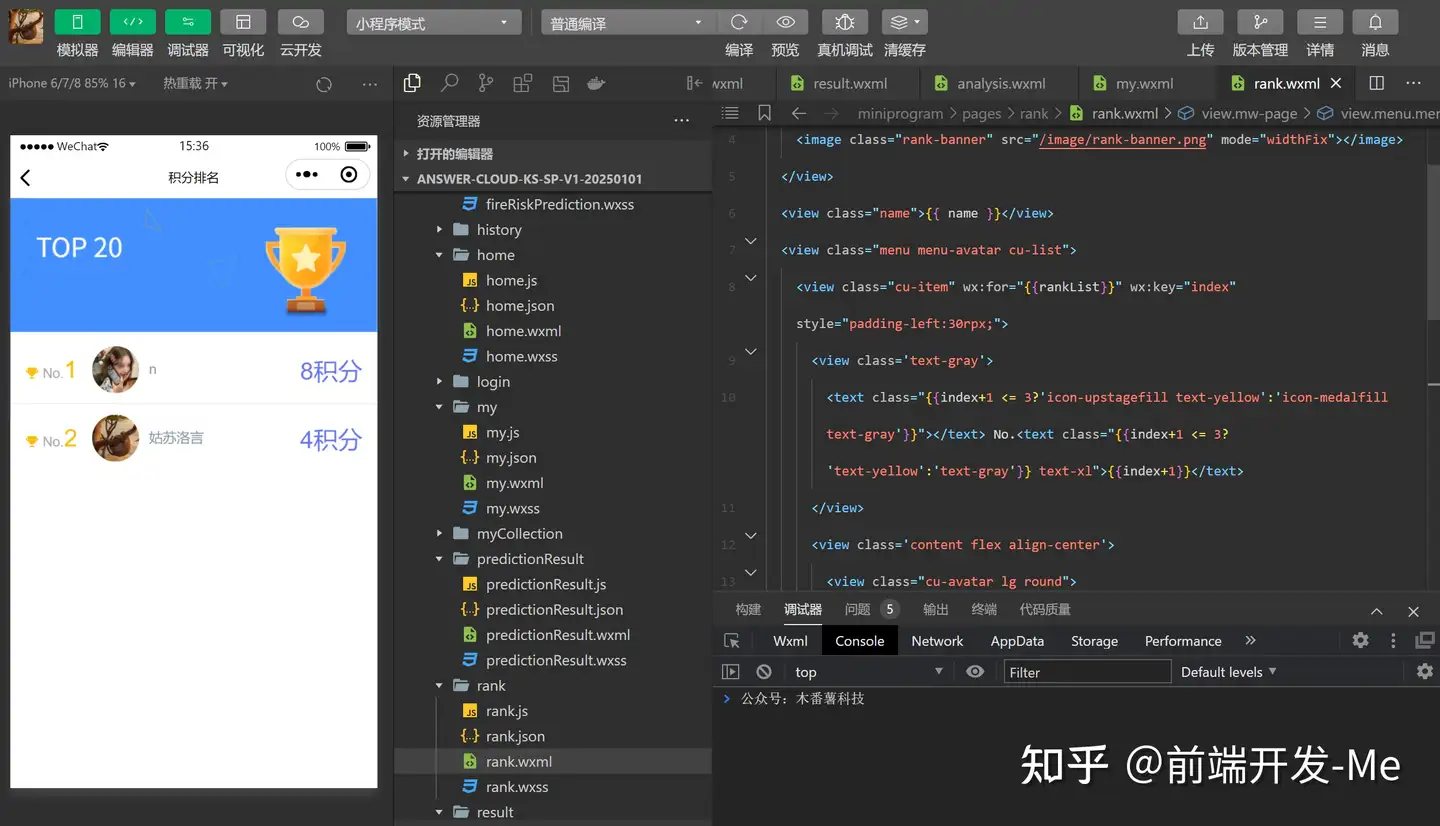
页面布局
<view class="mw-page">
  <view>
    <image class="rank-banner" src="/image/rank-banner.png" mode="widthFix"></image>
  </view>
  <view class="name">{{ name }}</view>
  <view class="menu menu-avatar cu-list">
    <view class="cu-item" wx:for="{{rankList}}" wx:key="index" style="padding-left:30rpx;">
      <view class='text-gray'>
        <text class="{{index+1 <= 3?'icon-upstagefill text-yellow':'icon-medalfill text-gray'}}"></text> No.<text class="{{index+1 <= 3?'text-yellow':'text-gray'}} text-xl">{{index+1}}</text>
      </view>
      <view class='content flex align-center'>
        <view class="cu-avatar lg round">
          <image class="avatar" src="{{item.avatarUrl}}" mode="widthFix"></image>
        </view>
        <view class='text-df text-grey nick-name'>{{item.nickName}}</view>
      </view>
      <view class='action'>
        <view class='text-xl text-sky'>{{item.totalPoints}}积分</view>
      </view>
    </view>
  </view>
</view>
层叠样式
page{
  background-color: #fff;
}
.name {
  position: absolute;
  top: 150rpx;
  left: 50rpx;
  z-index: 1;
  color: #fff;
}
.rank-banner {
  width: 100%;
}
.nick-name {
  padding-left: 50rpx;
}
.text-xl {
  font-size: 50rpx;
}
考试记录页
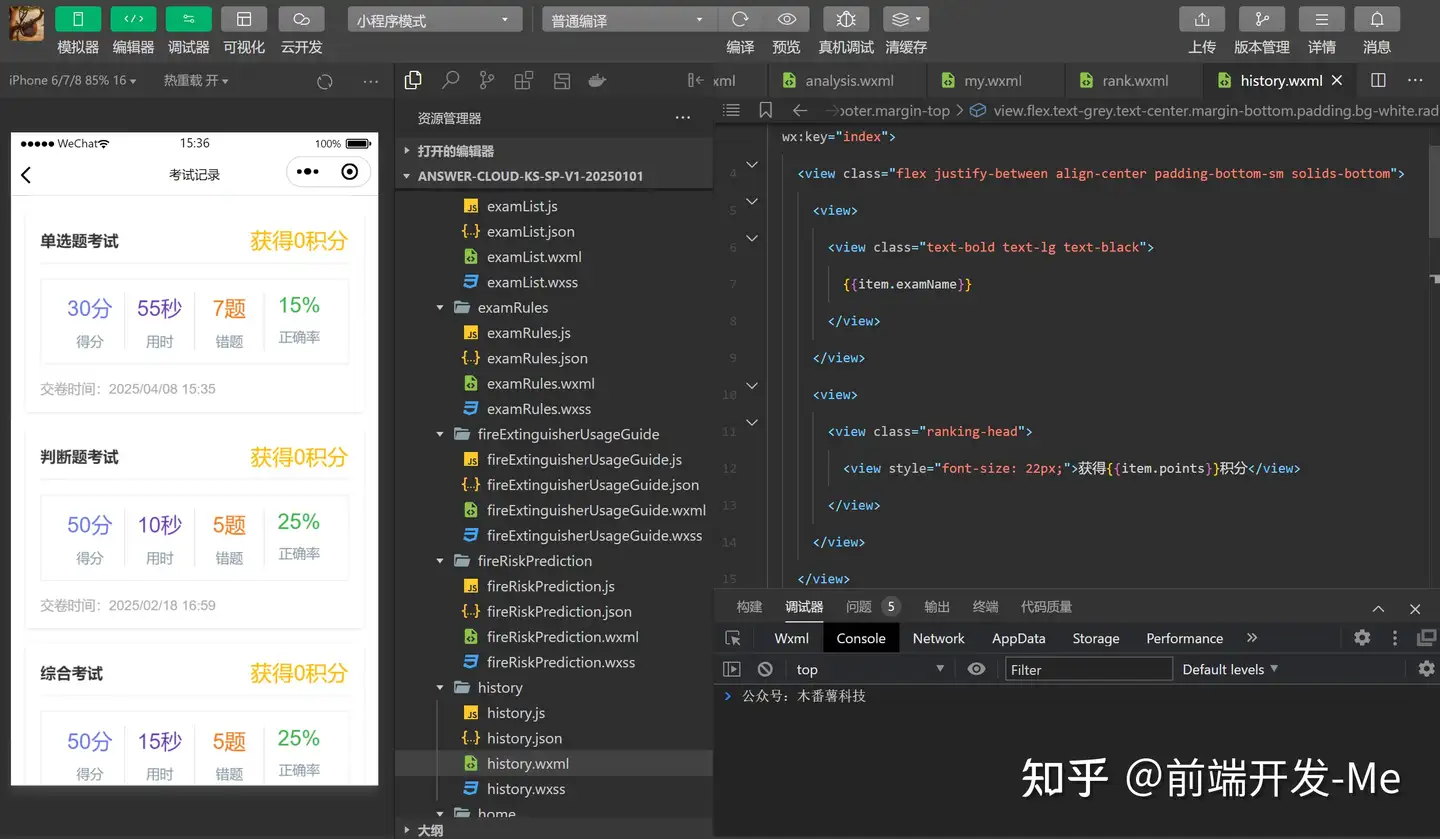
页面布局
<view class="mw-history-page padding">
  <view class="padding radius shadow margin-bottom" wx:for="{{historyList}}" wx:key="index">
    <view class="flex justify-between align-center padding-bottom-sm solids-bottom">
      <view>
        <view class="text-bold text-lg text-black">
          {{item.examName}}
        </view>
      </view>
      <view>
        <view class="ranking-head">
          <view style="font-size: 22px;">获得{{item.points}}积分</view>
        </view>
      </view>
    </view>
    <view class='page-footer margin-top' data-id="{{item._id}}" bindtap="goToResult">
      <view class='flex text-grey text-center margin-bottom padding bg-white radius solids'>
        <view class='solid-right flex flex-direction flex-sub'>
          <view class="text-sky text-xxl">{{item.totalScore}}分</view>
          <view class="margin-top-sm">
            得分
          </view>
        </view>
        <view class='solid-right flex flex-direction flex-sub'>
          <view class="text-purple text-xxl">{{item.totalTime}}秒</view>
          <view class="margin-top-sm">
            用时
          </view>
        </view>
        <view class='solid-right flex flex-direction flex-sub'>
          <view class="text-orange text-xxl">{{item.wrong}}题</view>
          <view class="margin-top-sm">
            错题
          </view>
        </view>
        <view class='flex flex-direction flex-sub'>
          <view class="text-xxl text-green">
            {{item.zql}}%
          </view>
          <view class="margin-top-sm">
            正确率
          </view>
        </view>
      </view>
    </view>
    <view class="text-gray">
      交卷时间:{{item.date}}
    </view>
  </view>
</view>
层叠样式
page{
  background-color: #fff;
}
.ranking-head {
	text-align: center;
	color: #FFB900;
	font-size: 24rpx;
}
我的收藏
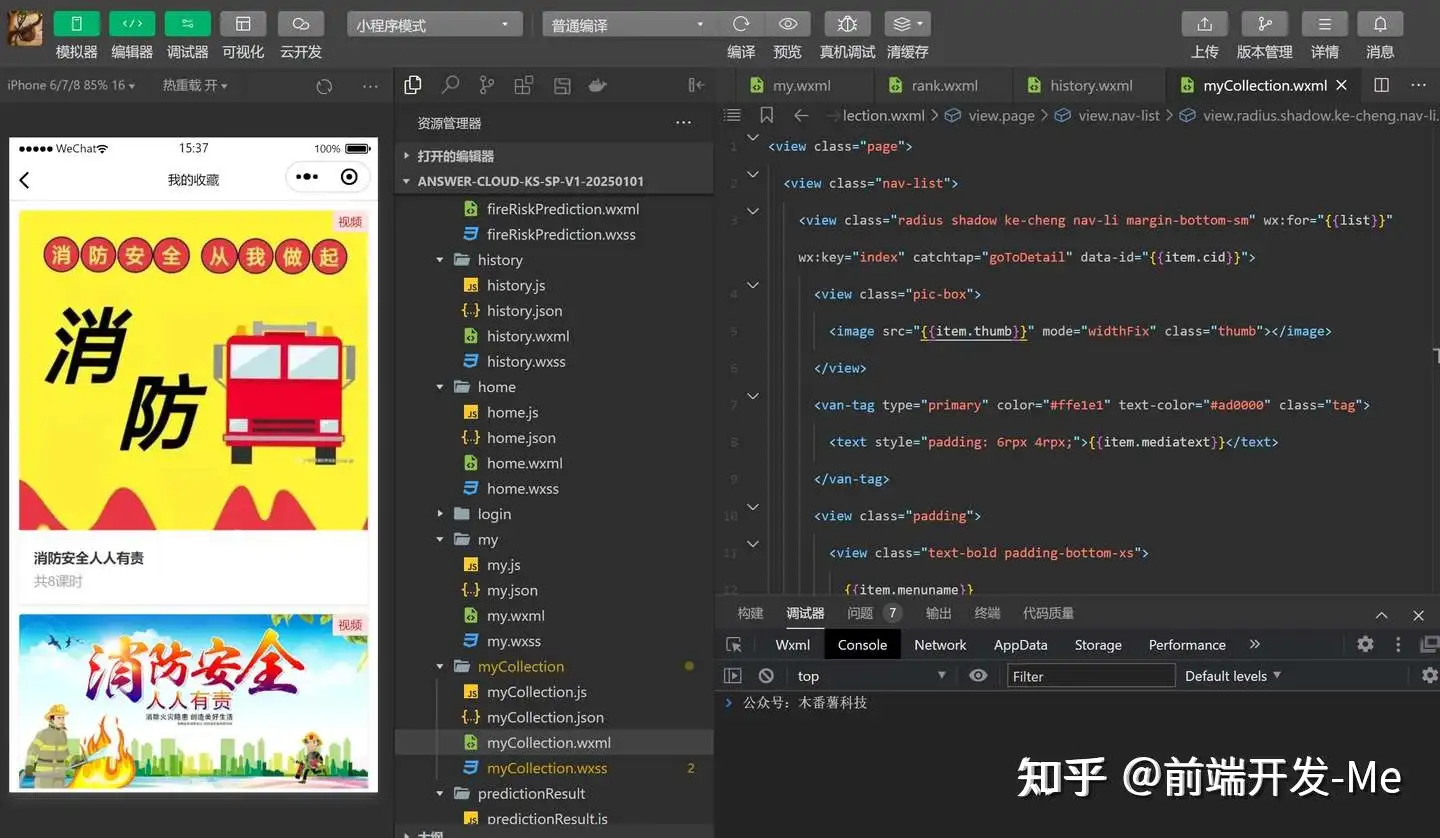
页面布局
<view class="page">
  <view class="nav-list">
    <view class="radius shadow ke-cheng nav-li margin-bottom-sm" wx:for="{{list}}" wx:key="index" catchtap="goToDetail" data-id="{{item.cid}}">
      <view class="pic-box">
        <image src="{{item.thumb}}" mode="widthFix" class="thumb"></image>
      </view>
      <van-tag type="primary" color="#ffe1e1" text-color="#ad0000" class="tag">
        <text style="padding: 6rpx 4rpx;">{{item.mediatext}}</text>
      </van-tag>
      <view class="padding">
        <view class="text-bold padding-bottom-xs">
          {{item.menuname}}
        </view>
        <view class="text-gray">
          共{{item.ksnum}}课时
        </view>
      </view>
    </view>
  </view>
</view>
层叠样式
page {
  background-color: #fff;
}
.page {
  padding: 20rpx;
}
.page-bd {
  padding: 20rpx;
}
.page .radio-group, .page .checkbox-group {
  display: block;
}
.my-choosebox {
  display: block;
  margin-bottom: 20rpx;
  border: 2rpx solid #ddd;
  padding: 20rpx;
  border-radius: 10rpx;
  line-height: 1;
}
.my-choosebox.checked {
  border-color: #0760E3;
  background-color: #438FFF;
  color: #fff;
}
.toindex-btn {
  margin-top: 20rpx;
  display:inline-block;
  line-height:2.3;
  font-size:13px;
  padding:0 1.34em;
  color: red;
  float: right;
}

.yi-zuo-da, .wei-zuo-da, .yi-da, .wei-da {
  display: inline-block;
  width: 26rpx;
  height: 26rpx;
  border-radius: 50%;
  margin-right: 6rpx;
}
.yi-zuo-da, .yi-da {
  background-color: #4685FF;
  color: #fff;
}
.wei-zuo-da, .wei-da {
  border: 1px solid #ddd;
}
.yi-da, .wei-da {
  width: 66rpx;
  height: 66rpx;
  line-height: 66rpx;
}


.collect {
  float:right;
  padding-right: 20rpx;
}

.collect .lg {
  font-size: 36rpx;
}

/* 评论区 */
.infoTitle{
  font-size: var(--font-size-M);
  font-weight: 600;
  color: #000;
  margin-bottom: 20rpx;
}
.van-cell{
  padding: 10rpx 0 10rpx 0 !important;
  /* position: relative;
  left: -26rpx; */
  /* font-size: var(--font-size-S); */
}

.noComment{
  /* text-align: center; */
  color: #868688;
  margin-top: 50rpx;
  margin-bottom: 50rpx;
}

.comment{
  background-color: #F2F1F6;
  margin-top: var(--font-size-M);
  padding: var(--font-size-S);
  border-radius: var(--font-size-S);
}

.comment_time{
  color: #868688;
  display: inline-block;
  float: right;
}

.comment_nickName{
  display: inline-block;
  color: #868688;
}

.comment_text{
  font-size: 25rpx;
  color: #454547;
}

.commentShell {
  margin-top: 50rpx;
  height: var(--font-size-M);
  margin-bottom: 100rpx;
}

.inputComment{
  /* display: inline-block; */
  /* background-color: aqua; */
  border: var(--color-theme) 1px solid;
  border-radius: var(--font-size-S);
  overflow: hidden;
  width: 95%;
}

/* 评论按钮 */
.submitComment{
  display: inline-block;
  /* align-items : center; */
  /* display: flex; */
  /* float: right; */
}


.thumb {
  width: 100%;
}
.ke-cheng {
  position: relative;
  overflow: hidden;
}
.tag {
  position: absolute;
  top: 0;
  right: 0;
}