鱼眼摄像头(一)多平面格式 单缓冲读取图像并显示
1.摄像头格式
1. 单平面格式(Single Plane):各通道数据保存在同一个平面(缓冲),图像数据按行连续存储
	a. mjpeg,yuyv等,适用于轻量级或者简单场景
2. 多平面格式(Multi-plane):图像数据分别保存在多个平面(缓冲)
	a. NV12,Y平面+UV平面
	b. 每个平面都有自己单独的物理内存缓冲区。因此对于ISP,写入DMA等场景来说分通道处理更高效
    c. 代码层面对于多平面数据的采集可以借助v4l2
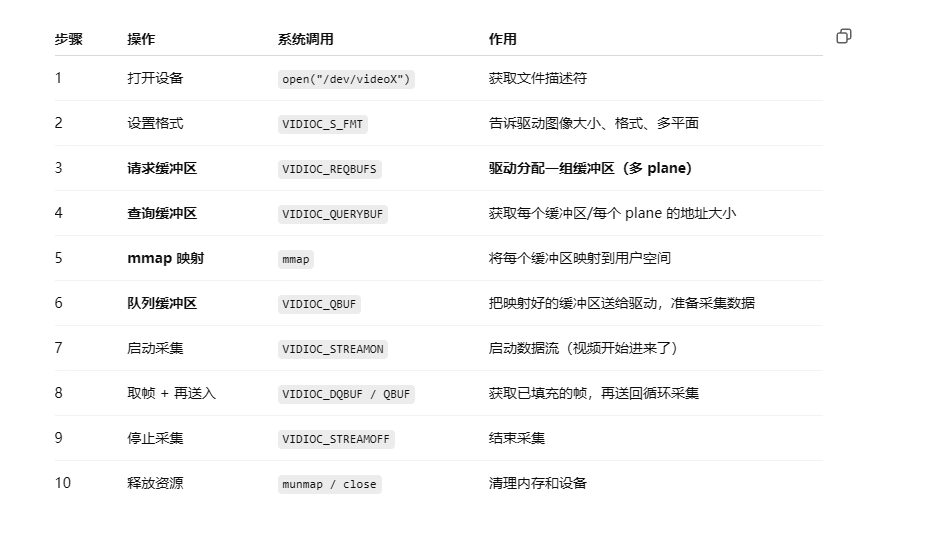
2.流程图
3.重要流程详解
设置格式
bool V4L2MPlaneCamera::initFormat()
{
    struct v4l2_format fmt = {};
    fmt.type = V4L2_BUF_TYPE_VIDEO_CAPTURE_MPLANE;
    fmt.fmt.pix_mp.width = width_;
    fmt.fmt.pix_mp.height = height_;
    fmt.fmt.pix_mp.pixelformat = V4L2_PIX_FMT_NV12;
    fmt.fmt.pix_mp.num_planes = 1;

    return ioctl(fd_, VIDIOC_S_FMT, &fmt) >= 0;
}
请求缓冲区,获取申请的缓冲区信息,用于后续取数据
bool V4L2MPlaneCamera::initMMap()
{
    if (!initFormat())
        return false;

    struct v4l2_requestbuffers req = {};
    req.count = 1;
    req.type = V4L2_BUF_TYPE_VIDEO_CAPTURE_MPLANE;
    req.memory = V4L2_MEMORY_MMAP;

    if (ioctl(fd_, VIDIOC_REQBUFS, &req) < 0)
        return false;

    struct v4l2_buffer buf = {};
    struct v4l2_plane planes[VIDEO_MAX_PLANES] = {};
    buf.type = V4L2_BUF_TYPE_VIDEO_CAPTURE_MPLANE;
    buf.memory = V4L2_MEMORY_MMAP;
    buf.index = 0; // 缓冲区索引
    buf.m.planes = planes;
    buf.length = 1; // 表示 planes 数组中有多少个 plane

    // 向驱动请求第 index 个缓冲区的详细信息,比如大小、偏移位置,实际 plane 的个数等。
    if (ioctl(fd_, VIDIOC_QUERYBUF, &buf) < 0)
        return false;

    buffer_.length = buf.m.planes[0].length; // plane 的实际内存长度
    buffer_.start = mmap(NULL, buf.m.planes[0].length, PROT_READ | PROT_WRITE, MAP_SHARED, fd_, buf.m.planes[0].m.mem_offset);
    return buffer_.start != MAP_FAILED;
}
启动采集,注意每次采集前必须设置缓冲区队列ioctl(fd_, VIDIOC_QBUF, &buf)
bool V4L2MPlaneCamera::queueBuffer()
{
    struct v4l2_buffer buf = {};
    struct v4l2_plane planes[VIDEO_MAX_PLANES] = {};
    buf.type = V4L2_BUF_TYPE_VIDEO_CAPTURE_MPLANE;
    buf.memory = V4L2_MEMORY_MMAP;
    buf.index = 0;                     // 缓冲区索引
    buf.length = 1;                    // 本缓冲区包含多少个 plane(平面)。
    buf.m.planes = planes;             // 接收 plane 结果
    planes[0].length = buffer_.length; // plane 的实际内存长度

    return ioctl(fd_, VIDIOC_QBUF, &buf) >= 0;
}

bool V4L2MPlaneCamera::startCapture()
{
    if (!queueBuffer())
        return false;

    enum v4l2_buf_type type = V4L2_BUF_TYPE_VIDEO_CAPTURE_MPLANE;
    return ioctl(fd_, VIDIOC_STREAMON, &type) >= 0;
}
取帧数据,再送入队列
bool V4L2MPlaneCamera::readFrame(cv::Mat &bgr)
{
    fd_set fds;
    FD_ZERO(&fds);
    FD_SET(fd_, &fds);

    // 等待1s后返回
    struct timeval tv = {1, 0};
    int r = select(fd_ + 1, &fds, NULL, NULL, &tv);
    if (r <= 0)
        return false;

    struct v4l2_buffer buf = {};
    struct v4l2_plane planes[VIDEO_MAX_PLANES] = {};
    buf.type = V4L2_BUF_TYPE_VIDEO_CAPTURE_MPLANE;
    buf.memory = V4L2_MEMORY_MMAP;
    buf.index = 0;         // 缓冲区索引
    buf.length = 1;        // 本缓冲区包含多少个 plane(平面)。
    buf.m.planes = planes; // 接收 plane 结果

    // 从缓冲队列中取出一帧缓冲区
    if (ioctl(fd_, VIDIOC_DQBUF, &buf) < 0)
        return false;

    cv::Mat yuv(height_ + height_ / 2, width_, CV_8UC1, buffer_.start);
    cv::cvtColor(yuv, bgr, cv::COLOR_YUV2BGR_NV12);

    // 将取出的缓冲区重新放回队列
    if (!queueBuffer())
        return false;

    return true;
}
3.完整代码
#ifndef V4L2MPLANECAMERA_H
#define V4L2MPLANECAMERA_H

#pragma once

#include <linux/videodev2.h>

#include <opencv2/opencv.hpp>
#include <string>
#include <vector>

struct FormatInfo {
  std::string fourcc;
  std::string description;
  std::vector<std::pair<int, int>> resolutions;
};

class V4L2MPlaneCamera {
 public:
  V4L2MPlaneCamera(const std::string &devPath, int width, int height);
  ~V4L2MPlaneCamera();

  std::vector<FormatInfo> listFormats();

  bool openDevice();
  bool initMMap();
  bool startCapture();
  bool stopCapture();
  void closeDevice();
  bool readFrame(cv::Mat &bgr);

 private:
  struct Buffer {
    void *start;
    size_t length;
  };

  std::string devicePath_;
  int width_, height_;
  int fd_ = -1;
  Buffer buffer_;
  int bufferCount_ = 4;
  enum v4l2_buf_type bufferType_ = V4L2_BUF_TYPE_VIDEO_CAPTURE_MPLANE;

  bool initFormat();
  bool queueBuffer();
};

#endif
#include "V4L2MPlaneCamera.h"

#include <fcntl.h>
#include <sys/ioctl.h>
#include <sys/mman.h>
#include <unistd.h>

#include <cstring>
#include <iostream>

static std::string fourccToString(__u32 fmt);

V4L2MPlaneCamera::V4L2MPlaneCamera(const std::string &devPath, int width,
                                   int height)
    : devicePath_(devPath), width_(width), height_(height) {}

V4L2MPlaneCamera::~V4L2MPlaneCamera() {
  stopCapture();
  closeDevice();
}

bool V4L2MPlaneCamera::openDevice() {
  fd_ = ::open(devicePath_.c_str(), O_RDWR | O_NONBLOCK);
  return fd_ >= 0;
}

bool V4L2MPlaneCamera::initFormat() {
  struct v4l2_format fmt = {};
  fmt.type = bufferType_;
  fmt.fmt.pix_mp.width = width_;
  fmt.fmt.pix_mp.height = height_;
  fmt.fmt.pix_mp.pixelformat = V4L2_PIX_FMT_NV12;
  fmt.fmt.pix_mp.num_planes = 1;  // NV12只有一个plane

  return ioctl(fd_, VIDIOC_S_FMT, &fmt) >= 0;
}

bool V4L2MPlaneCamera::initMMap() {
  if (!initFormat()) return false;

  struct v4l2_requestbuffers req = {};
  req.count = 1;
  req.type = bufferType_;
  req.memory = V4L2_MEMORY_MMAP;

  if (ioctl(fd_, VIDIOC_REQBUFS, &req) < 0) return false;

  struct v4l2_buffer buf = {};
  struct v4l2_plane planes[VIDEO_MAX_PLANES] = {};
  buf.type = bufferType_;
  buf.memory = V4L2_MEMORY_MMAP;
  buf.index = 0;  // 缓冲区索引
  buf.m.planes = planes;
  buf.length = 1;  // 表示 planes 数组中有多少个 plane

  // 向驱动请求第 index 个缓冲区的详细信息,比如大小、偏移位置,实际 plane
  // 的个数等。
  if (ioctl(fd_, VIDIOC_QUERYBUF, &buf) < 0) return false;

  buffer_.length = buf.m.planes[0].length;  // plane 的实际内存长度
  buffer_.start = mmap(NULL, buf.m.planes[0].length, PROT_READ | PROT_WRITE,
                       MAP_SHARED, fd_, buf.m.planes[0].m.mem_offset);
  return buffer_.start != MAP_FAILED;
}

bool V4L2MPlaneCamera::queueBuffer() {
  struct v4l2_buffer buf = {};
  struct v4l2_plane planes[VIDEO_MAX_PLANES] = {};
  buf.type = bufferType_;
  buf.memory = V4L2_MEMORY_MMAP;
  buf.index = 0;          // 缓冲区索引
  buf.length = 1;         // 本缓冲区包含多少个 plane(平面)。
  buf.m.planes = planes;  // 接收 plane 结果
  planes[0].length = buffer_.length;  // plane 的实际内存长度

  return ioctl(fd_, VIDIOC_QBUF, &buf) >= 0;
}

bool V4L2MPlaneCamera::startCapture() {
  if (!queueBuffer()) return false;

  return ioctl(fd_, VIDIOC_STREAMON, &bufferType_) >= 0;
}

bool V4L2MPlaneCamera::readFrame(cv::Mat &bgr) {
  fd_set fds;
  FD_ZERO(&fds);
  FD_SET(fd_, &fds);

  // 等待1s后返回
  struct timeval tv = {1, 0};
  int r = select(fd_ + 1, &fds, NULL, NULL, &tv);
  if (r <= 0) return false;

  struct v4l2_buffer buf = {};
  struct v4l2_plane planes[VIDEO_MAX_PLANES] = {};
  buf.type = bufferType_;
  buf.memory = V4L2_MEMORY_MMAP;
  buf.index = 0;          // 缓冲区索引
  buf.length = 1;         // 本缓冲区包含多少个 plane(平面)。
  buf.m.planes = planes;  // 接收 plane 结果

  // 从缓冲队列中取出一帧缓冲区
  if (ioctl(fd_, VIDIOC_DQBUF, &buf) < 0) return false;

  cv::Mat yuv(height_ + height_ / 2, width_, CV_8UC1, buffer_.start);
  cv::cvtColor(yuv, bgr, cv::COLOR_YUV2BGR_NV12);

  // 将取出的缓冲区重新放回队列
  if (!queueBuffer()) return false;

  return true;
}

bool V4L2MPlaneCamera::stopCapture() {
  return ioctl(fd_, VIDIOC_STREAMOFF, &bufferType_) >= 0;
}

void V4L2MPlaneCamera::closeDevice() {
  if (fd_ >= 0) {
    munmap(buffer_.start, buffer_.length);
    close(fd_);
    fd_ = -1;
  }
}

std::vector<FormatInfo> V4L2MPlaneCamera::listFormats() {
  std::vector<FormatInfo> formats;
  if (fd_ < 0) {
    std::cerr << "[错误] 摄像头设备未打开。" << std::endl;
    return formats;
  }

  struct v4l2_fmtdesc fmtDesc = {};
  fmtDesc.type = bufferType_;

  std::cout << "[信息] 开始枚举支持的图像格式..." << std::endl;

  for (fmtDesc.index = 0; ioctl(fd_, VIDIOC_ENUM_FMT, &fmtDesc) == 0;
       fmtDesc.index++) {
    FormatInfo info;
    info.fourcc = fourccToString(fmtDesc.pixelformat);
    info.description = reinterpret_cast<char *>(fmtDesc.description);

    std::cout << "  - 格式: " << info.fourcc << " (" << info.description << ")"
              << std::endl;

    struct v4l2_frmsizeenum sizeEnum = {};
    sizeEnum.pixel_format = fmtDesc.pixelformat;

    bool hasResolution = false;

    for (sizeEnum.index = 0; ioctl(fd_, VIDIOC_ENUM_FRAMESIZES, &sizeEnum) == 0;
         sizeEnum.index++) {
      switch (sizeEnum.type) {
        case V4L2_FRMSIZE_TYPE_DISCRETE:
          std::cout << "      离散分辨率: " << sizeEnum.discrete.width << "x"
                    << sizeEnum.discrete.height << std::endl;
          info.resolutions.emplace_back(sizeEnum.discrete.width,
                                        sizeEnum.discrete.height);
          hasResolution = true;
          break;

        case V4L2_FRMSIZE_TYPE_CONTINUOUS:
          std::cout << "      连续分辨率范围: " << sizeEnum.stepwise.min_width
                    << "x" << sizeEnum.stepwise.min_height << " 到 "
                    << sizeEnum.stepwise.max_width << "x"
                    << sizeEnum.stepwise.max_height << "(任意值均可)"
                    << std::endl;
          hasResolution = true;
          // 可考虑生成若干预设分辨率加入 info.resolutions
          break;

        case V4L2_FRMSIZE_TYPE_STEPWISE:
          std::cout << "      步进型分辨率: "
                    << "宽度 [" << sizeEnum.stepwise.min_width << "~"
                    << sizeEnum.stepwise.max_width << "] 步长 "
                    << sizeEnum.stepwise.step_width << ",高度 ["
                    << sizeEnum.stepwise.min_height << "~"
                    << sizeEnum.stepwise.max_height << "] 步长 "
                    << sizeEnum.stepwise.step_height << std::endl;
          hasResolution = true;
          // 同上可生成预设 resolution
          break;

        default:
          std::cerr << "      [警告] 未知分辨率类型: " << sizeEnum.type
                    << std::endl;
          break;
      }
    }

    if (!hasResolution) {
      std::cerr << "    [警告] 无可用分辨率" << std::endl;
    }

    formats.push_back(info);
  }

  if (fmtDesc.index == 0) {
    std::cerr << "[警告] 未能枚举到任何图像格式!" << std::endl;
  } else {
    std::cout << "[信息] 完成格式枚举,总共: " << fmtDesc.index << " 种格式"
              << std::endl;
  }

  return formats;
}
static std::string fourccToString(__u32 fmt) {
  char str[5];
  str[0] = fmt & 0xFF;
  str[1] = (fmt >> 8) & 0xFF;
  str[2] = (fmt >> 16) & 0xFF;
  str[3] = (fmt >> 24) & 0xFF;
  str[4] = '\0';
  return std::string(str);
}