d该系列项目整体介绍及源代码请参照前面写的一篇文章【springcloud学习(dalston.sr1)】项目整体介绍(含源代码)(一)
springcloud学习(dalston.sr1)系统文章汇总如下:
【springcloud学习(dalston.sr1)】项目整体介绍(含源代码)(一)
【springcloud学习(dalston.sr1)】Eureka服务端集群的搭建(含源代码)(二)
【springcloud学习(dalston.sr1)】Eureka单个服务端的搭建(含源代码)(三)
【springcloud学习(dalston.sr1)】Eureka 客户端服务注册(含源代码)(四)
【springcloud学习(dalston.sr1)】服务消费者通过restTemplate来访问服务提供者(含源代码)(五)
【springcloud学习(dalston.sr1)】Eureka 服务发现(含源代码)(六)
【springcloud学习(dalston.sr1)】Ribbon负载均衡(含源代码)(七)
【springcloud学习(dalston.sr1)】使用Feign实现接口调用(含源代码)(八)
【springcloud学习(dalston.sr1)】Hystrix服务熔断(含源代码)(九)
【springcloud学习(dalston.sr1)】Hystrix服务降级(含源代码)(十)
【springcloud学习(dalston.sr1)】Hystrix Dashboard服务监控(含源代码)(十一)
【springcloud学习(dalston.sr1)】Zuul路由访问映射规则配置及使用(含源代码)(十二)
【springcloud学习(dalston.sr1)】Config配置中心-ConfigServer端与Git通信(含源代码)(十三)
【springcloud学习(dalston.sr1)】Config配置中心-Configclient端通过和Config server端通信来获取配置文件信息(含源代码)(十四)
这篇文章主要介绍Eureka客户端服务注册到eureka的server端。
上篇文章【springcloud学习(dalston.sr1)】Eureka单个服务端的搭建(含源代码)(三)里,我们已经创建好了eureka服务端工程。现在我们来创建一个简单的eureka客户端工程。
该项目是一个简单的spring boot微服务,主要是一个简单的接口,涉及到数据库的访问。通过访问数据库的商品表,来查询一个商品列表,并返回json数据给前端。该模块会用到microservicecloud-api项目的商品实体类,所以在pom文件中,需要引入该项目的依赖。
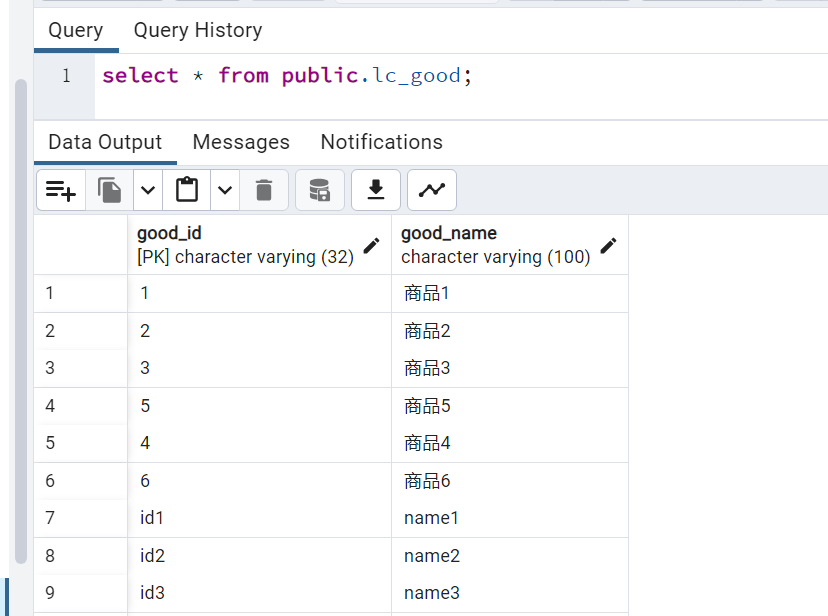
需要提前准备好数据库的一张表,这里我用的是postgres数据库,创建了一个商品表,包括商品ID和商品名称两个字段。如下图
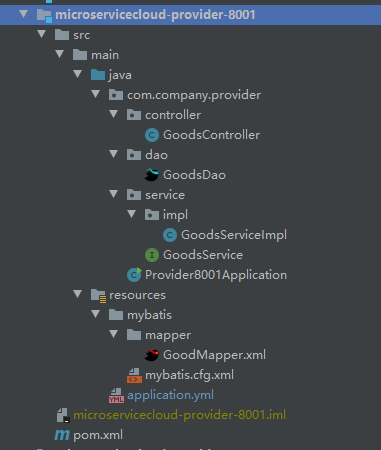
该项目的整体代码结构如下:
(一)Eureka客户端创建
(1)在IEDA中springcloud2015项目下新建一个microservicecloud-provider-8001的模块,如下图:
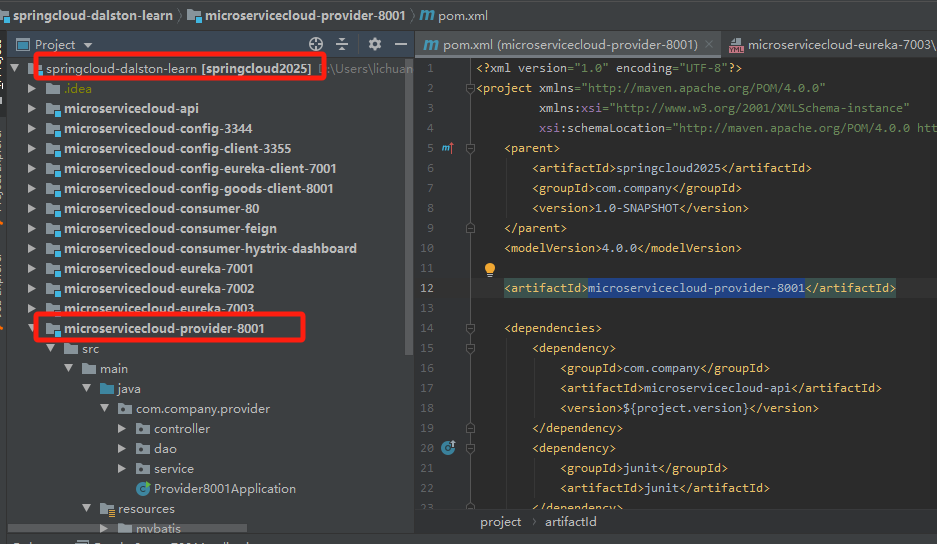
(2)Maven依赖添加
XML
<?xml version="1.0" encoding="UTF-8"?>
<project xmlns="http://maven.apache.org/POM/4.0.0"
         xmlns:xsi="http://www.w3.org/2001/XMLSchema-instance"
         xsi:schemaLocation="http://maven.apache.org/POM/4.0.0 http://maven.apache.org/xsd/maven-4.0.0.xsd">
    <parent>
        <artifactId>springcloud2025</artifactId>
        <groupId>com.company</groupId>
        <version>1.0-SNAPSHOT</version>
    </parent>
    <modelVersion>4.0.0</modelVersion>

    <artifactId>microservicecloud-provider-8001</artifactId>

    <dependencies>
        <dependency>
            <groupId>com.company</groupId>
            <artifactId>microservicecloud-api</artifactId>
            <version>${project.version}</version>
        </dependency>
        <dependency>
            <groupId>junit</groupId>
            <artifactId>junit</artifactId>
        </dependency>
        <dependency>
            <groupId>org.postgresql</groupId>
            <artifactId>postgresql</artifactId>
        </dependency>
        <dependency>
            <groupId>com.alibaba</groupId>
            <artifactId>druid</artifactId>
        </dependency>
        <dependency>
            <groupId>org.mybatis.spring.boot</groupId>
            <artifactId>mybatis-spring-boot-starter</artifactId>
        </dependency>
        <dependency>
            <groupId>org.springframework.boot</groupId>
            <artifactId>spring-boot-starter-jetty</artifactId>
        </dependency>
        <dependency>
            <groupId>org.springframework.boot</groupId>
            <artifactId>spring-boot-starter-web</artifactId>
        </dependency>
        <dependency>
            <groupId>org.springframework.boot</groupId>
            <artifactId>spring-boot-starter-test</artifactId>
        </dependency>
        <!-- 将服务provider注册进eureka -->
        <dependency>
            <groupId>org.springframework.cloud</groupId>
            <artifactId>spring-cloud-starter-eureka</artifactId>
        </dependency>
        <dependency>
            <groupId>org.springframework.cloud</groupId>
            <artifactId>spring-cloud-starter-config</artifactId>
        </dependency>

        <!-- actuator监控信息完善 -->
        <dependency>
            <groupId>org.springframework.boot</groupId>
            <artifactId>spring-boot-starter-actuator</artifactId>
        </dependency>
    </dependencies>


</project>
可以看到POM文件用到了microservicecloud-api模块,该模块结构如下图:
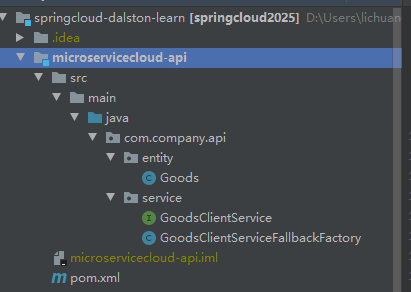
(3)在application.yml中添加如下配置文件信息
java
server:
  port: 8001

mybatis:
  config-location: classpath:mybatis/mybatis.cfg.xml  #mybatis配置文件所在路径
  type-aliases-package: com.company.api.entity  #所有Entity别名类所在包
  mapper-locations: classpath:mybatis/mapper/*.xml #mapper映射文件

spring:
  application:
    name: microservicecloud-goods
  datasource:
    type: com.alibaba.druid.pool.DruidDataSource  #当前数据源操作类型
    driver-class-name: org.postgresql.Driver    #postgres驱动包
    url: jdbc:postgresql://localhost:5432/postgres    #数据库名称
    username: postgres
    password: 123456
    dbcp2:
      min-idel: 5           #数据库连接池的最小维持连接数
      initial-seze: 5       #初始化连接数
      max-total: 5          #最大连接数
      max-wait-millis: 200  #等待链接获取的最大超时时间


eureka:
  client: #客户端注册进eureka服务列表里
    service-url:
      defaultZone: http://localhost:7001/eureka/ #这里填eureka服务端的地址
      #http://eureka7001.com:7001/eureka/,http://eureka7002.com:7002/eureka/,http://eureka7003.com:7003/eureka/ #设置与erueka server交互的地址查询服务和注册服务,都需要依赖于这个地址
  instance:
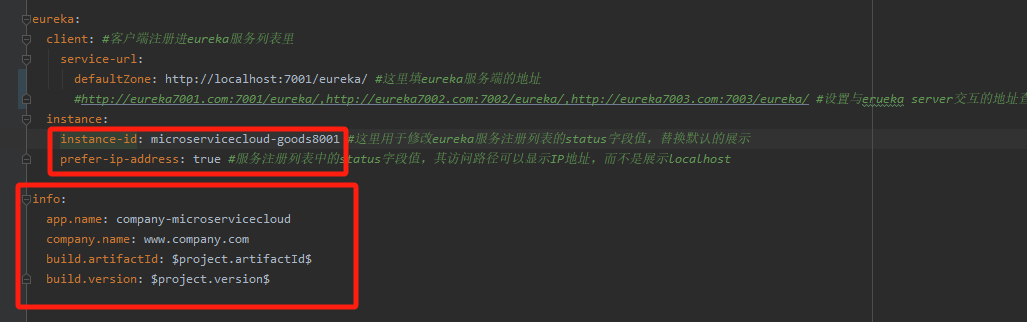
    instance-id: microservicecloud-goods8001 #这里用于修改eureka服务注册列表的status字段值,替换默认的展示
    prefer-ip-address: true #服务注册列表中的status字段值,其访问路径可以显示IP地址,而不是展示localhost

info:
  app.name: company-microservicecloud
  company.name: www.company.com
  build.artifactId: $project.artifactId$
  build.version: $project.version$
(4)创建mybatis mapper xml文件,dao接口,service接口,controller接口,启动类
XML
<?xml version="1.0" encoding="UTF-8" ?>
<!DOCTYPE configuration
        PUBLIC "-//mybatis-org//DTD Config 3.0//EN"
        "http://mybatis.org/dtd/mybatis-3-config.dtd">
<configuration>
    <settings>
        <setting name="cacheEnabled" value="true"/> <!-- 二级缓存开启 -->
    </settings>
</configuration>
XML
<?xml version="1.0" encoding="UTF-8" ?>
<!DOCTYPE mapper PUBLIC "-//mybatis.org//DTD Mapper 3.0//EN"
        "http://mybatis.org/dtd/mybatis-3-mapper.dtd">
<mapper namespace="com.company.provider.dao.GoodsDao">
    <select id="getGoods" resultType="com.company.api.entity.Goods">
        select good_id as goodId, good_name || '数据库1' as goodName from public.lc_good limit 5
    </select>
</mapper>
java
package com.company.provider.dao;

import com.company.api.entity.Goods;
import org.apache.ibatis.annotations.Mapper;

import java.util.List;

@Mapper
public interface GoodsDao {

    List<Goods> getGoods();
}
java
package com.company.provider.service;

import com.company.api.entity.Goods;

import java.util.List;

public interface GoodsService {

    List<Goods> getGoods();
}
java
package com.company.provider.service.impl;

import com.company.api.entity.Goods;
import com.company.provider.dao.GoodsDao;
import com.company.provider.service.GoodsService;
import org.springframework.beans.factory.annotation.Autowired;
import org.springframework.stereotype.Service;

import java.util.List;

@Service
public class GoodsServiceImpl implements GoodsService {

    @Autowired
    private GoodsDao goodsDao;

    @Override
    public List<Goods> getGoods() {
        return goodsDao.getGoods();
    }
}
java
package com.company.provider.controller;

import com.company.api.entity.Goods;
import com.company.provider.service.GoodsService;
import org.springframework.beans.factory.annotation.Autowired;
import org.springframework.cloud.client.ServiceInstance;
import org.springframework.cloud.client.discovery.DiscoveryClient;
import org.springframework.web.bind.annotation.GetMapping;
import org.springframework.web.bind.annotation.RequestMapping;
import org.springframework.web.bind.annotation.RestController;

import java.util.List;

@RestController
@RequestMapping("/goods")
public class GoodsController {

    @Autowired
    private DiscoveryClient discoveryClient;

    @Autowired
    private GoodsService goodsService;

    @GetMapping("/list")
    public List<Goods> getGoods() {
        return goodsService.getGoods();
    }

    /**
     * 服务发现,提供一个接口可以查询当前组件提供了哪些服务
     * @return
     */
    @GetMapping("/discovery")
    public Object discovery() {
        List<String> services = discoveryClient.getServices();
        System.out.println("discovery服务列表" + services);

        List<ServiceInstance> instances = discoveryClient.getInstances("microservicecloud-goods".toUpperCase());
        instances.forEach(x ->
                System.out.println("serviceId:" + x.getServiceId()
        + ",host:" + x.getHost()
        + ",port:" + x.getPort()
        + ",uri:" + x.getUri()));
        return discoveryClient;
    }
}
java
package com.company.provider;

import org.springframework.boot.SpringApplication;
import org.springframework.boot.autoconfigure.SpringBootApplication;
import org.springframework.cloud.client.discovery.EnableDiscoveryClient;
import org.springframework.cloud.netflix.eureka.EnableEurekaClient;

@SpringBootApplication
@EnableEurekaClient //服务启动后会注册到eureka服务中
@EnableDiscoveryClient //用于服务发现
public class Provider8001Application {

    public static void main(String[] args) {
        SpringApplication.run(Provider8001Application.class, args);
    }
}
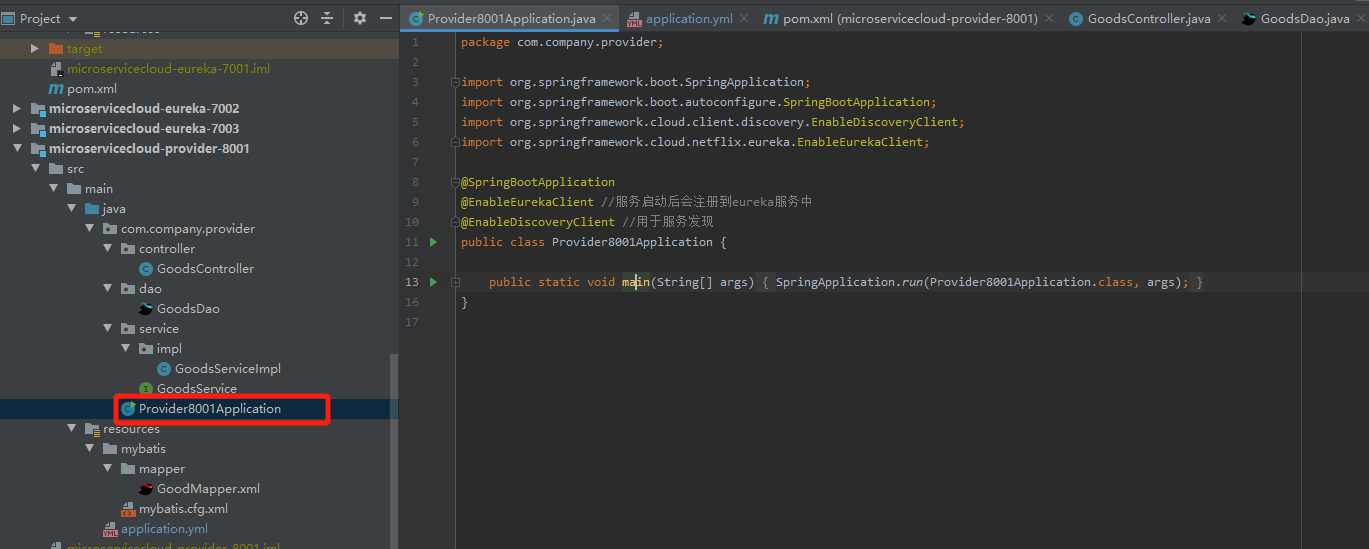
(5)项目整体结构如下(注意:该项目引用的实体类Goods来自于microservicecloud-api项目,文章前面已有提及,并且已在pom文件中进行了引用):
(二)验证eureka客户端将服务注册到eureka服务端的效果。
(1)首先我们启动eureka服务端EurekaServer7001Application。
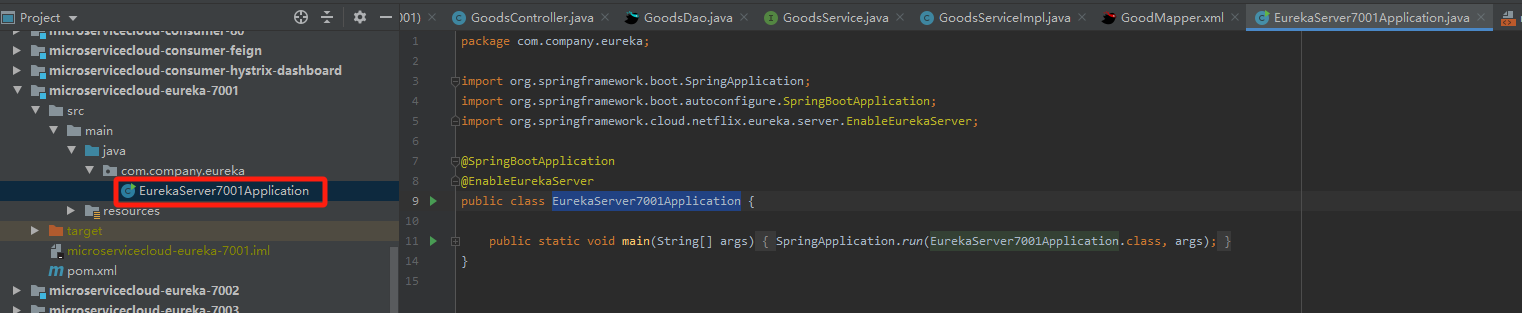 (2)启动完成后,在浏览器输入:http://localhost:7001查看如下,可以看到服务注册列表为空的。
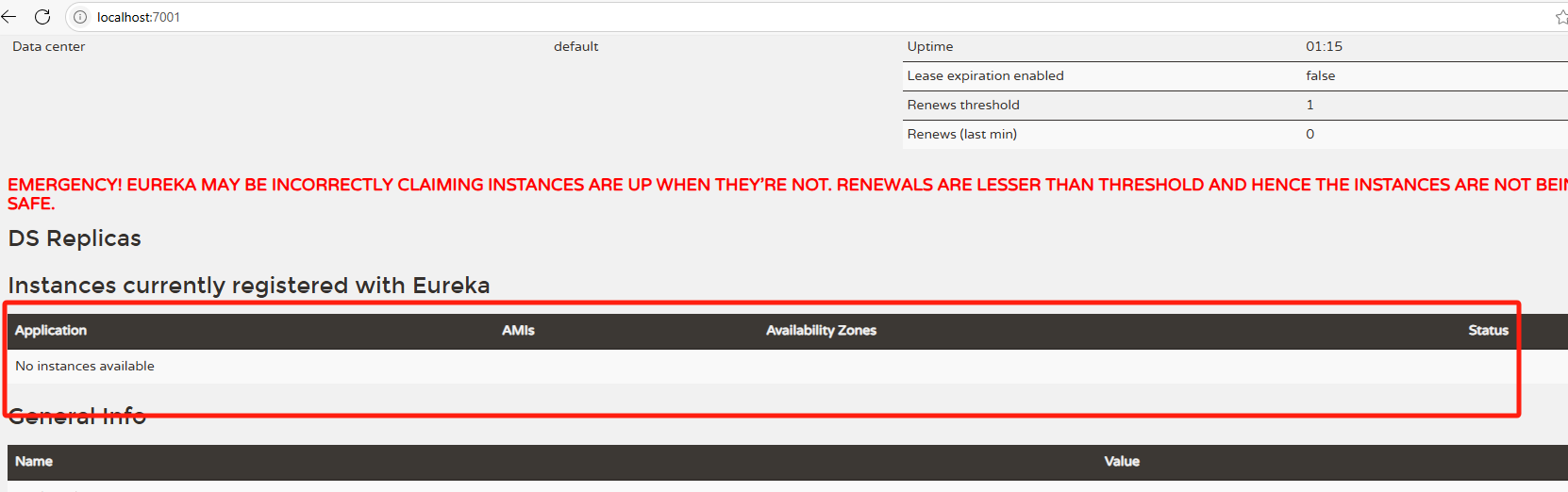
(3)然后我们启动eureka客户端Provider8001Application
(4)启动完成后,我们首先访问客户端的一个接口,以确认客户端服务是正常的,如下图。这样说明结果客户端服务是正常的。
在浏览器输入http://localhost:8001/goods/list

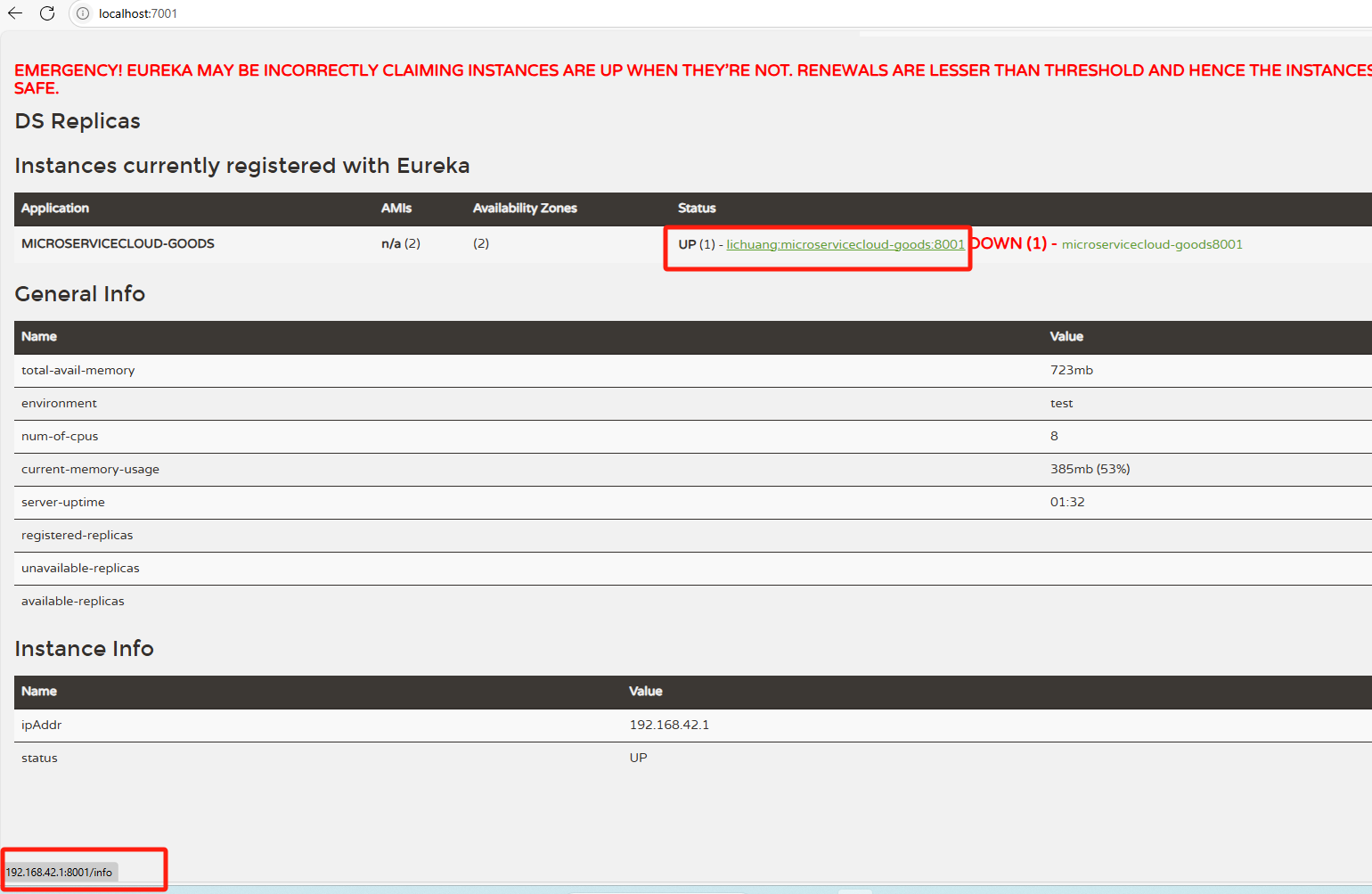
(5)然后我们在eureka页面(http://localhost:7001/)刷新该网页,可以看到该页面多了一行,说明客户端已经成功注册到,并能在服务端看到。如下图:
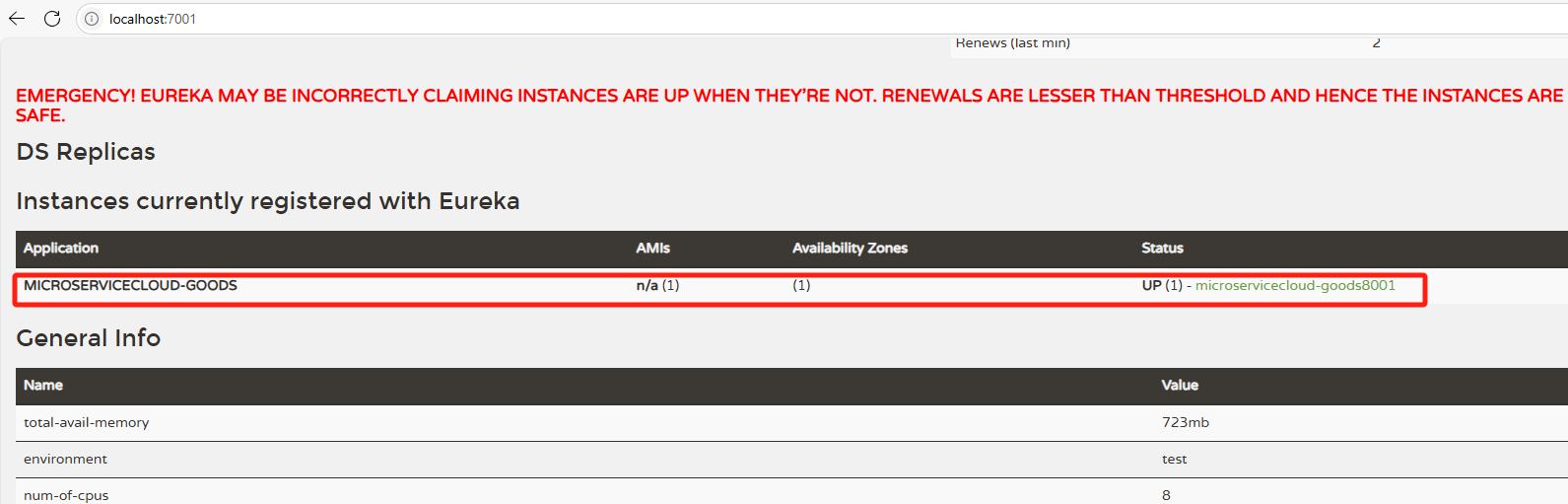
(6)需要说明的是如下几项配置如果不添加,则eureka服务注册界面的status字段的展示名称也会有所变化,以及鼠标放上去时,展示的链接地址是localhost,而不是IP地址;还有点击链接时会跳转至错误页,可以自行尝试下,试试效果