记录一下控制相机围绕物体旋转与移动的脚本,相机操作思路分为两块,一部分为旋转,一部分为移动,旋转是根据当前center中心点的坐标,根据距离设置与默认的旋转进行位置移动,移动是根据相机的左右和前后进行计算,当获取到移动的值时把中心点进行移动,而不是移动相机,相机是根据中心点的坐标进行计算自己的坐标
这个中心点是一个空物体放在模型下方,不要把模型放进去 ,
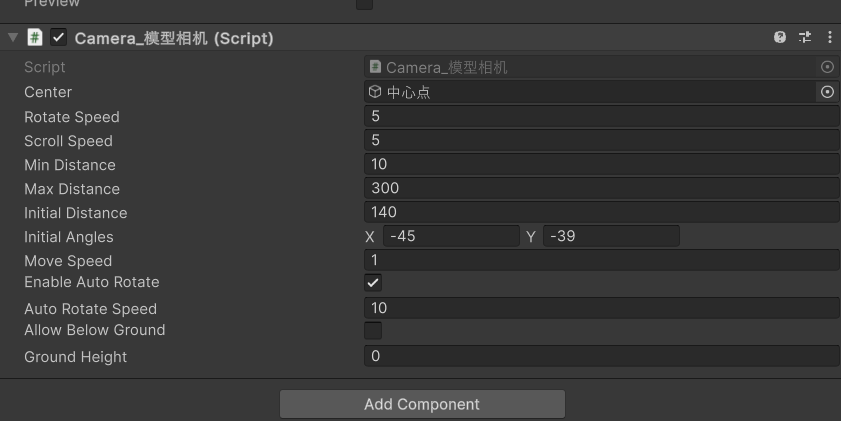
默认的角度设置需要提前说一下,例如当前我相机在场景的旋转为(39,135,0),
如果我想在运行的时候也是这个角度 就需要吧相机x轴填入到脚本的y轴上,需要取反为负数
相机的y轴放到脚本的x上,但是脚本的y需要自身的旋转减去180 设置就为(-45,-39,0)
这样做的理由就是把360的角度映射为正负1800
剩下的就是是否开启自旋转与是否可以低于地面


csharp
using QFramework;
using System.Collections;
using System.Collections.Generic;
using TMPro;
using UnityEngine;

public class Camera_模型相机 : MonoBehaviour
{

   // public Transform target; // 目标物体
    public GameObject center;//围绕点
    public float rotateSpeed = 5.0f; // 旋转速度
    public float scrollSpeed = 5.0f; // 滚轮速度
    public float minDistance = 20f; // 最小距离
    public float maxDistance = 150; // 最大距离
    public float initialDistance = 20.0f; // 初始距离
    public Vector2 initialAngles = new Vector2(0f, 30f); // 初始角度(水平,垂直)
    public float moveSpeed;//移动速度
    float move_X,move_Y;
    private float currentDistance;
    private float horizontalAngle;
    private float verticalAngle;
    public bool enableAutoRotate = false; // 是否启用自动旋转
    public float autoRotateSpeed = 10f; // 自动旋转速度
    bool bl_旋转控制;
    Vector3 initialPos;
    float time_自选择控制=5;
    public bool allowBelowGround = true; //是否允许低于地面
    public float groundHeight = 0f; // 地面高度(可自定义)
    void Start()
    {
        currentDistance = initialDistance;
        horizontalAngle = initialAngles.x;
        verticalAngle = initialAngles.y;
        initialPos = center.transform.position;
        UpdateCameraPosition();
    }
    void Update()
    {
        HandleMouseInput();
        HandleScrollInput();
        if (enableAutoRotate)
        {

            if (!bl_旋转控制)
            {
                time_自选择控制 += Time.deltaTime;
                if (time_自选择控制 >= 5) { bl_旋转控制 = true; time_自选择控制 = 0; }
            }
            AutoRotateCenter();
        }

        UpdateCameraPosition();


    }
    void AutoRotateCenter()
    {if (bl_旋转控制)
        horizontalAngle -= autoRotateSpeed * Time.deltaTime;
    }
    void HandleMouseInput()
    {
        if (Input.GetMouseButton(1))
        {
            bl_旋转控制 = false;
            time_自选择控制 = 0;
            // 获取鼠标移动量
            horizontalAngle += Input.GetAxis("Mouse X") * rotateSpeed;
            verticalAngle += Input.GetAxis("Mouse Y") * rotateSpeed;
            verticalAngle = Mathf.Clamp(verticalAngle, -89f, 89f); // 限制垂直角度
        }   // 新增右键平移逻辑

        // 鼠标左键移动
        if (Input.GetMouseButton(0))
        {
            bl_旋转控制 = false;
            time_自选择控制 = 0;
            move_X = moveSpeed * Input.GetAxis("Mouse X");
            move_Y= moveSpeed* Input.GetAxis("Mouse Y");
            Vector3 right = transform.right * move_X;
            Vector3 forward = transform.forward * move_Y;
            forward.y = 0; // 保持水平移动
           // print((right + forward));
            center.transform.Translate(-(right + forward), Space.World);

        }
    }
    void HandleScrollInput()
    {
        float scroll = Input.GetAxis("Mouse ScrollWheel");
        currentDistance -= scroll * scrollSpeed;
        currentDistance = Mathf.Clamp(currentDistance, minDistance, maxDistance);

    }
   public void ResetCamera()
    {
        // 重置到初始状态
        currentDistance = initialDistance;
        horizontalAngle = initialAngles.x;
        verticalAngle = initialAngles.y;
        center.Position(initialPos); bl_旋转控制 = false;
    }
    void UpdateCameraPosition()
    {
        // 计算旋转
        Quaternion yaw = Quaternion.AngleAxis(horizontalAngle, Vector3.up);
        Quaternion pitch = Quaternion.AngleAxis(verticalAngle, Vector3.right);
        Quaternion combinedRotation = yaw * pitch;
        // 计算相机位置
        Vector3 offset = combinedRotation * Vector3.forward * currentDistance;
        Vector3 targetPos = center.transform.position + offset;
        // 新增地面高度限制
        if (!allowBelowGround && targetPos.y < groundHeight)
        {
            targetPos.y = groundHeight+0.2f;
             重新计算距离保持原有水平距离
            //float horizontalDist = Mathf.Sqrt(
            //    Mathf.Pow(targetPos.x - center.transform.position.x, 2) +
            //    Mathf.Pow(targetPos.z - center.transform.position.z, 2)
            //);
            //currentDistance = horizontalDist / Mathf.Cos(Mathf.Asin(
            //    (groundHeight - center.transform.position.y) / currentDistance
            //));
        }

        transform.position = targetPos;
        // 确保相机看向目标
        transform.LookAt(center.transform.position);

    }
}