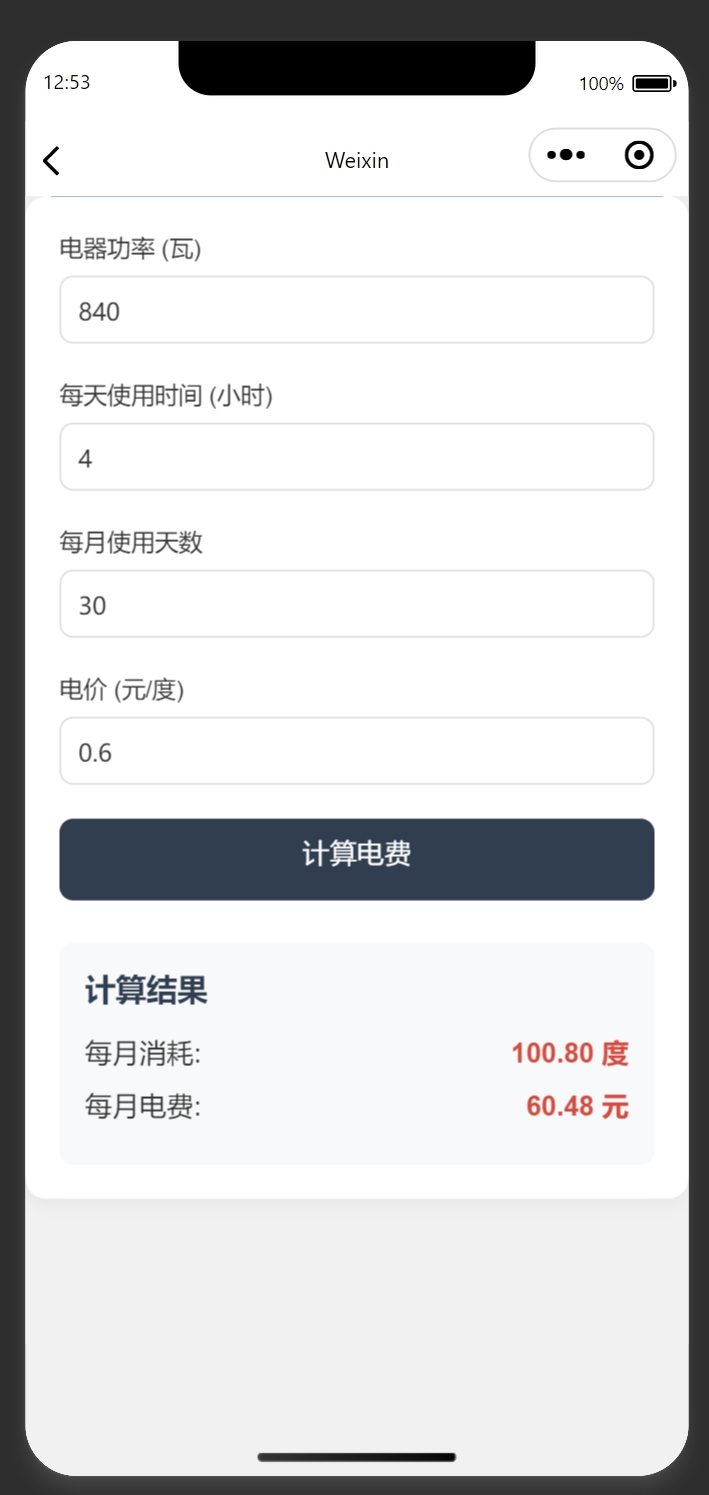
微信小程序版电费计算器
以下是一个去掉"电器名称"后的微信小程序电费计算器代码,包含所有必要文件:
1. app.json (全局配置)
javascript
{
  "pages": [
    "pages/index/index"
  ],
  "window": {
    "backgroundColor": "#F6F6F6",
    "backgroundTextStyle": "light",
    "navigationBarBackgroundColor": "#2c3e50",
    "navigationBarTitleText": "电费计算器",
    "navigationBarTextStyle": "white"
  },
  "sitemapLocation": "sitemap.json",
  "style": "v2"
}
2. app.wxss (全局样式)
css
/* 全局样式 */
page {
  background-color: #f5f5f5;
  font-family: -apple-system, BlinkMacSystemFont, 'Segoe UI', Roboto, Oxygen, Ubuntu, Cantarell, 'Open Sans', 'Helvetica Neue', sans-serif;
  padding: 20px;
}
3. pages/index/index.wxml (页面结构)
html
<view class="container">
  <view class="calculator">
    <view class="form-group">
      <text class="label">电器功率 (瓦)</text>
      <input type="number" placeholder="请输入电器功率" bindinput="inputPower" value="{{power}}"/>
    </view>

    <view class="form-group">
      <text class="label">每天使用时间 (小时)</text>
      <input type="number" placeholder="请输入使用时间" bindinput="inputHours" value="{{hours}}"/>
    </view>

    <view class="form-group">
      <text class="label">每月使用天数</text>
      <input type="number" placeholder="请输入使用天数" bindinput="inputDays" value="{{days}}"/>
    </view>

    <view class="form-group">
      <text class="label">电价 (元/度)</text>
      <input type="digit" placeholder="请输入电价" bindinput="inputPrice" value="{{price}}"/>
    </view>

    <button bindtap="calculate">计算电费</button>

    <view class="result" wx:if="{{showResult}}">
      <view class="result-title">计算结果</view>
      <view class="result-item">
        <text>每月消耗:</text>
        <text class="result-value">{{consumption}} 度</text>
      </view>
      <view class="result-item">
        <text>每月电费:</text>
        <text class="result-value">{{cost}} 元</text>
      </view>
    </view>
  </view>
</view>
4. pages/index/index.wxss (页面样式)
css
.container {
  display: flex;
  flex-direction: column;
  align-items: center;
}

.calculator {
  width: 100%;
  background-color: #fff;
  border-radius: 12px;
  padding: 20px;
  box-shadow: 0 2px 10px rgba(0, 0, 0, 0.05);
}

.form-group {
  margin-bottom: 20px;
}

.label {
  display: block;
  margin-bottom: 8px;
  font-weight: 500;
  color: #333;
}

input {
  width: 100%;
  height: 40px;
  border: 1px solid #ddd;
  border-radius: 8px;
  padding: 0 10px;
  box-sizing: border-box;
}

button {
  width: 100%;
  height: 48px;
  background-color: #2c3e50;
  color: white;
  border: none;
  border-radius: 8px;
  font-size: 16px;
  margin-top: 10px;
}

button:active {
  opacity: 0.8;
}

.result {
  margin-top: 25px;
  padding: 15px;
  background-color: #f8f9fa;
  border-radius: 8px;
}

.result-title {
  font-size: 18px;
  font-weight: bold;
  margin-bottom: 15px;
  color: #2c3e50;
}

.result-item {
  display: flex;
  justify-content: space-between;
  margin-bottom: 10px;
  font-size: 16px;
}

.result-value {
  color: #e74c3c;
  font-weight: bold;
}
5. pages/index/index.js (页面逻辑)
javascript
Page({
  data: {
    power: '',
    hours: '',
    days: '30',
    price: '0.6',
    consumption: 0,
    cost: 0,
    showResult: false
  },

  inputPower: function(e) {
    this.setData({
      power: e.detail.value
    });
  },

  inputHours: function(e) {
    this.setData({
      hours: e.detail.value
    });
  },

  inputDays: function(e) {
    this.setData({
      days: e.detail.value
    });
  },

  inputPrice: function(e) {
    this.setData({
      price: e.detail.value
    });
  },

  calculate: function() {
    const power = parseFloat(this.data.power) || 0;
    const hours = parseFloat(this.data.hours) || 0;
    const days = parseFloat(this.data.days) || 0;
    const price = parseFloat(this.data.price) || 0;

    const consumption = (power * hours * days) / 1000;
    const cost = consumption * price;

    this.setData({
      consumption: consumption.toFixed(2),
      cost: cost.toFixed(2),
      showResult: true
    });
  }
});
6. pages/index/index.json (页面配置)
javascript
{
  "usingComponents": {}
}
功能说明
这个小程序电费计算器包含以下功能:
-
输入电器功率(瓦)
-
输入每天使用时间(小时)
-
输入每月使用天数(默认30天)
-
输入电价(默认0.6元/度)
-
点击计算按钮后显示:
-
每月用电量(度)
-
每月电费(元)
-
使用说明
-
将以上代码分别放入对应文件中
-
在微信开发者工具中创建新项目
-
将这些文件放入相应目录
-
编译运行即可
这个小程序界面简洁,操作直观,适合快速计算家电的电费消耗。你可以根据需要进一步调整样式或添加更多功能。