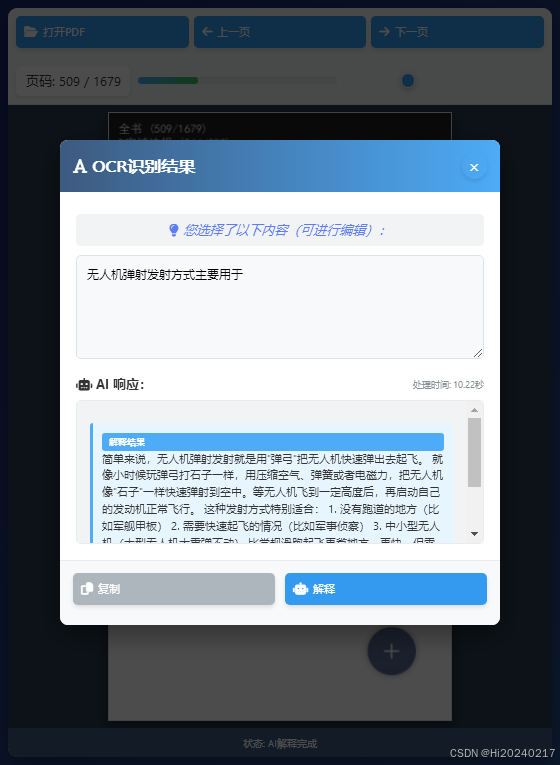
支持OCR和AI解释的Web PDF阅读器:解决大文档阅读难题
一、背景:为什么需要这个工具?
问题场景
当你在手机上阅读扫描版PDF文档(特别是超长文档如2000页的书籍)时,是否遇到过这些问题:
- 翻页卡顿:越往后翻页,加载速度越慢
- 文字识别失败:尝试复制文字时,OCR识别经常失败或需要长时间等待
- 内容理解困难:专业术语或复杂段落难以理解,需要额外查询
技术解释:扫描版PDF本质上是图片合集,手机自带的OCR功能对长文档处理能力有限,特别是:
- 内存限制导致大文档处理困难
- 后台进程被系统强制终止
- 缺乏持续优化的大文档处理机制
解决方案
为此我开发了这款Web版PDF阅读器,核心功能包括:
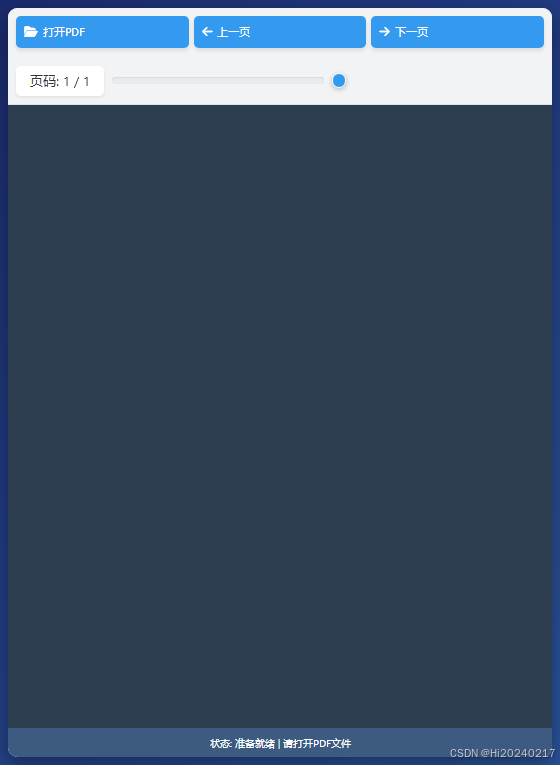
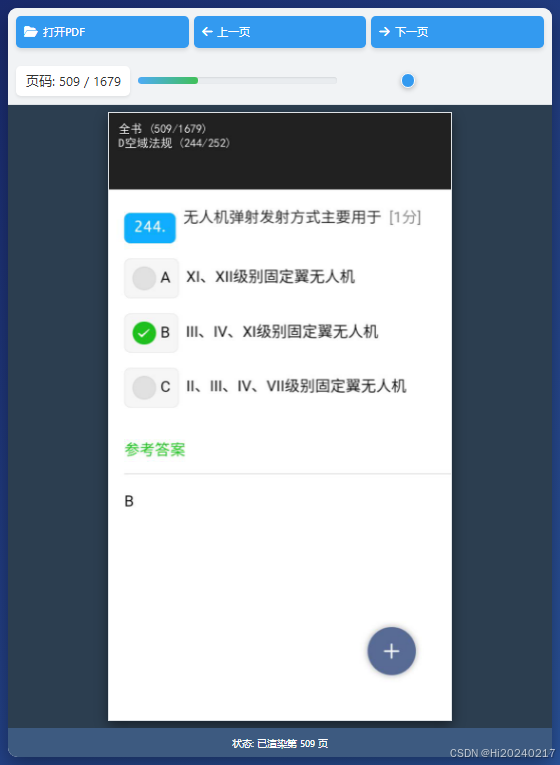
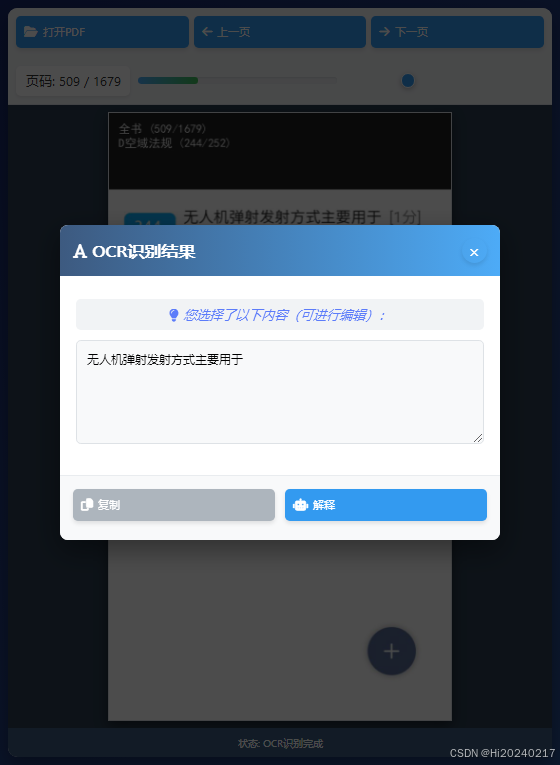
- 区域选择识别:自由框选文档任意区域进行OCR
- 文字即时编辑:直接修改识别结果
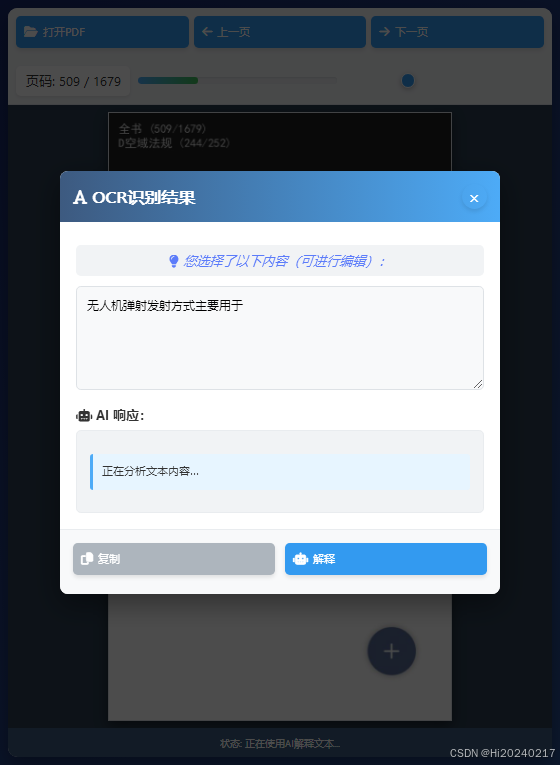
- AI智能解释:一键获取复杂内容的通俗解释
- 跨平台使用:在电脑/手机浏览器中都能流畅运行
设计理念:将OCR和AI能力转移到服务器端处理,突破移动设备性能限制,同时通过Web技术实现免安装使用
二、技术原理:如何实现这些功能?
1、核心技术组件
| 组件 | 功能 | 使用技术 |
|---|---|---|
| 前端界面 | PDF渲染/用户交互 | PDF.js + HTML5 Canvas |
| OCR引擎 | 图片转文字 | 百度文字识别API |
| AI解释引擎 | 文本内容解释 | DeepSeek LLM大模型 |
| 服务端 | 功能调度 | Python Flask框架 |
2、工作流程
用户选择PDF 前端渲染 框选区域 发送到服务端 OCR识别 返回识别文字 编辑文本 请求AI解释 返回解释结果
3、关键点
-
智能区域选择:
- 自动适配不同分辨率设备
- 支持触摸屏手势操作
- 实时显示选择框效果
-
阅读记忆功能:
- 自动记录上次阅读位置
- 本地存储阅读进度
- 翻页进度可视化展示
三、操作指南
1、环境准备
bash
cat > .env <<-'EOF'
APP_ID = '您的百度APPID'
API_KEY = '您的百度APIKEY'
SECRET_KEY = '您的百度SECRETKEY'
OPENAI_API_KEY = "您的DeepSeek密钥"
OPENAI_BASE_URL = "https://api.deepseek.com"
EOF注意:
2、生成Html代码
html
mkdir templates
cd templates
cat > index.html <<-'EOF'
<!DOCTYPE html>
<html lang="zh-CN">
<head>
<meta charset="UTF-8">
<meta name="viewport" content="width=device-width, initial-scale=1.0">
<title>本地化PDF阅读器 - OCR识别与文本解释</title>
<link rel="stylesheet" href="https://cdnjs.cloudflare.com/ajax/libs/font-awesome/6.4.0/css/all.min.css">
<style>
* {
margin: 0;
padding: 0;
box-sizing: border-box;
font-family: 'Segoe UI', Tahoma, Geneva, Verdana, sans-serif;
touch-action: manipulation;
}
body {
background: linear-gradient(135deg, #1a2a6c, #2a5298);
min-height: 100vh;
padding: 15px;
color: #333;
display: flex;
flex-direction: column;
align-items: center;
overflow-x: hidden;
}
.container {
width: 100%;
max-width: 100%;
background: white;
border-radius: 12px;
box-shadow: 0 10px 25px rgba(0, 0, 0, 0.35);
overflow: hidden;
display: flex;
flex-direction: column;
height: calc(100vh - 30px);
}
header {
background: linear-gradient(to right, #2c3e50, #4a6491);
color: white;
padding: 15px 25px;
display: flex;
align-items: center;
justify-content: space-between;
}
.logo {
display: flex;
align-items: center;
gap: 12px;
}
.logo i {
font-size: 30px;
color: #4dabf7;
animation: pulse 2s infinite;
}
@keyframes pulse {
0%, 100% { transform: scale(1); }
50% { transform: scale(1.1); }
}
.logo h1 {
font-size: 24px;
font-weight: 600;
text-shadow: 1px 1px 3px rgba(0,0,0,0.3);
}
/* 修改开始:移除固定宽度,使用弹性布局 */
.controls {
display: flex;
padding: 12px 15px;
background: #f1f3f5;
gap: 12px;
border-bottom: 1px solid #dee2e6;
align-items: center;
width: 100%;
overflow-x: auto;
overflow-y: hidden;
flex-wrap: nowrap;
}
/* 修改结束 */
.file-controls, .progress-container {
display: flex;
align-items: center;
gap: 10px;
flex-shrink: 0;
}
.file-controls {
flex: 1;
min-width: 300px;
}
.progress-container {
flex: 2;
min-width: 400px;
}
button {
padding: 9px 16px;
border: none;
border-radius: 6px;
cursor: pointer;
font-weight: 500;
transition: all 0.2s ease;
display: flex;
align-items: center;
gap: 6px;
background: #339af0;
color: white;
box-shadow: 0 3px 5px rgba(0,0,0,0.1);
flex-shrink: 0;
}
button:hover {
background: #228be6;
transform: translateY(-2px);
box-shadow: 0 5px 10px rgba(0,0,0,0.15);
}
button:active {
transform: translateY(1px);
}
button:disabled {
background: #adb5bd;
cursor: not-allowed;
transform: none;
box-shadow: none;
}
button i {
font-size: 15px;
}
.page-info {
font-weight: 500;
background: #fff;
padding: 7px 12px;
border-radius: 6px;
box-shadow: 0 2px 4px rgba(0,0,0,0.08);
min-width: 110px;
text-align: center;
flex-shrink: 0;
}
.progress-bar {
flex: 1;
height: 8px;
background: #e9ecef;
border-radius: 4px;
position: relative;
overflow: hidden;
box-shadow: inset 0 1px 2px rgba(0,0,0,0.1);
}
.progress-fill {
height: 100%;
background: linear-gradient(90deg, #4dabf7, #40c057);
border-radius: 4px;
width: 0%;
transition: width 0.3s ease;
}
input[type="range"] {
width: 100%;
height: 8px;
-webkit-appearance: none;
background: transparent;
flex: 1;
}
input[type="range"]::-webkit-slider-thumb {
-webkit-appearance: none;
width: 18px;
height: 18px;
border-radius: 50%;
background: #339af0;
cursor: pointer;
box-shadow: 0 2px 6px rgba(0,0,0,0.25);
border: 2px solid white;
}
.viewer-container {
position: relative;
flex: 1;
background: #2c3e50;
overflow: hidden;
display: flex;
justify-content: center;
align-items: center;
}
#pdf-viewer {
width: 100%;
height: 100%;
display: flex;
justify-content: center;
align-items: center;
padding: 8px;
overflow: auto;
}
.canvas-container {
position: relative;
display: flex;
justify-content: center;
align-items: center;
margin: 0;
box-shadow: 0 6px 15px rgba(0, 0, 0, 0.45);
border: 1px solid #dee2e6;
transition: transform 0.3s ease;
max-width: 100%;
max-height: 100%;
overflow: hidden;
}
.canvas-container canvas {
display: block;
cursor: pointer;
max-width: 100%;
max-height: 100%;
touch-action: none;
}
#selection-overlay {
position: absolute;
top: 0;
left: 0;
cursor: crosshair;
border: 2px dashed rgba(77, 171, 247, 0.9);
background: rgba(77, 171, 247, 0.2);
pointer-events: none;
z-index: 10;
}
.status-bar {
background: #3d5a80;
color: white;
padding: 8px 15px;
display: flex;
justify-content: space-between;
font-size: 13px;
font-weight: 300;
}
.loading-overlay {
position: absolute;
top: 0;
left: 0;
width: 100%;
height: 100%;
background: rgba(0, 0, 0, 0.85);
display: flex;
flex-direction: column;
justify-content: center;
align-items: center;
color: white;
z-index: 100;
}
.spinner {
width: 50px;
height: 50px;
border: 4px solid rgba(255, 255, 255, 0.3);
border-radius: 50%;
border-top: 4px solid #4dabf7;
animation: spin 1s linear infinite;
margin-bottom: 15px;
}
@keyframes spin {
0% { transform: rotate(0deg); }
100% { transform: rotate(360deg); }
}
.modal {
position: fixed;
top: 0;
left: 0;
width: 100%;
height: 100%;
background: rgba(0, 0, 0, 0.7);
display: flex;
justify-content: center;
align-items: center;
z-index: 1000;
opacity: 0;
visibility: hidden;
transition: all 0.3s ease;
}
.modal.active {
opacity: 1;
visibility: visible;
}
.modal-content {
background: white;
border-radius: 10px;
width: 85%;
max-width: 550px;
max-height: 85vh;
overflow: hidden;
box-shadow: 0 12px 35px rgba(0, 0, 0, 0.4);
transform: translateY(-15px);
transition: transform 0.3s ease;
}
.modal.active .modal-content {
transform: translateY(0);
}
.modal-header {
padding: 16px;
background: linear-gradient(to right, #3d5a80, #4dabf7);
color: white;
display: flex;
justify-content: space-between;
align-items: center;
}
.modal-header h3 {
font-size: 20px;
font-weight: 600;
}
.close-btn {
background: none;
border: none;
color: white;
font-size: 22px;
cursor: pointer;
width: 32px;
height: 32px;
border-radius: 50%;
display: flex;
align-items: center;
justify-content: center;
transition: all 0.3s ease;
}
.close-btn:hover {
background: rgba(255,255,255,0.2);
}
.modal-body {
padding: 20px;
overflow-y: auto;
max-height: 55vh;
}
.modal-footer {
padding: 16px;
display: flex;
justify-content: flex-end;
gap: 12px;
background: #f8f9fa;
border-top: 1px solid #e9ecef;
}
.btn-secondary {
background: #adb5bd;
color: white;
}
.btn-primary {
background: #339af0;
color: white;
}
#ocr-text {
width: 100%;
min-height: 130px;
padding: 12px;
border: 1px solid #dee2e6;
border-radius: 6px;
font-size: 15px;
line-height: 1.5;
resize: vertical;
margin-bottom: 15px;
background: #f8f9fa;
transition: border-color 0.3s;
}
#ocr-text:focus {
border-color: #4dabf7;
outline: none;
box-shadow: 0 0 0 3px rgba(77, 171, 247, 0.2);
}
#deepseek-response {
background: #f1f3f5;
border-radius: 6px;
border: 1px solid #e9ecef;
padding: 16px;
font-size: 14px;
line-height: 1.5;
max-height: 180px;
overflow-y: auto;
transition: all 0.3s ease;
}
.hidden {
display: none;
}
.api-response {
padding: 12px;
background: #e7f5ff;
border-left: 4px solid #4dabf7;
border-radius: 4px;
margin: 12px 0;
animation: fadeIn 0.4s ease;
}
@keyframes fadeIn {
from { opacity: 0; transform: translateY(8px); }
to { opacity: 1; transform: translateY(0); }
}
.ocr-hint {
text-align: center;
color: #5c7cfa;
font-style: italic;
margin-top: 8px;
padding: 8px;
background: #f1f3f5;
border-radius: 6px;
margin-bottom: 12px;
}
.error-message {
background: #ffe3e3;
border: 1px solid #ff6b6b;
border-radius: 8px;
padding: 12px;
margin: 0 auto 15px;
text-align: center;
max-width: 600px;
display: none;
}
.api-status {
display: flex;
align-items: center;
gap: 6px;
margin-top: 8px;
font-size: 13px;
color: #495057;
}
.response-header {
display: flex;
justify-content: space-between;
align-items: center;
margin-bottom: 8px;
}
.api-tag {
background: #4dabf7;
color: white;
padding: 3px 8px;
border-radius: 4px;
font-size: 11px;
font-weight: bold;
}
.api-time {
color: #868e96;
font-size: 11px;
}
@media (max-width: 1024px) {
.file-controls {
min-width: 250px;
}
.progress-container {
min-width: 350px;
}
}
@media (max-width: 900px) {
.controls {
flex-wrap: wrap;
padding: 10px;
}
.file-controls, .progress-container {
min-width: 100%;
}
.progress-container {
margin-top: 10px;
}
}
@media (max-width: 768px) {
body {
padding: 10px;
}
.container {
height: calc(100vh - 20px);
}
.logo h1 {
font-size: 18px;
}
.status-bar {
flex-direction: column;
gap: 6px;
text-align: center;
}
.modal-content {
width: 95%;
}
button {
padding: 10px;
font-size: 14px;
}
.modal-footer {
flex-wrap: wrap;
justify-content: center;
}
.modal-footer button {
flex: 1;
min-width: 45%;
margin-bottom: 8px;
}
.file-controls {
gap: 6px;
min-width: 100%;
}
.file-controls button {
flex: 1;
}
}
@media (max-width: 480px) {
.page-info {
min-width: auto;
padding: 5px 8px;
}
.file-controls button span {
display: none;
}
.file-controls button i {
margin-right: 0;
}
}
</style>
</head>
<body>
<div class="error-message" id="error-message">
<i class="fas fa-exclamation-triangle"></i>
<span id="error-text">发生了错误,请查看控制台获取详细信息</span>
</div>
<div class="container">
<div class="controls">
<div class="file-controls">
<button id="open-file">
<i class="fas fa-folder-open"></i> 打开PDF
</button>
<button id="prev-page">
<i class="fas fa-arrow-left"></i> 上一页
</button>
<button id="next-page">
<i class="fas fa-arrow-right"></i> 下一页
</button>
</div>
<div class="progress-container">
<div class="page-info">
页码: <span id="current-page">1</span> / <span id="total-pages">1</span>
</div>
<div class="progress-bar">
<div class="progress-fill"></div>
</div>
<input type="range" id="page-slider" min="1" max="1" value="1">
</div>
</div>
<div class="viewer-container">
<div id="pdf-viewer"></div>
<div id="selection-overlay" class="hidden"></div>
<div id="loading-overlay" class="loading-overlay hidden">
<div class="spinner"></div>
<p id="loading-text">加载中...</p>
</div>
</div>
<div class="status-bar">
<div>
状态: <span id="ocr-status">准备就绪</span>
</div>
</div>
</div>
<!-- OCR模态框 -->
<div class="modal" id="ocr-modal">
<div class="modal-content">
<div class="modal-header">
<h3><i class="fas fa-font"></i> OCR识别结果</h3>
<button class="close-btn" id="close-ocr-modal">×</button>
</div>
<div class="modal-body">
<div class="ocr-hint">
<i class="fas fa-lightbulb"></i> 您选择了以下内容(可进行编辑):
</div>
<textarea id="ocr-text" placeholder="识别内容将显示在这里..."></textarea>
<div id="api-response-section" class="hidden">
<div class="response-header">
<p><strong><i class="fas fa-robot"></i> AI 响应:</strong></p>
<div class="api-time" id="api-time"></div>
</div>
<div id="deepseek-response">
等待AI的回复...
</div>
</div>
</div>
<div class="modal-footer">
<button class="btn-secondary" id="copy-text">
<i class="fas fa-copy"></i> 复制
</button>
<button class="btn-primary" id="explain-text">
<i class="fas fa-robot"></i> 解释
</button>
</div>
</div>
</div>
<!-- 使用本地文件 -->
<script src="https://cdnjs.cloudflare.com/ajax/libs/pdf.js/2.16.105/pdf.min.js"></script>
<script>
// 设置PDF.js工作环境
pdfjsLib.GlobalWorkerOptions.workerSrc = 'https://cdnjs.cloudflare.com/ajax/libs/pdf.js/2.16.105/pdf.worker.min.js';
// 常量
const STORAGE_PREFIX = 'pdfReader_';
// DOM元素
const viewer = document.getElementById('pdf-viewer');
const fileInput = document.createElement('input');
fileInput.type = 'file';
fileInput.accept = '.pdf';
const openFileButton = document.getElementById('open-file');
const prevPageButton = document.getElementById('prev-page');
const nextPageButton = document.getElementById('next-page');
const currentPageElement = document.getElementById('current-page');
const totalPagesElement = document.getElementById('total-pages');
const pageSlider = document.getElementById('page-slider');
const progressFill = document.querySelector('.progress-fill');
const loadingOverlay = document.getElementById('loading-overlay');
const loadingText = document.getElementById('loading-text');
const ocrStatus = document.getElementById('ocr-status');
const ocrModal = document.getElementById('ocr-modal');
const closeOcrModal = document.getElementById('close-ocr-modal');
const ocrText = document.getElementById('ocr-text');
const copyTextButton = document.getElementById('copy-text');
const explainTextButton = document.getElementById('explain-text');
const apiResponseSection = document.getElementById('api-response-section');
const deepseekResponse = document.getElementById('deepseek-response');
const selectionOverlay = document.getElementById('selection-overlay');
const errorMessage = document.getElementById('error-message');
const errorText = document.getElementById('error-text');
const apiTimeElement = document.getElementById('api-time');
// 全局变量
let pdfDoc = null;
let currentPage = 1;
let currentScale = 1;
let pageRendering = false;
let pageNumPending = null;
let fileName = null;
let fileKey = null;
let canvasMap = new Map();
let selection = {};
let currentCanvas = null;
let currentCanvasRect = null;
let dpr = window.devicePixelRatio || 1;
let isMobile = /Mobi|Android/i.test(navigator.userAgent);
let viewerContainer = document.querySelector('.viewer-container');
// 初始化
openFileButton.addEventListener('click', () => fileInput.click());
fileInput.addEventListener('change', loadPDF);
prevPageButton.addEventListener('click', () => gotoPage(currentPage - 1));
nextPageButton.addEventListener('click', () => gotoPage(currentPage + 1));
pageSlider.addEventListener('input', () => gotoPage(parseInt(pageSlider.value)));
closeOcrModal.addEventListener('click', closeOCRModal);
copyTextButton.addEventListener('click', copyOCRText);
explainTextButton.addEventListener('click', explainTextWithAI);
// 显示错误信息
function showError(message) {
errorText.textContent = message;
errorMessage.style.display = 'block';
console.error(message);
}
// 隐藏错误信息
function hideError() {
errorMessage.style.display = 'none';
}
// 加载PDF文件
function loadPDF(e) {
const file = e.target.files[0];
if (!file) return;
if (file.type !== 'application/pdf') {
alert('请选择PDF文件');
return;
}
fileName = file.name;
fileKey = STORAGE_PREFIX + fileName;
showLoading('加载PDF文件...');
hideError();
const fileReader = new FileReader();
fileReader.onload = function() {
const typedArray = new Uint8Array(this.result);
try {
// 加载PDF文档
pdfjsLib.getDocument(typedArray).promise.then(function(pdf) {
pdfDoc = pdf;
const numPages = pdf.numPages;
// 显示总页数
totalPagesElement.textContent = numPages;
pageSlider.max = numPages;
// 尝试从本地存储获取阅读位置
const lastPage = localStorage.getItem(fileKey + '_page');
const initPage = lastPage ? parseInt(lastPage) : 1;
// 加载第一页(或上次阅读的页面)
gotoPage(initPage);
// 清除画布映射
canvasMap.clear();
// 移除加载状态
hideLoading();
}).catch(function(error) {
hideLoading();
showError('加载PDF失败: ' + error.message);
});
} catch (error) {
hideLoading();
showError('PDF.js初始化失败: ' + error.message);
}
};
fileReader.onerror = function() {
hideLoading();
showError('读取文件失败');
};
fileReader.readAsArrayBuffer(file);
}
// 渲染指定页码
function renderPage(num) {
if (!pdfDoc) return;
pageRendering = true;
showLoading(`渲染第 ${num} 页...`);
ocrStatus.textContent = '正在渲染页面...';
hideError();
try {
// 获取页面的promise
pdfDoc.getPage(num).then(function(page) {
const container = document.createElement('div');
container.className = 'canvas-container';
// 创建Canvas
const canvas = document.createElement('canvas');
const ctx = canvas.getContext('2d', { willReadFrequently: true });
// 获取PDF页面原始尺寸
const viewport = page.getViewport({ scale: 1 });
const originalWidth = viewport.width;
const originalHeight = viewport.height;
// 计算缩放比例以适应容器
const viewerContainer = document.querySelector('.viewer-container');
const viewerWidth = viewer.clientWidth - 20; // 减去内边距
const viewerHeight = viewer.clientHeight - 20;
// 计算合适的缩放比例
const widthScale = viewerWidth / originalWidth;
const heightScale = viewerHeight / originalHeight;
const scale = Math.min(widthScale, heightScale) * currentScale;
const scaledViewport = page.getViewport({ scale: scale });
// 设置Canvas尺寸(考虑设备像素比)
const displayWidth = scaledViewport.width;
const displayHeight = scaledViewport.height;
const pixelWidth = Math.floor(displayWidth * dpr);
const pixelHeight = Math.floor(displayHeight * dpr);
canvas.width = pixelWidth;
canvas.height = pixelHeight;
canvas.style.width = displayWidth + 'px';
canvas.style.height = displayHeight + 'px';
// 缩放上下文以匹配设备像素比
ctx.scale(dpr, dpr);
container.appendChild(canvas);
// 清空查看器并添加新容器
viewer.innerHTML = '';
viewer.appendChild(container);
// 将Canvas存储在映射中
canvasMap.set(num, {
canvas: canvas,
rect: container.getBoundingClientRect(),
viewport: scaledViewport,
dpr: dpr
});
// 设置事件监听器用于OCR选择
setupSelectionEvents(container);
// 渲染PDF页面到Canvas
const renderContext = {
canvasContext: ctx,
viewport: scaledViewport
};
const renderTask = page.render(renderContext);
renderTask.promise.then(function() {
if (pageNumPending !== null) {
gotoPage(pageNumPending);
pageNumPending = null;
}
pageRendering = false;
hideLoading();
updateStatus(`已渲染第 ${num} 页`);
updateFileInfo();
}).catch(function(error) {
pageRendering = false;
hideLoading();
showError('渲染页面失败: ' + error.message);
});
}).catch(function(error) {
hideLoading();
showError('获取PDF页面失败: ' + error.message);
});
} catch (error) {
hideLoading();
showError('渲染页面时出错: ' + error.message);
}
}
// 设置选择事件(同时支持鼠标和触摸)
function setupSelectionEvents(container) {
container.addEventListener('mousedown', startSelection);
container.addEventListener('touchstart', handleTouchStart, { passive: false });
}
// 处理触摸开始事件
function handleTouchStart(e) {
if (e.touches.length === 1) {
// 单指触摸,开始选择
startSelection(e.touches[0]);
}
}
// 处理触摸移动事件
function handleTouchMove(e) {
if (e.touches.length === 1) {
// 单指移动,调整选择区域
resizeSelection(e.touches[0]);
}
}
// 处理触摸结束事件
function handleTouchEnd(e) {
if (e.touches.length === 0) {
// 所有手指离开,结束选择
finishSelection();
}
}
// 跳转到指定页面
function gotoPage(num) {
if (!pdfDoc) return;
if (pageRendering) {
pageNumPending = num;
return;
}
if (num < 1 || num > pdfDoc.numPages) return;
currentPage = num;
currentPageElement.textContent = num;
pageSlider.value = num;
// 更新进度条
const percent = Math.round((num / pdfDoc.numPages) * 100);
progressFill.style.width = percent + '%';
// 保存当前页到本地存储
if (fileKey) {
localStorage.setItem(fileKey + '_page', num);
}
// 清空当前查看器内容
viewer.innerHTML = '';
selectionOverlay.classList.add('hidden');
// 渲染该页
renderPage(num);
updateFileInfo();
}
// 更新底部状态栏信息
function updateFileInfo() {
}
// 更新OCR状态
function updateStatus(message) {
ocrStatus.textContent = message;
}
// 显示加载状态
function showLoading(message) {
loadingText.textContent = message;
loadingOverlay.classList.remove('hidden');
}
// 隐藏加载状态
function hideLoading() {
loadingOverlay.classList.add('hidden');
}
// OCR区域选择
function startSelection(e) {
e.preventDefault();
const container = e.currentTarget;
if (!container) return;
const canvas = container.querySelector('canvas');
if (!canvas) return;
// 存储当前canvas和其边界
currentCanvas = canvas;
currentCanvasRect = container.getBoundingClientRect();
// 获取事件坐标
const clientX = e.clientX || e.pageX;
const clientY = e.clientY || e.pageY;
// 计算相对于容器的坐标(考虑滚动位置)
const viewerRect = viewer.getBoundingClientRect();
const containerRect = container.getBoundingClientRect();
// 计算容器在viewer中的位置(考虑滚动)
const containerXInViewer = containerRect.left - viewerRect.left + viewer.scrollLeft;
const containerYInViewer = containerRect.top - viewerRect.top + viewer.scrollTop;
// 计算事件在容器内的坐标
const x = clientX - containerRect.left;
const y = clientY - containerRect.top;
// 初始化选择框位置
selectionOverlay.style.width = '0';
selectionOverlay.style.height = '0';
selectionOverlay.style.left = (containerXInViewer + x) + 'px';
selectionOverlay.style.top = (containerYInViewer + y) + 'px';
selectionOverlay.classList.remove('hidden');
// 存储初始位置(相对于容器)
selection = {
startX: x,
startY: y,
endX: x,
endY: y
};
// 添加事件监听
if (isMobile) {
document.addEventListener('touchmove', handleTouchMove, { passive: false });
document.addEventListener('touchend', handleTouchEnd);
} else {
document.addEventListener('mousemove', resizeSelection);
document.addEventListener('mouseup', finishSelection);
}
}
// 调整选择框大小
function resizeSelection(e) {
const container = document.querySelector('.canvas-container');
if (!container) return;
// 获取事件坐标
const clientX = e.clientX || e.pageX;
const clientY = e.clientY || e.pageY;
// 获取容器和viewer的边界矩形
const viewerRect = viewer.getBoundingClientRect();
const containerRect = container.getBoundingClientRect();
// 计算容器在viewer中的位置(考虑滚动)
const containerXInViewer = containerRect.left - viewerRect.left + viewer.scrollLeft;
const containerYInViewer = containerRect.top - viewerRect.top + viewer.scrollTop;
// 计算事件在容器内的坐标
const x = clientX - containerRect.left;
const y = clientY - containerRect.top;
// 限制在画布显示范围内
const clampedX = Math.max(0, Math.min(x, containerRect.width));
const clampedY = Math.max(0, Math.min(y, containerRect.height));
// 更新选择框尺寸
const left = Math.min(selection.startX, clampedX);
const top = Math.min(selection.startY, clampedY);
const width = Math.abs(clampedX - selection.startX);
const height = Math.abs(clampedY - selection.startY);
// 设置选择框在viewer中的位置
selectionOverlay.style.left = (containerXInViewer + left) + 'px';
selectionOverlay.style.top = (containerYInViewer + top) + 'px';
selectionOverlay.style.width = width + 'px';
selectionOverlay.style.height = height + 'px';
// 更新结束位置
selection.endX = clampedX;
selection.endY = clampedY;
}
// 完成选择并进行OCR识别
function finishSelection() {
// 移除事件监听
if (isMobile) {
document.removeEventListener('touchmove', handleTouchMove);
document.removeEventListener('touchend', handleTouchEnd);
} else {
document.removeEventListener('mousemove', resizeSelection);
document.removeEventListener('mouseup', finishSelection);
}
// 检查选择区域是否有效
const minArea = 20;
const width = Math.abs(selection.endX - selection.startX);
const height = Math.abs(selection.endY - selection.startY);
if (width < minArea || height < minArea) {
selectionOverlay.classList.add('hidden');
return;
}
// 获取当前页的Canvas
const container = document.querySelector('.canvas-container');
if (!container || !currentCanvas) return;
const canvas = currentCanvas;
const ctx = canvas.getContext('2d');
// 计算画布的实际像素与显示尺寸的比率
const scaleX = canvas.width / currentCanvasRect.width;
const scaleY = canvas.height / currentCanvasRect.height;
// 转换为画布的实际像素坐标
const pixelX = selection.startX * scaleX;
const pixelY = selection.startY * scaleY;
const pixelW = width * scaleX;
const pixelH = height * scaleY;
try {
// 获取图像数据
const imageData = ctx.getImageData(
Math.round(pixelX),
Math.round(pixelY),
Math.round(pixelW),
Math.round(pixelH)
);
// 创建临时Canvas来存储选择区域的图像
const tempCanvas = document.createElement('canvas');
tempCanvas.width = Math.round(pixelW);
tempCanvas.height = Math.round(pixelH);
const tempCtx = tempCanvas.getContext('2d');
tempCtx.putImageData(imageData, 0, 0);
// 显示OCR模态框
ocrModal.classList.add('active');
ocrText.value = '';
apiResponseSection.classList.add('hidden');
deepseekResponse.innerHTML = '等待AI的回复...';
updateStatus('准备进行OCR识别...');
// 将图像转换为DataURL
const imageDataURL = tempCanvas.toDataURL('image/jpeg');
// 发送到Flask服务端进行OCR识别
fetch('/ocr', {
method: 'POST',
headers: {
'Content-Type': 'application/json'
},
body: JSON.stringify({ image: imageDataURL })
})
.then(response => response.json())
.then(data => {
if (data.success) {
ocrText.value = data.text.trim() || '未能识别到文字';
updateStatus('OCR识别完成');
} else {
throw new Error(data.error || 'OCR识别失败');
}
})
.catch(err => {
ocrText.value = 'OCR错误: ' + err.message;
updateStatus('OCR识别失败');
showError('OCR识别失败: ' + err.message);
})
.finally(() => {
selectionOverlay.classList.add('hidden');
});
} catch (error) {
showError('获取图像数据失败: ' + error.message);
selectionOverlay.classList.add('hidden');
updateStatus('选择区域错误');
}
}
// 关闭OCR模态框
function closeOCRModal() {
ocrModal.classList.remove('active');
}
// 复制识别文本
function copyOCRText() {
ocrText.select();
document.execCommand('copy');
alert('文本已复制到剪贴板');
}
// 使用AI解释文本 - 调用Flask服务
function explainTextWithAI() {
const text = ocrText.value.trim();
if (!text) {
alert('请先识别出文本内容');
return;
}
apiResponseSection.classList.remove('hidden');
updateStatus('正在使用AI解释文本...');
deepseekResponse.innerHTML = '<div class="api-response">正在分析文本内容...</div>';
const startTime = new Date();
// 调用Flask服务的/explain端点
fetch('/explain', {
method: 'POST',
headers: {
'Content-Type': 'application/json'
},
body: JSON.stringify({ text: text })
})
.then(response => {
if (!response.ok) {
throw new Error('服务器错误: ' + response.status);
}
return response.json();
})
.then(data => {
const endTime = new Date();
const timeTaken = (endTime - startTime) / 1000;
deepseekResponse.innerHTML = `
<div class="api-response">
<div class="api-tag">解释结果</div>
<p>${data.explanation || '未能获取解释内容'}</p>
<div class="api-status">
<i class="fas fa-clock"></i> 本次分析耗时 ${timeTaken.toFixed(2)} 秒
</div>
</div>
`;
updateStatus('AI解释完成');
apiTimeElement.textContent = `处理时间: ${timeTaken.toFixed(2)}秒`;
})
.catch(err => {
deepseekResponse.innerHTML = `
<div class="api-response" style="background:#ffecec;border-left-color:#ff6b6b;">
<p>错误: ${err.message}</p>
<p>请检查服务是否正常运行</p>
</div>
`;
updateStatus('AI解释失败');
showError('调用解释服务失败: ' + err.message);
});
}
// 显示示例PDF加载
window.addEventListener('load', function() {
updateStatus('准备就绪 | 请打开PDF文件');
});
</script>
</body>
</html>
EOF
cd -3、Web服务端
python
cat > main.py <<-'EOF'
import os
import base64
import io
import re
import logging
from logging.handlers import RotatingFileHandler
from flask import Flask, render_template, jsonify, request, send_from_directory
from PIL import Image
from aip import AipOcr
from dotenv import load_dotenv
import openai

# 加载环境变量
load_dotenv()

app = Flask(__name__)

# 配置日志系统
def configure_logging():
    # 创建日志目录
    log_dir = "logs"
    if not os.path.exists(log_dir):
        os.makedirs(log_dir)

    # 设置日志格式
    log_format = '%(asctime)s - %(name)s - %(levelname)s - %(message)s'
    formatter = logging.Formatter(log_format)

    # 文件日志处理器(滚动日志,最大10MB,保留3个备份)
    file_handler = RotatingFileHandler(
        os.path.join(log_dir, 'app.log'),
        maxBytes=10*1024*1024,
        backupCount=3
    )
    file_handler.setFormatter(formatter)
    file_handler.setLevel(logging.DEBUG)

    # 控制台日志处理器
    console_handler = logging.StreamHandler()
    console_handler.setFormatter(formatter)
    console_handler.setLevel(logging.DEBUG)

    # 获取应用日志器并添加处理器
    app.logger.setLevel(logging.DEBUG)
    app.logger.addHandler(file_handler)
    app.logger.addHandler(console_handler)

    # 禁用werkzeug的默认日志处理
    werkzeug_logger = logging.getLogger('werkzeug')
    werkzeug_logger.setLevel(logging.ERROR)
    werkzeug_logger.addHandler(file_handler)

configure_logging()

class OpenAILLM:
    """OpenAI语言模型封装类"""
    def __init__(self, model_name: str = "deepseek-chat"):
        self.model_name = model_name
        self.client = openai.OpenAI()
        app.logger.info(f"初始化OpenAI模型: {model_name}")

    def predict(self, query: str) -> str:
        """使用LLM生成解释文本"""
        try:
            app.logger.debug(f"LLM查询开始: {query[:100]}... (长度:{len(query)})")

            response = self.client.chat.completions.create(
                model=self.model_name,
                messages=[
                    {"role": "system", "content": "请用简洁且通俗易懂的方式解释下面这句话:"},
                    {"role": "user", "content": query}
                ],
                temperature=0.7,
            )

            result = response.choices[0].message.content.strip()
            cleaned_result = re.sub(r'<think>.*?</think>', '', result, flags=re.DOTALL)

            app.logger.debug(f"LLM原始响应: {result[:200]}...")
            app.logger.debug(f"LLM清理后结果: {cleaned_result[:200]}...")
            return cleaned_result
        except openai.APIError as api_err:
            app.logger.error(f"OpenAI API错误: {str(api_err)}", exc_info=True)
            return "API服务错误,请稍后再试"
        except openai.APIConnectionError as conn_err:
            app.logger.error(f"OpenAI连接错误: {str(conn_err)}", exc_info=True)
            return "网络连接错误,请检查网络"
        except openai.RateLimitError as limit_err:
            app.logger.error(f"OpenAI限流错误: {str(limit_err)}", exc_info=True)
            return "请求过于频繁,请稍后再试"
        except Exception as e:
            app.logger.exception("LLM处理未知错误")
            return "解释生成失败,请稍后再试"

# 初始化全局模型实例
llm = OpenAILLM()

@app.route('/')
def index():
    """主页面路由"""
    app.logger.info("访问首页")
    return render_template('index.html')

@app.route('/ocr', methods=['POST'])
def ocr_processing():
    """OCR文字识别接口"""
    try:
        app.logger.info("收到OCR请求")
        data = request.json
        image_data = data.get('image', '')

        # 记录图像数据基本信息
        app.logger.debug(f"收到图像数据: 长度={len(image_data)} 字符, 类型={type(image_data)}")

        # 提取Base64编码数据
        if 'base64,' in image_data:
            image_data = image_data.split('base64,', 1)[1]
            app.logger.debug("已剥离Base64前缀")

        # 解码图像
        img_bytes = base64.b64decode(image_data)
        app.logger.debug(f"图像解码成功: {len(img_bytes)} 字节")

        # 使用百度OCR API
        client = AipOcr(os.getenv('APP_ID'),
                        os.getenv('API_KEY'),
                        os.getenv('SECRET_KEY'))

        app.logger.info("调用百度OCR API...")
        result = client.basicAccurate(img_bytes)

        # 检查OCR结果
        if 'words_result' not in result:
            app.logger.warning(f"OCR返回异常结果: {result}")
            return jsonify(success=False, error="OCR识别失败"), 500

        text = ' '.join(item['words'] for item in result.get('words_result', []))
        app.logger.info(f"OCR识别成功: 识别到{len(result['words_result'])}个文本块")
        app.logger.debug(f"OCR识别结果: {text[:200]}...")

        return jsonify(success=True, text=text)

    except base64.binascii.Error as e:
        app.logger.error(f"Base64解码失败: {str(e)}", exc_info=True)
        return jsonify(success=False, error="无效的图像数据"), 400
    except KeyError as e:
        app.logger.error(f"请求数据缺少必要字段: {str(e)}", exc_info=True)
        return jsonify(success=False, error="请求数据不完整"), 400
    except Exception as e:
        app.logger.exception("OCR处理未知错误")
        return jsonify(success=False, error="服务器内部错误"), 500

@app.route('/explain', methods=['POST'])
def text_explanation():
    """文本解释接口"""
    try:
        app.logger.info("收到解释请求")
        data = request.json
        text = data.get('text', '')

        if not text:
            app.logger.warning("解释请求缺少文本数据")
            return jsonify(success=False, error='缺少文本数据'), 400

        app.logger.debug(f"待解释文本: {text[:200]}... (长度:{len(text)})")

        explanation = llm.predict(text)
        app.logger.info("解释生成成功")
        app.logger.debug(f"完整解释结果: {explanation}")

        return jsonify(success=True, explanation=explanation)

    except KeyError as e:
        app.logger.error(f"请求数据缺少必要字段: {str(e)}", exc_info=True)
        return jsonify(success=False, error="请求数据不完整"), 400
    except Exception as e:
        app.logger.exception("解释生成未知错误")
        return jsonify(success=False, error="服务器内部错误"), 500

if __name__ == '__main__':
    app.run(debug=os.getenv('DEBUG_MODE', 'False').lower() == 'true')
EOF
4、启动服务端
bash
python main.py四、效果