Hive解析嵌套Json用get_json_object
数据是string类型,拆分的时候get_json_object的逗号后要加个空格
{"KdProjCode":"A20160518015NB","DTjType":"调价","xmlns:xsi":"www.w3.org/2001/XMLSch...
查询不嵌套字段 (json外加上单引号)
select get_json_object('{"KdProjCode":"A20160518015NB","DTjType":"调价","xmlns:xsi":"www.w3.org/2001/XMLSch...', '$.KdProjCode')
得到A20160518015NB
查询嵌套字段
select get_json_object('{"KdProjCode":"A20160518015NB","DTjType":"调价","xmlns:xsi":"www.w3.org/2001/XMLSch...', '$.PriceHzInfo.Item.HzAmountBefore')
得到 1.0190805449E10
Hive用explode拆分嵌套Json数组
这样数组里面套Json然后嵌套数组的, explode就是将hive一行中复杂的array或者map结构拆分成多行
其实Hive SQL也可以一行sql直接搞定,没必要写什么udf,思路如下:
- 将json 以把含数组的字段进行切分成多行 使用lateral view和explode进行配合处理
vbnet
WITH temp_data AS (
    SELECT '{
   "fixed_charge": {
      "discount": 1,
      "fixed_fee": -1,
      "end_amount": -1,
      "actual_rate": -1,
      "origin_rate": -1,
      "start_amount": -1
   },
   "float_charges": [
      {
         "discount": 10,
         "fixed_fee": -1,
         "end_amount": 1000000,
         "actual_rate": 0.01,
         "origin_rate": 0.01,
         "start_amount": 0
      },
      {
         "discount": 10,
         "fixed_fee": -1,
         "end_amount": 3000000,
         "actual_rate": 0.006,
         "origin_rate": 0.006,
         "start_amount": 1000000
      },
      {
         "discount": 10,
         "fixed_fee": -1,
         "end_amount": 5000000,
         "actual_rate": 0.002,
         "origin_rate": 0.002,
         "start_amount": 3000000
      },
      {
         "discount": -1,
         "fixed_fee": 1000,
         "end_amount": -999,
         "actual_rate": -1,
         "origin_rate": -1,
         "start_amount": 5000000
      }
   ],
   "user_discount_flag": 0
}' AS doc)
SELECT
       GET_JSON_OBJECT(doc, '$.fixed_charge.discount') as fixed_charge_discount,
       GET_JSON_OBJECT(doc, '$.fixed_charge.fixed_fee') as fixed_charge_fixed_fee,
       GET_JSON_OBJECT(doc, '$.fixed_charge.end_amount') as fixed_charge_end_amount,
       GET_JSON_OBJECT(doc, '$.fixed_charge.actual_rate') as fixed_charge_actual_rate,
       GET_JSON_OBJECT(doc, '$.fixed_charge.origin_rate') as fixed_charge_origin_rate,
       GET_JSON_OBJECT(doc, '$.fixed_charge.start_amount') as fixed_charge_start_amount,
       GET_JSON_OBJECT(float_charges, '$.discount') as float_charges_discount,
       GET_JSON_OBJECT(float_charges, '$.fixed_fee') as float_charges_fixed_fee,
       GET_JSON_OBJECT(float_charges, '$.end_amount') as float_charges_end_amount,
       GET_JSON_OBJECT(float_charges, '$.actual_rate') as float_charges_actual_rate,
       GET_JSON_OBJECT(float_charges, '$.origin_rate') as float_charges_origin_rate,
       GET_JSON_OBJECT(float_charges, '$.start_amount') as float_charges_start_amount,
       GET_JSON_OBJECT(doc, '$.user_discount_flag') as user_discount_flag
FROM temp_data T
 LATERAL VIEW  explode(SPLIT(regexp_replace(regexp_replace
(GET_JSON_OBJECT(T.doc, '$.float_charges'),'\}\,\{', '\}\;\{'),
                            -- }, 替换成 };  按照;切分数组
'\[|\]','')               -- 把数组的左右符号[]去掉
,';'))  as  float_charges;
得到的结果为
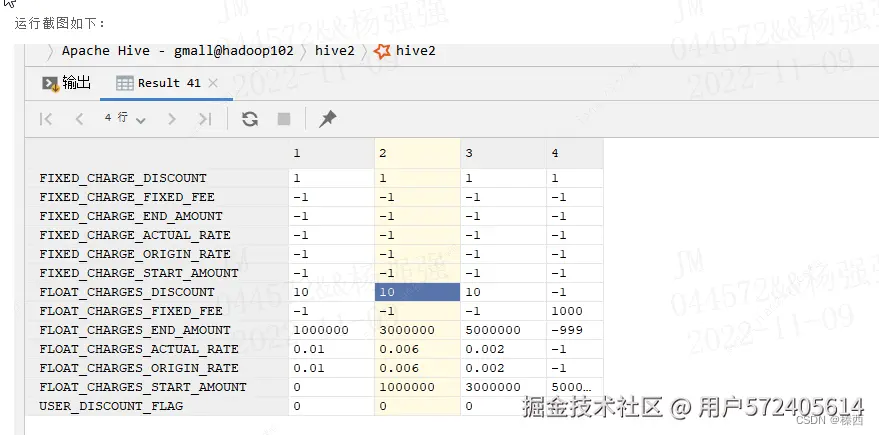 编辑
编辑
Spark解析JSON用get_json_object()
get_json_object() 方法 从一个json 字符串中根据指定的json路径抽取一个json 对象
根据指定数据,获取一个DataFrame
arduino
import org.apache.spark.sql.functions._
val json4 = Seq(
  (0, """{"device_id": 0, "device_type": "sensor-ipad", "ip": "68.161.225.1", "cn": "United States"}"""))
  .toDF("id", "json")
json4.printSchema()
schema结构为
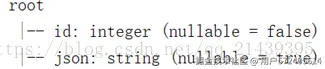 编辑
编辑
使用get_json_object 从json字符串中提取列:
less
// 利用get_json_object 从 json字符串中,提取列
val jsDF = json4.select($"id",
  get_json_object($"json", "$.device_type").alias("device_type"),
  get_json_object($"json", "$.ip").alias("ip"),
  get_json_object($"json", "$.cn").alias("cn"))
jsDF.printSchema()
schema信息为
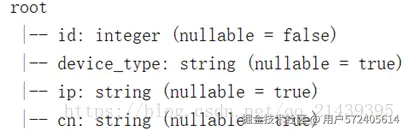 编辑
编辑
读取嵌套Json
 编辑
编辑
读取文件
css
val json: DataFrame = session.read.json("jsonlog2.json")
json.printSchema()
操作嵌套json的方式:
scss
//DSL 语法的查询
json.select("address.province").show()

// 使用sql语法查询
json.createTempView("v_tmp")
session.sql("select address.city from  v_tmp").show()
操作嵌套json数组-explode函数
 编辑
编辑
读取json文件
ini
val json3 = session.read.json("jsonlog3array.json")
json3.printSchema()
json3.show()
解决方案:
利用explode函数,把数组数据进行展开。
kotlin
// 导入sparksql中的函数
import org.apache.spark.sql.functions._
// 利用explode函数  把json数组进行展开, 数组中的每一条数据,都是一条记录
val explodeDF = json3
.select($"name", explode($"myScore")).toDF("name", "score")

explodeDF.printSchema()

// 再次进行查询  类似于普通的数据库表  默认schema: score1, 可以通过as 指定schema名称
val json3Res: DataFrame = explodeDF.select($"name", $"score.score1",
  $"score.score2" as "score222")
// 创建临时视图
json3Res.createTempView("v_jsonArray")
// 写sql,分别求平均值
session.sql("select name,avg(score1),avg(score222) from v_jsonArray group by name")
  .show()