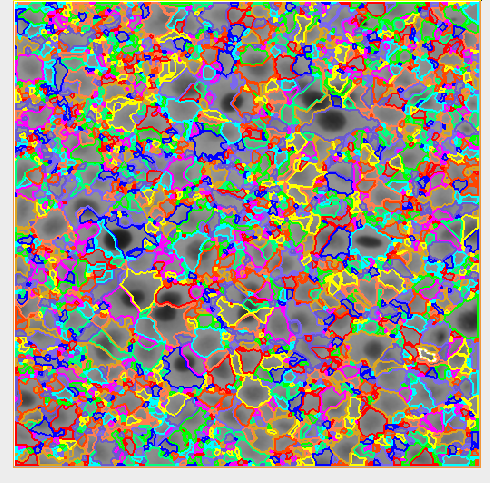
图像分割的标准:像素灰度、边界、几何形状、颜色、纹理等。
一、阈值处理
1、全局阈值
threshold(Image : Region : MinGray, MaxGray : )
使用全局阈值对图像进行分割。
阈值从输入图像中选择灰度值g满足以下条件的像素:
MinGray<g<MaxGray.
满足条件的图像所有点将作为一个区域返回。参数MinGray和MaxGray可以设置为'min'或'max',以便分别保留下限和上限的开放性。
php
dev_close_window()

read_image (Image, 'printer_chip/printer_chip_01')

dev_open_window (0, 0, 512, 512, 'black', WindowHandle)

dev_display (Image)

dev_set_color ('green')

dev_set_draw ('margin')

threshold (Image, Region, 128, 255)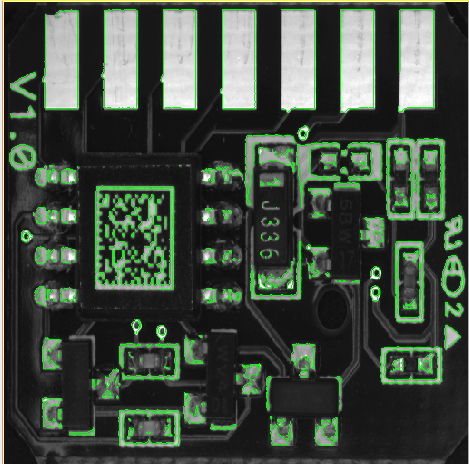
2、基于直方图的自动阈值分割
auto_threshold(Image : Regions : Sigma : )
使用多阈值分割单通道图像。首先,确定灰度值的绝对直方图。然后,从直方图中提取相关极小值,这些极小值依次用作阈值操作的参数。对于字节图像,使用的阈值为0、255以及从直方图中提取的所有极小值(在直方图用标准差为Sigma的高斯滤波器平滑后)。对于每个灰度值区间,生成一个区域。因此,区域的数量是最小值数量+1。对于uint2图像,类似地使用上述过程。但是,这里的最高阈值为65535。此外,对于uint2图像,Sigma的值(实际上)指的是具有256个值的直方图,尽管内部使用的是更高分辨率的直方图。这样做是为了便于在图像类型之间切换,而无需更改参数Sigma。对于浮点图像,阈值为图像中的最小和最大灰度值以及从直方图中提取的所有极小值。在这里,参数Sigma的缩放指的是图像的原始灰度值。选择的Sigma值越大,提取的区域就越少。如果待提取的区域具有相似的灰度值(均匀区域),则此操作符非常有用。
php
auto_threshold (Image, Regions, 23)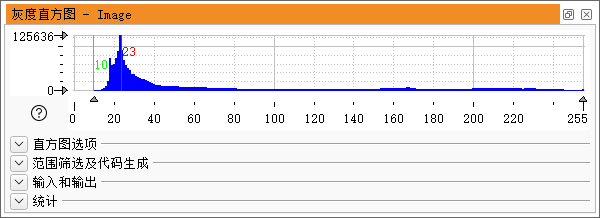
3、自动全局阈值分割
binary_threshold(Image : Region : Method, LightDark : UsedThreshold)
使用自动确定的全局阈值对单通道图像进行分割,并在region中返回分割的区域。例如,这对于在均匀照明的背景上分割字符非常有用。binary_threshold也返回UsedThreshold中使用的阈值。
使用的阈值由方法中给出的方法确定。目前,运算符提供了以下两种方法:"max_seculability"和"smooth_histo"。这两种方法都应该只用于具有双峰直方图的图像。
方法"smooth_histo"提供了与运算符bin_threshold相同的功能。方法"max_cleaability"倾向于为UsedThreshold确定较小的值。此外,它对直方图中远离光谱其余部分的薄孤立峰不太敏感,而且通常比"smooth_histo"更快。
php
binary_threshold (Image, Region, 'max_separability', 'dark', UsedThreshold)4、局部阈值分割
dyn_threshold(OrigImage, ThresholdImage : RegionDynThresh : Offset, LightDark : )
适用于无法使用单一的阈值分割的情况,如背景比较复杂。一般和平滑滤波器 mean_image 一起使用
php
dev_close_window()
dev_open_window (0, 0, 512, 512, 'black', WindowHandle)

read_image (Image, 'C:/Users/DingZhu/Pictures/33f79_r.jpg')
*彩色图像转换为灰度图像
rgb1_to_gray (Image, GrayImage)
*对图像相乘,增强对比度
mult_image (GrayImage, GrayImage, ImageResult, 0.005, 0)
*使用平滑滤波器对原始图像进行适当平滑
mean_image (ImageResult, ImageMean, 9, 9)
dev_display (Image)

dev_set_color ('green')

dev_set_draw ('margin')
*动态阈值分割,提取区域
dyn_threshold (ImageResult, ImageMean, RegionDynThresh, 5, 'not_equal')
var_threshold(Image : Region : MaskWidth, MaskHeight, StdDevScale, AbsThreshold, LightDark : )
通过局部均值和标准差分析对图像进行阈值处理。
php
dev_close_window ()
read_image (Image, 'label/label_02_occluded.png')

get_image_size (Image, Width, Height)
dev_open_window_fit_size (0, 0, Width, Height, -1, -1, WindowHandle)

 * 对图像设置阈值。
var_threshold (Image, Region, 15, 15, 1.01, 40, 'dark')
* 选择特定高度和大小的区域。
connection (Region, ConnectedRegions)
select_shape (ConnectedRegions, SelectedRegions, ['height', 'area'], 'and', [20, 100], [100, 400])

dev_display (Image)
dev_display (SelectedRegions)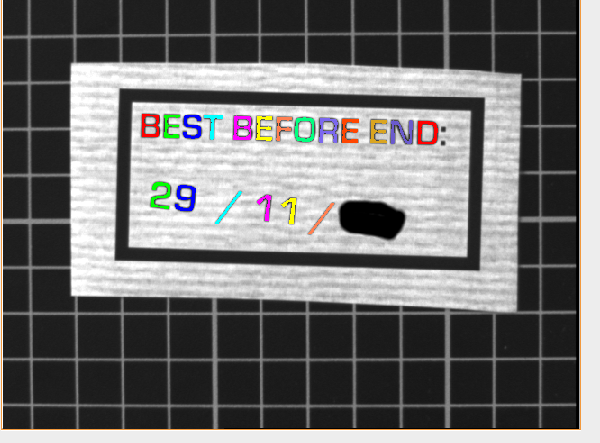
二、区域生长法
regiongrowing(Image : Regions : RasterHeight, RasterWidth, Tolerance, MinSize : )
使用区域生长对图像进行分割。
将图像分割成具有相同强度的区域,并光栅化成大小为RasterHeight RasterWidth的矩形。为了判断两个相邻的矩形是否属于同一区域,只使用它们中心点的灰度值。如果灰度值差小于或等于公差,则矩形将合并到一个区域中。
如果是要检查的两个灰度值,则在以下情况下,它们将合并到同一区域:
对于"循环"类型的图像,使用以下公式:

对于大于一个像素的矩形,通常在调用区域生长之前,应使用大小至少为RasterHeight RasterWidth的低通滤波器对图像进行平滑(以便矩形中心的灰度值对整个矩形具有"代表性")。如果图像包含很少的噪声并且矩形很小,则在许多情况下可以省略平滑。
生成的区域是选定大小的矩形集合RasterHeight RasterWidth。仅返回至少包含MinSize点的区域。它是一项非常快速的操作,因此适用于时间紧迫的应用程序。
php
read_image (Image, 'mreut')
dev_close_window ()
get_image_size (Image, Width, Height)
dev_open_window (0, 0, Width, Height, 'white', WindowID)
*中值滤波器。
median_image (Image, ImageMedian, 'circle', 2, 'mirrored')
*区域生长法
regiongrowing (ImageMedian, Regions, 1, 1, 2, 100)
*填充具有给定形状特征的区域中的孔
fill_up_shape (Regions, RegionFillUp, 'area', 1, 100)
*用圆形结构元素封闭一个区域。
closing_circle (RegionFillUp, RegionClosing, 7.5)
dev_clear_window ()
dev_set_draw ('fill')
dev_set_colored (12)
dev_display (RegionClosing)
dev_set_color ('black')
dev_set_draw ('margin')
dev_display (RegionClosing)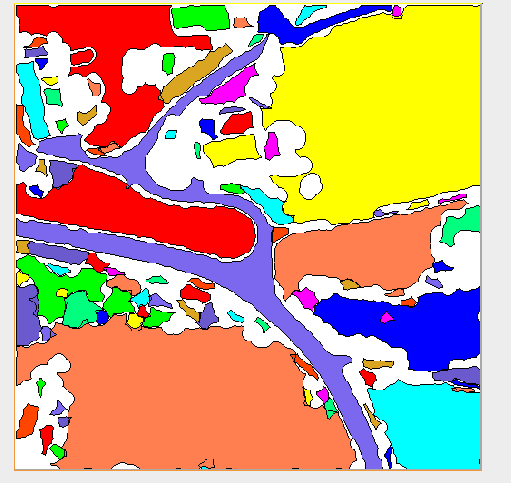
三、分水岭算法
watersheds_threshold(Image : Basins : Threshold : )
基于边缘的图像分割,通过寻找区域之间的分界线进行分割。
php
dev_set_draw ('margin')
dev_set_line_width (2)
dev_set_colored (12)

read_image (Meningg6, 'meningg6.png')
dev_close_window ()
get_image_size (Meningg6, Width, Height)

dev_open_window (0, 0, Width, Height, 'black', WindowHandle)
*使用离散高斯函数进行平滑处理。
gauss_filter (Meningg6, ImageGauss, 3)

dev_display (ImageGauss)


watersheds (ImageGauss, Basins1, Watersheds)
dev_display (ImageGauss)
dev_display (Basins1)